
Get Your ExpressVPN Activation Code 2023 and Troubleshooting Tips
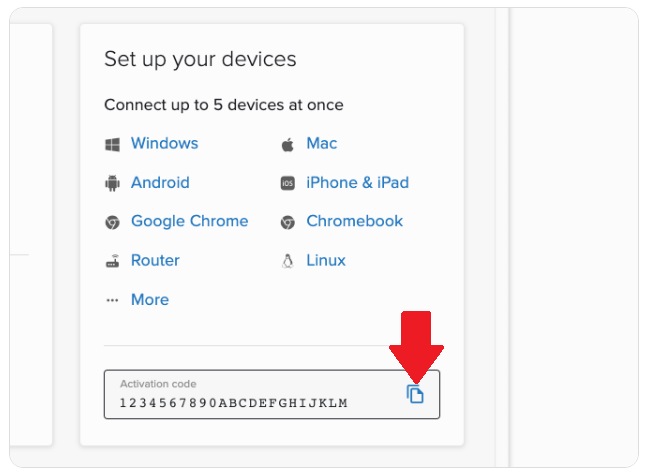
When it comes to online privacy, ExpressVPN is the go-to choice for millions of users around the world. But what happens if your activation code doesn’t work? Don’t worry, we’ve got you covered with our Express VPN activation code generator. This powerful tool will help you generate a valid activation key so you can keep your online activity safe and secure.
Getting your ExpressVPN activation code is as easy as wrapping up a gift. Simply sign up for a new account and you’ll be eligible for a discounted price on your subscription. Once you’ve signed up, you can choose your plan and download the ExpressVPN app on multiple devices – Windows, Mac, iPhone, and more.
If you’re still having trouble activating your ExpressVPN license, don’t panic. Our activation code generator lets you automatically generate a new key if the one you entered is not working. You can use this feature again and again until you find the key that works for you.
For those who are new to ExpressVPN, let’s do a quick summary of its features. ExpressVPN is one of the most trusted VPN providers in the market, offering top-notch online privacy and security. With ExpressVPN, you can encrypt your internet traffic, mask your IP address, and keep your online activities hidden from prying eyes.
ExpressVPN offers a variety of plans to suit your needs. Whether you’re a casual internet user or a heavy downloader, ExpressVPN has a plan that will fit your requirements. By signing up through our key generator, you’ll also get an exclusive customer discount on every plan. So why pay full price when you can get the same great service at a discounted rate?
So, if you’re ready to take control of your online privacy and security, generate your ExpressVPN activation code with our key generator. It’s a simple and safe process that can be done in just a few steps. Don’t let anyone track your online activities – get ExpressVPN today and enjoy the freedom of browsing the internet without any restrictions.
Express VPN Activation Code 2023: Generate Your ExpressVPN Key with Our Key Generator
Express VPN is a popular virtual private network service that allows you to connect to the internet securely and privately. When you sign up for the service, you are given an activation code that you need to enter in order to activate your account. However, sometimes the activation code may not work, and that’s when our key generator comes in handy.
Generate Your ExpressVPN Key
If you’re having trouble activating your ExpressVPN account using the activation code provided, you can use our key generator to generate a new code. By using our key generator, you can ensure that you’re getting a valid code that will work with your ExpressVPN service.
Using our key generator is simple. Just follow these instructions:
- Go to our website and find the key generator tool.
- Enter your email address and choose your operating system (Windows, Mac, iOS, Android).
- Click on the “Generate Key” button and wait for the generator to do its work.
- Your new activation code will be generated and automatically copied to your clipboard.
- Go back to the ExpressVPN app and paste the new code in the activation field.
- Click on the “Activate” button.
Why Use Our Key Generator?
Our key generator is an amazing tool that can save you the hassle of contacting customer support or paying for a new activation code. It’s absolutely free to use, and it’s worth every penny. By using our generator, you can get a valid activation code for ExpressVPN without spending any money.
Plus, our generator is safe and secure. We take your privacy and security seriously, so you can trust that your information is in good hands. The activation codes generated by our tool are legitimate and will work with your ExpressVPN service.
What to Do if Your Activation Code Doesn’t Work
If your activation code doesn’t work even after using our key generator, don’t panic. There are a few steps you can take to troubleshoot the issue:
- Double-check that you’ve entered the code correctly. Sometimes, a simple typo can cause the code to not work.
- Follow the instructions provided by ExpressVPN to ensure that you’re activating your account correctly.
- Check if there are any discounts or promotions available that could lower the price of a new activation code.
- Reach out to ExpressVPN customer support for help. They are there to assist you and can provide you with further instructions.
Conclusion
Activating your ExpressVPN account is a simple process, but if you encounter any issues with your activation code, our key generator can help you get the job done. By using our generator, you can ensure that you have a valid activation code that will activate your ExpressVPN service without any problems. Keeping your privacy and security intact while accessing websites and protecting your online activity is worth the price of a valid license key. So, don’t hesitate to use our key generator if you need to activate your ExpressVPN account.
Get A Free Activation Code for ExpressVPN
If you are looking for a free activation code for ExpressVPN, you have come to the right place. Our key generator will provide you with a valid code that you can use to activate your ExpressVPN subscription and enjoy all its benefits.
Why choose ExpressVPN?
ExpressVPN is one of the best VPN services available today. It offers advanced features and a user-friendly interface, making it the perfect choice for both beginners and experienced users. With ExpressVPN, you can access the internet securely and anonymously, protecting your privacy and ensuring your online activity remains private.
How to get your free activation code
Follow these step-by-step instructions to get your free ExpressVPN activation code:
- Download and install ExpressVPN on your Windows or Mac device.
- Sign up for an account or log in if you already have one.
- Access the “My Account” section and look for the “Activation Code” feature.
- Click on the “Generate” button and our key generator will provide you with a valid activation code.
- Copy the code and enter it into the activation window in the ExpressVPN app.
- Enjoy using ExpressVPN for free!
Frequently Asked Questions
Q: What should I do if the activation code doesn’t work?
If the activation code doesn’t work, make sure you entered it correctly and that it hasn’t expired. If it still doesn’t work, contact ExpressVPN customer support for further assistance.
Q: Can I use the activation code on multiple devices?
Yes, you can use the activation code on multiple devices. ExpressVPN allows you to access its services on up to five devices simultaneously.
Q: How long is the activation code valid for?
The validity of the activation code depends on the plan you choose. ExpressVPN offers monthly, yearly, and multi-year plans, and the activation code will remain valid for the duration of your chosen subscription.
Take advantage of our free activation code generator and start enjoying the benefits of ExpressVPN today!
Why Do You Need an Activation Code for ExpressVPN?
An activation code is required to activate and use the ExpressVPN service. It serves as a license key that allows you to access all the features and benefits of this best-in-class VPN service. Whether you’re looking to protect your online privacy, securely browse the web, download files, or access geo-restricted content, activating your ExpressVPN with an activation code is essential.
ExpressVPN is known for its top-notch security and encryption, which ensures that your online activity is safe and hidden from prying eyes. By activating your ExpressVPN, you can rest assured that your data is protected and your online activities are kept private. This is especially important when accessing sensitive information or using public Wi-Fi networks where your data could be at risk.
The activation code is also important for verifying your subscription plan and ensuring that you have an active subscription. Without a valid activation code, you may not be eligible for customer support or updates from ExpressVPN. It’s also worth noting that the activation code is tied to a specific device, so if you change devices, you’ll need to generate a new code.
Activating ExpressVPN with an activation code is a simple process. After signing up for a subscription plan, you will receive the activation code via email or within your ExpressVPN account. Simply follow the provided instructions to enter the code on your device, and you’ll be ready to start using ExpressVPN.
Using ExpressVPN has many benefits, including the ability to bypass censorship, access streaming services, and protect your online privacy. With affordable pricing plans and a wide range of features, ExpressVPN is one of the most popular VPN services on the market. So if you want to enjoy all these benefits and more, make sure to activate your ExpressVPN with an activation code.
Activate Your ExpressVPN Subscription with Our Activation Code
If you’ve recently subscribed to ExpressVPN and received an activation code, you can easily activate your VPN subscription and start enjoying the benefits of a secure and private internet connection. Here’s a step-by-step guide on how to activate your ExpressVPN subscription using the activation code:
- First, make sure you have downloaded and installed the ExpressVPN application on your device. You can find the installation files for different operating systems on the official ExpressVPN website.
- Once the application is installed, open it and sign in to your ExpressVPN account. If you don’t have an account yet, you can sign up for one by clicking on the “Sign Up” button and following the instructions.
- After signing in, you will be taken to the main interface of the ExpressVPN application. Here, click on the “Menu” button and select the “My Account” option.
- In the “My Account” section, you will find a field where you can enter your activation code. Copy the activation code from your email or any other source, and paste it into the provided field.
- Click on the “Activate” button to activate your subscription. The application will automatically validate your activation code and activate your plan within a few seconds.
- If your activation code doesn’t work, make sure you have entered it correctly and that it hasn’t expired. Activation codes are valid for a limited time, so if your code has expired, you may need to contact customer support for assistance.
- Once your subscription is activated, you can start using ExpressVPN to protect your online activity and access the internet securely. Simply select a server location and click the “Connect” button to establish a VPN connection.
Activating your ExpressVPN subscription is a quick and easy process that allows you to enjoy the benefits of an affordable and reliable VPN service. With ExpressVPN, you can be sure that your online activity is protected and your data is secure. So why wait? Activate your subscription today and experience the difference ExpressVPN can make in your online security and privacy.
How to Use Our ExpressVPN Activation Code Generator
Using our ExpressVPN Activation Code Generator is a simple process that will ensure you get the most out of your ExpressVPN service. Whether you’re a new or existing user, follow these steps to activate your ExpressVPN key and start enjoying a secure and private online browsing experience.
Step 1: Generate your activation code
First, click on the “Generate Activation Code” button on our website. Our key generator will automatically create a unique activation code for you. This code is essential for activating your ExpressVPN service and unlocking its full range of features.
Step 2: Sign up or log in to your ExpressVPN account
If you’re new to ExpressVPN, you’ll need to sign up for an account. Just provide your personal details and choose a subscription plan that best suits your needs. If you’re an existing user, simply log in using your credentials.
Step 3: Activate your ExpressVPN service
Once you’ve signed up or logged in, go to the “Activate” section of your account. Enter the activation code you generated in Step 1. Make sure to double-check that the code is entered correctly. If the code doesn’t work, refer to the FAQs section for troubleshooting tips.
Step 4: Enjoy your secured online activity
Once your activation code is successfully entered, your ExpressVPN service will be activated. You can now connect to any of ExpressVPN’s servers and protect your online data and privacy. With ExpressVPN, your internet traffic will be encrypted, ensuring that your sensitive information remains secure.
FAQs
Still have questions or encountering issues with the activation process? Check out our FAQs section for detailed answers. Our FAQs cover common questions such as how to activate ExpressVPN on multiple devices, what to do if your activation code expires, and how to change your plan or upgrade to a discounted price.
Using our ExpressVPN Activation Code Generator is the first step toward enjoying the full benefits of ExpressVPN. Whether you’re a new user looking to protect your online privacy or an existing user wanting to take advantage of discounted prices and additional features, our generator simplifies the activation process. Don’t wait any longer – activate your ExpressVPN service today and experience the secure and unrestricted internet access you deserve.
Generate Your Personalized Activation Code for ExpressVPN
If you are looking for an easy and affordable way to secure your online privacy, ExpressVPN is the answer. With its amazing features and step-by-step instructions, ExpressVPN is one of the most popular VPN services available today. However, if you’re not ready to buy the service just yet, you can generate your personalized activation code using our key generator.
First and foremost, you may be wondering why you need an activation code for ExpressVPN. Well, this code is what allows you to unlock all the features and benefits of the VPN service. Without it, you won’t be able to access their exclusive servers or enjoy their high-speed and secure connection. Hence, obtaining a working activation code is essential.
With our key generator, you no longer have to worry about entering or downloading codes that may not work. You simply need to follow a few easy steps to generate your own activation code. This process is compatible with both Windows and other devices, ensuring that you can enjoy ExpressVPN on any platform.
Once you’ve generated your activation code, you can simply copy it to your clipboard and paste it into the activation field in your ExpressVPN app. This will activate your VPN service, and you can start enjoying all the benefits of ExpressVPN right away. From encrypting your data traffic to ensuring your privacy online, ExpressVPN lets you browse the internet freely and securely.
Furthermore, you can also get discounted prices on ExpressVPN plans by using our key generator. These discounted plans are worth considering, as they offer the same amazing features at a more affordable price. So not only do you get an amazing VPN service, but you also save money in the process.
In conclusion, if you’re looking for a reliable and secure VPN service, ExpressVPN is the way to go. With our activation code generator, you can easily get your own personalized code to enjoy all the benefits of ExpressVPN. Don’t miss out on this opportunity to protect your online privacy and browse the internet without restrictions.
Protect Your Privacy with ExpressVPN Activation Code
ExpressVPN is a leading company in providing secure and private internet connections. With its activation code, you can ensure that your sensitive information and online activities are protected from prying eyes.
Why ExpressVPN?
ExpressVPN offers a wide range of features and advanced security protocols to safeguard your online privacy. Whether you’re using Windows, Mac, or even your iPhone, ExpressVPN lets you connect up to five devices simultaneously.
By signing up for an ExpressVPN activation code, you’ll be able to access the amazing benefits of this VPN service. Your internet traffic will be encrypted, ensuring that your passwords, personal data, and browsing history remain safe from hackers and surveillance.
How to Activate ExpressVPN using an Activation Code
If you’ve recently obtained an ExpressVPN activation code, but you’re not sure how to activate it correctly, follow this step-by-step guide:
- Sign in to your ExpressVPN account or create a new one if you’re a first-time user.
- Go to the “My Account” section and find the “Activate ExpressVPN” option.
- Enter your activation code in the designated field and click “Activate.”
- You’re now ready to start accessing the internet with the added security and privacy of ExpressVPN.
What to Do if Your Activation Code Doesn’t Work
If you’re experiencing issues with your activation code, make sure you’re entering it correctly. If the problem persists, reach out to ExpressVPN’s customer support for assistance. They will guide you through the troubleshooting process and help you get your VPN subscription active.
Take Advantage of Discounted Plans
ExpressVPN often offers discounted plans for new and eligible users. By getting a discounted plan, you can enjoy all the benefits of ExpressVPN at a reduced price. Keep an eye out for any current promotions or visit the FAQ section on ExpressVPN’s website for more information.
Remember, with ExpressVPN’s activation code, you’re securing your online activities and protecting your privacy. Don’t wait, start using ExpressVPN today!
Don’t Miss Out on the Benefits of ExpressVPN Activation Code
If you want to connect to the internet safely and ensure the privacy of your online activity, an activation code from ExpressVPN is what you need. With this code, you can activate ExpressVPN on your devices and enjoy the most advanced VPN service available.
Why do you need an ExpressVPN activation code?
- Activate ExpressVPN: An activation code allows you to activate ExpressVPN on your devices, ensuring your online activities are protected.
- Change IP address: With an activation code, you can change your IP address, making it difficult for websites and third parties to track your online activities.
- Safe browsing: ExpressVPN keeps your internet traffic encrypted, ensuring your data and online browsing are safe from hackers and surveillance.
- Access restricted content: By using ExpressVPN, you can unblock websites and access content that may be restricted in your location.
How to activate ExpressVPN using the activation code?
- Find your activation code: Once you purchase an ExpressVPN plan, you will receive an activation code via email or from the ExpressVPN website.
- Download and install ExpressVPN: If you haven’t already, download and install ExpressVPN on your device.
- Launch ExpressVPN: Open the ExpressVPN app and click on “Sign In.”
- Enter the activation code: Copy the activation code from your email or clipboard and paste it into the activation window.
- Click “Activate”: Once you’ve entered the activation code, click on the “Activate” button to start using ExpressVPN on your device.
What to do if your ExpressVPN activation code doesn’t work?
If your activation code doesn’t work, don’t worry. Here are a few steps you can follow:
- Verify the code: Make sure you have entered the activation code correctly, as it should be case-sensitive.
- Contact the company: If the code still doesn’t work, reach out to ExpressVPN customer support for assistance. They will help you troubleshoot and find a solution.
- Check your subscription: Ensure that your subscription is active and eligible for an activation code. Sometimes, certain plans or discounts may not include an activation code.
- Update or reinstall the app: If all else fails, try updating or reinstalling the ExpressVPN app on your device. This may resolve any technical issues that could be causing the code to not work.
ExpressVPN activation code is worth getting, as it offers an affordable and reliable VPN service. Don’t miss out on the benefits of using ExpressVPN to ensure your privacy and online security.
ExpressVPN Activation Code: Frequently Asked Questions
What is ExpressVPN?
ExpressVPN is a popular virtual private network (VPN) service that allows users to connect to the internet securely and privately. It provides a high level of security and privacy by encrypting your internet traffic and hiding your IP address.
How does the activation code work?
The activation code is a unique key that authenticates your subscription to ExpressVPN. It is used to activate the software on your devices and grant you access to the full range of features and services.
What should I do if my activation code doesn’t work?
If your activation code doesn’t work, first double-check that you have entered it correctly. If the problem persists, you can contact ExpressVPN’s customer support for assistance. They will guide you through the troubleshooting process and help resolve the issue.
Can I use the same activation code on multiple devices?
ExpressVPN allows you to use the same activation code on multiple devices. However, there is a limit to the number of devices that can be connected simultaneously. This limit depends on the subscription plan you have purchased.
How do I install ExpressVPN on my Windows device?
To install ExpressVPN on your Windows device, follow these step-by-step instructions:
- Sign in to your ExpressVPN account.
- Download the ExpressVPN installation file for Windows.
- Run the installation file and follow the on-screen instructions to complete the installation.
- Once the installation is done, launch the ExpressVPN app and sign in using your account credentials.
- Click the “Connect” button to establish a secure VPN connection.
What are the benefits of using ExpressVPN?
ExpressVPN offers a range of benefits, including:
- Enhanced online security and privacy
- Access to geo-restricted websites and streaming services
- Protection of your internet traffic from hackers and surveillance
- A fast and reliable connection
Is there a key generator to generate ExpressVPN activation codes?
No, there is no authorized key generator to generate ExpressVPN activation codes. The only legitimate way to obtain an activation code is to purchase a valid license from ExpressVPN’s official website.
Can I use ExpressVPN without an activation code?
No, you cannot use ExpressVPN without an activation code. The activation code is required to activate and use the service.
How long is the ExpressVPN activation code valid?
The ExpressVPN activation code is valid for the duration of your subscription. It will remain active and eligible for use until the end of your subscription period in 2023.
How can ExpressVPN protect my online security?
ExpressVPN protects your online security by encrypting your internet traffic and routing it through secure servers. This prevents hackers and surveillance agencies from intercepting and monitoring your online activities.
Does ExpressVPN work on all devices?
ExpressVPN is compatible with a wide range of devices, including Windows, Mac, iOS, Android, Linux, and routers. You can install and use ExpressVPN on multiple devices simultaneously, as long as they are eligible and within the device limit of your subscription plan.
What to do if ExpressVPN is not working?
If ExpressVPN is not working properly, you can try the following troubleshooting steps:
- Ensure that you have the latest version of the ExpressVPN app installed.
- Check your internet connection to make sure it is stable and reliable.
- Restart your device and relaunch the ExpressVPN app.
- If the problem persists, contact ExpressVPN’s customer support for further assistance.
Complete Guide on How to Activate ExpressVPN
ExpressVPN is a popular VPN service that allows you to access the internet with enhanced privacy and security. Activating ExpressVPN is a simple process that can be done in just a few steps. In this guide, we will walk you through the activation process and provide you with important information to ensure a smooth experience.
Step 1: Download ExpressVPN
The first step to activating ExpressVPN is to download the software onto your device. ExpressVPN is compatible with Windows, Mac, iOS, Android, and many other platforms. Visit the ExpressVPN website and click on the download button for your specific device.
Step 2: Sign Up and Access your Activation Code
When you first run ExpressVPN, you will be prompted to sign up for an account. Fill in the required information and create a strong password to protect your account. Once signed up, you will have access to your activation code.
Step 3: Enter Your Activation Code
Launch the ExpressVPN application on your device and click on the “Activate” button. Enter the activation code you received during the sign-up process and click “Activate” again. Your ExpressVPN subscription will now be active, and you can start using the service.
Step 4: Advanced Features and Settings
ExpressVPN offers advanced features and settings that you can customize to enhance your VPN experience. You can change encryption protocols, enable a kill switch, and much more within the settings section of the application. Take some time to explore these features and configure them to fit your needs.
Step 5: FAQs and Troubleshooting
If you ever run into any issues or have questions about using ExpressVPN, the company provides a comprehensive FAQ section on their website. Here, you will find answers to common problems and step-by-step instructions to resolve them. Make sure to check this section before reaching out to customer support.
In conclusion, activating ExpressVPN is a simple process that can be done in just a few steps. By following the instructions provided and exploring the advanced features, you can protect your privacy and access the internet securely. Remember to save your activation code in a safe place for future reference, and enjoy the benefits of using ExpressVPN.
Issues with Your Activation Code? Here’s What to Do

If you’re experiencing any issues with your activation code for ExpressVPN, don’t worry. There are a few steps you can take to troubleshoot and resolve the problem. Follow the instructions below to ensure that you can activate your ExpressVPN and enjoy all its features.
Check for Typing Errors and Expiry Dates
First, double-check that you’ve entered the activation code correctly. Sometimes, a simple typing error can prevent the code from being accepted. Additionally, make sure that the code has not expired. Activation codes generally have an expiration date, so ensure that you’re within the valid time window.
Contact ExpressVPN Support
If you’ve entered the code correctly and it still doesn’t work, it’s best to contact ExpressVPN support. They have a dedicated team that can assist you in resolving any activation issues you may be facing. Simply reach out to them, and they will guide you through the process of activating your subscription.
Ensure You’re Using a Legitimate Activation Code
Make sure that you’ve acquired the activation code from a legitimate source. Avoid using key generators or suspicious websites offering free activation codes, as these are often scams or could expose your data to security risks. It’s worth investing in a reliable and secure VPN service to protect your privacy and ensure your online security.
Uninstall and Reinstall ExpressVPN
If you’re still unable to activate your ExpressVPN after following the above steps, you can try uninstalling and reinstalling the application. This will ensure that you have the latest version of the software and that any potential issues with the installation are resolved.
Subscribe or Renew Your ExpressVPN License
If all else fails, and you’re unable to activate your ExpressVPN using the provided code, you may need to consider subscribing or renewing your license. ExpressVPN offers affordable plans with advanced encryption and features designed to keep your data safe while accessing websites and connecting multiple devices. It’s a worthwhile investment for your online privacy and security.
In summary, if you’re having trouble activating your ExpressVPN with the provided code, double-check your typing, expiry dates, and validity of the code. Contact ExpressVPN support for assistance, ensure you’re using a legitimate code, and consider uninstalling and reinstalling the application if necessary. If all else fails, subscribing or renewing your license may be the best option to ensure your privacy and security online.
ExpressVPN Activation Code Expiration: When Does It Happen?
If you’re an ExpressVPN subscriber, you might be wondering when your activation code will expire. It’s important to know this information so that you can make sure your VPN service is always active and running, keeping your online activities secure and private.
ExpressVPN provides its customers with an activation code that they need to enter in order to activate their VPN service. This code is usually sent to you via email after subscribing to a plan. The activation code is what allows you to connect your devices to the VPN and start enjoying the benefits of secure browsing and online privacy.
But what happens if your activation code expires? Don’t worry! Even if your activation code expires, you can still use ExpressVPN. You won’t lose access to the service or any of the features it offers. The activation code simply lets you activate the VPN service, but once it’s activated, you can continue using ExpressVPN without any issues.
ExpressVPN’s activation code is tied to your subscription plan, not to the individual devices you use. This means that even if you uninstall ExpressVPN from one device and install it again on another, you can still use your active subscription by following the instructions to activate the service on the new device.
Why does ExpressVPN use activation codes and expiration dates? The activation code system helps ExpressVPN protect its service and provide security to its customers. By requiring an activation code, ExpressVPN ensures that only paying subscribers can access the VPN. Additionally, setting an expiration date for the activation code helps prevent misuse or sharing of the code.
In summary, the activation code for ExpressVPN expires after a certain period of time, but it doesn’t affect your ability to use the VPN service. As long as your subscription plan is active, you can activate ExpressVPN on your devices using the provided code. Keep your devices secure and enjoy safe and private browsing with ExpressVPN!
How Can I Request a New Activation Code for ExpressVPN?
If you’re having trouble finding or using activation codes for ExpressVPN and your current code is not working, you may need to request a new one. To ensure you’re getting a working code, there are a few steps you can follow.
- Start by signing into your ExpressVPN account. Once you’re signed in, navigate to the activation section.
- Click on the “Request New Code” option. This will generate a new activation code for you to use.
- Once you have the new code, you can try entering it again to activate your account. Make sure you enter it correctly to prevent any issues.
- If you’re still experiencing issues with the activation code, it’s worth reaching out to the ExpressVPN company for further assistance. They may be able to provide you with an alternative solution or troubleshoot the problem from their end.
It’s important to note that not all users may be eligible for a new activation code. The availability of new codes may vary depending on factors like your subscription plan or the current promotions being offered by ExpressVPN.
To save yourself from having to request a new code, it’s recommended to ensure that you’re entering the code correctly in the first place. Take your time to double-check the code and ensure it matches the one provided to you.
Overall, the process of requesting a new activation code for ExpressVPN is simple. By following the steps provided and reaching out to the company if needed, you can get your VPN service up and running with a valid and working activation code.
How to Troubleshoot Activation Code Problems with ExpressVPN
If you’re having trouble activating your ExpressVPN subscription, there are several things you can do to troubleshoot the issue. Follow these step-by-step instructions to ensure that your activation code is working properly.
1. Check for Eligibility and Pricing
Before you activate your ExpressVPN subscription, make sure that you are eligible for the promotion or discounted price you are accessing. There may be certain requirements or limitations on the offer, so review the details carefully.
2. Verify Your Activation Code
When you received your activation code, double-check that you entered it correctly. Typos or mistakes can prevent the code from working. Ensure that you have copied the code accurately and try again.
3. Update ExpressVPN
If you are using an older version of ExpressVPN, it may be causing compatibility issues with your activation code. Try updating the software to the latest version to ensure that you have access to all the advanced features and improvements.
4. Restart Your Device
Sometimes a simple restart can resolve activation code problems. Reboot your device and then try activating ExpressVPN again. This can help refresh the system and clear any temporary issues.
5. Contact ExpressVPN Support
If none of the above steps have resolved your activation code problem, it’s best to reach out to ExpressVPN support for further assistance. They can guide you through additional troubleshooting steps and provide personalized help based on your specific situation.
By following these troubleshooting tips, you should be able to activate your ExpressVPN subscription and start enjoying secure and private online access with the VPN service. Don’t let activation code problems get in the way of accessing the amazing features and protection that ExpressVPN offers.
Changing Your ExpressVPN Activation Code: Step-by-Step Guide
If you’re having trouble with your current ExpressVPN activation code or if you just need to change it for any reason, this step-by-step guide will help you through the process. Whether you’re a new customer signing up for the first time or an existing customer looking to update your code, these instructions will ensure that you can easily activate your ExpressVPN and enjoy secure access to the internet.
Step 1: Access the ExpressVPN website
To begin changing your activation code, go to the ExpressVPN website and sign in to your account. If you don’t have an account yet, you’ll first need to sign up and purchase a plan that best suits your needs. Remember to take advantage of any discounts or special offers that may be available.
Step 2: Find the activation section
Once you’re signed in, navigate to the activation section within your account settings. This is where you’ll be able to view your current activation code and make any necessary changes. Look for a “Change Activation Code” or similar option.
Step 3: Generate a new activation code
Click on the “Generate New Activation Code” button or similar option, and the website will automatically generate a new code for you. This new code will be valid for activation and will replace your old code. Make sure to copy the new code correctly to avoid any errors.
Step 4: Activate your ExpressVPN
With the new activation code in hand, open the ExpressVPN application on your device. Navigate to the activation section and enter the new code. Follow the prompts to complete the activation process. If done correctly, you should see a confirmation message indicating that your ExpressVPN is now active and ready to use.
Step 5: Ensure proper functionality
To ensure that your ExpressVPN is working correctly, test it by connecting to various websites and checking for any discrepancies. Verify that your internet traffic is being encrypted and that your settings are configured as desired. If you encounter any issues or if your ExpressVPN is not functioning properly, contact customer support for further assistance.
Wrapping Up
Changing your ExpressVPN activation code is a simple process that can be done within your account settings. Whether you’re a new customer signing up for the first time or an existing customer looking to update your code, following these steps will allow you to activate your ExpressVPN and enjoy the benefits of secure and affordable internet access.
ExpressVPN Activation Code Not Working? Try These Fixes
Are you having trouble activating your ExpressVPN? Don’t worry, we’ve got you covered. Here are some simple steps you can take to fix the issue and get your ExpressVPN up and running in no time.
1. Check if your activation code is still valid
Before proceeding with any troubleshooting steps, ensure that your activation code is still valid. Activation codes usually have an expiration date, so make sure yours is still within the valid period.
2. Ensure you’re using the correct activation code
Double-check whether you’re entering the correct activation code. It’s easy to make a typo or copy the wrong code, so be meticulous in entering the characters. You can also try copying and pasting the code directly from your email or activation source, ensuring there are no extra spaces or characters.
3. Re-install ExpressVPN
If you’re still having trouble activating ExpressVPN, try uninstalling the program and then re-installing it. Sometimes, the activation process can go awry due to software glitches or conflicts. Re-installing can help reset any configuration issues and provide a fresh start for activation.
4. Contact ExpressVPN support
If none of the above steps work, it’s best to reach out to ExpressVPN’s support team for assistance. They have a dedicated team of experts who can guide you through the activation process and troubleshoot any potential issues you may encounter.
By following these steps, you should be able to resolve any activation issues and enjoy the full benefits of ExpressVPN’s secure and anonymous browsing experience. Happy browsing!
Enhance Your Online Security with ExpressVPN Activation Code
If you’re concerned about your online security and privacy, getting an ExpressVPN activation code is a smart move. ExpressVPN is an advanced VPN service that provides secure and encrypted access to the internet. With an activation code, you can enjoy all the benefits of ExpressVPN at an affordable price.
Using ExpressVPN, you can browse the internet with peace of mind, knowing that your online activity is protected. ExpressVPN encrypts your internet connection, making it difficult for hackers and other malicious individuals to access your personal information and data.
When you use ExpressVPN, you’re not only ensuring your online security, but you also gain access to a range of additional features and benefits. By using ExpressVPN, you can bypass geographical restrictions and access content that is not available in your region. You can also hide your IP address and maintain your online anonymity.
If you’re wondering how to get an ExpressVPN activation code, it’s a simple process. First, you need to sign up for an ExpressVPN subscription. Once you’ve signed up, you’ll receive your activation code along with detailed instructions on how to use it. Simply follow the instructions, and you’ll be able to start using ExpressVPN in no time.
It’s worth noting that ExpressVPN activation codes have an expiration date. Make sure to use your activation code before it expires to ensure uninterrupted access to ExpressVPN. If your activation code doesn’t work, there’s a helpful FAQ section on the ExpressVPN website that can guide you through troubleshooting steps.
ExpressVPN is compatible with Windows, Mac, iOS, Android, and other operating systems, making it accessible on most devices. The company also offers excellent customer care, so if you encounter any issues, their support team will assist you in resolving them.
ExpressVPN is not only an affordable VPN service, but it also offers discounts for eligible customers. By taking advantage of these discounts, you can get even more value for your money. So, don’t wait any longer—enhance your online security and privacy by getting an ExpressVPN activation code today!
Get the Most Out of ExpressVPN with an Activation Code
When it comes to accessing websites and keeping your online activities safe, a VPN like ExpressVPN is a valuable tool. With an activation code, you can unlock all the amazing features it has to offer and ensure that your online traffic is encrypted and secure.
Why Use an Activation Code?
An activation code is a valid code that allows you to activate ExpressVPN on your devices. It’s like a password that grants you access to all the advanced features and settings that ExpressVPN has to offer. By using an activation code, you can ensure that your VPN is active and working properly.
How to Activate ExpressVPN with an Activation Code
If you’ve received an activation code, signing up and activating ExpressVPN is easy. Simply follow these instructions:
- Click on the “Sign Up” button on the ExpressVPN website.
- Choose the subscription plan that works best for you.
- Enter your activation code in the provided field.
- Click on the “Activate” button to activate your ExpressVPN.
- Once activated, ExpressVPN will be ready to use on your Windows, Mac, or other eligible devices.
What to Do if Your Activation Code Doesn’t Work
If your activation code doesn’t work, don’t worry. There are a few things you can try to troubleshoot the issue:
- Double-check that you’ve entered the activation code correctly. Activation codes are usually case-sensitive, so make sure to enter it exactly as provided.
- Make sure you’re using a valid activation code. Activation codes have an expiration date, so if yours is expired, it won’t work.
- If you’re copying and pasting the code, ensure that you’re not accidentally including any extra spaces or characters. Sometimes, extra characters can get copied along with the code.
- If none of these steps work, reach out to ExpressVPN customer support for further assistance. They’ll be able to help you troubleshoot the issue and provide you with a new activation code if necessary.
By following these instructions and using a valid activation code, you can ensure that you get the most out of ExpressVPN. Take care to protect your online activities by subscribing to a VPN, and enjoy all the benefits and features it has to offer.
Вопрос-ответ:
How can I generate an ExpressVPN activation code for 2023?
You can generate an ExpressVPN activation code for 2023 by using our key generator. Simply input your information, and the generator will provide you with a valid activation code.
Can I use the same ExpressVPN activation code on multiple devices?
No, each device requires its own unique activation code. When you purchase an ExpressVPN subscription, you will receive a limited number of devices that can be used simultaneously.
Is it safe to use a key generator to generate an ExpressVPN activation code?
Using a key generator to generate an ExpressVPN activation code is not recommended. These key generators are often illegal and can pose a threat to your computer’s security. It is best to purchase a legitimate activation code directly from ExpressVPN.
Is there a way to get a free ExpressVPN activation code?
No, ExpressVPN is a paid service, and they do not offer free activation codes. Any website or service claiming to provide free activation codes for ExpressVPN is likely fraudulent. It is recommended to purchase a legitimate activation code directly from ExpressVPN.
Видео:
How to Get an ExpressVPN Free Trial (Tested & Works in 2023)
How to Get an ExpressVPN Free Trial (Tested & Works in 2023) by CyberGeeks 8 months ago 2 minutes, 2 seconds 15,578 views
