How to Watch YouTube TV from Outside the US Using CyberGhost VPN
YouTube TV is a popular streaming service that offers a wide range of channels and on-demand content. However, it is only available in the United States, which can be frustrating for those traveling or living outside the country. The good news is that you can bypass YouTube TV’s location restrictions and watch it from anywhere in the world using a Virtual Private Network (VPN).
One of the best VPN providers for bypassing location restrictions is HideMyAss. With HideMyAss, you can select from over 1000 servers in 190 different countries, allowing you to appear as if you are browsing from any location you choose. Thanks to its excellent server network, HideMyAss can automatically switch your IP address to the United States whenever you connect to YouTube TV, tricking the service into thinking you are watching from within the country.
To bypass YouTube TV’s location detection, simply follow these steps:
- Sign up for a VPN provider like HideMyAss that has servers in the United States.
- Download and install the VPN software on your device.
- Select a server location in the United States.
- Connect to the VPN server.
- Open YouTube TV and start streaming your favorite shows and channels!
Using a VPN to bypass location restrictions is not limited to YouTube TV. You can also use it to access other popular streaming services like Hulu, Netflix, and FuboTV from outside the United States. Simply connect to a server location in the country where the streaming service is available, and you’ll be able to watch it as if you were there.
It’s important to note that not all VPN providers are created equal. Some may have a limit on the number of simultaneous connections or a bandwidth limit, which can affect your streaming experience. However, providers like CyberGhost offer large server networks with no such limitations, making them a great choice for watching YouTube TV and other streaming services.
So, if you’re traveling or living outside the United States and want to watch YouTube TV, a VPN is the solution you need. With a valid subscription and a reliable VPN provider, you can easily bypass location restrictions and enjoy all the content YouTube TV has to offer, even when you’re outside the country.
Why is watching YouTube TV outside the US not possible?
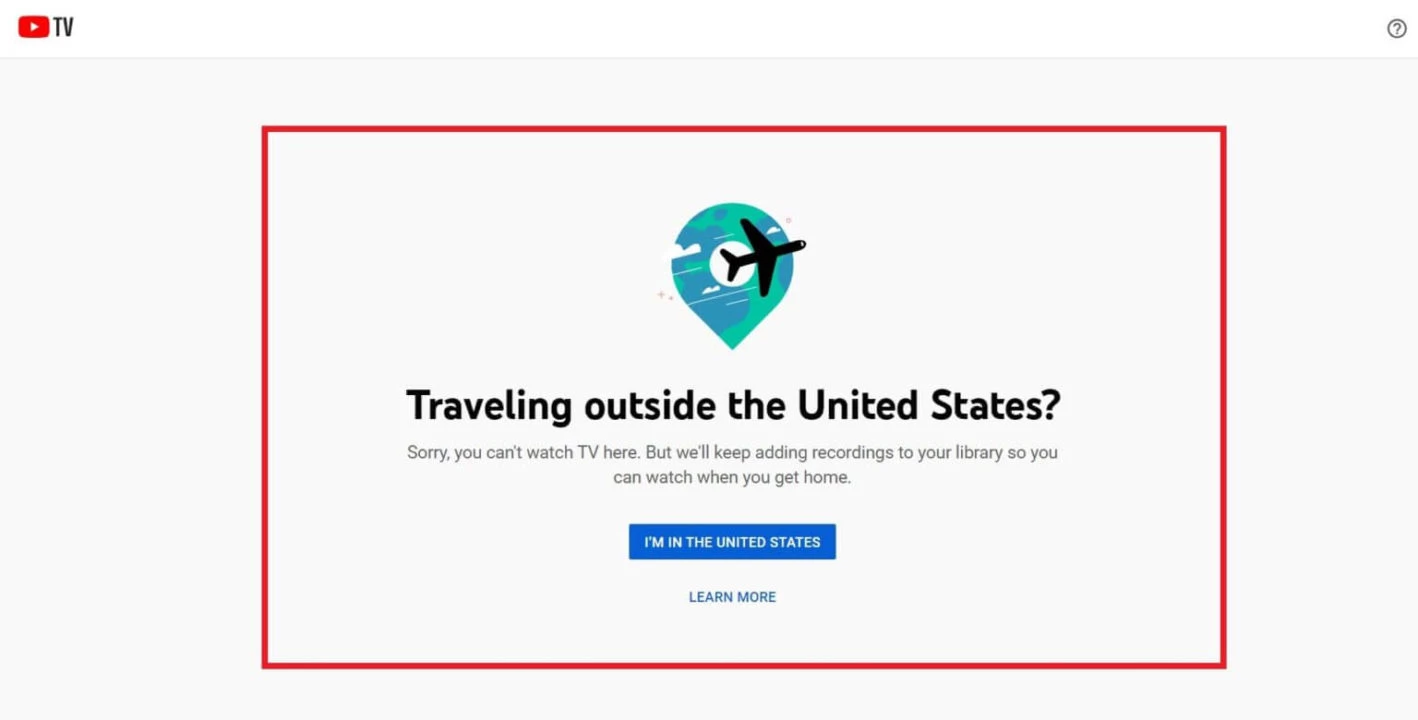
YouTube TV is a popular streaming service that offers live TV and on-demand content, but it is only available for users located in the United States. There are several reasons why watching YouTube TV outside the US is not possible.
Firstly, YouTube TV has licensing and copyright agreements that restrict its availability to the US. These agreements are often specific to certain regions or countries, and YouTube TV is licensed to broadcast content within the US only.
Another reason is the technology used by YouTube TV. The service relies on large server networks and data centers strategically located in major US cities. These servers work together to ensure simultaneous live streaming of TV channels and on-demand content. Attempting to access YouTube TV from outside the US would require accessing these servers, which is not possible without a US IP address.
Moreover, YouTube TV uses a geolocation tracking system to determine the user’s location. This system utilizes a combination of IP address analysis and GPS data to detect the user’s geographical location. If a user’s location is detected outside the US, access to YouTube TV is blocked.
One way to bypass these location restrictions and watch YouTube TV from outside the US is by using a VPN (Virtual Private Network). A VPN allows users to connect to a server in a different location and obtain a new IP address. By connecting to a VPN server in the US, users can make it appear as if they are accessing YouTube TV from within the country, thus bypassing the location restrictions.
There are various VPN services available that offer US servers and can help bypass YouTube TV’s location restrictions. Some popular choices include PrivateVPN, ExpressVPN, and NordVPN. These VPNs provide features such as zero-logging, lightning-fast connections, and strong encryption to ensure a reliable and secure streaming experience.
To watch YouTube TV from outside the US, follow these steps:
- Choose a suitable VPN provider that supports US servers, such as PrivateVPN.
- Download and install the VPN application on your device.
- Launch the VPN application and log in with your credentials.
- Connect to a VPN server located in the US.
- Once connected, you will have a US IP address, allowing you to access YouTube TV.
- Open the YouTube TV website or app and sign in using your YouTube TV account.
- You can now stream YouTube TV from outside the US and enjoy your favorite shows and channels.
It’s important to note that bypassing YouTube TV’s location restrictions may violate its terms of service and could potentially lead to account suspension or termination. Additionally, the quality of streaming may depend on the user’s internet connection speed and the VPN provider’s server performance.
In conclusion, watching YouTube TV outside the US is not possible due to licensing agreements, geolocation restrictions, and the technology used by the service. However, by using a VPN, users can bypass these restrictions and access YouTube TV from anywhere in the world.
What is a VPN and how does it work?
A VPN (Virtual Private Network) is a technology that enables users to create a secure and encrypted connection to a private network over the Internet. It allows users to browse the web, access online resources, and communicate with others without exposing their actual IP address or location.
When you connect to a VPN, your internet traffic is routed through a server located in a different geographical location. This server acts as a middleman between your device and the websites or services you want to access. As a result, your real IP address is hidden, and it appears as if you are accessing the internet from the server’s location.
VPNs are commonly used for various purposes, including bypassing geo-restrictions imposed by streaming services like Netflix. For example, if you are outside the United States and want to watch Netflix US, you can use a VPN to connect to a server in the US. This tricks Netflix into thinking that you are accessing their service from within the US, therefore allowing you to watch the content reserved for US viewers.
There are several ways a VPN can be used to bypass location restrictions on YouTube TV and other streaming platforms. One popular VPN option is PrivateVPN, which offers high-quality VPN servers in multiple locations around the world. PrivateVPN doesn’t limit the number of devices you can use simultaneously, so you can watch YouTube TV on multiple devices at the same time.
NordVPN is another popular VPN service known for its premium features and large server network. It uses a double VPN feature, which means your internet traffic passes through two VPN servers instead of just one. This adds an extra layer of security and further obscures your online identity. NordVPN also offers a 30-day money-back guarantee, allowing you to try out their service risk-free.
By using a VPN, you can hide your real location and bypass any regional geoblocking imposed by YouTube TV or other streaming services. This allows you to access YouTube TV and enjoy all its content no matter where you are in the world. Additionally, VPNs encrypt your data, ensuring your online activities remain private and secure from hackers or government surveillance.
In conclusion, VPNs are a wonderful tool for those who want to bypass location restrictions and access content from anywhere in the world. With VPNs like PrivateVPN and NordVPN, you can reliably watch YouTube TV and other streaming services without any issues. Whether you’re traveling, living abroad, or simply want to keep your online activities private, a VPN is a valuable service worth considering.
Choosing the right VPN service for bypassing YouTube TV location
When it comes to bypassing YouTube TV location and accessing it from outside the US, choosing the right VPN service is crucial. With the abundance of options available in the market, it can be overwhelming to find the best one. However, with some key considerations, you can make an informed decision.
1. Optimized servers for streaming
Look for a VPN service that has optimized servers specifically for streaming YouTube TV. These servers are designed to offer fast and reliable connections, ensuring smooth streaming without any buffering issues.
2. Free trial or money-back guarantee
Make sure the VPN service offers a free trial or a money-back guarantee. This allows you to test the service and determine if it meets your requirements before committing to a subscription.
3. Wide range of server locations
Check if the VPN service has a large number of server addresses in different locations, especially in the US. This enables you to connect to a server that is closer to the YouTube TV servers, ensuring better streaming speeds.
4. Simplicity of use
Look for a VPN service with a user-friendly application that is easy to set up and navigate. This will help you quickly connect to a server and start enjoying YouTube TV without any hassle.
5. Good customer support
Choose a VPN service that provides excellent customer support. In case you encounter any problems or have any questions, a responsive and knowledgeable support team can make a significant difference in resolving them quickly.
6. Compatibility with various platforms
Ensure that the VPN service is compatible with the platforms you plan to use YouTube TV on. Whether it’s Windows, macOS, Android, iOS, or other popular platforms, the VPN should work seamlessly on all of them.
7. Privacy and security features
Check for essential privacy and security features, such as strong encryption, a strict no-logs policy, and options for anonymous payment methods like PayPal or Bitcoin. These features ensure your online activities remain private and protected.
In conclusion, to bypass YouTube TV location and enjoy streaming it from outside the US, consider these factors when selecting a VPN service. Finding the right one will help you access and enjoy YouTube TV across different platforms while keeping your connection fast and secure.
Step-by-step guide: Setting up a VPN to watch YouTube TV from outside the US
Are you tired of being unable to access YouTube TV from outside the US? Don’t worry, with a VPN, you can bypass location restrictions and enjoy your favorite shows and live sports on YouTube TV regardless of where you are in the world. Follow this step-by-step guide to get started:
Step 1: Choose a reliable VPN provider
The first step in accessing YouTube TV from outside the US is to select a trustworthy VPN provider. Look for a provider that offers fast speeds, excellent customer support, and a large number of server locations.
Step 2: Sign up and install the VPN software
Once you have chosen a VPN provider, sign up for an account and download their software onto your device. Most VPNs offer software for Windows, Mac, iOS, and Android, so make sure to select the appropriate version for your device.
Step 3: Connect to a US server
After installing the software, open the VPN application and connect to a server located in the US. This will give you a US IP address and trick YouTube TV into thinking you are accessing the service from within the country.
Step 4: Access YouTube TV
Once you are connected to a US server, open your browser and navigate to the YouTube TV website. You should now have full access to all the live TV channels, movies, and shows that YouTube TV has to offer.
Step 5: Enjoy YouTube TV from outside the US
Now that you have successfully bypassed the location restrictions, you can enjoy all the content available on YouTube TV from anywhere in the world. Whether you want to watch a live sports event, catch up on your favorite shows, or explore the vast library of movies, YouTube TV has got you covered.
By following these simple steps, you can watch YouTube TV from outside the US and never miss out on your favorite programs again. So, get a VPN, connect to a US server, and start streaming unlimited entertainment today!
Benefits of using a VPN for bypassing YouTube TV restrictions
Using a VPN (Virtual Private Network) to bypass YouTube TV restrictions can offer wonderful benefits for users who want to access YouTube TV content from outside the US. Here are the main advantages:
- Access to restricted content: One of the major benefits of using a VPN is that it allows you to bypass geographical restrictions imposed by YouTube TV. By connecting to a server located in the US, you can share and enjoy all the wonderful content that YouTube TV offers, regardless of your actual location.
- Enhanced privacy and security: VPNs help protect your online privacy and security. When you connect to a VPN server, it acts as a proxy, encrypting your internet connection and masking your true IP location. This adds an extra layer of security, keeping your personal information and online activities private and protected.
- Choice of server locations: VPN providers offer a wide range of server locations to choose from, depending on your specific needs. You can select a server located in the US to access YouTube TV, or you can choose servers in other countries for different purposes. Top VPN services like ExpressVPN, CyberGhost, and HideMyAss provide multiple server options.
- Reliable network connections: VPNs ensure stable and reliable network connections. With fast and consistent speeds, you can enjoy streaming YouTube TV content without buffering or interruptions. This is particularly important when accessing YouTube TV on platforms like Android or iOS devices, where a high-quality network connection is crucial.
- Bypassing other geographical restrictions: In addition to accessing YouTube TV, a VPN can also help you access other geo-restricted content platforms like Netflix and Microsoft services. This gives you plenty of content choices and options to satisfy your digital entertainment needs.
In conclusion, using a VPN service like ExpressVPN or CyberGhost is a perfect recommendation for anyone who wants to bypass YouTube TV’s location restrictions. With the benefits it offers, including accessing restricted content, enhanced privacy and security, a choice of server locations, reliable network connections, and more, a VPN is the best solution for accessing YouTube TV from outside the US while minimizing the risk of legal issues. Try it out and continue enjoying premium digital content regardless of your physical location.
PrivateVPN: A reliable VPN choice for bypassing YouTube TV location
If you are tired of geoblocking and want to access YouTube TV from outside the US, PrivateVPN is a top choice. With 11 high-quality servers and simple payment options, this VPN makes the process of bypassing location restrictions a breeze.
This VPN service supports OpenVPN and allows you to access YouTube TV from countries where it is banned. The high-quality service ensures that you can enjoy YouTube TV without buffering or interruptions.
PrivateVPN keeps your digital activities private and secure with its selection of VPN protocols. It also supports PPTP, L2TP, and IKEv2, allowing for a better connection and faster speeds.
Choosing PrivateVPN also means you can access other popular streaming platforms like Netflix, as it does not limit the number of devices you can connect. Additionally, it supports a wide range of devices, including Windows, Mac, and Android.
With PrivateVPN, you can start accessing YouTube TV in just a few simple steps. The service supports PayPal as a payment method, and you can be up and running in less than 5 minutes.
If you have any issues, PrivateVPN offers a 30-day money-back guarantee, so you can try out the service risk-free. Many satisfied customers have praised PrivateVPN for its excellent customer support and reliable service.
Вопрос-ответ:
What is YouTube TV?
YouTube TV is a streaming service that offers live television from major broadcast and cable networks. It allows users to watch their favorite TV shows, sports events, and news broadcasts through an internet connection, without the need for a cable or satellite subscription.
Why is YouTube TV only available in the United States?
YouTube TV is currently only available in the United States due to licensing agreements with broadcasters and cable networks. These agreements restrict the availability of the service to a specific geographic region. However, with the use of a VPN, it is possible to bypass these restrictions and watch YouTube TV from outside the US.
What is a VPN and how does it work?
A VPN, or Virtual Private Network, is a technology that allows users to create a secure and encrypted connection to another network over the internet. It works by establishing a virtual tunnel between a user’s device and a VPN server, through which all internet traffic is routed. This masks the user’s IP address and encrypts their data, making it appear as if they are accessing the internet from the location of the VPN server.
Can I use any VPN to bypass YouTube TV location restrictions?
While many VPN services claim to be able to bypass location restrictions, not all of them are effective at unblocking YouTube TV. It is important to choose a VPN that has servers located in the United States and a strong track record of bypassing geo-restrictions. Additionally, the VPN should have fast and stable server connections to ensure a smooth streaming experience.
Видео:
How to UNBLOCK & Watch Youtube TV from Anywhere (2022)
How to UNBLOCK & Watch Youtube TV from Anywhere (2022) by vpnMentor 3 years ago 1 minute, 27 seconds 57,599 views
YouTube TV Outside Your Home Area – Bypass 2022- 2023
YouTube TV Outside Your Home Area – Bypass 2022- 2023 by Online Code Coaching 6 months ago 19 minutes 6,971 views
Does a VPN Work With YouTube TV in 2023?
Does a VPN Work With YouTube TV in 2023? by Hide IP Helper 4 months ago 1 minute, 45 seconds 1,941 views
