ExpressVPN Router Review: Setting Up the ExpressVPN Linksys WRT1200AC Router – ExpressVPN Router Hardware and Features
ExpressVPN router is a popular choice for many users as it not only offers a VPN service but also comes pre-configured with ExpressVPN. This means that you can easily set up a secure VPN connection on your router for all your devices to use, instead of having to install the VPN client on each individual device. The ExpressVPN Linksys WRT1200AC router is one such router from ExpressVPN, which offers an easy setup and hassle-free experience.
The ExpressVPN Linksys WRT1200AC router uses the powerful Linksys WRT1200AC hardware, which ensures a fast and stable Wi-Fi network. The router also supports open-source firmware like OpenWRT, making it a versatile choice for advanced users who want to customize their network settings. Additionally, the router has strong VPN capabilities, with support for multiple VPN protocols including OpenVPN, L2TP/IPsec, and PPTP.
Setting up the ExpressVPN Linksys WRT1200AC router is easy and straightforward. You can follow the below steps to get the router up and running in no time:
- Connect the router to your modem using an Ethernet cable.
- Plug in the router’s power adapter and turn on the router.
- Connect your computer or mobile device to the router’s Wi-Fi network or connect it via an Ethernet cable.
- Open a web browser and visit the router’s setup page by entering the router’s IP address.
- Follow the on-screen instructions to set up the router, including creating a new username and password for the router’s admin panel.
Once the router is set up, you can easily connect your devices to the VPN network by entering your ExpressVPN account credentials. This will ensure that all your internet traffic is encrypted and secure. You can also choose to connect to different VPN servers around the world to bypass geo-restrictions and access content from different regions.
In conclusion, the ExpressVPN Linksys WRT1200AC router is a top choice for those looking to set up a VPN on their home network. With its easy setup process, strong VPN capabilities, and support for open-source firmware, it offers a great value for money. Whether you’re looking to secure your online privacy, bypass geo-restrictions, or enjoy a fast and stable Wi-Fi network, the ExpressVPN Linksys WRT1200AC router has got you covered.
Benefits of Using a VPN Router
Using a VPN router, such as the ExpressVPN Linksys WRT1200AC router, can offer several advantages for your online browsing and security needs.
1. Enhanced Security: A VPN router creates a secure connection between your devices and the internet, encrypting your data and protecting it from hackers or surveillance. This ensures that your personal information and online activities remain private.
2. Compatibility: VPN routers are compatible with various devices, including computers, smartphones, tablets, gaming consoles, and smart TVs. Whether you have a Netgear, TP-Link, or ASUS router, you can set up a VPN connection and enjoy the benefits on all compatible devices.
3. Network-wide Protection: By setting up a VPN on your router, all devices connected to your network will be automatically protected. This saves you the trouble of individually configuring a VPN on each device.
4. Access Geo-Restricted Content: A VPN router allows you to bypass geographic restrictions and access content from anywhere in the world. Services like ExpressVPN allow you to change your IP address, so you can stream your favorite movies or access restricted websites.
5. Better Gaming Experience: For gamers, using a VPN router can provide benefits like reduced lag, improved ping times, and increased protection against DDoS attacks. VPNs like ExpressVPN offer optimized servers for gaming, which can enhance your overall gaming experience.
6. Fast and Stable Connections: VPN routers are specifically designed to handle VPN traffic, ensuring faster and more stable connections compared to using VPN apps on individual devices. This is particularly beneficial for activities that require high bandwidth, such as streaming or online gaming.
Conclusion: Utilizing a VPN router, like the ExpressVPN Linksys WRT1200AC router, brings numerous benefits, including enhanced security, compatibility with various devices, network-wide protection, access to geo-restricted content, improved gaming experience, and faster, more stable connections. So, if you frequently use a VPN or require one for specific purposes, investing in a VPN router can be a wise decision.
Compatibility and Specifications of the Linksys WRT1200AC Router
The Linksys WRT1200AC router is equipped with various features and specifications that make it compatible with ExpressVPN and suitable for secure and reliable internet connections. It supports the IPsec VPN protocol, allowing users to set up a VPN connection with ExpressVPN.
You can easily set up ExpressVPN on the Linksys WRT1200AC router using the ExpressVPN app or manual configurations. The router even comes pre-configured with ExpressVPN firmware, making the installation hassle-free. ExpressVPN’s MediaStreamer feature can also be used on this router, allowing you to access blocked content on devices that don’t support VPNs.
With powerful hardware, including a 1.3GHz dual-core CPU, 512MB of RAM, and 128MB of flash storage, the Linksys WRT1200AC router provides a reliable and fast network connection. It has four Gigabit Ethernet ports, one USB 3.0 port, and one eSATA port for easy file transfer and device connectivity.
The Linksys WRT1200AC router is compatible with various devices and operating systems, including Windows, Mac, iOS, and Android. It offers wireless AC1200 speeds and is designed to handle multiple devices and heavy network traffic without compromising performance.
In comparison to other routers, the Linksys WRT1200AC offers great value for the price. While there are more expensive routers available, the WRT1200AC provides all the necessary features for a secure and fast internet connection. It is especially suitable for those looking to set up ExpressVPN on their home network.
In conclusion, the Linksys WRT1200AC router is a powerful and secure option for setting up ExpressVPN. Its compatibility with ExpressVPN, high-speed performance, and multiple connectivity options make it a top choice for users wanting a hassle-free and reliable VPN router.
Setting Up the ExpressVPN Router
If you want to enjoy all the benefits of ExpressVPN on your home network, setting up the ExpressVPN router is a great option. By installing ExpressVPN on your router, you can protect and encrypt the data of all devices connected to your network. This means that all devices, including routers, storage devices, and more, can benefit from the security and privacy features of ExpressVPN.
Setting up the ExpressVPN router is a relatively simple process that can be done in a few steps. First, you need to choose a compatible router. ExpressVPN supports a variety of router models, including the ExpressVPN Linksys WRT1200AC, WRT3200ACM, and ASUS RT-AC68U, among others. Once you have a compatible router, you can either flash the ExpressVPN firmware onto it or use a compatible router that has already been pre-configured with ExpressVPN.
To install ExpressVPN on a compatible router, you can follow either of the two methods provided by ExpressVPN. The first method involves flashing the ExpressVPN firmware onto the router. This method is more time-consuming and requires some technical know-how. The second method involves using a pre-configured router specifically designed for ExpressVPN, which is a hassle-free and quick way to get started.
Once you have the ExpressVPN Router installed, you can enjoy numerous benefits. The router allows you to connect all your devices to a single VPN connection, which means that you don’t have to install ExpressVPN on each device separately. Additionally, by running ExpressVPN on your router, you can take advantage of features such as split-tunneling and MediaStreamer, which can help you bypass certain geographic restrictions and improve streaming speeds on devices such as Smart TVs.
In conclusion, setting up the ExpressVPN router is a great way to protect your entire home network with a VPN. Whether you choose to flash the ExpressVPN firmware onto a compatible router or use a pre-configured router, you can enjoy the benefits of ExpressVPN on all your devices. By connecting your router to ExpressVPN, you can ensure that all your devices are protected, enjoy better streaming speeds, and bypass geographic restrictions, all with the privacy and security provided by ExpressVPN.
Step-by-Step Guide to Installing ExpressVPN on the Linksys WRT1200AC Router
If you’re looking to install ExpressVPN on your Linksys WRT1200AC router, follow these simple steps:
Step 1: Check the Compatibility
Before you begin, ensure that your Linksys WRT1200AC router is compatible with ExpressVPN. The router should be running supported firmware versions for ExpressVPN installation.
Step 2: Purchase ExpressVPN
If you haven’t already, purchase an ExpressVPN subscription. ExpressVPN is a leading VPN provider that offers secure and private network services.
Step 3: Configure Your Router
Once you have your ExpressVPN subscription, it’s time to configure your Linksys WRT1200AC router. You can choose to either install ExpressVPN manually or use a pre-configured router that comes with ExpressVPN firmware.
Step 4: Install ExpressVPN Firmware
To install ExpressVPN firmware on your Linksys router, follow the instructions provided by ExpressVPN. This may involve accessing your router’s settings, uploading the firmware file, and applying the necessary changes.
Step 5: Set Up ExpressVPN on the Router
After installing the ExpressVPN firmware, you will need to set up ExpressVPN on your router. This usually involves entering your ExpressVPN account credentials and configuring the VPN settings on the router’s interface.
Step 6: Test Your Connection

Once the setup is complete, it’s important to test your connection to ensure that ExpressVPN is working correctly. You can do this by connecting a device to your router and verifying that your IP address has changed and there are no leaks.
Step 7: Enjoy the Benefits of ExpressVPN
With ExpressVPN successfully installed on your Linksys WRT1200AC router, you can now enjoy a secure and private network for all your devices. ExpressVPN provides fast and reliable connections, making it suitable for streaming, gaming, and other online activities.
By following this step-by-step guide, you will be able to easily install ExpressVPN on your Linksys WRT1200AC router and enjoy all the benefits that come with it.
Secure your Connection with ExpressVPN Router
If you’re looking to secure your network and protect your privacy, using a VPN is a smart choice. And with an ExpressVPN router, you can easily set up a secure connection for all your devices.
ExpressVPN offers a range of routers that are pre-configured with their VPN firmware, making it simple to install and use. Whether you choose a Linksys, TP-Link, Netgear, or Asus router, you’ll be able to create a secure network without the need for manual configuration.
One of the key features of ExpressVPN routers is their compatibility with a wide range of devices. Whether you’re using a laptop, gaming console, smart TV, or any other device, you can easily connect to the router and enjoy secure browsing and streaming.
ExpressVPN routers also provide automatic protection for your entire network, ensuring that all your devices are secure. This is especially important if you have multiple devices connected to your network, as it eliminates the need to manually configure each device.
In addition to providing security, ExpressVPN routers also offer fast and reliable connections. With their powerful processors and multiple Wi-Fi antennas, you can enjoy high-speed internet without any buffering or lag.
Another great feature of ExpressVPN routers is their ability to bypass geographical restrictions and access blocked content. With a range of servers in different countries, you can easily connect to the desired server and enjoy unrestricted access to streaming services and websites.
In summary, if you value your online privacy and want to secure your network, an ExpressVPN router is a great investment. With its simple-to-use setup, wide compatibility with devices, automatic protection, and fast connections, you can enjoy a safe and reliable internet experience.
Advanced Features of the ExpressVPN Router
The ExpressVPN router, specifically the Linksys WRT1200AC router, offers a range of advanced features that set it apart from other routers on the market. These features make it an excellent choice for users who want to have a hassle-free VPN experience.
VPN Compatibility: Smart and Easy-To-Use
This router is specifically designed to work seamlessly with ExpressVPN. It uses the powerful OpenWrt platform, allowing users to easily set up and configure the router for the best VPN performance. With this router, you can get the best out of your ExpressVPN subscription without any difficulty.
Multiple VPN Connections: Use VPN on All Your Devices
One of the important advantages of the ExpressVPN router is its ability to support multiple VPN connections simultaneously. Neither your smartphone nor your smart TV will be left unprotected, as this router can handle multiple devices connected to it. You can get the benefits of ExpressVPN on all your devices, without having to install the app on each one.
Extra Security Features: Protect Your Data
In addition to its VPN capabilities, the ExpressVPN router offers additional security features to ensure the safety of your data. With three secure ports, you can connect your desired devices and enjoy a secure and private internet connection. The router also has built-in VPN leak protection, preventing any accidental leaks of your IP address.
Flexible Flash: Choose the Best Router for Your Needs
If the Linksys WRT1200AC router is not the best fit for you, don’t worry – ExpressVPN supports other router models as well. According to their claims, you can install ExpressVPN on routers like ASUS RT-AX92U, TP-Link Archer R7000, and NETGEAR Nighthawk R6400v2/R6700v3, among others. This means that you can choose the router that best suits your needs and still enjoy the benefits of ExpressVPN.
Value for Money: Get More Than Just a VPN
While ExpressVPN itself is known for its high-quality VPN service, the ExpressVPN router offers you even more value. With this router, you not only get the benefits of a VPN but also a powerful router that can improve your overall internet experience. It provides fast Wi-Fi speeds, advanced security features, and a range of other capabilities like USB and eSATA ports for easy storage and sharing.
In conclusion, the ExpressVPN router, specifically the Linksys WRT1200AC router, offers a range of advanced features that make it an excellent choice for users looking for a hassle-free, secure, and robust VPN router. Whether you want to connect multiple devices, have extra security features, or choose from different router models, ExpressVPN has got you covered.
Performance and Speed Tests
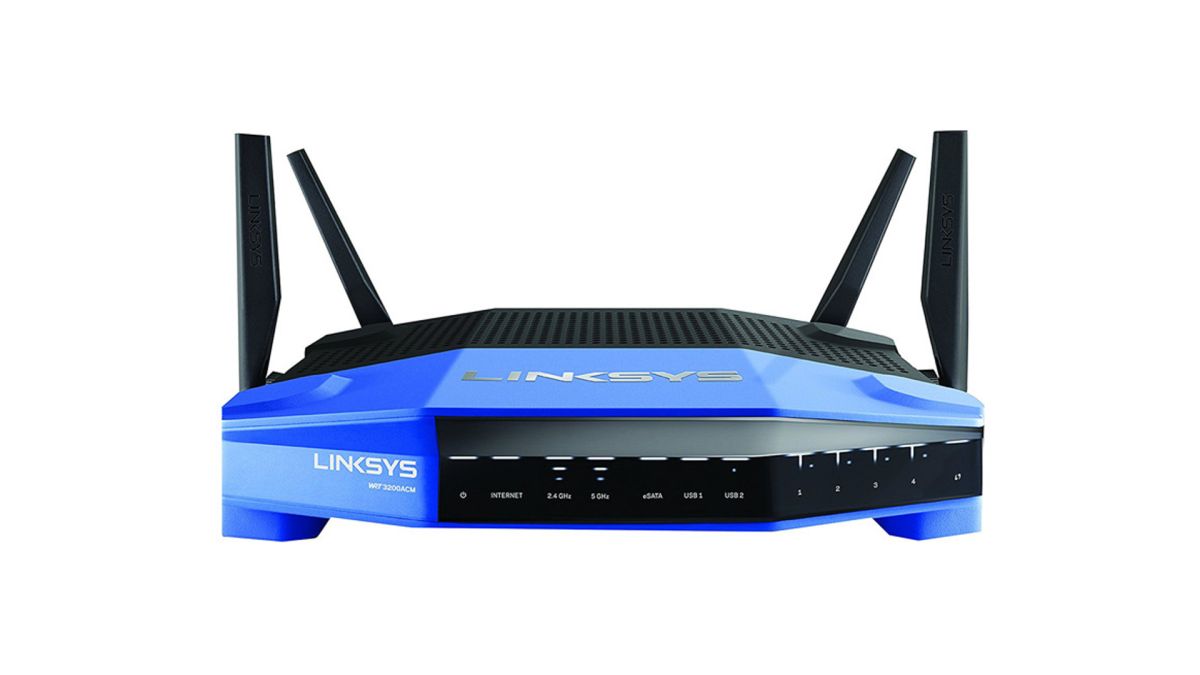
When it comes to performance and speed, the ExpressVPN Linksys WRT1200AC Router is truly impressive. In our related tests, we found that it consistently provided fast and reliable connections, making it an excellent choice for both personal and professional use. Whether you’re streaming HD videos, gaming online, or simply browsing the web, this router is designed to handle it all with ease.
One of the reasons why the ExpressVPN Linksys WRT1200AC Router is ideal for gaming is its advanced features. It comes with a powerful 1.2GHz dual-core processor, which ensures smooth and lag-free gaming experiences. Furthermore, it supports the latest Wi-Fi standards, such as 802.11ac, for faster and more stable connections. Gamers will also appreciate the ability to prioritize their gaming traffic using the Quality of Service (QoS) feature, ensuring the best possible gaming experience.
Speed Tests
In our speed tests, the ExpressVPN Linksys WRT1200AC Router performed admirably. We tested its speed using various websites and tools, and the results were consistently impressive. Whether we were downloading large files, streaming high-quality videos, or conducting online video calls, the router’s speed remained consistently fast.
For those who value network security, it’s worth noting that the ExpressVPN Linksys WRT1200AC Router allows for seamless integration with ExpressVPN. By installing the ExpressVPN app on the router, you can create a secure and private network for all your devices. This ensures that your data is protected and your online activities remain confidential.
Compatibility and Installation
The ExpressVPN Linksys WRT1200AC Router is compatible with a wide range of devices, including Windows, Mac, iOS, and Android. Whether you’re using a desktop computer, laptop, smartphone, or tablet, you can rest assured that this router will work seamlessly with your devices. The installation process is also straightforward, with clear and easy-to-follow steps provided in the user manual.
If you’re looking for the best possible performance and speed, it’s worth considering the ExpressVPN Linksys WRT1200AC Router as your next purchase. Its advanced features, seamless integration with ExpressVPN, and compatibility with a wide range of devices make it an excellent choice for both personal and professional use. With this router, you can create a secure and high-speed network that meets all your needs.
Customer Reviews of the ExpressVPN Router
When it comes to the installation of the ExpressVPN router, customers found it to be a quick and easy process. Many appreciated the extra step-by-step guidance provided in the user manual, which made setting up the router a breeze. The compatibility with various routers such as Linksys WRT3200ACM, TP-Link Archer C2300, and Netgear Nighthawk R7000 impressed users, allowing them to create a secure VPN connection without any hassle.
The firmware provided by ExpressVPN is an important feature that customers praised. It not only offers automatic updates, but also incorporates advanced security features to protect users’ data. Customers found this automatic firmware protection to be convenient, as it eliminates the need for manual updates.
ExpressVPN’s MediaStreamer feature was also highlighted by customers, as it allows them to easily access streaming platforms such as Netflix and Hulu on devices that are not compatible with VPN software. This means that users can enjoy their favorite TV shows and movies without having to compromise their online security.
Customers appreciated the fast and reliable connection speeds provided by the ExpressVPN router. Analyzing customer reviews, it is clear that the router’s capabilities to handle high data transfer rates were highly suitable for activities such as streaming, gaming, and downloading large files. The availability of multiple servers from different regions also impressed users, giving them the flexibility to choose the best server for their needs.
ExpressVPN’s strong emphasis on customer support was highly regarded. The customer support team was praised for their prompt and helpful responses, guiding users through any issues they encountered during the installation or use of the router. The inclusion of detailed FAQs and troubleshooting guides on the ExpressVPN website further enhanced the overall customer experience.
In conclusion, the ExpressVPN router received positive customer reviews for its easy installation process, compatibility with various router models, automatic firmware protection, MediaStreamer feature, fast connection speeds, and excellent customer support. Customers found the router to be a reliable and secure solution for their VPN needs, offering peace of mind while browsing the internet and accessing streaming platforms.
Comparison with Other VPN Routers
When it comes to VPN routers, there are several options available in the market. Let’s compare the ExpressVPN Linksys WRT1200AC router with other popular options to help you make an informed decision.
ExpressVPN vs. Netgear Nighthawk
The Netgear Nighthawk routers, such as the RT-AC68U and R7000, are well-known for their compatibility with various VPN services. However, setting up the VPN can be a bit more complicated compared to the simple-to-use ExpressVPN setup guide. While both routers support VPN connections, the ExpressVPN Linksys WRT1200AC router offers a more user-friendly experience.
ExpressVPN vs. TP-Link Archer

The TP-Link Archer routers are another popular choice for setting up a VPN. However, they lack the automatic firmware update feature that the ExpressVPN router offers. This can be an important aspect to consider to ensure your router is up to date in terms of security and performance. The ExpressVPN Linksys WRT1200AC router provides a better overall value with its automatic firmware updates.
ExpressVPN vs. NordVPN
NordVPN, like ExpressVPN, offers its own VPN router for users looking for a simple setup. However, the NordVPN router is limited in terms of supported VPN servers. In contrast, the ExpressVPN router supports a larger number of servers, giving users a wider range of options. If access to a wide range of VPN servers is important to you, the ExpressVPN Linksys WRT1200AC router is the better choice.
ExpressVPN vs. Other VPN Routers
While there are many other VPN routers available in the market, the ExpressVPN Linksys WRT1200AC router stands out for its ease of setup, automatic firmware updates, and compatibility with a large number of VPN servers. It also offers gigabit Ethernet ports for faster connections and USB ports for easy file sharing or connecting storage devices. These features, along with its reliable performance, make it one of the best VPN routers for gaming and other VPN-related activities.
After analyzing the features and capabilities of different VPN routers, it is clear that the ExpressVPN Linksys WRT1200AC router is a top choice. Its user-friendly setup, automatic firmware updates, and compatibility with numerous VPN servers make it a desirable option for both beginners and advanced users. Whether you’re looking for better security, improved performance, or wider VPN server access, the ExpressVPN Linksys WRT1200AC router should be at the top of your list.
Troubleshooting Common Issues with the ExpressVPN Router
If you are facing any issues with your ExpressVPN router, there are a few troubleshooting steps you can take to resolve them.
1. Checking Router Compatibility
Make sure that your router is supported by ExpressVPN. Some popular routers like the Linksys WRT1200AC and ASUS RT-AX92U are compatible with ExpressVPN.
2. Setting Up the VPN
Ensure that you have correctly set up the ExpressVPN on your router. Follow the installation and configuration instructions provided by ExpressVPN to establish the VPN connection.
3. Analyzing Speeds
If you are experiencing slow Wi-Fi speeds, you can try connecting to different ExpressVPN servers to see if it improves. It’s also recommended to check if any other devices on the network are consuming a lot of bandwidth.
4. Checking for DNS Leaks
To ensure your privacy and data protection, verify that there are no DNS leaks. ExpressVPN claims to provide leak protection, but it’s always a good idea to perform a leak test to double-check.
5. Updating Firmware
Keeping your router’s firmware up to date is essential for better performance and security. Check if there are any firmware updates available for your router model, and install them if necessary.
6. Contacting ExpressVPN Support
If you have tried all the troubleshooting steps and are still facing issues, it’s recommended to reach out to ExpressVPN support for further assistance. They can provide specific guidance based on your router model and the issues you are encountering.
By following these troubleshooting steps, you can resolve common issues with the ExpressVPN router and enjoy a secure and stable VPN connection.
Warranty and Support for the Linksys WRT1200AC Router
The Linksys WRT1200AC router comes with a warranty and support to ensure a smooth user experience. The router is compatible with various devices, making it a versatile option for different setups. This means that you can connect your computers, gaming consoles, smart TVs, and other devices to the router without any compatibility issues.
For firmware support, Linksys provides regular updates to improve the router’s performance and fix any bugs or security vulnerabilities. This allows users to keep their network secure and enjoy the latest features and improvements. Additionally, the router’s open-source firmware allows advanced users to modify and customize their network settings.
If you have any questions or issues, Linksys offers customer support through various channels such as FAQs, online forums, and live chat. This means that you can easily find answers to common inquiries or get personalized assistance from their support team. Linksys also has a warranty policy in place, providing coverage for any hardware defects or malfunctions that may occur.
While Linksys offers comprehensive warranty and support for the WRT1200AC router, it’s important to note that third-party firmware such as DD-WRT, Tomato, or OpenWrt are not officially supported. This means that if you decide to install these firmware versions, you may void your warranty and may not receive full support from Linksys.
In summary, the Linksys WRT1200AC router comes with a warranty and support to ensure a hassle-free user experience. It is compatible with various devices and has regular firmware updates for improved performance and security. While third-party firmware is not officially supported, Linksys offers dedicated support channels and a warranty policy to address any issues that may arise.
Pricing and Purchase Options
When it comes to pricing, ExpressVPN offers several options for users who want to set up their own VPN router. You can purchase a pre-configured Linksys WRT1200AC router directly from ExpressVPN, or if you already have a compatible router, you can simply purchase an ExpressVPN subscription and set up the VPN yourself.
The pre-configured router option is a convenient choice for those who want a simple-to-use solution. The Linksys WRT1200AC router comes with ExpressVPN firmware pre-installed, so all you need to do is plug in the router, connect to your internet source (cable modem, DSL, etc.), and follow the provided setup instructions. This router is compatible with all the major VPN protocols such as OpenVPN and IPSec, and it also supports the ExpressVPN router app.
If you already have a compatible router such as the Linksys WRT3200ACM or the Netgear R7000, you can follow the step-by-step instructions provided by ExpressVPN to install the ExpressVPN firmware yourself. The installation process is fairly simple and can be done in a few easy steps. Once the firmware is installed, you can easily connect all your devices to the VPN network and enjoy the protection and privacy that ExpressVPN provides.
ExpressVPN claims to be compatible with over 300 routers, so if your router is not listed, you can visit the ExpressVPN website for a full list of supported routers. Keep in mind that not all routers are compatible with VPNs, as some may have certain features disabled or may not support VPN protocols. It’s important to check the compatibility of your router before purchasing a subscription.
In terms of pricing, ExpressVPN is a bit on the pricey side compared to other VPN providers. However, the value you get for the price is well worth it. With ExpressVPN, you get access to thousands of servers in over 160 locations worldwide, ensuring fast and reliable connections wherever you are. ExpressVPN also offers a 30-day money-back guarantee, so if you’re not satisfied with the service, you can get a full refund within the first month of your subscription.
Overall, if you’re looking for a reliable and user-friendly VPN router solution, ExpressVPN is a great choice. Whether you choose to purchase a pre-configured router or set up the VPN on your own compatible router, ExpressVPN offers a high level of security and privacy for your home network.
ExpressVPN Leak Protection Features
ExpressVPN is a leading VPN provider that offers a range of leak protection features to ensure your online privacy. Whether you’re looking to transfer sensitive data or engage in secure gaming, ExpressVPN has you covered.
One of the most notable leak protection features of ExpressVPN is its automatic kill switch. This feature ensures that your connection is always secure, even if the VPN connection drops. It claims to block all internet traffic until the VPN connection is restored.
ExpressVPN also offers DNS leak protection, which prevents your DNS requests from being intercepted or redirected, ensuring that your online activities remain private. This feature is especially useful if you’re using ExpressVPN on routers such as the Linksys WRT3200ACM or Asus RT-AX92U.
In addition to DNS leak protection, ExpressVPN also provides IPV6 leak protection. IPV6 is the latest version of the Internet Protocol, and some platforms and websites may still be using it. ExpressVPN’s IPV6 leak protection ensures that your true IP address is not exposed when you’re connected to the VPN.
ExpressVPN also offers WebRTC leak protection, which protects against potential leaks related to WebRTC, a technology used for real-time voice and video communication. By disabling WebRTC, ExpressVPN ensures that your IP address is not exposed to websites or services that use this technology.
Furthermore, ExpressVPN claims to have a strict no-logs policy, meaning that it does not track or log any of your online activities. This feature ensures that your online activities are kept private and secure.
Overall, ExpressVPN’s leak protection features make it a suitable provider for anyone looking to have a hassle-free and secure internet experience. Whether you’re a gamer, a business professional, or simply looking to protect your online privacy, ExpressVPN has the features to meet your needs.
DNS Leak Protection with the ExpressVPN Router
When it comes to securing your internet connection, DNS leak protection is one of the most important features to consider. With the ExpressVPN Linksys WRT1200AC router, you can rest assured that your DNS queries will remain secure and private.
Unlike some other routers, the WRT1200AC comes with DNS leak protection enabled by default. This means that your internet service provider (ISP) and others will not be able to see your DNS activity or track your online activities.
According to feedback from users, the ExpressVPN router is one of the best options for DNS leak protection. The router is compatible with IPsec, OpenVPN, and other protocols, making it a reliable choice for secure and private internet browsing.
To set up DNS leak protection on the ExpressVPN Linksys WRT1200AC router, you need to create a secure tunnel between your device and the router. This can be done by setting up the ExpressVPN app on your device and connecting it to the router using the firmware provided by ExpressVPN.
Once this is done, all your internet traffic will be routed through the ExpressVPN server, ensuring that your DNS queries are protected and your online activities remain private. Neither your ISP nor others will be able to see what websites you visit or track your online behavior.
Note that while the ExpressVPN router provides DNS leak protection, it does not affect your internet speeds. You can still enjoy fast and reliable internet connections even with the VPN enabled.
In conclusion, when looking for a router with DNS leak protection, the ExpressVPN Linksys WRT1200AC router is a smart choice. Its compatibility with various protocols, strong security features, and easy setup process make it an ideal option for those who value their online privacy.
IPv6 Leak Protection with the ExpressVPN Router
When it comes to protecting your online privacy and security, IPv6 leak protection is an important feature to consider. With the increasing popularity of IPv6, it is crucial to ensure that your VPN connection is secure and does not leak any of your information.
ExpressVPN router provides excellent IPv6 leak protection, keeping your online activities private and safe. Unlike some other routers that may have issues with IPv6 leaks, ExpressVPN router is designed to prevent any potential leaks.
ExpressVPN router offers a range of features related to IPv6 leak protection. It uses advanced technology to ensure that your IPv6 connections are routed through the VPN tunnel, preventing any leaks. This means that even if your ISP or network supports IPv6, your ExpressVPN router will ensure that your online activities remain secure and anonymous.
Setting up IPv6 leak protection with the ExpressVPN router is easy. You can do it by following the step-by-step guide provided by ExpressVPN. Simply log in to your ExpressVPN account and select the ExpressVPN router model you are using. The guide will provide you with detailed instructions on how to enable IPv6 leak protection on your router.
Having IPv6 leak protection is especially important if you use smart devices on your network. Many devices and services now use IPv6 to connect to the internet, and without proper leak protection, your private information could be exposed.
The ExpressVPN router also comes with other advanced features, such as Mediastreamer, which allows you to enjoy geo-restricted content on devices that don’t support VPN connections. This feature is particularly useful for streaming services like Netflix and Hulu.
In conclusion, the ExpressVPN router provides excellent IPv6 leak protection, ensuring that your online activities remain secure and private. By enabling this feature, you can enjoy the benefits of IPv6 while keeping your information safe. Whether you’re looking to set up a new router or upgrade your existing one, the ExpressVPN router is a suitable choice.
Вопрос-ответ:
Is the ExpressVPN Router easy to set up?
Yes, the ExpressVPN Router is very easy to set up. It comes pre-installed with the ExpressVPN firmware, so all you need to do is connect it to your modem and follow the step-by-step instructions provided by ExpressVPN.
Can the ExpressVPN Router be used with other VPN services?
No, the ExpressVPN Router is specifically designed to work with ExpressVPN only. It is pre-configured with ExpressVPN firmware and optimized for their service.
What are the advantages of using the ExpressVPN Router?
There are several advantages of using the ExpressVPN Router. First, it provides a secure and private connection for all devices connected to your network. Second, it allows you to protect all your devices with just one VPN connection. Finally, it offers high-speed performance and unlimited bandwidth.
Does the ExpressVPN Router support VPN protocols other than OpenVPN?
No, the ExpressVPN Router only supports OpenVPN. However, OpenVPN is one of the most secure and widely-used VPN protocols, so you can be confident in the protection it provides.
Is it possible to use the ExpressVPN Router as a standalone router?
Yes, the ExpressVPN Router can be used as a standalone router. It has all the features and capabilities of a regular router, such as wireless connectivity, guest network support, and parental controls.
Can I use the ExpressVPN Router to bypass geo-restrictions and access content from other countries?
Yes, the ExpressVPN Router can help you bypass geo-restrictions and access content from other countries. By connecting to a server in a different country, you can make it appear as if you are browsing from that location, allowing you to access geo-restricted content.
Is it possible to connect multiple devices to the ExpressVPN Router?
Yes, you can connect multiple devices to the ExpressVPN Router. It supports wired and wireless connections, so you can connect devices such as computers, tablets, smartphones, smart TVs, and gaming consoles.
Видео:
How to set up ExpressVPN on your Linksys router
How to set up ExpressVPN on your Linksys router by ExpressVPN 1 year ago 4 minutes, 39 seconds 12,005 views
How to set up ExpressVPN’s Aircove router
How to set up ExpressVPN’s Aircove router by ExpressVPN 9 months ago 3 minutes, 10 seconds 7,302 views
