10 Tips to Solve Torrents Not Downloading with VPN
Using a VPN to download files via torrents is a popular method to keep your online activities private and secure. However, there are times when users encounter issues with torrents not downloading while using a VPN. In this article, we will discuss the top 10 tips and solutions to address this problem effectively.
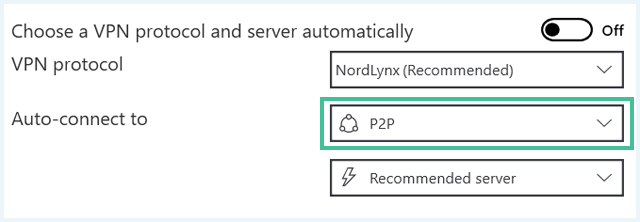
First and foremost, it is essential to ensure that your VPN supports P2P traffic and offers dedicated servers for torrenting. Some VPNs have specific protocols and settings designed to optimize torrent downloads. By choosing a reputable VPN that focuses on the needs of torrent users, you can enjoy faster download speeds and a more reliable connection.
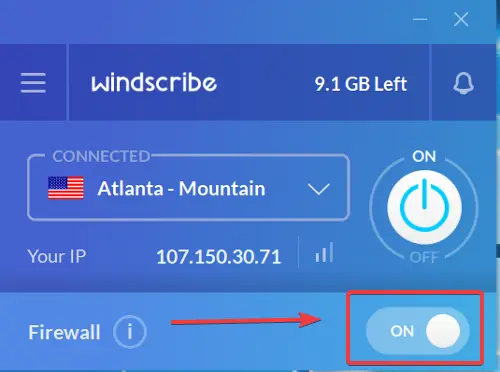
Another common issue that can prevent torrents from downloading is the presence of firewall rules or incoming port restrictions. This can be resolved by enabling port forwarding on your VPN and configuring your torrent client to use the designated port. Additionally, some VPNs offer obfuscated protocols that can bypass certain types of internet restrictions or blockages, allowing you to download torrents safely and without interruptions.
Moreover, it is crucial to check if your VPN has any DNS or IP leaks, as these can expose your real identity and compromise your privacy. To protect yourself, choose a VPN that has strict no-logs policy and offers DNS and IP leak protection. By doing so, you can be confident that your activities are shielded from prying eyes.
When using a VPN for torrenting, it is also recommended to turn off any other security software or tools that might interfere with the VPN connection. This includes antivirus programs, malware scanners, or other VPN clients. Disabling these programs temporarily can help avoid conflicts and ensure a smooth and uninterrupted torrent download experience.
Furthermore, if you are experiencing slow download speeds, you can try connecting to a different VPN server. Sometimes, certain servers may be overloaded or have limited bandwidth, resulting in reduced speeds. By switching to another server in the same location or a different region, you may find a server with better performance and faster download capabilities.
Additionally, if you are using a VPN on Windows, it is recommended to disable any active Windows updates while downloading torrents. Windows updates can consume significant bandwidth and affect the overall download speed. By temporarily disabling the updates, you can prioritize your torrents and enjoy faster download rates.
Lastly, it is crucial to ensure that your VPN subscription is active and up to date. Some VPN providers offer different plans with varying levels of access and features. If your subscription has expired or you are on a limited plan, it may prevent you from accessing certain servers or enjoying enhanced VPN features. To avoid this, always check your VPN account status, renew or upgrade your plans if necessary, and ensure continuous access to the VPN service.
In conclusion, by following these top 10 tips and solutions, you can effectively address and fix the issue of torrents not downloading with a VPN. By choosing the right VPN, optimizing your settings, and being aware of any potential restrictions or limitations, you can ensure a safe, secure, and seamless torrenting experience.
The 6 Best VPNs for BitTorrent
When it comes to downloading torrents safely and securely, using a VPN is essential. However, not all VPNs are created equal. If you’re in need of a reliable VPN for BitTorrent, here are the top 6 options to consider:
1. Private Internet Access (PIA)
PIA is a popular VPN service that offers a suite of protocols to ensure fast and secure torrenting. It has a dedicated Peer-to-Peer (P2P) firewall that blocks any unwanted content and provides access to a wide range of servers across the globe. PIA also offers a user-friendly interface that makes it easy to navigate and set up.
2. NordVPN
NordVPN is known for its incredibly fast speeds and reliable service. It offers a range of protocols to choose from, including OpenVPN and WireGuard, to maximize your downloading capabilities. With NordVPN, you can enjoy torrenting without any restrictions or bandwidth limitations.
3. ExpressVPN
ExpressVPN is a well-established VPN provider that offers excellent security features. It uses obfuscated servers to hide your VPN activity and ensure your privacy, making it ideal for torrenting. ExpressVPN also allows for unlimited file sharing and has a wide range of server locations to choose from.
4. CyberGhost
CyberGhost is a user-friendly VPN that is perfect for beginners. It offers dedicated servers for torrenting and uses strong encryption protocols to keep your data secure. With CyberGhost, you can easily access and enjoy torrenting without any hassle.
5. IPVanish
IPVanish is a reliable VPN provider that has been around for many years. It offers fast speeds and a large network of servers across the world. IPVanish also has a kill switch feature that ensures your IP address is protected at all times while torrenting.
6. Surfshark
Surfshark is a budget-friendly VPN option that offers high-quality service for torrenting. It has a strict no-logs policy and allows for unlimited device connections. Surfshark also offers a built-in ad and malware blocker, making it a great choice for those concerned about online security.
In conclusion, if you’re looking for the best VPNs for BitTorrent, these providers have proven to be reliable, fast, and secure. Whether you’re a beginner or an experienced user, these VPNs will ensure your privacy and allow you to enjoy torrenting without any restrictions.
Check your VPN settings
If you’re experiencing issues with torrent downloads while using a VPN, the first thing you should do is check your VPN settings. Make sure that your VPN client is properly configured to support and allow peer-to-peer file sharing, as some VPNs may have restrictions or limitations in place that could be causing the problem.
Additionally, it’s important to ensure that your VPN provider supports torrent downloads. Not all VPN providers allow or fully support torrenting, so you might need to switch to a VPN that specifically advertises support for torrent downloads.
If you’ve already configured your VPN correctly and ensured that it supports torrenting, but you’re still experiencing issues with downloads, you can try disabling the VPN temporarily to see if that fixes the problem. However, keep in mind that disabling the VPN will expose your IP address and make your activity more vulnerable to tracking or monitoring.
If you’ve tried the above steps without success, it may be worth considering switching to a different VPN provider. Some popular VPN options known for their compatibility with torrent clients include NordVPN, ExpressVPN, and Private Internet Access (PIA). These VPNs offer strong encryption, support for peer-to-peer file sharing, and often have dedicated servers specifically optimized for faster torrent downloads.
Moreover, some VPNs offer additional features that can enhance your torrenting experience. For example, ExpressVPN provides obfuscated servers that can help bypass restrictions and make your torrent traffic appear as regular internet traffic. NordVPN offers a double VPN feature, which encrypts your traffic twice for added security. Private Internet Access (PIA) has an “always-on” Kill Switch feature that ensures your torrent client’s traffic is blocked if the VPN connection drops.
In summary, when troubleshooting issues with torrent downloads while using a VPN, it’s important to check your VPN settings, ensure that your VPN provider supports torrenting, and consider switching to a different VPN if necessary. By taking these steps, you can enjoy fast and secure torrent downloads without any interruptions.
Select a VPN with high-speed servers
When it comes to fixing torrents not downloading with a VPN, one of the most important factors is to select a VPN with high-speed servers. Slow connection speeds can greatly impact the download speed of your torrents, making the whole process frustrating and time-consuming.
Before choosing a VPN, turn to reliable sources like Mohit, a VPN expert, and read their reviews on different VPN providers. There are various factors to consider when looking for a VPN with high-speed servers. One important factor is the number of servers available in different countries. The more servers a VPN offers, the better chances of finding a fast server for torrenting.
Another important aspect to consider is the type of servers available. Some VPNs offer specialized servers for torrenting, which are optimized for faster downloads. These servers utilize protocols like TCP/IP to ensure a stable and reliable connection for torrenting.
It’s also crucial to look for a VPN that supports P2P file sharing and has a large number of seeders. Seeders are users who have downloaded the torrent file and are actively sharing it with others. The more seeders there are, the faster the download speed will be.
Additionally, consider a VPN that offers obfuscation technology. Obfuscation allows VPN traffic to appear like regular internet traffic, making it harder for ISPs or other third parties to identify and throttle torrenting activities. This added layer of security can help maintain fast download speeds.
In conclusion, selecting a VPN with high-speed servers is essential to fixing torrents not downloading. Look for a VPN that supports torrenting, offers a large number of servers in different countries, and utilizes obfuscation technology to keep your torrenting activities secure and fast.
Disable firewalls and antivirus software
One option to consider when troubleshooting issues with torrents not downloading while connected to a VPN is to disable any firewalls or antivirus software that may be blocking the torrenting process.
Firewalls and antivirus software are designed to protect your computer from malicious threats, but sometimes they can interfere with the performance of torrents. By temporarily disabling these programs, you can test whether they are causing the issue.
ExpressVPN, a reliable VPN service that offers great performance for torrenting, provides a helpful link on their website with instructions on how to disable firewalls and antivirus software: link.
Moreover, NordVPN, another popular VPN service known for its reliable performance and strong privacy protection, offers a similar guide on how to disable firewalls and antivirus software: link.
Before making any changes to your computer’s security settings, it’s important to note that disabling firewalls and antivirus software can leave your system vulnerable to threats. Therefore, it is crucial to re-enable them after you have completed testing and troubleshooting.
Update your BitTorrent client
If you’re having trouble downloading torrents with your VPN, one of the first things you should check is the version of your BitTorrent client. Using an outdated or unsupported version can cause compatibility issues, resulting in slow or non-existent downloads. To ensure a smooth downloading experience, it’s crucial to keep your BitTorrent client up to date.
There are several reliable BitTorrent clients available today, such as uTorrent, qBittorrent, and BitComet. These clients regularly release updates that not only fix bugs but also enhance performance and security. By installing the latest version of your chosen BitTorrent client, you can take advantage of the newest features and protocols that enable faster and more secure torrent downloads.
Another important reason to update your BitTorrent client is to stay protected from potential threats. The authorities and copyright enforcement agencies are constantly listening for torrent activity. By using an outdated client, you may be leaving yourself vulnerable to detection. Newer versions often come with smart features, such as obfuscated connections, that make it more difficult for anyone to see what you’re downloading.
So, make sure to regularly check for updates for your BitTorrent client and stay up-to-date with the latest version. This simple step can greatly improve your torrent downloading experience and provide better security and privacy.
Choose a VPN with a no-logs policy
When it comes to using a VPN for downloading torrents, it’s important to choose a provider that has a strict no-logs policy. This means that the VPN does not keep any records of your online activities, ensuring your privacy and anonymity.
Selecting a VPN that offers strong encryption is also crucial. Encryption is a security measure that encrypts your data, making it unreadable to anyone who may intercept it. This ensures that your downloaded torrents and personal information remain safe and protected.
Opt for a VPN that supports the use of a dedicated IP address. With a dedicated IP, you’ll have faster and more stable access to torrent sites, ensuring a smoother downloading experience. In addition, some VPNs offer obfuscation, which disguises your VPN traffic as regular internet traffic, making it harder for ISPs and other third parties to detect that you’re using a VPN.
Look for a VPN that offers a kill switch feature. A kill switch is a fail-safe mechanism that automatically disconnects your internet connection if your VPN connection drops. This prevents your real IP address from being exposed and ensures that your torrent downloads don’t continue without the protection of the VPN.
If you’re concerned about your anonymity while making payments, consider using a VPN that accepts Bitcoin or other cryptocurrencies. This allows you to make anonymous payments without revealing your personal information or credit card details.
Before choosing a VPN service, read reviews from reliable sources and check if it has a good track record of protecting user privacy. Additionally, it’s always a good idea to try out the VPN service with a free trial or money-back guarantee to ensure it meets your needs.
Once you’ve selected a VPN, follow the provider’s instructions to download and install its client software. Most VPNs offer user-friendly interfaces that allow you to easily configure the settings. Simply choose a server location that supports torrenting and enable the VPN. Some VPNs also offer advanced features like split tunneling, where you can choose which apps or websites to use with the VPN and which to use directly through your regular internet connection.
Lastly, make sure to always keep your VPN client up to date with the latest version. This ensures that you have the latest security fixes and protocol updates to keep your torrent downloads safe.
Change your VPN server location
One of the most effective tips to fix torrents not downloading with VPN is to change your VPN server location. If you are experiencing slow or blocked downloads, switching to a different server location can often help resolve the issue.
Many VPN providers offer a wide range of server locations to choose from. It is important to find a server that supports torrenting and offers fast and reliable performance. Some VPN services even have special servers optimized for torrenting, which can provide lightning-fast download speeds.
By changing your VPN server location, you can also switch your IP address, making it more difficult for monitoring tools and ISPs to track your online activity. This can help you enjoy a more secure and private torrenting experience. Moreover, switching to a server in a different country may allow you to bypass any geographic restrictions or blocks that may be preventing you from accessing certain torrent files.
When changing your VPN server location, it is recommended to disable your torrent client’s upload capabilities. Uploading files while downloading can negatively impact your overall download speed. By disabling upload, you can prioritize your bandwidth towards downloading the files you want.
When selecting a new server location, consider factors such as the server’s proximity to your physical location, the number of users connected to the server, and the VPN provider’s server policy. Some VPN services offer dedicated IP addresses or offer the option to switch servers automatically to ensure better performance and connectivity.
In summary, changing your VPN server location can be an incredibly useful tool to fix torrents not downloading with VPN. By selecting a fast and reliable server, disabling upload, and ensuring proper server policy, you can enjoy a more secure, private, and fast torrenting experience.
Optimize your internet connection
To ensure smooth and efficient torrent downloads while using a VPN, it is essential to optimize your internet connection. Here are some tips to help you improve your connection:
1. Check your internet speed
Before you start downloading torrents, it’s important to check your internet speed to ensure you have a good connection. There are several websites and services available that allow you to test your internet speed.
2. Connect to a VPN server with fast speeds
When using a VPN, it’s crucial to connect to a server that provides fast speeds. Some VPN providers offer dedicated servers optimized for torrenting, which can help improve your download speeds.
3. Enable port forwarding
Port forwarding allows incoming connections to bypass any firewalls or network restrictions, resulting in faster download speeds for torrents. Check if your VPN provider supports port forwarding and enable it if possible.
4. Consider using a torrent-friendly VPN
Not all VPN providers allow torrenting on their servers. Look for a VPN service that specifically mentions support for torrenting and has a reputation for being torrent-friendly.
5. Use a VPN with obfuscated servers
Some ISPs may throttle or block VPN connections. To bypass this, use a VPN service that offers obfuscated servers. These servers can disguise VPN traffic, making it appear as regular internet traffic.
6. Turn off any antivirus or firewall software
Some antivirus or firewall software may interfere with your torrent downloads. Temporarily disabling these programs can help improve your download speeds.
7. Encrypt your torrent traffic
Encrypting your torrent traffic adds an extra layer of security and privacy to your downloads. Make sure your torrent client is set to use encryption to protect your data.
8. Avoid downloading multiple files simultaneously
Downloading multiple files at once can put a strain on your internet connection and slow down your overall download speeds. It’s best to download one file at a time to maximize your speeds.
9. Keep your torrent client up to date
Torrent clients regularly release updates that can improve performance and fix any bugs or issues. Make sure you’re using the latest version of your torrent client to optimize your downloads.
Final note:
By optimizing your internet connection and following these tips, you can enjoy faster and more reliable torrent downloads while using a VPN. Remember to choose a VPN provider that offers fast speeds, torrent-friendly servers, and obfuscated servers to ensure the best experience.
Adjust your BitTorrent settings
One excellent way to maximize your torrent downloading speed while using a VPN is to adjust your BitTorrent settings. By making a few changes, you can optimize your torrent client to better handle the VPN connection and ensure smooth and fast downloads.
1. Check your VPN connection
Before you start adjusting your BitTorrent settings, make sure your VPN connection is stable and secure. Test your connection speed to ensure you have a fast and reliable VPN service.
2. Enable encryption
BitTorrent clients offer options to enable encryption, which adds an extra layer of security and privacy to your torrenting activities. By enabling encryption, you can protect your data from being inspected or monitored by third parties.
3. Adjust upload and download limits
When using a VPN, you may need to adjust the upload and download limits in your torrent client. Limiting your upload speed can prevent your ISP from throttling your connection, allowing you to download torrents faster. Similarly, limiting your download speed can help free up bandwidth for other online activities.
4. Increase the maximum number of connected seeders
By increasing the maximum number of connected seeders in your torrent client, you can improve the overall torrenting speed. This allows your client to connect to more seeders, which can lead to faster downloads and a more reliable torrenting experience.
5. Enable port forwarding
Enabling port forwarding in your torrent client can help bypass firewalls and other network blocks that may be preventing you from connecting to seeders. This can significantly improve your torrent download speeds and allow you to connect to a larger number of seeders.
6. Check for IPv6 leaks
It is essential to check for IPv6 leaks when using a VPN for torrenting. Some torrent clients and VPNs may leak your real IP address through IPv6 connections, making you vulnerable to potential threats. Make sure to disable IPv6 in your torrent client settings to avoid any leaks and ensure complete anonymity.
By adjusting your BitTorrent settings according to these tips, you can enhance your torrenting experience and enjoy fast and secure downloads with your VPN. Remember to always prioritize your privacy and security online.
Use a seedbox for faster downloads
If you have tried using a VPN or changing your TCP/IP settings without success, one smart option to consider is using a seedbox for faster downloads. A seedbox is a remote server that allows you to download and upload torrents anonymously. It works by connecting to the torrenting services through a secure link, keeping your torrent data protected and your IP address hidden.
I recommend using a seedbox because it provides a reliable and easy way to switch between private and public torrenting. Moreover, the seedbox has developed its own protocols to ensure excellent performance and encrypts all the data packets, so there are no leaks in case of a VPN or DNS leak.
When using a seedbox, you can enjoy fast download speeds without worrying about others accessing your torrenting activity. The seedbox usually provides you with a unique IP address, allowing you to enjoy a private and secure torrenting experience.
Furthermore, some seedbox services offer additional features like a VPN, which adds an extra layer of defense to your torrenting. They also offer port forwarding, which allows you to optimize your torrent clients for better performance. With a seedbox, you can enjoy unlimited bandwidth and download as many files as you want without any restrictions.
In conclusion, if you are facing issues with torrent downloads and want a reliable solution, using a seedbox is a great choice. It not only fixes the problem of slow or blocked downloads but also provides enhanced security and privacy for your torrenting activities.
Contact your VPN provider for support
If you are experiencing issues with your VPN not downloading torrents, it is recommended to contact your VPN provider for support. They have dedicated customer support teams that can assist you in troubleshooting and resolving any issues you may be facing.
Note that not all VPN providers allow torrenting on their servers. Some VPNs have specific servers dedicated for torrenting, allowing you to download files without the risk of authorities or other prying eyes monitoring your activity. Make sure to check with your VPN provider if they offer this feature.
If your VPN allows torrenting and you are still facing issues, it could be due to certain settings or configurations. Your VPN provider may be able to guide you on how to enable or disable certain features that could be affecting your torrent downloads.
In some cases, disabling IPv6 on your device may resolve the issue. Torrents may spread over IPv6 connections, so if your VPN provider does not support IPv6, it could result in torrents not downloading. Contact your VPN provider for guidance on how to disable IPv6 or if they have any specific instructions for using their service with torrents.
Furthermore, it is important to ensure that your firewall settings are not blocking the torrent client. Although your VPN may be enabled, if your firewall is blocking the torrent client, it may appear as if you are unprotected and not downloading torrents. Check your firewall settings and make sure that the necessary ports for torrenting are open.
If all else fails, consider switching to a different VPN provider. Some VPN providers are more torrent-friendly than others and have optimized servers for P2P file sharing. CyberGhost, for example, is known for its support of torrenting and offers dedicated servers for torrent downloads. Do some research and find a VPN provider that suits your needs for torrenting.
NordVPN
Secure Your Torrent Downloads with NordVPN
If you are looking for a reliable VPN provider to ensure the safety and privacy of your torrent downloads, NordVPN is an excellent choice. With its open-source technology and a wide range of features, NordVPN offers a full-package solution for your personal security needs.
Fast and Reliable Connections
NordVPN boasts lightning-fast connections, ensuring that your torrent downloads are not slowed down. With its vast server spread of over 5,000 servers in 59 countries, you can enjoy unrestricted access to content from around the world.
Obfuscation and Encryption
NordVPN comes with advanced obfuscation and encryption features to help you bypass any restrictions that might come your way. With its obfuscated servers, you can stay anonymous while enjoying fast and secure torrent downloads.
User-Friendly Interface and Client’s Guide
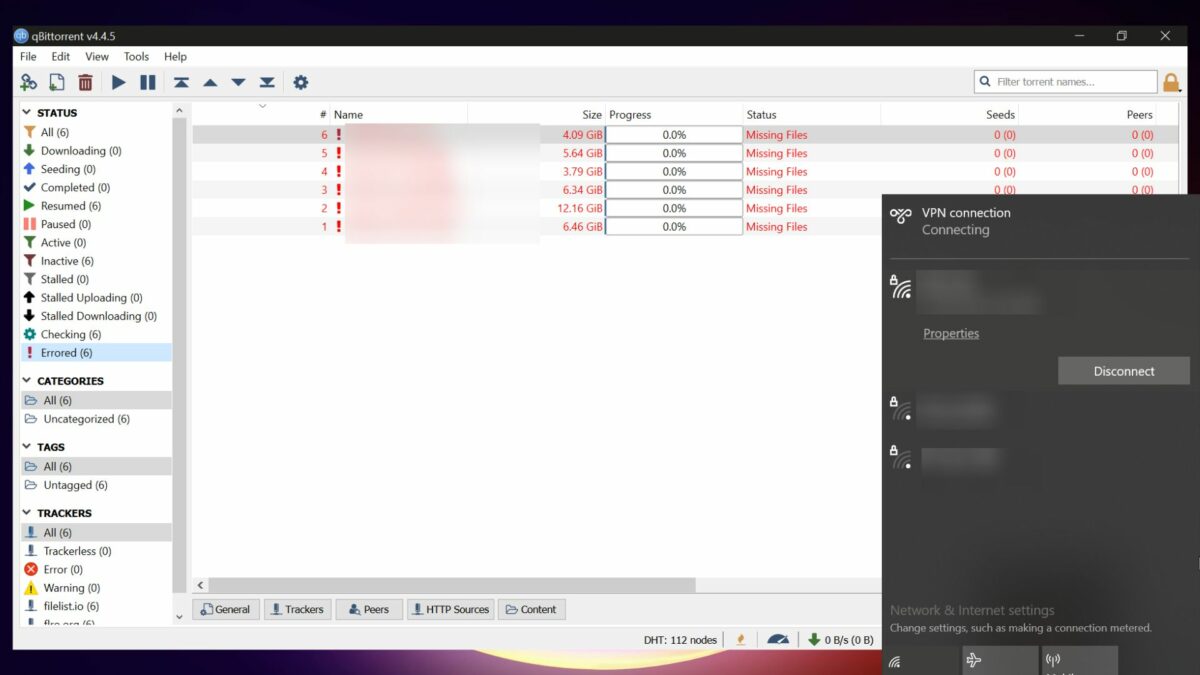
NordVPN provides a user-friendly interface and a detailed guide for its VPN client, making it easy to use even for beginners. The client’s guide offers step-by-step instructions on how to enable the VPN and customize your settings according to your needs.
Strong Firewall and Kill Switch
To ensure maximum security, NordVPN provides a strong firewall and a kill switch feature. The firewall protects your connection from any threats, while the kill switch automatically disconnects you from the internet if the VPN connection drops, keeping your IP address hidden.
Always-On VPN and Split Tunneling
NordVPN offers an always-on VPN feature that automatically connects you to the VPN every time you go online. With split tunneling, you can choose which applications or internet traffic you want to route through the VPN and which to keep outside.
Multiple Device Support
NordVPN supports multiple devices, allowing you to protect your torrent downloads on various platforms, including Windows, Mac, Android, iOS, and more. You can enjoy secure and unrestricted torrenting on all your devices.
No Logs Policy
NordVPN follows a strict no-logs policy, meaning that it does not track, collect, or store any of your personal information. This gives you the peace of mind that your browsing activities remain private and anonymous.
Conclusion
NordVPN offers a comprehensive solution to fix torrents not downloading with VPN. With its strong security features, fast connections, and user-friendly interface, NordVPN ensures that you can safely and efficiently download torrent files without any restrictions or threats. By choosing NordVPN, you can enjoy a worry-free torrenting experience while keeping your personal information and online activities secure.
ExpressVPN
ExpressVPN is a reliable VPN provider that offers fast and secure connections for torrenting. With its wide range of server locations and high-speed performance, ExpressVPN is a popular choice among torrent users.
One of the key features of ExpressVPN is its obfuscated servers, which help to bypass internet restrictions and blockades often imposed by authorities or ISPs. These servers use advanced obfuscation techniques to mask VPN traffic, making it harder to detect and block. This is especially useful for users who need to download or upload copyrighted material.
Moreover, ExpressVPN has a strict no-logging policy, ensuring that your online activities and personal data are not recorded or shared with any third parties. This provides an additional layer of privacy and security, which is essential when torrenting.
ExpressVPN offers several protocols for secure VPN connections, including TCP/IP and UDP. While UDP is faster, TCP/IP is more reliable and provides better defense against network congestion. Users can easily configure their VPN settings to choose the protocol that best suits their needs.
ExpressVPN also provides a kill switch feature, which automatically blocks all internet traffic if the VPN connection drops. This prevents your real IP address from being exposed and helps to maintain your anonymity while torrenting.
In terms of payment options, ExpressVPN accepts various methods, including credit cards, PayPal, and Bitcoin. This allows users to choose the most convenient and secure payment method for their needs.
ExpressVPN offers three different pricing plans, including monthly, 6-month, and yearly plans. While the monthly plan is more expensive, the 6-month and yearly plans offer significant discounts. Users can also take advantage of ExpressVPN’s 45-day money-back guarantee to test the service and ensure it meets their expectations.
In conclusion, ExpressVPN is a fast, reliable, and secure VPN provider that is well-suited for torrenting. Its obfuscated servers, strict no-logging policy, and range of payment options make it a popular choice among torrent users. Whether you need to download, upload, or seed torrents, ExpressVPN offers the performance and features you need to do so safely and anonymously.
Key takeaways:
- ExpressVPN is a reliable and fast VPN provider for torrenting.
- Its obfuscated servers help to bypass restrictions and blockades often imposed by authorities or ISPs.
- ExpressVPN has a strict no-logging policy, ensuring your privacy and security.
- It offers various protocols and a kill switch feature for secure and anonymous torrenting.
- ExpressVPN accepts multiple payment options, including credit cards, PayPal, and Bitcoin.
- It offers three pricing plans, with a 45-day money-back guarantee.
CyberGhost: The Ultimate Solution to Fix Torrents Not Downloading with VPN
If you’re tired of facing issues with downloading torrents using a VPN, CyberGhost could be the answer you’ve been looking for. This user-friendly VPN offers a range of features that guarantee fast and secure torrenting.
One of the key features that set CyberGhost apart is its smart P2P optimized servers. These servers are specifically designed to provide fast and reliable torrenting speeds. So whether you want to download or upload torrents, CyberGhost has got you covered.
Moreover, CyberGhost uses top-notch encryption and offers protection against IP leaks, ensuring your online activities remain anonymous and secure. With CyberGhost, you can enjoy the benefits of torrenting without worrying about your privacy being compromised.
Not only does CyberGhost provide strong security features, but it also offers a vast network of servers. With over 7,000 servers in more than 90 countries, you can easily find a server that suits your needs. Whether you want to maximize speed or bypass geo-restrictions, CyberGhost has a server for every purpose.
Additionally, CyberGhost offers a no-logging policy and a 45-day money-back guarantee, giving you peace of mind that your information is safe and that you can try out the service risk-free.
With CyberGhost, fixing issues with downloading torrents is a breeze. Its easy-to-use interface and efficient tools enable you to disable features that might be limiting your download performance, such as IPv6 or Windows Firewall. Furthermore, CyberGhost has developed a custom BitTorrent client that is optimized for fast and secure downloading.
If you’re still facing issues with downloading torrents using CyberGhost, their customer support team is always ready to help. They can guide you through any troubleshooting steps and resolve any problems you might encounter.
In conclusion, CyberGhost is an excellent VPN choice for anyone looking to fix issues with downloading torrents. With its fast and secure servers, top-notch protection, and user-friendly interface, CyberGhost ensures an enjoyable torrenting experience every time.
So why wait? Give CyberGhost a try and start enjoying hassle-free torrenting today!
Private Internet Access
Private Internet Access (PIA) is a reliable and fast VPN service that allows you to enjoy secure and private access to the internet. With PIA, you can easily fix issues with torrents not downloading by following a few simple steps.
1. Choose the Best VPN Provider
PIA is one of the best VPN providers in the market, offering a user-friendly interface and a wide range of features. With their secure and fast servers, you can enjoy a reliable VPN connection every time you need to download torrents.
2. Check Your Firewall Settings
Before you start downloading torrents with PIA, make sure to check your firewall settings. Sometimes, the firewall may block the torrent client from connecting to the internet. By allowing the torrent client through your firewall, you can ensure a smooth and uninterrupted download process.
3. Enable Port Forwarding
PIA supports port forwarding, which allows other torrent users to connect to you and download files faster. By enabling port forwarding in your PIA settings, you can improve your torrent download speeds and help others in the process.
4. Use Obfuscated Servers
If your ISP is blocking VPN connections or throttling your internet speed, PIA offers obfuscated servers that can bypass these restrictions. By connecting to an obfuscated server, you can enjoy a fast and secure VPN connection for torrent downloading.
5. Choose the Right VPN Protocol
PIA supports several VPN protocols, including OpenVPN and WireGuard. Depending on your needs, you can choose the protocol that works best for you. OpenVPN is the most common protocol and offers a good balance between security and speed, while WireGuard is known for its fast performance.
6. Switch Servers
If you’re experiencing slow download speeds, try switching to a different PIA server. Sometimes, certain servers may be overloaded or have network issues that can affect your torrent downloads. By switching to a different server, you can find one that offers better performance and faster speeds.
7. Avoid Copyrighted Content
Downloading copyrighted content is illegal in many countries. To avoid any legal issues, make sure to download only legal and non-copyrighted torrents. You can check the legality of the content you want to download before starting the process.
8. Consider a Dedicated IP
PIA offers dedicated IP addresses for an additional fee. With a dedicated IP, you can have a more stable and reliable VPN connection. This can be useful if you frequently download torrents or require a consistent IP address for certain online activities.
9. Use a Reliable Torrent Client
The torrent client you use can also affect your download speed and overall performance. Popular torrent clients like uTorrent, BitTorrent, and qBittorrent are compatible with PIA and can help you download torrents more efficiently.
10. Pay with Bitcoin or PayPal
To protect your privacy, PIA accepts payment methods like Bitcoin and PayPal. By using these payment methods, you can ensure that your personal information is kept secure and anonymous.
By following the above tips, you can fix issues with torrents not downloading and enjoy a fast and secure VPN connection with Private Internet Access.
Surfshark: A Comprehensive VPN Solution for Downloading Torrents
If you’re an avid torrent user and want to keep your downloads private and secure, Surfshark can be a great option for you. With its advanced monitoring and protection features, Surfshark ensures that you can download torrents without any restrictions or risks.
Fast and Secure Torrent Downloads with Surfshark
Surfshark provides a fast and reliable network of servers that are dedicated to downloading torrents. This means that you can enjoy high-speed downloads without any interruptions or limitations. Moreover, Surfshark’s private network works seamlessly with popular torrent clients like BitTorrent and uTorrent, making the downloading process hassle-free.
In addition to fast downloads, Surfshark also offers advanced protection features to safeguard your privacy. It has a strict no-logs policy, which means that your online activities are never recorded or monitored. This ensures that you stay anonymous while downloading torrents and protects you from any potential legal issues or penalties.
Enhanced Security and Additional Features
Surfshark goes beyond just protecting your torrent downloads. It offers a comprehensive suite of security features to keep you safe online. With its multi-hop feature, your internet traffic is encrypted and rerouted through multiple servers, providing an extra layer of defense against surveillance and hackers.
Moreover, Surfshark includes a built-in ad blocker and malware protection called CleanWeb. It prevents annoying ads and stops malicious websites from infecting your devices. Additionally, Surfshark’s MACE feature blocks suspicious websites and prevents phishing attempts, ensuring a safe browsing experience.
Flexible Pricing Plans and Reliable Customer Support
Surfshark offers flexible pricing plans that cater to different needs. Whether you want a short-term commitment or a long-term solution, Surfshark has got you covered. You can choose between monthly, yearly, or even a 2-year subscription plan. The longer your subscription, the more you save.
Furthermore, Surfshark provides 24/7 customer support to assist you with any issues or queries that may arise. Their dedicated team is always ready to help you with troubleshooting, setup, or any other concerns you might have. So, you can rest assured knowing that you have reliable technical support throughout your subscription.
Final Takeaways
Surfshark is an excellent VPN service for downloading torrents securely and privately. Its fast servers, advanced security features, and reliable customer support make it a top choice for torrent enthusiasts. Whether you’re a beginner or an experienced user, Surfshark offers a range of solutions to suit your needs.
IPVanish
IPVanish is a popular VPN service that offers a wide range of tools to help fix issues with torrent downloads. It has a user-friendly interface with a drop-down menu that makes it easy to navigate through its features and settings.
If you are experiencing problems with your torrents not downloading, you can try using IPVanish to resolve the issue. Developed specifically for torrenting, IPVanish has implemented certain protocols to avoid issues that may arise from using a VPN while downloading files online.
One of the key features of IPVanish is its ability to identify and avoid IPv6 leaks. This can help you stay protected while downloading torrents, as it keeps your IP address hidden from others. IPVanish also supports multiple platforms, so you can use it on your desktop, laptop, or mobile device.
IPVanish offers different plans to choose from, depending on your personal preferences and needs. Although it has a regular monthly subscription option, the best value is its 12-month plan, which makes it a popular choice for many users.
When using IPVanish for torrenting, it is important to check if the VPN connection is secure. IPVanish protects your connection temporarily with its built-in MACE feature, which helps block ads and malware. This adds an extra layer of protection while downloading torrents.
With IPVanish, you can also benefit from fast downloading speeds and access to a large number of seeders. This can significantly improve your torrenting experience and help you get the latest files more quickly.
In conclusion, if you are facing issues with your torrents not downloading, IPVanish can be a valuable tool to help fix the problem. Its secure protocols, fast downloading speeds, and built-in protection make it a top choice for torrenting. Try IPVanish today and enjoy a seamless and secure torrenting experience.
Вопрос-ответ:
Why can’t I download torrents with a VPN?
There are a few reasons why you may not be able to download torrents with a VPN enabled. One common issue is that your VPN connection may be blocking the port used by your torrent client. You can try changing the port in your torrent client’s settings to see if that resolves the issue. Another possible reason is that your VPN may be blocking or throttling torrent traffic. Some VPN providers have restrictions in place to prevent copyright infringement or to manage network congestion. If this is the case, you may need to switch to a different VPN provider that allows torrenting.
What can I do if my torrent downloads are slow with a VPN?
If your torrent downloads are slow with a VPN, there are a few steps you can take to improve the speed. First, try connecting to a different VPN server location. Sometimes, certain server locations can be overloaded or have slower speeds than others. You can also try using a different VPN protocol, such as OpenVPN, as it may offer faster speeds. Additionally, make sure that your internet connection is not being throttled by your ISP. Some ISPs throttle or limit bandwidth for torrent traffic, which can result in slower download speeds. If all else fails, consider switching to a different VPN provider that offers faster speeds.
Can I use any VPN to download torrents?
While technically you can use any VPN to download torrents, not all VPNs are created equal when it comes to torrenting. Some VPN providers have restrictions in place to prevent copyright infringement or to manage network congestion. They may block or throttle torrent traffic, making it difficult to download torrents. It’s important to choose a VPN provider that explicitly allows torrenting and has fast and reliable speeds for P2P file sharing. Additionally, you should make sure that the VPN provider has strong privacy protections in place to keep your torrenting activities anonymous.
Are there any risks associated with downloading torrents with a VPN?
Downloading torrents with a VPN can help protect your privacy and security, but there are still some risks involved. One potential risk is that some VPN providers may log your internet activity, including your torrenting activities. If these logs are ever subpoenaed or accessed by authorities, your torrenting activities could be exposed. This is why it’s important to choose a VPN provider that has a strict no-logs policy. Another risk is that using a VPN may not completely protect you from legal consequences if you engage in copyright infringement while downloading torrents. While a VPN can hide your IP address, it doesn’t guarantee complete anonymity. Therefore, it’s important to understand and comply with copyright laws in your country when downloading torrents.
Видео:
How To Use Surfshark Tutorial [Complete Setup & How To Installation Guide]
How To Use Surfshark Tutorial [Complete Setup & How To Installation Guide] by VPN Schooling 1 day ago 3 minutes, 18 seconds 1,093 views
How to Download Torrents Safely | Best VPNs For Torrents 2023
How to Download Torrents Safely | Best VPNs For Torrents 2023 by VPN Ninja 2 months ago 5 minutes, 10 seconds 7,664 views
