All You Need to Know About Mozilla VPN: Features, Comparison, and Compatibility
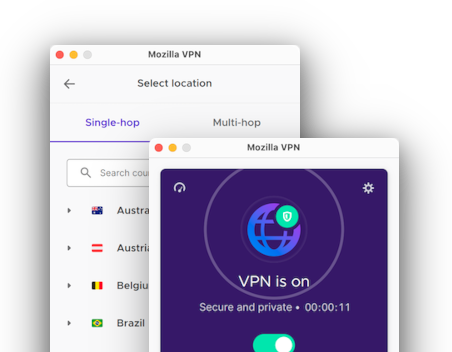
Recently, Mozilla has launched its own VPN service, called Mozilla VPN, which aims to provide users with a safer and more private internet experience. The VPN operates in partnership with Mullvad, a well-respected VPN provider based in Stockholm, Sweden.
Mozilla VPN is available as a standalone desktop application for Windows and macOS, as well as an Android app. It is designed to be easy to use, with a simple and intuitive GUI that allows you to activate the VPN with just one click. If you’re using Firefox, you can also get the VPN as a browser extension, making it even more convenient to use.
One of the standout features of Mozilla VPN is its support for the WireGuard protocol. WireGuard is a new and highly efficient VPN protocol that promises faster speeds and better security than older protocols like OpenVPN. With WireGuard, you can expect faster and more reliable connections, which is great news for those who want to stream content or download large files.
When it comes to pricing, Mozilla VPN is competitively priced compared to other VPN providers. It offers a monthly subscription option, as well as annual plans that offer a significant discount. While Mozilla VPN may not be the cheapest option on the market, it does offer good value for money when you consider the level of privacy and security it provides.
In terms of performance, Mozilla VPN performs well in tests and consistently delivers good speeds. In independent speed tests, it has been found to be one of the fastest VPN providers out there, beating out popular providers like NordVPN and ExpressVPN.
Overall, Mozilla VPN is a solid choice for anyone looking for a reliable and secure VPN service. Whether you’re concerned about privacy, want to bypass geo-restrictions, or simply want to browse the web anonymously, Mozilla VPN has you covered. With its strong encryption, user-friendly interface, and competitive pricing, it’s definitely worth considering if you’re in the market for a VPN.
How to activate ExpressVPN Firefox GUI extension?
If you’re using ExpressVPN and Firefox, you might be wondering how to activate the GUI extension for a more seamless browsing experience. Well, the process is quite simple!
To activate the ExpressVPN Firefox GUI extension, follow these steps:
- First, make sure you have ExpressVPN installed on your device.
- Open the Firefox browser and go to the “Add-ons” section.
- Search for the ExpressVPN extension and click on it.
- Choose the option to “Add to Firefox” and wait for the installation to complete.
- Once the extension is added, you will see the ExpressVPN icon in your Firefox toolbar.
- Click on the icon to open the extension and log in to your ExpressVPN account.
- After logging in, you can choose your desired server location and connect to it with a single click.
- You are now fully connected to ExpressVPN through the Firefox GUI extension.
With the ExpressVPN Firefox GUI extension, you can enjoy a range of features, including secure browsing, anonymous online presence, and access to geo-restricted content. It’s a great addition to your browsing experience, especially if you frequently use ExpressVPN for streaming or other online activities.
If you have any questions or run into any problems while activating the ExpressVPN Firefox GUI extension, you can find help and support on the ExpressVPN forums or contact their customer support team. They are always ready to assist you with any issues you may encounter.
Remember, ExpressVPN is just one of the many VPN providers available, and each offers its own set of features and benefits. So it’s worth exploring different options to find the best-value VPN for your specific needs. Whether you choose ExpressVPN, NordVPN, Mullvad, or any other provider, make sure to read user reviews, compare features, and learn about their support options before making a decision.
How does Mozilla VPN stack up against the competition?
When it comes to VPN providers, there are plenty of options to choose from. Two of the most popular choices are Mozilla VPN and ExpressVPN. Let’s take a closer look at how Mozilla VPN compares to ExpressVPN and other providers.
Privacy and Security
One of the main factors to consider when choosing a VPN is privacy and security. Mozilla VPN is built on the WireGuard protocol, which is known for its strong encryption and secure connection. ExpressVPN, on the other hand, uses OpenVPN and offers additional features like a kill switch and split tunneling.
Network Coverage
Both Mozilla VPN and ExpressVPN have a global network of servers to provide users with a fast and reliable connection. However, ExpressVPN has a larger network with servers in more countries. So if you’re someone who needs to connect to a specific location, ExpressVPN might be the better option.
User-Friendly Interface
Mozilla VPN has a user-friendly interface that makes it easy for anyone to connect to their preferred server. On the other hand, ExpressVPN offers a more feature-rich GUI with additional options like a speed test and a DNS leak test.
Pricing and Value
When it comes to pricing, Mozilla VPN offers a competitive rate of $4.99 per month, making it one of the best-value VPN options out there. ExpressVPN, however, is more expensive at $12.95 per month. So if you’re looking for an affordable option, Mozilla VPN is the better choice.
Additional Features
Both Mozilla VPN and ExpressVPN offer additional features that you might find useful. For example, ExpressVPN has a browser extension that can help you secure your browsing activity. On the other hand, Mozilla VPN offers a split tunneling option, which allows you to choose which apps or services go through the VPN.
Streaming and Torrenting
If you’re someone who enjoys streaming or torrenting, both Mozilla VPN and ExpressVPN can handle the job. Both VPNs support P2P connections and are capable of bypassing restrictions to access content from around the world.
Customer Support
When it comes to customer support, both Mozilla VPN and ExpressVPN provide excellent service. They have helpful support teams and community forums where you can get answers to your questions. However, Mozilla VPN recently introduced live chat support, making it even easier for users to get help when they need it.
Conclusion
In conclusion, Mozilla VPN is a strong contender in the VPN market. It offers solid privacy and security features, a user-friendly interface, and an affordable price. While it may not have as many servers as ExpressVPN or some other providers, it still provides a reliable and fast connection. So if you’re looking for a VPN that works well and won’t break the bank, Mozilla VPN is definitely worth considering.
What does Mozilla VPN offer?
Mozilla VPN offers a secure and private connection for your online activities. With Mozilla VPN, you can browse the internet, stream content, and download files knowing that your data is protected from prying eyes.
Fast and reliable connection
Mozilla VPN utilizes the ExpressVPN network, one of the most highly regarded VPN providers in the industry. This ensures that you have a fast and reliable connection that can keep up with your internet requirements.
Global server coverage
With servers in over 35 countries, including major locations like the United States, Canada, and Amsterdam, Mozilla VPN offers extensive server coverage. This allows you to access geo-restricted content and enjoy a more versatile online experience.
User-friendly interface
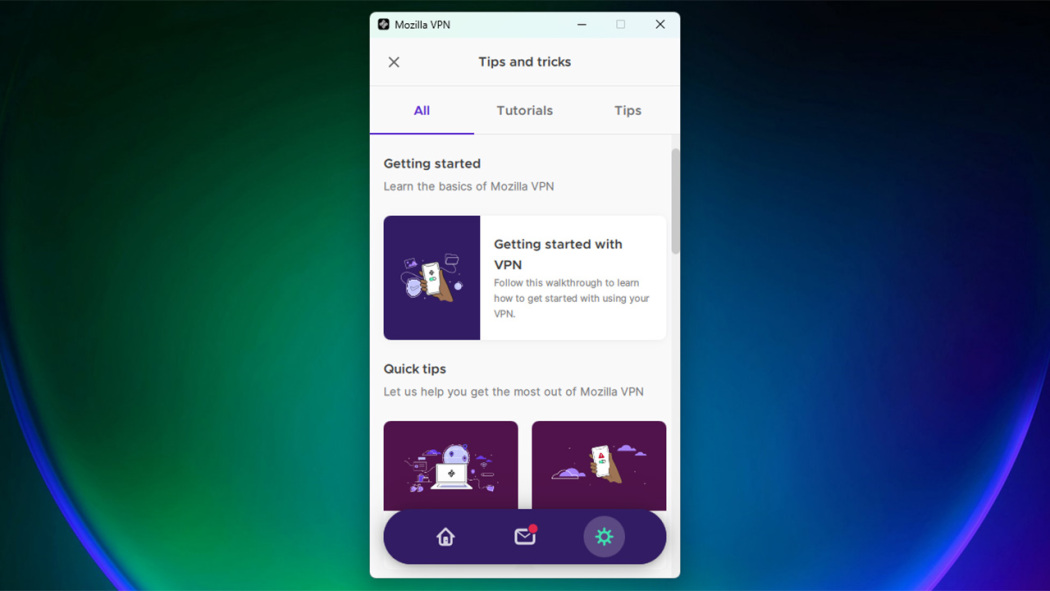
Setting up and using Mozilla VPN is easy thanks to its user-friendly interface. Whether you’re using Windows, Linux, or macOS, the Mozilla VPN client is designed to be intuitive and straightforward.
Expert support
If you run into any problems or have questions about using Mozilla VPN, the support team is there to help. Their customer support is known for being responsive and knowledgeable, ensuring that you get the assistance you need.
Transparent policies
Mozilla VPN is committed to protecting your privacy, and their policies reflect this. They have a strict no-logs policy, meaning they don’t collect or store any information about your online activities. This ensures that your data remains private and secure.
Competitive pricing
Compared to other VPN providers, Mozilla VPN offers competitive pricing. They have a simple and transparent pricing structure, with a monthly subscription plan that gives you unlimited access to their network.
Compatibility
Mozilla VPN is compatible with a wide range of devices and platforms. Whether you’re using Windows, macOS, Linux, or Android, you can easily install and use Mozilla VPN to protect your online activities.
Who can get Mozilla VPN?
If you’re a Firefox user, you may have heard about Mozilla VPN. But what is it and who can get it? Mozilla VPN is a virtual private network service provided by Mozilla, the same company behind the popular Firefox web browser. It is available to users in select countries, including the United States, Canada, the United Kingdom, Germany, France, Spain, Italy, Switzerland, Sweden, Netherlands, Singapore, Malaysia, New Zealand, and Australia.
If you’re living in one of these countries, you can download and install Mozilla VPN on your devices like Windows, macOS, Android, and iOS. Mozilla VPN also supports Linux, but you’ll need to set it up manually.
So, who does Mozilla VPN cater to? Well, it’s for anyone who wants to secure their online activities and protect their privacy. Whether you’re an individual user concerned about online security, a remote worker connecting to sensitive company networks, or a traveler wanting to access geo-blocked content, Mozilla VPN provides a solution.
In terms of pricing, Mozilla VPN offers a subscription-based model that provides the best value for your money. The cost is competitive with other VPN providers in the market. You can choose to pay monthly or opt for an annual plan, which works out to be more affordable in the long run.
When it comes to how Mozilla VPN works, it creates a secure, encrypted tunnel for your internet traffic, ensuring that your data is protected from prying eyes. It also masks your IP address, making it difficult for websites and advertisers to track your online activities. This additional layer of privacy and security is what sets VPNs like Mozilla VPN apart from other options.
NMAI global-speedscsv
NMAI global-speedscsv is a performance measuring tool provided by NMAI (Network Measurement and Analysis Infrastructure) that allows users to test their internet connection speed and latency. It can be used to compare the speed and latency of different internet service providers and locations around the world.
This tool collects data from various test servers located in different countries, including Brazil, Canada, London, and more. Users can select the server location they wish to test against and the test will provide information such as download speed, upload speed, and latency.
One of the unique features of NMAI global-speedscsv is its ability to test VPN connections. Users can activate their VPN and perform the test again to see how it affects their internet speed and latency. This can be useful for those who are using VPN services like Mozilla VPN or NordVPN and want to see the impact on their network performance.
The NMAI global-speedscsv tool works by sending data packets between the user’s device and the test server. It measures the time it takes for the packets to travel back and forth, which indicates the speed and latency of the connection. The tool provides a detailed report with the results of the test, allowing users to analyze the performance of their internet connection.
For those who are experiencing slow internet speeds or latency issues, NMAI global-speedscsv can help identify the problem. By comparing the results against their ISP’s advertised speeds or other locations, users can determine if the issue is with their internet service provider or other factors, such as network congestion.
In addition to testing internet speed and latency, NMAI global-speedscsv also offers a forum where users can ask questions about the tool and discuss their results. It provides a platform for users to share their experiences, seek help from others, and learn more about network performance and optimization.
In conclusion, NMAI global-speedscsv is a valuable tool for testing internet speed and latency. It offers the option to compare different VPN services, like Mozilla VPN and NordVPN, and provides a forum for users to seek support and learn more about network performance. Whether you want to troubleshoot slow internet speeds or simply want to learn more about the performance of your internet connection, NMAI global-speedscsv is a helpful resource.
Linux Mint Forums
Get Help and Share Knowledge on the Linux Mint Forums
When you’re a Linux Mint user, the Linux Mint Forums can be a valuable resource to find solutions to problems, get assistance, and share your knowledge with the community. Whether you’re a beginner or an experienced Linux user, the forums provide a platform for users to connect, ask questions, and find answers.
Wide Range of Topics and Discussions
The Linux Mint Forums cover a broad range of topics, from installation and configuration issues to software recommendations and troubleshooting. You can find posts about specific hardware compatibility, software updates, and general discussions about the Linux Mint operating system.
Experts and Novices Coming Together
One of the unique aspects of the Linux Mint Forums is the way experts and novices come together to help each other. Whether you’re a seasoned Linux user or just starting out, you’ll find people who are willing to lend a hand and share their knowledge. It is a collaborative community where everyone is encouraged to participate and contribute.
Comparison of VPN Providers
If you’re interested in VPN services, the Linux Mint Forums also provide discussions and comparisons of different VPN providers. They give a detailed analysis of VPN options such as NordVPN, Mullvad, and Mozilla VPN. You can find detailed reviews, performance comparisons, and answers to questions about the features and reliability of these VPN services.
Real-World Insights and Recommendations
For those looking to get a better understanding of how VPNs work and what they offer, the Linux Mint Forums are an excellent resource. Users share their own experiences and provide insights into the performance, speed, and security offered by various VPN providers. For instance, you can find information about how Mullvad’s WireGuard VPN protocol performs against other providers, or the best-value VPN for streaming.
Connect with the Linux Mint Community
The Linux Mint Forums are not just a place to find help; they are also a platform to connect with other Linux Mint users from around the world. You can join discussions, share your opinions, and interact with like-minded individuals who are passionate about Linux and open-source software.
Stay up to Date with the Latest News
Aside from seeking help and sharing knowledge, the Linux Mint Forums also provide up-to-date news and announcements related to the Linux Mint operating system. You can find information about new releases, updates, security notifications, and other important news that may affect your Linux Mint experience.
Join the Linux Mint Forums Today
If you’re a Linux Mint user and haven’t joined the Linux Mint Forums yet, it’s time to become a part of this vibrant community. Whether you have a problem to solve or want to contribute your expertise, the forums are a welcoming place where Linux Mint users come together to support each other and make the most out of their Linux Mint experience.
Is Mozilla VPN a real VPN?
Yes, Mozilla VPN is a real VPN. It is not just an extension or add-on, but a fully functional VPN service provided by Mozilla. It offers features like secure browsing, data encryption, and IP masking to protect your online privacy and security.
When it comes to how Mozilla VPN works, it creates a secure connection between your device and its network of servers located in different parts of the world. This helps to conceal your real IP address and encrypt your internet traffic, making it difficult for anyone to track your online activities or access your personal information.
Unlike some VPNs, Mozilla VPN has a user-friendly GUI (Graphical User Interface) that makes it easy to connect to the VPN server of your choice. It also offers low latency, which means your internet speed won’t be significantly slowed down when using the VPN.
Mozilla VPN is available for Windows, Mac, Android, and iOS devices, but it doesn’t currently offer a dedicated app for Linux. However, Linux users can still use Mozilla VPN through manual configuration.
One of the advantages of using Mozilla VPN is that it is backed by Mozilla, the maker of the popular web browser Firefox. Mozilla has a strong commitment to privacy and security, and their VPN service is designed with the same principles in mind.
When it comes to pricing, Mozilla VPN is competitively priced compared to other VPNs in the market. It offers a monthly subscription option and recently introduced a discounted annual plan. The service is available in select countries, including the United States, Canada, the United Kingdom, Singapore, Malaysia, and Brazil, with plans to expand to more countries in the future.
In terms of performance, Mozilla VPN is well-rated by users and independent tests. It has been found to provide fast and reliable connections for browsing, streaming, and other online activities. In independent speed tests conducted by NMAI, Mozilla VPN ranked among the top VPN providers in terms of global speeds.csv.
For support, Mozilla VPN has a helpful support center where users can find answers to common questions and troubleshooting guides. Additionally, users can also seek help from the Mozilla community through their forums and support channels.
When it comes to comparisons, Mozilla VPN offers a different set of features compared to other VPN providers. While some VPNs may offer more server locations or advanced features, Mozilla VPN focuses on providing a reliable and user-friendly VPN solution with strong privacy and security measures. It may not be the best option for users looking for specific features not offered by Mozilla VPN, but it is a solid choice for those who value simplicity and ease of use.
Вопрос-ответ:
How does Mozilla VPN stack up against the competition?
In terms of privacy and security features, Mozilla VPN is quite competitive. It has a strict no-logs policy and uses industry-leading encryption protocols. However, compared to some other VPNs, its server network is relatively small.
Is Mozilla VPN a real VPN?
Yes, Mozilla VPN is a real VPN service. It encrypts your internet connection and hides your IP address, providing you with online privacy and security.
What does Mozilla VPN offer?
Mozilla VPN offers a secure and private internet connection. It encrypts your online data, hides your IP address, and allows you to browse the web anonymously. It also features a built-in kill switch and supports multiple devices.
Who can get Mozilla VPN?
Mozilla VPN is available to users in the United States, Canada, the United Kingdom, Singapore, New Zealand, and Malaysia. However, Mozilla plans to expand its availability to more countries in the future.
How do I activate ExpressVPN Firefox GUI extension?
To activate the ExpressVPN Firefox GUI extension, you need to first install the extension from the Mozilla Add-ons website. Once installed, open the Firefox browser, click on the menu icon, go to Add-ons, and find the ExpressVPN extension. Click on Activate and follow the on-screen instructions to set up and use the extension.
Is there a way to activate ExpressVPN Firefox GUI extension without using a menu?
Yes, there is an alternative way to activate the ExpressVPN Firefox GUI extension. You can use keyboard shortcuts to open the Add-ons menu directly. Press Ctrl+Shift+A (Windows/Linux) or Command+Shift+A (Mac) to open the Add-ons Manager. From there, find the ExpressVPN extension and click on Activate.
Видео:
Why I no longer use a VPN (most of the time) and nor should you
Why I no longer use a VPN (most of the time) and nor should you by Sun Knudsen 1 month ago 11 minutes, 25 seconds 542,582 views
Mozilla VPN Review – Should you trust this US based VPN service?
Mozilla VPN Review – Should you trust this US based VPN service? by Anthony James 2 years ago 10 minutes, 8 seconds 1,197 views
How to Choose the Best VPN for You!
How to Choose the Best VPN for You! by Consumer Research Studios 1 month ago 7 minutes, 33 seconds 1,850 views
