
Step-by-Step Guide on Creating an ExpressVPN Account and Understanding if ExpressVPN Charges After the Free Trial
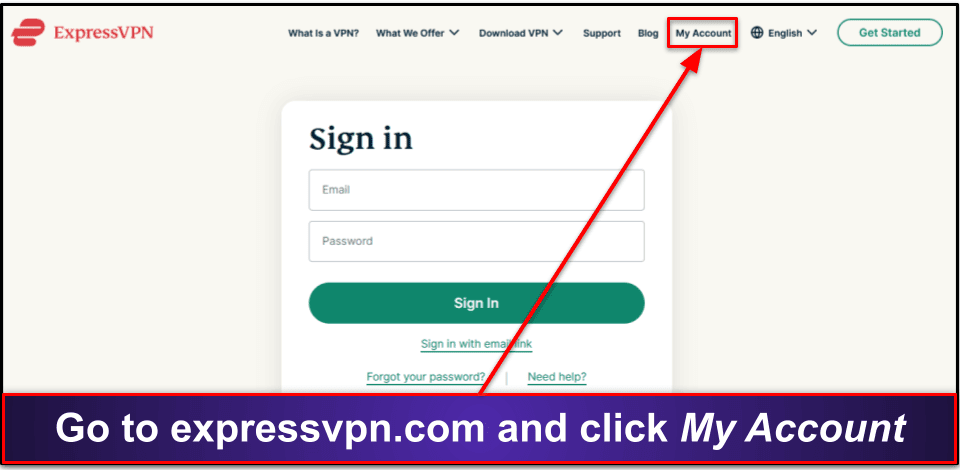
If you’re looking for a reliable and secure VPN service, ExpressVPN is a top choice. In this article, we’ll show you how to create an ExpressVPN account and whether or not you’ll be charged after the free trial period. ExpressVPN offers a 30-day risk-free trial, so you can test out their service and see if it meets your needs.
To get started, go to the ExpressVPN website and select the “Get ExpressVPN” button. You’ll then be prompted to choose from a variety of subscription plans. Whether you’re using Windows, Mac, Android, or iOS, ExpressVPN has you covered with easy-to-use apps for all devices.
Once you’ve selected your desired plan, you’ll need to provide some basic information, such as your email address and a password. You can also choose to pay with a credit card or through alternative payment methods. ExpressVPN values your privacy and does not require any personal details that aren’t necessary for account activation.
After creating your account, you can download and install the ExpressVPN app on your device. Once installed, simply log in with your account credentials, and you’re all set. ExpressVPN offers a user-friendly interface with a wide range of settings and options. You can choose your preferred protocol, such as Lightway or OpenVPN, and easily toggle features like split tunneling and a kill switch.
When it comes to performance, ExpressVPN is known for its fast and reliable connections. With over 3,000 servers in 160 locations across 94 countries, you can enjoy a seamless browsing experience without any speed or performance issues. ExpressVPN also offers unlimited bandwidth, so you can stream, game, and torrent without any restrictions.
If you plan on torrenting, ExpressVPN has got you covered. They offer optimized servers for torrenting, ensuring fast and secure downloads. Additionally, ExpressVPN provides excellent security features, including AES-256 encryption, DNS leak protection, and protection against DDoS attacks. Your IP address and online activities will remain hidden and anonymous.
ExpressVPN also offers 24/7 customer support to help you with any issues or questions you may have. Their support team is knowledgeable and responsive, and they have a helpful support website with detailed guides and troubleshooting tips. You can reach out to them via live chat or email, and they’ll be happy to assist you.
If you decide that ExpressVPN isn’t the right fit for you, cancelling is easy. ExpressVPN offers a 30-day money-back guarantee, so if you’re not satisfied, you can get your money back. Simply contact their customer support, and they’ll issue a refund without any hassle. ExpressVPN also understands that sometimes things don’t work out, so they offer a 100% risk-free guarantee for their users.
How to Create an ExpressVPN Account
If you want to create an ExpressVPN account, here are the steps to get you started:
Step 1: Visit the ExpressVPN website
To begin, visit the ExpressVPN website by entering the address in your browser’s search bar or by using an alternative method like typing “ExpressVPN” into a search engine.
Step 2: Subscribe to a plan
Once on the ExpressVPN website, browse through the available plans and choose the one that best suits your needs. ExpressVPN offers various plans, including monthly, 6-month, and annual subscriptions. Selecting a longer plan may help you save money in the long run.
Step 3: Fill in your details
After selecting a plan, you will need to provide your email address and create a password. Make sure to use secure credentials to protect your account.
Step 4: Choose a payment method
Next, you will need to select a payment method. ExpressVPN accepts various options such as credit card, PayPal, and other alternative methods. Enter the required details to activate your account.
Step 5: Download and install
Once your account is created, you can download the ExpressVPN app for your chosen device, whether it’s Windows, macOS, Linux, or routers. The process is easy and straightforward, and you can find detailed instructions on the ExpressVPN website.
Step 6: Log in and enjoy
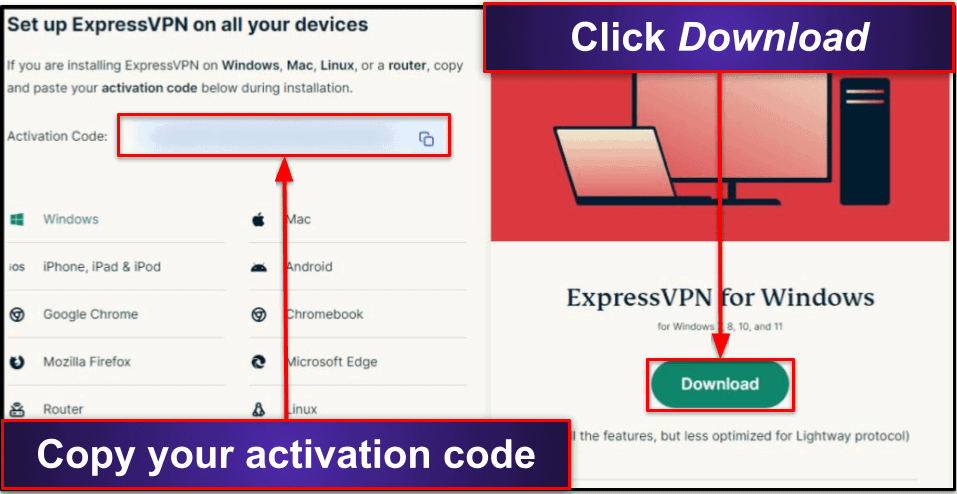
After the installation, launch the app and log in with your ExpressVPN account credentials. You are now ready to enjoy a secure and private internet connection. ExpressVPN provides great performance and is frequently cited as one of the best VPN services you can use.
Creating an ExpressVPN account is a quick and easy process. Once you have an active subscription, you can use ExpressVPN on multiple devices, such as your computer, smartphone, gaming consoles (such as PlayStation), and more. ExpressVPN also offers a 30-day money-back guarantee, so if you’re not satisfied, you can cancel your subscription and get a refund within that timeframe.
Steps to Sign Up for an ExpressVPN Account
To create an ExpressVPN account, follow these simple steps:
- Visit the ExpressVPN website: Open any web browser on your device, such as Windows or Linux, and go to the official ExpressVPN website.
- Choose your subscription plan: ExpressVPN offers different subscription options to cater to your privacy and security needs. Select the plan that best suits your requirements.
- Provide your email address: Enter your email address in the required field. This email will be used to send you the account details and installation instructions.
- Complete the payment: Proceed to make the payment for your chosen subscription. ExpressVPN offers secure payment options, ensuring your data is never at risk.
- Install the ExpressVPN apps: Once the payment is confirmed, you will be directed to a page where you can download the ExpressVPN app for your device. Install the app by following the provided instructions.
- Enjoy the risk-free trial: ExpressVPN offers a 30-day money-back guarantee, allowing you to try the service and request a refund if it doesn’t meet your expectations.
- Connect to ExpressVPN servers: Launch the ExpressVPN app, sign in with the account details provided, and choose a server location. ExpressVPN has servers in various countries, ensuring a fast and secure connection.
- Enjoy secure and private browsing: Once connected, your internet traffic will be encrypted, protecting your data and ensuring your privacy while browsing websites, streaming, or playing online.
By following these steps, you can easily sign up for an ExpressVPN account and start enjoying a secure and private online experience without compromising your data or risking your privacy.
Creating a Secure ExpressVPN Account
When it comes to online privacy and security, a temporary solution is not enough. With ExpressVPN, you can create a secure account that offers a month of protection and peace of mind.
One of the great advantages of ExpressVPN is its fast and reliable service. You can customize your settings and choose the best encryption protocol for your needs. Whether you want to browse the web, stream movies, or engage in torrenting activities, ExpressVPN has got you covered.
Step-by-Step Guide:
- First, go to the ExpressVPN website and select the subscription plan that suits you best, whether it’s a monthly or a yearly option.
- In the next step, you will need to provide your payment information. Don’t worry, ExpressVPN offers a 30-day money-back guarantee, so you can cancel within that period without any questions asked.
- After completing the subscription process, you will receive your account details via email. You can then download the ExpressVPN apps for your preferred devices, such as Android, iOS, Windows, Mac, or even set it up on your router.
- Once you’ve installed the app, launch it and enter your login information. This will activate your account and establish secure connections across all your devices.
ExpressVPN uses the latest encryption technologies to ensure your data is protected from prying eyes. With its global network of servers, you’ll have access to fast and reliable connections no matter where you are. ExpressVPN also supports various protocols, including the new Lightway protocol, which provides the fastest connection speeds.
If you ever need support or have any questions, ExpressVPN offers 24/7 customer support. You can reach out to their team via live chat or email. They are always ready to assist you and provide the help you need.
So, why wait? Create your secure ExpressVPN account today and enjoy a worry-free online experience!
Importance of Creating an ExpressVPN Account
Creating an ExpressVPN account is crucial if you want to take advantage of all the benefits that the service offers. Whether you want to ensure your security and privacy while browsing the internet or access geo-restricted content, having a registered account will enhance your overall experience.
One of the primary advantages of creating an ExpressVPN account is the ability to download and install their apps on various devices. With apps available for Windows, Mac, iOS, Android, and even routers, you can enjoy the fastest and most secure internet connection across all your devices.
By signing up for an account, you also get access to ExpressVPN’s extensive server network located in 94 countries around the world. This allows you to bypass censorships and restrictions, giving you the freedom to stream your favorite content and play online games without any limitations.
Furthermore, registering an account ensures that you receive automatic updates and the latest features from ExpressVPN. You don’t have to worry about manually downloading new versions; the process is seamless and hassle-free.
If you’re worried about the money, ExpressVPN offers a 7-day risk-free trial where you can test out their services without any charges. If you’re not satisfied, you can request a refund and get your money back.
Creating an account also guarantees top-notch customer support. ExpressVPN offers 24/7 live chat support, so if you have any questions or face any issues, their team will be available to assist you. This level of support ensures a better overall experience with the service.
In conclusion, whether you’re a frequent traveler, a streaming enthusiast, or simply someone who values security and privacy, creating an ExpressVPN account is a wise choice. With its fast and reliable connection, supported devices, and excellent customer service, you can enjoy a worry-free browsing and streaming experience without compromising on speed or security.
Does ExpressVPN Charge After Its Free Trial?
Many people wonder if ExpressVPN charges after the free trial period. The answer is yes, ExpressVPN does charge after its free trial. The free trial is designed to give users a chance to test out the service before committing to a paid plan. Once the trial period is over, ExpressVPN will automatically charge the user’s payment method for the chosen plan.
It’s important to note that ExpressVPN offers a 30-day money-back guarantee, so if you’re not satisfied with the service within the first month, you can cancel and get your money back. To cancel, simply contact their support team and they will guide you through the process.
ExpressVPN offers various plans and subscriptions to cater to different needs. They have plans ranging from 1 month to 12 months, giving users the flexibility to select the best option for them. ExpressVPN also offers a 49% discount for their 12-month plan, so if you’re looking to save some money, that’s the plan to go for.
When you subscribe to ExpressVPN, you get access to their vast network of servers located all over the world. This allows you to take advantage of their fast and secure connections, ensuring that your data and traffic are protected. ExpressVPN also has a strict no-logs policy, meaning they do not keep any logs of your online activities.
ExpressVPN works on multiple platforms, including Windows, Mac, iOS, Android, Linux, and even routers. This means you can use ExpressVPN on all of your devices and protect your internet connection wherever you go. ExpressVPN even offers an activation code for Apple devices, making it easy to set up on iOS devices.
Understanding ExpressVPN’s Billing Policies
ExpressVPN’s Billing Policies:
When you create an ExpressVPN account, you should be aware of the company’s billing policies to avoid any unexpected charges. ExpressVPN offers a risk-free trial period during which you can try out their service without being charged. However, after the free trial expires, ExpressVPN will automatically charge you for the chosen plan.
Cancellation and Renewal:
If you do not wish to continue using ExpressVPN after the free trial, there are a few methods to cancel your subscription. You can cancel it through the website or by contacting customer support. It’s important to note that the renewal is automatic, so unless you cancel, your subscription will be renewed at the end of each billing period.
Alternative VPNs:
If you’re looking for an alternative to ExpressVPN, there are several other VPN services available. CyberGhost, for example, is a popular option that offers similar features and security. It’s always a good idea to compare different VPN providers to find the one that best suits your needs.
Temporary Account Suspension:
If you’re trying to temporarily suspend your ExpressVPN account without completely canceling it, there is an option to do so. This can be useful if you want to take a break from using the service but plan to use it again in the future.
ExpressVPN’s Fastest Servers:
If you’re looking for the fastest possible VPN connection, ExpressVPN is known for having some of the most reliable and high-speed servers. This makes it a great choice for activities such as streaming, gaming, or downloading large files.
Supported Devices:
ExpressVPN is compatible with a wide range of devices and operating systems. Whether you’re using Windows, Mac, iOS, Android, or even routers, ExpressVPN has you covered. You can use the service on up to five devices simultaneously, ensuring your entire network is protected.
24/7 Customer Support:
If you have any questions or need assistance with setting up or using ExpressVPN, their customer support is available around the clock. You can reach out to them through live chat or via email, and they will be happy to provide you with the help and support you need.
Final Thoughts:
Understanding ExpressVPN’s billing policies is essential to ensure that you are aware of the charges and can make informed decisions about your subscription. Whether you choose to continue with ExpressVPN or explore alternative options, keeping these details in mind will help you stay secure and protected while browsing the internet.
Pricing Plans and Payment Options of ExpressVPN
ExpressVPN offers three pricing plans to cater to different needs and preferences. The plans are:
- 1-Month Plan: This plan costs $12.95 per month and is ideal for those who need a VPN for a shorter period of time.
- 6-Month Plan: Priced at $59.95 for 6 months, this plan offers a discounted rate and is suitable for users who require a VPN for a longer duration.
- 12-Month Plan: With a one-time payment of $99.95, this plan provides the best value for money as it offers the VPN service for a whole year.
When it comes to payment options, ExpressVPN offers a variety of methods to ensure convenience for their customers. Some of the available payment options include:
- Credit Cards: ExpressVPN accepts major credit cards like Visa, Mastercard, American Express, and Discover.
- PayPal: Users can also choose the alternative payment option of PayPal for a secure and hassle-free transaction.
- Bitcoin: Those who prefer to maintain their privacy can make payments using Bitcoin, a decentralized cryptocurrency.
ExpressVPN does not store any information that can be linked back to user activities, so customers can enjoy a full VPN experience without any concerns about privacy or security.
ExpressVPN’s Policy on Free Trials
ExpressVPN understands the importance of trying out their service before committing to a paid subscription. That’s why they offer a 7-day free trial to new users. During this trial period, you can access all of ExpressVPN’s features and experience the fastest and most secure connections.
Unlike some other VPN providers, ExpressVPN doesn’t charge you after the free trial ends without your consent. You have the freedom to decide whether or not you want to continue using the service. If you choose not to continue, simply cancel your subscription before the trial period ends, and you won’t be charged anything.
To create an ExpressVPN account and start your free trial, you need to provide some basic information, including your email address and a password. Once your account is created, you can download the ExpressVPN app on your preferred device, such as Windows, Mac, iOS, Android, or even your PlayStation or Apple TV.
ExpressVPN offers a range of server locations in countries around the world. This allows you to tunnel your internet connection through a server located in a different country, providing you with enhanced privacy and security. With ExpressVPN, you can go online without worrying about your personal information being compromised.
During the free trial period, you can also enjoy unlimited bandwidth and stream your favorite online content without any restrictions. ExpressVPN’s fast and stable connections ensure that you never experience any buffering or slowdowns, even when streaming in HD or 4K.
If you decide to continue using ExpressVPN after the free trial, you have the option to choose from different paid plans, ranging from monthly to annual subscriptions. ExpressVPN frequently offers special deals and discounts, which you can take advantage of to get even more value for your money.
ExpressVPN also provides a risk-free 30-day money-back guarantee for all paid plans. If you’re not completely satisfied with your experience, you can request a refund within 30 days of your purchase, no questions asked.
How do I cancel my ExpressVPN free trial?
If you decide that ExpressVPN is not the right fit for you during the free trial period, canceling your subscription is a straightforward process. Here are the steps to cancel your ExpressVPN free trial:
- Step 1: Go to the ExpressVPN website and log in to your account using the email and password you provided during the sign-up process.
- Step 2: Once logged in, navigate to the “Account” section and click on “Manage Subscription.”
- Step 3: Under the “Subscription” tab, you will find the option to cancel your subscription. Click on the “Cancel Subscription” button.
- Step 4: ExpressVPN may ask for feedback on why you are canceling. You can choose to provide feedback or skip this step.
- Step 5: After confirming the cancellation, your ExpressVPN free trial will be canceled, and you will not be charged.
It is important to note that the cancellation process must be completed before the end of the free trial period to avoid being charged for a full month’s subscription. If you cancel after the trial period, you may still be charged for the next billing cycle.
If you have any trouble canceling your ExpressVPN free trial or need further assistance, you can contact the ExpressVPN support team for help. They are available 24/7 and can assist you with any issues or questions you may have.
ExpressVPN offers a 30-day money-back guarantee, which means you can enjoy a risk-free trial and cancel within the first 30 days to get a full refund. This gives you peace of mind and reassurance that if ExpressVPN doesn’t meet your needs, you are not obligated to continue the subscription.
ExpressVPN is renowned for its high-speed servers and robust security features. It has a vast network of over 3,000 servers in 160 locations around the world, ensuring that you have fast and reliable connections wherever you are. ExpressVPN also supports various devices and platforms, including Windows, Mac, Android, iOS, routers, and even Linux. It is a popular choice for torrenting, as it provides excellent security and privacy protection.
In conclusion, if you decide to cancel your ExpressVPN free trial, follow the simple steps outlined above, and make sure to do so before the trial period ends to avoid being charged. ExpressVPN offers a top-rated product with excellent customer support and a risk-free trial, making it a reliable option for securing your online activities and accessing content worldwide.
Cancelling Your ExpressVPN Free Trial
If you’ve tried out ExpressVPN’s free trial and have decided that it’s not the right fit for you, canceling your subscription is quick and easy. Here’s how to do it:
Step 1: Sign in and select your account
First, log into your ExpressVPN account using your registered email and password. Once you’re logged in, select your account from the top-right corner of the page.
Step 2: Canceling your free trial
To cancel your ExpressVPN free trial, simply click on the “Cancel Subscription” button. This will bring up a confirmation prompt, where you’ll need to confirm that you want to cancel your trial. Once confirmed, your trial will be canceled, and you will no longer be billed for the service after the trial period ends.
Step 3: Alternative options
If you still want to enjoy the benefits of a VPN service but ExpressVPN isn’t meeting your needs, there are other options available. CyberGhost is a popular alternative, offering similar features and security. Additionally, you may consider using open-source VPNs like OpenVPN or WireGuard, which provide a great level of privacy and security.
Step 4: Contacting customer support
If you have any issues or questions regarding canceling your ExpressVPN free trial, it is recommended to reach out to their customer support team. You can contact them through the live chat support available on their website, or by logging into your account and submitting a support ticket. They usually respond within 24 hours and are always ready to assist you with any questions or concerns you may have.
In conclusion, canceling your ExpressVPN free trial is a straightforward process that can be done with just a few clicks. Whether you decide to stick with ExpressVPN or explore other VPN options, it’s essential to find a VPN service that meets your specific needs and provides the security and privacy you require for your online connections.
ExpressVPN’s Refund Policy for Free Trials
When it comes to the refund policy for free trials of ExpressVPN, there are a few important details to keep in mind. ExpressVPN offers a 30-day money-back guarantee, which means that if you aren’t satisfied with the service, you can request a refund within 30 days of signing up for the free trial.
To make use of the refund policy, you will need to contact ExpressVPN’s support team and provide them with the details of your account. This includes your email addresses and any other relevant information they may require.
ExpressVPN prides itself on being one of the fastest VPN services available, with back speeds that can provide a seamless experience for gaming, torrenting, and general web browsing. However, if you find that the service doesn’t meet your expectations or doesn’t work for your specific needs, you should definitely take advantage of the refund policy.
It’s important to note that you should only request a refund if you have genuinely tried the service and are not satisfied with it. ExpressVPN’s refund policy is not intended to be a way to get free access to the service. It is meant to provide peace of mind for new customers who want to try the service risk-free.
If you’re having trouble with installation or any other aspect of using ExpressVPN, their support team is there to help. You can visit their website and access their support page for a guide on how to install and use ExpressVPN on your device.
ExpressVPN works on various operating systems, including Windows, macOS, iOS, Android, Linux, and more. You can also install ExpressVPN on your router for automatic protection for all devices connected to your network.
In conclusion, if you’re looking for a fast and reliable VPN service, ExpressVPN is a great choice. With their 30-day money-back guarantee, you can try the service risk-free and see if it meets your needs. Should you decide that it’s not the right fit for you, simply contact their support team and request a refund within 30 days of your initial subscription.
ExpressVPN Free Trial Cancellation Process
When you subscribe to ExpressVPN, you have the option to take advantage of their free trial. However, if you decide that this service is not the best fit for you, you may need to cancel your subscription. Fortunately, ExpressVPN provides a hassle-free cancellation process.
To cancel your ExpressVPN free trial, you need to follow these steps:
- First, go to the ExpressVPN website and log into your account using the credentials you used to create it.
- Once you’re logged in, navigate to the “Account” page and select the “Subscriptions” tab.
- On the “Subscriptions” page, locate the subscription you wish to cancel and click on the “Cancel Subscription” link next to it.
- A cancellation window will pop up with information about what will happen when you cancel. If you’re sure you want to proceed, click on the “Confirm Cancellation” button.
- After confirming the cancellation, ExpressVPN will send you an email notification confirming the cancellation and any refund details, if applicable.
It’s important to note that ExpressVPN offers a 30-day money-back guarantee for their paid subscriptions, but this refund policy does not apply to the free trial. So, if you’re within the 30-day period of your paid subscription, you may be able to claim a refund, but for the free trial, refunds are not available.
If you encounter any issues during the cancellation process or have any questions, you can contact ExpressVPN support for assistance. They provide various contact options, including email, live chat, and a support ticket system.
In conclusion, canceling your ExpressVPN free trial is a simple process that you can do directly from your account page. Just follow the steps outlined above, and you’ll be able to unsubscribe from the service within minutes.
Steps to take if you want to keep using ExpressVPN after your free trial
If you have enjoyed the benefits of ExpressVPN during the free trial period and want to continue using their service, here are the steps you can take:
1. Create an ExpressVPN account
To get started, you need to create an account with ExpressVPN. Visit their website and select the “Get ExpressVPN” button to start the account creation process.
2. Select a subscription plan
ExpressVPN offers different subscription plans for its users. You can choose a monthly, semi-annual, or annual plan depending on your needs and budget. Select the plan that suits you best and proceed with the payment.
3. Install the ExpressVPN app
Once you have subscribed to ExpressVPN, you can proceed with the installation of their app. ExpressVPN supports various platforms such as Windows, Mac, iOS, Android, Linux, and more. Install the app on the device you want to use ExpressVPN on.
4. Enter your login credentials
Launch the ExpressVPN app and enter the login credentials you used to create your account. This will authenticate your account and give you access to the VPN service.
5. Enjoy ExpressVPN’s features
Once you are logged in to the ExpressVPN app, you can start taking advantage of its features. ExpressVPN offers high-performance servers in various locations around the world, allowing you to enjoy faster and more secure internet browsing, streaming, gaming, and more.
6. Renew your subscription
ExpressVPN offers a hassle-free auto-renewal process. If you don’t want any interruptions in your service, make sure to keep your payment method up to date so that your subscription can be automatically renewed.
In conclusion, after your free trial with ExpressVPN, you can easily create an account, select a subscription plan, install the app, and enjoy all the benefits of ExpressVPN’s world-class service. With their high-performance servers and top-notch security features, you’ll be able to browse the internet with confidence and enjoy a faster and more secure online experience. Don’t forget to provide feedback and share your experience with ExpressVPN’s customer support team to help them improve their product.
Upgrading from ExpressVPN’s Free Trial to a Paid Subscription
If you’ve been enjoying the features and benefits of ExpressVPN’s free trial, you may be considering upgrading to a paid subscription. By doing so, you can unlock even more capabilities and enjoy a more comprehensive internet experience. In this guide, we’ll walk you through the process of upgrading your ExpressVPN account and answer some common questions related to the payment and renewal procedures.
1. How to Upgrade
To upgrade from the free trial to a paid subscription, you’ll need to create an account and choose one of ExpressVPN’s available plans. First, visit the ExpressVPN website and click on the “Get ExpressVPN” button. Then, select a plan that best suits your needs and click “Continue to Payment.” Enter your email address and select a payment method, such as credit card or PayPal. Follow the prompts to complete the payment.
2. Payment Options
ExpressVPN offers a variety of payment options to cater to different preferences. You can choose to pay with a credit card, PayPal, or even cryptocurrencies like Bitcoin. The available payment methods may vary depending on your location. ExpressVPN ensures that all payments are secure and your personal information is kept confidential.
3. Renewal Process
When your subscription period is about to end, ExpressVPN will automatically renew your account using the same payment method. If you want to cancel the renewal, you can easily do so by going to your account settings and turning off the auto-renewal option. Additionally, if you have any issues or questions regarding the renewal process, ExpressVPN provides excellent customer support through live chat, email, or a support ticket system.
4. Money-Back Guarantee
ExpressVPN offers a 30-day money-back guarantee, which allows you to try out the full paid version risk-free. If you’re not satisfied with the service within the first 30 days, you can request a refund. ExpressVPN prides itself on its no-logs policy, which means that your online activities and personal data are never recorded or stored. This commitment to privacy and security ensures a great user experience.
5. Benefits of Upgrading
- Fast and Secure Connections: Upgrading to a paid subscription gives you access to ExpressVPN’s high-speed servers located all over the world. This allows for faster and more reliable internet connections.
- Advanced Features: With a paid subscription, you can take advantage of advanced features such as split tunneling, which allows you to choose which apps or websites use the VPN tunnel.
- Alternative VPNs: By upgrading, you gain the ability to switch between different VPN protocols and servers, ensuring optimal performance for your specific needs.
- 24/7 Customer Support: Paid subscribers receive priority customer support from ExpressVPN’s knowledgeable team, available 24/7 to assist with any technical issues or questions you may have.
Upgrading from ExpressVPN’s free trial to a paid subscription offers a range of benefits that can enhance your online experience. Whether you’re using the VPN for internet browsing, gaming, or streaming, investing in a paid subscription will provide you with the necessary tools and support to enjoy a fast, secure, and unrestricted internet connection.
Features and Benefits of upgrading to a Paid ExpressVPN Subscription
If you are considering upgrading to a paid ExpressVPN subscription, there are several features and benefits that you can take advantage of:
- Security: With a paid subscription, you get access to ExpressVPN’s advanced security features. This includes their no-logs policy that ensures your online activities are not stored or monitored. Additionally, ExpressVPN uses high-level encryption to protect your data and keep your information secure.
- Faster speeds: Upgrading to a paid plan allows you to enjoy faster speeds compared to the free trial. This is especially useful for activities like streaming, gaming, or torrenting, where a faster connection is essential.
- Access to more servers: With a paid plan, you have access to ExpressVPN’s entire network of servers. This means you can easily connect to servers in different locations across the globe, giving you more options and flexibility.
- Support and assistance: Paid subscribers receive priority support from ExpressVPN’s customer service team. You can contact them via email, live chat, or phone for any questions or issues you may have.
- Additional device connections: ExpressVPN’s free trial allows you to connect only up to three devices simultaneously. With a paid subscription, you can connect up to 6 or even 7 devices at the same time, depending on the plan you choose.
- Uninterrupted service: By going paid, you won’t have to worry about your subscription expiring after the 7-day trial period. This ensures that your VPN service remains active and accessible whenever you need it.
- Flexibility and customization: Paid subscribers have access to advanced settings and features, allowing them to customize their VPN experience. You can chose protocols, activate a kill switch, or forward specific apps or traffic through the VPN.
- Money-back guarantee: ExpressVPN offers a hassle-free 30-day refund policy for all their paid plans. If you’re not satisfied within the first 30 days, you can get your money back without any questions asked.
If you are considering upgrading to a paid ExpressVPN subscription, these features and benefits make it a worthwhile investment. Whether you want better security, faster speeds, or additional device connections, a paid plan provides you with a more comprehensive and enjoyable VPN experience. So go ahead, create your ExpressVPN account, download the app, and start browsing the internet securely and privately.
ExpressVPN’s Premium Subscription Plans
When it comes to security and privacy, ExpressVPN is a top choice for many users. With its easy installation process and reliable connection, you can enjoy a worry-free browsing experience. Say goodbye to disconnects and hello to a risk-free online presence.
But why should you choose ExpressVPN’s premium subscription plans over the free trial? Let’s dive into what they offer:
- Advanced Security Features: ExpressVPN provides a wide range of security features to protect your data. From encryption to protection against DDoS attacks, you can browse the web with peace of mind.
- Access to Over 160 Server Locations: With ExpressVPN, you get access to a vast network of servers around the world. Say goodbye to geo-restrictions and enjoy browsing websites without limitations.
- Unlimited Bandwidth and Data: Unlike many other VPN services, ExpressVPN offers unlimited bandwidth and data usage, allowing you to stream, download, and browse to your heart’s content.
- 24/7 Customer Support: If you ever run into any issues or have questions, ExpressVPN’s customer support team is there to assist. They are available round the clock to provide you with the support you need.
- Frequent Updates and Feedback: ExpressVPN values customer feedback and regularly updates its services based on user suggestions. Your voice matters, and ExpressVPN takes it into account.
In addition to these features, ExpressVPN also offers a 30-day money-back guarantee. If you’re not satisfied with their service, you can cancel within the first 30 days and get your money back – no questions asked.
So why wait? Get ExpressVPN today and enjoy a secure and private browsing experience. Just follow the simple installation process, choose a plan that suits your needs, and start exploring a world of online freedom.
ExpressVPN Account Security
When creating an ExpressVPN account, security should be a top priority. By following a few simple steps, you can ensure that your account and personal information are well protected.
Choose a Strong Password
During the account creation process, you will be asked to choose a password. It is important to choose a strong and unique password that includes a combination of letters, numbers, and special characters. Avoid using easily guessable information, such as your name or birthdate.
Enable Two-Factor Authentication

ExpressVPN offers two-factor authentication as an additional security measure. By enabling this feature, you will receive a notification on your registered email or mobile device whenever a login attempt is made. This ensures that only authorized individuals can access your account.
Keep Your Account Details Secure
Make sure to keep your ExpressVPN account details, including your username and password, secure and confidential. Avoid sharing this information with anyone and be cautious of phishing attempts or suspicious emails that may try to trick you into revealing your login credentials.
Update App and Device Security Settings
ExpressVPN provides apps for various devices and platforms, such as Windows, Mac, iOS, and Android. It is important to keep these apps and your devices’ operating systems updated to ensure they have the latest security patches and features. Additionally, consider enabling automatic app updates and regularly check for firmware updates on your router if you use ExpressVPN on multiple devices.
Monitor Account Activity
Periodically review your ExpressVPN account activity to ensure there are no unauthorized logins or suspicious activities. If you notice any unusual activity, such as unrecognized devices or IP addresses accessing your account, contact ExpressVPN support for assistance.
Use Secure Payment Methods
When subscribing to ExpressVPN, make sure to use secure payment methods. ExpressVPN accepts various payment options, including credit cards, PayPal, and Bitcoin. By choosing a trusted and secure payment method, you can further protect your financial and personal information.
Take Advantage of ExpressVPN Support
If you have any questions or concerns regarding your ExpressVPN account security, the ExpressVPN support team is available to help. They can assist in resolving any issues and provide guidance on how to enhance your account’s security.
Вопрос-ответ:
Can I create an ExpressVPN account without providing my payment details?
No, in order to create an ExpressVPN account, you will need to provide your payment details.
What information do I need to provide to create an ExpressVPN account?
To create an ExpressVPN account, you will need to provide your email address and payment details.
Will I be charged after the free trial period ends?
Yes, after the free trial period ends, you will be automatically charged for the subscription unless you cancel it before the trial expires.
What happens if I cancel my ExpressVPN subscription before the free trial ends?
If you cancel your ExpressVPN subscription before the free trial ends, you will not be charged for the subscription.
Is the free trial of ExpressVPN available to everyone?
Yes, the free trial of ExpressVPN is available to new customers who sign up for the service.
What payment methods are accepted for ExpressVPN?
ExpressVPN accepts various payment methods, including credit card, PayPal, Bitcoin, and others.
Can I use a different email address for my ExpressVPN account than the one I used for the payment?
Yes, you can use a different email address for your ExpressVPN account as long as it is associated with a valid payment method.
Видео:
How to Get an ExpressVPN Free Trial Account in 2023
How to Get an ExpressVPN Free Trial Account in 2023 by Geekman 1 year ago 7 minutes, 3 seconds 34,615 views
Express VPN Free Trial (How To Use ExpressVPN For Free)
Express VPN Free Trial (How To Use ExpressVPN For Free) by KnowledgeBase 9 months ago 1 minute, 59 seconds 522 views
Can You Cancel ExpressVPN After Free Trial?
Can You Cancel ExpressVPN After Free Trial? by Techouse 11 months ago 1 minute, 3 seconds 5,804 views
