Step-by-Step Setup Tutorials: Secure the Best Price on ExpressVPN Service with Custom Plug and Play Routers
Are you looking to bring your online security to the next level? Look no further than ExpressVPN, one of the industry’s leading VPN providers. With their custom plug and play routers, you can now easily and securely set up your own private network in a matter of minutes.
ExpressVPN is known for its fast and secure service, and with their custom routers, you can enjoy all the benefits of their premium service on all of your devices. These routers come pre-configured with ExpressVPN software, making installation a breeze. Whether you use Windows, Mac, Apple devices, Xbox, PlayStation, Ubuntu, or any other supported device, setting up ExpressVPN is now easier than ever.
By using a custom router from FlashRouters, you can take full advantage of ExpressVPN’s features and enjoy the fastest-growing VPN service on the market. Not only will you have access to all of ExpressVPN’s plans and extensions, but you will also benefit from their special pricing, which is only available when you purchase their custom routers.
Setting up ExpressVPN with your own custom router is the best way to secure your online identity and protect your privacy. With step-by-step setup guides provided by FlashRouters, you can rest assured that you are getting the best price for the best service. Don’t settle for a regular router when you can have a custom, pre-flashed, and plug-and-play solution that brings you the highest level of security and ease of use.
Secure the Best Price on ExpressVPN Service
ExpressVPN is one of the fastest-growing and most reliable VPN providers in the industry. If you want to secure the best price on ExpressVPN service, there are a few steps you can take.
The easiest and most secure way to set up ExpressVPN is by using custom plug and play routers. These routers come pre-configured with the ExpressVPN software, making the installation process quick and hassle-free. You can choose from a wide range of supported routers, including those from popular brands like Asus, Netgear, and Linksys.
When you use a custom router from a provider like FlashRouters, you not only get the benefit of easy setup, but you also have the added security of a dedicated VPN network. This means that all of your devices, from your Windows computer to your Apple devices, can connect to the VPN network and enjoy secure internet browsing.
If you prefer to set up ExpressVPN directly on your own router, you can follow the step-by-step installation guides available on the ExpressVPN website. These guides provide detailed instructions on how to flash your router with the ExpressVPN firmware and configure it to work with ExpressVPN.
Once your router is configured, you can connect any device to your secure ExpressVPN network. This includes devices like your smartphone, tablet, PlayStation, Kodi, and more. ExpressVPN supports a wide range of devices and operating systems, including Windows, Mac, Linux, and Ubuntu.
By using a custom plug and play router or flashing your own router with ExpressVPN software, you can secure the best price on ExpressVPN service while enjoying the convenience and security of a dedicated VPN network.
ExpressVPN Configured VPN Routers
ExpressVPN offers a wide range of pre-configured routers that can be easily set up to use their private, secure VPN service. These routers come pre-flashed with ExpressVPN software, making the setup process quick and easy. With these routers, you can protect all of your devices, from your gaming consoles like Xbox and PlayStation, to your smart devices like Apple TV, as well as regular desktop computers and laptops running on Windows or Ubuntu.
The ExpressVPN configured VPN routers are available in various models and provide support for all the latest VPN protocols, ensuring fast and secure online browsing. Whether you are a beginner or an advanced user, ExpressVPN provides step-by-step setup guides to help you install the router and get up and running in no time. The routers offer the easiest way to secure your identity and protect your online activities from any potential threats.
ExpressVPN’s pre-configured routers are the perfect solution for those who want to use a VPN on multiple devices. Instead of manually installing VPN software on each device, you can simply connect your devices to the router and enjoy the benefits of a VPN connection. This also means that your devices do not need to have the ExpressVPN software installed, making it more convenient and providing support for devices that are not supported by the ExpressVPN software.
ExpressVPN offers competitive pricing on their pre-configured routers, making them one of the best options available. With their custom plug and play routers, you can now enjoy the benefits of ExpressVPN services at a limited price. These routers not only offer fast and secure VPN connection, but also provide support for multiple devices, ensuring that you get the most out of your VPN service.
Bring Your Own Device: We’ll Flash It for You
At FlashRouters, we understand that you may already have your own device that you want to use with the best VPN services out there. That’s why we offer a special service to flash your device so that it can support custom plug and play routers.
Whether you have a smart device, Xbox, or Apple device, we can help you set it up with the best VPN software in the industry. Our step-by-step setup guides make it easy to install and secure your device. And if you have a Windows, Ubuntu, or Kodi device, we have the right software and support for you.
With our custom routers and support for a wide range of devices, you can bring your own device and we’ll take care of the rest. Our team will manually flash your device to support VPNs, ensuring that you have a secure and private network.
Protecting your online privacy and security is important, which is why we only partner with the fastest-growing VPN providers in the industry. With ExpressVPN as one of our supported services, you can be confident in the level of security and speed you’ll have on your device.
Not only do we offer the best VPN service and support, but we also provide limited time special prices on our custom plug and play routers. Secure the best price on ExpressVPN service with our custom flashed routers now.
Whether you’re a regular user or a tech-savvy individual, our step-by-step setup tutorials will guide you through the installation process. It’s the easiest way to set up your own secure network and protect all your devices.
Protect your online identity today with ExpressVPN
ExpressVPN is one of the fastest-growing VPN providers in the industry, offering medium fast and secure internet connections. With their custom plug and play routers, you can easily install and configure ExpressVPN on all your devices.
ExpressVPN is well-known for its easy setup and user-friendly software. They support a wide range of devices, including routers, Xbox, PlayStation, Kodi, Windows, Apple, and more. By using their service, you can protect your online identity and keep your private information secure.
With ExpressVPN, you get the fastest-growing VPN provider in the industry. They offer a limited-time offer for a special price on their custom plug and play routers. This is the easiest and fastest way to set up a secure network for all your devices.
ExpressVPN is supported on a variety of routers, including Asus, Netgear, and Linksys. With their custom router firmware, you can bring the benefits of a VPN to your entire network. This means that all devices connected to your router will be protected and have access to the secure VPN services.
Don’t wait to protect your online identity. Get ExpressVPN today and enjoy the peace of mind that comes with secure internet browsing.
Step-by-Step Guides on How to Install and Use ExpressVPN on All Your Devices
If you are looking for a secure and private way to browse the internet, ExpressVPN is a top choice. With its fast and reliable service, ExpressVPN has become one of the industry’s leading providers of VPNs. In this article, we’ll show you how to set up and use ExpressVPN on all your devices, from Windows to Apple devices, and even on smart TVs.
Windows Installation and Setup
If you are a Windows user, installing and setting up ExpressVPN is a breeze. Simply follow these steps:
- Sign up for an ExpressVPN account and choose a plan that fits your needs.
- Download the ExpressVPN software for Windows from their website.
- Install the software and follow the instructions provided during the installation process.
- Once installed, open the ExpressVPN app and sign in using your credentials.
- Select a server location and click the “Connect” button to start browsing securely.
Custom Routers for Secure Setup
If you want to secure your entire home network with ExpressVPN, you can use custom routers available from FlashRouters. These routers come pre-installed with ExpressVPN software, making it easy to protect all your devices with a single installation.
Using ExpressVPN with Apple Devices
If you own an Apple device, such as an iPhone or iPad, you can easily set up and use ExpressVPN. Follow these steps:
- Go to the App Store and search for ExpressVPN.
- Download and install the ExpressVPN app for iOS.
- Open the app and sign in using your ExpressVPN credentials.
- Choose a server location and tap the “Connect” button to start using ExpressVPN on your Apple device.
Setting Up ExpressVPN on Smart TVs and Xbox
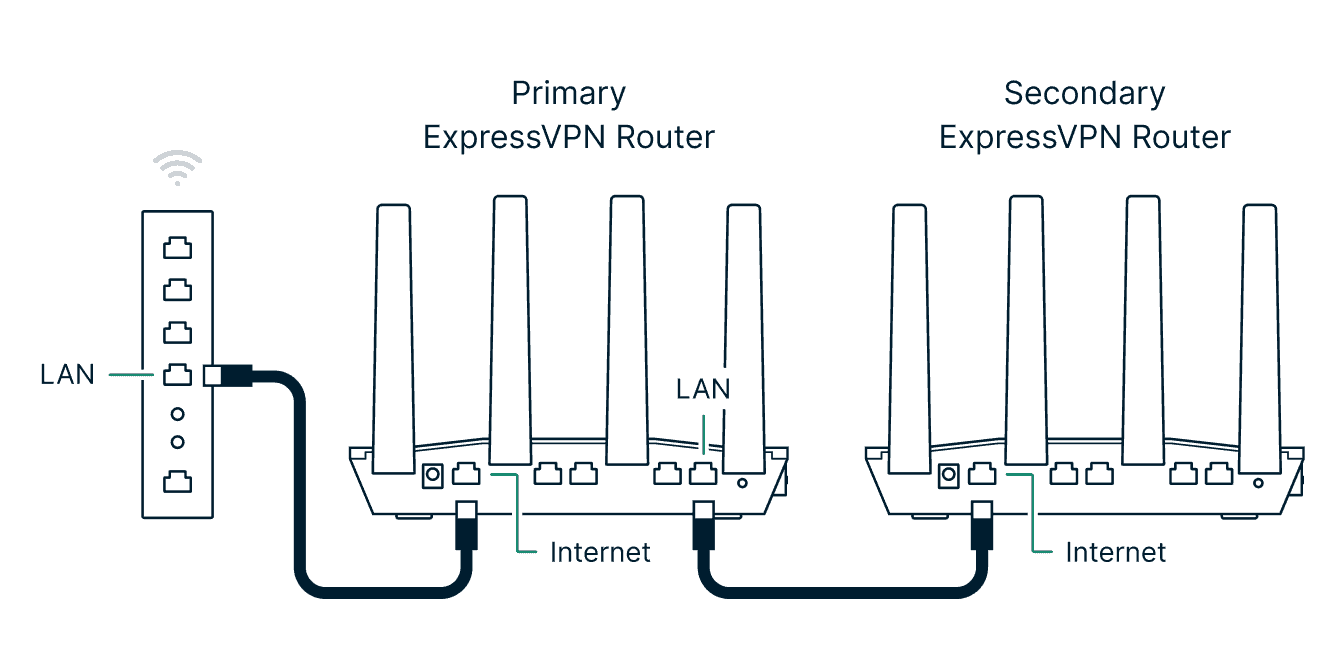
If you want to bring ExpressVPN protection to your smart TV or Xbox, you can do so with the help of special routers. These routers allow you to connect your devices to a VPN, securing your online activities. Follow these steps:
- Purchase a FlashRouter that supports ExpressVPN.
- Set up the router according to the instructions provided.
- Connect your smart TV or Xbox to the VPN-enabled router.
- Open the ExpressVPN app on your router and sign in using your credentials.
- Select a server location and establish a secure connection for your smart TV or Xbox.
Using ExpressVPN with Kodi
If you use Kodi for streaming, it’s important to protect your identity and ensure a smooth streaming experience. ExpressVPN can help you achieve this. Here’s how:
- Visit the ExpressVPN website and sign up for an account.
- Download the ExpressVPN app for the device on which you use Kodi.
- Install and open the app, then sign in using your ExpressVPN credentials.
- Connect to a server location and launch Kodi to enjoy secure streaming.
With the step-by-step guides provided above, you can easily install and use ExpressVPN on all your devices. Whether you’re using Windows, Apple devices, smart TVs, or gaming consoles, ExpressVPN offers a secure and private browsing experience at a price that suits you.
FlashRouter Support Plans
When it comes to setting up and configuring your custom FlashRouter, we understand that sometimes you need a little extra help. That’s why we offer a range of support plans to assist you every step of the way.
Regular Support Plan
Our Regular Support Plan is ideal for those who are comfortable manually setting up their routers and have some technical know-how. This plan includes access to our detailed setup guides, as well as email support for any troubleshooting questions you may have. With this plan, you can confidently configure your FlashRouter to work with your chosen VPN provider, ensuring a secure and private network.
Medium Support Plan
If you don’t have much experience with router installation and configuration, our Medium Support Plan is the perfect choice. With this plan, we’ll assist you in setting up your FlashRouter remotely, ensuring that it is properly configured and optimized for your specific needs. We’ll also provide email and phone support to answer any questions that may arise during the setup process.
Special Support Plan
For those who want the peace of mind of having a dedicated support team available to assist them whenever they need it, our Special Support Plan is the right option. In addition to all the features of the Regular and Medium plans, this plan includes priority email and phone support, as well as access to a dedicated support portal. With this plan, you’ll have the added confidence of knowing that you have expert assistance right at your fingertips.
No matter which support plan you choose, our team of technical experts is here to ensure that you have a smooth and successful setup experience with your custom FlashRouter. Don’t hesitate to reach out to us for assistance, as we understand the importance of a secure and reliable network.
CUSTOM PLUG PLAY EXPRESSVPN ROUTERS
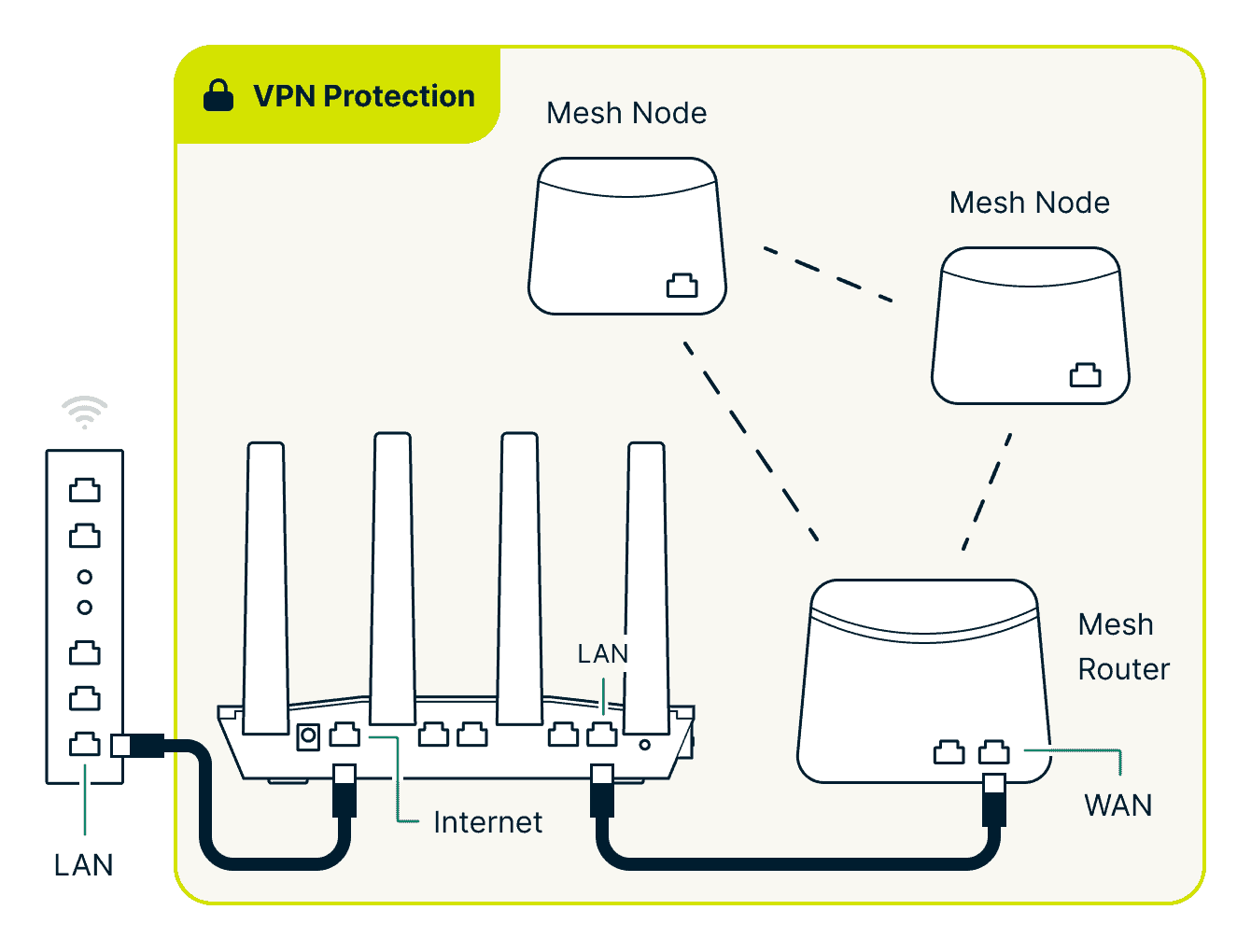
If you’re looking for a secure way to use ExpressVPN on all your devices, custom plug and play routers are the perfect solution. These routers come pre-flashed with the ExpressVPN software, making it easy to set up and use on your network. With a plug and play router, you can protect all your devices, from your Windows PC to your Apple devices, Xbox, PlayStation, Kodi, and more.
Easy Installation
With a custom plug and play router, the installation process is straightforward. Simply connect the router to your modem, and you’re ready to go. There’s no need to manually install any software or configure any settings. Everything is set up right out of the box.
All Devices Supported
Custom plug and play routers support a wide range of devices. Whether you want to protect your laptop, smartphone, tablet, or gaming console, a plug and play router has you covered. You can use ExpressVPN on all your devices without any limitations.
Secure and Fast
When you use ExpressVPN with a custom plug and play router, your internet connection is secure and fast. ExpressVPN is one of the best VPN providers available, and with a custom router, you can enjoy its benefits on all your devices.
Get the Best Price
By using a custom plug and play router, you can secure the best price on ExpressVPN service. FlashRouters, one of the fastest-growing router providers today, offers custom routers that are optimized for use with ExpressVPN. These routers bring out the best in ExpressVPN and make it easy for you to protect your identity and browse anonymously.
Exclusive Features
Custom plug and play routers also come with exclusive features. For example, some routers have a built-in VPN extension that allows you to easily turn the VPN on and off. Others have special settings that optimize ExpressVPN’s performance on specific devices or platforms, such as Windows, Apple, Ubuntu, and more.
Protect Your Network
By using a custom plug and play router with ExpressVPN, you can protect your network and all the devices connected to it. This is especially important if you regularly use public Wi-Fi networks, as they can be vulnerable to hacking and identity theft. With a custom router, you can ensure that your data is always encrypted and secure.
Choose the Best Plan
ExpressVPN offers different plans to suit your needs. Whether you’re a heavy user or just need a VPN for occasional use, there’s a plan that’s right for you. By using a custom plug and play router, you can enjoy the benefits of ExpressVPN on your own terms.
In conclusion, custom plug and play ExpressVPN routers are the easiest and best way to secure your internet connection and protect your identity. With easy installation, support for all devices, exclusive features, and the ability to get the best price on ExpressVPN service, a custom router is a must-have for anyone who values online privacy and security.
How to Set Up a VPN on Your Router
If you want to protect all of your devices and ensure your online identity remains private, setting up a VPN on your router is the best solution. By doing so, all the devices connected to your network will automatically be secured with the VPN.
Step-by-step guides are available for various router models, making it easy to install a VPN on your router. Whether you have a custom plug and play router or a regular one, you can follow the instructions provided by the VPN service provider.
First, you’ll need to choose a reliable VPN service provider that supports router installation. Look for a provider that offers a custom firmware specifically designed for router setup, as this will ensure that the installation process is fast and hassle-free.
Once you have chosen a VPN service provider, you can proceed with the installation. You will need to flash your router with the custom firmware provided by the VPN provider. This process may vary depending on your router model, so you can refer to the step-by-step guides provided by the VPN service.
After your router is flashed with the custom firmware, you’ll need to configure the VPN settings. This typically involves entering your VPN username and password, as well as selecting the VPN server location you want to use. Some VPN providers even offer special software to make the configuration process easier.
Once your router is configured with the VPN settings, all the devices connected to your network will have their internet traffic routed through the VPN. Whether you’re using a smartphone, tablet, computer, gaming console (such as Xbox or PlayStation), or smart TV, all the devices will be protected by the VPN.
With a VPN set up on your router, you can enjoy the benefits of a secure and private internet connection for all your devices. Additionally, you’ll have access to the fastest-growing list of VPN server locations, allowing you to bypass geo-restrictions and access content from anywhere in the world.
Now that you know how to set up a VPN on your router, you can bring your own custom router or purchase one from a supplier that supports VPN installation. By manually installing the VPN on your router, you can protect all your devices without the need for individual VPN installations.
By using a VPN on your router, you can ensure that all devices on your network are protected and your online activities remain private. With the right VPN service provider and a properly secured router, you can enjoy a secure and private internet experience on all your devices.
Get the best price available on ExpressVPN service right now
If you’re looking for a top-notch VPN service, ExpressVPN is one of the best providers in the industry. With their custom plug and play routers, you can easily set up and configure your own VPN network in no time.
ExpressVPN offers fast and secure VPN software for a wide range of devices, including Windows, Mac, Android, iOS, Linux, Ubuntu, Apple TV, Xbox, Kodi, and more. Their easy-to-follow step-by-step setup guides ensure that you can get your VPN up and running in no time.
By using a custom flashed router from FlashRouters, you can bring your VPN setup to a whole new level. FlashRouters specializes in pre-configured routers that are optimized specifically for VPN services like ExpressVPN. This means that you don’t have to manually set up the VPN on each device – simply connect to your FlashRouter and enjoy a secure and private internet connection.
With ExpressVPN, you also get access to their special “Best Price” plans. These limited-time offers bring you the best possible price for their services, allowing you to save money while enjoying top-notch VPN protection.
ExpressVPN is one of the fastest-growing VPN providers in the industry, and their commitment to privacy and security is unmatched. With their custom plug and play routers and excellent customer support, you can be confident that your online identity and data are protected.
Don’t miss out on the best price available on ExpressVPN service right now. Set up your own secure VPN network with a custom flashed router and enjoy the fastest and most reliable VPN service in the industry.
Вопрос-ответ:
How can I secure the best price on ExpressVPN service?
To secure the best price on ExpressVPN service, you can visit their official website and check for any ongoing promotions or discounts. You can also consider getting a custom plug and play ExpressVPN router, which may offer special deals or bundles that can save you money.
What are ExpressVPN Configured VPN Routers?
ExpressVPN Configured VPN Routers are routers that have been pre-configured to work seamlessly with ExpressVPN service. These routers come with ExpressVPN already installed, allowing you to easily connect to the VPN network without the need for manual setup.
How can I install and use ExpressVPN on all my devices?
To install and use ExpressVPN on all your devices, you can follow the step-by-step guides provided by ExpressVPN. They offer detailed instructions for various devices and platforms, including computers, smartphones, tablets, and even routers. Simply choose the guide that corresponds to your device and follow the instructions carefully.
Why should I choose ExpressVPN to protect my online identity?
ExpressVPN is one of the fastest-growing VPN providers in the industry, known for its top-notch security and privacy features. By using ExpressVPN, you can encrypt your internet connection, hide your IP address, and browse the web anonymously. This helps to protect your online identity and keep your personal information safe from hackers, ISPs, and other prying eyes.
What are the benefits of getting a custom plug and play ExpressVPN router?
Getting a custom plug and play ExpressVPN router offers several benefits. Firstly, it saves you the hassle of setting up the VPN on each individual device, as the router handles the connection for the entire network. Additionally, these routers often come with special discounts or promotions that can help you secure the best price on ExpressVPN service.
What support plans are available for ExpressVPN routers?
FlashRouter offers support plans for ExpressVPN routers. These plans provide assistance with setting up and troubleshooting the router, ensuring that it works smoothly with ExpressVPN service. Additionally, FlashRouter offers a “Bring your own device” option where they can flash your existing router with ExpressVPN firmware, allowing you to enjoy the benefits of ExpressVPN without purchasing a new router.
How can I set up a VPN on my router?
To set up a VPN on your router, you can follow the step-by-step instructions provided by ExpressVPN. These instructions guide you through the process of configuring your router to work with the VPN service. Once set up, all devices connected to the router will automatically use the VPN, providing secure and private internet access.
Видео:
5 Router Settings You Should Change Now!
5 Router Settings You Should Change Now! by ThioJoe 1 year ago 13 minutes, 57 seconds 794,471 views
