
2023 Guide: How to Change the App Store Country on your iPhone and Mac – Create Second Apple ID for Another Country
Are you currently outside your home country and want to access and download apps or media from another country’s App Store? Or maybe you’re planning to move to another country and need to switch your Apple ID to that country’s store. Whatever the reason, changing the App Store country on your iPhone and Mac can be a little challenging, but with a few easy-to-follow steps, you’ll be able to do it in no time.
The first thing you need to do is create a second Apple ID for the country you want to switch to. This will require a different email address and a new username. Once you have the new Apple ID, make sure to sign out of your existing Apple ID on all devices.
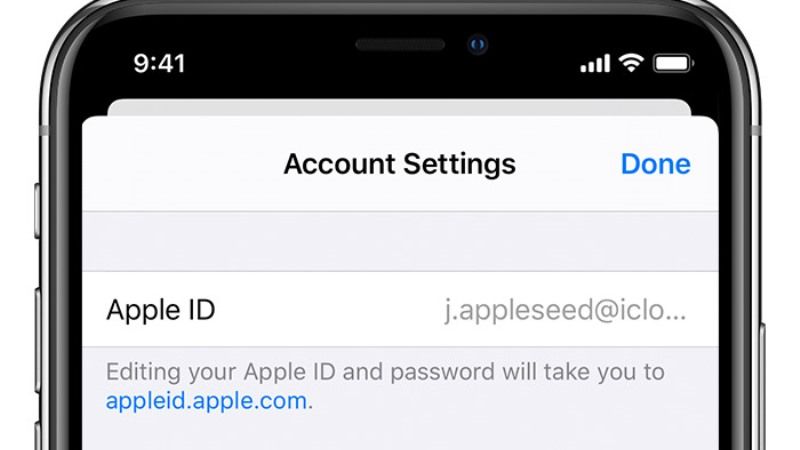
Next, go to the settings on your device and tap on your profile at the top of the screen. Then, select the “iTunes & App Store” option. From there, click on your Apple ID and select “View Apple ID.” You may need to enter your password to confirm your identity.
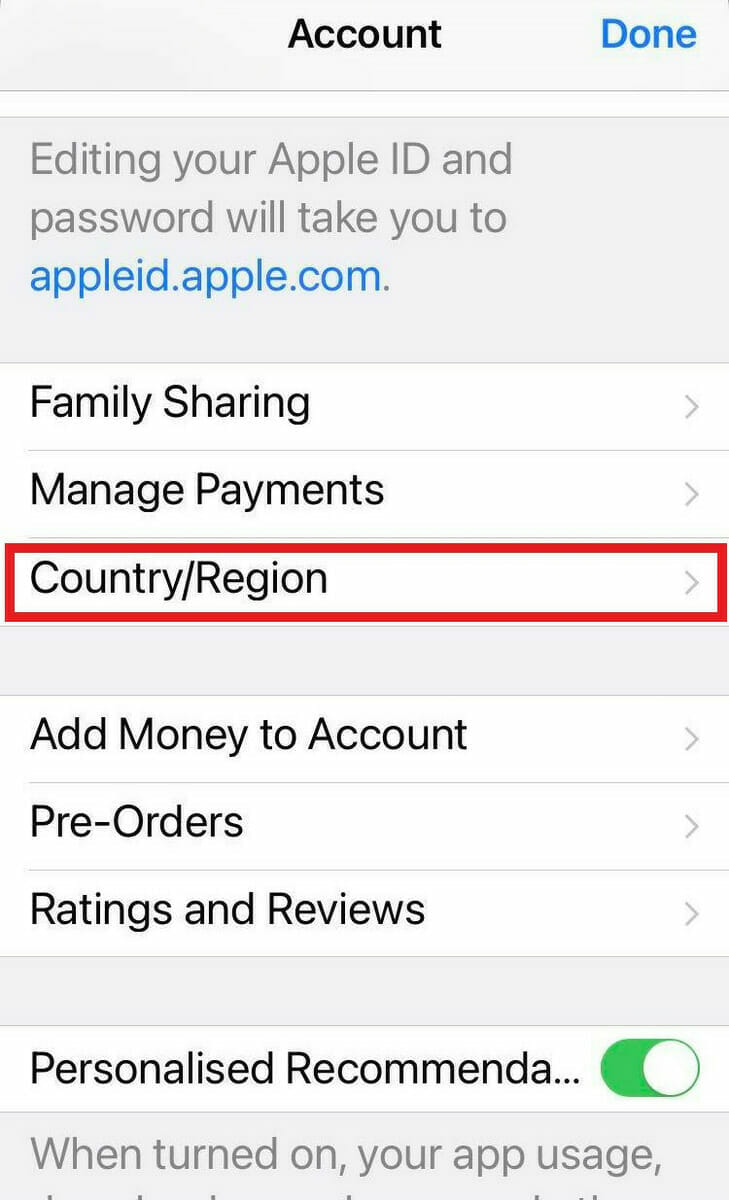
Once you’re in your Apple ID settings, scroll down until you see the “Country/Region” option. Tap on it, and you’ll be prompted to select a new country. Take note that changing the country will affect your access to certain apps and media that are region-specific, including pre-orders and location-based services.
After selecting the new country, you may need to provide additional information, such as a billing address and payment method that is associated with the country you selected. Keep in mind that some countries may have specific prerequisites for accessing their stores, such as requiring a local credit card or bank account.
If you face any issues during this process, you can contact Apple Support for more guidance or use web tools like NordVPN to change your location and access the App Store of another country.
In summary, changing the App Store country on your iPhone and Mac requires a few steps, including creating a second Apple ID, signing out of your existing account, and selecting a new country in your Apple ID settings. While it may take a few days to get everything set up, the ability to access apps and media from another country is worth the effort. So go ahead, follow this guide, and start exploring a whole new world of digital content!
3 Guide: How to Change the App Store Country on your iPhone and Mac
If you want to access apps and content that are limited to a specific country, you can change your App Store country on your iPhone and Mac. This guide will walk you through the steps to change your App Store country and create a second Apple ID for another country.
1. Using a Tunnel Authority to Change the App Store Country
There are several tunneling authorities available that can help you change your App Store country. One of the most popular ones is CyberGhost VPN. By using CyberGhost, you can connect to a server in the country you want to switch to and enjoy the apps and content available in that region. However, it’s important to note that this method may not be legal in some countries, so proceed with caution.
2. Setting up a Second Apple ID for Another Country
If you don’t want to use a VPN and prefer a more official method, you can create a second Apple ID for another country. To do this, you will need a credit card with a billing address in the desired country. Launch the App Store on your iPhone or Mac and sign out of your current Apple ID. Then, go to the App Store and choose a free app to download. At this point, you can create a new Apple ID and select the desired country. Fill in the necessary information and proceed with the creation of the new Apple ID.
3. Checking the App Store Country on your iPhone or Mac
After you’ve changed your App Store country, it’s important to verify that the switch was successful. On your iPhone, go to Settings, tap on your Apple ID at the top, and then on “Media & Purchases”. You should now see the new country listed. On your Mac, open the App Store, and at the bottom of the screen, check the country selected next to your Apple ID. If the new country is displayed, you are all set to enjoy the apps and features specific to that region.
In conclusion, whether you choose to use a tunnel authority or create a new Apple ID, changing the App Store country on your iPhone and Mac is possible and can bring you access to a whole new range of apps and content. Just remember to be aware of the legal implications and choose the method that works best for you.
Create Second Apple ID for Another Country
If you want to be able to access apps, movies, and other content that is only available in a different country’s App Store, you can create a second Apple ID specifically for that country. This guide will walk you through the steps to create a new Apple ID and associate it with a different country.
Step 1: Open the App Store
To begin, open the App Store on your iPhone or Mac device.
Step 2: Sign Out of your Current Apple ID
If you are currently signed in with your existing Apple ID, sign out of it to proceed.
Step 3: Choose a New Apple ID Location
Select a new location for your Apple ID by scrolling down to the bottom of the App Store’s main page, tapping on your Apple ID, and selecting “Sign Out.”
Step 4: Sign in with a New Apple ID
Next, sign in with a new Apple ID that is associated with the country you wish to access content from. If you don’t already have a second Apple ID, you can create one by going to the Apple ID website or by using the Apple ID option in the settings on your iPhone or Mac device.
Step 5: Download a VPN Service
To access content from another country’s App Store, you will need to download a Virtual Private Network (VPN) service like ExpressVPN, NordVPN, or PrivateVPN. These services allow you to route your internet connection through servers in different countries, giving you access to content that is restricted to specific locations.
Step 6: Configure the VPN
After downloading a VPN service, follow their installation and configuration instructions to set it up on your device. You may need to choose a specific country or server to connect to in order to access the content you want.
Step 7: Enjoy the Content from Another Country
Once the VPN is set up, you should be able to access the App Store from another country and download apps, movies, and other content that is only available in that location. Enjoy exploring a whole new world of content!
Note: Keep in mind that while using a VPN may allow you to access content from another country, there may be some limitations or restrictions imposed by the content providers or the App Store itself. Use caution and make sure you are adhering to applicable laws and regulations.
Private Internet Access — Huge Server Network for Reliable Access to Any App Store Country
Private Internet Access (PIA) is a highly recommended VPN service for anyone looking to change their App Store country easily and securely. With a vast server network, PIA ensures reliable access to any App Store country you want to connect to.
The first step is to check if the service offers servers in the country you want to change your App Store location to. With PIA, this is not an issue as they have servers in numerous countries around the world.
PIA is known for its user-friendly interface, making it easy to connect to a server in the desired country. Once connected, you will be able to browse the App Store as if you were located in that region.
With PIA, you can also download region-restricted streaming applications without any hassle. Whether you want to stream content from Netflix, Hulu, or other region-specific platforms, PIA’s server network masks your true location, allowing you to access them without any problems.
Another great feature of PIA is that you can associate multiple regions with a single account. This means you can easily switch between different App Store countries whenever you need to download apps or access region-specific tools.
In terms of reliability, PIA is known for its stable and secure VPN connection. You can rest assured that your entire internet connection is encrypted and your data is protected from cyberghosts or malicious entities.
In summary, Private Internet Access is a reliable VPN service that allows you to change your App Store country with ease. With their vast server network and user-friendly interface, you can connect to any region and enjoy access to region-restricted apps and streaming platforms.
Step-by-Step Instructions to Change the App Store Country on your iPhone
If you’re looking to access different applications or content that is only available in certain countries, you may need to change the App Store country on your iPhone. Thankfully, there are tools available that can help you with this process and allow you to switch to a different country’s App Store with ease.
Step 1: Open the Settings App
To begin the process, open the Settings application on your iPhone. This can be done by tapping on the “Settings” icon, which is typically located on your home screen.
Step 2: Sign Out of your Current Apple ID
In order to change your App Store country, you’ll need to sign out of your current Apple ID. To do this, go to the “iTunes & App Store” section in the Settings app, tap on your Apple ID, and select “Sign Out”.
Step 3: Create a Second Apple ID for the Country you Want to Switch to
Next, you’ll need to create a second Apple ID for the country you want to switch to. This can be done by visiting the Apple ID creation website and choosing the option to create a new Apple ID. Make sure to select the desired country during the registration process.
Step 4: Sign in with your Second Apple ID
Once you’ve created your second Apple ID, go back to the “iTunes & App Store” section in the Settings app and sign in with your new Apple ID. This will assign the new country to your App Store settings.
Step 5: Configure a Trusted Network or Use a VPN
In some cases, you may need to configure a trusted network or use a VPN (Virtual Private Network) to ensure that your iPhone’s location is recognized as being in the new country. This will help you to access the specific content or applications that are available only in that country.
Step 6: Open the App Store
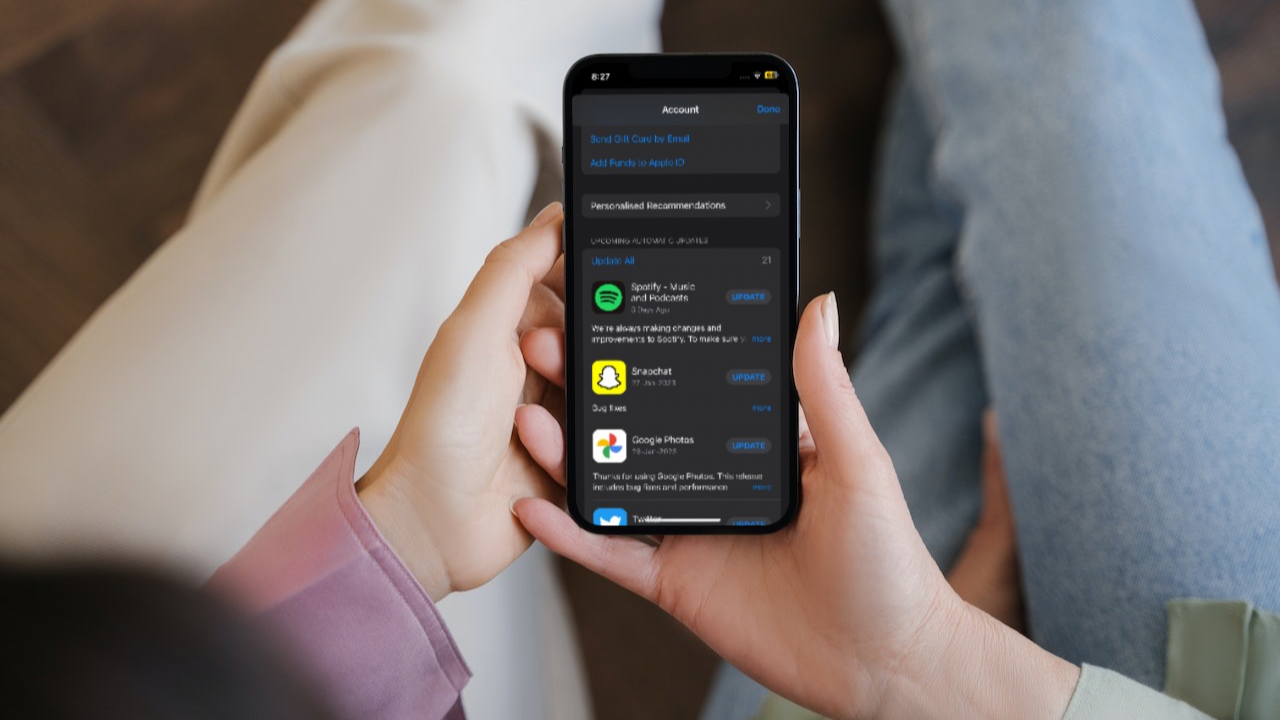
Now that you have switched to the new country’s App Store, open the App Store application on your iPhone to browse and download applications that are available in that particular country.
Additional Tips and FAQs
– It is important to note that changing the App Store country will not affect your previously downloaded applications or any subscriptions you may have had.
– If you are experiencing any issues with changing your App Store country or redeeming gift cards in the new country, it is recommended to contact Apple Support for assistance.
– Keep in mind that some applications or content may still be restricted based on licensing agreements, even if you have successfully changed your App Store country.
– Choosing a VPN or tunneling service can be a helpful tool in bypassing certain restrictions or accessing region-specific content.
– Netflix, Hulu, and other streaming services are among the most likely applications that will require a VPN or tunneling service to access content from a different country.
– It’s important to know the terms and conditions of the VPN or tunneling service you choose, as some may have limitations on the number of devices or data usage allowed.
Step-by-Step Instructions to Change the App Store Country on your Mac
1. Open the App Store
Launch the App Store application on your Mac. You can find it in the Applications folder or by searching for it using Spotlight.
2. Sign in with your Apple ID
If you’re not already signed in, click on the “Sign In” button in the top right corner and enter your Apple ID and password.
3. Go to your Account settings
In the App Store menu bar, click on “Account” and then select “View My Account”. This will take you to your Apple ID account settings.
4. Click on “Change Country or Region”
In the Account settings page, scroll down to the “Settings” section and click on the “Change Country or Region” link.
5. Select your new country/region
A pop-up window will appear with a list of available countries/regions. Choose the one you want to switch to and click “Continue”.
6. Agree to the terms and conditions
You will be presented with the terms and conditions for the new country/region. Read through them and click “Agree” to proceed.
7. Enter your payment information
Next, you’ll need to enter your payment information for the new country/region. This is necessary for making app purchases and subscriptions. You can choose to use an existing payment method or add a new one.
8. Complete the change
Follow the on-screen prompts to complete the change of your App Store country/region. Once done, you’ll be able to browse and download apps available in the selected country/region.
9. Restart the App Store
After changing your App Store country/region, it’s recommended to restart the App Store application to ensure that the changes take effect.
10. Enjoy using apps from your new country/region
Once you’ve successfully changed your App Store country/region, you can enjoy accessing and downloading apps that are popular and available in your new location.
Tips for Choosing the Right Country for App Store Access
When it comes to accessing the App Store from a different country or creating a second Apple ID for another country, there are a few things you should consider. Here are some tips to help you choose the right country for App Store access:
Consider Your Device and Operating System
Before you begin the process of changing your App Store country, make sure to check if your device and operating system are compatible. Different countries may have different restrictions or requirements for certain devices. It’s recommended to check the official guidelines from Apple for the specific device you’re using.
Evaluate App Availability
One of the main reasons to change your App Store country is to gain access to apps that are not available in your current region. Take some time to research and find out which countries have the apps you’re interested in. Look for reviews, check the popularity of certain apps, and see if there are any hot new releases in a particular country. This will help you make an informed decision.
Consider Connection Speed and Server Locations
When changing your App Store country, keep in mind that your connection speed may vary depending on the location of the App Store server. Consider choosing a country with fast and reliable servers to ensure smooth app downloads and updates. Some VPN services, such as CyberGhost and NordVPN, offer servers optimized for streaming and downloading, so make sure to take advantage of their capabilities.
Review Subscription and Membership Availability
If you have a subscription or membership with certain apps, like Netflix or Spotify, make sure the country you choose supports those services. Certain services may not be available or have limited content in certain countries. Before changing your App Store country, check if all your favorite apps and subscriptions will be accessible so you don’t end up disappointed.
Consider Local Content and Language
When choosing a country for your App Store access, it’s important to consider the local content and language. Certain countries may have better options for movies, TV shows, and other media content. Additionally, if you are learning a new language or want to have access to apps in a specific language, choosing a country with that language as the primary language can enhance your app experience.
Follow the Proper Steps
Make sure to follow a reliable guide or tutorial when changing your App Store country. There are plenty of resources available online that provide step-by-step instructions on how to change your App Store country on different devices, such as iPhone, iPad, and Mac. Always remember to back up your device before making any changes and take note of any important information, such as gift card balances or app purchases tied to your current account.
Consider Using VPN Services
If you’re experiencing difficulties changing your App Store country directly on your device, you can consider using a VPN service. VPNs like ExpressVPN and CyberGhost offer user-friendly apps that allow you to connect to servers in different countries, giving you virtual access to different app stores. This can be especially helpful if you need access to specific apps or content available in a certain country.
Remember, changing your App Store country or creating a second Apple ID for another country is a legal process, but it’s important to follow the proper guidelines and procedures. By considering the factors mentioned above and following the recommended steps, you can choose the right country for your App Store access and enhance your overall app experience.
Common Issues and Troubleshooting when Changing App Store Country
Certificate-Based Authentication
One common issue when changing the App Store country is encountering certificate-based authentication errors. This occurs when the certificate used to verify the App Store’s digital signature does not match the new country selected. To resolve this issue, make sure the certificate used is valid and matches the new country.
Creating a Second Apple ID
When changing the App Store country, it may be necessary to create a second Apple ID for another country. This allows you to download and use applications that are only available in that specific country’s App Store. To create a second Apple ID, select the “Create New Apple ID” option and provide the necessary information, including an official address in the desired country.
Configuring Devices to Use the New Country
After changing the App Store country, it is important to configure all your devices to use the new country. This includes setting the country in the iTunes & App Store settings, as well as in any other applications or services that rely on the country settings. Failure to do so may result in issues accessing certain applications or services.
Network Tunneling and Security
Using network tunneling services can help bypass country restrictions, allowing you to access applications and services from another country. However, it is important to use such services with caution as they may compromise your security. Make sure to use a reputable and secure tunneling service, and be aware that accessing region-restricted content may violate the terms of service of certain applications or services.
Quality of Service and Network Connection
When changing the App Store country, it is important to consider the quality of your network connection. Poor network connectivity may result in slow downloads, errors, or incomplete installations of applications. Make sure you have a stable and reliable network connection before attempting to change the App Store country or download new applications.
Gift Card and Payment Issues
If you encounter issues with gift cards or payment methods when changing the App Store country, it may be necessary to contact Apple support for further assistance. They can provide guidance and help resolve any payment-related issues that may arise during the process of changing the App Store country.
Malicious Applications and Security Concerns
When changing the App Store country, it is important to be cautious and only download applications from trusted sources. Malicious applications can pose security risks to your device and personal information. Make sure to read user reviews, check the developer’s reputation, and verify the authenticity of applications before downloading them.
User-Friendly Interface and Feedback
While changing the App Store country may seem complex, Apple provides a user-friendly interface to guide users through the process. If you encounter any issues or have questions, Apple support is available to help you. Additionally, providing feedback to Apple about your experience can help improve the process for future users.
Understanding the Implications of Changing App Store Country
When it comes to the App Store, privacy and security are always a top concern. That’s why it’s important to understand the implications of changing your App Store country.
First, it’s worth noting that changing your App Store country means you’ll have access to a different region’s app offerings. This can be a good thing, as different countries may have unique apps that are not available in your current region.
Changing your App Store country may require following a guide or going through a relatively simple process. For instance, if you are using an iPhone or iPad, you can change your App Store country by creating a second Apple ID for another country. On Mac, you can change your country setting by going to the App Store preferences in System Preferences.
One of the benefits of changing your App Store country is that it allows you to add different apps to your device. This can be particularly useful for people who travel frequently or want to access region-specific applications. Whether you’re looking for apps related to finance, gaming, or even movies, changing your App Store country opens up a world of new possibilities.
Beyond apps, changing your App Store country can also have an impact on other aspects of your device. For example, it can affect how your device connects to Wi-Fi networks. Some countries may have different network providers that offer higher-quality and better speeds, so changing your App Store country might help you identify and connect to the most reliable networks.
It’s important to keep in mind that changing your App Store country may also affect the level of security and privacy protection you have on your device. For instance, some countries may have more robust security measures in place, while others may have less. By switching countries, you may be able to benefit from enhanced security features and better protection for your personal data.
Finally, changing your App Store country can also impact the availability of certain services and features. For instance, some regions may have official apps or services that are not available in other countries. By changing your App Store country, you can access these services and take full advantage of what they have to offer.
In conclusion, understanding the implications of changing your App Store country is important for making informed decisions. It’s a user-friendly and relatively simple process, but it’s essential to know how it can impact your device, apps, security, and overall user experience. Whether you want to access region-specific applications or improve your device’s security, changing your App Store country can offer a range of benefits.
How to Transfer Purchases from One App Store Country to Another
Transferring your purchases from one App Store country to another can be a complex process, but with the right steps and precautions, it can be done. Here’s a guide to help you transfer your purchases without losing any of your data.
Prerequisites
Before you begin the transfer process, there are a few things you need to take care of. First, make sure you have a valid Apple ID for the country you want to transfer your purchases to. If you don’t have one, you’ll need to create a second Apple ID with the desired country’s details.
Second, ensure that the app or content you want to transfer supports the region or country you’re transferring to. Some apps may not be available in certain countries, so it’s best to check the app’s description or contact the developer for confirmation.
Methods for Transfer
There are a few different methods you can use to transfer your purchases:
- Direct Transfer: This is the fastest way to transfer your purchases. It involves changing the region or country settings on your device and signing in with your new Apple ID. However, this method may not be available for all apps or purchases.
- Redownload: If the direct transfer method is not available, you can try redownloading your purchases from the new App Store country. This can be done by signing in with your new Apple ID and going to the Purchased section to redownload your apps.
- Contact Support: If the above methods don’t work, you can reach out to Apple Support for assistance. They may be able to help you transfer your purchases or provide alternative solutions.
Protecting Your Data
When transferring your purchases, it’s important to protect your data and ensure a smooth transition. Here are a few tips to help:
- Backup: Before making any changes, it’s always a good idea to backup your device. This will ensure that you don’t lose any important data during the transfer process.
- Credit Card and Payment Information: Make sure to update your credit card and payment information to the new country or region. This will ensure that you can make purchases without any issues.
- Check App Availability: After the transfer, check if all your apps are available in the new App Store country. Some apps may not be available or may have region-specific restrictions.
- Feedback and Support: If you encounter any issues during the transfer process, don’t hesitate to reach out to Apple Support or the app developer for assistance. They can provide guidance and help resolve any problems.
Summary
Transferring your purchases from one App Store country to another may seem daunting, but with the right steps and precautions, it can be done. Make sure you have the necessary prerequisites in place, choose the most suitable transfer method, and protect your data throughout the process. By following these guidelines, you can successfully transfer your purchases to the desired App Store country.
Understanding Geo-Restrictions and How they Affect App Store Access
Geo-restrictions are limitations imposed on accessing certain content or services based on the geographical location of the user. When it comes to the App Store, geo-restrictions can affect your ability to access and download apps from different countries. This can be problematic if you want to use an app that is only available in a specific country or if you want to take advantage of certain features or offers that are exclusive to a particular market.
One of the main reasons for geo-restrictions in the App Store is to ensure that apps comply with local laws and regulations. By restricting access to certain apps based on the user’s country, Apple can ensure that only apps that meet the necessary legal requirements are available for download.
Another reason for geo-restrictions is the control of content distribution. Some apps may have licensing agreements that limit their availability to specific regions. This could be due to content rights issues or other contractual obligations. By enforcing geo-restrictions, Apple can comply with these agreements and prevent the unauthorized distribution of content.
To access apps from a different country’s App Store, you need to change your Apple ID’s country or create a new Apple ID associated with the desired country. This can be done on both iPhone and Mac devices, and there are several user-friendly methods available to help you through the process.
One highly recommended method is to use a trusted VPN service, such as CyberGhost. A VPN allows you to change your IP address and connect to servers in different countries, effectively bypassing geo-restrictions. By choosing a server location in the desired country, you can access the corresponding App Store and download apps as if you were physically located there.
Before changing your Apple ID’s country, it’s important to know that certain limitations apply. For example, you should have a valid payment method associated with the country you want to switch to, as well as a billing address within that country. Additionally, once you change your country, some apps and purchases may no longer be available, so it’s important to check the app’s profile and reviews before making the switch.
It’s also worth noting that changing your Apple ID’s country will not affect your existing apps or data. However, you may need to re-download certain apps if they are not available in the new country’s App Store.
In conclusion, understanding geo-restrictions and how they affect App Store access is crucial if you want to unlock high-quality apps and take advantage of exclusive features or offers. By knowing how to change your App Store country and using a trusted VPN service like CyberGhost, you can ensure that you have access to a wide range of apps from around the world on your iPhone or Mac device.
How to Avoid In-App Purchase Restrictions in Different App Store Countries
When it comes to accessing and making in-app purchases from different App Store countries, there are a few helpful methods and strategies you can employ to avoid any restrictions. This guide will walk you through some quick steps to ensure you have the necessary tools and information to make the most of your app store experience, no matter where you are.
1. Using VPNs and Proxy Services
A popular choice among users, VPNs (Virtual Private Networks) and proxy services can be a huge help when it comes to bypassing in-app purchase restrictions. Providers like CyberGhost, WireGuard, and ExpressVPN offer secure tunneling and encryption, allowing you to connect to servers in different countries and access the apps and content they offer.
2. Creating Multiple Apple IDs
If you find yourself stuck with in-app purchase restrictions in a specific country, creating multiple Apple IDs is another option. By creating a new Apple ID tied to a different country, you can access that country’s App Store and enjoy the apps and content available there. Just make sure to redeem any gift cards or payment information associated with the specific country you’re interested in.
3. Changing Your Account’s Country Settings
For those who prefer not to create multiple Apple IDs, changing your account’s country settings directly on your device can also be a viable solution. By going to your Apple ID settings and selecting the “Country/Region” option, you can change your location to a different country. Keep in mind that this may require valid payment information from that country, so be prepared to provide the necessary details.
4. Utilizing SCEP and Intune Certificates
An optional but effective way to avoid in-app purchase restrictions in different countries is by utilizing SCEP (Simple Certificate Enrollment Protocol) and Intune certificates. These certificates ensure a secure connection and provide additional protection for your device. By following the necessary steps and configuring your device with these certificates, you can enjoy a more secure app store experience.
5. Choosing the Right VPN Provider
When selecting a VPN provider, it’s important to choose one that offers the features and properties you need for a better app store experience. Providers like PrivateVPN and NordVPN are known for their reliable connection speeds and user-friendly interfaces, making them popular choices for iOS/iPadOS users. Do some research and find the VPN provider that suits your needs the best.
By following these recommended methods and steps, you can avoid in-app purchase restrictions and make the most out of the available apps and content in different App Store countries. Whether you choose to use VPNs, create multiple Apple IDs, or change your account’s country settings, the choice is yours. Just remember to prioritize your security and be aware of any potential limitations or restrictions imposed by the authorities in each country.
Using VPNs to Access App Store Content from Different Countries
In 2023, the App Store offers a wide range of apps and content, but some apps may only be available in specific countries. If you want to access App Store content from a different country, using a VPN (Virtual Private Network) can be a trusted and average way to achieve this.
What is a VPN?
A VPN is a service that masks your IP address and assigns you a new one based on the location you choose. This allows you to appear as if you’re accessing the internet from a different country, giving you access to region-specific content and services.
How to Use a VPN for App Store Access
- Choose a VPN provider: There are many popular VPN services available, so it’s necessary to do some research and select a trusted and easy-to-use VPN client.
- Install and open the VPN client: Once you’ve chosen a VPN, download and install the client software on your iPhone or Mac.
- Connect to a server in the desired country: Open the VPN client, enter your username and password, and choose a server location in the country where the desired App Store content is available.
- Start the VPN connection: Click the connect button in the VPN client, and the client will establish a secure connection to the selected server.
- Confirm your new IP location: After connecting, your IP address will now reflect the country you selected. This means that when you access the App Store, it will think you are connecting from that country.
- Access App Store content: Open the App Store on your device, and you should now see the available apps and content of the country you selected.
Benefits of Using a VPN for App Store Access
Using a VPN for accessing App Store content from different countries has several benefits:
- Access to a huge variety of apps and content that is not available in your current region.
- Ability to gift apps to friends or family located in different countries.
- Protection of your online privacy and security while accessing App Store content.
- Option to change your region and access different properties of the App Store.
- Choice of preferred VPN server locations for better speeds and connections.
Note: It’s important to keep in mind that using VPNs to bypass geographic restrictions may violate the terms of service of certain apps or content providers. Additionally, some services may require a valid payment method from the desired country to access certain content.
Guide to Creating a Second Apple ID for App Store Access
If you want to access apps and content that are exclusive to another country’s App Store, you will need to create a second Apple ID. This guide will walk you through the process of creating a new Apple ID specifically for accessing different regional App Stores.
Step 1: Sign out of your current Apple ID
Before you begin, make sure you are signed out of your current Apple ID on all devices, including your iPhone and Mac. This will prevent any conflicts or confusion during the process.
Step 2: Choose a VPN or Proxy Service
To create a second Apple ID for accessing a different country’s App Store, you will need to use a VPN or proxy service. These services will mask your IP address and make it appear as though you are connecting from a different country. Some reliable options include PrivateVPN, NordVPN, and CyberGhost.
Step 3: Change your region and create a new Apple ID
Once you have chosen a VPN or proxy service, launch the application on your device and connect to a server in the country whose App Store you want to access. This will change your IP address to that country, making it appear as though you are located there.
Next, go to the Settings app on your iPhone or Mac, and navigate to “iTunes & App Store” > “Apple ID:” > “View Apple ID.” Here, you can tap on “Country/Region” and select the country you want to change to. Follow the prompts to create a new Apple ID with a different country’s information.
Step 4: Continue using your new Apple ID
After you have created your new Apple ID, you can sign in with it on your devices and access the App Store for the selected country. You can also use this Apple ID to change your region-restricted subscriptions or download apps that are only available in that country’s App Store.
Remember, if you want to switch back to your original country’s App Store, simply sign out of your current Apple ID and sign in with your original account.
Creating a second Apple ID for App Store access is a simple process that can open up a world of new apps and content. Follow these steps, choose a VPN or proxy service, and enjoy exploring a different country’s App Store.
How to Switch Between Different App Store Countries on your Device
If you are a user of the App Store, you may find yourself in a situation where you want to access apps or content that are only available in a different country’s App Store. Whether you are traveling, or simply want to explore apps from other regions, changing your App Store country can help you access region-restricted content. Here are the steps to switch between different App Store countries on your device.
Step 1: Launch the App Store
Start by launching the App Store on your iPhone or Mac device. This can be done by tapping on the App Store icon in your home screen or clicking on the App Store app in your dock.
Step 2: Sign out of your current Apple ID
If you are currently signed in with your Apple ID, you will need to sign out before changing the country. To do this, go to the “Account” section in the App Store and choose “Sign Out”.
Step 3: Create a new Apple ID for the desired country
If you already have a second Apple ID for the desired country, you can sign in with that. Otherwise, you can create a new Apple ID by choosing “Create New Apple ID” and following the provided instructions.
Step 4: Change the App Store region
Once you are signed in with the new Apple ID, go to your device settings and navigate to the “iTunes & App Store” section. Tap on your Apple ID and select “View Apple ID”. From there, choose “Country/Region” and select the desired country from the list.
Step 5: Confirm the region change
Confirm the App Store country change by agreeing to the terms and conditions. This may require you to provide a payment method that is valid in the selected country. If you don’t have a payment method for that country, you can choose “None” or use gift cards specific to that region to make purchases.
Note: Some apps, such as Netflix and Hulu, have their own restrictions and may not be available even if you change your App Store country. You may need to use VPN services, like CyberGhost or PrivateVPN, to access geo-restricted content.
In conclusion, by following the steps above, you can easily switch between different App Store countries on your device. This allows you to access a wider range of apps and content, and expand your app browsing experience.
Exploring App Store Content from Different Countries
If you’re an iOS or iPadOS user, you know that the App Store is filled with a wide range of applications and games. However, did you know that the content available on the App Store can vary depending on the country you’re in? Exploring App Store content from different countries can be a great way to discover new and exciting apps that may not be available in your own region.
How to Access App Store Content from Different Countries
Accessing App Store content from different countries is easy, especially if you have multiple Apple IDs. Here are the steps to help you get started:
- Create a second Apple ID for the country whose App Store content you want to explore. This can be done by visiting the Apple ID account page and selecting “Create your Apple ID”. Remember to select the country you want to explore.
- Sign out of your current Apple ID on your iPhone or Mac by going to Settings, then tapping on your Apple ID profile icon, and selecting “Sign Out”.
- Sign in with the newly created Apple ID by going to Settings, tapping on “Sign In to your iPhone/Mac”, and entering the new Apple ID credentials.
- Once signed in, open the App Store and you’ll notice that the content has changed to match the country associated with the new Apple ID. You can now explore and install apps and games that are specific to that country.
Benefits of Exploring App Store Content from Different Countries
Exploring App Store content from different countries offers several benefits:
- Discover popular apps and games that are trending in other regions and may not be available in yours.
- Access apps and games that are available for pre-orders in specific countries, allowing you to stay updated on new releases.
- Try out unique and descriptive applications that cater to certain cultures or languages.
- Explore free or discounted apps and games that are specific to certain regions or promotions.
Tips for Exploring App Store Content from Different Countries
Here are some tips to enhance your experience when exploring App Store content from different countries:
- Use VPN services like PrivateVPN, NordVPN, or CyberGhost to change your IP address to the country you want to explore, helping you bypass geographical restrictions.
- Ensure your VPN connection is always secure by selecting a service provider that offers high-quality encryption and no-logs policy.
- Consider using tools like Zscaler or Microsoft PKCS to set up trusted profiles for better security and speeds.
- Remember to read reviews and documentation before making any purchases or installing apps to ensure their reliability and compatibility.
- If you enjoy gaming, exploring App Store content from different countries can give you access to unique and exciting games that may not be available in your region.
By exploring App Store content from different countries, you can expand your app and game collection, discover new and interesting applications, and take advantage of region-specific features and promotions. So why not start exploring today?
Exploring Cultural Differences in App Store Content
When it comes to the App Store, different countries may have different cultural preferences and requirements when it comes to app content. This can be seen in the selection of apps available across different regions, catering to the diverse needs and interests of users.
The App Store strives to be user-friendly and provides a wide range of apps for iPhone, iPad, and Mac users across the globe. However, due to varying cultural norms and regulations, certain apps may be available in one country but restricted in another.
For those who want to explore apps from another country, there are recommended steps to follow. First, you can create a second Apple ID for another country, allowing you to access content specific to that region. Services like NordVPN or PrivateVPN can help you connect to the App Store server of another country, giving you a virtual presence in that region.
Setting up a second Apple ID is straightforward and can be done in a few simple steps. You’ll need to start by choosing the right country and providing a valid credit card associated with that country for verification purposes. Once your new Apple ID is created, you can start exploring the content available in that region.
It’s important to note that certain region-restricted apps may require a local address and a trusted payment method specific to that country. However, for many apps, a virtual presence generated by a VPN service is sufficient to access and download them.
This guide provides a quick and easy way to change your App Store country and explore different cultural content. It is particularly beneficial for those who enjoy streaming services or want to access apps that are popular in a specific country. With a few simple steps, you can start experiencing the diverse range of apps available in the global App Store in 2023.
Understanding the Importance of App Store Localization
The virtual marketplace of the App Store is a hub for millions of users, offering a vast range of applications that cater to their needs. However, one crucial aspect that determines the success and accessibility of these apps is localization.
Localization refers to the process of adapting an app to a specific region or country, considering factors such as language, cultural norms, and legal requirements. This ensures that users from different regions can effectively use and benefit from the app, creating a personalized and seamless experience.
Why is app store localization important? Firstly, it allows developers to expand their user base by reaching out to a wider audience. By making apps available in multiple languages and configuring them to different regions, developers can tap into new markets and attract users from around the world.
Secondly, region-restricted apps are a common phenomenon. Some apps are only available in certain countries due to licensing agreements, legal restrictions, or other factors. By understanding how to change the app store country settings, users can gain access to these region-restricted apps and unlock a whole new range of possibilities.
So, how can one change the app store country settings? There are a few steps that users can follow:
- Firstly, open the App Store on your iPhone or Mac.
- Next, scroll down to the bottom of the main page and tap on your Apple ID.
- Then, tap on “View Apple ID” and enter your password.
- In the Account Settings page, tap on “Country/Region” and select the desired country.
- Read and agree to the terms and conditions, and then enter your payment information if required.
- Finally, tap on “Next” and wait for the changes to take effect. Congratulations, you have successfully changed your app store country!
Understanding the importance of app store localization is crucial for both developers and users, as it opens up new opportunities and enhances the overall app experience. By knowing how to configure app store country settings, users can access region-restricted apps and benefit from a wider range of options.
Вопрос-ответ:
Can I change the app store country on my iPhone and Mac?
Yes, you can change the app store country on both your iPhone and Mac. However, the process may differ slightly between the two devices.
What is the benefit of changing the app store country?
Changing the app store country allows you to access apps, music, movies, and other content that may not be available in your current country’s app store. It also allows you to switch to a different country’s app store if you have moved or are planning to visit that country.
How do I change the app store country on my iPhone?
To change the app store country on your iPhone, go to the “Settings” app, tap on your name at the top, then tap on “iTunes & App Store”. From there, tap on your Apple ID, choose “View Apple ID”, enter your password if prompted, and then tap on “Country/Region”. You can then select the desired country and follow the prompts to change your app store country.
Will changing the app store country on my iPhone and Mac affect my existing apps and purchases?
No, changing the app store country will not affect your existing apps and purchases. However, some apps and content may not be available in the new country’s app store, so you may lose access to those specific apps and media.
Can I create a second Apple ID for another country?
Yes, you can create a second Apple ID for another country. This allows you to have separate accounts for different countries’ app stores and access the content specific to each country. However, you will need a different email address for each Apple ID.
Is it legal to change the app store country on my iPhone and Mac?
Yes, it is legal to change the app store country on your iPhone and Mac. Apple provides the option to change the country in order to cater to users who have moved or who want to access content from different countries. However, it is important to note that some apps and content may be subject to country-specific laws and regulations.
Are there any limitations or restrictions when changing the app store country?
There are a few limitations and restrictions when changing the app store country. For example, you can only change your app store country once every 90 days. Additionally, you will need a valid payment method for the new country in order to make purchases from that app store. Some apps and content may also be restricted or not available in certain countries due to licensing agreements or other factors.
Видео:
46 iPhone Settings You Need To Turn Off Now [2023]
46 iPhone Settings You Need To Turn Off Now [2023] by Payette Forward 5 months ago 23 minutes 879,597 views
How To Change App Store Region To United Kingdom || Change App Store Country To UK || iOS 16 {2023}
How To Change App Store Region To United Kingdom || Change App Store Country To UK || iOS 16 {2023} by My Apple Support 3 months ago 1 minute, 52 seconds 4,437 views
