
Secure Your Devices with NordVPN: Download and Installation Guide
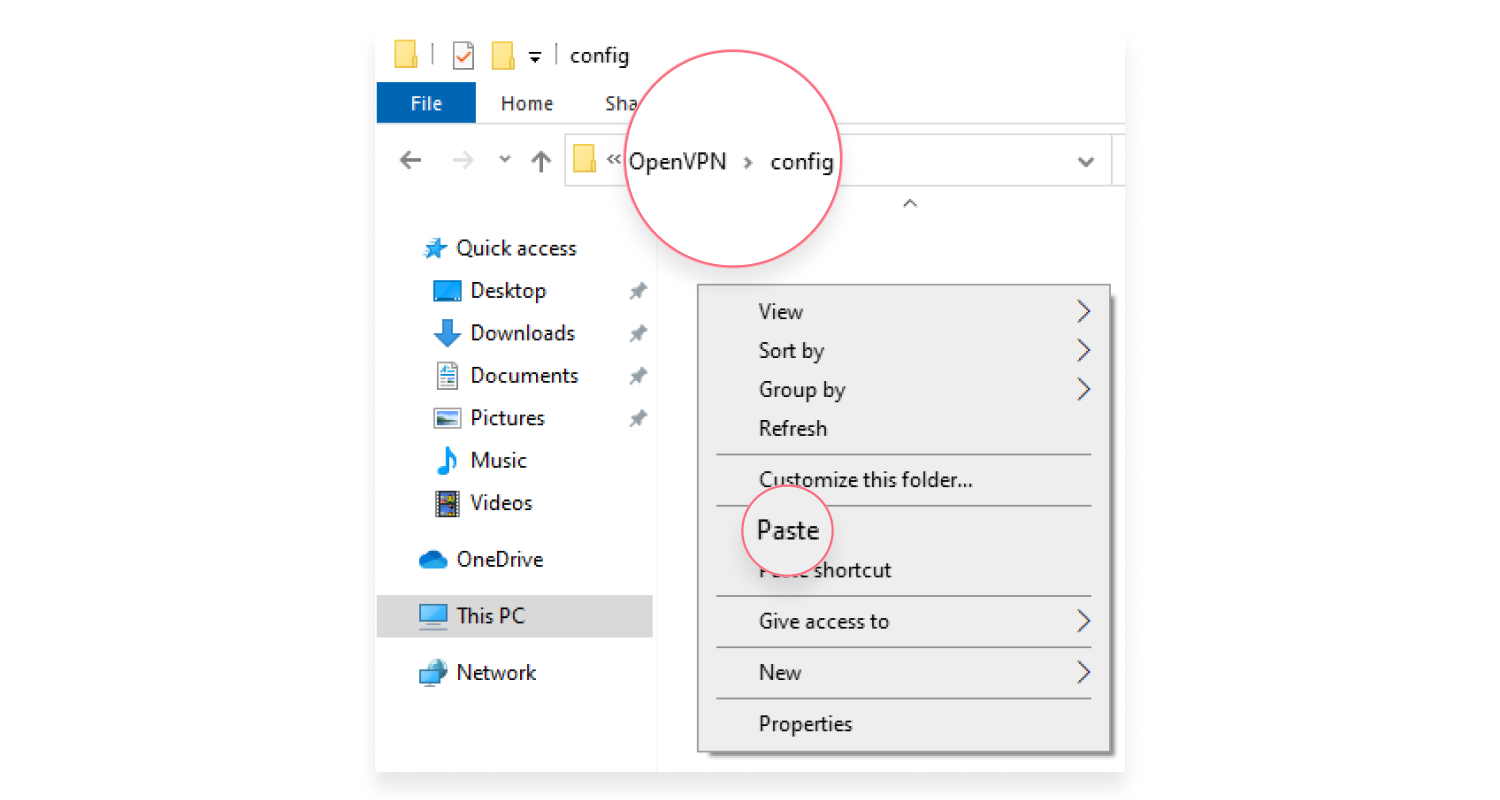
With over 14 million users worldwide, NordVPN is one of the most popular VPN services available today. It offers secure and private connections for users who want to browse the internet freely, stream their favorite content, and enjoy online gaming without any restrictions. Whether you’re using a Windows PC, an Android device, a Mac computer, or an iOS device, NordVPN has got you covered.
Setting up NordVPN on your device is quick and easy. The download and installation process is straightforward, and NordVPN provides step-by-step instructions for each platform. For Windows, NordVPN uses the OpenVPN protocol, which makes it independent of any bugs or security vulnerabilities. What’s more, NordVPN automatically updates its software to fend off any potential malware.
In addition to its strict security features, NordVPN also offers a wide range of server locations. With over 5,400 servers in 59 countries, you can browse the internet from virtually anywhere in the world. This is especially useful if you want to access geo-restricted content or if you’re traveling abroad and need to use the internet securely.
Once you have NordVPN installed on your device, you can enjoy a host of features that enhance your browsing experience. For example, NordVPN offers a double VPN feature called Multi-hop, which allows you to route your internet traffic through multiple servers for added security. NordVPN also offers a split tunneling feature that lets you choose which apps or websites use the VPN connection and which ones don’t.
If speed is a concern for you, NordVPN has you covered. It uses a lightweight protocol called Lightway, which delivers faster and more reliable connections. With NordVPN, you won’t have to worry about slow or laggy internet speeds.
In addition to its user-friendly interface and full compatibility across Windows, Android, Mac, and iOS, NordVPN also offers an advanced kill switch feature. This feature automatically disconnects your internet connection if your VPN connection drops, ensuring that your real IP address and data are never exposed. Furthermore, NordVPN has a strict no-logs policy, which means that it doesn’t keep any records of your online activity.
So, if you’re looking for the best VPN experience with enhanced security, fast connections, and a wide range of server locations, NordVPN is the way to go. Download and install NordVPN today and enjoy a safe and unrestricted internet browsing experience.
Set up NordVPN for Windows, Android, Mac, and iOS
In today’s digital landscape, it is essential to protect your online privacy and security. With the increasing risks of cyber threats and intrusive malware, having a reliable VPN provider is a must. NordVPN is one of the best VPN providers, offering extensive features and benefits to its users.
When you install NordVPN on Windows, Android, Mac, or iOS devices, you gain the advantage of having military-grade encryption protocols to safeguard your data. Moreover, NordVPN allows you to access a vast number of servers from a variety of locations, ensuring optimal internet speed and performance.
With NordVPN’s easy-to-use apps, you can download and install the program within minutes. The installation process is seamless and automatically configures your device to connect through NordVPN’s secure tunnel. This tunnel allows you to browse the internet anonymously and bypass any blocks or restrictions that may be in place.
NordVPN also provides additional security features, such as CyberSec, which protects against malware and other known threats. By using NordVPN, you can enjoy a safer online browsing experience without compromising your bandwidth or internet speed.
For iOS users, NordVPN offers an app that can be downloaded from the App Store. The NordVPN app for iOS not only provides the same military-grade encryption and security as the other platforms but also allows you to effortlessly connect to NordVPN’s extensive network of servers.
In addition to the security and privacy benefits, NordVPN offers different subscription plans to cater to different user needs. Whether you’re an individual or a business, you can choose from a variety of plans that best suit your requirements. NordVPN’s subscriptions are flexible, allowing you to upgrade or downgrade as needed.
If you’re still unsure whether NordVPN is the best choice for you, consider the fact that NordVPN has been recognized as one of the leading VPN providers by reputable organizations such as meshnet.tv and Proton VPN. These endorsements speak volumes about NordVPN’s reputation and the value it provides to its users.
In conclusion, setting up NordVPN for Windows, Android, Mac, and iOS is a simple and straightforward process. By taking advantage of NordVPN’s extensive features and benefits, you can enjoy a safer, more secure online experience, with the added benefit of seamless installation and user-friendly apps.
Download and Install
Downloading and installing NordVPN is a simple process that ensures your online activities are secure and private. It is compatible with a variety of devices, including Windows, Android, Mac, and iOS.
Windows
To download and install NordVPN on Windows, follow these steps:
- Visit the official NordVPN website and navigate to the “Downloads” section.
- Click on the “Download” button for Windows.
- Once the file is downloaded, double-click on it to start the installation process.
- Follow the on-screen instructions to complete the installation.
- After installation, launch the NordVPN app and log in with your credentials.
- You can now connect to any server location and enjoy secure and private internet browsing.
Android
If you want to set up NordVPN on your Android device, here’s what you need to do:
- Go to the Google Play Store and search for “NordVPN”.
- Tap on the NordVPN app and click on the “Install” button.
- Once the installation is complete, open the app and log in using your NordVPN account.
- You can now select a server location and connect to the NordVPN network.
- NordVPN provides a user-friendly interface for easy navigation and selection of protocols.
Mac and iOS
For Mac and iOS devices, the installation process is similar:
- Go to the App Store or the official NordVPN website.
- Search for “NordVPN” and download the app.
- Once downloaded, install the app on your device.
- Open the app and log in with your NordVPN account.
- You can now connect to any server location and enjoy the benefits of NordVPN’s secure connections.
- NordVPN uses advanced encryption protocols to protect your data from any intrusive activity on the network.
In conclusion, NordVPN is a reliable and user-friendly VPN service provider that offers a variety of protocols suitable for a number of devices. Whether you are seeking to fend off any bugs and limitations while downloading or streaming files or simply want to enjoy a secure browsing experience, NordVPN has you covered. With its NordLynx technology and a wide range of server locations around the world, NordVPN consistently provides fast and stable connections. You can also use NordVPN to access geo-restricted websites and content while traveling abroad. Take advantage of NordVPN’s monthly subscriptions and enjoy the full benefits of its encryption technology.
What other devices does NordVPN support?
In addition to Windows, Android, Mac, and iOS, NordVPN supports a wide range of devices so you can stay protected no matter what you use. NordVPN has a multi-device policy, providing you with the flexibility to use their VPN tool on multiple devices at the same time.
Whether you want faster downloading speeds, browse from different IP addresses and countries, or want to secure your gaming consoles against DDoS attacks, NordVPN has got you covered. Their VPN client is available for Windows, Mac, Android, iOS, and Linux. You can also set it up on your router to protect all devices connected to your network.
If you’re looking for a VPN specifically for gaming, NordVPN is one of the best choices. It has dedicated servers for gaming and DDoS protection, providing optimal speeds and security while you play your favorite games. NordVPN also offers a feature called “CyberSec” which protects you against malicious websites and ads in addition to enhancing your internet speeds.
In addition to NordVPN, there are other popular VPN providers that support various devices. For example, ExpressVPN offers a comprehensive VPN program and supports devices such as Windows, Mac, iOS, Android, Linux, and even some gaming consoles.
When choosing a VPN provider, it’s important to consider the device compatibility, speed, and security features that best suit your needs. Each provider has its own set of benefits, so make sure to review and compare them before making a decision.
How to download and install NordVPN for iOS
NordVPN is one of the best VPN services available, offering enhanced security and privacy features for iOS devices. Whether you want to browse websites privately on your iPhone or secure your connection on your iPad, NordVPN has got you covered.
NordVPN for iOS uses the NordLynx protocol, which combines the best features of both the WireGuard and OpenVPN protocols. This ensures faster speeds and enhanced security while browsing the internet. With NordVPN, you can browse the web through a private and secure connection, whether you’re connected to a public Wi-Fi network or using your cellular data.
Downloading and installing NordVPN for iOS is quick and easy. Simply head over to the official App Store and search for “NordVPN.” Once you find the app, tap on “Get” to start the download and installation process. The app is free to download, but additional features and premium plans are available for a cost.
After the app is downloaded and installed, you can open NordVPN and sign in to your account. If you don’t have an account, you can create one easily within the app itself. Once you’re signed in, you can choose a server from a variety of locations around the world, allowing you to access geo-restricted content or browse anonymously.
NordVPN offers a variety of features that make it the best choice for iOS users. In addition to its enhanced security and privacy features, NordVPN also offers a Kill Switch that automatically shuts off your internet connection if the VPN connection drops. This prevents your data from being exposed, even momentarily.
Moreover, NordVPN’s CyberSec feature helps fend off malware and intrusive ads, providing an additional layer of protection while browsing. The Multi-Hop feature allows you to connect to multiple VPN servers, further securing your connection and masking your IP address.
In addition to iOS devices, NordVPN is compatible with a wide range of devices, including Windows, Android, Mac, and even gaming consoles. This compatibility ensures that you can use NordVPN across all your devices for a seamless and secure browsing experience.
NordVPN also has a user-friendly interface, making it suitable for both extensive and limited technical knowledge users. Whether you’re using an iPhone or an iPad, the NordVPN app is optimized for a smooth experience on iOS devices.
With NordVPN, you can enjoy faster speeds, unlimited bandwidth, and military-grade encryption. This helps protect your data from any potential threats and ensures that your connection is secure and private, no matter where you’re browsing from.
So, if you’re looking for the best VPN solution for your iOS device, NordVPN is the way to go. Download and install the app today to experience enhanced security and privacy while browsing the internet.
How to set up NordVPN for Mac
Step 1: Download and Install
Start the process by accessing the official NordVPN website and downloading the Mac version of the application. Once downloaded, follow the installation instructions to install the app on your Mac.
Step 2: Sign in to your NordVPN account
Launch the NordVPN app on your Mac and sign in using your NordVPN account credentials. If you don’t have an account yet, you can create one on the NordVPN website.
Step 3: Choose a server from the NordVPN server list
After signing in, you will see a list of NordVPN servers. Choose the server you want to connect to by either selecting it from the list or using the search bar to find a specific country or server.
Step 4: Connect to the selected server
Click on the “Connect” button to establish a connection with the selected server. Once connected, your Mac will be protected by NordVPN’s encryption and your internet traffic will be routed through the chosen server.
Step 5: Enjoy the benefits of NordVPN on your Mac
Once connected, you can enjoy the benefits of NordVPN on your Mac. NordVPN offers a number of features and benefits such as a dedicated IP address, split tunneling, and strict no-logs policy, among others. You can now browse the internet securely and privately, while also being able to access geo-restricted content.
By following these steps, you can easily set up NordVPN on your Mac and start enjoying a secure and private internet browsing experience.
Router
Setting up NordVPN on your router can be a great solution for providing VPN protection for all of your devices in one go. By installing NordVPN on your router, you can enjoy the benefits of enhanced security and privacy while browsing the internet. Plus, you won’t have to worry about download and installation processes on each individual device since the router will automatically apply the VPN settings.
Moreover, NordVPN supports a variety of router models and comes with easy-to-follow setup instructions, making the process quick and hassle-free. By using NordVPN on your router, you can protect your entire network from threats, malware, and other intrusive activities.
Additionally, NordVPN offers a feature called NordLynx, which is a WireGuard-based technology that ensures fast and stable connections. With NordLynx, you can enjoy full performance without experiencing slow internet speeds. This technology is known for its efficient tunneling and low-latency connection.
If you’re looking for an extra layer of security, NordVPN also offers a multi-hop feature that allows you to route your connection through multiple servers. This can provide you with even more anonymity and protection when browsing the web.
NordVPN’s router setup is suitable for all major operating systems, including Windows, Android, Mac, and iOS. Whether you’re at home or using a remote service, NordVPN’s router setup is a reliable and versatile solution to ensure your internet connection is secure and private.
When it comes to compatibility, NordVPN has an official list of routers that are known to work well with their service. However, even if your router isn’t on the list, NordVPN has a user-friendly guide that can help you set it up by manually configuring the settings.
By setting up NordVPN on your router, you can split your network into different virtual networks, allowing you to prioritize specific devices or activities. This can be useful for streaming content on your TV, gaming, or browsing securely with your Chromebook. The split tunnel feature allows you to choose which devices or apps use the VPN and which ones don’t, giving you more flexibility.
In summary, installing NordVPN on your router is the best solution for securing your entire network and ensuring your online activities are protected from threats. With NordVPN, you’ll have the peace of mind that your personal information and browsing data are safe and secure.
Gaming consoles
When it comes to gaming consoles, their default settings often do not provide the optimum online gaming experience. That’s where NordVPN comes in, with its advanced technology and extensive features.
Improved online gaming
NordVPN can be easily installed on gaming consoles such as Xbox and PlayStation, allowing users to walk through cyber threats and enjoy a better gaming experience. By having NordVPN installed, users can enjoy unlimited bandwidth and faster speeds while gaming, ensuring a smoother and more enjoyable online gameplay.
Extra security
One of the key advantages of using NordVPN on gaming consoles is the added security it provides. By encrypting your internet data with military-grade encryption, NordVPN guarantees that your gaming activity and personal information are protected from any potential threats.
Access to geo-restricted content
Moreover, NordVPN allows users to access geo-restricted gaming services, websites, and files. This means that if you’re looking to play games that are only available in certain countries, NordVPN can easily help you bypass those restrictions and set up an optimal gaming experience.
Multiple protocols
NordVPN offers a variety of protocols to choose from, such as OpenVPN, WireGuard, and NordLynx (based on the new Lightway protocol). These protocols ensure that your data is securely transmitted through the internet and provides a better gaming experience.
In conclusion, NordVPN is an essential tool for gaming console users who want to enhance their online gaming experience. With its advanced features, extensive server network, and military-grade encryption, NordVPN ensures that your gaming activity is protected, and you have access to a wide variety of games and services. So, get NordVPN for your gaming console and take your gaming to the next level!
How to set up NordVPN for Windows
When looking for the best VPN solution for your Windows device, NordVPN is a top choice. With its quick and easy installation process, you can set up NordVPN within minutes and start enjoying a secure and private internet connection.
To set up NordVPN for Windows, you first need to download and install the NordVPN app. This lightweight application wont take up much space on your device, and it is designed to provide a seamless user experience.
NordVPN offers a free trial for Windows users, so you can try out their service before committing to a full subscription. Once you’ve signed up, you’ll have access to NordVPN’s dedicated server network, which spans over 5,500 servers in a variety of locations around the world.
By default, NordVPN uses the OpenVPN protocol, which ensures a high level of encryption and security for your internet connection. You can also choose to use the NordLynx protocol, which leverages the latest WireGuard® technology for even faster speeds and improved performance.
One of the key benefits of using NordVPN for Windows is that it allows you to securely access websites and online services that may be blocked or restricted in your region. NordVPN’s advanced encryption and tunneling technology fend off any attempts to intercept or monitor your online activities.
In addition to protecting your online privacy, NordVPN also offers a range of features that enhance your browsing experience. It includes a kill switch, which automatically disconnects your internet connection if the VPN connection drops, preventing any potential leaks of your real IP address.
For users who prefer a static IP address or need a dedicated IP for specific purposes like gaming or accessing certain services, NordVPN offers these options as well. You can choose from a diverse range of servers that provide dedicated IP addresses.
Setting up NordVPN on your Windows device is a breeze. All you need to do is install the app, sign in with your NordVPN account, and weve covered everything else. NordVPN ensures that your connection is secure and private, so you can browse the internet with peace of mind.
Whether you’re using your Windows laptop, desktop, or tablet, NordVPN has you covered. Their user-friendly interface makes it easy to connect to the VPN with just a single click. Plus, with NordVPN’s military-grade encryption and reliable performance, you can keep your data safe no matter where you are.
Smart TV
If you have a Smart TV, you can also take advantage of NordVPN’s features, plus it provides enhanced security and privacy for your online activities. Additionally, having NordVPN on your Smart TV allows you to access geo-restricted content, as it hides your IP address and makes it appear as if you are in a different country.
NordVPN offers a variety of protocols, including NordLynx and WireGuard, which are popular choices for Smart TVs. Their program can be installed on Android-based Smart TVs, as well as Mac and Windows computers. Moreover, NordVPN’s Smart TV support doesn’t limit you to a specific TV brand or model, as it can be set up on any Smart TV that is connected to the internet.
When NordVPN is installed on your Smart TV, you can start enjoying a secure online experience. It ensures your online activity is protected from any threats, and you can freely browse the internet without worrying about your security or privacy being breached. NordVPN’s Smart TV support also guarantees high-speed and unlimited bandwidth, allowing you to stream content without any interruptions.
One of the main advantages of using NordVPN on your Smart TV is that it opens up a whole new world of content. You can access streaming platforms and services that are only available in certain countries, allowing you to enjoy a wider range of shows, movies, and sports events. NordVPN’s vast network of servers in different countries ensures that you can easily connect to the server of your choice and access the content you want.
How to set up NordVPN for Android
NordVPN is a leading VPN provider known for its optimal security and seamless user experience. If you are an Android user looking to protect your online activities and browse the internet with better privacy, NordVPN is a great solution for you.
To set up NordVPN on your Android device, you can follow these simple steps:
1. Download and Install the NordVPN App
To begin, go to the official NordVPN website or the Google Play Store and search for the NordVPN app. Download and install the app on your Android device.
2. Create an Account or Log In
Once the app is installed, open it and create a new account or log in if you already have one. NordVPN offers a variety of subscription plans to choose from.
3. Connect to a Server
After logging in, you will be redirected to the main screen of the app. From here, you can choose a server location from a wide variety of options. NordVPN supports thousands of servers across the globe, allowing you to access content from different countries and bypass any restrictions.
4. Enable Extra Security Features
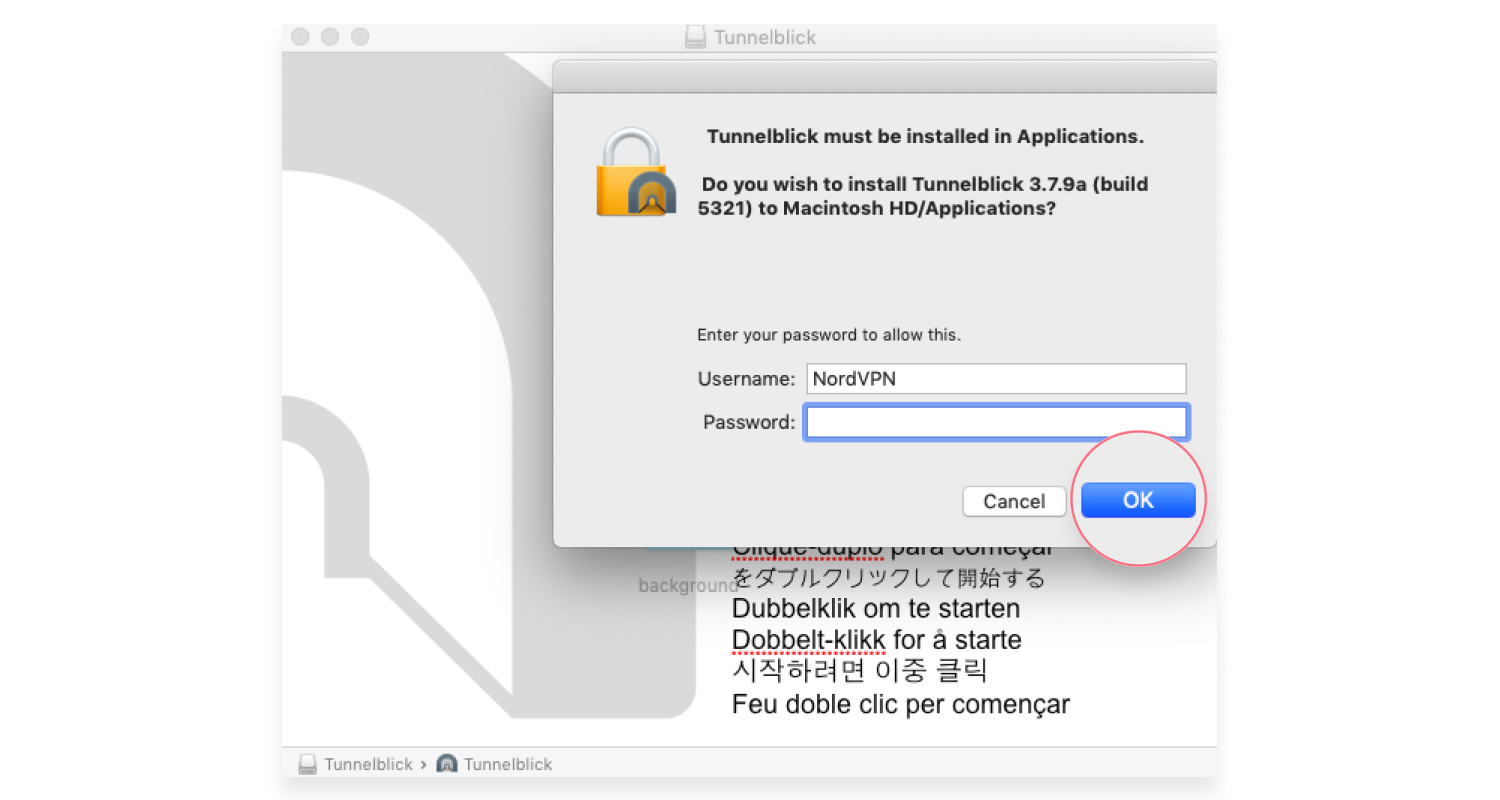
NordVPN offers a number of extra security features to enhance your online protection. One of these features is NordLynx, which is a VPN protocol based on the WireGuard technology. Enabling this feature will give you military-grade encryption and faster connection speeds.
5. Customize VPN Settings (Optional)
If you want to further customize your NordVPN settings, you can do so by navigating to the app’s settings section. Here, you can choose to enable features like CyberSec, which blocks intrusive ads and malware, and the Kill Switch, which ensures that your internet connection is always encrypted.
By following these steps, you can easily set up NordVPN on your Android device and enjoy a safer and more private browsing experience. NordVPN’s user-friendly app and optimal security measures make it one of the best VPN providers in the market.
Devices
When it comes to using NordVPN, the service is compatible with a wide range of devices. Whether you’re using Windows, Android, Mac, or iOS, you can set up NordVPN easily on each of them.
Windows and Mac
For Windows and Mac, NordVPN provides a user-friendly desktop program that can be installed and used on these operating systems. The program allows you to choose from a variety of servers across different countries and also supports a feature called Double VPN, which adds an extra layer of security.
Android and iOS
If you’re using an Android device, you can download and install the NordVPN app from the Google Play Store. The app is light and easy to use, and it allows you to connect quickly to any server of your choice. On iOS, you can download the NordVPN app from the App Store and enjoy the same user-friendly experience.
Tablets and Consoles
In addition to desktop and mobile devices, NordVPN can also be used on tablets and gaming consoles. The service can be accessed on devices such as iPads or Android tablets and provides the same level of security and performance as it does on other devices. Moreover, NordVPN supports dedicated apps for popular gaming consoles, allowing you to protect your network while enjoying online gaming.
Split Tunneling and WireGuard
One of the advantages of using NordVPN is its split tunneling feature. This feature allows you to choose which apps or services use the VPN connection and which ones go through your regular internet connection. Additionally, NordVPN supports the WireGuard protocol, which offers faster and more efficient connections while maintaining the same level of security.
Threats and Risks
NordVPN takes security seriously and provides users with full protection against threats and risks on the internet. Its servers are located in various countries around the world, allowing users to choose their desired location and access content that may be restricted in their country. NordVPN also uses strict no-logs policy, ensuring that no user data is collected or stored.
Other Services
In addition to NordVPN, there are other VPN services available for users. One such service is ExpressVPN, which offers a wide range of servers and a user-friendly interface. However, it should be noted that ExpressVPN has limited device support compared to NordVPN. Users also have the option to choose from a variety of VPN protocols, including OpenVPN, IKEv2, and L2TP/IPSec.
In summary, NordVPN provides a user-friendly and secure VPN service that can be easily installed and used on various devices. Whether you’re using Windows, Android, Mac, or iOS, NordVPN has you covered with its wide range of servers and excellent performance. With features like split tunneling and WireGuard support, NordVPN offers a complete package for users looking to protect their online privacy and security.
Fend off cyber risks with the best VPN app for Windows PC
When it comes to protecting your online data and privacy, using a reliable VPN app is crucial. With cyber risks and intrusive bugs constantly lurking around, it’s essential to choose a VPN service that provides a secure and straightforward solution for users. That’s where NordVPN comes in.
NordVPN is a top-rated VPN service that offers a user-friendly app for Windows PC. With just a few clicks, you can set up NordVPN and enjoy a safer browsing experience.
One of the advantages of NordVPN is the use of Lightway, a protocol that guarantees a fast and secure connection. It automatically selects the best server for you, ensuring that your data is protected and your online activity remains private.
With NordVPN, you can also browse the internet effortlessly on other devices such as Android, Mac, iOS, and Smart TV. The app supports a wide range of devices, making it suitable for all your browsing needs.
Moreover, NordVPN provides a number of additional features to enhance your online security. It blocks malware and intrusive ads, ensuring that you can enjoy a seamless browsing experience without any interruptions. NordVPN also has a Double VPN feature, which encrypts your data and routes it through two separate servers for an added layer of protection.
If you’re a gaming enthusiast, NordVPN has got you covered. It offers a dedicated gaming server that optimizes your connection and reduces lag, allowing you to enjoy smooth gameplay without any interruptions.
In addition to its excellent features, NordVPN also offers a 30-day money-back guarantee. If you’re not satisfied with the service, you can get a full refund, no questions asked.
So, if you’re looking for the best VPN app for Windows PC, NordVPN is the way to go. Don’t compromise your online security and privacy – download and install NordVPN today to enjoy a safer and more private browsing experience.
How to download and install NordVPN for Android
When it comes to protecting your online privacy and ensuring a secure internet connection, NordVPN is a trusted and reliable choice. With over 7670 servers in more than 59 countries, NordVPN offers fast and secure VPN services for Android devices. Here’s a step-by-step guide on how to download and install NordVPN on your Android device:
Step 1: Go to the Google Play Store
The first step is to go to the Google Play Store, which is the official app store for Android devices. Search for “NordVPN” in the search bar and click on the NordVPN app that appears in the search results. This will take you to the NordVPN app page.
Step 2: Download and install the app
Once you’re on the NordVPN app page, click on the “Install” button to download and install the app on your Android device. The app is free to download, but it requires a subscription to use. You can choose from different subscription plans, including a monthly, annual, or 3-year plan. Select the plan that suits your needs and proceed with the installation.
Step 3: Sign in or create an account
After the app is installed, open it and either sign in to your existing NordVPN account or create a new account. If you don’t have an account, you’ll be prompted to create one by entering your email address and choosing a password.
Step 4: Connect to a server
Once you’re signed in, you’ll see a map with different server locations. You can either select a server location manually or use the “Quick Connect” feature to connect to the best server location based on your current location. NordVPN has servers in the United States, the United Kingdom, Canada, and many other countries, so you can choose the server location that suits your needs.
Step 5: Enjoy secure browsing
Once you’re connected to a server, NordVPN will automatically encrypt your internet traffic and protect your online activity from cyber threats. The app uses advanced encryption technology to ensure that your data is secure, even when you’re connected to public Wi-Fi networks. NordVPN also blocks malware and other known threats, providing you with a safe and secure browsing experience.
In conclusion, downloading and installing NordVPN on your Android device is a simple and straightforward process. With NordVPN, you can enjoy fast and secure internet browsing on your Android device, protecting your privacy and ensuring your online security.
How to download and install NordVPN for Mac
When it comes to online security, it’s important to choose a reliable VPN service. NordVPN is one of the top VPN providers, offering a user-friendly solution that works across multiple devices including Mac. In this article, we will walk you through the steps on how to download and install NordVPN on your Mac.
Step 1: Sign up for a NordVPN account
The first step to download and install NordVPN on your Mac is to sign up for a NordVPN account. Visit the NordVPN website and choose a subscription plan that suits your needs. NordVPN offers different tiers of subscriptions with varying features and costs.
Step 2: Download the NordVPN app for Mac
Once you have signed up for an account, go to the NordVPN website and download the app for Mac. NordVPN offers a dedicated app for Mac that is easy to install and use. Simply click on the “Download” button and wait for the download to complete.
Step 3: Install and set up NordVPN on Mac
After the download is complete, locate the downloaded file and double-click on it to start the installation process. Follow the on-screen instructions to install NordVPN on your Mac. Once the installation is complete, launch the NordVPN app.
Step 4: Connect to a NordVPN server
When you open the NordVPN app on your Mac, you will see a list of available servers. You can either choose a server from the list or let NordVPN automatically select the best server for you. NordVPN offers a vast network of servers located in different countries, allowing you to browse the internet with a different IP address and take advantage of faster speeds.
Step 5: Enjoy secure browsing on Mac
Once you are connected to a NordVPN server, you can browse the internet securely and anonymously on your Mac. NordVPN uses industry-standard encryption protocols like OpenVPN to protect your online activity from threats. With NordVPN, you can also enjoy access to geo-restricted websites and services, as well as stream content from platforms like Netflix or BBC iPlayer.
NordVPN for Mac not only ensures the security of your internet connection but also makes it easy for you to bypass restrictions and enjoy a faster browsing experience. With NordVPN, you can browse the internet without worrying about bandwidth limitations. It also offers a variety of additional features like CyberSec, a tool that protects you from online threats, as well as dedicated IP addresses for an additional cost.
By following these steps, you can easily download and install NordVPN on your Mac and enjoy secure and private browsing. NordVPN is a trusted company with millions of users worldwide, and their extensive server network ensures that you will always find a server that suits your needs. So, take advantage of NordVPN’s user-friendly interface and start browsing the internet with peace of mind on your Mac.
Download NordVPN How to install NordVPN on Windows, Mac, iOS, and Android
NordVPN is a popular VPN provider that offers a wide range of features and is known for its strong security measures. Whether you are looking to protect your online privacy, bypass geo-restrictions, or secure your Wi-Fi connection, NordVPN has got you covered.
Downloading and Installing NordVPN on Windows
To setup NordVPN on Windows, simply head to the official NordVPN website and download the app. Once the download is complete, run the installer and follow the on-screen instructions to install NordVPN on your Windows device. Once installed, you can log in with your NordVPN account and start using the VPN service.
Installing NordVPN on Mac
Installing NordVPN on a Mac is just as easy. Visit the NordVPN website, download the Mac app, and run the installer. Follow the instructions to complete the installation and then log in with your NordVPN account to start using the VPN service on your Mac.
Setting Up NordVPN on iOS
If you are using iOS, you can download and install NordVPN from the App Store. Once installed, open the app and log in with your NordVPN account. You can then connect to a server and start enjoying the benefits of NordVPN on your iOS device.
Installing NordVPN on Android
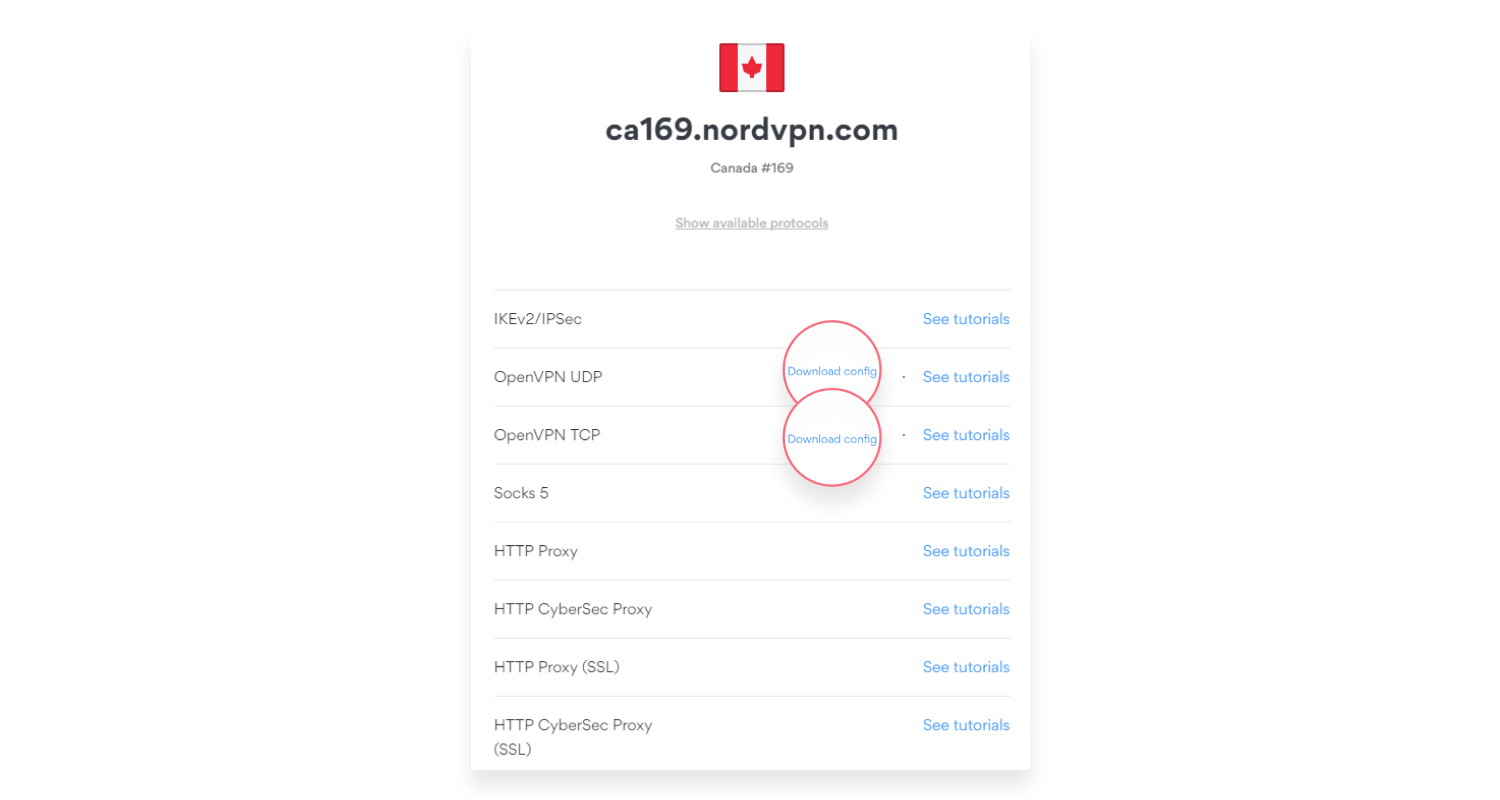
For Android users, NordVPN can be downloaded and installed from the Google Play Store. After installation, open the app and log in with your NordVPN account. From there, you can connect to a server and secure your internet connection on your Android device.
With NordVPN, you can have peace of mind knowing that your data is protected from hackers, cyber threats, and other online risks. The company offers a wide range of protocols, including the best-in-class NordLynx protocol, based on WireGuard. This ensures that your internet connection is secure and your data is consistently encrypted.
NordVPN has a dedicated team of servers located all over the world, making it suitable for users looking to connect to servers in different countries. This feature allows you to bypass geo-restrictions and access content that would otherwise be unavailable.
In addition to its wide range of servers, NordVPN also offers static IP addresses and dedicated IP servers, providing you with an independent and faster connection. They also have plans that support up to 6 devices simultaneously, so you can stay connected and protect all your devices at once.
If you are unsure about committing to a long-term plan, NordVPN also offers a 30-day money-back guarantee, allowing you to try out their service risk-free. This makes it a great option for users who want to test the service before making a long-term commitment.
In conclusion, NordVPN is one of the best VPN providers available, offering a wide range of features and a secure online experience. Whether you are using Windows, Mac, iOS, or Android, NordVPN has the tools you need to stay connected and keep your data safe.
NordVPN 7670 Download For Windows PC
If you’re looking for a reliable and secure VPN solution for your Windows PC, NordVPN 7670 is a great choice. With its extensive network of servers and advanced features, NordVPN offers enhanced online security and privacy.
One of the benefits of using NordVPN is its multi-hop setup, which allows you to route your internet traffic through multiple servers to further protect your data. This is especially useful if you’re concerned about online surveillance or censorship.
When it comes to speed, NordVPN doesn’t slow you down. With its advanced Lightway protocol, you can enjoy fast and stable connections, even when streaming or downloading large files.
NordVPN also supports a wide range of devices, so you can use it not only on your Windows PC, but also on your Android, Mac, and iOS devices. Additionally, NordVPN can be installed on your smart TV, gaming consoles, and other compatible devices.
With NordVPN installed and activated, you can start enjoying all the benefits of a VPN. Your online activities will be encrypted and your IP address will be masked, making it harder for anyone to track or monitor your online presence.
NordVPN also offers an extensive server network, with servers located in various countries around the world. This allows you to bypass content restrictions and access geo-restricted websites and services, such as streaming platforms and social media sites.
Furthermore, NordVPN has a user-friendly interface, making it easy to navigate and configure. You can choose from a variety of server locations and customize the settings to suit your preferences. NordVPN also offers a kill switch feature, which automatically disconnects your internet connection if the VPN connection drops, ensuring that your data is always protected.
In conclusion, NordVPN 7670 is a reliable and feature-packed VPN solution for Windows PCs. With its advanced technology and extensive server network, NordVPN offers enhanced online security and privacy, giving you the advantage against potential hackers and surveillance. Install NordVPN and enjoy a safer and more secure online experience.
Вопрос-ответ:
What other devices does NordVPN support?
NordVPN supports a wide range of devices, including Windows, Mac, iOS, Android, routers, smart TVs, gaming consoles, and more. You can set up NordVPN on multiple devices and protect your online privacy and security on all of them.
Видео:
How to Use NordVPN in 2023 | Easy NordVPN Tutorial
How to Use NordVPN in 2023 | Easy NordVPN Tutorial by Consumer Research Studios 6 months ago 5 minutes, 3 seconds 9,919 views
Get NordVPN for FREE | How to use NordVPN for free? (TUTORIAL)
Get NordVPN for FREE | How to use NordVPN for free? (TUTORIAL) by VPNpro 1 year ago 5 minutes 155,478 views
How to use NordVPN on iPhone Best iOS Tutorial Setup Guide
How to use NordVPN on iPhone Best iOS Tutorial Setup Guide by VPN Wisdom 1 year ago 5 minutes, 15 seconds 30,697 views
