A Review of ExpressVPN Keys Setup: A Simple Secure Password Manager with Room for Improvement

If you’re looking for a simple and secure way to manage your passwords, ExpressVPN Keys Setup is the solution you’ve been searching for. With the increasing need for strong and unique passwords to protect our online accounts, a password manager is essential in today’s digital age. However, with so many options available on the market, it can be overwhelming to choose the right one for your needs.
ExpressVPN Keys Setup stands out from the competition with its user-friendly interface and robust features. It is designed to make managing your passwords as hassle-free as possible.
One of the key advantages of ExpressVPN Keys Setup is its ability to generate and store strong passwords for all your online logins, credit cards, and websites. With just a few clicks, you can create complex and unique passwords that are virtually impossible to guess or crack. This feature alone makes ExpressVPN Keys Setup a top choice among most password managers.
ExpressVPN Keys Setup also offers a zero-knowledge system, meaning that your passwords are encrypted and stored securely on your device. This gives you complete control and peace of mind, knowing that your sensitive information is not stored on any remote servers or accessible to anyone else.
Another major advantage of ExpressVPN Keys Setup is its cross-platform compatibility. Whether you’re using a Windows PC, macOS laptop, or even a smartphone, ExpressVPN Keys Setup has you covered. It seamlessly syncs across all your devices, ensuring that you have access to your passwords whenever and wherever you need them.
When it comes to pricing, ExpressVPN Keys Setup offers a reasonable subscription plan. For a small monthly fee, you get unlimited password storage with no limit on the number of websites or devices you can use. This is a great deal considering the many features and benefits it provides.
In conclusion, ExpressVPN Keys Setup is a solid password manager that makes it easy and safe for anyone to store and manage their passwords. Its user-friendly interface, robust features, and zero-knowledge system set it apart from the competition. Whether you’re a tech-savvy individual or a privacy-conscious user, ExpressVPN Keys Setup is a must-have tool to keep your online accounts secure.
Before you make a final decision on which password manager to choose, be sure to read our in-depth review on ExpressVPN Keys Setup. It will provide you with more information on how this product compares to others in terms of performance, autofill capabilities, and more.
So why wait? Get ExpressVPN Keys Setup today and start saving time and enhancing your online security!
Sources: TechRadar
A Simple Secure Password Manager
A password manager is an essential tool for anyone who needs to store and manage multiple logins and passwords securely. With so many different accounts and passwords to remember, using a password manager can save you time and ensure the security of your accounts.
How a Password Manager Works
A password manager works by securely storing your logins and passwords in an encrypted vault. Instead of remembering all your passwords, you only need to remember the master password for the password manager app. When you need to log in to a website or app, the password manager autofills your credentials, making it much easier and safer to use strong, unique passwords for all your accounts.
The ExpressVPN Password Manager
ExpressVPN offers its own password manager as part of its product suite. The ExpressVPN Password Manager works across devices, so you can access your stored logins and passwords from your phone, tablet, or computer. Currently, it is available as a browser extension for popular browsers, and an app is in development.
- Easy to Use: The ExpressVPN Password Manager is easy to install and use. You can quickly import your existing passwords and start using the password manager right away.
- Strong Security: ExpressVPN uses solid encryption and a zero-knowledge policy to ensure that your passwords are kept secure. Your passwords are encrypted and only accessible by you.
- Unlimited Storage: Unlike some other password managers, ExpressVPN’s Password Manager offers unlimited storage for your logins and passwords. You can store as many accounts as you need.
- Better Autofill: The ExpressVPN Password Manager’s autofill feature makes it easy to fill in login forms with your saved credentials. It is compatible with most websites and apps.
The Verdict
Overall, the ExpressVPN Password Manager is a solid choice for anyone looking for a simple and secure way to manage their passwords. It has all the features you would expect from a password manager, with the added benefit of ExpressVPN’s strong security and privacy features. While it might not have all the bells and whistles of some other password managers, it offers a reliable and easy-to-use solution for mainstream users.
ExpressVPN Keys Setup
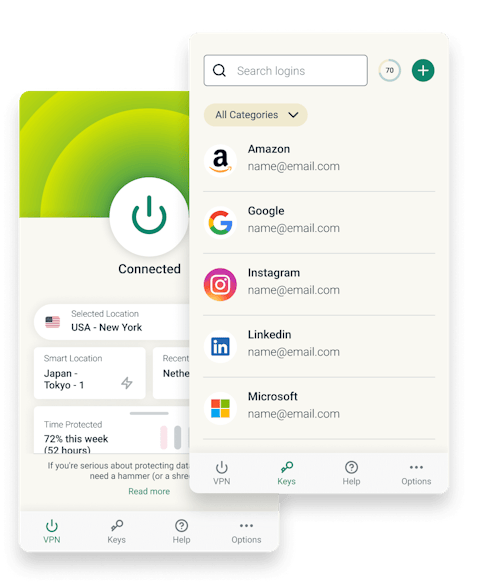
If you are looking for a solid password manager to keep your accounts safe, ExpressVPN Keys Setup is a great choice. This password manager not only provides a secure way to generate and store your passwords, but also offers plenty of other useful features.
One of the main pros of ExpressVPN Keys Setup is its integrated password generator. This means that you can easily generate strong and unique passwords for all your online accounts, ensuring that your private information stays safe. The password generator takes into account various factors to ensure that your passwords are as secure as possible, such as the length and complexity of the password.
ExpressVPN Keys Setup works by creating a secure vault to store all your passwords. This vault is encrypted and can only be accessed using your master password, which means that even if someone gains access to your device, they won’t be able to unlock your password vault without knowing your master password.
One of the best features of ExpressVPN Keys Setup is its zero-knowledge policy. This means that ExpressVPN does not have access to your passwords or any other sensitive information stored in your password vault. This ensures that your data remains private and secure, even if ExpressVPN were to experience a data breach.
ExpressVPN Keys Setup also offers excellent performance, with fast and reliable syncing across devices. This means that you can access your passwords from any device with an internet connection, making it much easier to use your passwords on the go.
In terms of pricing, ExpressVPN Keys Setup offers competitive plans that are well worth the investment. With its robust security features and easy-to-use interface, ExpressVPN Keys Setup is a much better option than mainstream password managers.
In conclusion, if you want a secure and easy-to-use password manager, ExpressVPN Keys Setup is a top choice. It offers plenty of features to help you keep your accounts safer and your data private. With its integrated password generator and zero-knowledge policy, ExpressVPN Keys Setup is a solid product that will definitely improve your online security.
Store Unlimited Passwords and More
ExpressVPN’s password manager offers a convenient way to store unlimited passwords and other sensitive information. With the ability to generate strong, unique passwords for each account, you can ensure the security of your online accounts across a wide range of devices and platforms.
Many password managers, like the one offered by ExpressVPN, also include additional features such as biometric authentication and encrypted storage for important documents and files.
According to TechRadar’s review, ExpressVPN’s password manager is an excellent product with high ratings. They particularly highlight its ease of use and cost-saving by eliminating the need for a separate password generator software.
Although ExpressVPN’s password manager is currently only available for macOS, the team behind the product has plans to expand its compatibility to other operating systems in the future.
One of the main advantages of using ExpressVPN’s password manager is the integration with ExpressVPN’s VPN service. By using both services together, you can ensure that your online activities are not only secure but also anonymous.
However, it is important to note that although ExpressVPN’s password manager offers excellent encryption and security features, no software can be completely immune to vulnerabilities. In the event of a security breach, it is always recommended to change your passwords and enable two-factor authentication.
Overall, ExpressVPN’s password manager is a reliable and convenient solution for managing passwords and securing sensitive information. With its unlimited storage capability and integration with ExpressVPN’s VPN service, it provides a comprehensive solution for privacy and security in the digital world.
Forget Password Frustrations
Forgetting passwords can be a frustrating experience. We all have numerous online accounts that require unique and secure passwords, but it’s difficult to remember them all. That’s where a password manager comes in handy.
A password manager is an excellent tool that helps limit the number of passwords you need to remember. With an integrated manager, you can store all your passwords in one secure vault, making it easy to access them whenever you need to log in to different websites and services.
One solid password manager to consider is ExpressVPN Keys Setup. It offers a user-friendly interface that does not require tech-savvy knowledge to use. This manager supports multiple devices, including MacOS, Windows, and even mobile devices like Android and iOS.
The key feature of this password manager is its excellent support and service. They provide a detailed FAQ section that answers all your questions about the product setup and usage. If you need further assistance, their team is always available to help you.
Another great feature of ExpressVPN Keys Setup is its integrated password generator. This tool creates strong and unique passwords for all your accounts, ensuring that your online security is top-notch. The generated passwords are stored securely within the password manager, so you don’t have to worry about remembering them.
One potential drawback of this password manager is its pricing. Although they offer different plans to cater to your needs, the cost can be a bit higher compared to other password managers on the market. However, considering the solid performance and plenty of features it offers, it’s a deal worth considering.
In conclusion, if you’re looking for a password manager that keeps your passwords safe and secure across all your devices, ExpressVPN Keys Setup is a solid choice. It offers plenty of features and excellent support. Just make sure to consider the pricing before making a decision. With this password manager, you can forget your password frustrations and have peace of mind knowing that your private information is kept safe and secure.
Effortlessly Manage Your Passwords
Are you tired of trying to remember multiple passwords for all of your online accounts? With a simple secure password manager, you can effortlessly manage and secure all of your passwords in one place.
Whether you’re on your phone, tablet, or computer, a password manager makes it easy to unlock your accounts with just one master password. Not only does this make it more convenient for you to use, but it’s also much safer than using weak or duplicate passwords.
Currently, there are many password managers available, but not all of them offer the same level of security. Look for a password manager that uses zero-knowledge encryption, which means that only you have access to your passwords. This ensures that even the password manager provider can’t access your stored passwords.
In addition to keeping your passwords safe, a good password manager will also offer other integrated features such as a password generator and autofill for your account logins. This will help you create strong and unique passwords for each of your accounts, and save you time when logging in.
One of the most important factors to consider when choosing a password manager is its compatibility with your devices and web browsers. Look for a password manager that works with Windows, Mac, iOS, and Android, and integrates seamlessly with popular web browsers like Chrome, Firefox, and Edge.
The final verdict on which password manager is the best for you will depend on your specific needs and preferences. Take into account factors such as pricing, ease of use, additional security features, and customer ratings and reviews. By doing your research, you can find the password manager that works best for you and your team or business, saving you time and keeping your passwords secure.
Keep Your Data Secure
In today’s digital age, keeping your data secure is more important than ever. With so many threats and vulnerabilities out there, it’s crucial to have a reliable password manager in place. A Simple Secure Password Manager with ExpressVPN Keys Setup is the perfect solution.
Using a subscription-based password manager like ExpressVPN provides you with a cost-effective way to keep your data safe. Unlike other password managers, ExpressVPN’s built-in password manager has added features that go above and beyond just storing passwords. It can also generate strong, unique passwords for all your accounts.
The ExpressVPN password manager is available on both macOS and Windows operating systems, making it accessible to most people. Its user-friendly interface allows you to store and manage your passwords with ease. You can also monitor your online accounts and receive alerts if any suspicious activity is detected.
ExpressVPN’s password manager has a built-in password generator that can create strong and unique passwords for each of your accounts. It will automatically fill in login fields for you, saving you time and effort. With the added security of ExpressVPN, you can feel confident that your private information is secure.
One of the standout features of ExpressVPN’s password manager is its unlimited storage. Unlike other password managers that limit the number of logins you can store, ExpressVPN allows you to store as many logins as you need. This is especially beneficial if you have multiple accounts for both personal and business use.
In addition to its password manager, ExpressVPN also offers the added security of VPN service. With ExpressVPN, you can browse the internet with peace of mind, knowing that your data is encrypted and your online activities are private. This added layer of security can give you the edge over the competition.
In conclusion, ExpressVPN’s password manager offers a reasonable cost with plenty of added features to keep your data secure. Whether you’re an individual user or a business, ExpressVPN’s password manager is a great tool to have. With its built-in password generator, unlimited storage, and VPN service, you can browse the internet with confidence and keep your private information safe.
One-Click Password Access
With the ExpressVPN Keys Setup, you can enjoy one-click password access to all your online accounts. Say goodbye to the hassle of trying to remember multiple passwords and the risk of using weak passwords.
Using password managers has become a necessity in today’s digital age. The ExpressVPN app makes it easy to store, manage, and access your passwords securely across all your devices. Whether you’re using Windows, Mac, or Android, the ExpressVPN password manager works seamlessly and ensures that your passwords are always protected.
One of the key features that sets ExpressVPN apart from other password managers is its integration with ExpressVPN’s strong encryption. This means that not only does the password manager keep your passwords secure, but it also encrypts your internet traffic, providing an extra layer of privacy and security.
But ExpressVPN’s password manager offers much more than just secure password storage. It also has a built-in password generator that creates unique and strong passwords for each of your accounts. This eliminates the need to come up with passwords on your own and ensures that your accounts are better protected against hacking attempts.
The ExpressVPN password manager also offers a biometric login option, such as fingerprint or face recognition, making it even more convenient for you to access your passwords quickly and securely. This feature works on compatible devices, ensuring that only you have access to your password vault.
When it comes to managing your passwords, ExpressVPN has made it easy for you to organize them in a way that works best for you. You can create different categories or folders to group your passwords, making it easier to find the password you need when you need it.
ExpressVPN’s password manager also supports auto-fill, which means it can automatically fill in your login details for websites and apps. This saves you time and ensures that you enter your credentials correctly every time.
ExpressVPN’s password manager does not limit the number of passwords you can store, so you can store as many passwords as you need. Whether it’s for personal use or for your business, ExpressVPN has you covered.
In conclusion, ExpressVPN’s password manager offers a simple and secure solution for managing your passwords. Its easy setup, strong encryption, and integrated features make it a better choice compared to other password managers. With ExpressVPN, you can keep your passwords secure and easily accessible across all your devices with just one click.
Create Strong Passwords
Creating strong passwords is crucial for ensuring the security of your online accounts and protecting your personal information from being compromised. With the increasing number of data breaches and hacking attempts, it is essential to use passwords that are difficult to guess and resistant to brute-force attacks.
One way to create strong passwords is to use a combination of uppercase and lowercase letters, numbers, and symbols. Avoid using common words or easily guessable phrases. Instead, opt for random combinations of characters that are not related to personal information or common patterns.
Using password generators provided by password managers or built-in features in browsers can also be a great means of generating strong passwords. These tools can generate complex and unique passwords that are difficult to crack. Additionally, password managers offer the advantage of securely storing your passwords, making it easier to remember and access them when needed.
Another way to create strong passwords is to use passphrases. A passphrase is a sentence or a string of memorable words that are easy for you to remember but difficult for others to guess. For example, “correct horse battery staple” is a much stronger password than a shorter, more complex random string of characters.
Make use of password strength ratings provided by some password managers or online tools. These ratings can give you an idea of how strong your password is and provide suggestions for improvements. It’s always better to aim for passwords with the highest possible ratings to ensure better security.
Keep in mind that it is important to use different passwords for each of your accounts. This way, if one account gets compromised, your other accounts will still remain secure. Using a password manager can help you keep track of all your passwords and ensure that each one is unique and secure.
Lastly, consider enabling two-factor authentication (2FA) whenever possible. 2FA adds an extra layer of security by requiring a second form of authentication, such as a code sent to your phone or a biometric scan, in addition to your password.
In conclusion, creating strong passwords is essential for maintaining the security of your online accounts. By following these tips, you can ensure that your personal information is better protected from hacking attempts and data breaches.
Access Your Passwords Anywhere
With the increasing number of online accounts and the need for strong and unique passwords, a reliable password manager is essential. ExpressVPN Keys Setup offers a simple and secure solution for managing your passwords across multiple devices.
One of the key pros of ExpressVPN Keys Setup is that it allows you to access your passwords anywhere. Whether you are using your computer, smartphone, or tablet, you can easily retrieve your stored passwords with just a few clicks.
The built-in password generator is another great feature that ExpressVPN Keys Setup offers. Instead of coming up with your own passwords, which can often be weak and easily exposed, you can use the generator to create strong and random passwords for your accounts.
Although most browsers offer a built-in password manager, it is not always the best option in terms of security. ExpressVPN Keys Setup uses encryption technology to ensure that your passwords are securely stored and can only be accessed by you. This provides an extra layer of protection, especially in the event of a data breach or if your device is compromised.
ExpressVPN Keys Setup also offers a zero-knowledge policy, which means that the team behind the password manager has no access to your passwords. This ensures that even if the company is compromised, your passwords remain safe and secure.
In terms of user interface, ExpressVPN Keys Setup has a simple and intuitive design, making it easy for anyone to use. The interface works seamlessly across different devices, ensuring that you can easily manage your passwords no matter what device you are using.
In conclusion, if you are looking for a solid and secure password manager, ExpressVPN Keys Setup is definitely worth considering. With its easy-to-use interface, strong encryption, and zero-knowledge policy, it offers a safer way to generate and store your passwords for websites. Accessing your passwords anywhere becomes hassle-free, giving you peace of mind that your security needs are met.
Secure Cross-Device Syncing
One of the key features of ExpressVPN’s password manager is its secure cross-device syncing. This means that you can access your passwords and login credentials from any device, whether it’s a desktop computer, laptop, or mobile device.
When you store your passwords with ExpressVPN, you can rest assured that they are protected with built-in encryption. This encryption ensures that your passwords are safe from prying eyes and hackers.
Whether you’re using a Windows computer, macOS device, or even a mobile phone, ExpressVPN’s password manager has you covered. With its robust syncing capabilities, your passwords will be available on all of your devices, making it easy to log in to your favorite websites and apps no matter where you are.
Not only does ExpressVPN’s password manager securely store your passwords, but it also has the ability to generate strong passwords for you. This means that you don’t have to worry about coming up with complex passwords yourself – ExpressVPN’s password generator will do it for you.
ExpressVPN’s password manager is easy to install and set up across your devices. Once you have created an account, you can download the software and start using it right away. The user-friendly interface makes it simple to add and organize your passwords and other sensitive information.
ExpressVPN’s password manager also has a zero-knowledge policy. This means that your passwords and other data are never stored on ExpressVPN’s servers. Instead, they are encrypted locally on your devices, giving you full control over your data and minimizing the risk of it being compromised.
If you ever need help with ExpressVPN’s password manager, their support team is available to assist you. They have a comprehensive FAQ page where you can find answers to common questions, as well as live chat support for more immediate assistance.
In conclusion, ExpressVPN’s password manager offers secure cross-device syncing, strong password generation, and zero-knowledge encryption. With its easy installation and user-friendly interface, it is a convenient and reliable solution for managing your passwords and improving your online security.
Generate Unique Passwords
If you want to ensure the security of your online accounts, it is crucial to generate unique passwords for each one. This way, if one of your accounts is compromised, the others will remain protected. ExpressVPN’s password manager provides a built-in password generator that can help you create strong and unique passwords.
The password generator is easy to use. Simply install the ExpressVPN application on your devices and set up the password manager. When you review the product, you will notice the “Generate Password” button in the password manager interface. Clicking on it will generate a random and strong password for you.
The password generator has several pros. Firstly, it can generate passwords with a number of characters that you specify, allowing you to set a limit based on the requirements of the website or service. Secondly, you can choose whether the generated password includes numbers, symbols, or both. This gives you the flexibility to create passwords that meet the specific criteria of different websites.
Another benefit of the password generator is that it securely stores the generated passwords. This means you don’t have to remember them all, and they will be available across devices. ExpressVPN’s password manager uses encryption to store your passwords securely, protecting them from unauthorized access.
Furthermore, the password manager has a familiar interface that makes it easy to use. It works seamlessly with popular browsers, such as Chrome, Firefox, and Edge, which most users are already familiar with. Additionally, the password manager software can be used on mobile devices, including Android and iOS, giving you the flexibility to manage your passwords on the go.
In conclusion, ExpressVPN’s password manager offers a reliable solution for generating and managing unique passwords. Its built-in password generator allows you to easily create strong passwords that meet the requirements of different websites. The secure storage and cross-device support ensure that your passwords are protected and accessible whenever you need them.
Protect Your Digital Accounts
In today’s digital age, it’s more important than ever to protect your online accounts from hackers and data breaches. With the integrated password manager, ExpressVPN not only offers excellent VPN service but also added security features to help secure your digital presence.
Secure Password Generation
ExpressVPN’s password manager offers a secure password generator, which creates strong, unique passwords for each of your accounts. This helps prevent hackers from easily guessing or accessing your sensitive information.
Autofill Functionality
When you log in to a website, ExpressVPN’s password manager can autofill your login credentials, saving you time and ensuring that you enter the correct information without mistakes. This feature is handy for those who have multiple online accounts.
Biometric Integration
To further enhance security, ExpressVPN’s password manager can integrate with biometric authentication on compatible devices. This means you can use your fingerprint or face recognition technology to unlock your password vault, adding an extra layer of protection.
Monitoring and Support
ExpressVPN’s password manager also helps monitor the health of your digital accounts. It notifies you when a website you have an account on experiences a data breach or compromise, so you can take immediate action to protect yourself.
Pros and Cons
- Pros: Excellent password generator, autofill functionality, biometric integration.
- Cons: Limited to beta version, currently only available on Opera browser for macOS.
Cost and Limitations
ExpressVPN’s password manager is currently available for free in beta, but the company plans to release a paid version in the future. The beta version has a reasonable limit on the number of accounts you can store, but the final version will offer unlimited account storage. The pricing details for the final version are yet to be announced.
Setup and FAQ
To get started with ExpressVPN’s password manager, simply install the beta version of Opera browser. Once installed, you can easily set up the password manager from the browser settings. If you have any questions or need assistance, ExpressVPN provides a comprehensive FAQ section and customer support.
Safe and Secure Encryption
When it comes to keeping your passwords safe and secure, using a password manager is a must. A password manager is a tool that will help you securely store and manage all your passwords and login information. This means that you will no longer have to rely on your memory or write down your passwords, which can be easily compromised.
One of the best password managers currently on the market is ExpressVPN’s Keys setup. Although it works as a VPN service, ExpressVPN also offers a password manager as part of its subscription. The best part is that it’s free to use, making it an even better deal.
What makes ExpressVPN’s password manager secure is its use of strong encryption. ExpressVPN uses a zero-knowledge protocol, which means that the company has no knowledge or access to your passwords. This ensures that even if the system is compromised, your passwords remain safe and secure.
One of the most important features of ExpressVPN’s password manager is the secure password generator. This tool helps you create strong and unique passwords for all your accounts. Using strong passwords is crucial for your online security, as weak passwords can be easily guessed or cracked by hackers.
In addition to its strong encryption and password generator, ExpressVPN’s password manager also provides an easy-to-use interface. It allows you to store and organize your passwords, as well as autofill them when needed. This makes it convenient and time-saving to use.
Another benefit of ExpressVPN’s password manager is that it works across multiple devices. Whether you’re using a computer, tablet or smartphone, you can access your passwords from anywhere. This is especially important in today’s mobile world, where many of us rely on our phones for most of our online activities.
In conclusion, when it comes to keeping your passwords safe and secure, ExpressVPN’s Keys setup is a reliable choice. Its strong encryption, secure password generator, and user-friendly interface make it a solid password manager. By using ExpressVPN’s password manager, you can ensure that your online accounts are protected and your personal information remains confidential.
Simplify Your Online Life
The use of password managers has become a common practice for anyone looking to simplify their online life. With the increasing number of accounts and passwords we need to remember, it’s no wonder that password managers have gained popularity. But what is a password manager, and why should you consider using one?
A password manager is a secure tool that helps you deal with the challenge of managing and remembering multiple passwords. It securely stores all your passwords in one place, allowing you to generate strong, unique passwords for each online account, and accessing them whenever you need to log in. This eliminates the need to remember countless passwords and ensures the privacy and security of your personal information across different devices.
One solid option in the realm of password managers is the ExpressVPN Keys Setup. A techradar review of this password manager gives it a positive verdict, highlighting its solid base and added security features. It makes use of strong encryption to ensure that all your passwords are securely stored and protected from being exposed or compromised.
Setting up ExpressVPN Keys is easy and straightforward. You can create an account and add all your passwords through the app’s user-friendly interface. It also comes with a built-in password generator that helps you generate strong, unique passwords for each of your accounts. This is a great feature that saves you the trouble of coming up with your own passwords.
One notable feature of ExpressVPN Keys is its zero-knowledge policy. This means that your passwords are encrypted and stored in a way that the company itself has no access to them. Only you have the keys to unlock and access your stored passwords. This adds an extra layer of security, ensuring that even if ExpressVPN Keys were to be compromised, your passwords would remain safe.
Another reason why ExpressVPN Keys stands out is its cross-platform support. It is currently available in beta for Windows, macOS, iOS, and Android, making it compatible with the most commonly used devices. This means that you can access and manage your passwords no matter what device you are using.
ExpressVPN Keys also offers a subscription with reasonable pricing, offering features such as password monitoring and added security. This ensures that you stay on top of any potential security threats and can take immediate action if your passwords are exposed or compromised.
In summary, if you’re looking for a password manager that simplifies your online life and ensures the privacy and security of your personal information, ExpressVPN Keys is a solid option to consider. Its user-friendly setup, solid security features, and cross-platform support make it a reliable tool for anyone in need of a better way to manage and secure their passwords.
Organize Your Passwords in One Place
If you find yourself struggling to remember all of your passwords, an app like ExpressVPN’s Simple Secure Password Manager can help. With this easy-to-use software, you can securely store all of your logins and passwords in one place, making it much easier to keep track of them.
ExpressVPN’s password manager is available for both Windows and MacOS, so no matter what operating system you use, you can benefit from its features. It also has a mobile app for those who want to access their passwords on the go.
But what makes ExpressVPN’s password manager stand out from other options on the market? For one, it has excellent security features. ExpressVPN is a well-known and respected VPN service, so you can trust that their password manager prioritizes your security.
The password manager uses zero-knowledge encryption, meaning that your passwords are stored encrypted and even ExpressVPN doesn’t have access to them. This ensures that even if the ExpressVPN service is compromised, your passwords remain protected.
ExpressVPN’s password manager also has a feature that generates strong, unique passwords for your different accounts. This is important as using the same password for multiple accounts can leave you vulnerable to attacks. With ExpressVPN’s password manager, you can quickly generate complex passwords and securely store them in your password vault.
In addition to these security features, ExpressVPN’s password manager is also user-friendly. It has an intuitive interface that allows you to easily organize and categorize your passwords. This makes it much easier to find the password you need quickly.
Furthermore, ExpressVPN integrates with popular browsers such as Chrome, Firefox, and Opera, making it even more convenient to autofill your passwords when needed. This saves you time and ensures that you’re using strong, unique passwords for each website.
In conclusion, if you’re in need of a password manager that not only keeps your passwords secure but also makes organizing and accessing them easy, ExpressVPN’s Simple Secure Password Manager is an excellent choice. Its zero-knowledge encryption and password generation features ensure your security, while its user-friendly interface and integration with popular browsers make it a solid option for both personal and business use.
Never Forget Another Password
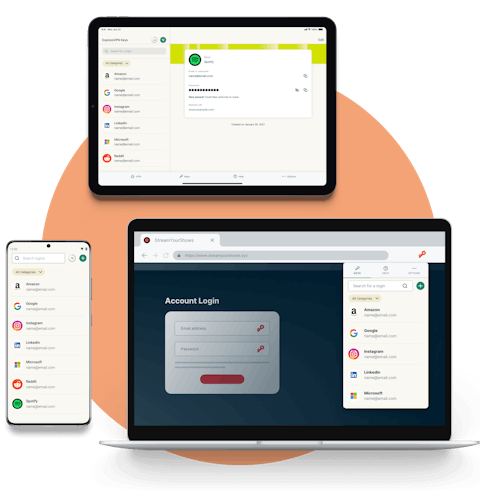
With the proliferation of online accounts, it’s becoming increasingly difficult to remember all the passwords we need to securely access our personal information. This is where password managers come in, offering a convenient and secure solution to keep track of all your passwords.
One of the main advantages of using a password manager is the ability to generate and store complex, unique passwords for each of your accounts. This eliminates the risk of using weak passwords or reusing the same password across multiple sites, which can greatly enhance the security of your online presence. Additionally, password managers often have features such as autofill, which can save you time and effort when logging into websites or apps.
ExpressVPN’s password manager sets itself apart from the competition in several ways. First and foremost, it prioritizes security by utilizing top-notch encryption methods to protect your sensitive information. The app uses zero-knowledge architecture, meaning that only you have access to your passwords – not even ExpressVPN can view them. This gives you peace of mind knowing that your passwords are safe and private.
Furthermore, ExpressVPN’s password manager is integrated with their VPN service, allowing you to easily access it with a single click. This seamless integration makes it a convenient choice for users who are already using ExpressVPN for their online privacy and security needs. Moreover, the password manager is compatible with various platforms and devices, including Windows, Mac, iOS, and Android, so you can access your passwords wherever you are.
In terms of performance, ExpressVPN’s password manager offers fast and reliable access to your passwords. They are constantly improving their app and adding new features to enhance the user experience. For instance, they have recently introduced a beta version that includes a built-in password generator, making it even easier to create strong and secure passwords.
ExpressVPN’s password manager is currently priced at a reasonable rate, especially considering the level of security and convenience it offers. They have different pricing options to suit various needs, and they even offer a free trial so you can test out the service before committing.
In conclusion, if you’re looking for a secure and user-friendly password manager that will help you never forget another password, ExpressVPN’s password manager is definitely worth considering. Its robust encryption, seamless integration with their VPN service, and performance enhancements make it stand out from the competition. Say goodbye to password-related headaches and start protecting your online accounts with ExpressVPN’s password manager.
Increase Your Online Security
In today’s digital world, protecting your online presence and personal information is paramount. With cyber threats becoming increasingly sophisticated, it’s essential to take proactive measures to ensure your online security. One of the most effective ways to do so is by using a password manager.
A password manager is a tool that securely stores and manages all your passwords in one place. Instead of having to remember multiple complex passwords, you only need to know the master password for your password manager. This master password unlocks access to all your other passwords, making it easier to use strong, unique passwords for every online account you have.
ExpressVPN’s Simple Secure Password Manager is a robust solution that offers a number of key features to enhance your online security. It not only securely stores your passwords but also helps generate strong passwords to ensure maximum protection. Additionally, it offers autofill functionality, meaning you don’t have to manually enter your login credentials every time.
One of the standout features of ExpressVPN’s password manager is its zero-knowledge architecture. This means that your passwords and other sensitive information are encrypted and stored in a way that not even ExpressVPN can access them. This provides an extra layer of security and peace of mind, knowing that your data is safe from prying eyes.
ExpressVPN’s password manager is currently available for Windows, macOS, and other popular operating systems, ensuring compatibility across a wide range of devices. Its performance is solid, with quick response times and minimal impact on system resources.
In terms of pricing, ExpressVPN offers a reasonable subscription plan, making it accessible to users of all budgets. While there may be some limitations on the number of logins and devices you can store, the added security and convenience make it a worthwhile investment.
In conclusion, if you need to enhance your online security and simplify the management of your passwords, ExpressVPN’s Simple Secure Password Manager is a great option. Its robust security features, solid performance, and reasonable pricing make it a strong contender in the password manager competition. With ExpressVPN’s password manager, you can generate strong, unique passwords, autofill login credentials, and ensure your online security across various devices.
Take Control of Your Passwords
Tired of trying to remember all your passwords? It’s a familiar struggle for many people. But with a password manager like ExpressVPN’s Keys Setup, it’ll be easy to keep track of all your passwords in one integrated solution.
When you need to log in to your accounts, you won’t have to remember each individual password. The ExpressVPN Keys Setup manager will do it for you. It uses a zero-knowledge encryption system to keep your passwords and credit card information safe and secure.
ExpressVPN’s Keys Setup manager works on most platforms, including Windows, macOS, and mobile devices. It’s easy to install and set up, and the software will automatically fill in your login fields when you visit a website or use an app. This makes it safer and more convenient to use your passwords on different devices.
One of the pros of using ExpressVPN Keys Setup is that all your passwords are stored in a private vault. Even if your device gets lost or stolen, your passwords will remain secure. ExpressVPN also offers 24/7 customer support to help you with any questions or concerns.
ExpressVPN Keys Setup is available for a reasonable subscription fee, and there are different plans to choose from, depending on your needs. The software also offers other security features, like a VPN for added privacy and performance.
In the verdict, if you want to take control of your passwords and keep them secure, ExpressVPN’s Keys Setup is a great choice. It’s easy to use, works on multiple platforms, and provides a built-in password manager with autofill capabilities. With zero-knowledge encryption, your passwords will be safe even if other password managers get compromised.
Вопрос-ответ:
How does ExpressVPN Keys setup work?
ExpressVPN Keys setup is a simple and secure password manager that helps you keep your online accounts secure. To set up ExpressVPN Keys, you need to create an ExpressVPN account and install the ExpressVPN app on your device. Once you have done that, you can start using ExpressVPN Keys to store and manage your passwords.
Can I use ExpressVPN Keys on multiple devices?
Yes, you can use ExpressVPN Keys on multiple devices. ExpressVPN Keys is compatible with Windows, Mac, iOS, and Android devices. You just need to install the ExpressVPN app on each device and sign in to your ExpressVPN account to access your passwords.
What are the features of ExpressVPN Keys’ interface?
ExpressVPN Keys has a user-friendly interface that makes it easy to manage your passwords. Its features include a password generator, autofill option, and the ability to organize passwords in different categories. You can also search for specific passwords and easily edit or delete them as needed.
How does ExpressVPN Keys perform in terms of security?
ExpressVPN Keys is designed to prioritize security. It uses AES-256 encryption to protect your passwords and other personal information. It also offers two-factor authentication for an extra layer of security. Additionally, ExpressVPN Keys is built on a zero-knowledge architecture, which means that your passwords are encrypted and stored locally on your device, ensuring that only you have access to them.
Видео:
Hacker Teaches How to Manage Passwords
Hacker Teaches How to Manage Passwords by Valuetainment Short Clips 2 years ago 4 minutes, 51 seconds 66,701 views
