Apple Private Relay VS VPN: Are They the Same or Not? Find the Best VPN for Apple – Privacy and Security
When it comes to online privacy and security, there are various tools and methods available. Two popular options to consider are Apple Private Relay and VPNs. While they might seem similar at first glance, there are some differences between the two. This article will compare Apple Private Relay and VPNs, and help you find the best VPN provider for your Apple devices.
Apple Private Relay is a general method developed by Apple to keep your internet traffic secure and private. It is a versatile tool that allows you to mask your IP address and encrypt your data, making it safe from prying eyes. The main difference between Apple Private Relay and VPNs is that while VPNs route all your internet traffic through a secure server, Apple Private Relay only encrypts the traffic between your device and your chosen destination.
VPNs, on the other hand, provide a wide range of features and options to enhance your online privacy and security. They can be used to access geo-restricted content, protect your data from your ISP or government, and provide a secure connection when using public Wi-Fi networks. In addition, VPNs offer faster internet speeds, as they can stop your ISP from throttling your connection. This makes them a favorite method for those who value both privacy and performance.
When choosing a VPN for your Apple devices, there are some important questions to consider. Firstly, you will want to compare the pricing and available locations of different VPN providers. Additionally, you should look for a VPN that is easy to use and compatible with Apple’s systems. It is also important to find a VPN that keeps no records of your online activity, ensuring your privacy is truly protected.
So, in conclusion, while Apple Private Relay and VPNs both offer methods to enhance your online privacy and security, they differ in their range of features and level of protection. Apple Private Relay is a convenient option for those who want to keep their browsing activity private, but it will not stop ISPs or governments from seeing the websites you visit. On the other hand, VPNs provide a more comprehensive solution by encrypting all your internet traffic and routing it through secure servers. For the best overall protection and ease of use, a VPN is the recommended choice for Apple users.
Apple Private Relay VS VPN: Are They the Same or Not?
Introduction:
When it comes to online security and privacy, one of the options that many individuals and companies consider is a VPN. However, with the introduction of Apple Private Relay, there has been some confusion about how it compares to a VPN and whether they are the same or not.
What is a VPN?
A VPN, or Virtual Private Network, is a service that allows you to create a secure and encrypted connection over the internet. It protects your online activities from being monitored or intercepted by others, providing an overall higher level of security than a regular internet connection.
How does Apple Private Relay compare to a VPN?
Apple Private Relay is a feature of iCloud that is designed to protect your online privacy. It works by encrypting the traffic between your device and the destination, just like a VPN. However, there are some key differences between the two.
Key features of Apple Private Relay:
- Apple Private Relay is available only on Apple devices, such as iPhone, iPad, and Mac.
- It allows you to access websites and services that may be restricted in certain countries.
- It protects your online activities from being tracked by third-party companies.
- Apple Private Relay uses a network of relays to route your internet traffic, making it more difficult for anyone to link your online activities to your IP address.
- It does not require you to set up a separate VPN provider.
Key features of a VPN:
- A VPN can be used on various devices and operating systems, not just Apple devices.
- It allows you to choose from a wide range of servers located in different countries.
- With a VPN, you can encrypt all of your internet traffic, not just specific requests like Apple Private Relay.
- There are many VPN providers available, such as ExpressVPN and NordVPN, offering different features and pricing options.
- Some VPN providers offer a free trial period for you to test their service before committing to a subscription.
Verdict: VPNs vs Apple Private Relay
In conclusion, VPNs and Apple Private Relay provide similar features in terms of protecting your online privacy. However, VPNs have a wider range of options and can provide a more secure overall connection with features like encryption for all internet traffic. On the other hand, Apple Private Relay is a convenient option for Apple device users who want to enable extra privacy and protection for specific requests. Ultimately, the choice between a VPN and Apple Private Relay depends on your specific needs and preferences.
Understanding the Differences between Apple Private Relay and VPN
When it comes to online privacy and security, many people turn to Virtual Private Networks (VPNs) for added protection. However, with the introduction of Apple Private Relay on the latest iPhones and iPads, there has been a lot of confusion about how it differs from a traditional VPN.
First, let’s visit the concept of a VPN. A VPN is a built-in feature that users can enable on their devices to mask their IP address and encrypt their internet traffic. It uses a remote server to route your internet requests, making it difficult for anyone to track your online activities. In addition, VPNs also offer protection from potential hackers and restrict third parties from accessing your private data.
Apple Private Relay, on the other hand, is a new method of online privacy offered by Apple. It is designed to stop websites and advertisers from tracking your online activities. It operates by sending your internet traffic through two separate relays, making it more difficult for anyone to track your browsing habits. Instead of using a third-party server like a VPN, Apple Private Relay uses its own network.
Another thing that sets Apple Private Relay apart from traditional VPNs is its ease of use. With a VPN, users often have to manually select the server location they want to connect to. However, Apple Private Relay does all the work for you by automatically choosing the best route for your data. This not only ensures faster browsing but also prevents you from accidentally connecting to a server in a country with strict internet laws.
In terms of pricing and availability, VPNs have a wider range of options. There are both free and paid VPN services available, with some offering more advanced features than others. On the other hand, Apple Private Relay is only available to Apple device users who have an iCloud+ subscription.
In conclusion, while both Apple Private Relay and VPNs offer privacy and security, they differ in their methods of operation. VPNs provide a wider range of server locations and options, making them a better choice for those who require more flexibility. On the other hand, Apple Private Relay offers a simpler and more integrated approach for Apple device users, ensuring privacy and ease of use.
Pros and Cons of Apple Private Relay and VPN
Apple Private Relay
Apple Private Relay is a new feature introduced by Apple that aims to provide enhanced privacy and security while browsing the internet. It acts as a proxy service, allowing users to browse the web in a more private and anonymous manner.
Pros:
- Apple Private Relay provides an extra layer of encryption, making it difficult for anyone to intercept and view your internet traffic.
- With Apple Private Relay, your IP address is hidden, which helps protect your identity and location from being tracked.
- It allows you to access region-restricted content by routing your traffic through a server in another country.
- Apple Private Relay is built-in to the Apple ecosystem, making it easy to set up and use without the need for additional apps or subscriptions.
- It offers a seamless browsing experience with minimal impact on internet speed.
Cons:
- Apple Private Relay is only available to users with an iCloud+ subscription, meaning it is a paid feature.
- It is currently only available on iOS, iPadOS, and macOS systems, limiting its accessibility to users on other platforms.
- While Apple Private Relay provides privacy and encryption for browsing, it does not offer the same level of security as a full-fledged VPN.
VPN
A VPN, or Virtual Private Network, is another method to enhance privacy and security while browsing the internet. It creates a secure connection between your device and a remote server, encrypting your internet traffic and hiding your IP address.
Pros:
- A VPN provides a high level of security by encrypting all internet traffic, making it extremely difficult for third parties to intercept and view your data.
- It allows you to choose from multiple server locations around the world, giving you more control over your online presence and enabling access to region-restricted content.
- VPNs can work on various devices and operating systems, making them versatile and accessible for different users.
- There are many VPN providers available, offering a range of features to cater to different needs and preferences.
Cons:
- Using a VPN can sometimes slow down your internet speed due to the additional encryption and routing processes.
- Free VPN services may have limitations on data usage and server access, while paid VPNs come at a cost.
- Setting up and managing a VPN might require some technical knowledge, although some VPN providers offer user-friendly apps.
- Not all VPNs guarantee complete anonymity and privacy, so careful research is needed to choose a reputable and trustworthy provider.
Verdict
In conclusion, both Apple Private Relay and VPNs have their advantages and disadvantages. Apple Private Relay, with its built-in and user-friendly nature, is a great option for Apple users looking for a convenient and safe browsing experience. However, if privacy and security are of utmost concern, or if you require more flexibility and features, a VPN may be a better choice.
Choosing the Best VPN for Apple Devices
When it comes to protecting your identity and ensuring your online privacy, using a VPN is a general practice. While Apple devices are known for their built-in security features, using a VPN can provide an extra layer of protection and enhance your online experience. Here are some key points to consider when choosing the best VPN for your Apple devices:
1. Speed and Availability
The most important factor to consider is the speed and availability of the VPN servers. A fast VPN will ensure that you can browse websites, stream content, and work efficiently without compromising on speed.
2. Ease of Use and Compatibility
Installing and using a VPN should be easy and seamless. Look for a VPN provider that offers a user-friendly interface and supports multiple Apple devices, including iPhones, iPads, and Mac computers.
3. Privacy and Security Features
The main purpose of using a VPN is to keep your online activity private and secure. Make sure the VPN provider you choose does not keep logs of your browsing history or share your data with third parties. Look for VPNs that offer strong encryption protocols and additional security features like a kill switch.
4. Range of Servers and Locations
Having a wide range of servers and locations to choose from is essential, as it allows you to access content from different regions and bypass any geo-restrictions. Look for VPN providers that offer a large number of servers in various countries.
5. Customer Support and Reputation
Research the reputation and customer support of the VPN provider before making a decision. Check reviews and ratings from other Apple users to ensure that the VPN you choose is reliable and responsive to any issues or concerns.
6. Paid vs Free VPNs
While there are free VPNs available, it is generally recommended to opt for a paid VPN service. Free VPNs often have limitations on data usage, speed, and server availability. Paid VPNs offer better overall performance and more advanced features.
In conclusion, finding the best VPN for your Apple devices requires considering factors like speed, privacy, and compatibility. By doing thorough research and comparing different VPN providers, you can find a VPN that meets your needs and provides the level of security and privacy you require.
Factors to Consider when Selecting a VPN for Apple
1. Plans and Pricing: When choosing a VPN for your Apple devices, it’s important to consider the plans and pricing options available. Some VPN providers offer free plans, while others have paid subscriptions with additional features. It’s important to compare the plans and choose the one that best fits your needs and budget.
2. Features and Functionality: A good VPN for Apple should have a clear set of features that provide a secure and versatile range of options. Look for features such as multiple device support, the ability to operate in multiple locations, and strong encryption to protect your data.
3. Overall Performance: The performance of a VPN can vary, so it’s important to research and compare the speed and reliability of different providers. Look for a VPN that offers fast connection speeds, especially if you plan to use it for streaming or gaming.
4. Ease of Use and Installation: Installing and using a VPN should be a straightforward process, especially for Apple users. Look for a VPN that has a user-friendly interface and provides clear instructions on how to install and use it on your Apple devices.
5. Compatibility with Apple Services: If you use Apple services like iCloud or Apple Music, make sure the VPN you choose is compatible with these services. Some VPNs may have limitations or restrictions when it comes to certain Apple services.
6. Security and Privacy: Security should be a top priority when choosing a VPN for Apple. Look for a VPN that offers strong encryption, protects your data from third-party requests, and has a clear privacy policy that ensures your information is kept safe.
7. Customer Support: In case you encounter any issues or have questions, it’s important to have reliable customer support that can assist you. Look for a VPN provider that offers responsive and helpful customer support channels to assist you when needed.
8. Reviews and Recommendations: Lastly, before making a decision, take the time to read reviews and recommendations from other users. Their experiences can give you valuable insights into a VPN’s performance, reliability, and overall user satisfaction.
Comparing Apple Private Relay and VPN Speed
When it comes to speed, both Apple Private Relay and VPNs offer their own advantages. Apple Private Relay, being a built-in feature on Apple devices, provides a fast and reliable connection. It operates in the background, encrypting your internet traffic and routing it through two independent relays, which helps to ensure that your data remains safe and your identity protected.
On the other hand, VPNs have always been known for their fast performance. A VPN allows you to connect to servers located in different countries, which can help optimize your internet speed. When you turn on a VPN, all your internet traffic is encrypted and sent through a secure tunnel to a VPN server. From there, it is then routed to its destination. This means that if you’re in a country where certain websites or services are blocked, a VPN can help you bypass those restrictions and access the content you need.
One of the most popular VPN providers is ExpressVPN. It offers a wide range of server locations around the world, so you can choose the one that works best for you. ExpressVPN is known for its fast connection speeds and reliable performance, making it a favorite among users. Whether you’re streaming content, downloading files, or just browsing the web, ExpressVPN can help ensure that you have a fast and secure connection.
Another great VPN option is VeePN. It offers a range of features that can help tailor your online experience to your needs. With VeePN, you can choose from a variety of server locations and protocols to optimize your speed and security. VeePN also offers a paid account option, which provides even faster speeds and access to more servers.
So, when it comes to comparing Apple Private Relay and VPN speed, both have their advantages. Apple Private Relay, with its built-in feature on Apple devices, offers a fast and reliable connection. VPNs, on the other hand, provide a versatile range of features that can help tailor your online experience. Whether you choose Apple Private Relay or a VPN like ExpressVPN or VeePN, you can rest assured that your internet connection will be fast, safe, and extremely secure.
Exploring the Privacy Features of Apple Private Relay and VPN
Apple Private Relay and VPN are two popular tools that offer privacy and security features for internet users. While they have similarities, they also have key differences that make them unique. Let’s take a closer look at the features of each tool and understand how they work.
Apple Private Relay
Apple Private Relay is a built-in feature available to Apple users. It works by routing internet traffic through multiple relays, masking the destination of the requests and providing an extra layer of privacy. By using Private Relay, your IP address is hidden, making it more difficult for companies to track and record your online activity. This tool is recommended for those who value secure and anonymous browsing.
VPN
On the other hand, VPN (Virtual Private Network) is a versatile tool that allows users to create a secure, encrypted connection to the internet. It also masks your IP address and provides privacy by directing your internet traffic through a remote server. VPNs are known for their ability to bypass geo-restrictions and access content from different parts of the world. They are also a popular choice for users who want to prevent their internet service provider and other third parties from tracking their online activity.
Key Differences
One key difference between Private Relay and VPN is the range of features they offer. While Private Relay focuses on disguising your IP address and protecting your privacy, VPNs offer a variety of features, including faster internet speed, multiple server options, and additional security measures such as malware protection. If you’re looking for a tool that goes beyond privacy and offers a more comprehensive package, a VPN may be the better option for you.
Another difference is the level of control and customization. Private Relay is a built-in feature in Apple devices and operates automatically. On the other hand, with a VPN, you have the option to choose server locations, protocols, and even the ability to manually turn it on or off. This level of control can be advantageous for users who want to have more flexibility and control over their online security.
Which One is Better?
The answer to this question depends on your specific needs and preferences. If you prioritize privacy and want a simple, no-fuss solution, Apple Private Relay is a great option. It offers a high level of privacy and protection without the need for additional setup. However, if you need additional features and customization options, a VPN might be a better fit for you. VPNs provide a range of benefits beyond privacy, such as faster internet speeds and the ability to access content from different parts of the world.
In conclusion, both Apple Private Relay and VPN are effective tools for enhancing your online privacy and security. They offer different features that cater to different user preferences. Whether you choose to use Private Relay or a VPN, both options can help you stay safe and secure in the digital world.
How Does Apple Private Relay Protect Your Online Activities?
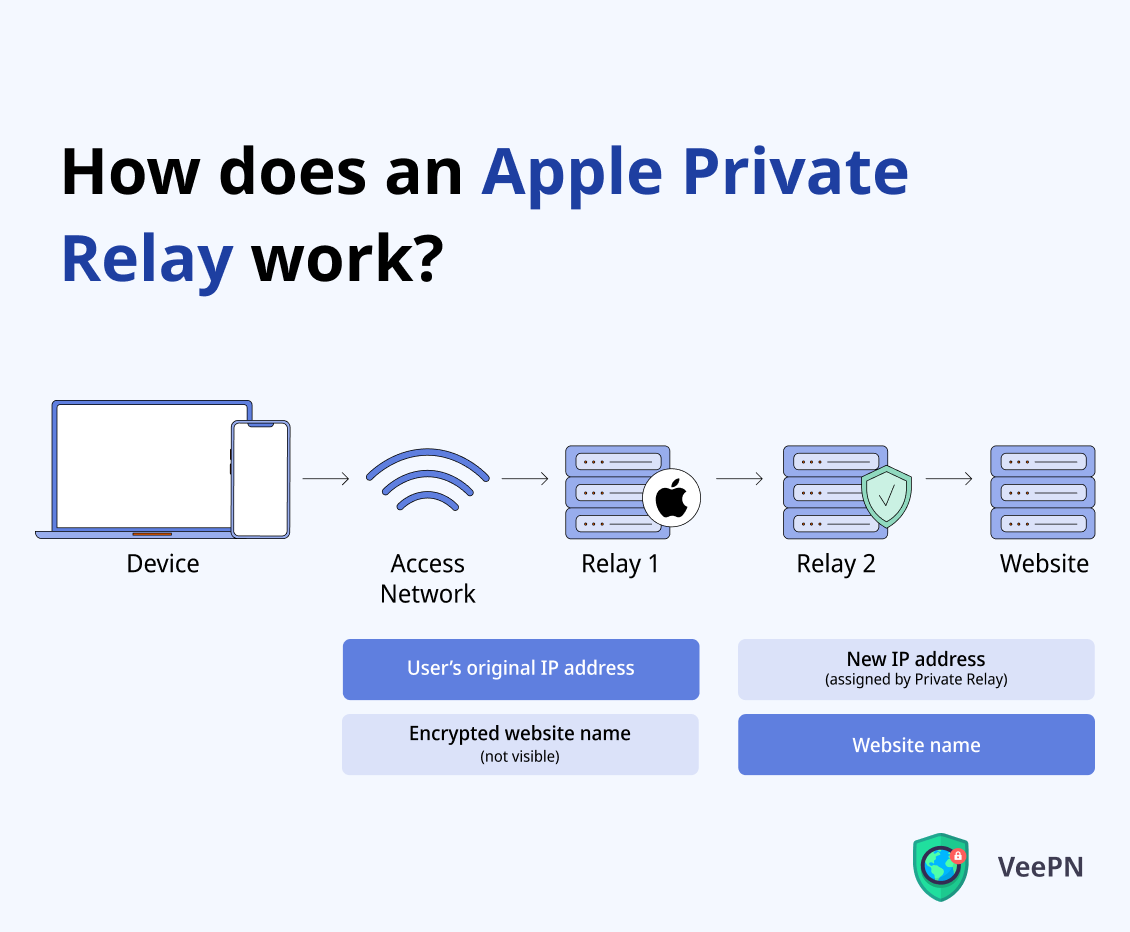
Apple Private Relay is a new feature introduced by Apple to enhance the privacy and security of your online activities. It works by routing your internet traffic through two separate servers.
The first server, called the “relay,” is operated by Apple and is responsible for encrypting your data and assigning it a temporary IP address. This helps mask your identity and location, making it more difficult for third parties to track your online activities.
The second server, known as the “destination server,” is selected by Apple based on your chosen destination. This server decrypts your data and forwards it to the intended website or service you’re visiting. By using two separate servers, Private Relay adds an extra layer of security and privacy.
Compared to traditional VPNs, Private Relay offers a number of benefits. First, it is built-in to your Apple device, making it easier to set up and use. Second, it uses Apple’s own network of servers, which are known for their fast speeds and reliable performance.
In terms of speed, Private Relay may be faster than some VPNs since it doesn’t route all of your internet traffic through a single server. Instead, it only routes the necessary data through the relay server, while the rest of your traffic goes directly to its destination. This can result in faster browsing and download speeds.
Additionally, Private Relay ensures that your online activities are not visible to your internet service provider (ISP) or any other third parties. It encrypts your data, making it difficult for anyone to intercept or monitor your online communications.
While Private Relay offers enhanced privacy and security, it is important to note that it does not offer the same level of anonymity as some other VPN services. Some VPNs may offer features like no-logs policies and the ability to choose from multiple server locations. Private Relay, on the other hand, is limited to the Apple ecosystem and does not offer these advanced features.
In conclusion, Apple Private Relay is a great option for Apple users who want an easy-to-use and secure method to protect their online activities. It offers built-in privacy and security features, fast speeds, and overall ease of use. However, for those who require more advanced features or need to access region-restricted content, other VPN services like NordVPN or ExpressVPN may be a better choice.
Understanding the Encryption Technologies Used by VPNs
In today’s virtual world, privacy has become a top concern for many users. With the increase in online threats and concerns over data security, VPNs have become a popular choice for individuals and businesses alike. But how do VPNs work and what encryption technologies do they use?
Types of Encryption Used in VPNs
First and foremost, it is important to understand that VPNs provide a secure and encrypted connection between your device and the websites you visit. This is done by routing your internet traffic through a private server located in a different location. There are two main encryption methods that most VPNs use:
- OpenVPN: This is one of the most frequently used encryption methods by VPN companies. It is an open-source protocol that provides strong encryption and is flexible enough to work on different platforms and operating systems.
- IPSec: IPSec is another popular encryption protocol used by VPNs. It is a set of protocols that secure internet communications by encrypting and authenticating each data packet that is transmitted. IPSec is commonly used in combination with other encryption technologies like L2TP or IKEv2.
Why Encryption is Important
The clear benefit of using encryption technologies in VPNs is to protect your privacy and prevent third parties from intercepting your data. Without encryption, your internet traffic is vulnerable to interception, allowing hackers or even your ISP to access your personal information.
Along with keeping your data secure, encryption also allows you to mask your IP address, making it more difficult for websites and online services to track your online activities. This adds an extra layer of privacy, especially when browsing websites in countries with strict internet regulations.
Choosing the Right VPN
When it comes to choosing the right VPN, there are a few factors to consider. Firstly, you need to assess what level of privacy and security you require. Free VPNs may offer limited features and slower speeds, while paid VPNs generally provide better encryption and faster connection speeds.
Additionally, it is essential to research the jurisdiction and logging policies of the VPN company. Some VPNs may keep logs of user activity, which may compromise your privacy. For stronger privacy protection, look for a VPN provider that has a strict no-logs policy.
Comparing pricing plans and customer reviews can also help you find the best VPN option for your needs. Paid VPNs often offer more versatile features and server locations, allowing you to connect to different countries and access geo-restricted content.
In conclusion, VPNs use encryption technologies to provide a secure and private connection between your device and the internet. By using protocols like OpenVPN or IPSec, VPNs encrypt your data, protect your privacy, and prevent unauthorized access to your personal information. When choosing a VPN, consider the level of encryption, logging policies, server locations, and pricing plans to ensure you find the best option for your specific requirements.
Can You Use Apple Private Relay and VPN Simultaneously?
Many Apple users who are concerned about their online privacy and security often wonder whether they can use Apple Private Relay and a VPN at the same time. Let’s take a look at how these two technologies work and whether they can be used together.
Apple Private Relay
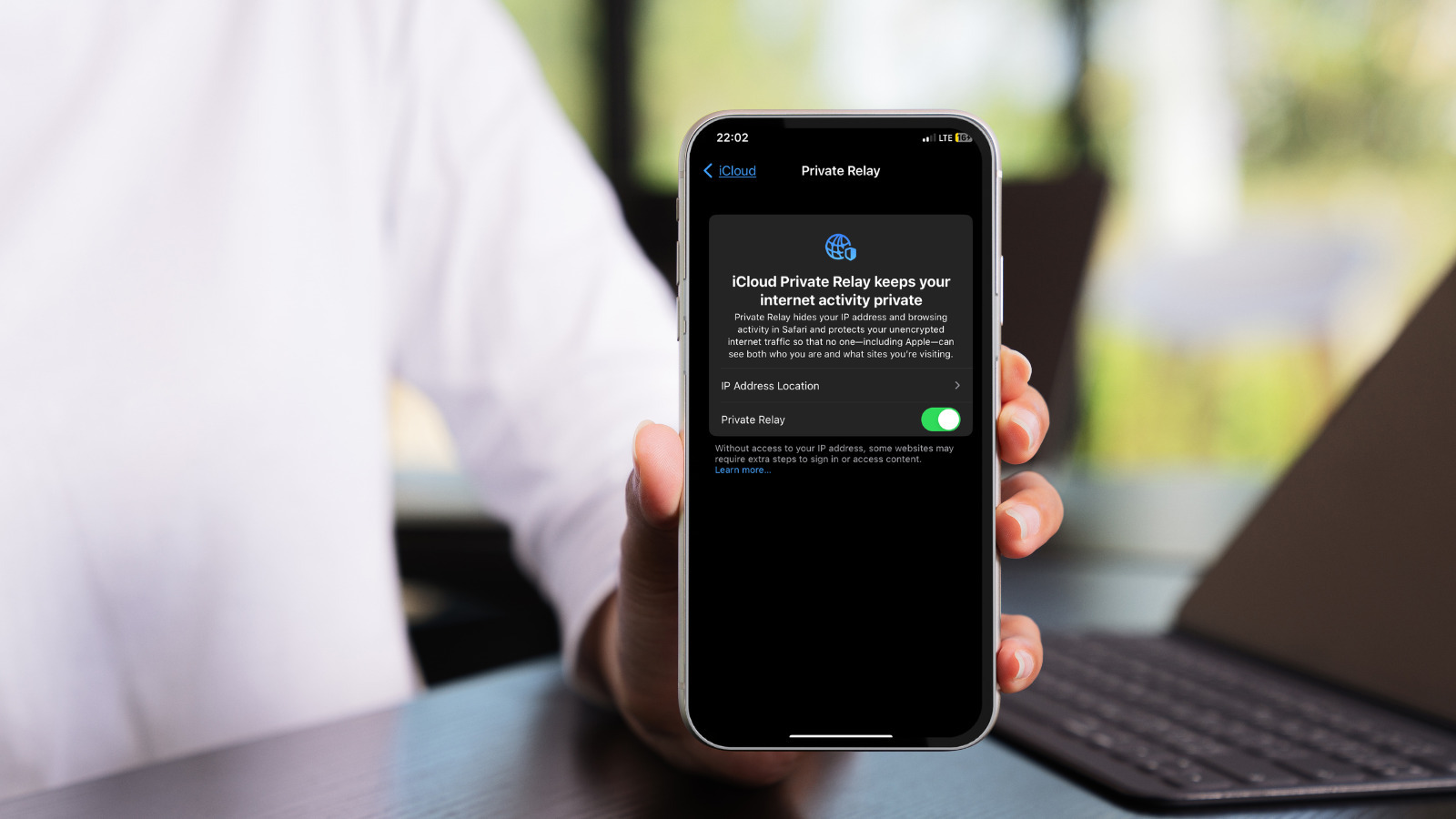
Apple Private Relay is a feature introduced in iOS 15 that allows users to browse the internet with an extra layer of privacy. It works by encrypting the user’s internet traffic and routing it through two separate relays, ensuring that both the user’s IP address and the websites they visit are kept private. This feature is built into the iCloud+ subscription package.
VPN – Virtual Private Network
A VPN, or Virtual Private Network, is a software tool that allows users to create a secure connection to the internet. It masks the user’s IP address and encrypts their internet traffic, making it difficult for third parties to intercept and access their data. VPNs are frequently used by individuals and companies to enhance their online security and protect their identity.
Can You Use Both?
Unfortunately, Apple Private Relay and a VPN cannot be used simultaneously. When Apple Private Relay is enabled, it automatically routes the user’s internet traffic through Apple’s servers. This means that if a VPN is active at the same time, the VPN will not be able to route the traffic through its own servers, and the user will not have the added benefits of the VPN’s security features.
Which is the Better Option?
The decision between using Apple Private Relay or a VPN depends on the user’s specific needs and priorities. Apple Private Relay is a great choice for individuals who primarily want to mask their online activity from their ISP and prevent websites from tracking their online behavior. However, if overall online security and protection of sensitive data are the top priority, a VPN might be a better option. VPNs offer more versatile security features and allow users to choose from a wide range of server locations. One of the best VPNs in this regard is ExpressVPN, which provides fast speeds, strong security, and access to servers in numerous countries.
In conclusion, while Apple Private Relay and a VPN cannot be used simultaneously, both offer valuable features and enhance online privacy and security. The choice between the two depends on the individual’s specific needs and priorities.
Setting up and Configuring Apple Private Relay on Your Apple Device
If you want to enhance your online privacy and security, Apple Private Relay offers a safe and secure way to browse the internet. With Private Relay, you can protect yourself and your data while accessing websites. But how do you set it up and configure it on your Apple device?
To start using Apple Private Relay, you first need to make sure that your device is running the latest version of iOS or macOS. This feature is built-in and comes with your Apple device, so you don’t need to download any additional software.
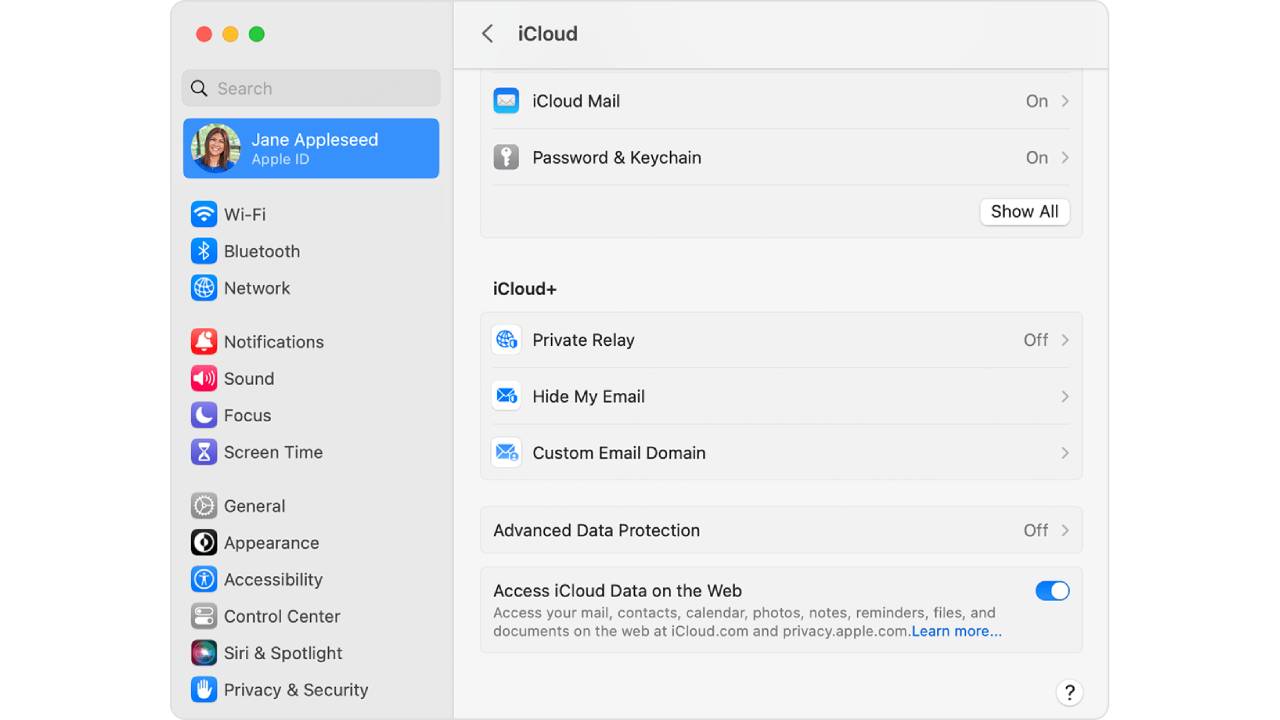
To enable Private Relay, go to your device’s Settings, then tap on your Apple ID at the top of the screen. From there, go to “iCloud” and select “Private Relay.” Here, you can tailor your Private Relay settings to your preferences, such as allowing or disallowing IP address access, or choosing which apps can use Private Relay.
Unlike VPNs, Apple Private Relay uses multiple relays to securely route your requests, providing you with a more private and secure browsing experience. This means that when you visit your favorite websites, your data is encrypted and sent through a series of servers around the world, keeping it safe from prying eyes.
In addition to its security features, Apple Private Relay can also help improve your browsing speed. It uses a range of servers to provide faster access to websites, compared to some VPNs. For even faster access, you can also consider using a reputable VPN service like ExpressVPN or Veepn.
So, if privacy and security are important to you, Apple Private Relay is a great tool to have. With its ease of use and built-in features, you can protect yourself online and keep your data secure. Try out Private Relay today and experience the benefits it brings to your Apple device!
Step-by-Step Guide to Turning on Private Relay in iCloud
If you want to enhance your online privacy and security, turning on Private Relay in iCloud is a great option to consider. This built-in feature of Apple’s iCloud provides users with a secure and fast browsing experience. In this step-by-step guide, we will show you how to enable Private Relay and compare it to traditional VPNs.
Introduction to Private Relay
Private Relay works by encrypting your internet traffic and routing it through multiple servers, making it extremely difficult for anyone to track or access your data. This feature is similar to a VPN (Virtual Private Network) and offers a higher level of privacy and security when compared to using a regular internet connection.
How to Enable Private Relay
- Open the Settings app on your Apple device.
- Tap on your Apple ID at the top of the screen.
- Select “iCloud” from the list of options.
- Scroll down and find the “Private Relay” option.
- Toggle the switch to turn on Private Relay.
- You may be prompted to upgrade your iCloud storage to use Private Relay if you are not already on a paid plan.
- Follow the on-screen instructions to complete the setup.
Benefits of Private Relay
Private Relay offers several advantages over traditional VPNs. One of the main benefits is its ease of use. With Private Relay, you don’t need to install any additional apps or configure any settings. It is built-in and ready to use on compatible Apple devices.
Private Relay also provides faster browsing speed compared to some VPNs. This is because it uses Apple’s network of servers to optimize speed and performance. Additionally, Private Relay offers enhanced privacy protection by encrypting your DNS queries, preventing malicious actors from tracking your online activities.
How Private Relay Compares to Traditional VPNs
While Private Relay offers many of the same benefits as traditional VPNs, there are some key differences. Private Relay is currently only available to iCloud+ subscribers, whereas there are many VPN services available that provide free or paid plans for users.
Additionally, Private Relay operates differently from VPNs. When using a VPN, your internet traffic is routed through a server located in a specific country or region. Private Relay, on the other hand, routes your traffic through multiple servers located globally, providing an extra layer of security.
Overall, Private Relay can be considered a winner when it comes to ease of use and integrated privacy protection for Apple users. However, for those who have specific needs or questions about using a VPN, there are many VPN apps and services available that can provide a wider range of features and options. ExpressVPN, Veepn, and NordVPN are some of the most popular choices that offer great value for Apple users.
Ensuring Device Compatibility with Apple Private Relay
Apple Private Relay is a new service introduced by Apple that aims to provide enhanced privacy and security when browsing the internet. While it shares similarities with a virtual private network (VPN), there are some key points to consider when ensuring device compatibility with Apple Private Relay.
First and foremost, Apple Private Relay is only available to users with an iCloud+ subscription. This means that, in order to access the service, you must first ensure that your iCloud account is upgraded to the iCloud+ tier. It’s important to note that iCloud+ is not available in all regions, so the availability of Apple Private Relay may differ depending on your location.
In terms of functionality, Apple Private Relay works by encrypting your internet traffic and routing it through two separate network relays. This ensures that your online activity is kept private and prevents your internet service providers (ISPs) from tracking your browsing habits. Additionally, Apple Private Relay provides a built-in browser extension that can be used to easily enable or disable the service as needed.
In addition to Apple Private Relay, there are other VPN providers available that offer similar security and privacy features. These VPN apps can be installed on your Apple device and provide an additional layer of encryption and security when browsing the internet. They can also offer additional functionality, such as the ability to choose your desired server location and access geo-restricted content.
When comparing Apple Private Relay to other VPN options, it’s important to consider factors such as pricing, data security, and ease of use. While Apple Private Relay is included with the iCloud+ subscription, other VPN providers may offer different pricing plans depending on the features and level of security they provide. Additionally, some VPN apps may log user data, while Apple Private Relay is designed to keep your online activities private and prevent third-party tracking.
In conclusion, ensuring device compatibility with Apple Private Relay involves verifying that you have an iCloud+ subscription, enabling the service in your device settings, and understanding the limitations and functionality the service provides. While Apple Private Relay offers a great level of internet security and privacy, there are other VPN options available that may better suit your specific needs and preferences.
Testing the Effectiveness of Apple Private Relay and VPN
Introduction:
In recent years, concerns about online privacy and security have increased, leading to the popularity of virtual private networks (VPNs) among internet users. However, Apple has introduced a new feature called Apple Private Relay, which aims to provide a safer internet browsing experience for iCloud users. This article aims to compare and contrast the effectiveness of Apple Private Relay with traditional VPNs.
What is Apple Private Relay and how does it work?
Apple Private Relay is a built-in feature in iCloud that allows users to keep their online activity private and secure. It works by rerouting users’ internet traffic through two separate relays, encrypting the data at each step. This helps to avoid third-party tracking and keep users’ browsing habits anonymous.
How does a VPN work?
A VPN, or virtual private network, is a service that establishes a secure connection between the user’s device and the internet. It encrypts the user’s data and directs it through a secure server located in a chosen country, masking the user’s IP address and making their online activity more private.
Comparing Apple Private Relay and VPNs:
- Security: Both Apple Private Relay and VPNs aim to enhance online security. However, while VPNs encrypt all the user’s internet traffic, Apple Private Relay only encrypts the traffic that goes through Apple’s servers, such as browsing data.
- Privacy: Apple Private Relay and VPNs have similar objectives when it comes to privacy. They both help to hide the user’s IP address and browsing activity from third parties, like government surveillance or data-hungry apps and websites.
- Overall effectiveness: While both Apple Private Relay and VPNs provide a level of privacy and security, VPNs are more comprehensive in terms of protecting all internet traffic. VPNs also offer more control over server locations, making it easier for users to choose a server in a specific country or region.
- Speed: Apple Private Relay is designed to prioritize speed, aiming to minimize any impact on browsing performance. On the other hand, some VPNs may have a noticeable impact on internet speed due to the encryption and rerouting of traffic.
- Availability and cost: Apple Private Relay is a built-in feature that comes with an iCloud subscription, making it easily accessible to Apple device users. VPNs, on the other hand, are offered by various providers, with both paid and free options available. Free VPNs often have limitations or may not provide the same level of security as paid options.
Conclusion:
Both Apple Private Relay and VPNs are effective tools for enhancing online privacy and security. While Apple Private Relay is more focused on protecting browsing data and prioritizing speed, VPNs offer a more comprehensive solution for encrypting all internet traffic and providing greater control over server locations. Ultimately, the choice between Apple Private Relay and a VPN will depend on individual preferences and specific security needs.
Exploring the Compatibility of VPNs with Apple Products
When it comes to using VPNs with Apple products, there are a few key points to consider. First and foremost, using a VPN is a safe way to mask your IP address and keep your online activities private. Whether you’re operating a Mac computer, iPhone, or iPad, a VPN provides an added layer of security that helps protect your personal data from prying eyes.
One of the great things about using a VPN on Apple devices is that there are many software options to choose from. You can easily install VPN software from a variety of providers, such as NordVPN, which is one of the most popular names in the industry. These VPNs have user-friendly interfaces and allow you to select from a wide range of server locations, giving you the freedom to browse the internet securely from wherever you are.
When comparing Apple’s Private Relay and VPNs, it’s important to note that they serve similar purposes but differ in certain features. Private Relay, built-in to Apple’s Safari browser, allows you to access websites in a more secure and private manner. It hides your IP address and encrypts your traffic, making it more difficult for anyone to track your online activities. However, it’s worth mentioning that Private Relay only protects your Safari browsing and does not extend to other apps or software on your device.
On the other hand, using a dedicated VPN service, such as NordVPN, gives you more control over your online privacy. It not only protects your identity and encrypts your traffic but also allows you to choose from a vast number of server locations. Additionally, VPNs like NordVPN have extra features, such as a kill switch and ad-blockers, which further enhance your online security.
In addition to providing security and privacy, VPNs are also a great tool for accessing geo-restricted content. Whether you want to access streaming platforms, such as Netflix or Hulu, or visit websites that are blocked in your location, a VPN can enable you to bypass these restrictions and enjoy the content you want.
When considering VPN options for Apple devices, it’s important to do your research and find a trustworthy provider that guarantees your privacy and security. While there are free VPN services available, they often come with limitations and may not offer the same level of security as paid options. Opting for a reputable VPN like NordVPN ensures that your internet activities are secure and your personal data is properly encrypted.
What Are the Limitations of Apple Private Relay and VPN?
Apple Private Relay and VPNs both aim to provide a secure and private browsing experience, but they have some limitations that users should be aware of.
1. Government and ISP Surveillance
While both Apple Private Relay and VPNs offer encryption, they do not guarantee protection against government surveillance or ISPs monitoring your online activities. In some countries with strict surveillance laws, using a VPN might be illegal or heavily regulated.
2. Content and Location Restrictions
Apple Private Relay and VPNs can help you avoid content and location restrictions to a certain extent, but they differ in how they handle this. VPNs provide you with multiple server locations to choose from, allowing you to appear in different parts of the world. Apple Private Relay, on the other hand, only routes your traffic through Apple servers, limiting the available locations.
3. Limited Features
Apple Private Relay has limited features compared to VPNs. VPNs often offer additional features such as ad-blocking, malware protection, and the ability to access region-specific content. If you want a more versatile and feature-rich browsing experience, a VPN might be a better choice.
4. Device Compatibility
Not all devices are compatible with Apple Private Relay. It is currently only available on devices running the latest iOS and macOS versions. On the other hand, VPNs are available on a wide range of devices, including Windows, Android, and routers.
5. Pricing and Apps
Apple Private Relay is included as part of the iCloud pricing plans, while VPNs often require a separate subscription. Additionally, VPNs usually have dedicated apps that provide easy setup and configuration, while Apple Private Relay settings are integrated into the device’s system settings.
6. Research and Trust
While both Apple Private Relay and VPNs claim to protect your data, it’s important to do your research and choose a reputable VPN provider. Some VPN providers may collect and sell your data, defeating the purpose of using a VPN for privacy and security. Look for providers with strong privacy policies and a trusted track record.
In conclusion, while Apple Private Relay has its advantages, VPNs generally offer more features, device compatibility, and flexibility in choosing server locations. If you want a comprehensive and secure browsing experience, a VPN is likely the better option. However, it’s important to consider your specific needs and priorities before making a decision.
Understanding the Costs and Subscriptions of Apple Private Relay and VPN
When it comes to prioritizing privacy and protecting your online activity, both Apple Private Relay and VPN services offer viable options. However, it is important to understand the costs and subscriptions associated with each to make an informed decision.
Apple Private Relay
Apple Private Relay is a new feature that comes built-in with the latest Apple devices. It operates by encrypting and routing your internet traffic through multiple relays, making it difficult for companies and ISPs to track and monitor your online requests. This added layer of privacy can help keep your identity and browsing habits more secure.
With Apple Private Relay, you are automatically subscribed to the service when you use an eligible Apple device. There are no additional costs or subscriptions specifically for Private Relay, as it is included as part of your Apple device’s features and functionality.
VPN Services
On the other hand, VPN services like NordVPN provide similar privacy benefits. When you use a VPN, your internet traffic is encrypted and routed through a remote server, making it difficult for third parties and ISPs to track and monitor your online activity. This can help protect your privacy and keep your data secure.
However, VPN services typically require a separate subscription and cost. There are many VPN providers available, and the pricing and subscription plans may vary. Some providers offer free versions with limited features, while others have paid plans that offer more robust privacy and security features.
Choosing the Best Option
When deciding between Apple Private Relay and VPN services, it’s important to consider your specific needs and preferences. If you are an Apple user and value the ease and convenience of a built-in feature, Apple Private Relay may be the better choice for you. It provides automatic encryption and privacy without the need for additional subscriptions or costs.
On the other hand, if you want more control over your privacy features, or if you use devices from different companies, a VPN service like NordVPN may be a better fit. VPNs can offer additional features such as the ability to choose server locations in different countries, bypass government censorship, and access region-restricted content.
Ultimately, the decision between Apple Private Relay and VPN services depends on your individual needs and priorities. By understanding the costs and subscriptions associated with each option, you can make an informed decision and choose the best solution to protect your privacy and online activity.
FAQ:
What is Apple Private Relay?
Apple Private Relay is a new feature introduced by Apple that allows users to browse the internet with increased privacy and security. It works by routing the user’s internet traffic through two separate internet relays, making it difficult for anyone to track their online activities and protecting their personal information.
How does Apple Private Relay differ from a VPN?
While both Apple Private Relay and VPNs aim to provide privacy and security online, there are some key differences between the two. Apple Private Relay only routes the user’s Safari browser traffic, while a VPN can protect all internet traffic on a device. Additionally, Apple Private Relay uses two relays to encrypt and route traffic, whereas a VPN typically uses a single server.
Can Apple Private Relay be used on non-Apple devices?
No, Apple Private Relay is exclusively available for Apple devices and only works within the Safari browser. It is not compatible with non-Apple devices or other web browsers.
Is Apple Private Relay free to use?
Apple Private Relay is available as part of Apple’s iCloud+ subscription, which is a paid service. It is not available for free. However, Apple does offer a free trial period for iCloud+ for new users to try out the features, including Apple Private Relay.
What are the advantages of using a traditional VPN over Apple Private Relay?
Using a traditional VPN has several advantages over Apple Private Relay. Firstly, a VPN can be used on any device and is not limited to Apple devices or Safari browser. Secondly, a VPN can provide more advanced features such as changing the user’s virtual location, bypassing geo-restrictions, and protecting all internet traffic, not just browser traffic. Lastly, VPNs often have a larger server network, offering more options for connection and faster speeds.
Videos:
How To Use a VPN On ANY iPhone! (2022)
How To Use a VPN On ANY iPhone! (2022) by LoFi Alpaca 1 year ago 3 minutes 174,081 views
