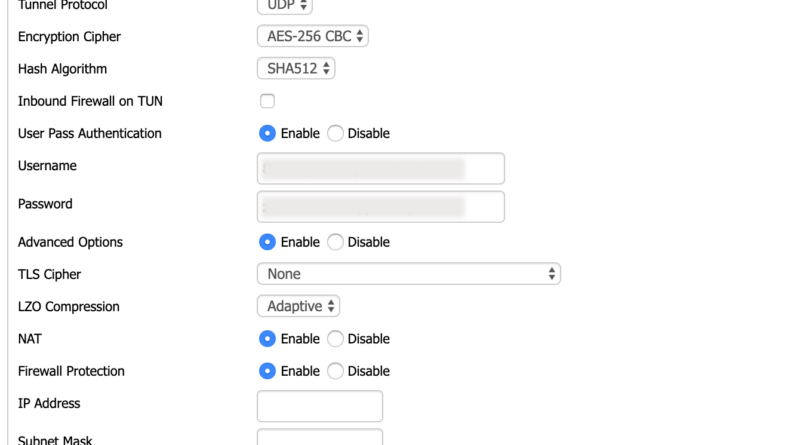
Step-by-Step Guide to Finding Your ExpressVPN Account Credentials for Manual Configuration
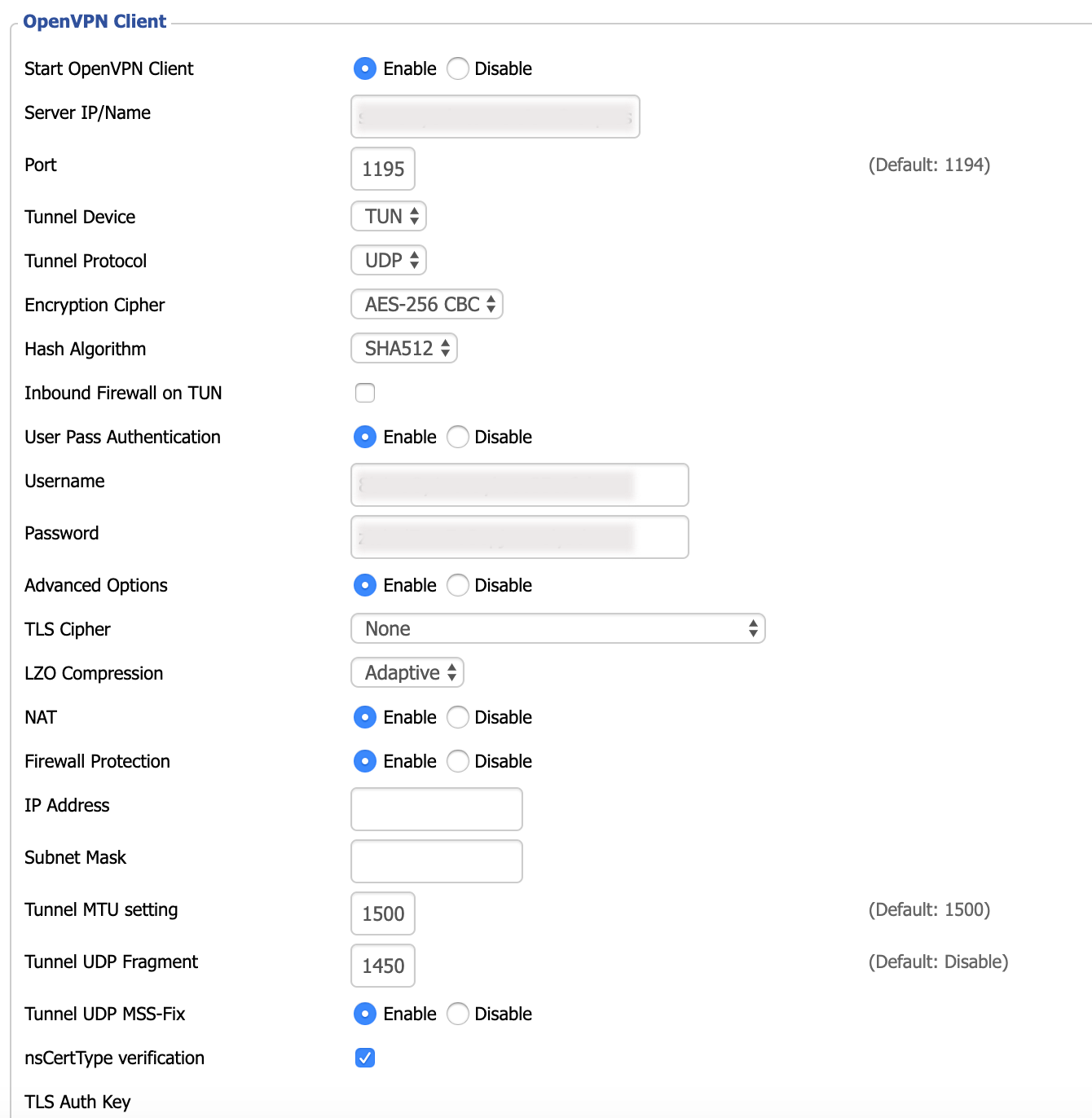
ExpressVPN is a popular virtual private network (VPN) service that allows users to encrypt their internet connection and browse the web securely. Whether you’re using ExpressVPN on your computer, mobile device, or even on your router, you’ll need to find your account credentials to get started.
To find your ExpressVPN account credentials, you’ll first need to sign in to your account on the ExpressVPN website. Once you’re logged in, look for the “My Account” option and click on it. This will take you to a page where you can find all the information you need.
On the “My Account” page, you’ll see information about your account, including your username and the email address you used to sign up for ExpressVPN. If you’re an active member, your account will also show you how many devices you have connected to the VPN and how much time is left on your subscription.
If you’re new to ExpressVPN and don’t yet have an account, don’t worry. You can easily sign up for an account on the ExpressVPN website. Just enter your email address and choose a password. You can also choose the subscription plan that best fits your needs and even extend the coverage to cover more devices.
Once you have your ExpressVPN account credentials, you’re ready to get started with manual configuration. ExpressVPN offers apps for Windows, Mac, iOS, Android, and even routers, but if you prefer to configure your VPN manually, you have that option too.
To configure ExpressVPN manually, you’ll need to know the VPN server locations and protocols. ExpressVPN supports a wide range of protocols, including OpenVPN (TCP and UDP), IKEv2, L2TP/IPSec, and PPTP. You can find the manual configuration options for each protocol on the ExpressVPN website.
In addition to providing security and privacy, ExpressVPN also offers features like defeating censorship and accessing blocked websites. If you know a friend or family member who would benefit from using ExpressVPN, you can send them a referral link, and if they sign up, both you and your friend will get 30 days of free service.
That’s everything you need to know to find your ExpressVPN account credentials for manual configuration. If you have any issues or questions, you can always reach out to the ExpressVPN support team. They’re available 24/7 and are ready to help you get the most out of your VPN experience.
Know a Friend Who Needs a VPN
If you hear your friend talking about issues with online censorship or the inability to access certain websites, they might need a VPN. A VPN, or Virtual Private Network, can help save your friend’s online privacy and bypass any restrictions imposed by their internet service provider or government.
To offer a helping hand, you can find your ExpressVPN account credentials and share them with your friend. ExpressVPN offers a manual configuration option for various devices, including iOS and Android. By sharing your account credentials, your friend can quickly get started with ExpressVPN and enjoy secure, private, and unrestricted internet access.
Here is a step-by-step guide on how to find and share your account credentials:
- Sign in to your ExpressVPN account via the ExpressVPN app or website.
- Navigate to the “My Account” section to find your account details.
- Under the “Account” tab, you will find your active devices and the option to delete or extend coverage for each device.
- Next, go to the “Setup” tab and select the “Manual Configuration” option.
- Find the necessary credentials, such as the server locations, protocol, and encryption settings. These details will be used during the manual configuration process.
- Send your friend the credentials via email or any other secure communication method.
Once your friend has the credentials, they can follow the manual configuration guide provided by ExpressVPN’s support team. This guide will explain how to enter the credentials into the ExpressVPN app or device settings. Your friend will then be able to connect to the ExpressVPN servers and enjoy a private and secure browsing experience.
By sharing your ExpressVPN account credentials, you can help your friend defeat online censorship, access blocked content, and protect their online privacy. Remember, sharing your account credentials should be done with trusted individuals, as it grants them access to your ExpressVPN subscription. It’s also important to note that sharing your credentials does not save your friend any money, as they will need their own subscription to continue using ExpressVPN after the initial setup.
Get Started
If you want to get started with ExpressVPN, there are a few simple steps you need to follow. First, you’ll need to create an account. You can do this by visiting the ExpressVPN website and signing up. Once you have an account, you can request your credentials to manually configure your VPN.
To get your account credentials, log in to your ExpressVPN account. From there, navigate to the “My Account” section and find the option to request your manual configuration credentials. Once you make the request, you’ll need to wait a short time for the ExpressVPN team to process your request and send you your credentials via email.
Next, you can find the manual configuration article on the ExpressVPN website. This article will give you step-by-step instructions on how to manually set up ExpressVPN on your devices. Even if you’re not the most tech-savvy person, the article will guide you through the process and ensure that you can enjoy all the benefits of ExpressVPN.
For those who prefer a more hands-on approach, ExpressVPN offers support through their live chat feature. If you’re having trouble with the manual configuration or need assistance with any other issues, you can simply reach out to the ExpressVPN support team. They’re available 24/7 and are always ready to help you.
Once you have your credentials and have followed the manual configuration steps, you’ll be ready to go. ExpressVPN will encrypt your internet connection, ensuring that your online activities are private and secure. You can browse the web, access blocked websites, defeat censorship, and even protect your personal information when using public Wi-Fi.
ExpressVPN offers a user-friendly app for both iOS and Android devices, making it easy to stay protected on the go. The app provides step-by-step instructions and allows you to quickly connect to servers in different locations around the world. With ExpressVPN, you’ll have the freedom to access all the content you want, no matter where you are.
In summary, if you want to get started with ExpressVPN, create an account, request your manual configuration credentials, and follow the step-by-step instructions provided. And if you encounter any issues along the way, don’t hesitate to reach out to the ExpressVPN support team for assistance. Now, get started and enjoy the benefits of a secure and private internet connection!
How Do I Delete My ExpressVPN Account
If you are no longer in need of ExpressVPN services and would like to delete your account, you can follow the steps below:
- Sign in to your ExpressVPN account: Enter your credentials and log in to your ExpressVPN account on the website or the app.
- Send a deletion request: Contact the ExpressVPN support team via email or live chat and request the deletion of your account. Let them know that you would like to delete everything related to your account.
- Verify your identity: The support team may ask for some verification details to ensure the account deletion request is genuine.
- Confirm the deletion: Once your identity is verified, the support team will guide you on the next steps to confirm the deletion of your ExpressVPN account.
- Save any important content: Before deleting your account, make sure to save any important content or credentials related to ExpressVPN or any other services you may have linked to your account.
Once you have completed the account deletion process, your ExpressVPN account will be deactivated. All your devices will no longer be connected to the VPN, and your membership will be canceled. This means that you will no longer have access to the VPN servers, support, or updates.
If you ever decide to use ExpressVPN again in the future, you would need to sign up as a new customer and start a new account. Keep in mind that ExpressVPN offers a 30-day money-back guarantee, so you can always get a refund if you change your mind within that time.
It is important to note that by deleting your ExpressVPN account, you are removing an effective tool to defeat censorship, encrypt your online activities, and access restricted websites. If you have any concerns or are facing any issues with the service, it is recommended to reach out to the ExpressVPN support team and explore other options before deciding to delete your account.
Defeat Censorship
When it comes to accessing restricted content and defeating censorship, ExpressVPN is your go-to option. With its wide range of server locations, you can easily find a server in a location where censorship is not an issue.
ExpressVPN encrypts everything you do online, ensuring that your activity remains private and secure. By masking your IP address and encrypting your data, ExpressVPN makes it virtually impossible for anyone to know what websites you visit or what content you access.
Even if you’re an active member of a team or have multiple devices that need VPN coverage, ExpressVPN has got you covered. You can save time by extending your account’s coverage to multiple devices, all with a single login.
If you have a friend who needs a VPN, ExpressVPN offers an option to send your friend an email with instructions on how to get started. With ExpressVPN, you can be the hero who helps defeat censorship for your friend as well.
If you ever need to delete your ExpressVPN account, you can do so with just a few clicks. Simply sign in to your account and navigate to the account settings, where you can find the option to delete your account.
ExpressVPN offers manual configuration for devices that do not support the ExpressVPN app, such as routers. This step-by-step guide will show you how to find your ExpressVPN account credentials for manual configuration, ensuring that you can still get all the benefits of ExpressVPN on any device.
Sign in to Your ExpressVPN Account
If you’re new to ExpressVPN, you will need to sign in to your account in order to access your credentials for manual configuration. Your ExpressVPN account provides you with the necessary information to set up and use the VPN service on your devices.
1. Enter your credentials
To sign in to your ExpressVPN account, enter your email and password on the login page. If you can’t remember your password, you can request a password reset via email.
2. Find your account details
Once you are signed in, navigate to your account settings to find your ExpressVPN account details. These details will include your account ID, subscription type, and your active devices.
3. Get your manual configuration options
To manually configure ExpressVPN on your device, you will need to obtain the necessary configuration details. These include the VPN server addresses, protocols, and authentication types. ExpressVPN provides detailed instructions for each operating system and device.
4. Contact support for assistance
If you are having issues finding or using your ExpressVPN account credentials, don’t worry. You can reach out to the ExpressVPN support team for help. They are available 24/7 and will be able to assist you with any questions or concerns you may have.
5. Enjoy the benefits of ExpressVPN
Once you have successfully signed in to your ExpressVPN account and set up the VPN on your devices, you can start enjoying its benefits. ExpressVPN offers secure and private browsing, access to restricted content and websites, defeat of censorship and geo-restrictions, and the ability to encrypt your internet connection no matter where you are.
Find Your Credentials for Manual Configuration
When it comes to setting up your ExpressVPN account manually, you may need to find your credentials. These credentials are essential for configuring the VPN on your devices and ensuring a secure and private internet connection.
To find your ExpressVPN account credentials, you will need to sign in to your account. If you haven’t signed up yet, you can easily do so by visiting the ExpressVPN website and becoming a member of their team.
Step 1: Sign Up or Sign In
If you’re a new member, start by signing up for an ExpressVPN account. You will need to provide your email address and choose a password. If you’re already a member, simply sign in using your credentials.
Step 2: Navigate to Account Settings
Once signed in, navigate to your account settings. Look for the option to access your account information, where you’ll find everything you need to configure your VPN manually.
Step 3: Find Your Credentials
In your account settings, you’ll find your ExpressVPN credentials, including your username and password. These credentials will be required when setting up the VPN on your devices, so make sure to save them in a secure location.
Step 4: Configure Your Devices
With your credentials in hand, you can now configure your devices to use the ExpressVPN manually. Follow the step-by-step guides provided in the ExpressVPN support article to ensure a smooth setup process for each of your devices.
Step 5: Get Started!
With your VPN configured, you can now enjoy secure and private internet browsing. ExpressVPN encrypts your connection, ensuring that your data and online activities remain safe from prying eyes.
Whether you’re traveling, need to bypass censorship, or simply want to extend your coverage to all your devices, ExpressVPN has everything you need to enjoy a fast and reliable VPN experience.
Option 1: Delete via the ExpressVPN iOS App
If you’re an ExpressVPN member who needs to delete your account credentials for manual configuration on an iOS device, you can do it easily via the ExpressVPN iOS app. Follow these steps:
- Launch the ExpressVPN app on your iOS device.
- Sign in to your account using your email and password.
- Once you’re signed in, tap on the three horizontal lines in the top-left corner to open the menu.
- Scroll down and tap on “Account”.
- In the Account section, you’ll find your account details, including the “Delete Account” option.
- Tapping on “Delete Account” will prompt you to confirm the deletion. Confirm your decision and your account credentials will be deleted from the app.
By following these steps, you can easily delete your account credentials for manual configuration on your iOS device. If you have any issues or need further support, you can always contact the ExpressVPN support team.
Encrypt Everything
In today’s digital age, online privacy and security are more important than ever. With the increasing number of data breaches, cyber attacks, and online censorship, it is crucial to protect your sensitive information and ensure your online activities remain private.
One way to achieve this is by using a reliable and trusted VPN service like ExpressVPN. With ExpressVPN, you can encrypt your internet connection and browse the web anonymously, even on public Wi-Fi networks. By encrypting your traffic, you make it unreadable to anyone who may try to intercept it, defeating censorship and protecting your online identity.
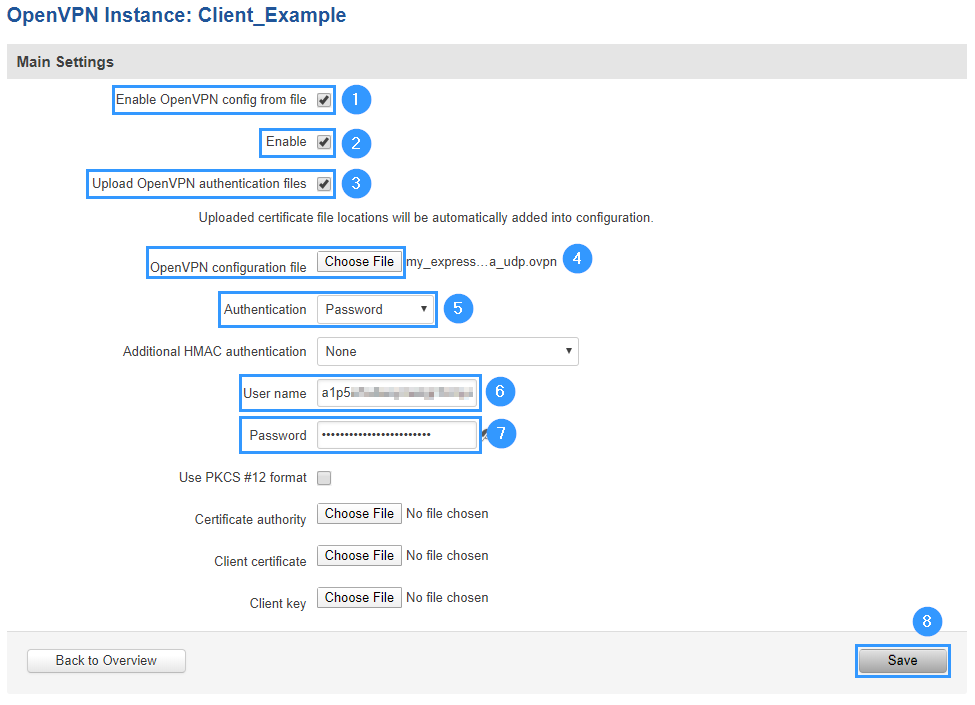
To get started with ExpressVPN, you would first need to sign up for an account. Once you have an active ExpressVPN account, you can find your account credentials for manual configuration. This is useful if you want to set up ExpressVPN on devices that don’t have the ExpressVPN app available, such as routers or gaming consoles.
- To find your ExpressVPN account credentials, you can follow these steps:
- Sign in to your ExpressVPN account via the ExpressVPN website or the app.
- Click on your account name to access your account settings.
- Under the “Subscription” tab, you’ll find your active subscription information.
- Click on “Manage settings” to view your account credentials.
- Save or copy your username and password for future reference.
- Once you have your ExpressVPN account credentials, you can proceed with the manual configuration on your preferred device.
By encrypting everything with ExpressVPN, you ensure that all your online activities, including browsing, streaming, and downloading, are protected. This means that even your ISP won’t be able to track or log your internet usage, giving you complete privacy and freedom online.
If you have any issues or questions regarding your ExpressVPN account or the manual configuration process, ExpressVPN’s support team is always ready to help. You can reach out to them via email, live chat, or submit a support request through their website.
Don’t let censorship and online threats compromise your privacy and security. Take control of your online experience and encrypt everything with ExpressVPN.
Extend Your Coverage
Are you an ExpressVPN member who needs to extend your coverage? If so, we’ve got you covered! Whether you’re at home or on the go, our VPN service allows you to encrypt your internet connection and access blocked content from anywhere in the world.
To extend your coverage, simply follow these steps:
- Sign in to your ExpressVPN account via the app or website.
- Click on your account credentials in the top right corner to access your account settings.
- Find the “Extend Coverage” option and click on it.
- Enter the email address of a friend you’d like to invite and click “Send Request”.
- Your friend will receive an email with an invitation to join ExpressVPN. Once they sign up and become an active member, you will both receive a free month of service!
By extending your coverage, you not only help your friend gain access to the benefits of ExpressVPN, but you also save money on future subscription fees. It’s a win-win situation!
If you have any questions or need support on how to extend your coverage, don’t hesitate to reach out to our friendly support team. We’re here to help and ensure that you get the most out of your ExpressVPN experience.
So why wait? Extend your coverage today and enjoy the freedom to browse, stream, and download without censorship or limitations. Your privacy and security are important to us, and we’re committed to providing you with the best VPN service available. Sign up for ExpressVPN now and get started!
Save Money: Tips for Getting the Best Deals
When it comes to managing your finances, finding ways to save money is always a top priority. Whether you’re trying to cut back on expenses or looking for ways to stretch your budget, there are several effective strategies you can employ. In this article, we will explore some practical tips that can help you save money.
1. Compare prices and find the best deals
Before making a purchase, take the time to compare prices from different retailers. By doing so, you can ensure that you’re getting the best deal possible. Check out online marketplaces, use price comparison tools, and keep an eye out for any ongoing promotions or discounts.
2. Take advantage of discounts and coupons
Make it a habit to look for discounts and coupons before making a purchase. Many retailers offer special deals and promotions that can help you save money. Subscribe to newsletters of your favorite stores, follow them on social media, and keep an eye out for exclusive offers.
3. Avoid unnecessary expenses
To save money, it’s important to differentiate between wants and needs. Before making a purchase, ask yourself if it’s something you truly need or if it’s just a want. Cutting back on unnecessary expenses can help you save a significant amount of money in the long run.
4. Plan your meals and reduce eating out
One of the biggest expenses for many people is eating out. By planning your meals, you can reduce the number of times you eat out and save money by cooking at home. Additionally, buying groceries in bulk and taking advantage of sales can help you save even more.
5. Optimize your subscriptions and memberships
Take a look at your subscriptions and memberships and evaluate if you’re getting value for your money. Consider canceling any unused or unnecessary subscriptions. You can also try negotiating a lower price or switching to a more affordable option.
By following these tips, you can start saving money and improve your financial situation. Remember, every small step counts, and it’s never too late to start taking control of your finances.
Option 2: Send an Email Request
If you’re having trouble finding your ExpressVPN account credentials for manual configuration, don’t worry! There’s another option you can try. You can send an email request to the ExpressVPN support team and they will assist you in retrieving your account information.
To send an email request, follow these steps:
- Open your email app or website and create a new message.
- Enter support@expressvpn.com as the recipient of the email.
- In the subject line, type “Request for ExpressVPN Account Credentials” so that the support team knows what your email is regarding.
- In the body of the email, explain your issue and let them know that you need help finding your ExpressVPN account credentials for manual configuration. Be sure to include any relevant details, such as the devices you’re using or any specific locations or websites you’re trying to access.
- Once you’ve entered all the necessary information, click the “Send” button to send the email.
After sending the email, you should receive a response from the ExpressVPN support team within a timely manner. They will provide you with the instructions and guidance you need to get your ExpressVPN account credentials for manual configuration.
Please note that it may take some time for the support team to respond, as they receive a high volume of requests. Rest assured that they will do their best to assist you. And if you have a friend who needs help with their ExpressVPN account, don’t hesitate to let them know about this option as well!
Вопрос-ответ:
Видео:
How to set up ExpressVPN on your Android device
How to set up ExpressVPN on your Android device by ExpressVPN 2 years ago 2 minutes, 7 seconds 31,470 views
