
How to Change Your IP Address: Ultimate Guide – AdGuardVPN

Are you wondering how to change your IP address? Determining your IP address is simple. Just search “What is my IP address?” on any search engine, and it will provide you with your current IP address. But why would you want to change it?
There are several reasons why you might want to change your IP address. Firstly, by changing your IP address, you can bypass certain restrictions set by various online services. Each device connected to the internet has its own unique IP address, so changing it can help you access websites or content that may be restricted in your country.
Secondly, changing your IP address can help protect your online privacy. When you connect to the internet, your IP address is like a public identification number. By changing it, you can make it more difficult for others to track your online activities.
Thirdly, changing your IP address can allow you to access content that is geographically restricted. For example, if a website or streaming service is only available in certain countries, changing your IP address to a location where it is available will allow you to access it.
Lastly, some people change their IP address to avoid being traced or identified online. While this may not be a concern for most, there are cases when individuals may want to remain anonymous for various reasons.
Now that you understand why changing your IP address can be beneficial, let’s explore how to do it. There are several methods you can use, depending on your device and the type of network you are connected to.
If you are using a mobile device, such as a smartphone or tablet, changing your IP address is relatively easy. Simply go into your device’s settings and look for the option to change your IP address. The exact steps may vary depending on your device and operating system, but it is usually found under the “Network” or “Connections” settings.
If you are using a computer, such as a Windows PC, changing your IP address requires a few more steps. You will need to access your network settings and modify the IP address settings there. Again, the exact steps may vary depending on your operating system, but it is usually found under the “Network and Internet” or “Network Connections” settings.
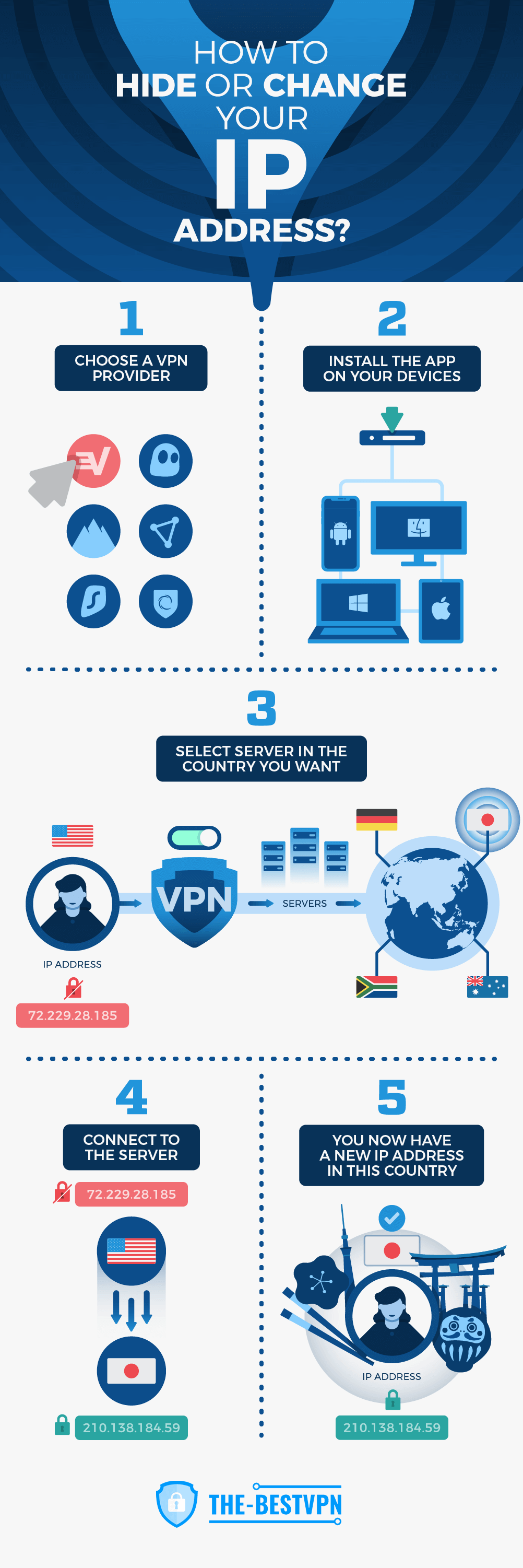
Alternatively, you can use a VPN service like AdGuardVPN to change your IP address. A VPN, or Virtual Private Network, allows you to connect to the internet through a server located in a different country. This server acts as a proxy, masking your true IP address and providing you with a new one.
In conclusion, changing your IP address can offer several benefits, such as bypassing restrictions, protecting your privacy, accessing geographically restricted content, and remaining anonymous online. Whether you choose to change your IP address using your device’s settings or through a VPN service like AdGuardVPN, it is important to understand why you may need to do so and how to do it safely.
How to Change Your IP Address: Ultimate Guide
Changing your IP address can be useful for a variety of reasons. Whether you want to access content that is restricted in your country or region, protect your online privacy, or bypass network restrictions, knowing how to change your IP address can help you achieve these goals. In this ultimate guide, we’ll walk you through the different methods you can use to change your IP address.
1. Use a VPN
A Virtual Private Network (VPN) is one of the most popular methods to change your IP address. When you connect to a VPN, it establishes a secure connection between your computer or device and a remote server. As a result, your IP address will appear as if it is originating from the location of the VPN server. There are many VPN services available, so you should choose one that suits your needs.
2. Utilize a Proxy Server
Another way to change your IP address is by using a proxy server. A proxy server acts as an intermediary between your device and the websites you visit. When you connect to a proxy server, it hides your real IP address and assigns you a different one. There are both free and paid proxy servers available, but keep in mind that the quality and reliability may vary.
3. Configure Your Network Settings
If you want to change your IP address locally, you can do so by configuring your network settings. This method is more suitable for changing your IP address on a specific device within your home network. By accessing your network settings, you can manually assign a different IP address to your device.
4. Use Public Wi-Fi Networks
When you connect to a public Wi-Fi network, your IP address will be different from your home network. This is because public Wi-Fi networks typically use a different external IP address for all connected devices. Keep in mind that public Wi-Fi networks are less secure, so exercise caution when using them for sensitive tasks.
Changing your IP address can provide you with more online freedom and privacy. By following the methods mentioned above, you can easily change your IP address and enjoy a different browsing experience. Whether you choose to use a VPN, proxy server, configure your network settings, or rely on public Wi-Fi networks, make sure to consider the pros and cons of each method before making a decision.
Remember, your IP address is your online identity, and changing it can make your online activities more anonymous and secure.
Use a proxy
If you need to change your IP address, using a proxy server is one way to do it. A proxy server acts as an intermediary between your computer and the websites you visit. It can help you bypass restrictions, access blocked content, and maintain your privacy online.
There are different types of proxies available, such as HTTP proxies, HTTPS proxies, SOCKS proxies, and more. Each type has its own advantages and use cases. For example, an HTTP proxy is commonly used for web browsing, while a SOCKS proxy can be used for more advanced applications.
To use a proxy, you’ll need to configure your browser or system settings to connect to the proxy server. This can usually be done in the network settings or through browser extensions. Once connected to the proxy, your IP address will be masked and the websites you visit will see the IP address of the proxy server instead.
Using a proxy can make it easier to bypass certain restrictions or access content that may be blocked in your region. However, it’s important to note that not all proxies offer the same level of privacy and security. Some proxies may collect and log your data, while others may be less reliable or trustworthy.
If you’re concerned about privacy and security, it’s recommended to use a reputable proxy service, like AdGuard VPN. AdGuard VPN uses advanced encryption technology to ensure your online activities are private and secure. It also allows you to choose from a wide range of proxy servers located around the world, giving you greater flexibility and control over your IP address.
FAQ
What is an IP address?
An IP address is a unique identifier assigned to each device connected to a computer network. It is used to determine the location of the device and establish a connection.
What is a VPN?
A VPN (Virtual Private Network) is a service that allows users to connect to the internet securely and privately by encrypting their internet traffic. AdGuard VPN is one such service.
How does AdGuard VPN determine my IP address?
AdGuard VPN assigns you a new IP address when you connect to their VPN servers. This IP address can be different from your external IP address.
Does my IP address change when using a VPN?
Yes, when you connect to a VPN service like AdGuard, your IP address is changed to the IP address of the VPN server you are connected to.
Can I use a different IP address for each device?
Yes, AdGuard VPN allows you to use a different IP address for each device connected to their service. This can be useful for various reasons, like accessing geo-restricted content or improving online privacy.
Can I change my IP address for Google searches?
Yes, when you use AdGuard VPN, your IP address will be different for each search you make on Google or any other search engine.
What is the difference between internal and external IP addresses?
An internal IP address is assigned to a device on a local network, while an external IP address is assigned by your ISP and is the address seen by websites and services on the internet.
What is a dynamic IP address?
A dynamic IP address is an IP address that is assigned to a device by your ISP and can change over time. This is in contrast to a static IP address, which remains the same.
Do I need to login to change my IP address with AdGuard VPN?
No, once you are connected to AdGuard VPN, your IP address will automatically change without the need for any login or manual configuration.
Can I use AdGuard VPN to bypass certain websites or content?
Yes, by connecting to AdGuard VPN, you can bypass certain websites or access restricted content that may be blocked in your country or region.
How do I find my IP address?
To find your IP address, you can use online IP address lookup tools or check the network settings on your device. AdGuard VPN will also display your new IP address when you are connected to their service.
Google it
When it comes to changing your IP address, one of the quickest and easiest ways is to simply “Google it”. By performing a quick search on Google, you can find a variety of resources and guides that will walk you through the process of changing your IP address.
If you’re not familiar with IP addresses, they are unique identifiers assigned to each device on a network. The most common type of IP address is IPv4, which is shown as a series of four numbers separated by periods. However, there is also a newer type called IPv6, though it is not as widely used.
Whether you’re looking to change your IP address for privacy reasons, to bypass geo-restrictions, or for any other reason, a simple Google search will provide you with answers. You might come across articles, forums, or frequently asked questions (FAQ) that explain how to connect to a different server or use a proxy to change your IP address.
In some cases, you might also find guides specific to using a VPN service like AdGuard VPN. VPNs can help you change your IP address by routing your internet connection through a different server, making it appear as though you are connected from a different location.
It’s important to know that changing your IP address can have different effects depending on the context. For example, some websites and online services rely on IP addresses to determine your location and provide localized content. By changing your IP address, you may encounter issues accessing certain websites or content.
- Static and Dynamic IP Addresses
IP addresses can be either static or dynamic. Static IP addresses remain the same and are typically assigned to devices that need a fixed address, such as servers. Dynamic IP addresses, on the other hand, are assigned by a network’s DHCP (Dynamic Host Configuration Protocol) server and can change over time.
It’s worth noting that even if you change your IP address, certain websites and services may still be able to track you using other methods, such as cookies or browser fingerprinting. These methods can help websites collect information about your browsing habits and preferences, regardless of your IP address.
However, changing your IP address can still be a useful tool for protecting your privacy and bypassing certain restrictions. Whether you use a VPN, proxy, or other methods, a quick Google search will provide you with the information you need to change your IP address on various devices and browsers.
In summary, if you’re looking to change your IP address, start by Googling it. There are plenty of resources available that will walk you through the process and provide you with the necessary tools and techniques to change your IP address. Just keep in mind that the process may vary depending on your device, network setup, and the specific reason for wanting to change your IP address.
On the computer
If you need to change your IP address on the computer, there are several methods you can use. One option is to use a proxy server. A proxy server acts as a middleman between your device and the internet, allowing you to browse anonymously and bypass certain restrictions. You can find free proxy servers with a simple Google search, but be cautious as some of them may track your online activities.
Another method is to use a VPN (Virtual Private Network). A VPN can help you change your IP address by routing your internet traffic through a server located in a different location. This can be useful when you want to access geo-restricted content or protect your privacy online. AdGuardVPN is one such service that provides a secure and reliable VPN connection.
If you want to change your IP address locally on your computer, you can try modifying your network settings. For example, you can use a static IP address instead of a dynamic one. A static IP address is a permanent address that doesn’t change, while a dynamic IP address is assigned to you by your internet service provider and can change periodically.
Changing your IP address can also be done by modifying your DNS settings. DNS (Domain Name System) is responsible for translating domain names into IP addresses. By using a different DNS server, you can change the IP address that your computer connects to when accessing websites. AdGuard DNS is a popular choice for those who want to block ads and protect their privacy.
Who can see your IP address
Your IP address is a unique identifier that is assigned to your device when it connects to the internet. This address is visible to certain parties when you are online, and it can provide information about your location and internet service provider. In this article, we will discuss who can see your IP address and why.
Internet Service Provider (ISP)
Your ISP is the first entity that can see your IP address. They provide you with internet access and are responsible for routing your internet traffic. Your ISP can see your IP address in order to deliver the data packets to your device. They can also keep a record of your internet activity, which is subject to privacy policies and laws.
Websites and online services
Websites and online services can also see your IP address when you visit their pages or use their services. This is necessary for them to deliver the requested content to your device. Additionally, websites and services can use your IP address for various reasons, such as tracking your online activity, personalizing content, or enforcing access restrictions.
Third-party trackers and advertisers
Third-party trackers and advertisers may also have access to your IP address when you interact with their content or visit websites that include their tracking codes. They can use this information to create user profiles, target advertisements, or gather data for analytics purposes. However, some privacy tools like VPNs or ad blockers can help mitigate this tracking.
Other users on the same network
When you are connected to a local network (e.g., in a coffee shop, library, or office), other users on the same network can see your IP address. This is because devices on the same local network share a common IP address, known as the public IP address. However, they cannot see your specific device’s internal IP address, which is assigned by the network’s router.
In conclusion, your IP address can be seen by various parties for different reasons. It is important to be aware of who can see your IP address and take steps to maintain your online privacy if needed. Using tools like VPNs, proxies, or privacy-focused browsers can help you appear anonymous, hide your IP address, and protect your online identity.
Why AdGuard?
When it comes to changing your IP address, there are several reasons why AdGuard stands out among other services. First, AdGuard doesn’t keep any logs of your online activity, ensuring your privacy and security.
If you connect multiple devices to AdGuard VPN, you’ll only need to log in once. You can easily switch between devices without any hassle.
There are several ways to change your IP address using AdGuard. The first one is by using the VPN mode. This mode lets you connect to one of AdGuard’s servers, and your IP address will appear as if you are connected from a different location. This is useful for bypassing geographical restrictions or hiding your true location.
The second way to change your IP address is by using the Proxy mode. This mode allows you to connect to an AdGuard proxy server, which will route your internet traffic and change your IP address. It’s a great option if you want to change your IP address for a specific app or browser, while keeping the rest of your system unchanged.
AdGuard also offers an internal DNS server, which can change your IP address for specific websites. This is useful if you want to access blocked websites or prevent tracking.
If you’re concerned about IPv6 leaking your IP address, don’t worry! AdGuard has you covered. AdGuard VPN supports IPv6, and by default, it will clear your IPv6 routes to ensure your IP address remains hidden.
AdGuard also provides a white label solution for businesses who want to offer their own VPN service to their users. This allows businesses to have full control over the VPN service, from its appearance to the server infrastructure.
In summary, AdGuard offers a comprehensive and user-friendly service for changing your IP address. Whether you’re looking to bypass restrictions, protect your privacy, or access blocked websites, AdGuard has the tools and features to help you achieve your goals.
The VPN is connected but my IP address does not change
When using a VPN, the purpose is to change your IP address and browse the web anonymously. However, there may be instances where you find that even though the VPN is connected, your IP address is not changing. There could be several reasons for this:
1. Static IP addresses
One of the reasons why your IP address may not be changing is if you have a static IP address assigned to you. Static IP addresses do not change and are typically used in office settings or by users who require a consistent IP address for certain services or applications.
2. Dynamic IP addresses
In contrast to static IP addresses, dynamic IP addresses can change each time you connect to the internet. However, even with a dynamic IP address, certain factors may prevent the address from changing. This could include settings in the VPN client or on your device that are forcing the retention of the same IP address.
3. Third-party tracking
Some websites or services use third-party tracking tools to identify and associate your IP address with your online activities. In these cases, even if your IP address changes, the tracking tool may still be able to link your activities to your previous IP address, making it appear as if your IP is not changing.
4. IPv4 vs IPv6
There are two types of IP addresses: IPv4 and IPv6. Most users are still primarily using IPv4 addresses. However, as IPv6 adoption increases, some websites or services might only track or display your IPv4 address. Therefore, even if your IPv6 address changes, it may not be reflected in your browsing experience.
To determine why your IP address is not changing, you can try different ways to connect to the VPN and see if the issue persists. For example, you can try connecting using different VPN servers or using different types of network connections.
If you are using AdGuard VPN, you can check the FAQ section on their website to find more information about changing IP addresses and troubleshooting any issues you might encounter.
Why you might need to change your IP address
There are several reasons why you might need to change your IP address. For example, you may want to access online content that is restricted in your current location. By changing your IP address, you can bypass these restrictions and access the content you want.
Another reason to change your IP address is to protect your privacy. When you are connected to the internet, your IP address can be used to track your online activities. By changing your IP address, you can make it more difficult for third parties to track and collect your personal information.
If you’re using a shared network, such as an office or a public Wi-Fi, changing your IP address can also help you avoid problems with other devices connected to the same network. For example, if there is an IP address conflict, changing your IP address can resolve the issue and ensure smooth network operations.
Changing your IP address can also be helpful when troubleshooting network or internet connectivity problems. By switching to a different IP address, you can determine if the problem lies with your current IP or with the system or service you are trying to connect to.
One of the easiest ways to change your IP address is by using a VPN (Virtual Private Network). A VPN creates a secure connection between your computer and a server located in a different location. This server assigns you a new IP address, making it appear as if you are browsing from a different location.
AdGuardVPN is one such VPN service that lets you change your IP address with ease. By using AdGuardVPN, you can enjoy a secure and private browsing experience, while also being able to access geographically restricted content.
It’s important to note that there are different types of IP addresses, such as static and dynamic IP addresses. A static IP address remains the same over time, while a dynamic IP address can change each time you connect to the internet. AdGuardVPN assigns you a dynamic IP address, ensuring that your online activities are more difficult to trace.
In summary, here are some key points:
- Changing your IP address can help you bypass online restrictions and protect your privacy.
- It can resolve network conflicts and troubleshoot connectivity issues.
- A VPN like AdGuardVPN is an easy way to change your IP address.
- There are different types of IP addresses, including static and dynamic IP addresses.
How to know your IP address
If you’re experiencing connection problems or need to configure a network, it’s important to know your IP address. Your IP address is a unique identifier for your device on the internet. Knowing your IP address can help you troubleshoot network issues, connect to a remote server, or change your location for online privacy.
There are four main types of IP addresses: public, private, static, and dynamic. Public IP addresses are globally unique and are assigned to your device by your internet service provider (ISP). Private IP addresses are used within a local network and are not accessible from the internet. Static IP addresses don’t change, while dynamic IP addresses can change over time.
There are several ways to find your IP address. On a Windows computer, you can go to the “Network and Sharing Center” in the Control Panel and view your IP address under the “Connections” section. Alternatively, you can open the Command Prompt and type “ipconfig” to see a list of network interfaces and their associated IP addresses.
If you’re using a mobile device, finding your IP address might be a bit more complicated. You’ll need to go to the device’s settings and look for the network or Wi-Fi settings. There, you should find an option to view the IP address of your device.
If you’re using AdGuardVPN, you can see your IP address in the app’s settings. Simply open the app, go to the “Settings” tab, and look for the “IP Address” section. There, you’ll find your current IP address and the option to change it.
Why would you need to know your IP address? There are several reasons. For example, if you’re experiencing connection issues, knowing your IP address can help you troubleshoot the problem. If you need to connect to a remote server or access a specific website, knowing your IP address can help you determine if your connection is being blocked or restricted. Additionally, if you’re concerned about your online privacy, knowing your IP address can help you understand how exposed you are and take measures to protect your identity.
In some cases, you might see both IPv4 and IPv6 addresses. IPv4 is the older version of the IP protocol and uses a 32-bit address. IPv6 is the newer version and uses a 128-bit address. Most websites and services still use IPv4, though IPv6 adoption is gradually increasing.
In conclusion, knowing your IP address is important for various reasons. Whether you need to troubleshoot network issues, connect to a remote server, or protect your online privacy, understanding your IP address can help you take the necessary steps to achieve your goals.
On the mobile device
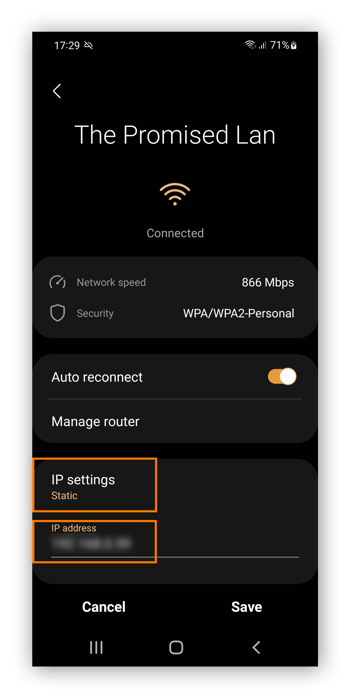
If you are using a mobile device, such as a smartphone or tablet, there are several ways you can change your IP address.
1. Using a VPN
One of the easiest and most popular ways to change your IP address on a mobile device is by using a VPN (Virtual Private Network). A VPN allows you to connect to a remote server and browse the internet with a different IP address. This can help you bypass geo-restrictions, hide your online activities, and protect your privacy. Many VPN apps are available for both iOS and Android devices, and they can be easily configured through the device settings or a dedicated app. Once connected to a VPN server, your IP address will appear as if you are browsing from a different location.
2. Using a proxy server
Another way to change your IP address on a mobile device is by using a proxy server. A proxy server acts as an intermediary between your device and the internet. It forwards your requests to the destination server and returns the response to you. By connecting to a proxy server, your IP address will be replaced with the IP address of the server. There are both free and paid proxy servers available, and they can be configured in the network settings of your device. However, it is worth noting that using a proxy server may not provide the same level of security and privacy as a VPN.
3. Changing network settings
Changing your network settings is another way to change your IP address on a mobile device. Depending on the network you are connected to, you may have the option to obtain an IP address automatically (DHCP) or enter a specific IP address manually. By switching between dynamic and static IP addressing, you can change your IP address. However, keep in mind that this method will only change your local IP address, and your public IP address will remain the same.
It is important to note that changing your IP address does not make you completely anonymous online. While it can help you hide your identity and bypass certain restrictions, there are still other ways to track your activities. For example, websites can collect information about your browsing habits through cookies and other tracking technologies. Therefore, it is recommended to use additional measures, such as ad blockers like AdGuard, to enhance your online privacy and security.
How to Change Your IP Address
Changing your IP address can be an important and useful task for various reasons. Whether you want to bypass location restrictions, improve privacy, or fix network problems, there are several ways to change your IP address.
Using a VPN Service
One of the easier ways to change your IP address is by using a VPN service. A VPN, or Virtual Private Network, allows you to connect to a third-party server that assigns you a different IP address. This change in IP address helps you hide your real location and browse the internet anonymously.
Configuring Network Settings
If you want to change your IP address on your Windows device, you can do so by configuring your network settings. By accessing the Control Panel, you can navigate to the Network and Internet settings, and then change your IP address manually. However, keep in mind that this method may not work in all cases.
Using Proxy Servers
Another method to change your IP address is by using proxy servers. A proxy server acts as an intermediary between your device and the internet. When you connect to a proxy server, it masks your IP address and assigns you a different one. However, be cautious as some proxy servers may collect your data.
Dynamic IP Addresses
Many internet service providers (ISPs) assign dynamic IP addresses to their users. In this case, your IP address can change automatically every time you connect to the internet. This is useful for those looking for a temporary change in their IP address, but keep in mind that the new IP address might not be completely different.
Overall, changing your IP address can help you maintain online privacy, bypass location restrictions, and fix network problems. Whether you use a VPN service, configure network settings, or rely on dynamic IP addresses, knowing how to change your IP address is essential in today’s digital world.
Types of IP addresses
An IP address, or Internet Protocol address, is a unique identifier that is assigned to each device connected to a computer network. There are different types of IP addresses that serve various purposes in the online world.
1. Public IP addresses
A public IP address is an address assigned to your device by your Internet Service Provider (ISP). It is visible to the public and can be used to connect to the internet. When you browse the web or use any online service, your public IP address is what is shown to the outside world.
2. Private IP addresses
Private IP addresses are reserved for devices within a private network, like your home or office network. These addresses are not publicly accessible and are used to connect devices within the network. Private IP addresses are commonly used to identify devices on a local network.
3. Dynamic IP addresses
A dynamic IP address is an address that can change over time. ISPs usually assign dynamic IP addresses to users. These addresses are temporary and can vary each time you connect to the internet. Dynamic IP addresses are more common because they allow ISPs to allocate IP addresses more efficiently.
4. Static IP addresses
A static IP address is a fixed address that does not change. It is usually used for servers, such as web servers or gaming servers, that need a consistent address to operate. Static IP addresses are less common for regular users as they are usually more expensive and require specific configurations.
In summary, IP addresses come in different types, each serving a specific purpose. Public IP addresses are visible to the outside world and allow users to connect to the internet, while private IP addresses are used to identify devices within a private network. Dynamic IP addresses can change over time, while static IP addresses remain constant. Understanding the different types of IP addresses can help you better navigate and troubleshoot network-related issues.
Use an anonymous browser
An anonymous browser is a type of web browser that helps protect your privacy by hiding your IP address and other identifying information. By using an anonymous browser, you can browse the internet without leaving traces of your online activity.
One popular anonymous browser is Tor Browser, which is known for its strong privacy features. Tor Browser routes your internet traffic through a network of relays, making it difficult for anyone to track your online activity back to your IP address. It also allows you to access websites that may be blocked in your country or region.
Another option is using a proxy browser. A proxy browser acts as an intermediary between your device and the website you are trying to access. It masks your IP address and replaces it with the IP address of the proxy server, making it appear as if you are browsing from a different location.
It’s worth noting that while using an anonymous browser can help protect your privacy, it is not foolproof. Certain websites may still be able to detect your true IP address or gather information about you through other means. Additionally, your internet service provider (ISP) and other network administrators may still be able to see your internet activity.
If you’re looking to change your IP address for privacy reasons, using an anonymous browser is just one of the options available to you. There are also virtual private network (VPN) services that can provide a more comprehensive solution by encrypting your internet traffic and routing it through their servers, effectively hiding your true IP address.
In summary, using an anonymous browser can be an effective way to change your IP address and browse the internet more privately. However, it is important to understand its limitations and consider other options for a more secure online experience.
Search it in device settings
To change your IP address on your device, you can start by searching for the relevant settings in your device’s system settings menu. Each operating system may have a slightly different path to access these settings. For example, on a Windows device, you can go to “Network & Internet” settings and find the IP address under the “Properties” section of your internet connection. On a mobile device, the IP address settings can be found in the “Wi-Fi” or “Cellular” section of your device settings.
It’s important to note that the IP address settings may be grayed out or not available on certain devices or networks. This is because the network administrator or your internet service provider may have restrictions in place that prevent you from changing your IP address. In such cases, you may need to contact your network administrator or ISP to discuss your options.
If you’re using a VPN service like AdGuardVPN, there is a secret behind how it changes your IP address. When you connect to a VPN server, your device establishes a secure connection with the server, and all your internet traffic goes through that server. This means that your IP address, which is tied to your physical location, is effectively masked by the IP address of the VPN server. So, when you visit a website or use an online service, it will appear as though you’re accessing it from the location of the VPN server instead of your actual location.
There are different types of IP addresses, and the most common ones are static and dynamic IP addresses. A static IP address remains the same over time, while a dynamic IP address can change each time you connect to the internet. Most residential internet connections use dynamic IP addresses, which helps internet service providers conserve their address space. However, if you have specific reasons for needing a static IP address, you may need to consult with your ISP to see if they provide that option.
When it comes to determining your IP address, you can simply go to a website like Google and search for “what is my IP address.” Google will display your IP address at the top of the search results page. Alternatively, you can use online IP address lookup tools or check the settings on your device. It’s worth noting that if you’re using a VPN service, the IP address shown will be that of the VPN server, not your actual IP address.
Changing your IP address can be useful for a variety of reasons, such as enhancing your online privacy, accessing geo-restricted content, or troubleshooting network issues. By using the methods mentioned above, you can easily change your IP address on your device and enjoy the benefits of a different online presence.
What an IP address is
An IP address, or Internet Protocol address, is a unique numerical label assigned to each device connected to a computer network. It serves as a way to identify and locate devices on a network. There are two main types of IP addresses: IPv4 and IPv6.
IP addresses play a crucial role in the functioning of the global network. Every website and service you interact with relies on IP addresses to transmit data between servers and devices. IP addresses allow websites to track user activity and determine geographical locations.
When you connect to the internet, your device is assigned an IP address by your internet service provider (ISP). This IP address can be either static or dynamic. Static IP addresses do not change and are often used by businesses or individuals who host their own servers. On the other hand, dynamic IP addresses can change each time you connect to the internet.
By default, your IP address is not visible to others when you are using the internet. However, websites can still collect information about your IP address when you visit them. Search engines like Google use your IP address to provide localized search results and targeted advertisements.
If you want to change your IP address, there are several ways to do so. One option is to use a VPN service like AdGuard VPN, which lets you connect to different servers around the world. This allows you to bypass any regional restrictions and appear as if you are browsing from a different location.
Another method is to use a proxy server, which acts as an intermediary between your device and the internet. When you connect to a website through a proxy server, the website only sees the IP address of the proxy server, not your own.
In some cases, you may need to clear your browser’s cache in order to change your IP address. This can be done by going into your browser’s settings and clearing your browsing history and cookies. Additionally, restarting your modem or router can also result in a change of IP address.
Changing your IP address can be useful for a variety of reasons. It can help protect your privacy online, bypass geographical restrictions, or troubleshoot network connectivity issues. However, it’s important to note that changing your IP address does not guarantee complete anonymity on the internet, as there are other methods of tracking user activity.
Use a VPN
A Virtual Private Network (VPN) is one of the most effective tools for changing your IP address and enhancing your online privacy and security. By using a VPN, you can route your internet connection through a server located in a different country or region, and thus hide your real IP address and make it appear as if you are connected from that server’s location.
When you connect to a VPN server, your internet traffic is encrypted and passes through the VPN server before reaching its destination. This ensures that no third parties can intercept or collect your data while it’s in transit. Additionally, because your traffic is routed through a different server, it becomes much harder for anyone to track your online activities back to your original IP address.
For example, if you are using a VPN server located in the United States, your IP address will be masked with a US IP address. This can be useful for accessing geo-restricted content that is only available to users in the US. Furthermore, it can also help you maintain your anonymity while browsing the web, as your real IP address will not be visible to websites or anyone trying to track your online activities.
AdGuardVPN is a VPN service that allows you to change your IP address and browse the web anonymously. It provides a network of servers located in different countries around the world, allowing you to easily connect to a server in the desired location and change your IP address. AdGuardVPN is compatible with various devices and operating systems, including Windows, Mac, Android, and iOS.
How to change your IP address using AdGuard VPN
If you want to change your IP address for any reason, AdGuard VPN offers an easy and efficient solution. By connecting to AdGuard VPN servers, you can collect a new IP address that is different from your current one. This allows you to browse the internet anonymously and without worrying about being tracked by websites or online services.
Why would you want to change your IP address?
There are several reasons why you might need to change your IP address. For example, you may want to access geo-restricted content that is only available in specific countries. Changing your IP address to appear as if you are located in that country can help you bypass these restrictions and access the content you want.
Changing your IP address can also help improve your online privacy and security. By using AdGuard VPN, your connection is encrypted, making it harder for others to intercept your data. Additionally, by changing your IP address, you can prevent websites and online services from collecting information about your online activities.
How does AdGuard VPN change your IP address?
AdGuard VPN utilizes its own servers located in different countries. When you connect to AdGuard VPN, your internet traffic is routed through one of these servers, and your IP address is replaced with a new one associated with that server. This allows you to appear as if you are browsing from a different location, helping you bypass geo-restrictions.
Does changing your IP address affect your online experience?
Changing your IP address using AdGuard VPN should not cause any problems with your internet connection. AdGuard VPN supports both IPv4 and IPv6 protocols, ensuring compatibility with different systems. Whether you are using Windows, Mac, or mobile devices, you can easily change your IP address and enjoy a private and secure online experience.
How to change your IP address using AdGuard VPN
To change your IP address using AdGuard VPN, you need to follow these steps:
- Download and install AdGuard VPN on your device.
- Launch the AdGuard VPN app and sign in to your account.
- Select a server location from the available options.
- Click the “Connect” button to establish a connection.
Once connected, AdGuard VPN will assign you a new IP address, and you can start browsing the internet anonymously and securely.
FAQs about changing your IP address with AdGuard VPN
- Can I change my IP address without using a VPN?
Though some browsers offer proxy services that can change your IP address, using a VPN like AdGuard VPN is generally easier and more reliable. - Why doesn’t my public IP address change when connected to AdGuard VPN?
Your public IP address might not change when connected to AdGuard VPN because it depends on your internet service provider. - Who might need to change their IP address?
Changing your IP address can benefit users who want to access geo-restricted content, improve online privacy, or bypass tracking by websites and online services. - What types of IP addresses does AdGuard VPN offer?
AdGuard VPN provides both dynamic and static IP addresses, giving you flexibility based on your specific needs. - Does changing my IP address affect my connection speed?
AdGuard VPN aims to provide a fast and reliable connection without significantly affecting your connection speed.
By using AdGuard VPN, you can easily change your IP address and enjoy a private, anonymous, and secure online browsing experience.
Вопрос-ответ:
How can I change my IP address?
There are several ways to change your IP address. One method is to use a virtual private network (VPN) service, which can mask your IP address and assign you a new one from a different location. Another option is to reset your internet modem, which may give you a new IP address. Additionally, you can contact your internet service provider (ISP) and request a new IP address.
Why would I want to change my IP address?
There are a few reasons why you might want to change your IP address. One common reason is to enhance your online privacy and security. By changing your IP address, you can hide your real location and protect your identity from potential hackers or trackers. Additionally, changing your IP address can help you bypass certain restrictions or access content that may be blocked in your country or region.
Is it legal to change my IP address?
Yes, it is completely legal to change your IP address. Many individuals and organizations use techniques like using VPN services or resetting their internet modem to change their IP address for various reasons. However, it is important to note that while changing your IP address is legal, using it for illegal activities is not.
Can changing my IP address improve my internet speed?
No, changing your IP address will not directly improve your internet speed. Your internet speed is determined by various factors such as your broadband connection, network congestion, and the server you are accessing. However, using a VPN service may indirectly improve your internet speed by optimizing your connection and reducing latency.
Are there any risks involved in changing my IP address?
While changing your IP address itself does not pose any significant risks, there are a few things to consider. If you are using a VPN service, it is important to choose a reliable and trustworthy provider to ensure your online privacy and security. Additionally, if you reset your internet modem, you may experience a temporary interruption in your internet connection. It is also worth noting that changing your IP address may not always guarantee complete anonymity.
Can I change my IP address on my mobile device?
Yes, you can change your IP address on your mobile device. Most VPN services offer applications for mobile platforms such as iOS and Android, allowing you to easily connect to their servers and change your IP address. Additionally, you can also try resetting your mobile network settings to obtain a new IP address.
Is it possible to change my IP address to a specific location?
Yes, it is possible to change your IP address to a specific location using a VPN service. VPNs allow you to connect to servers in different countries, thereby assigning you an IP address from that location. This can be useful if you want to access region-restricted content or bypass geo-blocking. However, it is important to choose a VPN provider that offers servers in your desired location.
Видео:
How to change your IP address in Windows 10
How to change your IP address in Windows 10 by The Geek Page 2 years ago 2 minutes, 53 seconds 22,612 views
How to change IP Address Automatically. TOR IP Changer March 2023 !!! Still WORK ???
How to change IP Address Automatically. TOR IP Changer March 2023 !!! Still WORK ??? by TutorialEz96 3 months ago 8 minutes, 10 seconds 6,783 views
How to change IP address in Windows 10: Get Static IP Address
How to change IP address in Windows 10: Get Static IP Address by Professional Tutorial 4 years ago 4 minutes, 39 seconds 736,162 views
