Protect Your Passwords with ExpressVPN Keys: The Ultimate Password Security Solution
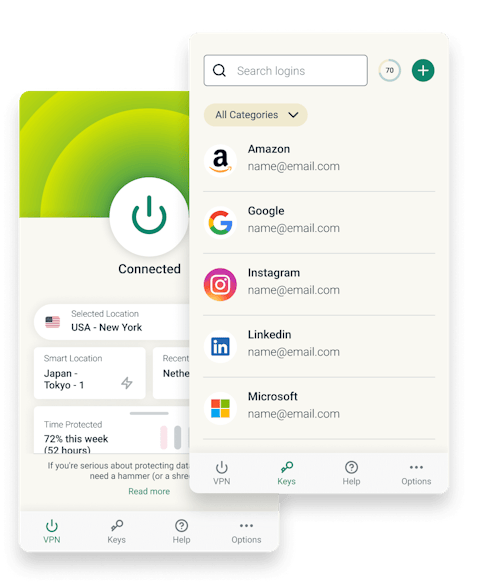
With the new ExpressVPN Keys feature, you can keep all your passwords safe and secure. Whether you are a new or existing ExpressVPN user, this new feature allows you to set and store limitless logins for many devices, making it faster and easier to enter your credentials when you need to. No more forgetting passwords or having to search for them across different platforms.
ExpressVPN Keys works with just a simple click. Once you install the ExpressVPN app on your Android or iOS device, you can find the Keys feature within the app. With ExpressVPN Keys, you can monitor the health of your passwords and generate strong and valid logins with just one click. It also helps improve the security of your login credentials by taking password limits into account.
ExpressVPN Keys is not just a password manager. It goes beyond that. It allows you to keep extra logins for any of your devices, making it even safer and easier to log in. And with ExpressVPN’s robust encryption, you can be sure that your passwords are stored securely, making it virtually impossible for anyone to access them.
So, take your password security to the next level. Download ExpressVPN Keys now and enjoy the peace of mind that comes with having a secure and reliable password management solution for all your devices.
Note: ExpressVPN Keys feature is only available with an ExpressVPN subscription.
Protect your online accounts
In today’s digital age, protecting your online accounts is more important than ever. With so much of our personal information stored in these accounts, it is crucial to ensure that our passwords are secure. Weak passwords can easily be hacked, putting our sensitive data at risk.
One effective way to protect your online accounts is by using a password manager. This is a digital tool that allows you to store and manage all your passwords in one secure location. With a password manager, you can easily generate strong and unique passwords for each of your accounts, making it nearly impossible for hackers to guess them.
When using a password manager, you only need to remember one master password. This means that you can create complex passwords that are difficult for others to crack, without having to worry about forgetting them. The password manager will securely store all your passwords and autofill them when needed, saving you time and effort.
Another important security measure to protect your online accounts is to enable two-factor authentication (2FA) whenever possible. 2FA adds an extra layer of security by requiring you to enter a code from an app, such as Google Authenticator or a text message, in addition to your password. This ensures that even if your password is compromised, the hacker would still need access to your device or the app to log in.
Additionally, it is advisable to use a VPN (Virtual Private Network) like ExpressVPN when accessing your online accounts. A VPN encrypts your internet connection, making it difficult for hackers to intercept your data. This is particularly important when using public Wi-Fi networks, which are often insecure and can be easily exploited by cybercriminals.
Remember to regularly update your passwords and never reuse them across multiple accounts. If one of your accounts has been compromised, using the same password on other accounts puts all of them at risk. Keeping your passwords unique and changing them periodically is essential for maintaining the security of your online accounts.
By following these steps, you can significantly enhance the security of your online accounts and protect your personal information from unauthorized access. Take the edge off worrying about your online security and take the necessary steps to safeguard your accounts today.
Encrypt your passwords
When it comes to keeping your online accounts secure, encrypting your passwords is essential. With a subscription to ExpressVPN, you can encrypt your passwords and keep them safe from prying eyes.
ExpressVPN is open to use on multiple devices, including routers, making it easy to secure your passwords across all of your devices. Whether you’re logging in from a Windows, Mac, Linux, Android, or any other device, you can count on ExpressVPN to provide a safe and secure connection.
ExpressVPN offers a built-in password manager that allows you to effectively manage and save your passwords. With this feature, you can easily generate secure passwords, sync them across different devices, and autofill them when needed. This saves you time and ensures that you are using strong and unique passwords for each of your accounts.
By using ExpressVPN, you can also benefit from faster login times. The service limits the amount of data that needs to be transferred between your device and the server, resulting in faster login times, especially for websites that have a lot of data to load.
To set up password encryption with ExpressVPN, simply download the ExpressVPN app on your preferred device and log in with your username and password. Then, follow the simple setup instructions to enable password encryption. ExpressVPN will take care of the rest and ensure that your passwords are secure.
Don’t be one of the many who fall victim to password hacks. Keep your accounts secure by encrypting your passwords with ExpressVPN. With its advanced security features and state-of-the-art encryption keys, ExpressVPN ensures that your passwords stay safe and secure, no matter where you go or what device you’re using.
Generate strong and unique passwords
When it comes to online security, one of the first things you need to do is create strong and unique passwords for all your accounts. Using the same password for multiple accounts puts you at risk, as once someone gains access to one account, they can quickly try that password elsewhere. Instead, make sure to fill your digital galaxy with strong and unique passwords for each and every account.
But how do you come up with strong and unique passwords? Well, you can use a password generator tool that will help you create strong passwords with a mix of upper and lowercase letters, numbers, and special characters. It’s a simple process that only takes a few seconds.
If you’re an ExpressVPN user, you’re in luck. ExpressVPN offers a built-in password generator feature that allows you to generate strong and unique passwords with just a click of a button. Once you have the ExpressVPN app installed on your device, you can access this feature by clicking on the “Keys” tab. With ExpressVPN, you can generate passwords and save them securely using ExpressVPN’s password manager.
By using the ExpressVPN password manager, you can save your login details across multiple devices and platforms. Whether you’re on Windows, Mac, iOS, Android, or Linux, ExpressVPN has got you covered. Gone are the days of having to remember multiple login details or constantly reset passwords. With ExpressVPN’s password manager, you can easily log in to any existing account with just a click or tap.
In addition to saving and autofilling your login details, ExpressVPN’s password manager also has some extra features that make your online experience even more secure. With ExpressVPN, you can set up two-factor authentication for an extra layer of security. ExpressVPN also encrypts your login details and stores them securely on your device, so you don’t have to worry about your passwords falling into the wrong hands.
If you’re tired of struggling to come up with strong and unique passwords, give ExpressVPN’s password manager a try. It’s the best way to secure your passwords and keep them organized across all your devices. Don’t forget to download the ExpressVPN app and get started today.
Store passwords securely
When it comes to keeping your online accounts secure, it’s important to store your passwords securely. Storing your passwords in a safe and protected manner is crucial to protecting your sensitive information from being accessed by unauthorized individuals. With the extra security provided by ExpressVPN, you can store your passwords with peace of mind.
With ExpressVPN, you no longer need to remember multiple passwords for different accounts or worry about writing them down and potentially losing them. The ExpressVPN password manager allows you to securely store all your passwords and access them whenever you need them. You can also sync your passwords across devices, making it easy to find and fill in your login details on any device at any time.
How it Works
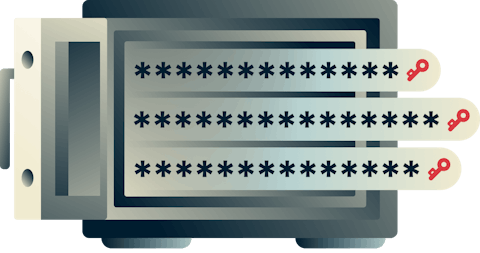
The ExpressVPN password manager works by encrypting your passwords and storing them in a secure vault. When you need to log in to a website, simply click the autofill button and the password manager will automatically fill in your login details for you. You can also generate strong and unique passwords with the password generator, so you don’t have to worry about coming up with complex passwords on your own.
ExpressVPN’s password manager is available for Windows, Mac, and Linux, as well as for Android and iOS devices. To start using it, simply download and install the app on your device. It’s easy to set up and saves you time and effort in remembering and entering your login details.
With the ExpressVPN password manager, you can keep all your passwords safe and secure in one place. Say goodbye to the worry of forgetting your login details or using simple and easy-to-guess passwords. Improve your online security and protect your sensitive information with ExpressVPN’s password manager.
Avoid password reuse
One of the most common mistakes people make when it comes to password security is reusing the same password across multiple accounts. This is a dangerous practice because if one of your accounts is compromised, all of your other accounts are at risk.
To avoid password reuse, it is important to have unique passwords for each account that you create. This can be difficult to manage, especially if you have many online accounts. But with the help of a VPN like ExpressVPN, you can securely store and manage all of your passwords.
ExpressVPN offers a built-in password manager that allows you to securely save and store all of your passwords in one place. This not only saves you the hassle of having to remember multiple passwords, but it also ensures that your passwords are safe and protected.
In addition to storing your passwords, ExpressVPN’s password manager also has a built-in password generator. This feature allows you to generate strong, random passwords that are virtually impossible to guess. By using this password generator, you can further enhance the security of your online accounts.
When you create a new account or change an existing password, ExpressVPN’s password manager will automatically fill in the password for you. This means that you don’t have to memorize or enter your passwords manually.
Furthermore, ExpressVPN’s password manager is compatible with multiple devices and platforms, including Windows, Mac, iOS, and Android. This means that you can access your passwords from any device, ensuring that you always have them when you need them.
To take advantage of ExpressVPN’s password manager, all you need to do is download and install the ExpressVPN app on your device. Once you have done that, you can set up an account and start using the password manager.
In conclusion, avoiding password reuse is essential for maintaining good password security. By using a VPN like ExpressVPN and its built-in password manager, you can save yourself the trouble of remembering multiple passwords and keep your accounts safe and secure.
Easily access your passwords
With ExpressVPN Keys, you’ll never have to worry about forgetting or losing your passwords again. This powerful tool not only helps you store and organize your passwords, but also helps improve your online security.
Logging in to various websites can be a hassle, especially if you have multiple accounts. With ExpressVPN Keys, you can easily access all your passwords from any device. Simply enter your username and the app will autofill your login details, saving you time and effort.
ExpressVPN Keys also offers built-in password generator functionality. If you’ve ever been unsure how secure your existing passwords are, you can quickly generate new, strong passwords with just a click of a button. This helps you protect your digital accounts from any potential security breaches.
One of the many advantages of ExpressVPN Keys is its simplicity. It’s a user-friendly app that anyone can easily set up and use. Whether you’re using it on your Windows PC, Android device, or even on your Chrome browser, the app provides a seamless and efficient password management experience.
ExpressVPN Keys also offers sync and backup features, allowing you to keep your passwords safe and accessible across multiple devices. Whether you’re at home or on the go, you can access your passwords anytime, anywhere.
ExpressVPN Keys is compatible with various browsers and platforms, including Google Chrome, making it easier for you to integrate it into your existing workflow. Simply install the app, sign in with your ExpressVPN account, and you’re ready to go.
ExpressVPN Keys also provides an extra layer of protection for your passwords. With its advanced encryption technology, you can rest assured that your sensitive information is secure and private.
So don’t forget to download ExpressVPN Keys today and experience the many benefits it offers for securing and managing your passwords. With ExpressVPN Keys, you can keep your digital health in check, enjoy faster logins, and have peace of mind knowing that your passwords are secure.
Sync passwords across devices
With ExpressVPN Keys, you can easily sync your passwords across all your devices, whether you’re using Windows, Android, or iOS. This means that no matter where you are or which device you’re using, you’ll always have access to your passwords.
By syncing your passwords, you can save time and make your browsing experience faster. Instead of entering your usernames and passwords manually, ExpressVPN Keys will automatically fill them in for you. This not only saves you time, but also ensures that your passwords are secure and not easily guessed.
ExpressVPN Keys offers the best digital security features, so you can feel confident that your passwords are safe. The encryption code used by ExpressVPN Keys is strong, making it nearly impossible for anyone else to access your passwords. And with ExpressVPN, your logins are protected by secure and anonymous servers.
Setting up ExpressVPN Keys on your devices is quick and easy. Simply download the app, create an account, and install it on your Windows, Android, or iOS device. Once installed, ExpressVPN Keys will automatically sync your passwords from your existing password manager, so you don’t have to manually enter or remember them.
With ExpressVPN Keys, there’s no limit to the number of devices you can sync your passwords to. Whether you have just a few devices or many, ExpressVPN Keys can handle them all. So whether you’re at home, at work, or on the go, you’ll always have access to your passwords.
Don’t forget to regularly update and generate strong passwords to improve your online security. ExpressVPN Keys can help you with this by providing suggestions for strong and secure passwords. This can help protect your accounts from unauthorized access and keep your personal information safe.
Authenticate with biometrics
ExpressVPN offers a secure and convenient way to authenticate using biometrics. With the latest technology advancements, you can now set up biometric authentication on your device to enhance the security of your login credentials.
By enabling biometric authentication, such as fingerprint or facial recognition, you can protect your sensitive information from unauthorized access. It adds an extra layer of security and ensures that only you can access your ExpressVPN account and passwords.
To set up biometric authentication, simply go to the ExpressVPN app on your device and navigate to the settings. Look for the biometric authentication option and enable it. Depending on your device, you may need to register your fingerprint or face in the system settings first.
Once biometric authentication is set up, you can log in to your ExpressVPN account with just a touch or a glance. No more need to remember complex passwords or enter them manually. Biometrics provide a quick and secure way to access your account and protect your data.
With biometric authentication, you’ll have peace of mind knowing that your ExpressVPN account and passwords are safe from unauthorized access. It’s the best way to keep your login credentials secure and easily accessible.
ExpressVPN offers biometric authentication as one of its many features to enhance the user experience. You can enjoy the convenience and security it brings across various devices, including Windows, Mac, iOS, Android, and even routers.
No matter which device or platform you use, ExpressVPN’s biometric authentication ensures that only you can access your account and keep your sensitive information secure. Experience the convenience and peace of mind with ExpressVPN’s biometric authentication today!
Use multi-factor authentication
Multi-factor authentication (MFA) is a powerful security measure that adds an extra layer of protection to your online accounts. By requiring more than just a password to access your account, MFA significantly reduces the risk of unauthorized access and protects your sensitive information.
With MFA, you’ll play an active role in ensuring the security of your accounts. The first step is to download and install a reputable authenticator app, such as Google Authenticator or Authy, on your device. Once installed, you’ll need to set it up by linking it to your account.
Whenever you sign in to an account with MFA enabled, you’ll need to enter not just your password, but also a unique code generated by the authenticator app. This code is only valid for a short period of time and constantly changes, making it nearly impossible for hackers to gain access to your account.
Using MFA on multiple devices is highly recommended, as it provides an additional level of security. For example, you can set up MFA on your Windows PC, Android phone, and even your Mac. This means that even if one of your devices is compromised, your accounts will still be safe.
To enable MFA on your accounts, simply go to the security settings and look for the option to enable it. Once enabled, you’ll need to follow the setup instructions provided by your chosen authenticator app. Make sure to save your backup codes and securely store them in case you ever lose access to your device.
In summary, using multi-factor authentication is one of the best ways to protect your online accounts from unauthorized access. With the added layer of security, your passwords are no longer the sole gatekeepers to your accounts. So take the extra step and set up MFA today to keep your digital life safe and secure.
Get alerts for compromised passwords
Keeping your passwords secure is essential for protecting your online accounts and personal information. With ExpressVPN Keys, you can receive alerts whenever your passwords are compromised, ensuring that you can take immediate action to protect your accounts.
ExpressVPN Keys uses advanced algorithms to monitor the security of your passwords and compare them to known data breaches. If any of your passwords are found to be compromised, you will receive an alert, allowing you to change the password and secure your account.
This feature is especially useful because many people use the same password for multiple accounts. If one account is compromised, it can lead to a domino effect, where hackers gain access to your other accounts. By receiving timely alerts, you can prevent any further unauthorized access and ensure the safety of your information.
In addition to compromised passwords, ExpressVPN Keys can also help you improve the overall security of your passwords. With a built-in password generator, you can easily create strong, unique passwords for each of your accounts. This eliminates the need to remember complex passwords or write them down, providing an extra layer of protection against unauthorized access.
ExpressVPN Keys is compatible with various devices and operating systems, including Windows, Mac, Android, and iOS. Whether you’re using a desktop, laptop, smartphone, or tablet, you can install the ExpressVPN Keys app and benefit from its password alert and generation features.
To get started with ExpressVPN Keys, simply install the app on your device and create an account. Once you’ve logged in, you’ll be able to sync your passwords across all your devices, ensuring that you have access to them whenever and wherever you need.
With ExpressVPN Keys, you no longer have to worry about forgetting your passwords or using weak ones. The app fills in your login details automatically, saving you time and frustration. With just a few clicks, you can have a strong, unique password for each of your accounts, providing you with limitless protection online.
Improve your password hygiene
In today’s digital age, where almost every aspect of our lives is connected to the internet, it is essential to prioritize password security. Weak or easily guessable passwords can leave you vulnerable to hacking attempts and compromise your personal information. By following a few simple steps and utilizing the right tools, you can improve your password hygiene and protect yourself from potential cyber threats.
Create strong and unique passwords
The first step in improving your password hygiene is to set strong and unique passwords for all your accounts. Avoid common passwords like “123456” or “password” and instead, use a combination of uppercase and lowercase letters, numbers, and special characters. Consider using a password manager that can generate and store secure passwords for you, eliminating the need to remember them all.
Enable two-factor authentication
Two-factor authentication adds an extra layer of security to your accounts by requiring not just a password but also a second form of verification, such as a fingerprint or a verification code sent to your mobile device. By enabling this feature, you significantly enhance the security of your logins, making it harder for hackers to gain unauthorized access to your accounts.
Keep your devices and apps up to date
Regularly updating your devices and apps is crucial for maintaining good password hygiene. Software updates often include security patches that fix vulnerabilities and protect against known threats. Ignoring these updates can leave your device or app exposed to potential attacks, so make sure to stay on top of the latest updates to keep your passwords secure.
Monitor your accounts and logins
It’s important to regularly monitor your accounts and logins for any suspicious activity. If you notice any unfamiliar logins or unusual behavior, take immediate action by changing your password and enabling any available security features, such as email notifications for login attempts. Being proactive in monitoring your accounts can help you detect potential security breaches early on and prevent further damage.
Improving your password hygiene is an ongoing process that requires diligence and awareness. By following these tips and implementing the right security measures, you can significantly enhance the security of your online accounts and protect your personal information from falling into the wrong hands.
Secure your Wi-Fi connections

When it comes to securing your Wi-Fi connections, it is important to protect your account and passwords to ensure the safety of your personal information. Whether you are using a Windows, Mac, or Android device, there are steps you can take to secure your connections and maintain your online security.
1. Use a strong password for your Wi-Fi network
The first step in securing your Wi-Fi connections is to set a strong password for your network. Avoid using common passwords and choose a combination of letters, numbers, and symbols to make it more difficult for others to guess.
2. Enable encryption on your router
To add an extra layer of protection to your Wi-Fi connections, enable encryption on your router. This will ensure that all data transmitted between your devices and the router is encrypted, making it more difficult for hackers to intercept and access your information.
3. Use a VPN for added security
Another way to secure your Wi-Fi connections is to use a VPN (Virtual Private Network). A VPN creates a secure, encrypted connection between your device and the internet, protecting your data from being intercepted by malicious individuals.
4. Update your devices regularly
Make sure your devices (such as laptops, smartphones, and tablets) are always up to date with the latest security patches and updates. These updates often include important security fixes that can help protect your Wi-Fi connections from vulnerabilities.
5. Be cautious when connecting to public Wi-Fi
When connecting to public Wi-Fi networks, exercise caution and avoid accessing sensitive information such as banking or personal accounts. Public Wi-Fi networks are often less secure and can be compromised by attackers seeking to intercept data.
6. Use a password manager
If you find it difficult to remember multiple passwords, consider using a password manager. Password managers securely store your passwords and can automatically fill them in for you when needed. This eliminates the need to remember and enter passwords manually, making your Wi-Fi connections faster and more secure.
By following these steps, you can secure your Wi-Fi connections and ensure the safety of your personal information. Take the necessary precautions and stay one step ahead of potential threats.
Protect against phishing attacks
Phishing attacks are one of the most common methods used by hackers to steal sensitive information such as passwords, credit card numbers, and personal data. By pretending to be a trustworthy entity, like a bank or a popular website, cybercriminals trick unsuspecting users into divulging their login credentials or clicking on malicious links.
To protect yourself against phishing attacks, it’s essential to take proper precautions:
- Be vigilant: Always be cautious when opening emails or clicking on links, especially if they request personal information or credentials. Verify the sender’s identity and scrutinize the content of the message.
- Monitor your logins: Regularly review your account activity to identify any unusual or unauthorized logins. If something seems suspicious, take immediate action by changing your passwords and enabling two-factor authentication.
- Use strong and unique passwords: Create complex passwords that are difficult to guess, and avoid using the same password across multiple accounts. Consider using a password manager to generate and store your passwords securely.
- Keep your devices and software up to date: Regularly install updates and patches for your operating system, applications, and antivirus software. These updates often include security fixes that can protect against known vulnerabilities.
- Enable multi-factor authentication: Adding an extra layer of security by requiring a second form of verification, such as a fingerprint or a unique code sent to your mobile device, can significantly reduce the risk of unauthorized access to your accounts.
Protecting yourself against phishing attacks requires a combination of awareness, caution, and the right tools. By following these best practices and using a reliable VPN service like ExpressVPN, you can enhance your online security and minimize the risk of falling victim to phishing scams.
Safely share passwords
When it comes to sharing passwords, it’s important to ensure the security and confidentiality of your sensitive information. ExpressVPN Keys offers a solution that allows you to safely share passwords with others while keeping them protected from unauthorized access.
With ExpressVPN Keys, you can generate unique and secure passwords for different platforms and devices. Whether you’re using Windows, Mac, or mobile devices, ExpressVPN Keys has a built-in password generator that creates strong and complex passwords that are difficult to crack.
In addition to generating secure passwords, ExpressVPN Keys provides an autofill feature that makes logging in faster and easier. You just need to set up your account and then whenever you need to fill in your login credentials, ExpressVPN Keys will automatically input the username and password for you.
ExpressVPN Keys also allows you to save your passwords in a secure password manager. This means you don’t have to remember all your passwords or write them down on sticky notes. Instead, you can store them securely in the password manager, accessible only with your master password.
With ExpressVPN Keys, you can also safely share passwords with others. Whether you’re collaborating on a project or sharing an account with a family member, you can securely share passwords without compromising your security. You can limit access to certain logins and set an expiration time for shared passwords, ensuring that only valid users can access the shared information.
ExpressVPN Keys is available on multiple devices, including Windows, Mac, and mobile devices. This allows you to access your passwords and logins from any device within the ExpressVPN Keys ecosystem. You’ll never have to worry about forgetting a password or struggling to find it again.
Enable two-step verification
Two-step verification is an essential extension to your password security, adding an extra layer of protection to your online accounts. By enabling this feature, you can greatly improve the security of your sensitive information and prevent unauthorized access to your accounts.
To set up two-step verification, you’ll need to download and install an authenticator app on your device. There are many available for both Android and iOS devices, such as Google Authenticator or Authy. Once installed, you’ll need to enable two-step verification in the settings of the app.
When two-step verification is enabled, you will be required to provide a second factor, usually a six-digit code, in addition to your password, whenever you sign in to your account. This code is generated by the authenticator app and changes every 30 seconds, adding an extra layer of security.
Two-step verification is especially important when it comes to securing your ExpressVPN keys. By enabling this feature, you ensure that even if someone were to discover your password, they would still need to provide the second factor code to gain access to your VPN account.
Setting up two-step verification is a simple and straightforward process and can greatly enhance the security of your online accounts. It’s a best practice that has been widely adopted by many major online services, and it’s highly recommended that you enable this feature to keep your digital logins safe and secure. So enable two-step verification today and enjoy a stronger and faster level of security for all your online activities.
Keep your passwords safe with ExpressVPN Keys
With ExpressVPN Keys, you can secure your passwords and keep them safe from unauthorized access. Whether you’re a Windows user or prefer browsing on Google Chrome, ExpressVPN Keys has you covered.
ExpressVPN Keys makes it easy to generate strong, unique passwords for all your online accounts. By using the built-in password manager, you can store and autofill your login credentials with just one click. No more struggling to find or remember your passwords.
One of the key features of ExpressVPN Keys is its limitless syncing capability. You can sync your passwords across all your devices, including Android and iOS, so you can access them wherever you go. This means you’ll never have to enter your login information again and again.
Setting up ExpressVPN Keys is simple. Just download the extension or app, sign in, and you’re ready to go. The user-friendly interface makes it easy to manage and organize your passwords, giving you an extra layer of protection for your digital life.
ExpressVPN Keys also goes beyond just passwords and offers additional features like VPN protection. With ExpressVPN, you can browse the web securely and anonymously, keeping your online activities private and protected from prying eyes.
Don’t rely on weak or easily guessable passwords. Keep your accounts secure with ExpressVPN Keys and enjoy a hassle-free online experience.
Get the ExpressVPN Keys Chrome extension
If you store many passwords or are new to password managers, ExpressVPN Keys Chrome extension is the perfect solution. It enhances the security of your digital accounts and provides a seamless experience for managing your logins.
To install the ExpressVPN Keys Chrome extension, all you need to do is search for “ExpressVPN Keys” in the Chrome Web Store. Sorry, this extension is currently available only for Chrome.
Once installed, the ExpressVPN Keys Chrome extension will appear as a simple button on your Chrome browser. Just click the button to securely log in to any website, without the need to remember or type passwords.
The ExpressVPN Keys Chrome extension is not limited to Chrome on Windows. You can also use it on other devices such as Mac, Linux, or Android. ExpressVPN’s password manager app provides a secure and convenient way to keep track of all your passwords across different devices.
With the ExpressVPN Keys Chrome extension, you can generate strong, unique passwords for each of your accounts and store them securely within the ExpressVPN password manager.
Don’t forget to download the ExpressVPN app on your iOS, Android, or Windows device to sync your logins and autofills across all your devices.
So, if you want to improve your digital security and have a seamless experience managing your passwords, get the ExpressVPN Keys Chrome extension today.
Вопрос-ответ:
Why is it important to secure your passwords?
Securing your passwords is important because they are the keys to accessing your sensitive personal and financial information. If your passwords are not secure, hackers and cybercriminals can easily gain access to your accounts and potentially steal your identity or commit fraud.
What is ExpressVPN?
ExpressVPN is a virtual private network (VPN) service that allows you to create a secure and encrypted connection to the internet. It helps protect your online privacy and security by masking your IP address and encrypting your internet traffic.
How can ExpressVPN help secure my passwords?
ExpressVPN helps secure your passwords by encrypting your internet traffic and masking your IP address. This makes it much more difficult for hackers and cybercriminals to intercept and access your sensitive information, including your passwords.
Can I use ExpressVPN on different operating systems?
Yes, ExpressVPN is compatible with Windows, Mac, and Linux operating systems. You can easily download and install the ExpressVPN app on your device to secure your internet connection and protect your passwords.
Видео:
Setup a 2FA Key for MAXIMUM Online Security! (Yubikey Tutorial)
Setup a 2FA Key for MAXIMUM Online Security! (Yubikey Tutorial) by All Things Secured 1 year ago 10 minutes, 26 seconds 254,500 views
3 CRUCIAL Levels of Password Security (from EASY to INSANITY!!!!)
3 CRUCIAL Levels of Password Security (from EASY to INSANITY!!!!) by All Things Secured 1 year ago 7 minutes, 59 seconds 17,175 views
How to use Expressvpn in 2023 The Only Express VPN Tutorial You’ll Need!
How to use Expressvpn in 2023 The Only Express VPN Tutorial You’ll Need! by Geekman 1 year ago 8 minutes, 18 seconds 24,779 views
