Download Surfshark VPN App for Windows PC and Laptop – Surfshark VPN App Features

If you have been looking for a reliable VPN service that offers high-speed and secure connection, look no further than Surfshark VPN App for Windows PC and Laptop. With its modern and user-friendly interface, Surfshark VPN App provides a seamless browsing experience while protecting your personal information from potential hackers and data trackers.
One of the standout features of Surfshark VPN App is its Double VPN, which allows you to connect to two different servers at the same time, providing an additional layer of protection. This feature ensures that your online activities are kept safe and anonymous, making it impossible for anyone to track your browsing history.
Surfshark VPN App also offers a CleanWeb feature, which automatically blocks ads, trackers, and malware, ensuring that your online experience is clean and free from distractions. With CleanWeb, you can browse the internet without worrying about annoying pop-ups or malicious websites.
Another great feature of Surfshark VPN App is its No-Activity Logs policy, which means that the app does not track or store any of your online activities. This provides you with complete privacy and peace of mind knowing that your browsing history is not being monitored or recorded by the VPN service.
When it comes to speed, Surfshark VPN App is one of the fastest VPN services in the world, with its 10Gbps servers ensuring blazing fast connection speeds. Whether you are streaming movies, downloading files, or simply browsing the web, Surfshark VPN App guarantees a smooth and lag-free experience.
To ensure the highest level of security, Surfshark VPN App uses industry-leading encryption protocols, including OpenVPN and IKEv2, to safeguard your connection and protect your personal data. This ensures that your information is safe from hackers and other cyber threats.
If you are concerned about your online privacy and security, investing in Surfshark VPN App for Windows PC and Laptop is a wise choice. With its user-friendly interface, advanced features, and reliable service, Surfshark VPN App is the perfect solution for protecting your digital presence and ensuring a safe browsing experience.
To download Surfshark VPN App for Windows PC and Laptop or to learn more about its features, visit the official Surfshark website and take advantage of their 30-day money-back guarantee. Protect your online activities and make the investment in your digital security today.
Download Surfshark VPN App for Windows PC and Laptop

Surfshark VPN offers an incredible app for Windows PC and laptops, providing you with the ultimate online security and privacy. With this app, you can guarantee that you’ve never used a more secure digital connection before.
Supported by Surfshark’s double infrastructure and state-of-the-art features, this app ensures that your data and online activities remain completely private, with no-activity logs and enhanced security protocols. It automatically connects you to the fastest servers to optimize your speed and allows you to change your server location with just a few clicks.
Surfshark VPN’s app for Windows PC and laptops also features a multihop mode, where you can connect to two different servers at once to achieve an additional layer of security. This keeps your online activities truly anonymous, making it virtually impossible for anyone to track you or intercept your data.
In addition, Surfshark VPN’s app for Windows PC and laptops offers a blazing-fast connection speed, allowing you to stream, download, and browse without any interruptions. With its dynamic server infrastructure, it ensures that you’re always connected to the fastest server available.
If you want to add an extra layer of privacy and security, Surfshark VPN’s app for Windows PC and laptops includes a built-in ad blocker, ensuring that you’re protected from malicious ads and unwanted tracking. It also has a kill switch feature, which automatically disconnects your internet connection if the VPN connection drops, to avoid any potential data leaks.
With its user-friendly interface and comprehensive FAQ section, the app is easy to navigate and provides solutions to any questions you may have. And if you’re not satisfied, Surfshark VPN offers a 30-day money-back guarantee to ensure your complete satisfaction.
So, download the Surfshark VPN app for Windows PC and laptop now to enjoy the ultimate online security and privacy.
Surfshark VPN App Features
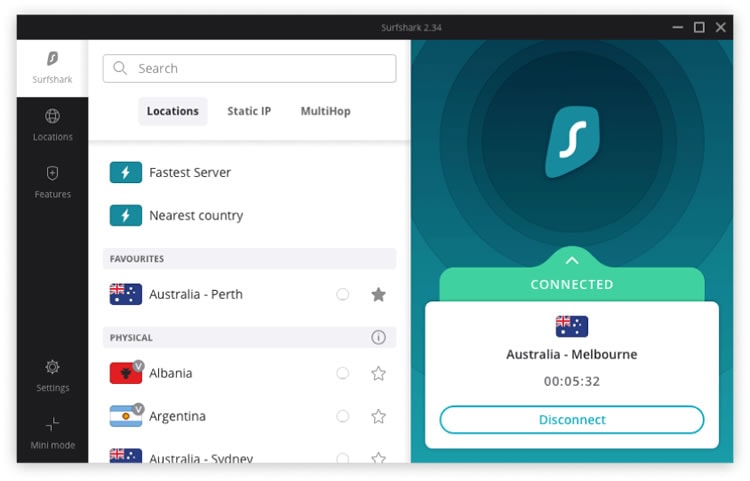
When it comes to ensuring a blazing fast and secure internet connection, Surfshark VPN App is the ultimate solution. With its innovative features and cutting-edge protocols, it guarantees your online privacy and anonymity.
- Fastest speeds: Surfshark VPN prioritizes speed, so you can enjoy seamless browsing and streaming without any lag or buffering.
- No-activity logs: Surfshark VPN never tracks or logs your online activities, giving you complete privacy and peace of mind.
- Worldwide server infrastructure: With over 3,200+ servers in 65 countries, Surfshark VPN ensures that you have access to a wide range of locations to connect from.
- Dynamic IP: Surfshark VPN provides a dynamic IP address for every connection, making it harder for anyone to track your online activities.
- 30-day money-back guarantee: If you’re not satisfied with Surfshark VPN, you can get a full refund within 30 days of your purchase.
- Ultimate privacy and security: Surfshark VPN encrypts your data and hides your IP address, keeping your online activities private and secure.
- Browser extension: Surfshark VPN offers a browser extension to ensure your privacy while browsing the internet, allowing you to easily switch between different server locations.
With Surfshark VPN App, you can feel safe and protected online. Its advanced features and secure servers guarantee your privacy and anonymity, ensuring that your data is never compromised.
Don’t let anyone track your online activities or recognize your digital footprint. Take control of your privacy and embrace the dark side with Surfshark VPN service.
Used by
Surfshark VPN is used by millions of users around the world who want to ensure their online privacy and security. With Surfshark, you can browse the internet safely and anonymously, without any restrictions or limitations.
Surfshark VPN offers a wide range of features to enhance your online experience. With just one click, you can connect to one of their high-speed servers located in over 60 countries. Plus, Surfshark VPN works on Windows PC and laptops, allowing you to protect your personal data and online activities no matter where you are.
One of the key features of Surfshark VPN is its 30-day money-back guarantee. If you’re not satisfied with the service, you can get a full refund within 30 days of your purchase. This ensures that you can try out the VPN without any risk.
Surfshark VPN also offers a range of additional features to enhance your browsing experience. For example, their CleanWeb feature helps you avoid ads, trackers, and malware. This helps to prioritize your data and achieve faster browsing speeds. Plus, Surfshark VPN’s MultiHop feature allows you to connect to multiple servers at once for added security.
With Surfshark VPN, you can also personalize your connection by choosing from a range of protocols, including OpenVPN and IKEv2. This allows you to achieve the best speeds and security for your needs.
Surfshark VPN is highly recommended by experts, with many praising its high-speed network and modern security features. Plus, Surfshark VPN has a strict no-logs policy, which means that your personal data and online activities are never stored or shared with anyone.
In conclusion, Surfshark VPN is a reliable and user-friendly VPN service that offers unlimited connections and high-speed servers. Whether you want to protect your personal data, access geo-restricted websites, or bypass censorship, Surfshark VPN has you covered. Try out Surfshark VPN today and experience the benefits for yourself.
Вопрос-ответ:
What are the features of Surfshark VPN app for Windows PC and laptop?
The Surfshark VPN app for Windows PC and laptop has several features, including unlimited simultaneous device connections, AES-256-GCM encryption, a kill switch, DNS leak protection, and a strict no-logs policy. It also offers fast and stable servers in over 65 countries, a CleanWeb feature to block ads and malware, and a Camouflage mode to hide VPN traffic from your internet service provider.
Is the Surfshark VPN app compatible with Windows PC and laptop?
Yes, the Surfshark VPN app is compatible with Windows PC and laptop. You can easily download and install the app on your Windows device to secure your internet connection and protect your online privacy.
How many devices can I connect to Surfshark VPN app simultaneously?
You can connect an unlimited number of devices to Surfshark VPN app simultaneously. This means that you can secure all of your devices, such as your Windows PC, laptop, smartphone, tablet, and even your smart TV, using a single Surfshark VPN subscription.
Does Surfshark VPN app have a no-logs policy?
Yes, Surfshark VPN app has a strict no-logs policy. This means that the app does not store any logs of your online activities, ensuring that your internet browsing history, connection timestamps, IP addresses, and other sensitive information are not recorded or logged. Your online privacy is protected when using Surfshark VPN.
Видео:
SurfsharkVPN 2022 Crack | Surfshark VPN Download & Install | Unlimited For Windows
SurfsharkVPN 2022 Crack | Surfshark VPN Download & Install | Unlimited For Windows by EvilLoot 3 months ago 1 minute, 18 seconds 1,835 views
How to Use Surfshark VPN The Only Surfshark Tutorial You’ll Need!
How to Use Surfshark VPN The Only Surfshark Tutorial You’ll Need! by VPNpro 3 weeks ago 6 minutes, 38 seconds 976 views
