Cisco RV Routers VPN: Types, Configuration Tips, and Best Practices
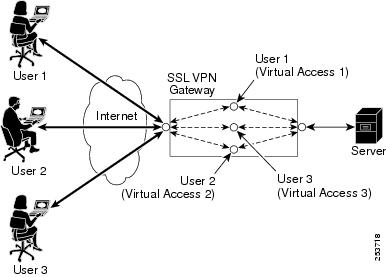
The Cisco IOS SSL VPN Router-Based Remote Access solution enables organizations to securely access private networks through the use of certificates. This option provides a secure and encrypted connection for remote employees and partners to access sensitive data and applications.
By using SSL/TLS protocols, the Cisco IOS SSL VPN Router-Based Remote Access solution ensures that all data transmitted between the client and the router is encrypted and secure. This eliminates the need for additional VPN client software on each client device, thereby simplifying the connectivity process.
With this solution, specific policies can be defined and implemented to manage the access and permissions of remote users. Additionally, the router can be configured to download specific protocols and encapsulation methods for client-to-site tunnels.
It is important to note that before using the Cisco IOS SSL VPN Router-Based Remote Access solution, organizations must consider the risks associated with deploying certificates and the security of the private network. Best practices and guidelines should be followed to ensure the highest level of security.
For organizations that require secure remote access to their private networks for employees and partners, the Cisco IOS SSL VPN Router-Based Remote Access solution is a reliable and effective option. It provides a secure and encrypted connection, allowing users to connect and manage their devices remotely.
Before implementing this solution, it is important to consider the specific needs and requirements of the organization. Organizations should conduct a thorough analysis of their connectivity needs, application usage, and security policies to ensure that the Cisco IOS SSL VPN Router-Based Remote Access solution is the right fit.
In conclusion, the Cisco IOS SSL VPN Router-Based Remote Access solution provides a secure and efficient method for remote users to connect to private networks. By using certificates and SSL/TLS protocols, organizations can ensure that the data transmitted between the client and the router is encrypted and protected. However, it is important to follow best practices and guidelines to mitigate any potential risks associated with using certificates and implementing this solution.
Secure Sockets Layer SSL
The Secure Sockets Layer (SSL) is a widely-used protocol for establishing secure and encrypted connections over the internet. SSL provides a secure mode of communication between a server and a client, ensuring that the data transmitted between them remains confidential and intact.
In the context of the Cisco IOS SSL VPN Router-Based Remote Access for Employees and Partners, SSL is used to secure the communication between remote users and the router. With SSL, remote users are able to establish a secure connection with the router, allowing them to access their corporate network resources from anywhere.
One of the useful features of SSL is that it works in existing web browser environments without the need to install any additional software. This makes it compatible with a wide range of devices and operating systems, ensuring that remote users can connect to the router using their preferred devices and platforms.
Moreover, SSL provides a best-in-class security level by having built-in support for features like end-to-end encryption, SSL header compression, and secure certificate management. This ensures that sensitive data and applications transmitted between the remote users and the router are protected from interception and tampering by third-party entities.
SSL can be configured in two main modes: clientless mode and AnyConnect client mode. In clientless mode, remote users can securely access applications and resources through a web browser without the need to install any additional software. This is especially useful for situations where the remote users are accessing the corporate network from untrusted devices or public computers.
On the other hand, AnyConnect client mode allows remote users to establish a secure point-to-point connection with the router using a dedicated client software, such as the Cisco AnyConnect VPN client. This mode provides advanced features like advanced authentication methods and advanced endpoint assessment checks, making it suitable for scenarios where having stronger security policies and different levels of access control is crucial.
Overall, SSL is a secure and reliable protocol that is widely used in router-based remote access solutions. Its implementation in the Cisco IOS SSL VPN Router-Based Remote Access for Employees and Partners provides a secure and cost-effective way for organizations to enable secure remote access for their employees and partners.
Types of VPN
VPN, or Virtual Private Network, is a network technology that allows users to create a secure connection to a public network over the internet. There are different types of VPN protocols and configurations that offer various levels of security and functionality. In this article, we will discuss some of the most common types of VPN.
1. Remote Access VPN
A remote access VPN allows individual users to connect to a private network from a remote location, such as their home or a coffee shop. This type of VPN provides a secure connection through the use of encryption, ensuring that data transmitted between the user’s device and the network is protected from unauthorized access. Remote access VPNs are typically used by employees who need to access company resources while working remotely or on the go.
2. Site-to-Site VPN
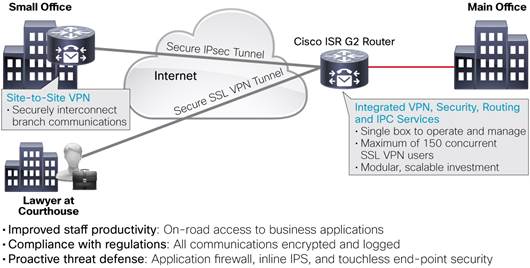
A site-to-site VPN, also known as a router-to-router VPN, allows multiple locations or sites to establish a secure connection with each other over the internet. This type of VPN is commonly used by organizations that have multiple offices or branches. Site-to-site VPNs forward network traffic between the sites, creating a seamless connection and allowing users at different locations to access resources on the remote network as if they were directly connected.
3. SSL VPN
SSL VPN, or Secure Sockets Layer VPN, is a type of VPN that uses the SSL/TLS protocol to provide secure communication over the internet. It allows users to access web applications and resources through a web browser without requiring any additional software or configuration. SSL VPNs are often used for remote access to internal web applications, as they provide a user-friendly and convenient method of accessing resources securely.
4. IPsec VPN
IPsec VPN, or Internet Protocol Security VPN, is a protocol suite that provides secure communication over IP networks. It is commonly used for site-to-site VPN connections and remote access VPNs. IPsec VPNs require specific software or configuration on both the client and server endpoints. They offer strong security and are often used in enterprise environments that require a high level of data protection.
5. OpenVPN
OpenVPN is an open-source VPN protocol that utilizes SSL/TLS protocols for secure communication. It is highly configurable, allowing users to customize various parameters to suit their specific needs. OpenVPN can be used with different types of VPN configurations, such as remote access VPNs and site-to-site VPNs. It is known for its strong security and flexibility, making it a popular choice for both personal and professional use.
In conclusion, there are various types of VPNs available, each with its own set of benefits and use cases. Whether you need to connect remotely to your company’s network, establish secure communication between multiple sites, or access web applications from a browser, there is a VPN type that can meet your specific requirements. The choice of VPN protocol and configuration will depend on factors such as the level of security required, the number of endpoints, and the specific use case.
Objective
The objective of the Cisco IOS SSL VPN Router-Based Remote Access for Employees and Partners is to provide a secure and authenticated remote access solution for employees and partners. This solution allows users to connect to the corporate infrastructure and access resources with ease, while ensuring that the connection is secure and data is protected.
Introduction
The Cisco IOS SSL VPN Router-Based Remote Access solution uses the Secure Socket Layer (SSL) protocol to provide a secure and authenticated connection over the internet. This eliminates the need to physically be in the same local-area network (LAN) as the corporate infrastructure. The solution supports a wide range of clients, including Android devices, by using a hypertext transfer protocol (HTTP) Java interface.
Overview
The solution uses the best practices of SSL VPN and IP Security (IPsec) to ensure a secure and authenticated connection. It utilizes certificates for keying and generic routing encapsulation (GRE) over IPsec tunnels to connect remote sites. The Cisco IOS router acts as the SSL VPN gateway, allowing users to securely access the corporate network from any location.
Objective
The objective of this article is to provide an overview of the Cisco IOS SSL VPN Router-Based Remote Access solution and its key features. It also aims to highlight the benefits and best practices that organizations must follow to protect their infrastructure and data.
Secure and Authenticated Access
The SSL VPN solution ensures that users are securely authenticated before they can access corporate resources. This authentication can be done using various methods, such as username and password, two-factor authentication, or the use of digital certificates. By requiring authentication, organizations can ensure that only authorized employees and partners can access sensitive data.
Endpoint Security
In addition to securing the connection, the SSL VPN solution also includes endpoint security features. These features include the ability to monitor and control the type of devices that can connect to the corporate network. By defining access policies based on device type and security posture, organizations can mitigate the risk of unauthorized access and protect their infrastructure from malware and other threats.
Per-User Access Control
The SSL VPN solution allows organizations to define granular access control policies on a per-user basis. This means that different users can have different levels of access based on their roles and needs. For example, employees in the finance department may have access to sensitive financial data, while partners may only have access to certain project files. By implementing per-user access control, organizations can ensure that data is shared on a need-to-know basis and minimize the risk of data breaches.
Series of Tips
In this article, we will provide a series of tips and best practices for configuring and managing the Cisco IOS SSL VPN solution. These tips will cover topics such as certificate management, keying practices, monitoring and troubleshooting, and endpoint security. By following these best practices, organizations can maximize the security and effectiveness of their SSL VPN deployment.
Benefits of using a VPN Connection
Using a VPN connection offers several benefits for secure communication between remote sites and ensures data confidentiality.
1. Secure Communication: VPN connections provide a secure way to connect remote sites, allowing data transmission over the Internet while keeping it encrypted and protected from unauthorized access.
2. Certificates and Authentication: VPNs use certificates and authentication methods to ensure that only authorized users can access the network. Certificates ensure that the remote user or site is trustworthy, and authentication methods verify their identity before granting access.
3. Data Encryption: A VPN connection encrypts all communication between the client and the server, protecting it from interception and ensuring data integrity.
4. Site-to-Site Connectivity: VPNs can establish secure connections between different locations, allowing them to communicate securely as if they were connected on a local network. This enables seamless collaboration and data sharing between remote sites.
5. Remote Access Options: VPNs provide various remote access options, such as client-to-site and point-to-point tunnels, allowing employees to securely access company resources from anywhere. This flexibility is especially valuable for remote workers and employees who travel frequently.
6. Support for Multiple Protocols: VPN connections support various protocols for encapsulation, routing, and data delivery. This ensures compatibility with different devices and operating systems, including Android, and allows for seamless integration into the existing network infrastructure.
Conclusion: Using a VPN connection brings numerous benefits, including secure communication, data encryption, site-to-site connectivity, remote access options, and support for different protocols. By implementing a VPN solution, businesses can ensure that their data stays private and connected individuals can securely access company resources, regardless of their physical location.
Point-to-Point Tunneling Protocol (PPTP) Overview and Best Practices
Overview
The Point-to-Point Tunneling Protocol (PPTP) is a widely-used protocol for creating virtual private networks (VPNs) that allow secure and encrypted communication between remote clients and a central server. PPTP provides a way to securely transmit data over a public network, like the internet, by encapsulating the data within IP packets. This protocol is often used for client-to-site VPN connections, where remote employees or partners need to access resources in a corporate network.
Tunneling and Encapsulation
PPTP uses tunneling and encapsulation to create a secure connection between the client and the server. Tunneling involves establishing a logical connection, or tunnel, from the client to the server over the existing network infrastructure. Encapsulation involves wrapping the original data within additional headers and trailers to ensure its secure transmission over the public network. This encapsulated data is then transmitted through the tunnel, keeping it protected from interception or tampering.
Authentication and Data Protection
PPTP provides authentication methods to ensure that only authorized users can access the network. It supports various authentication protocols, such as MS-CHAPv2, EAP-TLS, and EAP-MD5, allowing users to securely authenticate their identity before establishing the VPN connection. Additionally, PPTP uses encryption protocols, like MPPE, to protect the data transmitted over the tunnel, ensuring its confidentiality and integrity throughout the transmission.
Router-Based Integration
PPTP can be integrated into router-based VPN solutions, like the Cisco RV34x Series routers. These routers offer full-network VPN capabilities, allowing multiple client-to-site connections to be established simultaneously. By using a router as the VPN server, remote clients can securely access resources in corporate offices, supporting collaboration and productivity across geographic locations. This router-based integration simplifies the setup process and provides centralized management and monitoring of VPN connections.
Best Practices for PPTP
To ensure the secure and reliable operation of PPTP VPNs, several best practices should be followed. First, it is important to use strong authentication methods, such as certificates or two-factor authentication, to prevent unauthorized access. Second, regular monitoring of VPN connections and server performance is recommended to identify and address any potential issues. Lastly, keeping the router’s firmware up to date and following security practices, like disabling unused services and using strong encryption algorithms, will help protect the VPN infrastructure from potential vulnerabilities and attacks.
Generic Routing Encapsulation
Generic Routing Encapsulation (GRE) is a tunneling protocol that allows packets from one network to be encapsulated within packets from another network. It provides a mechanism for connecting remote networks over an intermediary network, such as the internet, while keeping the original packet intact. GRE is widely used in virtual private network (VPN) deployments to create secure connections between geographically dispersed offices or devices.
GRE encapsulation is particularly useful when the underlying network does not support the necessary protocols for direct communication between two endpoints, or when there are network connectivity risks that must be mitigated. With GRE, packets can travel through intermediate networks without the need for those networks to have knowledge or support for the protocols and headers used by the encapsulated packets.
To establish a GRE tunnel, two endpoints are defined: the source endpoint and the destination endpoint. The source endpoint is responsible for encapsulating outgoing packets, while the destination endpoint is responsible for de-encapsulating the packets and forwarding them to their final destination. The encapsulated packets can contain any type of network data, including protocols at the network layer, such as IP, or protocols at higher layers, such as TCP or UDP.
GRE tunnels can be used to create point-to-point connections between devices, enabling communication between specific endpoints. This makes GRE suitable for scenarios where the network architecture requires flexible and secure connections between different locations or devices. Furthermore, GRE can be used to establish multiple tunnels, each with its own set of parameters, allowing for per-user or per-session connectivity.
It is important to note that GRE does not provide any inherent security mechanisms. Therefore, it must be used in conjunction with other security protocols, such as encryption or keying protocols, to ensure the confidentiality and integrity of the encapsulated contents. Additionally, administrators must consider the potential overhead and performance impact of GRE encapsulation, as it adds extra headers and processing requirements to the packets.
In summary, GRE is a versatile protocol that enables tunneling and encapsulation of network packets between different locations or devices. It provides a flexible and cost-effective solution for establishing secure connections over public networks, but it must be used with caution and in combination with other security protocols to mitigate potential risks.
Cisco RV Routers VPN Overview and Best Practices
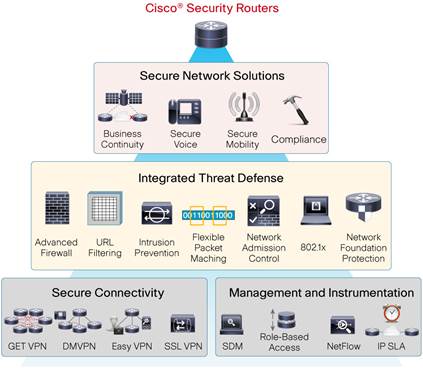
Cisco RV Routers provide a comprehensive VPN solution for businesses of all sizes, offering secure and efficient remote access for employees and partners. This overview will highlight the key features and best practices of using VPN with Cisco RV Routers.
VPN Types and Integration
RV Routers support different VPN types, including IPsec and OpenVPN, providing flexibility to meet various security requirements. These routers can be easily integrated into any network infrastructure, allowing secure connectivity between remote endpoints.
VPN Design and Configuration
When designing a VPN infrastructure with RV Routers, several best practices should be considered. It’s important to define the VPN parameters, such as encryption algorithms and authentication methods, based on the level of security required. The RV Router series offers a user-friendly interface for configuring VPN settings, making the process straightforward and efficient.
Data Protection and Monitoring
RV Routers ensure the protection of sensitive data by encrypting packets and encapsulating them within a secure tunnel. This ensures that the contents of the packets are safe from unauthorized access. Additionally, RV Routers provide monitoring capabilities, allowing administrators to track VPN sessions, monitor traffic, and ensure the stability and performance of the VPN.
Secure Access for Employees and Partners
Cisco RV Routers enable secure remote access for employees and partners, ensuring that sensitive company resources and data remain protected. With features like secure socket layer (SSL) VPN, employees can easily and securely connect to the corporate network from anywhere, using a web browser. This bias-free VPN solution provides a seamless and user-friendly experience for remote workers.
Best Practices and Tips
- When configuring VPN on RV Routers, it is recommended to use strong authentication methods, such as digital certificates or multi-factor authentication. This adds an extra layer of security to the VPN connection.
- Regularly monitor VPN sessions and network traffic to detect any anomalies or potential security breaches. This can be done using built-in monitoring tools or third-party software.
- If using IPsec VPN, make sure to enable perfect forward secrecy (PFS) to enhance the security of the VPN connection. PFS ensures that even if the private key is compromised, previously encrypted data remains protected.
- Consider setting up separate VPN accounts for different user groups or roles to restrict access and ensure better control over network resources.
- Keep router firmware up to date to take advantage of the latest security patches and improvements.
VPNs that are Compatible with Cisco RV Series VPN Routers
The Cisco RV Series VPN Routers provide a secure and encrypted connection between your business network and remote endpoints, such as Windows and Android devices. These routers support a variety of VPN types, making it easy to connect and manage your network securely.
One of the best VPN methods supported by Cisco RV Series VPN Routers is AnyConnect, a secure and feature-rich VPN client. It uses SSL/TLS protocols to ensure the encrypted transfer of sensitive business data. AnyConnect supports a wide range of platforms, making it compatible with most endpoints.
In addition to AnyConnect, the RV Series routers also support generic VPN methods such as PPTP, L2TP/IPsec, and SSL VPN. These methods allow for secure connectivity to remote sites and are useful for businesses that need to connect to different VPN types.
The Cisco RV Series VPN Routers also provide a quick and easy way to forward VPN traffic to specific destinations. By using client and site-to-site VPN types, you can design a VPN network that meets your specific business needs. This allows for efficient delivery of contents and applications to your remote endpoints.
To ensure secure VPN connectivity, the RV Series routers monitor and manage VPN parameters such as packet header and payload. This allows for the secure transfer of data between endpoints and ensures that only authorized users can access the network.
In summary, the Cisco RV Series VPN Routers are compatible with a variety of VPN methods, including AnyConnect, PPTP, L2TP/IPsec, and SSL VPN. These routers provide secure and encrypted connectivity for Windows and Android devices, making it easy to connect and manage your network. Whether you require a generic VPN method or a specific VPN type, the RV Series routers have the flexibility to meet your business needs.
Tips to Use When Configuring a VPN
Configuring a VPN can be a complex task, but with these tips, you’ll be able to set it up efficiently and securely.
1. Understand your objective and needs
Prior to configuring a VPN, clearly define your objective and understand the specific needs of your organization. This will help you choose the right VPN option that suits your requirements.
2. Choose the appropriate VPN protocols
There are multiple VPN protocols to choose from, including Cisco SSL VPN, IPsec, and OpenVPN. Consider the level of security, compatibility with your devices, and the specific services you want to access remote. Choose a protocol that best meets these requirements.
3. Configure site-to-site or client-to-site VPN
Decide whether you want to establish a site-to-site VPN, which allows secure communication between two or more local-area networks, or a client-to-site VPN, which enables users to securely connect to the network remotely. This choice depends on your network architecture and needs.
4. Consider using a VPN router
Using a VPN router, such as Cisco RV34X, can simplify the configuration process and offer additional security features. It securely encapsulates your data and ensures a secure transfer of information between your network and connected devices.
5. Configure VPN policies and certificates
Define VPN policies that govern the access, encryption, and authentication requirements. Set up certificates for user and device identification to ensure secure connections and protect against unauthorized access.
6. Monitor VPN connections and logs
Regularly monitor the VPN connections to ensure they are functioning as expected. Review logs and audit trails to detect any unusual activities or security breaches. This will help you identify and address any risks or exceptions promptly.
7. Take note of Windows-specific options
If the VPN is being used on Windows devices, there may be additional options or settings specific to that operating system. Be aware of these options and configure them accordingly to optimize the VPN performance on Windows devices.
8. Test the VPN connectivity
Once the configuration is complete, thoroughly test the VPN connectivity to ensure that it is working as intended. Test accessing both local and remote resources to verify that the VPN is functioning correctly.
By following these tips, you’ll be able to configure a VPN that securely connects your network and devices, while meeting your organization’s specific requirements.
IPsec Profile
The IPsec profile is a configuration that allows for secure communication between two endpoints using Internet Protocol Security (IPsec) protocol. Cisco IOS SSL VPN Routers offer IPsec VPN functionality, which provides encrypted and authenticated VPN connections over IP networks.
One of the benefits of using an IPsec profile is that it is compatible with most routers and devices, making it a widely adopted standard for secure communication. This compatibility ensures that your VPN connections can be established with a variety of devices, including Cisco routers and Android smartphones.
The IPsec profile also offers greater security by encapsulating the entire IP packet, including both the IP header and the layer 4 transport protocol header, within an IPsec header. This provides protection against header information being parsed or tampered with, ensuring that the data is encrypted and secure.
Configured within the IPsec profile are parameters such as authentication algorithms, key exchange protocols, and encryption algorithms. These parameters can be customized to meet the specific security requirements of your network. Additionally, per-user policies can be applied to control access to resources based on groups, intersectionality, or other criteria, thereby increasing the security level of your VPN connections.
With the IPsec profile, your data is encrypted and protected as it travels through the internet, making it an ideal solution for remote access, connecting branch offices, and secure communication between partners. Furthermore, IPsec VPN can be established in point-to-point or point-to-multipoint configurations, allowing for flexible network setups that suit your organization’s needs.
The Cisco IOS SSL VPN Routers provide an integrated SSL VPN solution that can be used alongside IPsec VPN. This allows for a layered security approach, where SSL VPN provides secure access to web-based resources and IPsec VPN provides secure communication between networks. Whether you need a soft VPN client for your remote employees or partners, or a solution that does not require any client installation, Cisco IOS SSL VPN Routers have you covered with their comprehensive SSL and IPsec VPN capabilities.
Shrew Soft VPN Client with Cisco RV34x Series Routers
The Shrew Soft VPN Client is a popular IPsec VPN client that can be used with Cisco RV34x Series Routers. This client can be easily downloaded and installed on Windows and Linux operating systems, providing a user-friendly interface for configuring and managing VPN connections.
Using the Shrew Soft VPN Client, you can establish IPsec VPN connections with Cisco RV34x Series Routers, ensuring that your data is encrypted and secure. The client supports various authentication methods, including pre-shared key, certificate, and RSA token, allowing for flexible and secure authentication processes.
The Shrew Soft VPN Client also supports NAT traversal, which allows IPsec VPN traffic to pass through NAT devices without the need for additional configuration. This makes it easier to establish VPN connections in environments where NAT is used.
Since the Shrew Soft VPN Client is compatible with Cisco RV34x Series Routers, it provides a reliable and secure solution for remote access to corporate resources. Whether you are working from home or on the go, the Shrew Soft VPN Client ensures that your data is protected and your connections are secure.
Risks of using a VPN Connection
Using VPNs (Virtual Private Networks) can provide a secure and protected connection between remote sites and the main network, allowing employees and partners to access resources that are not physically located in their local-area network.
However, there are certain risks associated with using a VPN connection. One generic risk is the possibility of a VPN connection being compromised. It is necessary to configure VPNs properly to ensure that all necessary security measures are in place. Cisco IOS SSL VPN Router-Based Remote Access eliminates the need for a third-party VPN client, providing a quick and secure connection to enterprise applications through a web browser.
Another risk is the potential for unauthorized access to the contents of the VPN. If a VPN connection is not properly configured, it may be possible for an attacker to intercept and parse the encrypted data flowing through the VPN tunnels. This can lead to the exposure of sensitive data and compromise the security of the connection.
Moreover, the use of soft keying protocols in VPN connections can pose a risk. While they can provide a shorter and more efficient key exchange, they may also be susceptible to attacks. It is important to carefully choose a secure key exchange protocol and ensure that it is properly implemented.
Additionally, the authentication process of VPN connections can be a potential point of vulnerability. If an endpoint is not properly authenticated, it may be possible for an unauthorized user to gain access to the network. Therefore, it is crucial to establish strong authentication policies and validate the identity of the client before allowing them to connect.
It is worth highlighting that while the Cisco IOS SSL VPN Router-Based Remote Access provides secure connections and protects against the risks mentioned above, it is important to note that no security solution can guarantee 100% protection. Organizations must continuously assess and update their security policies and implement additional measures where necessary to mitigate any vulnerabilities.
Table of Contents
The Table of Contents provides an overview of the content available in the “Cisco IOS SSL VPN Router-Based Remote Access for Employees and Partners Data Sheet”. The document is divided into several sections to make it easier for readers to navigate and find the specific information they need.
1. Introduction: This section introduces the topic of SSL VPN router-based remote access and provides a brief overview of its benefits and uses.
2. Overview of Cisco IOS SSL VPN: This section provides an in-depth overview of Cisco IOS SSL VPN, including its features, capabilities, and how it can be used to securely connect remote employees and partners to the corporate network.
3. Benefits of Router-Based Remote Access: This section highlights the benefits of using a router-based remote access solution, including increased security, scalability, and flexibility.
4. Deployment Options: This section discusses the different deployment options available for Cisco IOS SSL VPN, including clientless access, thin-client access, and full-network access.
5. Security Features: This section explores the various security features of Cisco IOS SSL VPN, including encryption, authentication, and access controls.
6. Best Practices: This section provides best practices for configuring and managing Cisco IOS SSL VPN routers to ensure optimal performance and security.
7. Case Studies: This section presents case studies that showcase how organizations have successfully implemented Cisco IOS SSL VPN to enable secure remote access for their employees and partners.
8. Frequently Asked Questions: This section addresses common questions and concerns related to Cisco IOS SSL VPN, providing answers and solutions to help readers troubleshoot any issues they may encounter.
9. Glossary: This section provides a list of common terms and definitions related to SSL VPN technology to help readers better understand the technical aspects of the solution.
10. References: This section includes a list of references and resources that readers can consult for more information on Cisco IOS SSL VPN and related topics.
With this comprehensive Table of Contents, readers can easily navigate the “Cisco IOS SSL VPN Router-Based Remote Access for Employees and Partners Data Sheet” and quickly find the information they need to securely connect and access corporate resources remotely.
Layer 2 Tunneling Protocol
The Layer 2 Tunneling Protocol (L2TP) is a key feature of Cisco IOS SSL VPN Router-Based Remote Access for Employees and Partners. This protocol provides an interface for establishing secure point-to-point connections between the remote clients and the router-based VPN gateway.
With L2TP, businesses can securely connect their employees and partners to the company’s network infrastructure. L2TP offers ease of use and simplifies the process of establishing secure connections, which reduces the risks associated with unauthorized access to sensitive data.
One advantage of L2TP is that it supports groups and generic routing encapsulation (GRE). This means that multiple clients can connect to the same VPN gateway and establish secure connections simultaneously. The router-based VPN gateway can handle the necessary keying material for these connections.
To ensure secure communication, L2TP uses a combination of certificate and private key authentication. The Diffie-Hellman key exchange is employed to securely establish the encryption keys. Users can obtain their certificates from a third-party or use the router-based VPN gateway’s built-in certificate authority.
During the connection establishment phase, L2TP uses the Point-to-Point Protocol (PPP) to negotiate the connection parameters and establish a secure tunnel. This tunnel is then used for the transmission of data between the remote client and the VPN gateway.
Once the tunnel is established, remote clients can securely access resources on the company’s network. L2TP supports both IPv4 and IPv6 traffic, making it compatible with a wide range of devices and networks. Users can connect to the VPN gateway using various devices, including Windows, Mac, Linux, Android, and iOS.
In summary, L2TP is a versatile and useful protocol for establishing secure remote access connections. It provides a secure point-to-point connection between the remote clients and the router-based VPN gateway, allowing users to securely access resources on the company’s network. L2TP supports a wide range of devices and networks, making it a convenient choice for businesses that want to ensure the security of their sensitive data.
Вопрос-ответ:
What is Cisco IOS SSL VPN Router-Based Remote Access?
Cisco IOS SSL VPN Router-Based Remote Access is a secure method of providing remote access to employees and partners. It allows users to connect to the corporate network securely over the internet using the SSL/TLS protocol.
How does Cisco IOS SSL VPN Router-Based Remote Access work?
Cisco IOS SSL VPN Router-Based Remote Access works by establishing an encrypted tunnel between the user’s device and the corporate network. This tunnel is created using the SSL/TLS protocol, ensuring that all data transmitted between the user and the network is secure.
Can Cisco IOS SSL VPN Router-Based Remote Access be used for both employees and partners?
Yes, Cisco IOS SSL VPN Router-Based Remote Access can be used for both employees and partners. It provides a secure and convenient method for remote access to the corporate network, regardless of whether the user is an employee or a trusted partner.
Видео:
Fortinet: How to Setup SSL/VPN to Remotely Connect to a FortiGate firewall
Fortinet: How to Setup SSL/VPN to Remotely Connect to a FortiGate firewall by Firewalls.com 3 years ago 5 minutes, 42 seconds 337,852 views
1.2.b Implement AnyConnect SSLVPN on routers
1.2.b Implement AnyConnect SSLVPN on routers by CCNADailyTIPS 3 years ago 24 minutes 3,833 views
1.2.c Implement clientless SSLVPN on Cisco IOS routers
1.2.c Implement clientless SSLVPN on Cisco IOS routers by CCNADailyTIPS 3 years ago 20 minutes 565 views
