Can a VPN Change Your Location? The Best VPN Locations for GPS Mocking and Location Spoofing FAQs
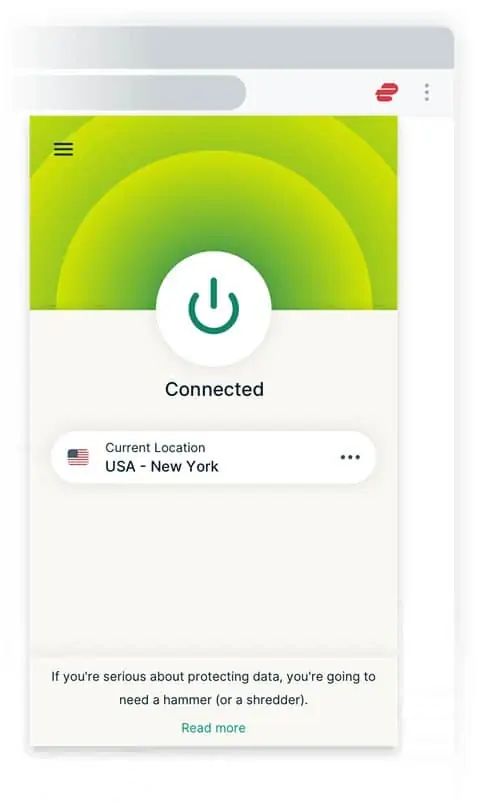
When it comes to accessing geo-restricted content or protecting your online privacy, using a VPN is a popular choice among users. But can a VPN really change your location? The answer is yes, a VPN can change your location by allowing you to connect to servers in different countries. This means that your IP address, which determines your location on the internet, will appear to be coming from a different country.
One of the most popular VPN providers, Surfshark, offers a wide range of server locations that users can choose from to change their virtual location. With Surfshark, you can easily bypass geo-blocking and access streaming services and websites that are only available in specific countries. This is especially useful if you want to watch content that is not available in your country.
But how does a VPN actually change your location? The trick lies in the VPN’s ability to route your internet connection through its servers. When you connect to a VPN server, all your internet traffic is encrypted and sent through the VPN’s server network. This makes it appear as if your connection is originating from the server’s location, rather than your actual location.
However, it’s important to note that while a VPN can change your virtual location, it cannot change your physical location. If you’re trying to fake your location for GPS-based apps on your smartphone, a VPN alone may not be enough. You may need to use additional tools like GPS mocking apps or location spoofing techniques to trick these apps into thinking you’re in a different location.
Another important point to consider is that using a VPN to change your location can have legal implications. While VPNs are legal in most countries, using a VPN to bypass regional restrictions or access copyrighted content may violate the terms of service of the streaming provider or the laws of your country. It’s always important to use VPNs responsibly and within the bounds of the law.
Can a VPN Change Your Location?

A VPN, or Virtual Private Network, can change your IP address and therefore, your virtual location. When you connect to a VPN server, your data is routed through that server, and the websites or services you access see the server’s location instead of your actual location. This means that if you are in the United States and connect to a VPN server in the United Kingdom, it will appear as though you are browsing the internet from the United Kingdom.
VPN allows you to bypass location-based restrictions and access websites or content that may be blocked in your own country. Additionally, it can be used for GPS mocking or location spoofing, which is when you want to fake your GPS location on a mobile device. By using a VPN with a server in a different country, you can make it appear as though you are in that country, allowing you to access location-restricted content or services.
How to Change Your Location with a VPN?
To change your location with a VPN, you need to select a server location from the available options provided by your VPN provider. Most VPNs have servers in various countries around the world, so you can choose the location you want to appear as if you are browsing from.
Once connected to the VPN server, your internet traffic will be routed through that server, and your IP address will be associated with the server’s location. This means that any website or service you access will see the VPN server’s location instead of your actual location.
For example, if you are in the United States and want to access a website that is only available in the United Kingdom, you can connect to a VPN server located in the United Kingdom. The website will then see your IP address as being in the United Kingdom, allowing you to access the content.
Recommended VPN Locations for GPS Mocking and Location Spoofing
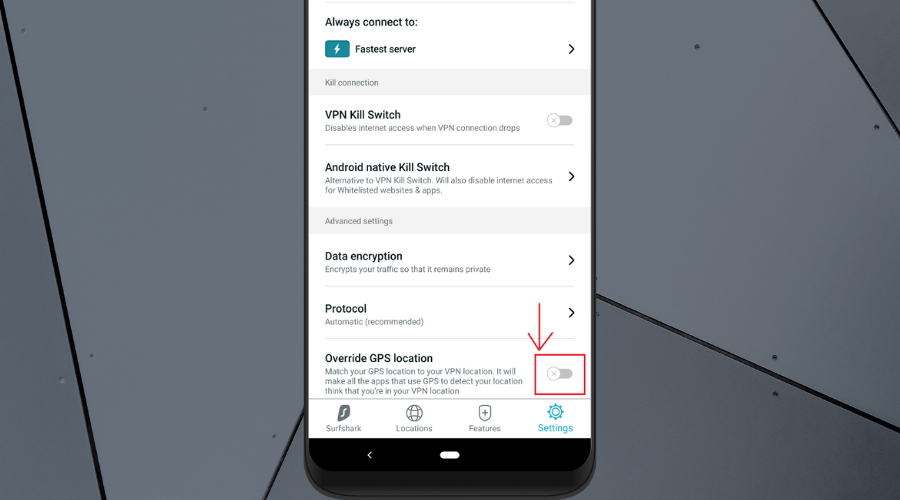
When it comes to GPS mocking and location spoofing, some popular VPN providers offer specific server locations that are commonly used for this purpose. Surfshark recommends using their “GPS Spoofing” mode, which allows you to choose a specific location on your mobile device without requiring any additional app installations.
ExpressVPN also provides a “Location Mode” feature in their iOS app, which lets you select a location anywhere in the world. This can be useful for faking your GPS location on an iPhone or iPad.
It’s important to note that faking your GPS location may have its limitations and can sometimes be detected by certain apps or services. Additionally, keep in mind that using a VPN to change your location for illegal or unethical purposes is not recommended and may be against the terms of service of both the VPN provider and the website or service you are accessing.
The Best VPN Locations for GPS Mocking and Location Spoofing FAQs
When it comes to GPS mocking and location spoofing, using a VPN can be incredibly useful. VPNs, or Virtual Private Networks, allow you to route your internet traffic through servers in different locations, making it appear as though you are accessing the internet from a different place.
By faking your IP address and location, VPN services can help you bypass restrictions imposed by streaming platforms like Hulu or other websites that have location-based content. For example, if you are trying to access Hulu from outside the United States, a VPN can make it seem like you are connecting from a U.S.-based IP address.
If you have a specific location in mind for GPS mocking or location spoofing, you’ll want to choose a VPN provider that has servers in that area. This means doing some research to ensure the VPN you select can provide you with the IP addresses you need.
One VPN provider that we recommend is ExpressVPN. They have a wide range of server locations around the world, and their service is well known for its speed and reliability. Whether you’re looking to spoof your location on Google Chrome, iOS, or other devices, ExpressVPN has you covered.
Keep in mind that while using a VPN to change your location is generally legal, some streaming services, websites, or other platforms may have terms of use that restrict the use of VPNs or faking your location. Make sure to review the terms of service for any platform you’re using to ensure you’re not violating any rules.
In conclusion, if you’re interested in GPS mocking and location spoofing, a VPN can provide you with the means to change your IP address and access content that may be restricted based on your real location. Choose a reputable VPN provider with server locations that meet your needs, and enjoy the benefits of accessing geo-restricted content.
How to use a VPN to fake your GPS location
If you want to fake your GPS location and use a different location on your devices, you can do so with the help of a VPN (Virtual Private Network). A VPN is a service that allows you to create a secure connection to another network over the Internet. With a VPN, you can change your IP address and fool websites, apps, and services into thinking you are located in a different country.
Choosing a VPN provider
When choosing a VPN provider, make sure to pick a reliable and trustworthy one. One popular VPN provider is Surfshark. They offer a user-friendly interface and a wide range of server locations to choose from.
Changing your location with a VPN
To fake your GPS location using a VPN, first, download and install the VPN app on your device. Once installed, open the app and choose a country or server location you want to appear as if you are browsing from. This will change your IP address to match the server location you selected.
Preventing location-based restrictions and spoofing your location
By using a VPN to fake your GPS location, you can bypass location-based restrictions imposed by websites and apps. For example, if you want to access content that is only available in certain countries, you can use a VPN to appear as if you are browsing from that country.
Why use a VPN for GPS spoofing?
There are many reasons why people use VPNs for GPS spoofing. Some use it to access streaming services like Hulu or Netflix that are only available in certain countries. Others use it to protect their privacy and hide their actual location from websites and apps that track their IP addresses.
FAQs about VPN location spoofing
– How does VPN location spoofing work on iPhone and Android devices?
– Do all VPNs work for location spoofing?
– Can GPS spoofing work in any country?
– Are there any risks or drawbacks to using a VPN for GPS spoofing?
In conclusion, using a VPN to fake your GPS location can be a useful tool for bypassing location-based restrictions, protecting your privacy, and accessing content that is only available in certain countries. However, it is important to choose a reliable VPN provider to ensure your data is secure and to avoid any potential leaks or other issues.
GPS mock locations
GPS mock locations refer to the ability to fake or change your device’s geographical location using a VPN connection. This can be useful for various purposes, including bypassing geo-restrictions, accessing region-restricted content, and protecting your privacy while browsing the internet.
When you connect to a VPN server, your device’s traffic is routed through that server and appears to be originating from the server’s location. So, if you select a server in a different country, websites and apps will see your IP address as coming from that location.
To fake your GPS location on an Android device, you can use apps like Fake GPS Location, GPS Emulator, or Fake GPS GO Location Spoofer. These apps allow you to manually set the coordinates of your desired location and then spoof your device’s GPS data accordingly.
On iOS devices, GPS mock locations can be achieved by using a similar app like iTools or by changing the location settings in the developer options.
It’s important to note that GPS mock locations have both legitimate and potentially illegal uses. While it can be used to access region-locked content or prevent location-based tracking, it can also be used for fraudulent activities or to circumvent legal restrictions. Always ensure you are using GPS mock locations in a lawful and responsible manner.
When using GPS mock locations, be aware that some apps or websites may detect the fake GPS data and prevent you from accessing their services. Additionally, using GPS mock locations may also affect other functions on your device that rely on GPS, like navigation or location-based apps.
To prevent GPS leaks while using a VPN, make sure to choose a reliable VPN service provider like ExpressVPN, which offers servers in many different locations. Additionally, you can configure your device’s DNS settings to avoid any potential leaks.
In conclusion, GPS mock locations can be a useful tool for changing your device’s location and accessing geo-restricted content. However, it’s important to use this feature responsibly and within the limits of the law.
Why VPNs change the IP address
When you connect to a VPN, it assigns you a new IP address and masks your true location. This is because a VPN works by routing your internet traffic through a remote server located in a different location, effectively changing your IP address and making it appear as if you are browsing from that server’s location.
One of the main reasons why VPNs change the IP address is to protect your privacy by preventing IP address leaks. IP address leaks can occur when your device connects to a website or service and sends your real IP address, potentially exposing your identity and location. By using a VPN, your traffic is encrypted and routed through the VPN server, hiding your actual IP address and preventing leaks.
Another reason why VPNs change your IP address is for location spoofing. Location spoofing allows you to bypass geo-restrictions and access content that is otherwise unavailable in your actual location. For example, if a streaming service like Netflix or Hulu is only available in certain countries, you can use a VPN to connect to a server in that country and access the content as if you were there.
Many VPNs have a variety of server locations available, allowing you to choose the best location for your needs. Some VPNs even have dedicated servers optimized for streaming or bypassing geo-restrictions. For example, ExpressVPN offers servers in over 90 countries, making it easy to find a server that can provide you with the best streaming experience or access to specific content.
Keep in mind that while using a VPN to change your IP address and location can help you access geo-restricted content and protect your privacy, it is important to use it legally and responsibly. Some websites and services may have terms of service that prohibit the use of VPNs, and using a VPN to engage in illegal activities is against the law.
FAQs about faking your GPS location
Can a VPN change my GPS location?
Yes, a VPN (Virtual Private Network) can change your GPS location. When you connect to a VPN server, your internet traffic is routed through that server, making it appear as if you are accessing the internet from a different location.
How do VPNs fake GPS locations?
VPNs fake GPS locations by allowing you to connect to a server located in a different country. When you connect to this server, your IP address is replaced with the server’s IP address, tricking websites and services into thinking you are in a different location.
Are there specific VPNs for faking GPS locations?
There are many VPNs available that offer the ability to fake GPS locations. Some of these VPNs are specifically designed for this purpose and often come with additional features like GPS spoofing tools. One popular example is ExpressVPN, which is known for its ability to bypass geo-restrictions and provide access to content from different countries.
Is faking your GPS location legal?
Faking your GPS location using a VPN is generally legal, although it may go against the terms of service of certain platforms or services. It is important to use VPNs responsibly and respect any applicable laws or regulations.
Can using a VPN leak my real address?
Using a VPN can help protect your real address and make it more difficult for websites to track your online activities. However, it is important to choose a reputable VPN provider that has a strict no-logs policy to minimize the risk of any leaks.
How do I fake my GPS location on Chrome?
To fake your GPS location on Chrome, you can use a VPN extension or a specialized GPS spoofing extension. These extensions allow you to choose a different location and simulate your GPS coordinates, effectively changing your location as perceived by websites and services.
Which VPN locations are the most popular for faking GPS locations?
The most popular VPN locations for faking GPS locations are typically countries with more lenient internet restrictions and a wide variety of available content. Some popular choices include the United States, United Kingdom, Canada, and Australia. However, the best location to choose may depend on your specific needs and the restrictions you are trying to bypass.
How to fake your location in Google Chrome browser
If you’re looking to fake your location in the Google Chrome browser, you have options to choose from. There are several ways to achieve this, such as using a VPN, changing your DNS settings, or using browser extensions specifically designed for location mocking.
Using a VPN
A VPN, or Virtual Private Network, allows you to route your internet connection through servers in different locations. This means that websites and online services will see your IP address as originating from the location of the server you’ve connected to, rather than your real location.
Many VPN providers have servers available in different countries, so you can choose the location you want to appear from. This can be useful for bypassing geo-restrictions or accessing content that may not be available in your own country.
Changing DNS settings
Changing your DNS (Domain Name System) settings is another method you can use to fake your location in Chrome. By modifying the DNS server addresses your device uses to resolve domain names, you can make it appear as if you’re browsing from a different location.
However, changing DNS settings may not be as effective as using a VPN, as it doesn’t encrypt your internet traffic and may still leak your real IP address.
Using browser extensions
There are various browser extensions available for Google Chrome that allow you to fake your location. These extensions work by modifying the geolocation data sent by your browser, fooling websites into thinking you’re browsing from a different country or city.
It’s important to note that not all location spoofing tools are reliable, and some may still leak your real location. It’s recommended to use trusted extensions like ExpressVPN’s Location Spoofing or similar ones, as they have been designed to effectively mock your location while ensuring your privacy.
In conclusion, faking your location in the Google Chrome browser can be done through a VPN, changing your DNS settings, or using browser extensions. Each method has its own advantages and limitations, so make sure to choose the one that suits your needs and preferences the best.
Can I use a free VPN to fake my GPS location?
While there are many free VPN services available, not all of them allow you to fake your GPS location. Some free VPNs may not offer the necessary features and capabilities for GPS mocking and location spoofing.
If you’re looking to fake your GPS location, it’s important to choose a VPN that specifically supports this functionality. Both Surfshark and ExpressVPN offer this feature, allowing you to bypass geographic restrictions and access content from different locations.
Using a free VPN for faking your GPS location may not be the most reliable option. Free VPN servers can be overcrowded and slow, making it difficult to maintain a stable connection while trying to spoof your location.
Another concern with free VPNs is that they may not have a wide range of server locations to choose from. This can limit your options when it comes to selecting a specific location to mock.
Additionally, free VPNs often have limitations on bandwidth usage and data caps, which can further restrict your ability to fake your GPS location effectively.
If you want to ensure a reliable and secure experience while faking your GPS location, it is recommended to use a paid VPN service like Surfshark or ExpressVPN. These VPN providers offer a wide range of server locations and robust features to help you meet your needs for location spoofing.
What is the Best VPN Location?
Bypass Location Restrictions and Access Blocked Websites
A Virtual Private Network (VPN) allows you to bypass location restrictions and access blocked websites. By changing your IP address and routing your internet connection through servers located in different countries, a VPN can make it seem like you are browsing from a different location.
Selecting the Best VPN Locations
When choosing a VPN, it’s important to select the best locations that suit your needs. Some VPN providers offer servers in more countries than others. For example, ExpressVPN provides access to servers in over 90 countries, while Surfshark has servers in more than 65 countries. These wide-ranging server locations give you the flexibility to connect from different parts of the world.
Avoiding GPS Spoofing and Faking Your Location
In addition to bypassing location restrictions on websites and streaming platforms like Netflix, VPNs can also assist in GPS spoofing on mobile devices. Using a VPN on your iPhone or Android device, you can fake your GPS location and appear as if you are in a different area. This can be useful for accessing location-specific content or preventing apps from tracking your real location.
Preventing Data Leaks and Protecting Your Privacy
One of the most important aspects of using a VPN is to ensure your data is secure and your privacy is protected. By encrypting your internet traffic and routing it through remote servers, a VPN can prevent data leaks and keep your online activities private. This is especially important when accessing public Wi-Fi networks.
Why It’s Important to Choose a Reliable VPN
When choosing a VPN, it’s crucial to select a reliable provider that offers a wide range of server locations. Additionally, make sure the VPN has a strict no-logs policy to ensure your online activities are not being recorded. By doing so, you can enjoy a secure and unrestricted internet browsing experience.
Is Faking Your GPS Location Legal?
Faking your GPS location refers to the act of misrepresenting your actual physical location through various means, such as utilizing GPS spoofing tools or VPNs. The legality of faking your GPS location can vary depending on the jurisdiction you are in and the intent behind your actions.
In some cases, faking your GPS location may be considered legal. For example, developers may use these tools to test location-based features in their applications. Additionally, certain online services or websites may require you to change your location to access their content due to geo-restrictions.
However, it is important to note that faking your GPS location with the intent to deceive or commit fraudulent activities is likely to be illegal. For instance, using fake GPS data to access location-based promotions or services that are only available in specific regions can be considered fraudulent.
When it comes to using VPNs for GPS mocking and location spoofing, the legality can also vary. VPNs, or virtual private networks, can change your IP address and route your internet traffic through servers located in different countries. This can give the appearance that you are browsing from a different location than your actual physical one.
Using VPNs to change your location for privacy, security, or access to geo-restricted content is generally considered legal. However, it is crucial to respect the terms of service of the platforms you are using. Some websites or services explicitly prohibit the use of VPNs and may take action against users who violate their policies.
Android GPS Spoofing
Android GPS spoofing is a popular method used by many Android users to mock their location. By using GPS spoofing tools, Android users can change their GPS location to any desired location without actually being there.
One of the most commonly used tools for Android GPS spoofing is the Surfshark VPN. This VPN provider offers a wide range of servers in various countries, allowing users to connect to different locations and effectively change their GPS location. With Surfshark, Android users can access geo-restricted websites and apps, such as Hulu, by spoofing their location to appear as if they are in a different country.
When using a VPN for GPS spoofing on Android, it is important to make sure that the VPN does not leak any DNS data. DNS leaks can reveal the user’s true location and compromise the effectiveness of the spoofing. Surfshark, like many other VPN providers, takes measures to prevent DNS leaks and ensure the user’s location remains hidden.
In addition to VPNs, there are other tools and methods available for GPS spoofing on Android devices. Some apps, like Fake GPS Location and Fake GPS Joystick, allow users to easily mock their GPS location by faking the GPS signals received by their device. By using these apps, Android users can easily change their location for various purposes, such as playing location-based games or testing location-based apps.
For Android users looking to mock their GPS location, using a VPN or GPS spoofing app can be a helpful solution. With these tools, users can change their GPS location to any desired location, bypass geo-restrictions, and access content that may otherwise be unavailable in their location. Whether you’re trying to access a website with country-specific restrictions or simply want to play a location-based game without leaving your home, GPS spoofing tools can help you achieve your goals.
iOS GPS spoofing
When it comes to faking your location on iOS devices, one of the best ways to do so is through the use of a VPN. By connecting to a VPN server, you can mask your IP address and make it appear as if you are browsing from a different location. This can be useful if you want to access geo-restricted content or bypass location-based restrictions on certain websites or apps.
There are several VPN services available for iOS users, and many of them offer GPS spoofing as one of their features. Some popular options include Surfshark, ExpressVPN, and NordVPN. These VPNs have a network of servers located in different countries, allowing you to choose the location you want to appear from.
To fake your location on iOS, you’ll first need to download a VPN app from the App Store. Once you’ve installed the app, you can select a server from the available locations. Make sure to choose a server in the country or region you want to fake your location to. Once connected, all your internet traffic will pass through the VPN server, obscuring your true location and making it appear as if you are browsing from the selected server’s location.
It’s important to note that using a VPN to fake your GPS location is not illegal, but it can violate the terms of service of certain apps or websites. Additionally, some websites or services may be able to detect VPN usage and block access or restrict functionality.
Lastly, it’s always a good idea to do your own research and choose a reputable VPN provider that has a strict no-logs policy to ensure your privacy and security. You should also check for DNS leaks to make sure your true location is not being exposed. By following these guidelines, you can effectively fake your GPS location on iOS devices and enjoy unrestricted access to geo-restricted content and websites.
VPN apps with location spoofing
VPN apps with location spoofing allow you to change your virtual location by connecting to servers in different countries. By faking your location, you can bypass geographical restrictions, access region-specific content, and protect your online privacy.
When using a VPN with location spoofing, make sure to select a server in the country you want to appear as. For example, if you want to access US-based websites or services like Netflix, you need to connect to a server in the United States.
There are many VPN apps available that offer location spoofing features, allowing you to change your IP address and route your internet traffic through different countries. Some popular options include Surfshark, ExpressVPN, and NordVPN.
When using a VPN with location spoofing, it’s important to consider potential leaks that could reveal your true location. Make sure the VPN app you choose has built-in leak protection features to ensure your real location remains hidden.
Additionally, some VPN apps offer browser extensions, like ExpressVPN for Chrome, that allow you to conveniently change your virtual location directly from your browser. This can be useful if you only need location spoofing for specific websites or services.
Keep in mind that while location spoofing with a VPN is legal, some websites and services may have policies in place to detect and block VPN usage. So, if you encounter any issues while trying to spoof your location, it’s best to reach out to the VPN provider’s support for further assistance.
In conclusion, VPN apps with location spoofing provide a convenient way to change your virtual location and access content from different countries. By using these apps, you can bypass geographical restrictions, protect your online privacy, and enjoy a greater level of internet freedom.
Preventing DNS leaks
DNS leaks can compromise your privacy and reveal your true location when using a VPN. Luckily, there are ways to prevent DNS leaks and ensure your online activities remain anonymous.
Choose a VPN provider with built-in DNS leak protection
When selecting a VPN provider, it’s important to choose one that offers built-in DNS leak protection. This feature ensures that all DNS requests are routed through the VPN’s encrypted tunnel, preventing any leaks that could expose your real IP address and location.
Configure your device’s DNS settings
In addition to using a VPN with built-in DNS leak protection, you can also manually configure your device’s DNS settings to further reduce the risk of leaks. By using the DNS servers provided by your VPN provider instead of your ISP’s DNS servers, you can ensure that all DNS queries are being routed through the VPN.
Use a browser extension or add-on
If you’re using a specific browser like Chrome, there are extensions and add-ons available that can help prevent DNS leaks. These tools can be installed in your browser and will automatically route all DNS requests through the VPN server, ensuring your true location remains hidden.
Perform DNS leak tests
To ensure that your VPN is effectively preventing DNS leaks, it’s a good idea to regularly perform DNS leak tests. There are various websites and tools available that can help you check for DNS leaks and identify any potential vulnerabilities in your setup.
Conclusion
Preventing DNS leaks is crucial for maintaining your privacy and anonymity while using a VPN. By choosing a VPN provider with built-in DNS leak protection, configuring your device’s DNS settings, using browser extensions or add-ons, and regularly testing for leaks, you can ensure that your true location remains hidden and your online activities are kept private.
Вопрос-ответ:
How does a VPN change your location?
A VPN changes your location by routing your internet connection through a server located in a different country or region. This makes it appear as if you are accessing the internet from that location, providing you with a new IP address associated with that server.
Can a VPN be used to fake your GPS location on a smartphone?
Yes, a VPN can be used to fake your GPS location on a smartphone. By connecting to a VPN server located in a different city or country, you can trick location-based apps and services into thinking you are in a different location.
Are there any legal implications of using a VPN to change your location?
Using a VPN to change your location is generally legal, but the legality may vary depending on the country you are in and the activities you engage in while using the VPN. It’s important to familiarize yourself with the laws and regulations regarding VPN usage in your specific jurisdiction.
What are the best VPN locations for GPS mocking and location spoofing?
The best VPN locations for GPS mocking and location spoofing are usually countries or regions that have a large number of VPN servers available. Some popular choices include the United States, Canada, the United Kingdom, Germany, and Australia. These locations offer a wide range of server options to choose from, allowing for greater flexibility in changing your virtual location.
Can a VPN be detected or blocked by websites or apps?
While it is possible for websites and apps to detect and block VPN usage, most reputable VPN services employ advanced techniques to bypass such restrictions. These include using obfuscation techniques, constantly updating their IP address pool, and offering specialized servers optimized for bypassing geo-blocks. However, it’s important to note that some websites and services may have more advanced detection methods, so there is always a small possibility of being detected or blocked.
Видео:
How to Fake GPS on Android without Mocking Location
How to Fake GPS on Android without Mocking Location by Location Changer 11 months ago 2 minutes, 35 seconds 74,286 views
EASY Way to Fake Your GPS Location on iPhone (NO jailbreak!!)
EASY Way to Fake Your GPS Location on iPhone (NO jailbreak!!) by All Things Secured 2 years ago 6 minutes 152,319 views
How to change location on Android with a VPN | Easy tutorial
How to change location on Android with a VPN | Easy tutorial by VPNpro 10 months ago 5 minutes, 31 seconds 31,355 views
