
Who Can See Your Browsing History: A Comprehensive Overview of 7 Governments and the Tor Browser
When I’m browsing the web, I often wonder who can see my browsing history. It’s an important question, as our browsing history can reveal a lot about us – from our interests and habits to our personal information. In this article, we will explore seven governments that have the power to see your browsing history and why this knowledge is important.
One of the main entities that can see your browsing history is your internet service provider (ISP). Your ISP has access to all the data that passes through their network, including your browsing history. While they may claim to protect your privacy, the reality is that they can still see everything you do online. This isn’t just limited to your home network – if you connect to a public Wi-Fi hotspot or share your internet connection with others, your ISP can still track your online activities.
Another party that can see your browsing history is your employer. If you are using a company-provided device or network, your boss may have the ability to monitor your internet usage. This can be particularly concerning if you are accessing personal accounts or engaging in activities that are not work-related. It’s important to be aware of your company’s policies regarding internet usage and take steps to protect your privacy.
For those looking for an alternative to traditional ISPs, using a Tor network can be a useful option. Tor is a free, open-source software that allows users to browse the internet anonymously. When you use Tor, your connection is routed through a series of volunteer-operated servers, making it difficult for anyone to track your online activities. However, it’s important to note that while Tor provides an extra layer of security, it is not foolproof and may still be vulnerable to certain attacks.
In addition to ISPs and employers, social media networks also have access to your browsing history. When you access a website or log in using your social media account, these platforms can track the websites you visit and the content you interact with. This data collection is often used to improve the user experience and provide targeted advertising. If you are concerned about your privacy, you can adjust your settings to limit the amount of data these platforms can collect.
Overall, being aware of who can see your browsing history is essential for protecting your privacy and security online. While it may not be possible to completely hide your online activities, understanding the potential risks and taking steps to mitigate them can help ensure a safer browsing experience. Whether you choose to use alternative providers like Tor, adjust your privacy settings on social media platforms, or simply be mindful of the information you share online, every precaution you take can make a difference in protecting your personal data.
Who Can See Your Browsing History: The Complete Overview
When it comes to browsing history, there are various entities that can potentially see it, including hackers, governments, and even the Wi-Fi administrators. Hackers can gain access to your browsing history when you visit compromised websites or download malicious software. Governments, on the other hand, can request access to your browsing history through legal forms such as warrants or subpoenas.
As well as hackers and governments, websites and apps that you use can also track your browsing history. Many websites offer a more personalized and private browsing experience by using cookies and other tracking technologies to remember user preferences and provide targeted content. Social media platforms, in particular, are known to collect vast amounts of user data for targeted advertising.
Browsing History and Privacy Settings
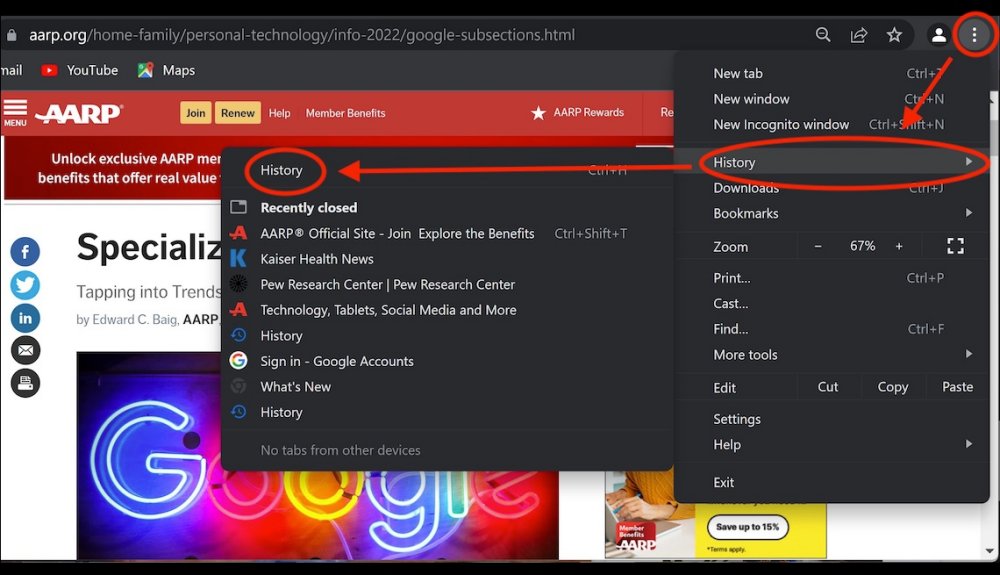
To increase your privacy, it’s important to be aware of your browser and privacy settings. Most browsers offer various privacy options, such as incognito mode or the ability to clear browsing history. These settings can help you protect your browsing history from being easily accessed by others.
Additionally, using virtual private networks (VPNs) or proxy servers can further enhance your privacy by hiding your IP address and encrypting your internet traffic. VPNs are particularly useful when using public Wi-Fi networks, as they can protect your data from potential eavesdropping by others on the same network.
Specific Countries and their Approach
Each country may have different laws and regulations regarding access to browsing history. Some countries, like the United States, have relatively more lenient policies, while others, such as China, have stricter regulations that enable widespread monitoring and censorship of internet activity.
Recommendations for Protecting Your Browsing History
If you want to keep your browsing history private, here are a few tips:
- Use secure and up-to-date browser software with built-in security protocols.
- Avoid using public Wi-Fi networks without using a VPN.
- Consider using privacy-focused browsers like Brave or DuckDuckGo that don’t track your online activities.
- Regularly clear your browsing history and cookies.
- Be cautious when downloading and installing apps, as some may track your browsing history.
While it’s not possible to completely eliminate the risk of your browsing history being seen by others, following these recommendations can help minimize the chances and protect your privacy online.
Governments and Your Browsing History
Websites and Tracking
Most websites track your browsing history for various purposes. Whether it’s to personalize your experience or for advertising reasons, many websites collect and store information about the pages you visit, the links you click, and the time you spend on each site.
Browsers with Encryption
To protect your browsing history from being easily tracked and shared, some browsers offer encryption options. For example, Apple’s Safari browser has a feature called “Intelligent Tracking Prevention” that helps prevent websites from tracking your browsing activities.
HTTPS and Website Security
Using the HTTPS protocol when visiting websites can also help protect your browsing history. The “S” in HTTPS stands for secure, and it encrypts the data exchanged between your browser and the website you’re visiting, making it harder for anyone, including governments, to track your online activities.
Browsing Anonymously
If you want an alternative to mainstream browsers that offer more privacy, you can try using browsers like DuckDuckGo. DuckDuckGo aims to keep your searches and browsing history private by not storing any personal information and encrypting your connections to websites.
Protecting Against Government Surveillance
In some countries, governments may have the power to access your browsing history, even without your consent. To protect yourself against such surveillance, you can use tools like virtual private networks (VPNs) that help mask your online identity and make it harder for governments to trace your browsing activities back to you.
Importance of Encryption and Security
In general, keeping your browsing history encrypted and secure is crucial for maintaining your online privacy and preventing governments or other entities from creating a detailed profile of your online activities. By using browsers with encryption features, practicing safe browsing habits, and utilizing anonymity tools, you can help protect your browsing history from prying eyes.
How Do Governments Access Your Browsing History?
When it comes to accessing your browsing history, governments have various methods they can use to monitor your online activities. These methods can vary from one government to another, but they often involve the cooperation of internet service providers (ISPs) and the use of advanced monitoring techniques.
Monitoring through ISPs
One common way governments can access your browsing history is through your internet service provider. ISPs have the capability to collect and store information about the websites you visit, the searches you perform, and the messages you send. They can then provide this information to the government upon request or as required by law.
Intercepting Internet Protocols
Another method that governments may use is intercepting internet protocols. By monitoring the flow of packets between your device and the websites you visit, they can gain insights into your browsing activities. This can include information about the websites you have visited, the duration of your visits, and the data exchanged during your sessions.
Exploiting System Vulnerabilities
In some cases, governments may exploit vulnerabilities in your home network or device to gain access to your browsing history. This can be done through malware or other malicious software that is unknowingly downloaded onto your system. Once installed, these tools can collect and send your browsing data to government administrators or other third parties.
Limitations and Prevention
While governments have the means to access your browsing history, there are steps you can take to protect your privacy. Using secure web protocols such as HTTPS can help prevent interception and ensure the confidentiality of your browsing activities. Additionally, regularly updating your devices, using strong passwords, and being cautious with the websites you visit can all help to keep your browsing history safe from prying eyes.
In conclusion, governments have various methods at their disposal to access your browsing history. Whether it’s through monitoring by ISPs, intercepting internet protocols, or exploiting system vulnerabilities, they can gather information about your online activities. However, by taking steps to protect your privacy and staying informed about the latest security measures, you can ensure that your browsing history remains private and secure.
The Consequences of Government Access to Your Browsing History
Your browsing history is a valuable source of information that governments can access and store for various reasons. When governments have access to this information, they can track your online activities, including the websites you visit, the apps you use, and the content you consume.
One of the consequences of government access to your browsing history is the loss of privacy. Governments can use this information to create a detailed profile of your online behavior, allowing them to monitor and control your online activities from a distance. They can follow the digital breadcrumbs you leave behind and see which websites you visit, how long you stay on those sites, and what actions you take while there.
This level of surveillance can have a chilling effect on freedom of expression and can potentially be used to target individuals based on their online activities. It is essential to be aware that not only can governments access your browsing history, but hackers and other malicious actors can as well.
There are ways to protect your browsing history from prying eyes, but they are not always foolproof. Using a virtual private network (VPN) can be an effective tool, as it encrypts your internet traffic and hides your IP address from your internet service provider (ISP). However, it is important to choose a reputable VPN provider and ensure that they have a strict no-logs policy to keep your browsing history private.
Another option is to use an anonymous proxy or the Tor network, which can provide additional layers of anonymity. These tools route your internet traffic through multiple servers, making it difficult for anyone to trace your online activities back to you.
While these methods can help to hide your browsing history, they are not completely foolproof. It is important to keep your operating system and software up to date, use strong and unique passwords, and be cautious about the websites you visit and the files you download.
Ultimately, the idea of complete privacy online is often an illusion. Governments, employers, internet service providers, and even social media networks can see and store your browsing history. However, taking steps to prevent easy access to this information can help protect your privacy and ensure that your online activities remain as secure as possible.
Legal Measures to Protect Your Browsing History from Governments

When it comes to protecting your browsing history from governments, there are several legal measures you can take. One effective way is to use a virtual private network (VPN). A VPN creates a secure and encrypted connection between your device and the server you are accessing, making it difficult for governments or hackers to track your online activities.
Another option is to use a browser that prioritizes user privacy, such as Mozilla Firefox or Brave. These browsers offer features like built-in ad-blockers, anti-tracking tools, and the ability to automatically delete cookies and browsing history after each session.
If you want an extra layer of protection, you can use the Tor browser. Tor routes your internet traffic through a series of volunteer-operated servers, making it almost impossible to trace your online activities back to your device.
Furthermore, using private browsing modes, such as Chrome’s Incognito mode or Safari’s Private browsing, can prevent your browsing history from being saved on your device. However, it’s important to note that while these modes may hide your browsing history from other users of the same device, your internet service provider and the websites you visit can still track your activities.
For those who want even more control over their privacy, using browser extensions like Privacy Badger or uBlock Origin can block third-party tracking cookies and prevent websites from collecting your browsing data. These extensions also offer additional security features like protecting against malware and phishing attempts.
Lastly, being mindful of the websites you visit and the permissions you give to apps and services is crucial. Some websites and apps may collect and store your browsing history, so it’s important to read their privacy policies and only use trusted and reputable platforms. Additionally, keeping your operating system and all your apps up to date will ensure that you have the latest security patches and improvements.
Hackers and Your Browsing History
When it comes to your browsing history, it’s important to understand that hackers can gain access to this information if certain security measures are not in place. Unlike governments or corporations, hackers do not have any restrictions or operating boundaries. They are individuals or groups who are looking to exploit vulnerabilities in your online activities for various reasons.
One of the most common ways hackers can access your browsing history is through malware or malicious software. This can be achieved by tricking you into downloading a file or visiting a compromised website. Once the malware is installed on your device, it can silently record your browsing history and send it back to the hacker’s servers.
Another method that hackers can use is by intercepting your internet traffic. This can be done when you are connecting to the internet through a public Wi-Fi network. Hackers can use special tools to intercept data packets and extract your browsing history.
While popular browsers like Google Chrome, Firefox, Safari, and others have built-in security features to protect your information, it is not foolproof. Hackers are constantly finding ways to bypass these security measures and gain access to your browsing history.
Heres how you can protect your browsing history from hackers:
- Use a Virtual Private Network (VPN): A VPN encrypts your internet traffic and routes it through servers located elsewhere, making it difficult for hackers to intercept.
- Keep your browser and operating system up to date: Browser and operating system updates often include security patches that protect against known vulnerabilities.
- Be cautious of the websites you visit: Make sure you are visiting reputable websites that have secure URLs (https://) and not sharing personal information on suspicious sites.
- Use strong and unique passwords: Avoid using the same password for multiple accounts and make sure they are complex enough to prevent brute-force attacks.
- Enable private browsing mode: Most browsers offer a private browsing mode that does not save your browsing history, cookies, or other data.
By following these tips, you can significantly reduce the risk of hackers accessing your browsing history. It’s important to stay vigilant and take the necessary precautions to protect your online privacy.
How Hackers Exploit Your Browsing History
1. Targeted Attacks: Hackers can exploit your browsing history to launch targeted attacks against you. By analyzing the websites you visit, hackers can gain insights into your interests, preferences, and online activities. They can then use this information to craft personalized phishing emails or messages that appear legitimate, tricking you into revealing sensitive information or downloading malicious software.
2. Session Hijacking: When browsing websites that do not have proper encryption protocols enabled, hackers can intercept and hijack your browsing session. This means they can see everything you do on that website, including any sensitive information you enter, such as login credentials or financial details. They can use this information for identity theft or to gain unauthorized access to your accounts.
3. Malvertising: Online advertising platforms can serve malicious ads that exploit your browsing history to deliver targeted malware. If a website you visit has been compromised and displays these malicious ads, clicking on them can lead to the installation of malware on your device. The malware can then gather further information from your browsing history, compromise your privacy, and even take control of your device.
4. Online Profiling: Your browsing history can be collected by various online platforms, including social media networks, search engines, and website analytics tools. These platforms may use this data to create an online profile of you, which can be used for targeted advertising, personalized content, or even sold to third parties. This can result in a loss of privacy and a flood of targeted ads that follow you on every website you visit.
5. Wi-Fi Network Exploitation: When connected to a public Wi-Fi network, your browsing history can be vulnerable to exploitation by hackers. By setting up malicious Wi-Fi hotspots or using specialized software, hackers can intercept your data as it travels between your device and the websites you visit. This means they can see all the websites you browse, the information you submit, and even your account credentials if you log in to any websites while connected to their network.
To prevent hackers from exploiting your browsing history, it is recommended to use secure and encrypted connections whenever possible. Make sure websites you visit use HTTPS instead of HTTP, which ensures that the data transmitted between your device and the server is encrypted and cannot be easily intercepted. Additionally, regularly update your software and use strong, unique passwords for each of your online accounts. Avoid clicking on suspicious links or downloading files from untrusted sources, as these can often contain malware that can compromise your privacy and security.
The Consequences of Hackers Access to Your Browsing History
Your browsing history contains a wealth of personal information that can be valuable to hackers. When hackers gain access to your browsing history, the consequences can be severe.
1. Privacy Invasion: Hackers can gain a deep understanding of your online activities, including the websites you visit, the searches you make, and the articles you read. This invasion of privacy can leave you feeling violated and vulnerable.
2. Identity Theft: With access to your browsing history, hackers can gather information about you that can aid in identity theft. They can learn about your interests, financial transactions, and even personal details.
3. Financial Loss: By tracking your online activities, hackers can gain access to your financial accounts and steal your money or make unauthorized purchases in your name.
4. Reputation Damage: If hackers gain access to your browsing history, they may use it to blackmail or embarrass you by revealing sensitive information about your online activities.
5. Account Takeover: Hackers may attempt to gain access to your online accounts by using the information they gather from your browsing history. This can lead to unauthorized access, password changes, and loss of control over your accounts.
6. Exposure to Malware: Through tracking your browsing history, hackers can determine which websites you visit frequently and use this information to target you with malware or phishing attacks.
7. Loss of Trust: Once your browsing history is compromised, the trust between you and the online services you use may be lost. This can lead to difficulties in accessing certain websites or services.
To protect yourself from these consequences, it is important to take steps to secure your browsing history. Use strong, unique passwords for your online accounts, enable two-factor authentication, regularly update your devices and software, and consider using a virtual private network (VPN) or a browser with built-in privacy features.
Steps to Protect Your Browsing History from Hackers
When it comes to protecting your browsing history from hackers, there are several steps you can take to ensure your online activities remain private and secure:
1. Use a Secure Browser
Choose a browser that has built-in security features, such as encryption and anti-tracking technologies. Popular options include Chrome, Firefox, Safari, and Edge.
2. Enable Private Browsing
Activate the private browsing mode offered by your browser. This prevents the browser from saving your history, cookies, and other data related to your online activities.
3. Use a Virtual Private Network (VPN)
A VPN creates a secure and encrypted connection between your device and the websites you visit, making it difficult for hackers to intercept your data. There are many free and paid VPN services available.
4. Clear Your Browsing History Regularly
Manually delete your browsing history and cookies on a regular basis, especially when using public Wi-Fi or shared devices. This helps to minimize the chances of your information being tracked or accessed by hackers.
5. Disable Auto-Fill and Auto-Complete
Turn off auto-fill and auto-complete features in your browser settings. This prevents your login credentials, personal information, and other sensitive data from being automatically filled in or stored.
6. Limit Third-Party Cookies
Adjust your browser settings to block or limit third-party cookies. These are cookies that are placed on your device by websites other than the one you are actively visiting. By limiting their use, you reduce the amount of data that can be collected and tracked.
7. Utilize Private Search Engines
Consider using private search engines, such as DuckDuckGo, that prioritize user privacy and do not collect personal information or track your searches.
By following these steps, you can significantly increase the security and privacy of your browsing history, keeping your online activities safe from hackers and prying eyes.
Вопрос-ответ:
Can the government see my browsing history?
Yes, government agencies, such as law enforcement, can request access to your browsing history from your internet service provider (ISP) through a legal process. However, they would usually require a warrant or court order to do so.
Are there any laws that protect my browsing history?
Yes, in many countries there are laws in place to protect the privacy of individuals’ browsing history. These laws vary by country, but they generally require government agencies to obtain a warrant or court order before accessing someone’s browsing history.
Can my browsing history be accessed without my knowledge?
It is unlikely that your browsing history can be accessed without your knowledge, especially if you are using secure connections (HTTPS) and taking measures to protect your online privacy. However, there are instances where hackers or malicious software can gain unauthorized access to your browsing history.
What can I do to protect my browsing history from being seen by others?
There are several steps you can take to protect your browsing history. Firstly, use a virtual private network (VPN) to encrypt your internet traffic and hide your browsing activities from prying eyes. Secondly, regularly clear your browser history, cookies, and cache. Finally, be cautious of the websites you visit and use secure browsing practices.
Can employers see my browsing history on a work computer?
Yes, in most cases, employers can monitor your browsing history on a work computer. They often have the right to do so as it is their property. It is important to be mindful of your online activities while using a work computer and adhere to any company policies regarding internet usage.
Видео:
Google: A History of Evil | Why They Are Not an Innovative Company
Google: A History of Evil | Why They Are Not an Innovative Company by Tek Syndicate 1 hour ago 18 minutes 868 views
