The Essential Guide: How to Change Your IP Address and Understand the Different Types of IP Addresses
Are you tired of not being able to access your favorite websites? Do you want to browse the web without any restrictions? Changing your IP address can help you achieve this and more. Whether you want to bypass geographical blocks, stream Netflix from another country, or simply enhance your online privacy, understanding how to change your IP address is essential.
There are different types of IP addresses, and depending on your needs, you can choose the one that suits you best. For example, if you’re traveling and want to access local services, a dynamic IP address assigned by your internet service provider (ISP) or a DHCP server is proper. On the other hand, if you need a dedicated and static IP address, you can edit your network settings or use a VPN service like CyberGhost.
One popular scenario where changing your IP address is helpful is when trying to watch region-restricted content. For example, if you’re in the UK and want to access BBC iPlayer, which is only available to users in the UK, changing your IP address to a British one will help you evade the restriction. Many VPN services, like CyberGhost, provide servers all around the world, allowing you to connect to the IP address of a different country and access the desired content.
One important thing to keep in mind is to always check your IP address after changing it to ensure that it has been properly assigned. There are online IP address checkers available that can show you the details of your current IP address, such as the location and the ISP. This can be especially useful when trying to troubleshoot any issues or ensure your privacy.
In conclusion, changing your IP address can help you bypass restrictions, access content from different countries, enhance your online privacy, and much more. Understanding the different types of IP addresses and how to change them can be a valuable skill in today’s digital world. So, if you’re tired of being limited by your current IP address, take control of your online experience and explore the possibilities that come with changing your IP address.
Essential Guide: How to Change Your IP Address and Understand Different Types of IP Addresses – Website Name
Changing your IP address can be a useful plan when it comes to protecting your online privacy and avoiding any leaks of your personal information. There are different types of IP addresses that you should understand, especially the difference between public and private addresses.
How to change your IP address
If you want to change your IP address, you can do so by using a VPN service. VPNs function by routing your internet connection through a different server, thus giving you a new IP address. It’s important to note that the IP address you get from the VPN will depend on the server you select.
Understanding the different types of IP addresses
In the world of IP addresses, there are public and private addresses. Public IP addresses are assigned to devices that are directly connected to the internet, like your home modem. On the other hand, private IP addresses are used within a local network, such as your home Wi-Fi network. They can’t be seen by anyone outside of that network.
Here’s why understanding this distinction is important: when you connect to the internet through your modem, you’re assigned a public IP address. However, when you connect to the internet through your Wi-Fi network, you’re assigned a private IP address. Knowing which type of IP address you have is essential when it comes to troubleshooting network issues.
Additional tips and tricks
1. Use an IP address checker tool to verify your current IP address and ensure that it has changed after using a VPN service or making any other changes.
2. Some websites or services may block certain IP addresses to prevent extra access or asking for verification. In these cases, using a VPN with a different IP address may allow you to bypass these blocks.
3. Update your IP address regularly to avoid being tracked or having your browsing activities monitored by third parties.
4. Split your internet connection across multiple routers and locations to ensure maximum privacy and security.
5. If you’re concerned about your privacy, it’s best to choose a paid VPN service over a free one. While free services may seem enticing, they often come with limitations and may not offer the same level of security.
Understanding IP Addresses
An IP address is a unique identifier assigned to each device connected to a computer network. It is like a digital fingerprint that allows devices to communicate with each other and send data over the network.
IP addresses can come in different forms, such as IPv4 or IPv6. IPv4 addresses are the most common and consist of a series of four numbers separated by dots, while IPv6 addresses are longer and use a combination of letters and numbers.
IP addresses are used for various purposes, such as identifying the source and destination of internet traffic or providing access to specific resources on a network.
If you’re looking to change your IP address, there are several methods available. One option is to use a Virtual Private Network (VPN), which allows you to mask your IP address and appear as if you’re browsing from a different location. This can be useful for accessing region-restricted content or enhancing privacy.
Another way to change your IP address is to manually update your router’s settings. By doing so, you can choose a different IP address range provided by your Internet Service Provider (ISP). However, this method may require technical knowledge and could result in network disruptions if not done correctly.
Some people may choose to change their IP address to evade online tracking or protect their privacy. By hiding your IP address, it becomes more difficult for others to identify your online activities or track your location.
When devices communicate with each other over a network, they use IP addresses to identify and exchange data. This ensures that the data goes to the intended recipient and is received correctly.
In summary, understanding IP addresses is essential for navigating the digital world. Whether you’re switching IP addresses for privacy reasons, accessing region-restricted content, or enhancing your online security, being aware of how IP addresses work can empower you to make informed decisions about your internet connectivity.
Why Change Your IP Address?
There are several reasons why someone may want to change their IP address. One of the main reasons is to protect their privacy. Every device connected to the internet has a unique IP address, which can be used to track their online activities. By changing their IP address, they can prevent others from easily identifying their location or monitoring their internet usage.
Another reason to change your IP address is to access content that is restricted in your current location. Many websites and online services are only available in certain countries or regions, and by changing your IP address, you can trick these websites into thinking that you are located somewhere else. This can give you access to region-locked content, such as streaming services or online games.
Additionally, changing your IP address can help you bypass certain restrictions that may be placed on your internet connection. For example, some internet service providers (ISPs) may place limits on your download speed or bandwidth usage. By changing your IP address, you can reset these restrictions and potentially improve your internet connection.
There are also security benefits to changing your IP address. If you suspect that your current IP address has been compromised or is being blocked by certain websites or services, changing it can help you regain access. By using a different IP address, you can avoid any blocking measures that may have been put in place for your previous address.
There are several ways to change your IP address, depending on your device and network setup. For example, you can manually change the IP address settings on your computer or mobile device. This involves going into the network settings and entering a new IP address, subnet mask, gateway, and DNS server. However, this method can be relatively complicated and may require some technical knowledge.
Another way to change your IP address is to use a proxy server. A proxy server acts as an intermediary between your device and the internet. When you connect to the internet through a proxy server, your IP address is hidden and replaced with the IP address of the proxy server. This can help you bypass certain restrictions and access blocked websites.
If you want to change your IP address on a more permanent basis, you can consider using a virtual private network (VPN) service. A VPN encrypts your internet connection and routes it through a server located in a different country or region. This not only changes your IP address but also provides added privacy and security.
In conclusion, changing your IP address can have several benefits, including protecting your privacy, accessing restricted content, bypassing restrictions, and improving security. Whether you choose to manually change your IP address, use a proxy server, or install a dedicated VPN, it’s important to consider the specific needs and preferences of your online activities to select the best option for you.
Types of IP Addresses
There are several types of IP addresses that you should be aware of when it comes to changing your IP address and understanding different types of IP addresses.
1. Static IP Address
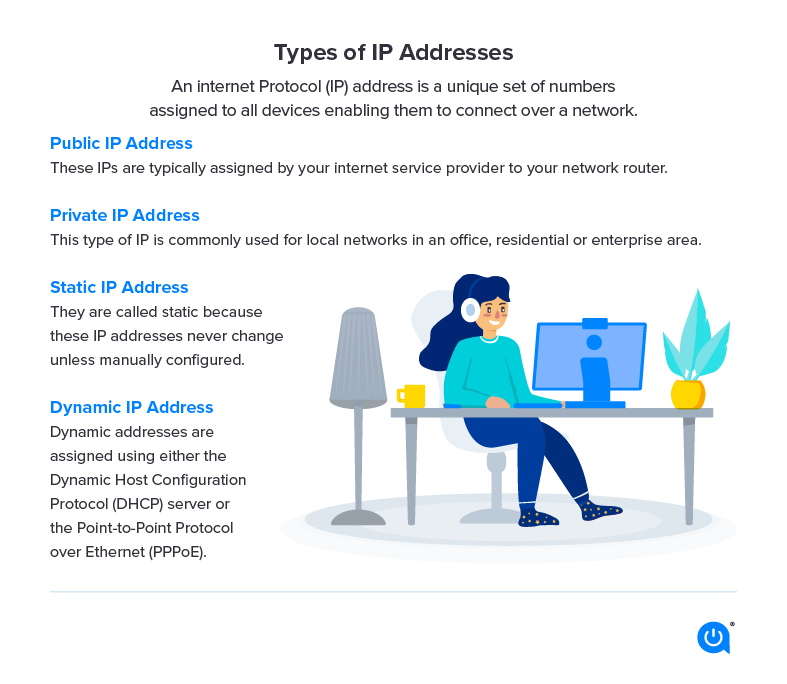
A static IP address is a unique, fixed IP address that is assigned to your device. This type of IP address does not change, which can be helpful for certain online services like running a server or accessing your home network remotely.
2. Dynamic IP Address
A dynamic IP address is an IP address that is assigned to your device by your ISP. This type of IP address can change each time you connect to the internet, which can help mask your online activities and protect your privacy. It is the most common type of IP address used by residential internet users.
3. VPN IP Address
A VPN, or Virtual Private Network, allows you to connect to the internet through a different IP address. By using a VPN, your IP address appears as if you are connecting from a different location. This can be useful for accessing geo-blocked content or protecting your identity online.
There are many VPN services available that can help you change your IP address and provide additional features to protect your online privacy. Some of the best VPNs include Surfshark, NordVPN, and ExpressVPN.
4. Proxy IP Address
A proxy IP address is an intermediary IP address that you can use to connect to the internet. When you connect through a proxy, your IP address is replaced with the proxy’s IP address, making it appear as if you are connecting from a different location.
Proxies can be helpful for accessing blocked websites or bypassing certain restrictions, but they may not provide the same level of security and privacy as a VPN.
5. Public IP Address
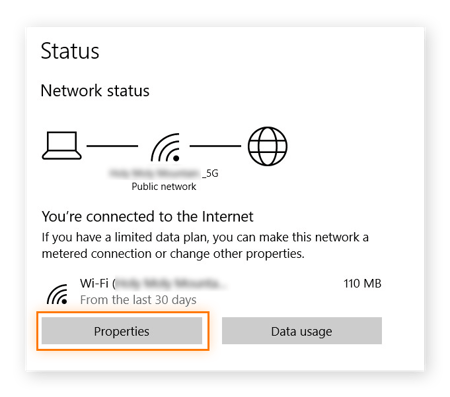
A public IP address is the IP address assigned to your router or modem by your ISP. This is the IP address that is visible to the outside world and is used to identify your network on the internet.
Static IP Addresses
A static IP address is an IP address that does not change. Unlike dynamic IP addresses, which are assigned to a device temporarily, static IP addresses remain constant, making them ideal for certain situations.
One advantage of a static IP address is that it allows you to easily access your devices from anywhere in the world. If you travel frequently or have multiple devices that need to communicate with each other, a static IP address can simplify the process.
Having a static IP address is also beneficial for advanced networking and routing configurations. It allows you to have more control over your network and make specific changes to your routing settings.
While dynamic IP addresses are commonly used and assigned by Internet Service Providers (ISPs), static IP addresses must be manually configured. You typically need to contact your ISP and request a static IP address for your plan. This extra step may require some additional fees, but it gives you the opportunity to choose the right IP address for your needs.
Dynamic IP Addresses
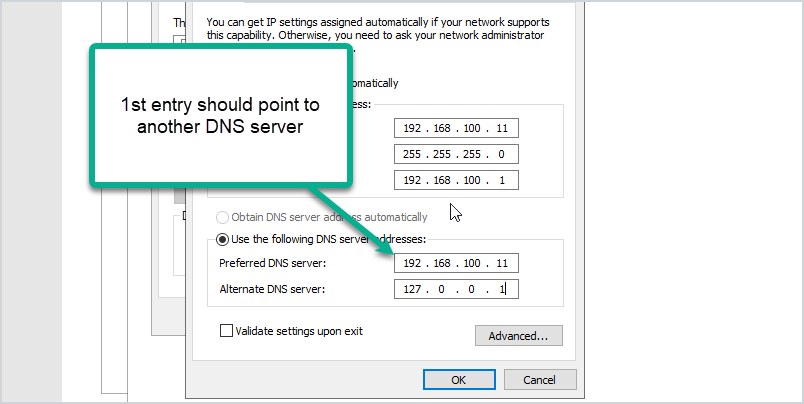
A dynamic IP address is an IP address that can change over time. Unlike a static IP address that remains the same, a dynamic IP address allows the user to have a different IP address each time they connect to the internet. Users with dynamic IP addresses often don’t have control over the specific IP address they get, as it is assigned by their Internet Service Provider (ISP).
One reason why someone would choose to have a dynamic IP address is that it provides an extra layer of privacy and security. Since the IP address is constantly changing, it can be more difficult for snoops and hackers to track a user’s online activities.
Another advantage of dynamic IP addresses is that it allows ISPs to efficiently allocate IP addresses to their users. With a limited number of available IP addresses, dynamic addressing avoids IP address exhaustion and allows a vast number of users to connect to the internet.
Changing a dynamic IP address can be done in a few different ways. One option is to simply reset the router. By turning off the router for a certain period of time and then turning it back on, the ISP assigns a new IP address to the user. Another method is to use software or online services that can change the IP address on the user’s behalf.
It is important to note that dynamic IP addresses can come in different formats, depending on the version of the Internet Protocol (IP) being used. The most common version is IPv4, which uses a 32-bit address and allows for approximately 4.3 billion unique IP addresses. However, with the increasing number of devices connected to the internet, the newer IPv6 protocol is being adopted, which uses a 128-bit address and provides a nearly unlimited number of IP addresses.
How to Change Your Dynamic IP Address
If you want to change your dynamic IP address, there are a few options available to you:
- Reset your router: Simply unplugging your router from power for a few minutes and then plugging it back in can often result in a new IP address being assigned by your ISP.
- Use software or online services: There are various software and online services that can change your IP address for you. These can be especially useful if you need to change your IP address frequently or if you are not comfortable manually resetting your router.
- Contact your ISP: If none of the above methods work, you can contact your ISP and ask them to assign you a new IP address.
It’s important to keep in mind that changing your dynamic IP address does not guarantee complete anonymity or security. It can help protect your privacy to some extent, but it is not foolproof. If you require high levels of privacy and security, additional measures such as using a VPN or Tor network may be necessary.
In summary, dynamic IP addresses offer the flexibility of changing IP addresses each time you connect to the internet. While it can provide some privacy and security benefits, it’s important to understand that it is not a foolproof method. Consider your specific needs and take additional measures if necessary to protect your online identity.
Public IP Addresses
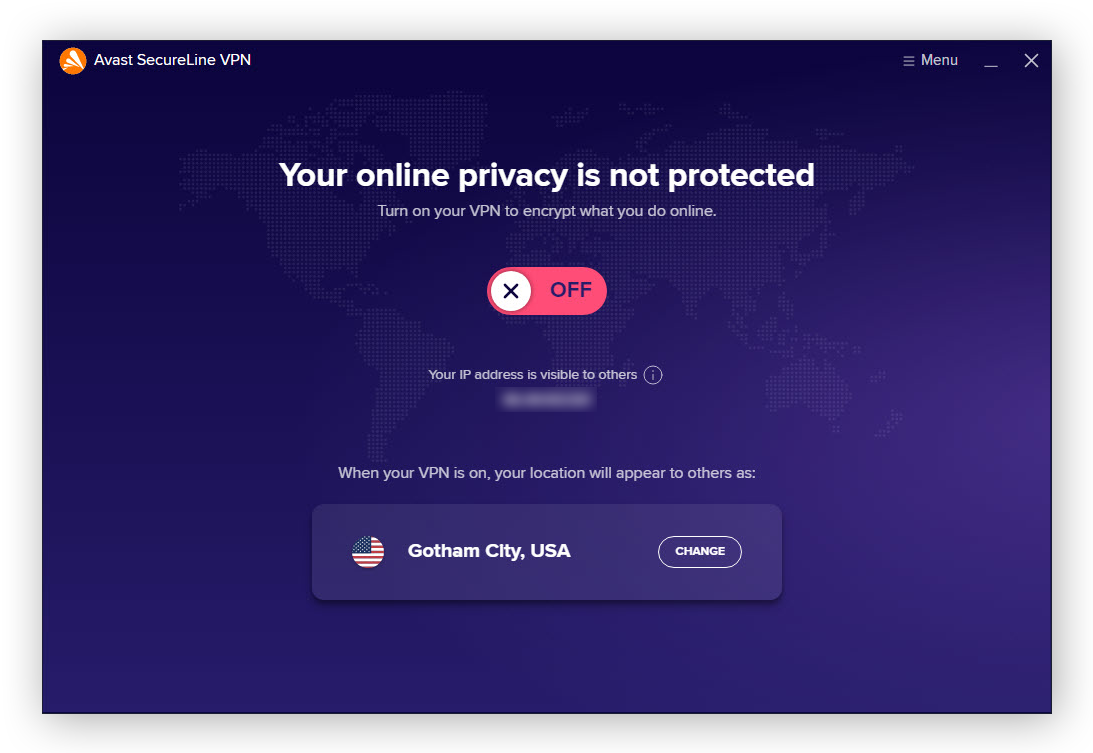
A public IP address is an address that is assigned to devices and networks that are connected to the internet. It is a unique identifier that allows these devices and networks to communicate with other devices and networks on the internet.
There are two types of public IP addresses: static and dynamic. A static IP address is an address that does not change. It is manually assigned to a device or network and remains the same over time. This is useful for services that need a consistent IP address, such as websites or servers. However, dynamic IP addresses are more commonly used. This type of address is assigned by the internet service provider (ISP) and can change periodically.
When you connect to the internet, your ISP assigns your device or network a public IP address. This IP address is used to identify your device or network on the internet. Your public IP address is visible to anyone who knows how to find it, and it can be used to track your online activities.
Changing your public IP address can be done in a few different ways. One step-by-step method is to manually change it on your router or modem. This process involves accessing the router or modem’s settings and entering a new IP address. Another option is to use a proxy server. A proxy server acts as an intermediary between your device and the websites or services you are connecting to. It masks your IP address and can provide additional privacy and security.
There are pros and cons to changing your public IP address. On the plus side, changing your IP address can help protect your privacy and hide your online activities from prying eyes. It can also allow you to bypass restrictions imposed by websites or services that may block certain IP addresses. For example, if you change your IP address to one from a different country, you may be able to access geo-restricted content, such as streaming services or websites.
However, there are also some downsides to changing your IP address. For one, it can be a time-consuming process, especially if you need to change it frequently. Additionally, some websites or services may still be able to detect and block certain proxy or VPN IP addresses. Furthermore, changing your IP address may not provide complete anonymity, as other identifying information can still be tracked.
Private IP Addresses
Private IP addresses play a crucial role in maintaining a secure and efficient network connection. They are used within a local network and are not visible or accessible to the internet. Private IP addresses provide a way for devices to communicate with each other without being exposed to potential security risks.
Private IP addresses are typically used in home networks, small businesses, and local area networks (LAN). They allow multiple devices to connect to the same network and share a single public IP address. This can help improve network performance and reduce the need for additional public IP addresses.
There are three different ranges of private IP addresses that are commonly used: 10.0.0.0 to 10.255.255.255, 172.16.0.0 to 172.31.255.255, and 192.168.0.0 to 192.168.255.255. These ranges are reserved by the Internet Assigned Numbers Authority (IANA) specifically for private use.
Private IP addresses are assigned to devices on a local network by the network router. Each device is given a unique private IP address, allowing data to be transmitted between devices within the same network.
One of the advantages of private IP addresses is that they can help protect your privacy. Since they are not visible to the internet, it is much more difficult for anyone to track your online activities or identify your browsing habits.
Changing your private IP address can be done by accessing your router’s settings. Depending on the router model, the process may vary. In most cases, you can change your private IP address by logging into your router’s admin interface and navigating to the appropriate settings page.
While changing your private IP address can help protect your privacy, it does not change your public IP address. Your public IP address is assigned by your internet service provider (ISP) and is visible to the internet. If you want to change your public IP address, you may need to contact your ISP and request a new one.
How to Change Your IP Address
Changing your IP address can be useful for various reasons, such as ensuring your privacy, accessing restricted websites, or troubleshooting network issues. There are a few methods you can try to change your IP address, depending on your device and network setup.
1. Check your current IP address
Before changing your IP address, it’s important to know your current IP address. You can use an IP address checker tool or simply search for “What is my IP address” in a search engine. This will give you the necessary information to track any changes.
2. Use a VPN service
A VPN, or Virtual Private Network, allows you to connect to the internet through a server located in a different geographic location. This masks your original IP address with a new one from the VPN server. VPN services come with various features, such as multiple server locations, encryption, and privacy protection. Install a reputable VPN application on your device, select a server location, and connect to the internet through the VPN.
3. Use a proxy server
A proxy server acts as an intermediary between your device and the internet. It can hide your IP address by using its own IP address when communicating with websites. There are both free and paid proxy servers available. Be cautious when using free proxies, as they may not provide the same level of privacy and security as paid options. Configure your device to use a proxy server in the network settings.
4. Reset your modem or router
Resetting your modem or router can sometimes result in a new IP address being assigned to your device. To do this, simply locate the reset button on your modem or router and press it for a few seconds. This will reset the device to its default settings, including the IP address.
5. Contact your ISP
If you need a new IP address for legal or specific reasons, you can contact your Internet Service Provider (ISP). They may be able to assign you a new IP address, especially if you have a valid reason for the request.
In conclusion, there are several methods you can try to change your IP address depending on your needs. Whether you prefer to use a VPN, proxy server, or reset your modem, it’s important to know which method would be the most suitable for your situation. Always take into account the legal implications and use proper tools to ensure your privacy and protection when connecting to the internet.
Using a Proxy Server
A proxy server acts as an intermediary between your device and the internet, allowing you to access online content while hiding or changing your IP address. There are different types of proxy servers available, and some popular options include CyberGhost, Tor, and HTTP proxies.
How Proxy Servers Work
When you connect to the internet through a proxy server, your device’s internet traffic is routed through the server before reaching its destination. This means that any website or online service you access will see the IP address of the proxy server instead of your own. Proxy servers can be useful in several ways:
- Privacy: By using a proxy server, you can keep your online activities private, as the server masks your IP address.
- Access to blocked content: If certain websites or online services are blocked in your country or region, using a proxy server can help you bypass these restrictions and access the content.
- Evading network restrictions: In some networks, certain websites or services may be blocked by the network administrator. By using a proxy server, you can bypass these restrictions and access the blocked content.
Types of Proxy Servers
There are different types of proxy servers, each with its own features and use cases. Here are some of the most common types:
- HTTP proxies: These are the most common type of proxy servers and are used for general web browsing. They work with HTTP and HTTPS protocols.
- HTTPS proxies: These proxies are specifically designed for secure browsing and work with HTTPS protocol.
- SOCKS proxies: SOCKS proxies can handle various types of internet traffic, including email, gaming, and file transfers.
When using a proxy server, it’s important to note that your data is still being routed through the server, so you should choose a reputable provider to ensure your privacy and security. Additionally, some proxies may leak your real IP address or DNS information, so it’s important to regularly check for any leaks.
Overall, using a proxy server can be a relatively easy and effective way to change your IP address and access online content that may not be available in your country or region. Whether you’re looking for privacy, access to blocked content, or evading network restrictions, there are numerous proxy server options to choose from. Just make sure to use them responsibly and within the bounds of the law.
What is a Proxy Server?
A proxy server is an intermediary between your device and the internet. When you connect to a website or any other online service, the request goes through the proxy server first before reaching its final destination. The proxy server acts as a middleman, forwarding your request and returning the response from the website.
Why use a proxy server?
There are multiple reasons why you might want to use a proxy server. One of the main reasons is to change your IP address. By connecting to a proxy server, you can reset your IP address to appear as if you are in a different city, region, or even country. This can be helpful if you want to access geo-restricted content, bypass censorship, or simply browse the internet anonymously.
Types of proxy servers
There are different types of proxy servers, but two main ones are HTTP proxies and SOCKS proxies. HTTP proxies are mainly used for web browsing and accessing HTTP websites. SOCKS proxies, on the other hand, can handle any type of traffic and are more versatile.
Pros and cons of using a proxy server
Using a proxy server comes with its own set of advantages and disadvantages. On the one hand, it can help you avoid IP-based restrictions and increase your online anonymity. On the other hand, free proxy servers may be slower, less reliable, or even unsafe. It’s important to choose a reputable proxy server provider to ensure a secure and reliable connection.
How to connect to a proxy server
To connect to a proxy server, you need to configure your device’s network settings. This can usually be done in the Wi-Fi or network settings of your device. You will need to enter the proxy server’s IP address and port number. Once configured, all your internet traffic will go through the proxy server before reaching its destination.
What is a static IP address?
A static IP address is an IP address that does not change. It is assigned to a specific device and remains the same every time the device connects to the internet. This is different from a dynamic IP address, which can change each time you connect to the internet. Static IP addresses are typically used for devices that require a permanent, unchanging IP address, such as servers or networked printers.
How to change your IP address
To change your IP address, you can use a proxy server, virtual private network (VPN), or a Tor network. Each option has its own benefits and drawbacks. Proxy servers are the simplest and often the most cost-effective option. VPNs provide a more complete solution, offering encryption and better anonymity. Tor networks provide the highest level of anonymity but can be slower.
FAQs about proxy servers
1. What is the difference between a proxy server and a VPN?
2. Can I use a proxy server on my Android device?
3. Are all proxy servers free?
4. Can I watch Netflix while using a proxy server?
5. Are proxy servers safe?
Conclusion
A proxy server is a helpful tool when it comes to changing your IP address and browsing the internet anonymously. It allows you to bypass restrictions, access geo-restricted content, and enhance your online privacy. However, it’s important to choose a reputable proxy server provider and be aware of the potential risks associated with using free or insecure proxy servers.
How Proxy Servers Work
Overview
A proxy server acts as an intermediary between your device and the internet. It allows you to browse the web through a different IP address, giving you enhanced privacy and allowing you to access blocked content.
Choosing a Proxy Server
By clicking on the proxy server settings in your browser, you can choose from multiple options. There are different types of proxy servers, including HTTP, HTTPS, and SOCKS proxies. Each type has its own advantages and may be used for different purposes, such as increased security or faster browsing.
Benefits of Using a Proxy Server
When connected to a proxy server, your IP address is hidden. This offers protection against hackers and allows you to browse the web anonymously. Additionally, proxy servers enable you to access content that may be restricted in your region, such as streaming services like Netflix.
How Proxy Servers Work
When you connect to a website through a proxy server, the server acts as a middleman between your device and the website’s server. It fetches the data from the website on your behalf and then relays it back to your device. This process ensures that your real IP address is not revealed to the website you are accessing.
Check Your IP Address
To check the IP address you are currently using while connected to a proxy server, you can visit a website that displays your IP address. This will show the IP address of the proxy server you are connected to, not your actual device’s IP address.
Switching Proxy Servers
If you want to change the proxy server you are using, you can manually switch to a different one in your browser settings. This allows you to change your virtual location and access content that may be restricted in your current region.
Legal Considerations
While using a proxy server is generally legal, it is important to be aware of the terms of service and any laws regarding internet usage in your country. Some websites or services may have policies against using proxy servers, so it is essential to use them responsibly and be aware of any potential legal implications.
In conclusion, using a proxy server can be a useful tool for enhancing your privacy, accessing blocked content, and protecting your data while browsing online. By selecting the best proxy server for your needs, you can enjoy a more secure and unrestricted internet experience.
Benefits of Using a Proxy Server
Using a proxy server can offer a number of benefits when it comes to changing your IP address and protecting your online privacy.
Anonymity and Privacy
One of the main advantages of using a proxy server is that it allows you to browse the web anonymously. By routing your internet traffic through a different IP address, proxies help to hide your real IP address, making it difficult for others to track your online activities. This is particularly important when you want to protect your personal information or avoid targeted advertising.
Access to Restricted Content
A proxy server can also provide you with access to blocked or restricted content. For example, if a website or online service is only available in a specific country or region, you can use a proxy server located in that area to connect and access the content. This is useful for watching geo-restricted videos, accessing restricted websites, or using online services that are not available in your country.
Increased Security
Proxies can add an extra layer of security to your online activities. When you connect to the internet through a proxy server, your data is encrypted, which can help prevent hackers from intercepting and accessing your personal information. This is especially important when you are using public Wi-Fi networks, as it helps to safeguard your sensitive data from potential cyber threats.
Faster Browsing and Download Speeds
Certain proxy servers, particularly premium or dedicated ones, are designed to enhance your browsing and download speeds. By selecting a fast and reliable proxy server, you can experience quicker page loading times and smoother file downloads. This can be beneficial for streaming, downloading large files, or accessing content that requires a stable and speedy internet connection.
Switching IP Addresses with Ease
When you need to change your IP address quickly and easily, using a proxy server can be the best solution. Instead of asking your internet service provider to reset your IP address, you can simply click a link or edit the proxy settings on your device to switch to a new IP address. This gives you more control over your online privacy and allows you to change your IP address at any time without any hassle.
- Overall, using a proxy server offers numerous benefits, including anonymity, access to restricted content, increased security, faster speeds, and easy IP address switching. However, it is important to consider the cons as well, such as the potential for proxies to hide malware or limited availability of certain services.
- To ensure a secure and reliable proxy server, you can consider using trusted proxy services like CyberGhost or opting for premium proxies that offer dedicated IP addresses. By making an informed choice and selecting the right proxy server that meets your needs, you can enjoy a safer and more flexible online experience from anywhere in the world.
Choosing the Right Proxy Server
If you’re looking to enhance your online privacy and security, finding the right proxy server is essential. A proxy server acts as an intermediary between your device and the internet, allowing you to hide your IP address and browse the web more privately.
1. Private vs. Public Proxies: There are two main types of proxy servers: private and public. Private proxies provide dedicated IP addresses that are exclusively assigned to you, while public proxies are shared among multiple users. Private proxies offer better privacy and faster speeds, making them ideal for more sensitive activities, such as accessing online banking or streaming services.
2. Location and IP Address: The location of the proxy server and the IP address it assigns you are crucial factors to consider. Different websites and online services may have restrictions based on geographical regions. By connecting to a proxy server in a specific city or region, you can easily access content that may be restricted or unavailable in your current location.
3. Surfshark’s Vast Proxy Network: Surfshark is a premium VPN provider that offers a vast network of private proxy servers. With Surfshark, you can choose from a range of IP addresses located in various cities and countries around the world. This allows you to mask your true IP address and appear as if you’re browsing from a different location.
4. Advanced Features: When selecting a proxy server, it’s important to check if it offers advanced features. Some proxies, like Surfshark, provide additional features like IPv6 support, which allows you to use both IPv4 and IPv6 addresses. This can be useful when connecting to websites or services that are transitioning to IPv6.
5. Traveling and Wi-Fi Security: If you frequently travel and connect to public Wi-Fi networks, a proxy server can help strengthen your security. By connecting to a proxy server, you can prevent others connected to the same Wi-Fi network from monitoring your online activities. This is particularly important when accessing sensitive information, such as your online banking or email accounts.
6. Premium vs. Free Proxies: While free proxies may seem enticing, they often come with limitations and potential risks. Free proxies can be unreliable, slow, and may not offer the same level of privacy and security as premium proxies. It’s recommended to choose a reputable VPN provider that offers dedicated proxy servers, like Surfshark, to ensure a safer and more reliable browsing experience.
In conclusion, selecting the right proxy server is crucial to maintain your online privacy and security. Consider the type of proxy (private or public), the location and IP address it provides, any advanced features offered, and whether you prefer a premium or free option. By making an informed choice and using a reliable proxy server, you can browse the web more privately and securely.
Configuring Your Browser to Use a Proxy Server
If you want to change your IP address and access blocked websites, using a proxy server is a great option. A proxy server acts as an intermediary between your device and the websites you visit, allowing you to stay anonymous and bypass any restrictions set by your ISP or network administrator.
Here’s a step-by-step guide on how to configure your browser to use a proxy server:
- First, find a reliable proxy server from a trusted provider. There are many free and paid options available online.
- Once you’ve chosen a proxy server, install any necessary software or browser extensions that the service offers. This will ensure that your browser is properly configured to connect through the proxy server.
- Next, open your browser’s settings and navigate to the network or proxy settings. This process may vary depending on the browser you’re using (e.g., Chrome, Firefox, Safari).
- Within the network or proxy settings, you’ll typically find options to manually configure the proxy server settings or choose an automatic configuration (such as a PAC file). If you’re using a dedicated proxy server, enter the IP address and port number provided by the proxy service.
- If you’re unsure about which settings to use, you can always ask the proxy service provider for assistance or refer to their documentation.
- After configuring the proxy settings, save your changes and restart your browser for the new settings to take effect.
Once your browser is configured to use a proxy server, you can now browse the internet with a different IP address, allowing you to access geo-restricted content and protect your privacy. It’s important to note that using a proxy server is not the same as using a VPN, as proxy servers only route your web traffic whereas a VPN encrypts your entire internet connection.
Вопрос-ответ:
How can I change my IP address?
There are several ways to change your IP address. One method is to use a virtual private network (VPN), which allows you to connect to a server in a different location and masks your original IP address. Another option is to use a proxy server, which acts as an intermediary between your device and the internet and can change your IP address. Additionally, you can try resetting your internet modem to obtain a new IP address from your internet service provider.
Why would I want to change my IP address?
There are several reasons why someone might want to change their IP address. One common reason is to bypass geo-restrictions and access content that is only available in certain regions. By changing your IP address to a location where the content is accessible, you can overcome these restrictions. Additionally, changing your IP address can help protect your privacy and anonymity online, as it makes it more difficult for websites and online services to track your online activities.
What are the different types of IP addresses?
There are two main types of IP addresses: IPv4 and IPv6. IPv4 addresses are composed of four sets of numbers, separated by periods, and are the most commonly used type of IP address. However, with the increasing number of devices connected to the internet, IPv4 addresses are running out, which led to the development of IPv6 addresses. IPv6 addresses are composed of eight sets of alphanumeric characters, separated by colons, and can provide a significantly larger number of unique addresses.
Can changing my IP address help protect against hackers?
Changing your IP address alone may not necessarily protect you against hackers. While it can make it more difficult for hackers to target your specific IP address, there are other security measures you should also take to protect yourself. These include using strong and unique passwords, regularly updating your software and operating system, and practicing safe browsing habits. It is also recommended to use a reputable antivirus and firewall software to further enhance your online security.
Do I need technical knowledge to change my IP address?
No, you do not need advanced technical knowledge to change your IP address. Many VPN services and proxy servers offer user-friendly interfaces that allow you to easily connect and change your IP address with just a few clicks. Additionally, there are numerous online tutorials and guides available that can walk you through the process step by step. However, it is always a good idea to research and choose a reliable and reputable service to ensure your privacy and security.
Видео:
IP addresses and DNS | Internet 101 | Computer Science | Khan Academy
IP addresses and DNS | Internet 101 | Computer Science | Khan Academy by Khan Academy 4 years ago 6 minutes, 45 seconds 368,345 views
