Secure Your Data with VPN Installation: GlobalProtect for Windows and GlobalProtect Gateways

In today’s digital age, ensuring the security of our data is of utmost importance. With the increasing number of cyber threats, it is crucial to have robust security measures in place. One such measure is the installation of a VPN (Virtual Private Network) on your Windows device. In this article, we will focus on the installation process of GlobalProtect, a next-generation VPN solution provided by Palo Alto Networks.
GlobalProtect is designed to provide a secure and encrypted connection for users accessing their organization’s network from remote locations. It utilizes IPsec and SSL protocols to establish a secure connection between the user’s device and the GlobalProtect gateway. This ensures that all data transmitted between the user and the gateway remains confidential and protected from unauthorized access.
Installing GlobalProtect on Windows is a straightforward process. Once installed, the user can easily connect to the organization’s network by entering their username and password. The GlobalProtect application automatically detects available gateways and connects to the closest one, ensuring optimal performance and minimal latency.
The always-on feature of GlobalProtect™ ensures that the user’s device is always connected to the VPN, even when switching between different networks or when the device is in sleep mode. This provides continuous protection for the user’s data, regardless of their location or network environment.
In conclusion, the installation of GlobalProtect for Windows is a crucial step in ensuring the security of your data. By utilizing this next-generation VPN solution, users can connect to their organization’s network securely and transmit data without the fear of unauthorized access. With its easy installation process and automatic gateway selection, GlobalProtect is an ideal choice for organizations looking to enhance their data security.
VPN Installation Guide: GlobalProtect for Windows
Introduction
GlobalProtect is a VPN application that provides secure access to your organization’s network. It ensures the confidentiality and integrity of your data by establishing an encrypted connection between your device and the VPN gateways. This installation guide will walk you through the necessary steps to install and configure GlobalProtect on your Windows device.
Step 1: Download and Install GlobalProtect
To begin, download the GlobalProtect application from the official website of your organization. Once downloaded, run the installer and follow the on-screen instructions to complete the installation process. After installation, launch the GlobalProtect application.
Step 2: Configure GlobalProtect
Upon launching the GlobalProtect application, you will be prompted to provide your VPN gateway information. Enter the IP address or FQDN (Fully Qualified Domain Name) of your organization’s VPN gateway. If you are unsure about this information, contact your system administrator for assistance. You may also need to enter your username and password for authentication purposes.
Once you have provided the necessary information, click on the “Connect” button to establish a VPN connection. GlobalProtect will automatically connect to the specified gateway and authenticate your credentials. The connection will be secured using IPsec, ensuring the privacy and security of your data.
Step 3: Automated Connection with Always-On
GlobalProtect offers an “Always-On” feature that automatically connects to the VPN gateway whenever your Windows device is connected to the internet. To enable this feature, go to the GlobalProtect settings and enable the “Always-On” option. This ensures that your data is always protected, even if you forget to manually connect to the VPN.
Conclusion
In conclusion, the GlobalProtect application provides a secure and convenient way to access your organization’s network. By following this installation guide, you can easily install and configure GlobalProtect on your Windows device. Enjoy the benefits of secure data transmission and enhanced privacy with GlobalProtect!
GlobalProtect™ 4+: Simplify Your VPN Experience
GlobalProtect™ 4+ brings a new level of simplicity and security to your VPN experience. By using this next-generation VPN solution, you can easily and securely connect to your company’s network and access all the resources and data you need, no matter where you are in the world.
With GlobalProtect™ 4+, the installation process is seamless. Simply enter your username and password and the application will automatically configure the VPN settings for you. You no longer need to worry about complex IPsec configurations or gateways – the application takes care of it all.
GlobalProtect™ 4+ ensures the security of your data by encrypting it during transit between your device and the VPN gateway. This ensures that your data remains confidential and protected from any unauthorized access. The application also leverages the advanced features of PAN-OS, the next-generation firewall, to provide extra layers of security.
Whether you are using Windows, Mac, or Linux, GlobalProtect™ 4+ supports all major operating systems, making it easy for users to connect to the VPN from any device. With a few clicks, you can connect to the VPN gateway and access all the resources you need.
GlobalProtect™ 4+ is designed to provide a seamless VPN experience for users around the globe. With its network of gateways located in strategic locations, you can connect to the nearest gateway to minimize latency and ensure a fast and efficient connection.
Don’t let complicated VPN installations and configurations slow you down. Simplify your VPN experience with GlobalProtect™ 4+ and enjoy secure and seamless access to your company’s network and resources.
Choose the Right Gateway for Your GlobalProtect VPN
Secure and Efficient Connectivity
The choice of a gateway is crucial for setting up your GlobalProtect VPN. The ipsec and GlobalProtect™ gateways offer a reliable and secure connection for Windows users, ensuring the protection of your data and applications.
Next-Generation Firewall Capabilities
The GlobalProtect™ gateways feature advanced firewall capabilities powered by PAN-OS, providing an extra layer of security for your network. With the ability to handle multiple applications and prioritize traffic, these gateways ensure optimal performance and productivity.
Automatic Connection with Always-On VPN
With the GlobalProtect VPN, users can enjoy the convenience of an automatic connection. Once the connection is established, your Windows device will always be connected to the VPN, guaranteeing the security of your data even when you’re on the go.
Scalable Deployment for Large Organizations
Whether you have 4+ gateways or a network spread across the globe, GlobalProtect VPN can handle your organization’s requirements. The gateways are designed to handle large amounts of traffic and can be easily deployed for a seamless and scalable VPN solution.
Password Protection for Enhanced Security
GlobalProtect VPN offers password protection to ensure only authorized users can access the network. With secure authentication, you can rest assured that your data and applications are protected from unauthorized access.
Choose the Right Gateway for Your GlobalProtect VPN
When setting up your GlobalProtect VPN, it’s essential to choose the right gateway that meets your organization’s needs. Consider factors such as scalability, security features, and automatic connection capabilities to ensure a reliable and efficient VPN solution.
GlobalProtect: Your Secure Connection to the Internet
GlobalProtect is a next-generation VPN solution that allows users to securely connect to the internet and access corporate resources. It provides a secure and encrypted connection, ensuring the confidentiality and integrity of your data.
By using GlobalProtect, you can connect to the internet through a secure gateway and browse the web without worrying about your online safety. With Pan-OS, GlobalProtect is able to provide automatic connectivity and access to corporate resources, making it easy and convenient for users to stay connected wherever they go.
GlobalProtect uses IPsec and other industry-standard encryption protocols to secure your connection, ensuring that no unauthorized access to your data occurs. This ensures that your sensitive information is protected from hackers and other malicious threats.
Whether you are using Windows 10 or Windows 7, GlobalProtect™ can be easily installed and configured to provide an always-on connection to the internet. Once installed, GlobalProtect™ automatically connects to the nearest available globalprotect™ gateway, ensuring that your connection is always secure.
GlobalProtect™ is designed to be user-friendly and intuitive, with a simple and intuitive interface that allows users to easily manage their VPN connections. With GlobalProtect, you can enjoy a secure and reliable connection to the internet, no matter where you are in the world.
So, if you are looking for a secure and reliable VPN solution for your Windows device, look no further than GlobalProtect. It provides the highest level of security and convenience, allowing you to browse the web and access corporate resources with peace of mind.
Protect Your Data with GlobalProtect VPN
GlobalProtect is a next-generation VPN solution that provides always-on, secure connectivity for Windows users. By connecting to a GlobalProtect gateway, your data is encrypted and protected as it travels across the internet, ensuring the confidentiality and integrity of your sensitive information.
Secure Remote Access
GlobalProtect™ enables users to securely access corporate resources from anywhere in the world, ensuring that their connection is always protected. With GlobalProtect, users can connect to the corporate network using a variety of gateways, including physical and virtual gateways, allowing for flexible and secure access to resources.
Automatic VPN Configuration
GlobalProtect makes it easy for Windows users to connect to VPN gateways without any manual configuration. With the aut
Step-by-Step Windows VPN Installation Guide: GlobalProtect
Welcome to the Step-by-Step Windows VPN Installation Guide for GlobalProtect!
1. Download and Install GlobalProtect™
To get started, download and install the GlobalProtect VPN application for Windows. This next-generation VPN client provides a secure connection to your organization’s gateways, allowing you to access resources and data from anywhere in the world.
2. Launch GlobalProtect and Connect to a Gateway
Once GlobalProtect is installed, launch the application and enter your organization’s gateway address. This gateway serves as the secure entry point to your organization’s network. By connecting to the gateway, you establish a secure VPN tunnel that protects your data and ensures your privacy.
3. Enter Your Credentials
After entering the gateway address, you will be prompted to enter your credentials, including your username and password. This ensures that only authorized users can access your organization’s network and resources. Enter your information and click “Connect” to proceed.
4. Enjoy Secure Access to Your Organization’s Resources
Once connected, you can now access your organization’s resources, such as files, applications, and services, securely. Whether you are working from home or traveling around the globe, GlobalProtect ensures that your data is protected and your connection is secure.
Congratulations! You have now successfully installed and configured GlobalProtect for Windows, providing you with a secure and reliable VPN connection.
Enhance Your Online Security with GlobalProtect for Windows
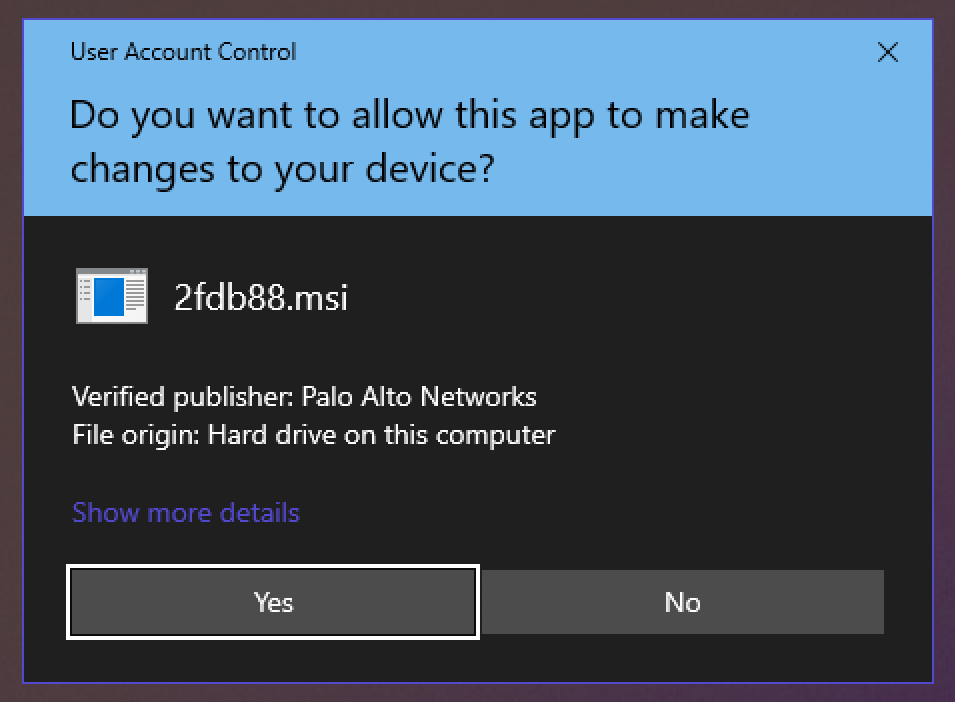
GlobalProtect™ for Windows is a next-generation VPN solution that enhances your online security by providing a secure and encrypted connection to your organization’s network. Whether you are working from home, traveling, or using public Wi-Fi, GlobalProtect ensures that your data is protected from unauthorized access.
With GlobalProtect, you can connect to your organization’s network using IPsec or SSL/TLS to establish an encrypted tunnel between your computer and the gateway located in your organization’s data center. This ensures that your data is securely transmitted over the internet and cannot be intercepted by hackers or other malicious entities.
One of the key features of GlobalProtect is its always-on functionality. This means that once you have installed and configured the GlobalProtect client on your Windows computer, it will automatically connect to the nearest available gateway whenever you go online. This ensures that your online activities are always protected, even if you forget to manually connect to the VPN.
In addition to providing enhanced security, GlobalProtect offers a seamless user experience. You can easily access your organization’s internal resources and applications, such as file shares, intranet sites, and collaboration tools, from anywhere in the world. GlobalProtect’s advanced features, such as split-tunneling and always-on VPN for specific applications, allow you to customize your VPN settings to meet your specific needs.
GlobalProtect for Windows is compatible with Windows 7, 8, 8.1, and 10, and supports both 32-bit and 64-bit versions of the operating system. It is also compatible with the latest version of PAN-OS, the operating system of Palo Alto Networks firewalls and gateways. This ensures that you can easily connect to your organization’s network regardless of the version of Windows or the PAN-OS running on your organization’s infrastructure.
With GlobalProtect for Windows, you can protect your data and enhance your online security. Whether you are a business professional, a remote worker, or a student, GlobalProtect ensures that your online activities are secure and your personal information is protected from prying eyes. So don’t wait, install GlobalProtect on your Windows computer today and experience the benefits of a secure and private online connection.
Stay Anonymous Online with GlobalProtect VPN
GlobalProtect VPN offers an always-on connection that ensures your online activities remain secure and private. By encrypting your data and masking your IP address, GlobalProtect VPN allows you to browse the internet anonymously, protecting your personal information from potential cyber threats.
With GlobalProtect VPN, your connection to the internet is automatic and hassle-free. Whether you’re using Windows or any other platform, simply install the GlobalProtect app and it will connect you to the nearest gateway in its network of worldwide gateways. This means you can enjoy a secure connection, no matter where you are on the globe.
GlobalProtect VPN is designed to provide next-generation security. It uses the IPsec protocol to secure your data and provide end-to-end encryption. This ensures that your information remains secure and is not intercepted by unauthorized users. Additionally, GlobalProtect VPN connects to a globalprotect™ gateway, which acts as a secure entry point to the internet, keeping your online activities private and protected.
Whether you’re browsing the web, using applications, or accessing sensitive data, GlobalProtect VPN ensures that your information is protected at all times. It encrypts your internet traffic, making it virtually impossible for anyone to intercept or access your personal information. With GlobalProtect VPN, you can have peace of mind knowing that your online activities are secure.
To start using GlobalProtect VPN, simply install the app on your Windows device and enter your password. The app will automatically connect you to the nearest globalprotect™ gateway, providing you with a secure and private connection to the internet. Enjoy the benefits of anonymity and enhanced security with GlobalProtect VPN.
Secure Your Internet Connection with GlobalProtect
GlobalProtect is a next-generation secure socket layer (SSL) VPN solution offered by Palo Alto Networks. It provides users with a secure connection to the internet, protecting their data and ensuring their privacy. GlobalProtect is compatible with Windows operating systems and integrates seamlessly with the PAN-OS, the operating system used by Palo Alto Networks’ security appliances.
With its always-on feature, GlobalProtect ensures that users are always connected to a secure network, regardless of their location. This automatic connection allows users to browse the web, access applications, and transfer data without worrying about the security of their connection.
GlobalProtect works by establishing a secure connection between the user’s device and a GlobalProtect gateway. These gateways act as the entry point to Palo Alto Networks’ security infrastructure, providing a secure tunnel for data transmission. The gateways support various protocols, including IPsec, to ensure the confidentiality and integrity of the data.
Once connected to a GlobalProtect gateway, users can securely access resources on the corporate network or the internet. This secure connection protects sensitive information from prying eyes and reduces the risk of data breaches. The user’s IP address is also hidden, ensuring their anonymity and further enhancing their security.
Overall, GlobalProtect offers a robust and reliable solution for securing internet connections. It simplifies the process of establishing a secure connection and provides comprehensive protection for users’ data. By leveraging Palo Alto Networks’ advanced security capabilities, GlobalProtect ensures that users can browse the web, access applications, and transfer data with confidence and peace of mind.
Step-by-Step Guide to Install GlobalProtect VPN on Windows
Introduction
GlobalProtect is a next-generation VPN application that ensures secure access to your organization’s network and data from anywhere around the globe. It provides a secure connection to your organization’s gateways, ensuring the confidentiality and integrity of your data.
Installation Process
Follow the steps below to install GlobalProtect VPN on your Windows device:
- Open your web browser and navigate to the GlobalProtect VPN download page.
- Click on the download link for the Windows version of GlobalProtect.
- Once the download is complete, locate the downloaded file and run the installer.
- Follow the on-screen instructions to complete the installation process. You may need to enter your Windows password to proceed.
- After the installation is complete, launch the GlobalProtect application.
- On the login screen, enter the IP address or hostname of your organization’s VPN gateway.
- Click the “Connect” button to initiate the VPN connection.
- If prompted, enter your username and password to authenticate.
- Once connected, you will have secure access to your organization’s network and resources.
Features of GlobalProtect
GlobalProtect offers various features to enhance the security and usability of your VPN connection:
- Always-On VPN: GlobalProtect can be configured to automatically establish a VPN connection whenever your Windows device is connected to the internet.
- IPsec Support: GlobalProtect supports IPsec, a protocol for secure communication over the internet.
- Multiple Gateways: You can configure GlobalProtect to connect to multiple gateways for improved redundancy and availability.
- Application-Level Security: GlobalProtect can enforce security policies at the application level, ensuring that only authorized applications can access the network.
With GlobalProtect VPN, your Windows device can securely connect to your organization’s network using advanced encryption and authentication techniques. Enjoy secure access to your organization’s resources, no matter where you are!
GlobalProtect VPN: Your Key to Data Security
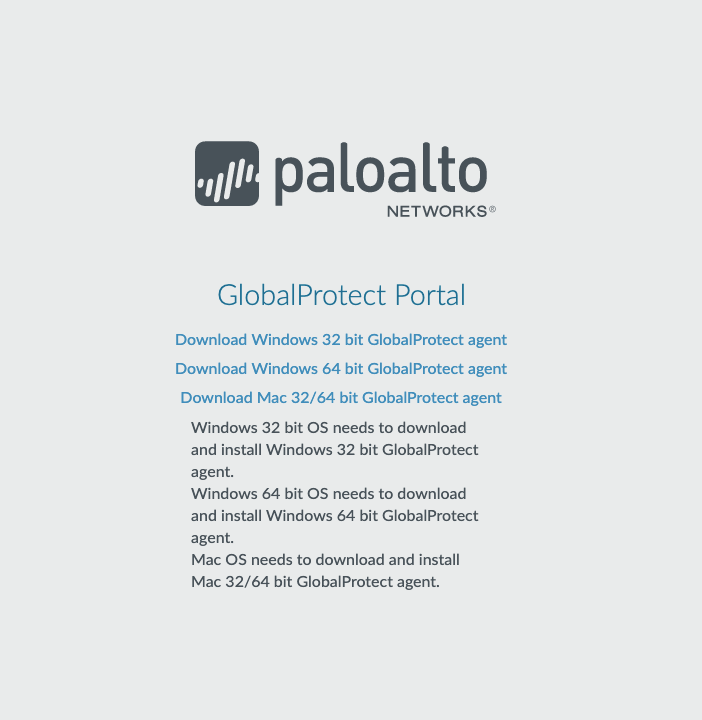
GlobalProtect VPN is a next-generation application that ensures the secure transmission of your data and protects your sensitive information. Whether you are using a Windows PC or any other device, GlobalProtect VPN is designed to provide you with the highest level of data security.
With GlobalProtect VPN, you can rest assured that your passwords, personal data, and other confidential information are protected from unauthorized access. By encrypting your internet connection, GlobalProtect VPN creates a secure tunnel that shields your data from potential threats.
GlobalProtect VPN offers a always-on feature that automatically connects to the designated gateways, ensuring that your connection is secure at all times. This way, you can browse the internet, access company resources, and use applications without worrying about the security of your data.
With GlobalProtect VPN, you can connect to global gateways located across the world. Whether you’re traveling or working remotely, you can choose a gateway that provides the best performance and security for your needs. GlobalProtect VPN utilizes IPsec and Pan-OS technologies, guaranteeing a reliable and secure connection.
GlobalProtect VPN supports users running Windows 7, 8, 8.1, and 10 operating systems. It offers a user-friendly interface with easy-to-follow instructions for installation and configuration. Once installed, GlobalProtect VPN ensures the automatic updating of security settings, keeping your data safe at all times.
In conclusion, GlobalProtect VPN is your key to enhanced data security. With its advanced features, user-friendly interface, and automatic security updates, GlobalProtect VPN provides a secure and reliable connection to protect your valuable data. Start using GlobalProtect VPN today and experience the peace of mind that comes with heightened data security.
Enjoy Seamless Connectivity with GlobalProtect for Windows
GlobalProtect for Windows provides a secure and reliable VPN (Virtual Private Network) solution for users who need to connect to corporate resources from remote locations. With GlobalProtect, you can easily access your network resources and applications, ensuring seamless connectivity wherever you are.
GlobalProtect uses next-generation security features, such as IPsec and SSL, to safeguard your data and ensure its confidentiality and integrity. By encrypting your data, GlobalProtect protects it from unauthorized access and ensures that your sensitive information remains secure.
With GlobalProtect, connecting to your corporate network is automatic and hassle-free. Once installed on your Windows device, GlobalProtect establishes a secure connection to the nearest gateway, connecting you to your corporate resources and applications without any manual configuration required.
GlobalProtect also provides always-on VPN connectivity, ensuring that you are constantly protected even when you switch networks or move between different locations. This feature is particularly useful for users who frequently travel or work remotely and need uninterrupted access to their corporate resources.
GlobalProtect supports multiple gateways, allowing you to connect to different corporate networks and access resources located in various geographical locations. This flexibility enables you to easily switch between different gateways based on your requirements, ensuring optimal performance and connectivity at all times.
In conclusion, GlobalProtect for Windows is an essential tool for users who need secure and reliable access to their corporate resources. With its automatic connection, next-generation security features, and support for multiple gateways, GlobalProtect ensures seamless connectivity, data protection, and peace of mind for users around the globe. Install GlobalProtect today and experience the benefits of a secure and reliable VPN solution.
Easy and Secure VPN Setup with GlobalProtect
Enhancing Security with GlobalProtect
With the increasing need for secure data transmission, having a reliable VPN solution is essential. GlobalProtect is a next-generation VPN gateway that ensures the utmost security for your network. Whether you are a home user or a business with multiple locations, GlobalProtect offers a seamless and secure connection.
Automated VPN Setup
Setting up a VPN can be a daunting task, but with GlobalProtect, the process is simplified and automated. By using GlobalProtect, you can quickly establish a secure VPN connection on your Windows device. No need to manually configure settings or worry about complicated protocols – GlobalProtect takes care of it all.
Seamless Integration with Your Applications
GlobalProtect seamlessly integrates with your existing applications, allowing you to access your resources securely from anywhere in the world. Whether you need to connect to your company’s intranet, access sensitive files, or collaborate with colleagues, GlobalProtect ensures a secure connection that protects your data.
Always-On Protection
GlobalProtect provides always-on protection for your Windows device. Once connected, GlobalProtect™ continuously monitors and encrypts your data, ensuring no unauthorized access. This constant protection creates a secure environment for your online activities, giving you peace of mind and keeping your sensitive information safe.
Easy Configuration for Multiple Gateways
GlobalProtect supports multiple gateways, allowing you to connect to different networks effortlessly. Whether you need to access resources in different regions or connect to various networks, GlobalProtect has you covered. With its easy-to-use interface, you can configure and switch between gateways with just a few clicks.
Multi-Factor Authentication and IPsec Support
For enhanced security, GlobalProtect supports multi-factor authentication, ensuring only authorized users can access your network. Additionally, GlobalProtect also supports IPsec, a robust protocol for secure communication over the internet. These features provide an extra layer of protection for your data and network.
Conclusion
GlobalProtect is the gateway to a secure and efficient VPN solution for Windows devices. Its easy setup, seamless integration, and robust security features make it an ideal choice for individuals and businesses alike. With GlobalProtect, you can confidently connect to your network from anywhere in the globe, knowing that your data is secure.
GlobalProtect VPN: Protect Your Privacy Online
The GlobalProtect™ VPN is a next-generation security solution for Windows users that helps protect your privacy online. By using the GlobalProtect VPN, you can securely connect to the internet and access various web applications while keeping your personal data safe from prying eyes.
With GlobalProtect, you can set up an automatic and always-on VPN connection, which means that every time you connect to the internet, your device will automatically connect to the designated VPN gateway. This ensures that all your internet traffic is encrypted and routed through a secure connection, providing an additional layer of protection.
GlobalProtect offers multiple gateways that you can choose from, depending on your location and the specific requirements of your network. These gateways use IPsec, a secure communication protocol, to establish a secure connection between your device and the VPN gateway. This way, your data is shielded from potential threats and your online activities remain private.
The GlobalProtect VPN is compatible with PAN-OS 4+ and is designed to provide advanced security features to users around the globe. Whether you are accessing sensitive information or simply browsing the web, the GlobalProtect VPN ensures that your online presence is protected, giving you peace of mind while using various web applications.
In summary, the GlobalProtect VPN is an essential tool for anyone concerned about their online privacy and security. By using this next-generation VPN solution for Windows, you can safeguard your personal data, protect your online activities, and maintain your privacy while using the internet.
One-Click GlobalProtect Installation for Windows
GlobalProtect for Windows offers an automated and secure way for users to connect to their organization’s network from anywhere in the world. Using the next-generation GlobalProtect™ app, users can easily establish a secure connection to their corporate resources and applications.
With GlobalProtect, you can ensure the confidentiality and integrity of your data as it travels over the internet. The app utilizes industry-standard IPsec encryption to protect your sensitive information from unauthorized access.
To install GlobalProtect, simply click on the provided link and follow the step-by-step instructions. The installation process is automatic and streamlined for ease of use. Once installed, the always-on feature allows GlobalProtect to automatically connect to the nearest gateway, providing a seamless experience for your users no matter where they are located on the globe.
GlobalProtect integrates with your organization’s PAN-OS gateways, ensuring compatibility and a secure connection. With GlobalProtect, you can take advantage of advanced security features such as authentication, device verification, and enforcement of security policies.
Key Features of GlobalProtect for Windows:
- Automated installation process
- Always-on connection
- Secure access to corporate resources
- Encryption of data over the internet
- Compatibility with PAN-OS gateways
With GlobalProtect for Windows, you can provide your users with a hassle-free VPN solution that enhances the security of their connections and ensures the protection of your organization’s data.
GlobalProtect: Safeguard Your Sensitive Data
The GlobalProtect VPN solution for Windows provides a secure and reliable way to protect your sensitive data while accessing the internet. With its always-on feature, you can ensure continuous protection for your data, even when you are not actively connected.
By connecting to GlobalProtect gateways, which are next-generation firewall devices, users can establish a secure connection to the internet from anywhere in the world. These gateways use IPsec and the PAN-OS operating system, ensuring high-level security for your data.
GlobalProtect is designed to be user-friendly, allowing users to easily connect to the VPN by using their Windows login password. It supports Windows 7, 8, 8.1, and 10, making it compatible with a wide range of devices.
With GlobalProtect, your data is protected from unauthorized access, ensuring the confidentiality and integrity of your information. The VPN application automatically connects to the nearest available gateway, providing fast and reliable access to the internet while maintaining a high level of security.
Whether you are a business or an individual user, GlobalProtect is an essential tool for enhancing your online security. With its advanced features and wide range of gateways located throughout the globe, you can trust GlobalProtect to safeguard your sensitive data and ensure a secure browsing experience.
Step-by-Step GlobalProtect VPN Installation Tutorial
Introduction
The GlobalProtect VPN is a secure remote access solution that provides users with secure access to their organization’s network resources. This tutorial will guide you through the step-by-step process of installing and configuring the GlobalProtect VPN for Windows.
Step 1: Download and Install GlobalProtect
To install GlobalProtect, you first need to download the GlobalProtect app from your organization’s software distribution site. Once the download is complete, run the installer and follow the on-screen instructions to install GlobalProtect on your Windows computer.
Step 2: Configure GlobalProtect
After installing the GlobalProtect app, you need to configure it with the appropriate settings. Open the GlobalProtect app and enter your organization’s VPN gateway address. This address is provided by your IT department. You can also choose to enable features such as always-on VPN and IPsec. Enter your username and password to authenticate with the VPN gateway.
Step 3: Connect to the VPN Gateway
Once you have configured GlobalProtect, you can connect to the VPN gateway by clicking the “Connect” button. GlobalProtect will establish a secure connection to the VPN gateway and assign you a virtual IP address. This IP address allows you to access your organization’s network resources securely.
Step 4: Access Your Organization’s Resources
After connecting to the VPN gateway, you can access your organization’s resources, such as files, applications, and data, as if you were physically present in the office. The GlobalProtect VPN provides a secure tunnel for transmitting your data, ensuring the confidentiality and integrity of your information.
Conclusion
The GlobalProtect VPN is a powerful tool for ensuring the security of your data when connecting to your organization’s network remotely. By following this step-by-step installation tutorial, you can easily set up and use the GlobalProtect VPN on your Windows computer. Enjoy the benefits of secure remote access to your organization’s resources using the GlobalProtect VPN.
GlobalProtect VPN: Secure Your Internet Connection
GlobalProtect VPN is a powerful and secure way to protect your internet connection. With its always-on feature, you can ensure that your connection is secure at all times. Whether you are using it for personal or business purposes, GlobalProtect VPN ensures that your data remains encrypted and safe from prying eyes.
GlobalProtect VPN works seamlessly with popular applications and operating systems such as Windows, making it easy for users to set up and use. It is compatible with PAN-OS 4+ and provides advanced security features to protect your sensitive data.
GlobalProtect VPN utilizes IPsec to establish a secure connection between your device and the gateway. By encrypting your data and traffic, it prevents unauthorized access and ensures that your information remains protected. Whether you are accessing the internet from home, the office, or on the go, GlobalProtect VPN provides a secure tunnel to secure your internet connection.
With GlobalProtect VPN, you can benefit from the next-generation security provided by GlobalProtect™ gateways. These gateways offer advanced security features to protect your data and ensure the confidentiality and integrity of your communications.
GlobalProtect VPN also offers automatic VPN provisioning, which simplifies the setup process for users. By entering their username and password, users can connect to their designated gateway and enjoy the benefits of secure browsing. This automation reduces the risk of human error and ensures that the VPN is always active and protecting your internet connection.
Key Features:
- Advanced security features provided by GlobalProtect gateways
- Automatic VPN provisioning for easy setup
- Always-on feature to ensure continuous protection
- Encrypts data and traffic using IPsec
- Compatible with Windows and popular applications
With GlobalProtect VPN, you can browse the internet with peace of mind, knowing that your connection is secure. Protect your data and privacy from anywhere in the world with GlobalProtect VPN.
Вопрос-ответ:
What are gateways in the context of GlobalProtect?
In GlobalProtect, gateways are the access points through which users connect to the corporate network via VPN. They serve as intermediaries between the user’s device and the internal resources of the network. Gateways ensure secure and encrypted communication between the user and the network, providing access to the company’s applications, data, and services.
What is GlobalProtect™ 4+?
GlobalProtect™ 4+ is the latest version of the GlobalProtect VPN client. It provides enhanced security features, improved performance, and a more user-friendly interface compared to previous versions. GlobalProtect™ 4+ offers seamless integration with various operating systems, including Windows, macOS, iOS, and Android, allowing users to securely access corporate resources from anywhere in the world.
Видео:
How To Install Global Protect VPN On Ubuntu | #linux #vpn #tech
How To Install Global Protect VPN On Ubuntu | #linux #vpn #tech by Linus Point 1 month ago 4 minutes, 32 seconds 171 views
Global-Protect-Installation-For-VPN-Access-PC/LAPTOP
Global-Protect-Installation-For-VPN-Access-PC/LAPTOP by Waldon #TechTips 1 year ago 11 minutes, 20 seconds 3,314 views
Tutorial: GlobalProtect Setup
Tutorial: GlobalProtect Setup by Palo Alto Networks LIVEcommunity 6 years ago 12 minutes, 24 seconds 197,738 views
