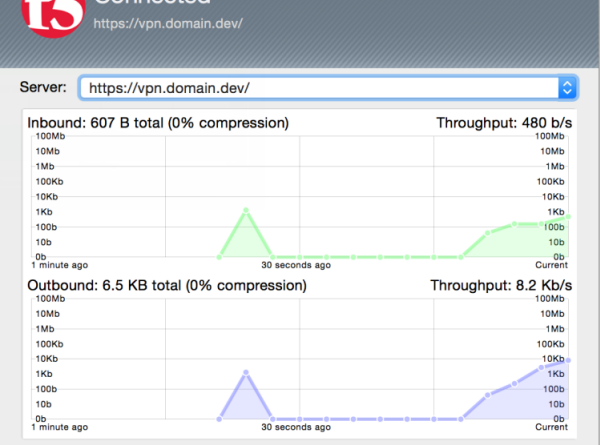
F5Access 4+: The Complete F5 VPN Client Guide
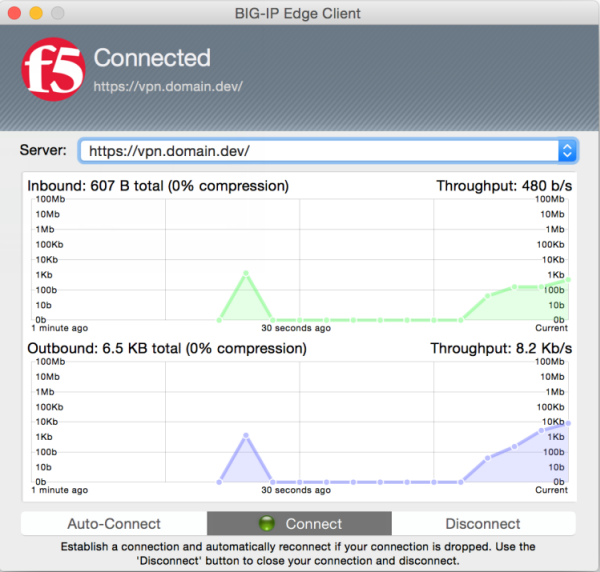
In today’s rapidly evolving digital landscape, secure remote access to corporate networks has become essential. With the increasing reliance on cloud computing and the rise of remote work, organizations need a robust VPN solution to ensure their employees can access company resources securely from any location. F5Access 4+ is the latest version of F5’s VPN client that provides comprehensive support for secure remote access.
As businesses continue to move towards a hybrid environment, where critical applications and data are housed both on-premises and in the cloud, the F5Access 4+ VPN client offers advanced features to meet the needs of modern networks. It seamlessly integrates with F5’s industry-leading BIG-IP platform, leveraging the power of this edge network device to provide secure connectivity.
One of the standout features of F5Access 4+ is its support for various authentication methods, including multi-factor authentication. This ensures that only authorized users can access the corporate network, adding an extra layer of security. Additionally, the client supports the use of cookies for easy and seamless authentication, providing a convenient user experience.
Furthermore, F5Access 4+ offers enhanced security protocols, such as SSL encryption, to protect sensitive data transmitted over the VPN. It also boasts advanced network optimization capabilities, ensuring optimal performance even in bandwidth-constrained environments. With its user-friendly interface and intuitive controls, the client empowers users to securely connect to corporate networks with ease.
Whether you are a small business looking to secure your remote workforce or a large enterprise managing a complex network infrastructure, F5Access 4+ provides the comprehensive VPN client solution you need. With its advanced features, support for various authentication methods, and strong security protocols, F5Access 4+ is the go-to choice for organizations seeking to establish secure connections and protect their critical resources.
Understanding F5Access 4+
F5Access 4+ is a comprehensive VPN client that offers advanced features and capabilities for secure remote access to networks. It provides a seamless and secure connection to your organization’s network, allowing you to access resources and applications from anywhere.
With F5Access 4+, you can connect to your organization’s network from the edge, ensuring that your data is always protected. The VPN client supports various authentication methods, including password, certificate, and multi-factor authentication, to ensure that only authorized users can access the network.
One of the key features of F5Access 4+ is its support for big-ip network environments. This allows organizations with big-ip infrastructure to easily integrate the VPN client into their existing network setup, providing a unified and secure remote access solution.
In addition to secure remote access, F5Access 4+ also offers other features that enhance your browsing experience. It provides support for advanced features such as ad-blocking and cookie management, allowing you to browse the internet faster and more securely.
F5Access 4+ also offers advanced network capabilities, such as split-tunneling, which allows you to choose which applications and services go through the VPN and which ones bypass it. This gives you more control over your network connections and ensures better performance.
In summary, F5Access 4+ is a powerful VPN client that provides secure remote access to networks. It offers advanced authentication methods, support for big-ip infrastructure, and a range of features that enhance your browsing experience. Whether you need secure access to your organization’s network or want to browse the internet more securely, F5Access 4+ has got you covered.
Features of F5 VPN Client
The F5 VPN Client, also known as F5Access 4+, offers a wide range of features that enhance your VPN experience.
- Secure VPN Connectivity: The F5 VPN Client provides secure connectivity to your corporate network over the internet. It uses industry-standard authentication and encryption protocols to keep your data safe and secure.
- F5 Edge Client Integration: The F5 VPN Client seamlessly integrates with the F5 Edge Client, allowing you to access your applications and resources from anywhere, at any time. This integration provides a unified user experience and simplifies the administration of your VPN network.
- Support for Big-IP Networks: The F5 VPN Client is specifically designed to work with Big-IP networks. It supports all the advanced features and capabilities of the Big-IP platform, allowing you to take full advantage of its powerful network management functionalities.
- Advertising and Cookies Control: The F5 VPN Client gives you control over advertising and cookies. It allows you to block unwanted ads and tracking cookies, ensuring a cleaner browsing experience and protecting your privacy online.
- Seamless Authentication: The F5 VPN Client provides seamless authentication, allowing you to authenticate once and access multiple applications and resources without having to re-enter your credentials. This saves time and improves productivity.
- Flexible Network Access: The F5 VPN Client offers flexible network access options, including split tunneling and full tunneling. Split tunneling allows you to route only the traffic you specify through the VPN, while full tunneling routes all your internet traffic through the VPN for maximum security.
- Support for Multiple VPN Networks: The F5 VPN Client supports multiple VPN networks, allowing you to connect to different corporate networks simultaneously. This makes it easy to work with multiple clients or access resources from different organizations.
- And More: In addition to these features, the F5 VPN Client also provides advanced network diagnostics, automatic VPN reconnection, and support for various authentication methods, ensuring a smooth and hassle-free VPN experience.
The F5 VPN Client is a comprehensive solution that offers all the features you need to securely and efficiently access your corporate network from anywhere in the world.
Installation Steps for F5 VPN Client
The F5 VPN client is a powerful tool that allows users to securely connect to their organization’s network. This client is specifically designed to work with the Big-IP network platforms, providing seamless access to protected enterprise resources. In this guide, we will walk you through the installation steps for the F5 VPN client.
Step 1: Download the F5 VPN Client
Before you can install the F5 VPN client, you need to download the installation package from the official F5 Networks website. This can usually be found in the “Downloads” or “Support” section of the website. Make sure to select the appropriate version of the client for your operating system.
Step 2: Install the F5 VPN Client
Once you have downloaded the F5 VPN client, locate the installation package and double-click on it to begin the installation process. Follow the on-screen instructions to complete the installation. Depending on your system settings, you may need to provide administrative credentials to proceed.
Step 3: Configure VPN Settings
After the F5 VPN client is installed, you will need to configure the VPN settings to connect to your organization’s network. Launch the VPN client and navigate to the settings section. Here, you will need to enter the server address, authentication credentials, and any other required information provided by your network administrator.
Step 4: Establish a VPN Connection
Once the VPN settings are configured, you can now establish a secure VPN connection. Simply click on the “Connect” button in the VPN client and wait for the connection to be established. The F5 VPN client provides support for various authentication methods such as certificates, tokens, and cookies, ensuring a secure and reliable connection.
In conclusion, the F5 VPN client is a valuable tool that offers secure access to enterprise networks. By following the installation steps outlined in this guide, you can quickly and easily set up the client on your device and establish a VPN connection to your organization’s edge. Experience the benefits of secure and encrypted communication while accessing protected resources for increased productivity and peace of mind.
Setting Up F5 VPN Client on Windows
Requirements
In order to set up the F5 VPN client on your Windows device, you will need the following:
- A Windows operating system (Windows 7, 8, or 10)
- An active internet connection
- Access to the F5 network
- Admin privileges on your Windows device
Installation Process
Follow these steps to install and set up the F5 VPN client on your Windows device:
- Visit the F5 website and download the appropriate F5 client for your Windows operating system.
- Run the installer and follow the on-screen instructions to complete the installation process.
- Once the F5 client is installed, launch the application.
- Click on the “Settings” option to configure your VPN connection.
- In the settings menu, enter the F5 network information provided by your network administrator.
- Choose the desired authentication method for your VPN connection, such as username and password or certificate-based authentication.
- Configure any additional settings, such as enabling cookies or using a VPN split tunnel.
- Click “Connect” to establish a VPN connection to the F5 network.
Benefits of Using F5 VPN Client
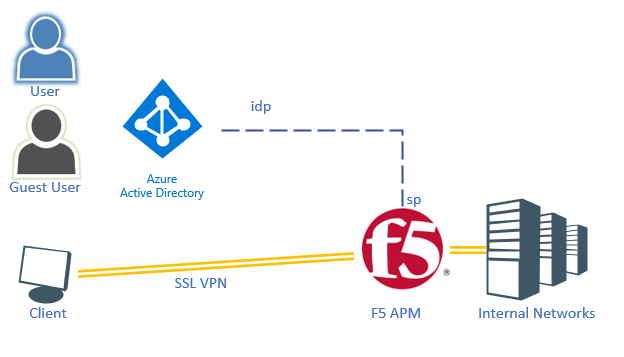
The F5 VPN client provides several benefits to users:
- The ability to securely access F5 networks from remote locations.
- Support for various authentication methods, ensuring secure access to the network.
- Integration with F5’s Big-IP edge gateway for enhanced security and performance.
- Easy-to-use interface for quick and convenient VPN connection setup.
- Compatibility with Windows operating systems for broad client support.
- Advanced features, such as cookie support and more, for enhanced network access and functionality.
By following the steps outlined above, you can easily set up and configure the F5 VPN client on your Windows device to securely access F5 networks.
Setting Up F5 VPN Client on Mac
The F5 VPN client is a powerful tool that allows Mac users to securely connect to their company’s network from any location. By setting up the F5 VPN client on your Mac, you can access internal resources, such as documents, applications, and network resources, without compromising security.
Step 1: Download and Install the F5 VPN Client
To begin, visit the official F5 Networks website and download the latest version of the F5 VPN client for Mac. Once the download is complete, double-click on the installer file and follow the on-screen instructions to install the client on your Mac.
Step 2: Configure F5 VPN Client Settings
After installing the F5 VPN client, open the application and navigate to the settings menu. Here, you will need to enter the necessary information to establish a connection to your company’s network. This may include the IP address or hostname of the F5 Big-IP server, as well as any authentication credentials provided by your network administrator.
Step 3: Establish a Connection
Once you have entered the required information, you can click on the “Connect” button to establish a secure connection to your company’s network. The F5 VPN client will handle the authentication process and ensure that your connection is secure.
Note: It is recommended to enable cookies and enable/disable advertising networks during the setup process to optimize performance and security.
By setting up the F5 VPN client on your Mac, you can enjoy secure access to your company’s network from anywhere in the world. Whether you’re working remotely or traveling for business, the F5 VPN client provides a reliable and convenient way to stay connected.
Troubleshooting F5 VPN Client Issues
If you are experiencing issues with your F5 VPN client, there are several troubleshooting steps you can take to resolve them.
1. Check F5 Support
If you are encountering problems with your F5 VPN client, it is always a good idea to check for support resources from F5 Networks. They provide comprehensive documentation, including FAQs, troubleshooting guides, and user forums where you can find answers to common issues.
2. Clear Cookies and Cache
In some cases, clearing your browser’s cookies and cache can help resolve F5 VPN client issues. This ensures that any stored information that may be causing conflicts or errors is removed. To do this, go to your browser’s settings, find the option to clear cookies and cache, and follow the prompts.
3. Verify Big-IP Edge Client Configuration
Double-check the configuration settings of your Big-IP Edge Client. Ensure that the authentication settings, including username and password, are correct. Also, make sure that the VPN network settings are properly configured to connect to the desired network.
4. Check Network Connectivity
If you are experiencing issues with your F5 VPN client, it is important to verify your network connectivity. Ensure that you have a stable internet connection and that your network settings are properly configured. Additionally, check if there are any firewall or security software that might be blocking the VPN connection.
5. Update F5 VPN Client
Make sure you are using the latest version of the F5 VPN client. Software updates often include bug fixes and performance improvements that can help resolve issues. Check the F5 Networks website for any available updates and install them accordingly.
Conclusion
While the F5 VPN client provides a secure and reliable way to connect to VPN networks, issues may still arise. By following these troubleshooting steps, you can address common problems and ensure a smooth VPN experience.
Remember to seek support from F5 Networks if you need further assistance, as they have a wealth of resources available to help you resolve any issues you may encounter.
Best Practices for Using F5 VPN Client
When using the F5 VPN Client, there are several best practices to ensure a secure and efficient connection to your network.
1. Authentication
Ensure that strong authentication methods are implemented for VPN access. This could include multi-factor authentication or certificate-based authentication, which provides an extra layer of security for your connection.
2. Edge Network Support
F5 VPN Client provides support for accessing your network from edge networks, such as public Wi-Fi or cellular data networks. However, it is important to be cautious when connecting to these types of networks, as they may not have the same level of security as your private network.
3. Big-IP Integration
If you are using F5’s Big-IP platform, consider integrating it with the F5 VPN Client. This integration allows for advanced access policies and provides a seamless user experience when accessing resources on the network.
4. Cookie Management
Be aware of the cookie management settings of your F5 VPN Client. By default, the client may store cookies from websites you visit during your VPN session. To enhance privacy and security, consider disabling or managing these cookies.
5. Network Performance
Monitor the network performance when using the F5 VPN Client. If you experience slow speeds or connection issues, check for any potential network congestion or bandwidth limitations. Optimizing your network settings may help improve the overall VPN experience.
6. Logging and Monitoring
Enable logging and monitoring features of the F5 VPN Client to track any suspicious or unusual activity. Regularly review the logs to identify any potential security threats or unauthorized access attempts.
7. Regular Updates
Keep the F5 VPN Client and its associated components up to date with the latest patches and updates. Regularly check for any available updates and apply them to ensure that you have the most secure and reliable version of the client.
By following these best practices, you can maximize the security and performance of your F5 VPN Client and ensure a seamless and protected connection to your network.
Securing Your Connection with F5 VPN Client
The F5 VPN Client is a powerful tool that allows you to securely connect to your network from anywhere in the world. With the increasing number of cyber threats, it is crucial to protect your data and ensure the privacy of your communication. F5 VPN Client provides a secure connection by encrypting your data, making it inaccessible to unauthorized users.
One of the main features of the F5 VPN Client is the authentication process. When you connect to a VPN, the client verifies your identity and ensures that only authorized users can access the network. This provides an additional layer of security and prevents unauthorized access to sensitive information.
In addition to authentication, the F5 VPN Client also offers advertising and cookies blocking. These features protect your privacy by preventing websites and online advertisers from tracking your activities and collecting your personal information. By blocking advertisements and cookies, the F5 VPN Client enhances your browsing experience and reduces the risk of data leakage.
Another important aspect of securing your connection with the F5 VPN Client is its compatibility with the F5 BIG-IP ecosystem. The F5 BIG-IP provides advanced network security features, such as firewall protection and intrusion prevention. By integrating the F5 VPN Client with the BIG-IP, you can ensure the highest level of security for your network and prevent unauthorized access.
Moreover, the F5 VPN Client offers support for multiple networks, allowing you to connect securely to different networks simultaneously. This flexibility is especially useful for organizations that have multiple branch offices or remote workers. With the F5 VPN Client, you can securely access your company’s resources from anywhere in the world, increasing productivity and efficiency.
In conclusion, securing your connection with the F5 VPN Client is essential in the current digital landscape. Whether you are working remotely or accessing sensitive information, the F5 VPN Client provides the necessary tools to protect your data and ensure a secure connection. With its authentication, advertising and cookies blocking, compatibility with BIG-IP, and support for multiple networks, the F5 VPN Client offers a comprehensive solution for securing your network connections.
Configuring Network Access with F5 VPN Client
Overview
The F5 VPN Client is a powerful tool that allows users to securely access their organization’s network from remote locations. With F5’s big-ip technology, network administrators can easily configure and manage access policies to ensure secure connections for their users.
Support for Multiple Networks
One of the key features of the F5 VPN Client is its ability to support multiple networks. This means that users can connect to different network resources, such as corporate networks or cloud services, using a single VPN client. This simplifies the process of accessing different resources and enhances productivity for remote workers.
Authentication and Security
The F5 VPN Client provides strong authentication mechanisms to ensure that only authorized users can access the network. It supports various authentication methods, including usernames and passwords, multi-factor authentication, and integration with third-party identity providers. This ensures that network access is secure and only granted to trusted individuals.
Edge Security and Cookies
Edge security is another important aspect of the F5 VPN Client. It supports features like cookie encryption and secure session management to protect user data from unauthorized access. By encrypting cookies, the client ensures that user information is not exposed to potential threats. Additionally, secure session management enables users to securely access resources without risking data compromise.
Advertising and More
The F5 VPN Client also offers additional features that enhance the user experience. It supports advertising networks to optimize network resources and provide a better overall connection. Furthermore, it provides advanced troubleshooting capabilities, allowing network administrators to quickly diagnose and resolve any connection issues.
Conclusion
Configuring network access with the F5 VPN Client offers a secure and flexible solution for remote workers. With support for multiple networks, strong authentication mechanisms, edge security features, and additional enhancements, the F5 VPN Client ensures a smooth and productive remote working experience.
Managing Multiple Connections with F5 VPN Client
The F5 VPN Client provides a secure and reliable way to connect to the big-ip network. With the increasing need for remote access to corporate resources, managing multiple connections has become essential for many organizations.
One of the key features of the F5 VPN Client is the ability to manage multiple connections simultaneously. This allows users to connect to different networks or edge devices using a single client application. Whether you need to access resources from multiple locations or connect to different environments for testing or troubleshooting purposes, the F5 VPN Client offers a seamless experience.
When managing multiple connections, the F5 VPN Client uses cookies for authentication and identification purposes. These cookies are stored on the client device and used to ensure seamless transition between different connections. This means that users don’t have to re-enter their credentials each time they switch between networks or edge devices.
In addition to providing support for multiple connections, the F5 VPN Client also offers advanced features for managing these connections. Users can easily view and switch between active connections, monitor their connection status, and even prioritize certain connections over others.
Furthermore, the F5 VPN Client allows users to configure different settings and preferences for each connection. This includes options such as automatic connection upon launch, saving credentials, and customizing connection behavior. These features provide flexibility and convenience for users who need to manage multiple connections on a regular basis.
In conclusion, the F5 VPN Client is a powerful tool for managing multiple connections. It provides secure access to the big-ip network, supports authentication through cookies, and offers advanced features for managing and configuring multiple connections. Whether you are a remote worker, a network administrator, or an IT professional, the F5 VPN Client is a reliable solution for easily managing and switching between multiple connections.
Optimizing Performance with F5 VPN Client
The F5 VPN Client provides enhanced network performance by optimizing connectivity between the client and the edge networks. Using advanced protocols and algorithms, the client ensures that data is efficiently transferred across the network, resulting in faster response times and improved overall performance.
One of the key features of the F5 VPN Client is its support for load balancing and traffic optimization. This allows the client to distribute network traffic across multiple servers, ensuring that no single server becomes overwhelmed and that network resources are used efficiently. By balancing the load, the client can handle large amounts of traffic and provide a seamless user experience even during peak usage times.
In addition, the F5 VPN Client supports authentication and authorization mechanisms, such as cookies and client certificates. These mechanisms ensure that only authorized users can access the network, providing an extra layer of security. By validating user credentials and verifying their identity, the client protects against unauthorized access and helps maintain network integrity.
The F5 VPN Client is designed to integrate seamlessly with F5’s Big-IP platform, providing a comprehensive solution for secure remote access. By combining the client with Big-IP’s advanced features, such as SSL acceleration and content filtering, organizations can further optimize network performance and enhance overall security.
Furthermore, the F5 VPN Client offers advertising support, allowing organizations to display targeted advertisements to users when they connect to the network. This feature can be customized to provide relevant and useful information to users, enhancing their experience and promoting brand awareness.
Overall, the F5 VPN Client provides a range of features and optimizations to improve network performance. Whether it’s load balancing, authentication, support for Big-IP, or advertising capabilities, the client ensures that users can connect securely and efficiently to their desired network resources.
Updating F5 VPN Client to the Latest Version
If you are using F5 VPN Client to connect to your company’s networks and utilize the features of Big-IP, it is important to keep your client up to date with the latest version. Updating the client ensures that you have access to the latest security enhancements, bug fixes, and performance improvements.
The F5 VPN Client, also known as F5 Access, provides a secure and reliable way to connect to your company’s network from anywhere. It uses VPN technology to create a secure tunnel between your device and the company’s network, allowing you to access resources and services as if you were physically on-site.
When updating the F5 VPN Client, it is recommended to first check the F5 website for the latest version available. The website provides information on the new features and improvements in each release. It is also important to check the release notes for any known issues or compatibility concerns.
Updating the F5 VPN client is usually a straightforward process. The client typically detects when a new version is available and prompts you to download and install it. You may need administrative rights on your device to install the update. During the update process, the client may need to restart and you might be required to re-authenticate to regain access to the network.
Before updating, it is recommended to back up any configuration settings and data stored within the F5 VPN Client. This ensures that you can easily restore your settings after the update. Additionally, clearing cookies and cache in your web browser can help resolve any issues that may arise after the update.
In conclusion, keeping your F5 VPN Client up to date is essential for ensuring the security and reliability of your remote network connections. Regular updates provide access to new features, improved performance, and enhanced security. By following the recommended update process and taking necessary precautions, you can seamlessly update your F5 VPN Client and continue to enjoy the benefits it provides.
Comparing F5 VPN Client with Other VPN Clients
1. Network Support:
F5 VPN Client distinguishes itself by offering robust network support. Its integration with the F5 Big-IP network ensures seamless connectivity and enhanced security for users accessing their organization’s network remotely.
2. Edge Security:
The F5 VPN Client provides advanced edge security features, protecting sensitive data from unauthorized access. Its SSL-encrypted tunnel ensures secure communication between the client and the network, safeguarding against potential threats.
3. Cookie Handling:
Cookie handling is a crucial aspect of VPN clients, as it affects user experience and security. F5 VPN Client efficiently manages cookies, ensuring smooth authentication and secure session management for users accessing web applications and services through the VPN.
4. Advertising Blocker:
F5 VPN Client incorporates an advertising blocker that enhances user experience. This feature eliminates disruptive ads, improving browsing speed and reducing distractions for users accessing online content through the VPN.
5. More Control and Customization Options:
F5 VPN Client offers users more control and customization options compared to other VPN clients. It allows users to configure settings according to their preferences and requirements, providing a tailored experience for each individual.
Conclusion:
The F5 VPN Client stands out in terms of network support, edge security, cookie handling, advertising blocking, and user control. Its integration with the F5 Big-IP network ensures seamless and secure access to organizational resources, making it a standout choice among VPN clients.
Integrating F5 VPN Client with F5 Load Balancers
The F5 VPN Client provides secure remote access to corporate applications and resources. It allows users to connect to the corporate network securely and access the internal resources from any location. To ensure high availability and scalability, F5 load balancers are commonly used in the network infrastructure. Integrating the F5 VPN Client with F5 load balancers can improve performance and provide a seamless user experience.
Authentication and Authorization
When integrating the F5 VPN Client with F5 load balancers, authentication and authorization play a crucial role. F5 load balancers support various authentication methods such as OAuth, SAML, NTLM, and more. This allows the F5 VPN Client to authenticate users and ensure that only authorized users can access the internal resources.
Session Persistence
Session persistence is essential for maintaining user connections when using F5 load balancers with the F5 VPN Client. F5 load balancers provide session persistence by using cookies. Each time a user connects to the VPN, a unique session cookie is generated and stored in the client’s browser. This cookie allows the load balancer to direct subsequent requests from the client to the same VPN server, ensuring uninterrupted access to the internal resources.
Load Balancing Algorithms
F5 load balancers use intelligent load balancing algorithms to distribute the VPN client connections across multiple VPN servers. These algorithms ensure optimal resource utilization and prevent overloading of any specific VPN server. Examples of load balancing algorithms supported by F5 load balancers include round-robin, least connections, and IP hash.
Enhanced Security
Integrating the F5 VPN Client with F5 load balancers also offers enhanced security capabilities. F5 load balancers can perform SSL offloading, decrypting the traffic from the VPN client and re-encrypting it before forwarding it to the internal resources. This ensures end-to-end encryption and allows the load balancer to inspect the traffic for any potential threats or malicious activities.
In conclusion, integrating the F5 VPN Client with F5 load balancers provides support for authentication, session persistence, load balancing, and enhanced security. This combination ensures a smooth and secure user experience when accessing corporate resources remotely. F5 load balancers play a critical role in optimizing VPN client connections and ensuring high availability and scalability in the network infrastructure.
F5 VPN Client for Mobile Devices
The F5 VPN Client provides secure remote access to private networks using the F5 BIG-IP® Edge Gateway. With this client, mobile devices can connect to corporate networks and access resources securely and easily.
Authentication
The F5 VPN Client supports various authentication methods, including username/password, two-factor authentication, and certificate-based authentication. This ensures that only authorized individuals can access the network and its resources.
F5 BIG-IP® Edge Gateway Support
The F5 VPN Client is specifically designed to work with the F5 BIG-IP® Edge Gateway. This integration provides advanced functionality and security features, such as traffic optimization, load balancing, and application security.
Secure Access to Networks
With the F5 VPN Client, mobile devices can securely access private networks, such as corporate intranets or cloud-based services. This ensures that sensitive data remains protected, even when accessed from remote locations.
More than just a VPN
The F5 VPN Client is more than just a VPN solution. It also provides additional features and functionalities that enhance the user experience, such as web acceleration, caching, and SSL offloading. This ensures that users can access resources quickly and efficiently.
Client-side Cookies
The F5 VPN Client supports client-side cookies, which allow the client device to store and manage session information. This improves performance and reduces the need for repeated authentication requests, making the user experience smoother and more seamless.
Вопрос-ответ:
What is F5Access 4+?
F5Access 4+ is a VPN client developed by F5 Networks. It provides secure access to corporate networks and applications for remote users.
How can I download and install F5Access 4+ on my device?
To download and install F5Access 4+ on your device, you can visit the official F5 Networks website and navigate to the Downloads or Support section. From there, you can find the client software for your specific operating system and follow the installation instructions provided.
What features does F5Access 4+ offer?
F5Access 4+ offers a range of features to enhance the remote user experience with the VPN client. Some of these features include seamless integration with multi-factor authentication systems, customizable client settings, automatic VPN reconnection, and split tunneling functionality.
Can F5Access 4+ be used on mobile devices?
Yes, F5Access 4+ is compatible with mobile devices running iOS or Android operating systems. You can download and install the client app from the respective app stores. Once installed, you can use F5Access 4+ to securely connect to your corporate network from your mobile device.
Видео:
F5 Access Guided Configuration for APM
F5 Access Guided Configuration for APM by Matthieu Dierick, F5 4 years ago 4 minutes, 23 seconds 5,490 views
Connect to the F5 VPN with BIG-IP Edge Client
Connect to the F5 VPN with BIG-IP Edge Client by F5, Inc. 3 years ago 9 minutes, 8 seconds 43,963 views
