6 Best Linux VPNs for Safe and Secure Browsing
When it comes to browsing the internet, privacy and security are top priorities. One way to achieve this is by using a VPN, or virtual private network. A VPN acts as a proxy, encrypting your connection and routing it through a server in another location, making it difficult for anyone to monitor your online activities.
For Linux users, finding a reliable and user-friendly VPN can be a challenge. However, there are several VPNs that not only work well with Linux systems, but also guarantee a safe and secure browsing experience.
One such VPN is PureVPN, which offers a great deal of features and is compatible with all major Linux distros. It has servers in over 140 countries worldwide, making it a popular choice among Linux users. Another option is TunnelBear, which offers an easy-to-use interface and provides strong encryption protocols like OpenVPN.
If you’re looking for a VPN that is specifically designed for Linux, consider Surfshark. It offers a sophisticated VPN client that is easy to install and maintain, making it a great choice for both beginners and more advanced users. Another popular VPN for Linux is OperaVPN, which is built into the Opera web browser and provides a secure and private browsing experience.
When choosing a VPN for Linux, it’s important to consider your specific needs. Some VPNs offer a free subscription, while others require a paid subscription. Some VPNs also offer additional features like ad-blocking and antivirus protection. Ultimately, the best VPN for Linux will depend on what you’re looking to achieve and how technically savvy you are.
So, whether you’re a Linux user who’s just starting out or a seasoned pro, finding the right VPN is essential for a safe and secure browsing experience. With the options mentioned above, you can rest assured that your online activities are protected and your personal information is kept private.
NordVPN

NordVPN encrypts all your internet traffic to provide complete online security. With a user-friendly GUI, it’s easy to use even for beginners. It works on any Linux distro, despite the differences in their protocols.
NordVPN is constantly updated to ensure the best security protocols are in place. It has been extensively tested and proven to safeguard your online activities. It hides your IP address and allows you to choose from multiple server locations, ensuring your anonymity and confidentiality.
NordVPN offers a wide range of options to meet your specific needs. Whether you want fast browsing or need extra security for sensitive data, NordVPN has you covered. It also has a strict no-logs policy, meaning it doesn’t store any information about your online activities.
One great feature of NordVPN is its ability to automatically connect to the closest and most trustworthy server. This ensures that you always have the best possible connection speed. Additionally, NordVPN offers an integrated kill switch to prevent any data leaks if the VPN connection suddenly drops.
Overall, NordVPN is a reliable and safe VPN service that provides quick and secure browsing. Whether you’re on a Linux device or using Windows, NordVPN has you covered. It’s a great choice for anyone looking for a trustworthy VPN provider that offers complete online security.
ExpressVPN
ExpressVPN is a top-rated VPN provider that offers a range of features for safe and secure browsing. With ExpressVPN, you can unblock websites and access content that is restricted in your region. Their vast network of servers across the globe ensures that you can easily connect to any server and enjoy a fast and reliable connection.
If you are a fan of streaming services like Netflix, Spotify, or Hulu, ExpressVPN is definitely worth considering. The VPN has a mechanism in place that allows you to bypass geo-restrictions and enjoy unrestricted access to these platforms. This means that you can stream your favorite shows, movies, or music without any interruptions.
In terms of security, ExpressVPN keeps your online activity safe and anonymous. Their advanced encryption systems and protocols ensure that your data is protected from hackers and cybercriminals. The VPN provider also has a strict no-logs policy, which means that they do not track or store any information about your browsing habits.
ExpressVPN also offers a user-friendly interface that is easy to navigate. Whether you are a beginner or an experienced user, you will find their software intuitive and straightforward. Additionally, ExpressVPN provides dedicated apps for all major operating systems, including Windows, Mac, Android, and iOS.
One of the standout features of ExpressVPN is its fast connection speed. The VPN provider offers unlimited bandwidth, allowing you to browse, stream, and download without any restrictions. Whether you are watching videos, playing online games, or downloading large files, ExpressVPN ensures that you get a smooth and fast connection.
If you are looking for a VPN that offers solid performance and trust, ExpressVPN is highly recommended. Their 24/7 customer support is always available to assist you and answer any questions you may have. Whether you need help with installation, troubleshooting, or general inquiries, ExpressVPN’s support agents are ready to help.
CyberGhost VPN
CyberGhost VPN is a well-known and reliable VPN service that offers a long list of features to ensure safe and secure browsing. It is a name that frequently comes up when looking for the best VPNs for Linux.
One of the standout features of CyberGhost VPN is its extensive network of servers spread across the world. With over 7,000 servers in 90 countries, you can easily find a server that suits your needs. The service automatically switches between servers, making sure your connection is constantly updated and optimized.
In terms of pricing, CyberGhost VPN offers different subscription plans, including a special 3-year plan that significantly reduces the monthly cost. This makes it a great option for long-term users who want a reliable VPN on their Linux platforms.
CyberGhost VPN also hides your IP address, making it harder for anyone to track your online activities. It also has a strict no-logging policy, so you can browse the internet with peace of mind knowing that your data is not being stored or monitored.
For those who frequently engage in gaming or torrenting, CyberGhost VPN offers specialized servers, like the ones optimized for gaming or P2P file sharing. These servers provide outstanding connectivity and ensure a smooth and fast gaming or downloading session.
Another notable feature is the integrated antivirus and malware protection. CyberGhost VPN includes an antivirus tool that scans and protects your device while you are browsing. This adds an extra layer of security and ensures that your online activities are completely safe and protected.
In conclusion, CyberGhost VPN is a top choice for Linux users who want a reliable and secure VPN service. With its extensive network of servers, zero-logging policy, and additional features like antivirus tools and optimized servers, you can expect a safe and hassle-free browsing experience well into 2023 and beyond.
Surfshark VPN
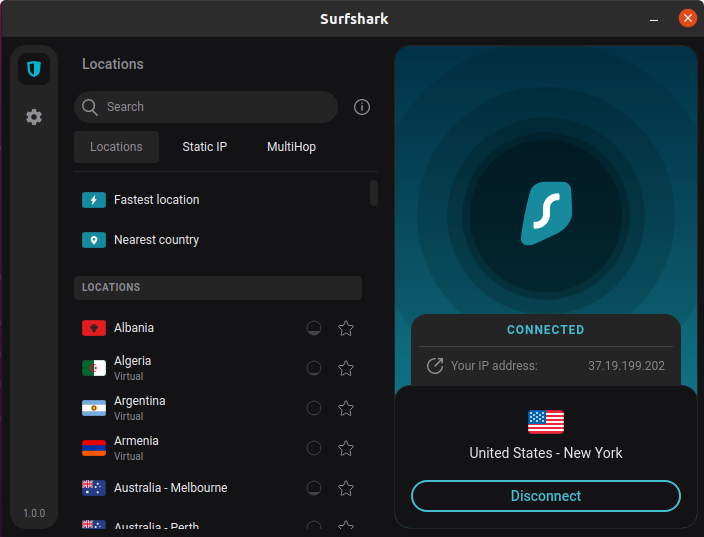
Surfshark VPN is a popular choice among Linux users for its reliable and secure browsing experience. With Surfshark, you can manually configure your VPN settings to establish a static IP address, ensuring uninterrupted gaming and streaming sessions. Though Surfshark does not have a dedicated Linux client, customers can easily set up Surfshark using the OpenVPN protocol.
Surfshark operates a vast network of servers worldwide, allowing users to connect to servers in different countries for better connectivity and access to region-restricted content. The VPN also administers its own DNS servers, providing an additional layer of security and privacy.
With Surfshark VPN, you can protect your online activities and data with military-grade encryption. Surfshark uses AES-256-GCM encryption, which keeps your internet traffic secure from prying eyes. Additionally, Surfshark offers a kill switch feature that automatically terminates the internet connection if the VPN connection drops, safeguarding your privacy and preventing any accidental data leaks.
Surfshark also offers an excellent feature called “MultiHop,” which allows you to connect to multiple VPN servers in different locations simultaneously, further enhancing your online anonymity. This feature is particularly useful if you want to browse the internet without leaving a trace or if you want to access content that is geographically restricted.
In terms of pricing, Surfshark offers affordable plans, including a 30-day money-back guarantee. They also have a 24/7 customer support channel in case you encounter any issues or need assistance with the VPN setup. While Surfshark may not offer a free version like some other VPNs, their pricing and features make it a solid choice for Linux users.
Private Internet Access
Private Internet Access, also known as PIA, is a popular VPN service that offers a complete and integrated solution for safe and secure browsing. It is a privacy-friendly VPN that provides a high level of security and anonymity to its users.
One of the most standout features of Private Internet Access is its wide range of supported protocols, including OpenVPN, L2TP/IPSec, and PPTP. This gives users the flexibility to choose the protocol that best suits their specific needs.
PIA also takes privacy and security very seriously, with a strict no-logs policy and strong encryption to ensure that your online activities are hidden and protected. It offers a kill switch feature that can automatically close down certain programs or even your entire internet connection in the event of a VPN connection drop, keeping your data safe from potential cyber attacks.
Another advantage of using Private Internet Access is its compatibility with various Linux distros, making it easy to set up and use on different distributions. Whether you’re using Ubuntu, Fedora, or any other distro, PIA has got you covered.
One potential downside of PIA is its somewhat inconsistent speeds. While it generally offers good speeds, some users have reported slower connections at times. However, the overall performance is still considered to be very reliable and suitable for most users’ needs.
Private Internet Access also has a user-friendly interface and comprehensive FAQs to assist users in setting up and configuring the VPN. Its customer support is highly responsive and ready to provide assistance whenever needed.
In conclusion, Private Internet Access is a reliable and secure VPN option for Linux users looking to enhance their privacy and security while browsing the internet. With its wide protocol support, easy setup options for different Linux distros, and strong privacy features, PIA offers a golden deal in terms of security and convenience.
ProtonVPN
ProtonVPN is a secure and reliable VPN service that offers a range of features to ensure your online privacy and security. With ProtonVPN, you can enjoy safe browsing while sharing your internet connection with others using their built-in sharing feature.
Simply install ProtonVPN on your device and activate the service to start browsing the internet securely. ProtonVPN acts as a proxy, encrypting your internet traffic and routing it through their servers, ensuring that your data is protected from any potential threats.
ProtonVPN offers a variety of subscription options to suit your needs, including monthly and yearly plans. You can choose the plan that best suits your requirements, whether you need the VPN for personal use or for business purposes.
In order to use ProtonVPN, you have the option to download their graphical user interface (GUI) utility or use it from the command line. The GUI utility is easy to use and provides a user-friendly interface for managing your VPN connections. Alternatively, using ProtonVPN from the command line can be a more efficient way to connect to the VPN, especially if you are familiar with command line tools.
ProtonVPN offers a large number of servers located in various countries around the world, allowing you to access geo-restricted content and bypass censorship. The service also provides unlimited bandwidth, ensuring that you can enjoy uninterrupted connectivity while using ProtonVPN.
One of the best features of ProtonVPN is its strong commitment to user privacy and anonymity. The company is based in Switzerland, which has strict privacy laws and is not part of any intelligence-sharing alliances. This means that ProtonVPN does not log your internet activity and your data is not shared with third parties.
ProtonVPN is an excellent VPN choice for users in China, where internet censorship is prevalent. The service has been proven to bypass the Great Firewall of China and provide reliable access to blocked websites and services.
In conclusion, ProtonVPN offers a comprehensive and reliable VPN service with a range of features to protect your online privacy and security. Whether you are using it for personal or business purposes, ProtonVPN provides a simple and easy-to-use tool to safeguard your online activities.
Is it hard to install a VPN on Linux?
Installing a VPN on Linux is not as hard as it may seem. With the right guidance and a few simple steps, you can ensure confidentiality and secure browsing on your Linux system. There are various VPN options available for Linux users, such as Opera VPN, Spotify VPN, WireGuard, and OpenVPN.
One of the popular VPN providers that support Linux is VyprVPN. They offer strong encryption and a wide range of servers in different countries, including the Netherlands. Installing and configuring VyprVPN on Linux is straightforward and can be done in a few simple steps.
Another option for Linux users is TunnelBear, a VPN provider that offers a zero-logs policy and integrated malware prevention. Setting up TunnelBear on Linux is relatively easy and only takes a few days of testing to ensure a smooth connection.
If you prefer a low-cost VPN option, you can look into VPNs that have a built-in VPN utility, such as Windscribe. They offer various ways to configure the VPN, including through a command line or a graphical user interface. Windscribe supports multiple distros and has servers in different countries.
In conclusion, while the process of installing a VPN on Linux may vary depending on the provider, it is generally not hard to do so. Just follow the guide provided by your VPN provider, and you can enjoy a safe and secure browsing experience on your Linux system.
FAQ:
What is a VPN and why do I need it?
A VPN, or Virtual Private Network, is a service that allows you to create a secure, encrypted connection to another network over the Internet. It can protect your online privacy and security by masking your IP address and encrypting your internet traffic. You might need a VPN for various reasons: to access geo-restricted content, to protect your data when using public Wi-Fi, to bypass censorship, or to maintain your anonymity online.
Can I use a free Linux VPN?
Yes, there are free Linux VPN options available. However, it’s essential to note that free VPNs often have limitations, such as a restricted number of servers, slower speeds, and data caps. Additionally, many free VPNs may collect and sell your data to third parties to sustain their operations. If privacy and security are your top concerns, it’s generally recommended to choose a reputable paid Linux VPN service.
Is it legal to use a VPN in my country?
The legality of using a VPN varies depending on the country. In most countries, using a VPN for personal privacy and security is legal. However, there are exceptions, such as countries that heavily restrict or ban the use of VPNs, usually for political or censorship reasons. Before using a VPN, it is recommended to research and understand the laws and regulations regarding VPN usage in your country.
Videos:
Don’t Use a VPN…it’s not the ultimate security fix you’ve been told
Don’t Use a VPN…it’s not the ultimate security fix you’ve been told by All Things Secured 2 years ago 7 minutes, 25 seconds 2,024,509 views
Top 5 Best Linux VPN Services
Top 5 Best Linux VPN Services by Geekman 2 months ago 4 minutes, 18 seconds 365 views
I’m leaving Firefox, and this is the browser I picked…
I’m leaving Firefox, and this is the browser I picked… by The Linux Experiment 1 year ago 17 minutes 1,066,432 views
