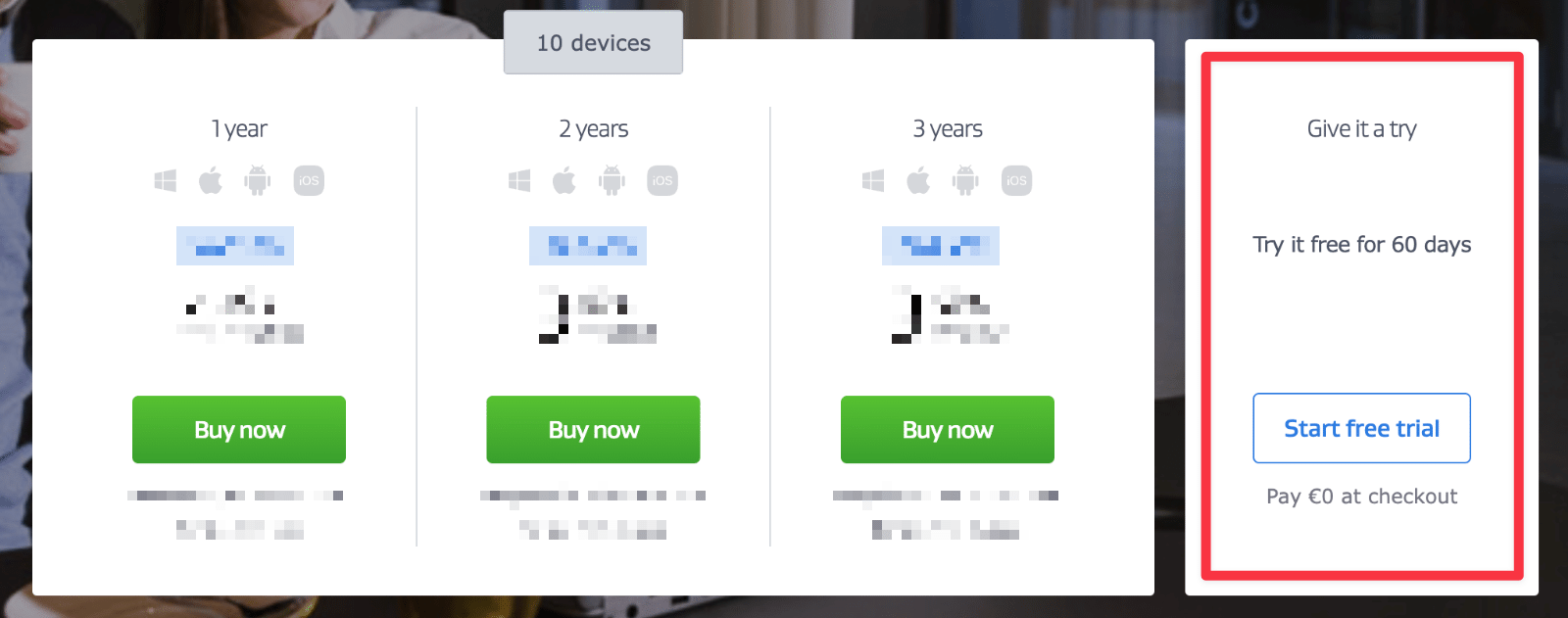
Get AVG Secure VPN 60 Day Free Trial & Learn about Minimum System Requirements for PC
When it comes to online security, AVG is a trusted name that has been providing top-notch protection for years. With AVG Secure VPN, you can browse the internet securely and anonymously, no matter where you are. This VPN service is available for Windows 10, Mac 11, and above, ensuring that users can securely access their favorite websites and content from any country.
AVG Secure VPN works by encrypting your internet connection, so your online activities remain hidden and your privacy is protected. When you install the program, it will automatically select the best network routes to ensure fast and secure connections. And with their 30-day money-back guarantee, you can try AVG Secure VPN for free and cancel if it’s not worth it.
One of the key benefits of using AVG Secure VPN is that it secures your online activities on multiple devices, including your PC, Mac, and mobile devices. This means that no matter where you are or what network you’re connected to, you can browse the internet securely and access your favorite content. With AVG Secure VPN, your privacy and security are always guaranteed.
Now, let’s talk about the minimum system requirements for PC. To use AVG Secure VPN on Windows 10, your machine must have at least 1 GB of RAM and 2 GB of free hard disk space. For Mac 11 and above, you’ll need a Mac with an Intel-based processor and at least 2 GB of RAM. If your PC meets these requirements, you can install AVG Secure VPN and enjoy its secure and reliable service.
In conclusion, AVG Secure VPN is a trusted and secure VPN service that allows you to browse the internet securely and access your favorite content from any location. With its strong encryption and strict privacy policy, you can be confident that your online activities will remain hidden and your privacy will be protected. Try AVG Secure VPN for free with their 60-day trial and see how it works for you. Stay secure and browse with confidence wherever you are!
Discover the Benefits of AVG Secure VPN
AVG Secure VPN offers a range of benefits to enhance your online experience. Whether you’re browsing from home or on-the-go, this virtual private network (VPN) can change the way you access the internet.
Enhanced Privacy and Security
With AVG Secure VPN, you can browse securely and anonymously. Your activities are encrypted, ensuring your online privacy. Whether you’re connected to a public Wi-Fi or worried about falling victim to cyber threats, AVG Secure VPN guarantees you a secure connection.
Access Restricted Content
Want to access content that is restricted in your region? With AVG Secure VPN, you can choose from a list of virtual servers located across the globe, allowing you to access content that may not be available in your home country. Whether it’s accessing Netflix US or Amazon Prime from anywhere in the world, AVG Secure VPN has got you covered.
Compatibility and Ease of Use
AVG Secure VPN is compatible with multiple devices. Whether you’re using a PC or a mobile device, you can easily download and install the VPN software. The minimum system requirements for PC include Windows 10, making it accessible to a wide range of users.
Try it Risk-Free
If you’re unsure about whether AVG Secure VPN is worth it, you can try it risk-free with their 30-day free trial. This allows you to test the actual service and its benefits before making a decision. If you’re not satisfied, you can cancel your subscription within the first 30 days without any hidden questions or fees.
Always Available Support
AVG Secure VPN provides support to its customers whenever they need it. Whether you have questions about installation, how the encryption works, or troubleshooting any issues, their support team is available to assist you.
Discover the many benefits of AVG Secure VPN and start enjoying a more secure and private online experience today!
Safeguard Your Online Privacy and Security
If you value your privacy and want to protect your online activities, it’s important to take steps to secure your connection. With AVG Secure VPN, you can browse the internet safely and securely, no matter where you are.
Why is online privacy important? Your privacy is constantly at risk as you navigate the digital world. Hackers and cybercriminals can easily intercept your personal information when you connect to unsecured networks (such as public Wi-Fi). By using AVG Secure VPN, you can protect your data and keep it away from prying eyes.
AVG Secure VPN offers a 30-day free trial, which gives you plenty of time to test out the service and see if it’s right for you. During this trial period, you can securely browse the internet without any restrictions and switch between multiple virtual locations.
Whether you’re using a PC or mobile device, AVG Secure VPN has minimum system requirements that are easily met by most devices. This means that you can enjoy military-grade encryption and secure your connection without any complications.
AVG Secure VPN is not only worth it for those who frequently use public Wi-Fi networks, but also for individuals who want to stream content from around the world. With AVG Secure VPN, you can browse streaming services and enjoy your favorite shows and movies without any geographic restrictions.
In addition to its easy-to-use interface, AVG Secure VPN also offers 24/7 customer support to assist users with any questions or issues they may have. This ensures that you will always have the assistance you need to stay secure online.
If you’re ready to take control of your online privacy and security, it’s time to download AVG Secure VPN. This program allows you to securely browse the internet, protect your personal information, and enjoy unrestricted access to content. Don’t wait any longer – get started with AVG Secure VPN today!
Enjoy Anonymity and Freedom on the Internet
When it comes to browsing the internet, privacy is a top concern for many users. With the constant threats of cyberattacks and online surveillance, it’s important to find a reliable service that can keep your online activity private and secure. That’s where AVG Secure VPN comes in.
AVG Secure VPN is a powerful service that allows you to browse the internet privately and securely. It does this by encrypting your internet connection, making it impossible for anyone to see what you’re doing online. Whether you’re at home, at work, or on-the-go, AVG Secure VPN keeps your activity hidden from prying eyes.
One of the main benefits of using AVG Secure VPN is the ability to choose your virtual location. With servers located all over the world, you can browse the internet as if you were in a different country. This not only gives you the freedom to access content that may be restricted in your own country, but it also allows you to bypass any geo-restrictions that may be in place for streaming services or websites.
Another advantage of using AVG Secure VPN is the ease of use. It’s available for Windows, Mac, and Android, so you can connect to the service on your preferred device. With just a few simple steps, you can set up AVG Secure VPN and start browsing anonymously. Plus, the service offers a 60-day free trial, so you can try it out before committing to a subscription.
AVG Secure VPN is a trusted service with over 50 million downloads worldwide. It’s backed by Avast, a leading cybersecurity company, so you can be confident in the quality and reliability of the service. When you use AVG Secure VPN, you can browse the internet with peace of mind, knowing that your privacy and security are protected.
In summary, if you value your privacy and want to enjoy unrestricted access to the internet, give AVG Secure VPN a try. It’s a trusted service that gives you the freedom to browse anonymously and securely from any location. With powerful encryption and a wide range of servers available, you’ll be able to browse the internet without limitations and with the peace of mind that your online activity is private.
Experience Fast and Reliable Connection Speeds
When it comes to internet security and privacy, users need a fast and reliable connection. With AVG Secure VPN, you can expect just that. Our program works to ensure that your online activity is protected and your data is encrypted.
Whether you’re at home or on the go, AVG Secure VPN guarantees a secure and anonymous connection. With over 50 virtual locations to choose from, you can easily select the trusted server that works best for you. With simultaneous connections available for up to 11 devices, you can protect your entire network.
Download and install AVG Secure VPN to experience fast and reliable connection speeds. Compatible with Windows and several other operating systems, the program is easy to install and use. With a 30-day free trial, you can try it out and see why so many users trust AVG Secure VPN.
Get unrestricted access to the internet and protect your privacy wherever you are. Whether you’re in a coffee shop, at the office, or even at an airport, AVG Secure VPN secures your Wi-Fi connection and allows you to browse anonymously.
Switch between locations with ease and enjoy uninterrupted browsing. With AVG Secure VPN, you can download and upload files, stream videos, and browse the web without any interruptions. Our program works in the background to ensure a seamless online experience.
Don’t compromise your security. Choose AVG Secure VPN and experience fast and reliable connection speeds today.
Access Geo-Restricted Content Anywhere, Anytime
Unrestricted Access
With AVG Secure VPN, you can browse the internet straight from your PC, Mac or mobile devices, using our secure and anonymous VPN program. This will give you the ability to access geo-restricted content wherever you are in the world. Whether you want to stream your favorite shows on Netflix or access websites that are blocked in your country, our VPN is here to help you.
Choose from Multiple Locations
Our VPN program offers several server locations worldwide, so you can choose the one that works best for you. Whether you want to access content from the US, UK, or any other country, we’ve got you covered. Enjoy unlimited access to websites and services that are otherwise unavailable in your region.
Minimum System Requirements
Before you install AVG Secure VPN, make sure your PC meets the minimum system requirements. For Windows users, the minimum requirements include Windows 7, 8, or 10, and 30-day trial is available for download. Mac users need to have Mac OS X 10.11 (El Capitan) or above. To install AVG Secure VPN on your mobile devices, make sure they are compatible with the program.
Why Choose AVG Secure VPN?
- Access geo-restricted content from anywhere
- Browse the internet anonymously and securely
- Choose from multiple server locations worldwide
- Enjoy unrestricted streaming and access to websites
- Minimum system requirements available for Windows, Mac, and mobile devices
- 30-day free trial available for download
- 24/7 support from our team of experts
Don’t be restricted by geographical limitations. Access the content you want, wherever you are. Checkout AVG Secure VPN today and see why it’s worth it.
Learn About AVG Secure VPN’s 60 Day Free Trial
AVG Secure VPN offers a 60-day free trial, allowing you to experience their VPN service straight from the start. Whether you’re at home or on the go, you can browse the web securely and anonymously, keeping your privacy intact.
With over 50 worldwide locations to select from, you can switch between different routes to ensure your internet connection is as private as possible. It works on both Windows and Mac machines, so no matter which operating system you use, you won’t be left behind.
Using AVG Secure VPN, you can be confident that your online activities are protected and kept away from prying eyes. It keeps your connection secure, especially when accessing public Wi-Fi networks. You can download and stream content anonymously, ensuring that your personal information remains secure.
If you’re worried about the minimum system requirements, rest assured that AVG Secure VPN works efficiently on most devices, requiring only minimal resources. It even supports simultaneous connections, meaning you can use the VPN service on multiple devices at the same time without any issues.
And when you decide to buy the full version, you can do so confidently, thanks to AVG’s money-back guarantee. If you’re not satisfied with the service within the first 30 days, you can request a refund, no questions asked.
In summary, AVG Secure VPN offers a 60-day free trial where you can explore their service and experience secure and private browsing. Whether you’re at home or on the go, their VPN service is available for download on Windows, Mac, and other devices. Don’t compromise your online security and privacy – try AVG Secure VPN today!
Start Protecting Your Personal Information Today
Are you concerned about the privacy of your personal information while browsing the internet? With AVG Secure VPN, you can take the necessary steps to protect your data and keep it safe from anyone trying to access it.
AVG Secure VPN is a program that works on both PC and Mac systems, giving you the ability to browse securely no matter what machine you’re using. It encrypts your connection and keeps your information private, allowing you to browse websites, access streaming content, and checkout on public Wi-Fi networks without worrying about your personal information being compromised.
By using AVG Secure VPN, you can also change your virtual location to browse the internet as if you were in a different country. This gives you access to content that may not be available in your current location, such as streaming services like Netflix or Amazon Prime.
The program allows you to connect to multiple locations simultaneously, with server locations in over 11 countries. Whether you’re at home or on the go, AVG Secure VPN works wherever you are. It’s compatible with minimum system requirements for PC and Mac, making it easy to install and start protecting your privacy today.
AVG Secure VPN also offers a 30-day money-back guarantee—so you can try it out risk-free. If you’re not satisfied with the security and privacy it provides, you can get a full refund.
Start protecting your personal information today with AVG Secure VPN. Don’t leave your privacy and security up to chance—give yourself peace of mind while browsing the internet.
Minimum System Requirements for PC
If you’re considering using AVG Secure VPN on your PC, it’s important to ensure that your system meets the minimum requirements to ensure compatibility and optimal performance. Here are the key factors to look out for:
Operating System:
Your PC needs to be running a compatible operating system, such as Windows 10, 8, or 7. These are the most commonly used operating systems, and AVG Secure VPN works seamlessly on them.
Processor and RAM:
To ensure smooth activity and fast connection speeds, it is recommended to have a modern processor and at least 2GB of RAM. A faster processor and more RAM will provide an even better experience.
Internet Connection:
In order to use AVG Secure VPN, you need an active internet connection. A high-speed connection is recommended for faster browsing and streaming of content.
System Storage:
While AVG Secure VPN itself doesn’t require a large amount of storage space, it is important to have enough free space on your machine to ensure smooth operation and avoid any potential issues.
In summary, here are the minimum system requirements:
- Compatible operating system like Windows 10, 8, or 7
- Modern processor and at least 2GB of RAM
- Active internet connection
- Enough free storage space on your machine
By meeting these requirements, you can ensure that AVG Secure VPN works seamlessly on your PC, providing a secure and private browsing experience wherever you are.
Ensure Your Device Meets the Necessary Specifications
If you’re looking to enhance your privacy and securely browse the internet, it’s important to ensure that your device meets the necessary specifications. By doing so, you can guarantee optimal performance and uninterrupted service.
Compatible Operating Systems:
- For Windows users:
- – Your device must be running Windows 7 or above.
- – Whether you’re using Windows 10, 8, or 7, you’re in luck! AVG Secure VPN is fully compatible with all versions of Windows.
- For Mac users:
- – Your Mac should be updated to macOS 11 Big Sur, macOS Catalina (10.15.x) or macOS Mojave (10.14.x).
Minimum System Requirements:
- – Your device should have at least 512 MB RAM.
- – It’s recommended to have at least 100 MB free hard disk space.
- – A stable internet connection with a minimum speed of 256 Kbps is required for seamless streaming and browsing.
Multiple Device Support:
Whether you’re at home or on the go, AVG Secure VPN has got you covered. It offers multi-device support, allowing you to connect up to 5 devices simultaneously with a single subscription. So, you can protect your privacy across all your devices.
Choose Your Location:
With AVG Secure VPN, you have the freedom to select your desired location from several available options. Whether you want to connect to a server in your home country or browse from a different country altogether, the choice is yours. This way, you can access content that may be restricted in your region or maintain anonymity while connecting from abroad.
Encryption and Privacy:
You can rest assured that your online activity is encrypted and your privacy is protected. AVG Secure VPN uses top-notch encryption technology to secure your data, ensuring that it cannot be intercepted by anyone. So, you can use public Wi-Fi networks and browse anonymously without any worries.
Money-Back Guarantee:
If you’re not satisfied with the service within 30 days of purchase, AVG offers a 30-day money-back guarantee. They stand behind their product and believe in providing true value to their customers.
So, don’t wait any longer. Give yourself the gift of privacy and secure browsing. Install AVG Secure VPN on your compatible device today and experience the benefits yourself!
Compatible Operating Systems for AVG Secure VPN
In today’s worldwide digital landscape, it’s important to ensure your online activities are protected. That’s where AVG Secure VPN comes in. This powerful VPN service works on a variety of operating systems, providing a trusted and true way to protect your privacy while you’re online.
Windows
If you’re a Windows user, you’re in luck. AVG Secure VPN is compatible with Windows 11, Windows 10, Windows 8, and Windows 7. Whether you’re at home or on the go, you can confidently connect to any public Wi-Fi network knowing that your online activity is hidden and your data is protected.
Mac
Mac users will also find that AVG Secure VPN works seamlessly on their machines. It’s compatible with the latest versions of macOS, giving you the freedom to browse the web anonymously and access restricted content from anywhere in the world.
Android and iOS
For those who prefer to use their smartphones or tablets, AVG Secure VPN is available for Android and iOS devices. This means you can protect your online activity and browse the web without restrictions, no matter where you are.
Other Supported Platforms
In addition to the above mentioned, AVG Secure VPN is also compatible with other operating systems. Whether you’re using it on your Linux machine or want to install it on your router, there are options available to ensure that your online activities remain private and secure.
So why wait? Get AVG Secure VPN today and enjoy a worry-free browsing experience. With a 30-day money-back guarantee, you can try it risk-free and see why millions of users trust AVG and its parent company, Avast. With unlimited bandwidth and the ability to connect from 50+ locations worldwide, you’ll have the power to browse, stream, and shop with peace of mind.
Processor and RAM Requirements:
When it comes to running AVG Secure VPN on your PC, it’s important to make sure that your device meets the minimum system requirements to ensure smooth and reliable performance.
The minimum processor requirement for running AVG Secure VPN on a PC is an Intel Pentium 4 or AMD Athlon 64 processor. This ensures that your device has enough processing power to handle the VPN’s encryption and decryption processes.
In terms of RAM, AVG Secure VPN requires a minimum of 256 megabytes (MB) of RAM. However, it is recommended to have at least 512 MB for optimal performance. This ensures that your PC has enough memory to handle the VPN’s activities without any lag or slowdown.
By meeting these processor and RAM requirements, you can ensure that AVG Secure VPN operates smoothly on your PC, allowing you to browse the web, use streaming services, and perform other online activities securely and without any interruptions.
Hard Disk Space and Internet Connection Recommendations
When it comes to using a virtual private network (VPN) service like AVG Secure VPN, there are certain hard disk space and internet connection requirements that you should be aware of to ensure a smooth and secure online experience.
Minimum Hard Disk Space
The minimum hard disk space requirement to install and run AVG Secure VPN is 50 MB. This means that even if you have limited storage available on your device, you can still enjoy the privacy and security features of AVG Secure VPN without compromising on other important files or applications.
Internet Connection Speed
In order to enjoy uninterrupted streaming, browsing, and downloading, a stable and fast internet connection is crucial. AVG Secure VPN is compatible with Windows 10, 8, and 7, and supports both wireless and wired network connections. However, it is recommended to have an internet connection with a minimum speed of 3 Mbps to ensure smooth and lag-free online activities.
Simultaneous Connections
With AVG Secure VPN, you can connect up to 5 devices simultaneously using a single subscription. This means that you can securely browse the internet, stream content, download files, and work privately on multiple devices at the same time, without having to switch between different VPN connections.
Here’s how it works: when you select a server location from the available options, AVG Secure VPN will route your internet connection through a virtual tunnel, masking your IP address and providing you with a private and secure online experience. This allows you to access geo-restricted content, browse the internet anonymously, and protect your sensitive data from falling into the wrong hands.
Money-back Guarantee
If for any reason you are not satisfied with AVG Secure VPN and want to cancel your subscription, you can do so within 30 days of the first purchase. AVG offers a 30-day money-back guarantee, giving you the freedom to try out the service risk-free and see if it meets your privacy and security needs.
So, whether you are a frequent traveler who needs unrestricted access to online content or a privacy-conscious individual who wants to secure their personal information, AVG Secure VPN is a reliable and user-friendly service that provides you with the necessary tools to browse the internet privately and securely.
Get the Most Out of AVG Secure VPN on Your PC
When it comes to protecting your privacy and ensuring your online security, AVG Secure VPN is the perfect tool to have. With its powerful features and easy-to-use interface, you can securely connect to the internet and browse anonymously with just a few clicks. But to get the most out of AVG Secure VPN on your PC, there are a few tips and tricks you should know.
Choose the Perfect Location
AVG Secure VPN offers a wide range of virtual locations around the world, giving you the ability to connect to servers in different countries. This not only allows you to access geo-restricted content, but also ensures that your activities online remain private and secure. To get the most out of AVG Secure VPN, choose a location that is closest to your physical location to ensure a faster and more stable connection.
Check the Minimum System Requirements
Before you download and install AVG Secure VPN on your PC, make sure your computer meets the minimum system requirements. This will ensure that the program runs smoothly and without any issues. The minimum requirements for AVG Secure VPN include a compatible operating system (such as Windows 7 or later), a stable internet connection, and sufficient device storage.
Connect Multiple Devices Simultaneously
If you have multiple devices at home, such as a PC, Mac, or smartphone, you can connect them all to AVG Secure VPN at the same time. This means that all your devices will be protected and your online activities will stay secure, no matter which device you use. To connect multiple devices simultaneously, simply purchase a plan that allows for multiple connections and follow the instructions provided.
Change Servers for Enhanced Privacy
AVG Secure VPN automatically routes your internet traffic through its trusted servers to ensure your privacy. However, if you want even greater privacy, you can change servers periodically. By doing so, you can switch to different locations and hide your online activities behind different IP addresses, making it harder for anyone to track you. This is especially useful if you want to access region-specific content or browse without leaving any digital footprints.
With these tips and tricks, you can get the most out of AVG Secure VPN on your PC and enjoy a safe and secure online experience. Whether you want to protect your privacy, access geo-restricted content, or browse anonymously, AVG Secure VPN has got you covered.
Learn How to Install AVG Secure VPN on Your Device
If you want to ensure your online privacy and security, installing AVG Secure VPN on your device is a wise choice. Follow these simple steps to get started:
Step 1: Check the System Requirements
Before installing AVG Secure VPN, make sure your PC meets the minimum system requirements. The list of requirements can be found on the AVG website.
Step 2: Download and Install AVG Secure VPN
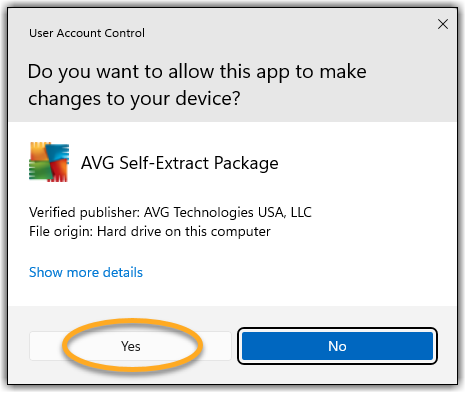
Visit the AVG website and navigate to the Secure VPN section. Look for the option to download the software for Windows. Click on the download button and follow the on-screen prompts to complete the installation process.
Step 3: Launch and Activate the VPN
Once the installation is complete, launch the AVG Secure VPN application. You will be prompted to activate the service using your AVG account. If you don’t have an account, you can create one for free.
Step 4: Connect to a Secure Server
After activating the VPN, you can choose a server from the list of available options. Use their trusted network of servers to guarantee your online privacy and security.
Step 5: Enjoy Private and Unrestricted Browsing
With AVG Secure VPN, you can now browse the web anonymously and access any content from anywhere. Your activities will be encrypted with military-grade security methods, ensuring your data stays private and your connection remains secure.
Step 6: Additional Tips and Support
If you have any questions or need further assistance, AVG provides excellent customer support. You can find helpful tips and tutorials on their website, and their support team is available 24/7.
Conclusion
Installing AVG Secure VPN on your device is a straightforward process that can give you peace of mind when it comes to your online privacy and security. With a 30-day money-back guarantee, trying out the service is just worth it. Enjoy a private and secure online experience with AVG Secure VPN.
Optimize Your VPN Settings for Maximum Performance
When using a VPN, it’s important to select and change the settings to ensure maximum performance. By optimizing your VPN settings, you can enjoy a faster and more secure internet experience. Here are some tips to help you optimize your VPN settings:
1. Choose the Right VPN Program
There are many VPN programs available, but not all of them offer the same level of performance and security. It’s important to choose a trusted VPN program that meets your specific requirements. Consider factors such as encryption strength, server locations, and ease of use when selecting a VPN program.
2. Change Your VPN Server
If you’re experiencing slow connection speeds or restricted access to certain websites, try changing your VPN server. By switching to a server closer to your location, you can potentially improve your internet speed and access to content. Experiment with different server locations to find the one that works best for you.
3. Optimize Your System Requirements
To ensure your VPN operates smoothly, make sure your PC or Mac meets the minimum system requirements. Check the VPN provider’s website for details on the necessary operating system, processor, memory, and storage specifications. Upgrading your system if needed can significantly enhance your VPN performance.
4. Use a Powerful VPN Encryption
VPN encryption is essential for maintaining privacy and security online. However, stronger encryption algorithms can impact performance. If you want maximum speed, consider using encryption protocols like OpenVPN or WireGuard, which offer high-security levels without significantly slowing down your connection.
5. Enable Split Tunneling
Split tunneling is a feature that allows you to choose which apps or services use the VPN and which ones access the internet directly. By enabling split tunneling, you can prioritize the VPN for specific tasks like streaming or accessing sensitive information, while excluding less important activities. This can significantly optimize your VPN performance.
6. Seek Expert Support
If you’re unsure about how to optimize your VPN settings or are experiencing issues, don’t hesitate to contact your VPN provider’s support team. They can provide guidance and troubleshooting tips to help you get the most out of your VPN service.
By following these optimization tips, you can ensure that your VPN works smoothly, securely, and privately wherever you are. Whether you’re streaming content, browsing the web, or accessing sensitive information, a well-optimized VPN can deliver the speed, security, and anonymity you need. Try out these tips and enjoy a fast and secure internet experience!
Stay Up to Date with the Latest Features and Updates
When it comes to browsing the internet, staying up to date is key. With AVG Secure VPN, you can ensure that you are always connected to the latest features and updates. Whether you are a first-time user or have been using the VPN for days, here are some tips on how to make the most out of your experience.
Why Choose AVG Secure VPN?
There are many reasons why AVG Secure VPN is the best choice for your online activities. Firstly, it offers a 60-day free trial, allowing you to try out the service before you commit. Secondly, it has servers in 10 countries worldwide, giving you the freedom to choose your preferred location. Thirdly, it guarantees anonymous browsing, ensuring that your privacy is protected.
How to Install and Use AVG Secure VPN
Installing and using AVG Secure VPN is a quick and easy process. First, ensure that your PC meets the minimum system requirements. Then, download the AVG Secure VPN software from the official website. Once installed, simply select the country you want to connect to and click the “Connect” button. You can also switch between different servers with just a few clicks.
Benefits of Using AVG Secure VPN
By using AVG Secure VPN, you can enjoy several benefits. Firstly, it allows you to browse the internet securely and anonymously, especially when connected to public Wi-Fi networks. Secondly, it provides unrestricted access to content and websites that may be blocked in your country. Lastly, it encrypts your online activities, ensuring that your personal information is protected from prying eyes.
Ask the Experts
If you have any questions or need assistance, the AVG Secure VPN support team is always available to help. They can provide guidance on how to use the VPN effectively and answer any queries you may have. Additionally, you can find helpful tips and resources on the AVG website to further enhance your VPN experience.
Wherever You Go, Stay Protected
Whether you are using a Windows machine, a mobile device, or any other supported platform, AVG Secure VPN works seamlessly on all devices. This means that you can stay protected and browse securely wherever you go. So, don’t fall victim to online threats – connect to AVG Secure VPN and enjoy the peace of mind that comes with robust online security.
Checkout the 30-day Money-Back Guarantee
If you are unsure whether AVG Secure VPN is the right service for you, take advantage of the 30-day money-back guarantee. This allows you to try out the service risk-free and see if it meets your needs. If you are not satisfied, you can easily get a refund within 30 days of your purchase.
Stay up to Date and Enjoy Online Privacy
With AVG Secure VPN, you can browse the internet with confidence, knowing that your privacy is protected. Stay up to date with the latest features and updates, and enjoy unrestricted access to content from around the world. Choose AVG Secure VPN today and experience the power of secure and private online browsing.
Common Issues and Troubleshooting Tips
1. Connection Issues
If you are experiencing difficulties connecting to AVG Secure VPN, try these troubleshooting tips:
- Ensure you have a stable internet connection wherever you are.
- Check if you have any other VPN or proxy services running, as they might conflict with AVG Secure VPN.
- Make sure to update AVG Secure VPN to the latest version to ensure optimal connectivity.
- If the issue persists, try switching between different VPN servers to find the one that works best for you.
2. Privacy and Security Concerns
When using AVG Secure VPN, your online activities and data are protected with military-grade encryption. However, if you have concerns about your privacy or security, you can take these steps:
- Review AVG Secure VPN’s privacy policy to understand how your data is handled and protected.
- Consider changing your virtual location to a different country to access content that may be restricted in your current location.
- If you are worried about your online activities being tracked, make sure to enable the VPN’s “Kill Switch” feature, which will automatically disconnect you from the internet if the VPN connection drops.
3. Installation and Compatibility
If you encounter issues during the installation or if AVG Secure VPN is not compatible with your device, try these tips:
- Ensure that your device meets the minimum system requirements for AVG Secure VPN, particularly if you are using older versions of Windows.
- If you have recently updated your operating system, make sure to restart your device after installation to avoid any compatibility issues.
- If the VPN connection keeps falling or disconnecting, try reinstalling the application or contacting AVG customer support for further assistance.
4. Frequently Asked Questions
If you have specific questions about AVG Secure VPN, here are some common FAQs:
- How many devices can I simultaneously connect to AVG Secure VPN?
- Is a money-back guarantee available if I’m not satisfied with the service?
- Can I browse privately and access unrestricted content with AVG Secure VPN?
- Why is AVG Secure VPN worth downloading?
- How can I protect my activities on Amazon services?
You can connect up to 5 devices simultaneously with one subscription, allowing you to protect all your devices at once.
Yes, AVG Secure VPN offers a 30-day money-back guarantee, so you can try it risk-free and get a refund if you’re not satisfied.
Yes, AVG Secure VPN allows you to browse the internet privately and access content that may be restricted in your country or region.
AVG Secure VPN provides powerful encryption to protect your online activities and keep your personal data hidden from prying eyes.
By connecting to AVG Secure VPN, you can secure your connection and encrypt your data when using Amazon services.
Contact AVG Support for Further Assistance
If you have encountered any issues or need further assistance regarding AVG Secure VPN, you can contact AVG Support for prompt and reliable help. The support team is available to assist you in troubleshooting any problems or answering any questions you may have.
Whether you need help with the installation process, configuring the VPN settings, or understanding the features and capabilities of AVG Secure VPN, the support team is equipped to provide you with the necessary guidance.
To contact AVG Support, you can visit their official website and navigate to the support section. There, you will find several options to get in touch with the team, including live chat, email support, or phone support. Choose the method that best suits your preference and reach out to them for assistance.
The support team is knowledgeable in addressing a variety of concerns, such as issues with VPN connectivity, compatibility with different devices and operating systems, troubleshooting firewall conflicts, and ensuring data privacy and security.
By contacting AVG Support, you will receive personalized assistance tailored to your specific needs and queries. The team will guide you through the necessary steps, provide detailed instructions, and offer solutions to resolve any problems you may encounter.
Remember, AVG Secure VPN is designed to provide you with a secure and private browsing experience. It encrypts your data and ensures your online activity remains anonymous, regardless of your location or the network you are using. However, in case you face any issues or have any questions, do not hesitate to contact AVG Support for further assistance.
FAQ:
What is AVG Secure VPN?
AVG Secure VPN is a virtual private network service provided by AVG Technologies. It allows users to browse the web anonymously and securely by encrypting their internet connection and masking their IP address.
How can I get the 60-day free trial of AVG Secure VPN?
To get the 60-day free trial of AVG Secure VPN, you can visit the official website of AVG Technologies and follow the instructions for downloading and installing the software. The trial period starts once the software is successfully installed on your device.
Is AVG Secure VPN compatible with mobile devices?
Yes, AVG Secure VPN is compatible with mobile devices. It has dedicated applications for Android and iOS devices, which can be downloaded from the respective app stores. The mobile version of AVG Secure VPN provides the same level of security and anonymity as the PC version, allowing users to browse the internet safely on their smartphones and tablets.
Videos:
AVG Secure VPN Review 2023 🔥 100% BRUTALLY HONEST REVIEW!
AVG Secure VPN Review 2023 🔥 100% BRUTALLY HONEST REVIEW! by Geekman 2 years ago 9 minutes, 36 seconds 23,179 views
AVG Secure VPN Review 🔥 In-depth Review 2023!
AVG Secure VPN Review 🔥 In-depth Review 2023! by VPN Academy 1 year ago 3 minutes, 29 seconds 3,233 views
AVG Internet Security 2023 and AVG Tuneup Utilities 2023 Activation
AVG Internet Security 2023 and AVG Tuneup Utilities 2023 Activation by infotecode 8 months ago 59 seconds 44,897 views
