Discover the Benefits of a 7-Day NordVPN Free Trial and Learn How to Redeem 4 NordVPN Codes to Enjoy Premium Features for Free
Are you interested in trying out NordVPN for free? If so, you’re in luck! NordVPN offers a seven-day free trial that allows you to experience their industry-leading virtual private network service without any commitments. It’s a great opportunity to test out their features and see if NordVPN is the right choice for you.
Signing up for the NordVPN free trial is easy and straightforward. All you need to do is download the application from their website or app store and create an account. Once you have your account set up, you can start using NordVPN on your devices such as Windows, Mac, Android, or Linux.
During the seven-day free trial period, you’ll have access to all of NordVPN’s features and benefits. This includes being able to connect to their vast network of servers located around the world, ensuring that your personal information and online activities remain private and secure.
With NordVPN, you can expect fast and reliable connections, allowing you to browse the internet, stream content, download files, and more with ease. Additionally, NordVPN provides extra security measures, such as double encryption and automatic kill switch, to ensure your data is always protected.
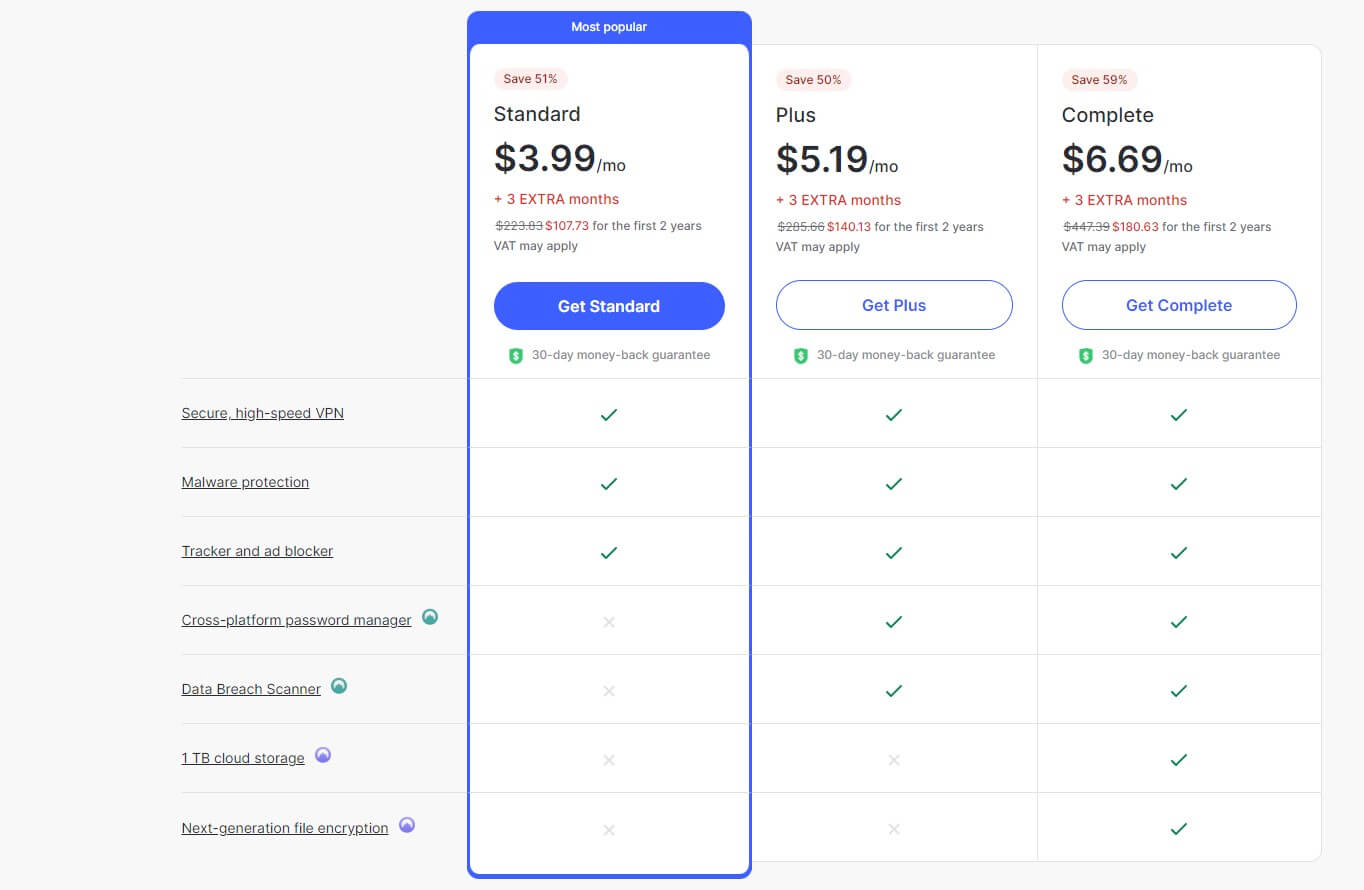
If you’re happy with the NordVPN service after the seven-day trial, you can choose to continue using it by signing up for one of their subscription plans. NordVPN offers different plans to cater to your specific needs, including options for one month, one year, and even a three-year plan that comes with a significant discount.
Now, let’s talk about how to cancel the NordVPN free trial. If you decide that NordVPN is not the right fit for you, you can easily cancel your trial before it expires, and you won’t be charged anything. NordVPN has a user-friendly interface that makes it simple to cancel the trial and avoid any unwanted charges.
To cancel your NordVPN free trial, you can go to your account settings and find the “Cancel Subscription” option. Click on it, follow the instructions, and your trial will be canceled. It’s important to note that if you don’t cancel the trial before it ends, you’ll be automatically subscribed to the paid service and charged accordingly.
In conclusion, the NordVPN free trial is an excellent way to get a taste of their top-rated VPN service without any financial commitment. It provides you with the opportunity to explore their features, experience the benefits of using a VPN, and decide if NordVPN is the best fit for your personal or professional needs. So, why not give it a try and see for yourself?
Get a 7-Day NordVPN Free Trial
If you are looking for a way to try NordVPN before committing to a subscription, you can take advantage of the 7-day free trial offer. This trial allows you to access all the features and benefits of NordVPN without any limitations for a week. It’s a great opportunity to test the service and see if it is the right fit for you.
To get the 7-day free trial, simply visit the NordVPN website at nordvpn.com and click on the “Get Free Trial” button. You will be prompted to create an account and provide your payment details. Don’t worry, your credit card won’t be charged during the trial period. If you decide to cancel before the trial ends, you won’t be charged anything.
Once you have created your account, you will be able to download the NordVPN application for your Windows, Mac, or Android device. The application is easy to install and provides a user-friendly interface that allows you to connect to NordVPN’s servers with just a few clicks.
During the trial, you will have access to NordVPN’s full range of features, including secure and private browsing, access to geo-restricted content, and protection against online threats. You can connect up to 6 devices simultaneously, so you can try NordVPN on all your devices.
After the trial period ends, you will have the option to continue using NordVPN by subscribing to one of their plans. NordVPN often runs promotions and discounts, so you may even get a better deal when you decide to upgrade.
Now that you know how to get a 7-day NordVPN free trial, why not give it a try? It’s a great way to experience the benefits of NordVPN and see why it is one of the best VPN services in the world.
Understanding how the NordVPN Free Trial Works
When it comes to trying out a VPN service like NordVPN, it’s only natural to want to test it out first before committing. That’s where the NordVPN Free Trial comes in. In this article, we will dive into how the NordVPN Free Trial works and what you can expect from it.
Getting the 7-day Free Trial
Anyone can access the NordVPN Free Trial by redeeming a trial code. These trial codes can be found online from various sources, or you can simply sign up and request a trial code directly from the NordVPN website. Once you have the trial code, you can easily redeem it on the NordVPN website or through the NordVPN app on different devices.
Redeeming the Trial Code
To redeem the trial code, you need to have an active NordVPN account. If you don’t already have an account, you can easily create one. After creating an account, go to the NordVPN website or app and find the “Redeem the Code” option. Enter the trial code and click “Redeem” to activate your 7-day free trial.
Using the 7-day Free Trial
With the activated free trial, you now have access to NordVPN’s features and network. You can connect to any server of your choice and enjoy the benefits of a secure and private online presence. However, it’s important to note that there are some limitations to the trial. For example, you may not have access to all the servers and features available in the full version, and you may be limited in terms of the number of devices you can connect simultaneously.
Canceling the Free Trial
If you’re not happy with the NordVPN service during the free trial, you can easily cancel it. Simply go to your NordVPN account settings and select the option to cancel the trial. You won’t be charged anything, and your access to the NordVPN network will be discontinued.
In conclusion, the NordVPN Free Trial is a great way to test out the service and see if it meets your needs. By understanding how the free trial works, you can make an informed decision about whether or not to continue with the paid version. So, if you’re looking for an easy and risk-free way to access more secure and private internet, give the NordVPN Free Trial a try.
The benefits of using NordVPN Free Trial
NordVPN offers a fantastic opportunity for users to try out their services for free with their 7-day NordVPN Free Trial. This trial gives you the chance to experience the benefits of NordVPN before committing to a paid subscription.
One of the main advantages of using the NordVPN Free Trial is that you can enjoy all the features and functionalities of their service. This includes access to over 5,500 servers worldwide, secure and encrypted connections, and the ability to bypass geographical restrictions to access content from different parts of the world.
During the 7-day trial period, you can use NordVPN on up to 6 devices simultaneously, allowing you to protect your entire network and enjoy a secure browsing experience. Whether you are using Windows, Mac, Linux®, or even your mobile devices, NordVPN works seamlessly on all major platforms.
If you decide to continue using NordVPN after the free trial, you can take advantage of a special discount code for a percentage off their current subscription prices. This makes it even more affordable to protect your online privacy and security.
One of the most important benefits of using the NordVPN Free Trial is that it allows you to test the service for its specific purposes. For example, you can test how well NordVPN protects you from malware and other online threats or how fast their servers are for streaming or torrenting. This way, you can make an informed decision about whether a NordVPN subscription is right for you.
To sign up for the NordVPN Free Trial, all you need is a valid email address and a credit card. The credit card is used for verification purposes only, and you will not be charged during the trial period. If you decide not to continue with a paid subscription, you can cancel your trial at any time.
In conclusion, the 7-day NordVPN Free Trial is a great option for anyone who wants to experience the benefits of NordVPN before committing to a subscription. It allows you to enjoy all the features and functionalities of NordVPN, test its performance for specific purposes, and make an informed decision about whether to continue with a paid subscription. Take advantage of this opportunity and start exploring the world of online privacy and security with NordVPN!
How to sign up for a NordVPN Free Trial
If you’re interested in trying out NordVPN before committing to a subscription, you can sign up for a free trial. Here’s how:
- Go to the official NordVPN website at nordvpn.com.
- Click on the “Get NordVPN” button to start the signup process.
- You’ll be redirected to the pricing page where you can choose the plan you want. Look for the “Try NordVPN for free” option and select it.
- On the next page, you’ll be asked to enter your email address and create a password for your account. Fill in the required information and click on “Create Account”.
- After creating your account, you’ll need to choose a payment method. However, don’t worry, you won’t be charged during the free trial.
- Once your account is set up, you can download and install the NordVPN application on your device. NordVPN supports various platforms, including Windows, macOS, Linux® and Android.
- After the installation is complete, launch the NordVPN app and enter your login credentials to log in.
- You are now ready to start using NordVPN during your 7-day free trial. The trial gives you access to all the features and servers available in the paid version.
During the free trial, you can test NordVPN’s performance, explore its different features, and see how it works for you. If you decide to continue using the service after the trial period expires, you can choose to subscribe to one of their plans.
Compatibility of NordVPN Free Trial with different devices
When it comes to compatibility, the NordVPN free trial works on a wide range of devices, making it convenient for users. Whether you are using Android, iOS, Windows, Mac, or Linux operating systems, you can enjoy the benefits of the free trial.
Additionally, NordVPN is compatible with routers. This means that you can set up the VPN on your router and secure your entire network, protecting all devices that are connected to it. This is especially useful for those who want to avoid the limitations of a specific number of devices connected to a single NordVPN account.
How to redeem the NordVPN free trial on different devices
- Windows, Mac, and Linux: To redeem the free trial on these devices, you can sign up for a NordVPN account, download the appropriate software, and then log in using your account details.
- Android and iOS: NordVPN has dedicated apps for both Android and iOS devices. Simply download the app from the respective app stores, sign up or log in to your account, and enjoy the seven-day free trial.
- Routers: To set up NordVPN on a router, you can follow the instructions provided on the NordVPN website. This will allow all devices connected to that router to benefit from the free trial.
Compatibility across devices
The NordVPN free trial allows you to enjoy all its features and benefits on multiple devices. This means that you can switch between devices seamlessly and continue to enjoy a secure and private internet experience.
Whether you are at home, in the office, or on the go, you can access NordVPN on your preferred device without any hassle. This level of compatibility makes it easy for people worldwide to try out the VPN and understand why so many people are happy with its performance and security features.
In conclusion, the NordVPN free trial is compatible with a wide range of devices, allowing you to experience its benefits across your entire network. Whether you want to secure your personal files, avoid specific limitations, or enjoy a discount on NordVPN’s products, the seven-day free trial is a great deal. Just make sure to redeem the trial code, get your account, and explore the world of NordVPN.
Important considerations before starting the NordVPN Free Trial
1. Understand what NordVPN is and how it works: NordVPN is a popular virtual private network (VPN) service that provides users with online privacy and security. It encrypts your internet traffic and routes it through servers in different locations around the world, making it difficult for anyone to track your online activities. Before starting the free trial, it’s important to have a basic understanding of what NordVPN does and how it can benefit you.
2. Know what the NordVPN Free Trial offers: The NordVPN Free Trial allows you to test out the service for 7 days without any cost or commitment. During this trial period, you’ll have access to all the features and benefits of a paid NordVPN subscription, including the ability to download and install the NordVPN client on multiple devices. It’s a great opportunity to see if NordVPN is the right VPN for your needs before making a financial commitment.
3. Consider the limitations of the NordVPN Free Trial: While the NordVPN Free Trial provides unlimited access to all NordVPN servers and features, there are a few limitations to be aware of. First, the trial is only available to new NordVPN users who have never used the service before. Additionally, the trial is only available on Windows and Android devices. If you’re using a different operating system such as macOS or Linux, you won’t be able to take advantage of the trial.
4. Understand how to sign up for the NordVPN Free Trial: To start the NordVPN Free Trial, you’ll need to create a NordVPN account and provide your credit card information. While the trial is technically free for 7 days, you’ll need to provide your credit card details to access the trial. If you’re unhappy with the service and wish to cancel before the trial period ends, make sure to do so within the 7-day timeframe to avoid being charged for a full NordVPN subscription.
5. What to do after the NordVPN Free Trial ends: If you’re happy with NordVPN and want to continue using the service after the trial ends, you can sign up for a paid NordVPN subscription. NordVPN offers different plans with prices ranging from $5 to $15 per month, depending on the length of the subscription. You can also refer friends to NordVPN and earn free time on your subscription.
6. Consider the benefits of a NordVPN subscription: A NordVPN subscription offers many benefits beyond the trial period. With a subscription, you can protect all your internet-connected devices, such as your computer, smartphone, and tablet. You’ll have access to NordVPN’s vast network of servers, allowing you to bypass geo-restrictions and access content from anywhere in the world. NordVPN also provides additional features, such as ad-blocking and protection against malware and other online threats.
How to Make the Most of Your NordVPN Free Trial
When it comes to testing out the services of NordVPN, the seven-day free trial is a great way to get started. Whether you’re using it on Linux, Windows, or Android devices, you can easily download and install the NordVPN application before signing up for the trial period. During your trial, you should make the most of the following features and options:
1. Test different server locations
One of the best things about NordVPN is its wide range of server locations. Take advantage of the trial period to test out different server locations and see which ones work best for you. Whether you’re looking for faster speeds, access to specific content, or better privacy, try connecting to different servers and see the difference.
2. Explore peer-to-peer sharing
If you’re someone who frequently downloads or shares files using peer-to-peer networks, the NordVPN trial allows you to test out their dedicated P2P servers. This feature ensures that your activities remain secure and anonymous while using peer-to-peer networks, making it an important consideration for many users.
3. Understand the full range of features
NordVPN offers a wide range of features to enhance your online security and privacy. During the trial period, take the time to explore and learn more about features like Double VPN, CyberSec, and the option to connect up to 6 devices simultaneously. Understanding these features will help you make an informed decision about whether NordVPN meets your needs.
4. Redeeming the trial with a code
If you have a trial code or offer, make sure to redeem it during the sign-up process. This will give you the full benefit of the seven-day trial without any limitations. Keep in mind that some trial codes may only be applicable for specific plans or subscriptions, so make sure to read the terms and conditions before using them.
5. Avoid sharing your credit card information
During the trial sign-up process, NordVPN may ask for your credit card information. However, you can still enjoy the trial period without providing this information. Simply choose the option to pay with an alternative method or select the option that allows you to start the trial without providing any payment information.
In conclusion, the NordVPN free trial is a valuable opportunity to test out the features and services of this popular VPN provider. Make the most of the trial period by exploring different server locations, testing peer-to-peer sharing, understanding the full range of features, redeeming any trial codes or offers you may have, and avoiding the need to share credit card information before enjoying the benefits of NordVPN.
Setting up NordVPN during the Free Trial period
During the 7-day Free Trial with NordVPN, you have the perfect opportunity to understand how the service works and decide if it is the right fit for your needs. To get started, you should first download the NordVPN application for your preferred device.
Once the download is complete, open the application and create a NordVPN account. This step is necessary to redeem the Free Trial. You will need to provide your personal information and choose a password to secure your account.
After setting up your account, you can now redeem your Free Trial. NordVPN will provide you with a unique code that can be used to activate the trial period. Simply enter the code into the designated field in the application and click “Redeem”. Your 7-day Free Trial will then be activated.
During the trial period, you can explore and enjoy all the features of the full version of NordVPN. This includes access to their extensive server network worldwide, protection against malware and other online threats, and secure peer-to-peer file sharing.
It is important to note that NordVPN does not require your credit card information for the Free Trial, unlike some other services. This means you can use the trial without worrying about any unexpected charges. However, if you decide to continue using NordVPN after the trial period, you will need to upgrade to a paid version.
If you encounter any issues or have any questions during the setup process or trial period, NordVPN provides live support. You can reach out to their customer service team through their website or the NordVPN application itself. They are available 24/7 to assist you with any concerns or inquiries you may have.
In summary, setting up NordVPN during the Free Trial period is a simple and straightforward process. All you need to do is download the application, create an account, redeem the trial code, and start exploring the benefits of NordVPN. Take full advantage of the 7-day trial to see if NordVPN is the right VPN solution for your personal needs.
Common FAQs about NordVPN Free Trial

1. How long is the NordVPN free trial?
The NordVPN free trial lasts for 7 days, allowing you to test the VPN service before committing to a subscription.
2. Does NordVPN offer free trials?
Yes, NordVPN offers a 7-day free trial to give users a chance to experience its features and performance.
3. Is there a NordVPN free trial code or promotion to access the trial?
No, there is no specific code or promotion required to access the NordVPN free trial. Simply sign up for an account and enjoy the trial period.
4. Are there any limitations during the NordVPN free trial?
During the NordVPN free trial, you have access to all the features and functionalities of a paid account. There are no limitations or restrictions.
5. Can I use NordVPN free trial on multiple devices?
Yes, the NordVPN free trial can be used on multiple devices, allowing you to test the VPN service on different platforms simultaneously.
6. What happens after the NordVPN free trial period ends?
After the 7-day free trial, you will be asked to choose a subscription plan and provide payment details to continue using NordVPN. If you decide not to subscribe, you can simply cancel your account.
7. Is it possible to get another NordVPN free trial after using the first one?
No, NordVPN does not offer multiple free trials. Once you have used the 7-day trial, you would need to subscribe to a paid plan to continue using the VPN service.
8. Can I share my NordVPN free trial account with someone else?
No, sharing your NordVPN free trial account with someone else is against NordVPN’s Terms of Service. Each user must create their own account to access the trial.
9. How does the NordVPN free trial encrypt my personal information?
During the free trial, NordVPN encrypts your internet traffic and masks your IP address, ensuring that your personal information and online activities remain private and secure.
10. What is the verdict on the NordVPN free trial?
The NordVPN free trial is a great opportunity for users to test the VPN service and see if it meets their needs before committing to a subscription. It offers all the features of a paid account without any limitations.
Tips for troubleshooting during the NordVPN Free Trial
If you’re currently on the NordVPN Free Trial and experiencing any issues, here are some tips to help you troubleshoot and resolve them:
1. Check your internet connection
Before troubleshooting any further, make sure your internet connection is stable and working properly. Try connecting to other websites or using other online services to confirm if it’s a problem specific to NordVPN or your network in general.
2. Update your NordVPN application
Ensure that you are using the latest version of the NordVPN app. Updates often include bug fixes and performance enhancements that may address any issues you’re experiencing. You can download the latest version from the official NordVPN website.
3. Restart your device
Sometimes, simply restarting your device can resolve temporary glitches or conflicts. Turn off your device completely, wait for a few seconds, and then turn it back on. Attempt to connect to NordVPN after the restart and see if the issue persists.
4. Try different servers
If you’re having trouble connecting to a specific server, try connecting to a different server within the NordVPN network. NordVPN offers a wide range of servers worldwide, so finding a stable connection by switching servers may solve your problem.
5. Contact NordVPN support
If none of the above solutions work, it’s best to reach out to NordVPN support for further assistance. They have a dedicated support team available 24/7, and they can provide personalized guidance to help resolve your specific issue. You can contact them through the NordVPN website or within the app.
By following these troubleshooting tips, you should be able to resolve any issues you encounter during your NordVPN Free Trial and have a smooth and secure browsing experience.
How to Cancel Your NordVPN Free Trial
If you decide that the NordVPN free trial is not for you and you want to avoid being charged after the trial period ends, it is important to know how to cancel it. Canceling your NordVPN free trial is a simple process and can be done in a few easy steps.
To cancel your NordVPN free trial, follow the steps below:
- First, visit the NordVPN website at nordvpn.com.
- Log into your account using your credentials.
- Once logged in, navigate to the “My Account” section.
- Under the “Subscriptions” tab, you will find your active trial subscription. Click on the “Cancel Subscription” button next to it.
- Follow the prompts to confirm the cancellation of your free trial subscription.
- After canceling, you will no longer have access to the NordVPN service and will not be charged once the trial period ends.
It is important to cancel your NordVPN free trial before the trial period is over to avoid any charges. If you do not cancel, your trial subscription will automatically convert to a paid subscription, and you will be billed accordingly.
In conclusion, canceling your NordVPN free trial is a quick and straightforward process. By following the steps outlined above, you can easily avoid any charges and ensure that you are not enrolled in a paid subscription plan that you do not wish to continue.
Steps to cancel your NordVPN Free Trial subscription
Canceling your NordVPN Free Trial subscription is a simple process that can be done in a few easy steps. Whether you’re not satisfied with the service or you’ve found another VPN that suits your needs better, cancelling is quick and hassle-free.
Step 1: Visit the NordVPN website and log in to your account using your credentials.
Step 2: Navigate to the “My Account” section, which can usually be found in the top-right corner of the website.
Step 3: In the “My Account” section, find the “Billing” tab and click on it.
Step 4: Here, you will see information about your subscription, including the duration and payment method. Look for an option to cancel your subscription, which may be labeled as “Cancel Subscription” or something similar.
Step 5: Click on the cancellation option and follow the on-screen instructions to confirm the cancellation of your NordVPN Free Trial subscription.
Step 6: Once the cancellation process is complete, you may receive a confirmation email or message. Keep this as a proof of cancellation, just in case.
Note: It’s important to cancel your NordVPN Free Trial subscription before the trial period ends to avoid being charged for a full subscription. If you don’t cancel, your trial will automatically convert to a paid subscription.
Overall, cancelling your NordVPN Free Trial subscription is a straightforward process that can be completed within minutes. Just follow the steps outlined above, and enjoy a hassle-free cancellation experience.
Important points to remember while canceling NordVPN Free Trial
Canceling the NordVPN free trial is a straightforward process, but there are a few important points to keep in mind. First and foremost, remember that the trial period is only for 7 days, so if you don’t cancel within this time frame, you will be charged for a full subscription. It’s crucial to be aware of the expiration date to avoid any surprises.
When canceling the NordVPN free trial, it’s necessary to open your NordVPN account and navigate to the cancellation section. Look for the specific instructions on how to cancel the trial, as the steps may vary depending on the device you’re using, whether it’s an Android or iOS device, or a computer.
It’s important to note that canceling the trial before the 7-day period expires will not result in any charges to your credit card. However, if you forget to cancel, NordVPN will automatically charge the full subscription fee to the credit card linked to your account.
If you’re happy with the NordVPN service and want to continue using it after the trial, you can redeem a discount code during the trial period to get a better offer. Keep an eye out for any promotional codes that can be found online or through NordVPN’s official channels.
In conclusion, remember to cancel your NordVPN free trial within the 7-day period if you’re not satisfied with the service. Otherwise, you will be charged for a full subscription. Take advantage of any available discount codes to save money if you decide to continue using NordVPN.
Alternatives to NordVPN Free Trial
If you’re looking for alternatives to the NordVPN Free Trial, there are a few options you can consider. While NordVPN is a popular choice for many, these alternatives may offer better features or pricing options to suit your needs.
1. ExpressVPN: With a 30-day trial period, ExpressVPN is a reliable VPN service that offers easy-to-use applications for all your devices. Their network is encrypted and they have servers worldwide, making it easy to access restricted content.
2. CyberGhost: CyberGhost offers a 45-day money-back guarantee, which is longer than most other VPN providers. They have an easy-to-use application and provide access to 6,400+ servers in 90+ countries.
3. Surfshark: Surfshark is an affordable VPN option with a 7-day free trial. They offer unlimited devices and have a strict no-logs policy, ensuring your personal information stays secure.
4. Private Internet Access: Private Internet Access (PIA) offers a 30-day money-back guarantee, allowing you to test their service for a longer period of time. They have a large network of servers and support peer-to-peer file sharing.
5. ProtonVPN: ProtonVPN is a free VPN service that encrypts your internet connection and protects your privacy. While they have some limitations with their free plan, they also offer a paid version with more features.
While these alternatives may not offer the exact same features as the NordVPN free trial, they provide different options for you to try out a VPN service without any financial commitment. Remember to read the terms and conditions of each provider before signing up.+
Reasons why you might want to cancel your NordVPN Free Trial
If you’re considering canceling your NordVPN Free Trial, there are several reasons why you might want to do so.
- Limited trial period: The NordVPN Free Trial only lasts for 7 days, which might not be enough time for you to fully evaluate the service and its features.
- Service limitations: The free trial version of NordVPN may have limitations compared to the full version, such as a limited number of servers or slower connection speeds.
- Download and file sharing: If downloading and file sharing are important to you, the free trial version of NordVPN may not offer the best experience as it may have restrictions on these activities.
- Compatibility issues: While NordVPN supports different devices and platforms, the free trial version may not be compatible with all operating systems, limiting its usability.
- Personal preferences: Every user has different preferences, and despite the high ratings NordVPN receives, it might not be the best fit for you. It’s important to explore other VPN services and compare them
- Redeeming trial codes: If you’re having trouble redeeming your trial code or encounter any issues, it may be frustrating and discourage you from continuing to use NordVPN.
- Cancelled services: If you cancel your NordVPN Free Trial, it’s important to make sure your account is properly cancelled to avoid any unexpected charges or additional fees.
- Peer-to-peer file sharing: If you engage in peer-to-peer file sharing or torrenting activities, it’s important to note that the free trial version of NordVPN may not fully support or allow these activities.
In conclusion, while the NordVPN Free Trial provides an easy way to try out the service, there are several reasons why you might want to cancel it. It’s important to consider your specific needs and preferences, as well as explore other VPN services, before making a final decision.
Understanding NordVPN Free Trial Refund Policy
When it comes to the NordVPN free trial, it’s important to understand their refund policy. Here are a few key points to keep in mind:
1. The seven-day trial period
The NordVPN free trial allows you to test out their service for seven days. During this time, you can explore all the features and benefits of their VPN.
2. The refund process
If you decide that NordVPN is not the right fit for you, you can request a refund within the first seven days of your trial. To do this, simply reach out to their support team and they will guide you through the process.
3. No questions asked
NordVPN aims to provide a hassle-free refund process. They have a “no questions asked” policy, meaning you don’t need to provide a reason for your refund request. They will process it promptly and ensure you get your money back.
4. Credit card payments
If you made your payment using a credit card, the refund will be credited back to the same card. This ensures a seamless refund process for you.
5. Other payment methods
If you used a different payment method, such as PayPal or cryptocurrency, the refund will be processed using the original payment method as well.
6. Keep your account
Even if you decide to request a refund, you can still keep your NordVPN account. You will be downgraded to the free version, which comes with limited features and a smaller number of servers. However, this allows you to still enjoy NordVPN’s services to some extent.
7. Enjoy the benefits
During the free trial, you get to experience the benefits of NordVPN’s secure and private internet browsing. This includes access to worldwide servers, encryption, and anonymity that NordVPN is known for.
In conclusion, understanding NordVPN’s free trial and refund policy is a vital part of making an informed decision when it comes to choosing a VPN service. The seven-day trial period gives you the opportunity to fully test out their services, and their hassle-free refund process ensures you can get your money back if you’re not satisfied. Take advantage of the free trial to see if NordVPN works best for you and your internet browsing needs.
Reviews and testimonials for NordVPN Free Trial
If you’re looking for a reliable VPN service, NordVPN is definitely worth trying out. With their 7-day free trial, you can test their services and see how it works for you.
Many users are happy with the NordVPN free trial because it allows them to experience the full range of features and benefits offered by the service. The trial gives you access to their extensive network of servers, ensuring that your internet connection gets encrypted and your data stays secure.
One of the reasons why NordVPN is being praised by users is that it works on all devices and operating systems. Whether you’re using Windows, Mac, Linux®, or even a specific method like a router, NordVPN has got you covered.
Kevin, a NordVPN user, shares his experience with the free trial: “I was skeptical at first, but the NordVPN free trial really exceeded my expectations. It was easy to install and set up, and I could instantly see the difference it made in my online security. I now use NordVPN on all my devices.”
Another user, Emily, mentions the promotional code: “I was able to redeem a discount code and get a 7-day free trial. It was an easy process, and I was impressed with the level of security and privacy NordVPN provides.”
The NordVPN free trial is a great opportunity to test their services and understand why it is one of the top VPN providers in the world. Whether you’re a casual internet user or someone who needs maximum online security, NordVPN has something to offer.
In conclusion, if you’re looking for a VPN service that is easy to use, offers a free trial, and provides great security, NordVPN is definitely worth considering. Take advantage of their 7-day free trial and see for yourself how NordVPN can improve your online experience.
FAQ:
How can I get a 7-day NordVPN free trial?
In order to get the 7-day NordVPN free trial, you need to sign up for a NordVPN account on their official website. Once you’ve created an account, you’ll be able to download the NordVPN app and use it for free for 7 days.
What are the benefits of using NordVPN?
There are several benefits of using NordVPN. Firstly, it provides a high level of security and privacy by encrypting your internet traffic and hiding your IP address. Secondly, it allows you to bypass geo-restrictions and access content from different parts of the world. Thirdly, it offers fast and stable connection speeds, which is crucial for streaming and downloading. Lastly, NordVPN has a user-friendly interface and is compatible with various devices and operating systems.
Is there a limit on the number of devices that can be connected to NordVPN during the free trial?
No, there is no limit on the number of devices that can be connected to NordVPN during the free trial. You can connect as many devices as you want and use NordVPN on all of them simultaneously.
Can I cancel my NordVPN free trial before it ends?
Yes, you can cancel your NordVPN free trial before it ends. If you decide that NordVPN is not the right fit for you, you can simply go to your account settings and cancel the trial. However, keep in mind that once the trial is canceled, you won’t be able to use NordVPN anymore unless you subscribe to one of their plans.
What happens after the 7-day NordVPN free trial ends?
After the 7-day NordVPN free trial ends, you have two options. You can either subscribe to one of NordVPN’s plans and continue using their service, or you can choose not to subscribe and your account will be deactivated. If you decide to subscribe, you’ll have access to all the features and benefits offered by NordVPN.
Can I get a refund if I’m not satisfied with NordVPN after the free trial?
Yes, NordVPN offers a 30-day money-back guarantee. If you’re not satisfied with their service after the free trial, you can contact their customer support and request a refund. They have a hassle-free refund policy, so you should have no problem getting your money back if you’re not happy with NordVPN.
Videos:
STOP using a VPN – You don’t really need it!
STOP using a VPN – You don’t really need it! by Liron Segev 1 year ago 5 minutes, 55 seconds 621,678 views
How to Get a NordVPN Free Trial
How to Get a NordVPN Free Trial by CyberGeeks 10 months ago 4 minutes, 30 seconds 14,628 views
