Best ASUS Routers for VPN Torrenting or Cloud Drive 2022 – DownloadMaster Torrent client
If you’re looking to connect your devices to a VPN server and download torrents or store files in the cloud, you need a reliable and powerful router. ASUS routers are among the best options available, with their high-quality hardware and user-friendly software.
One of the best models for VPN torrenting or cloud drive is the ASUS RT-AX56U. It offers dual-band Wi-Fi with high speeds and a powerful processor. The router supports the ASUSWRT firmware, which allows you to easily manage your network and configure VPN connections.
The ASUSWRT firmware also gives you the option to use the DownloadMaster Torrent client, which is a built-in torrent client that allows you to download files directly to your connected devices. With DownloadMaster, you can start, stop, and manage your torrent downloads with ease.
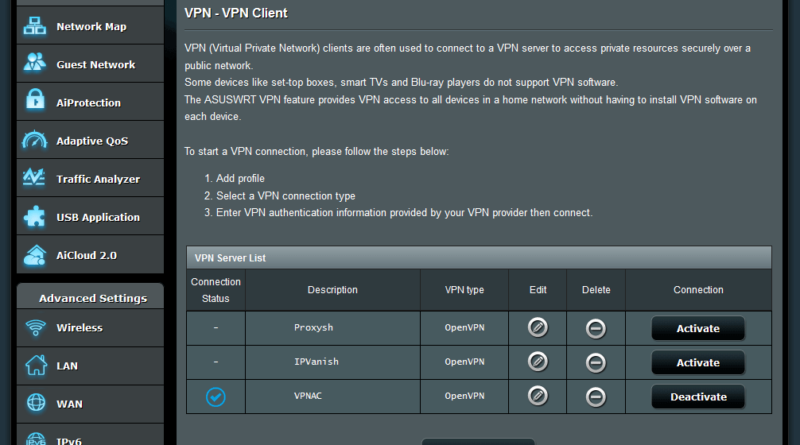
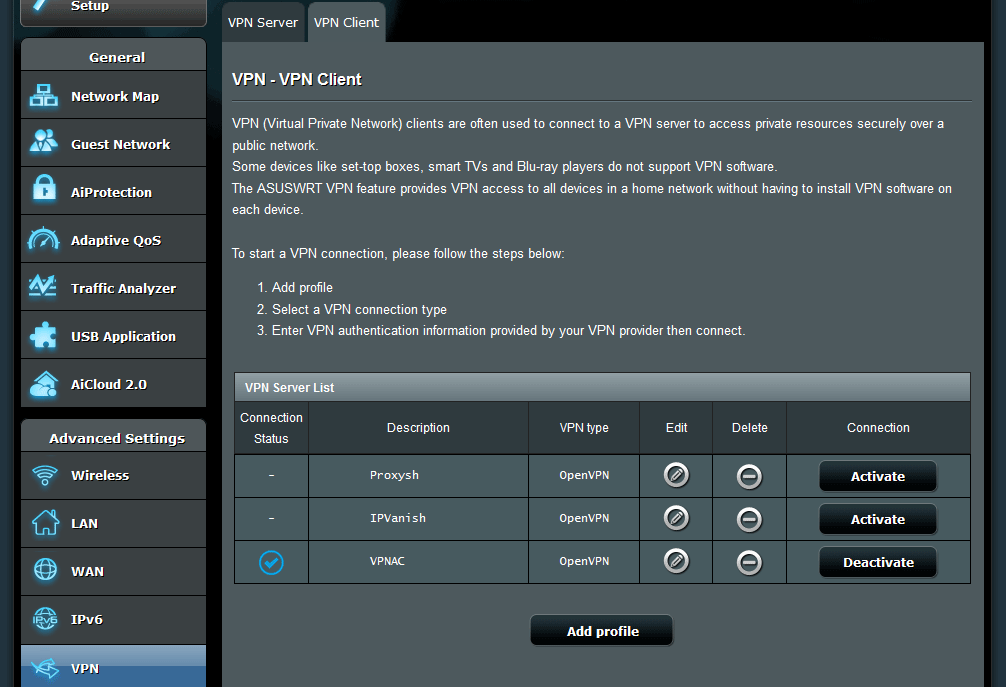
If you’re considering using a VPN with your ASUS router, you’ll love the support for OpenVPN. OpenVPN is a popular VPN protocol that provides secure and private connections to VPN servers. With ASUSWRT, you can easily configure OpenVPN settings and connect to your preferred VPN server.
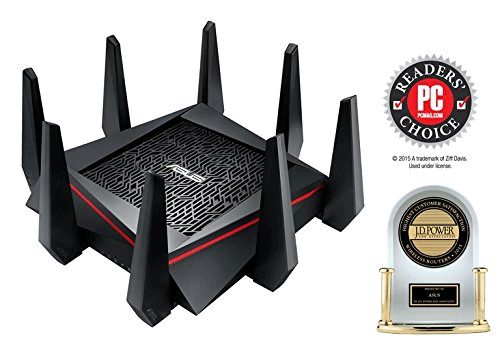
When it comes to budget-friendly options, the ASUS RT-AC5300 is one of the bestsellers. It’s a powerful router with tri-band Wi-Fi and a high-speed processor. It also supports ASUSWRT firmware and gives you the option to use the DownloadMaster Torrent client.
If you’re interested in more advanced features and customization options, you can consider models that support other firmware like ASUSWRT-Merlin or OpenWRT. These alternative firmware options provide additional features and flexibility for advanced users.
In conclusion, if you’re looking for the best ASUS router for VPN torrenting or cloud drive in 2022, consider models like the RT-AX56U or RT-AC5300. With their high-quality hardware, user-friendly software, and support for VPN connections, these routers are excellent choices for downloading files and accessing cloud storage securely.
Best ASUS Routers for VPN Torrenting or Cloud Drive 2022
If you want to enjoy a secure and fast internet connection while torrenting or accessing your cloud drive, having a reliable router is essential. ASUS routers are known for their excellent performance and advanced features, making them a top choice for many users. In this article, we will discuss some of the best ASUS routers for VPN torrenting or cloud drive in 2022.
ASUS RT-AC68U
The ASUS RT-AC68U is a popular choice among users who love torrenting or need a reliable router for cloud drive functionality. It runs on a powerful processor and offers advanced features like VPN support, QoS (Quality of Service) settings, and AiCloud support. With its fast speeds and excellent range, it is an ideal router for homes with multiple devices and users who prioritize privacy.
ASUS RT-AX56U
If you’re looking for a budget-friendly option that doesn’t compromise on performance, the ASUS RT-AX56U is worth considering. While it may not have all the advanced features of its sibling models, it still offers VPN client support and the ability to set up a cloud drive using AiCloud. With its reliable performance and affordable price, it is a great choice for users who want to enjoy VPN torrenting or cloud drive functionality on a budget.
ASUS RT-AX86U
For users who want the best of the best, the ASUS RT-AX86U is the way to go. This router features a powerful multi-core processor and supports VPN client functionality. It offers enhanced QoS settings for optimized performance and can handle multiple devices and networks simultaneously. If you can afford the higher price tag, the RT-AX86U is a top choice for VPN torrenting or cloud drive usage.
ASUS RT-AC86U
The ASUS RT-AC86U is another reliable option for users who prioritize VPN torrenting or cloud drive functionality. It supports VPN client operation, has advanced QoS settings, and offers AiCloud support for easy cloud drive setup. With its excellent range and stock security features, it is a popular choice among users who want to enjoy a stable and secure internet connection.
In conclusion, when choosing the best ASUS router for VPN torrenting or cloud drive in 2022, you should consider factors like your budget, the level of functionality you need, and the number of devices and users in your home. Whether you opt for the RT-AC68U, RT-AX56U, RT-AX86U, or RT-AC86U, each of these routers offers reliable performance and a range of features to support your private networking needs. So, do your research and find the router that best suits your requirements before making a purchase.
Why ASUS routers are the best for VPN Torrenting?
Description: ASUS routers are known for their exceptional performance and wide range of features, making them an ideal choice for VPN torrenting. Their advanced hardware and software capabilities allow for high speeds, secure connections, and easy setup.
ASUS RT-AC86U: With its powerful 1.8GHz dual-core processor, this router offers fast and reliable performance. It also has a built-in VPN server, allowing you to connect directly to your home network remotely. Additionally, the RT-AC86U supports AiCloud, which enables seamless access to your files from anywhere.
ASUS AX86U: This router provides even faster speeds and improved coverage with its 1.8GHz quad-core processor. It also supports the latest Wi-Fi 6 technology, making it ideal for heavy filesharing and overall network functionality. The AX86U is compatible with VPN services and has the ability to split your VPN connection between devices for optimal performance.
ASUS RT-AC68U: Although it is slightly older, the RT-AC68U still runs on a powerful single-core processor and offers excellent VPN performance. With its three external antennas, it provides a stable and reliable connection for VPN torrenting. This router also supports ASUS AiCloud, giving you easy access to your cloud storage.
Comparison: When comparing these routers, the AX86U stands out with its superior performance and Wi-Fi 6 compatibility. However, if you are on a budget, the RT-AC68U is a great choice for VPN torrenting. The RT-AC86U falls in between, offering a balance of speed and cost.
Tips for VPN Torrenting:
- Use a VPN service that supports OpenVPN or PPTP protocols.
- Make sure your router firmware (ASUSWRT) is up to date for optimal performance.
- Choose a server location that is closer to your physical location for faster speeds.
- Enable port forwarding on your router to improve filesharing capabilities.
- If possible, connect your devices directly to the router via Ethernet for a more stable connection.
In closing, ASUS routers are highly recommended for VPN torrenting due to their powerful hardware, extensive features, and excellent VPN performance. Whether you choose the AX86U, RT-AC86U, or RT-AC68U, you can be sure that you’ll have a reliable and secure connection for all your torrenting needs. Thanks for reading!
Top ASUS routers for VPN Torrenting
1. ASUS RT-AC87U
The ASUS RT-AC87U is one of the best routers for VPN torrenting. It has a built-in VPN server, which allows you to protect your online privacy and hide your IP address while downloading files. The router also supports advanced functionality like OpenWrt, DownloadMaster Torrent client, and PPTP VPN service.
2. ASUS RT-AC86U
If you’re looking for a powerful router that gets the job done, the ASUS RT-AC86U is a great option. It has a quad-core processor, dual-band WiFi, and supports the DownloadMaster Torrent client. This router is fast and reliable, making it ideal for VPN torrenting.
3. ASUS RT-AC68U
The ASUS RT-AC68U is a popular choice for VPN torrenting. It has a dual-band WiFi and a powerful Broadcom processor. This router uses the ASUSWRT firmware, which is user-friendly and easily customizable. It also supports OpenVPN and PPTP VPN server functionality.
4. ASUS RT-N66U
If you’re on a budget, the ASUS RT-N66U is a great value for money option. It has a dual-band WiFi and supports both PPTP and OpenVPN server functionality. This router is fast and reliable, making it a good choice for VPN torrenting.
5. ASUS RT-AC3200
If you want the best of the best, the ASUS RT-AC3200 is the router for you. It has a powerful dual-core processor, tri-band WiFi, and supports advanced features like DownloadMaster Torrent client and cloud sharing. This router is perfect for users who want a fast and secure VPN torrenting experience.
Tips for choosing the best ASUS router for VPN torrenting:
- Remember to check if the router supports the VPN service you want to use.
- Consider the number of devices you’ll be connecting to the router and choose a model with sufficient bandwidth.
- Look for routers with dual-band or tri-band WiFi for better performance.
- Consider the price and value for money when making your decision.
- Check if the router supports advanced features like DownloadMaster Torrent client and cloud sharing if you need these functionalities.
Features to consider when choosing an ASUS router for VPN Torrenting
When it comes to VPN Torrenting, choosing the right ASUS router is crucial to ensure fast and secure downloading. Here are some important features to consider when making your decision:
1. VPN Support:
Not all ASUS routers support VPN functionality, so it’s important to choose a model that explicitly mentions VPN support in its specifications. This will allow you to easily configure and connect to a VPN server, ensuring that your online activities are protected and anonymous.
2. Speed and Bandwidth:
Since VPN Torrenting involves transferring large files, it’s important to choose a router that offers high-speed and ample bandwidth. Look for routers that support faster network speeds, such as the ASUS AC88U or AC68U models, which can handle speeds up to 1 Gbps. This will ensure that you can download torrents quickly and efficiently without any slowdowns.
3. Advanced Features:
If you’re looking for more advanced features, consider routers that offer options like AiCloud, which allows you to access and share files from your connected devices. Additionally, routers that support USB ports can be used to connect external storage devices and create a personal cloud drive, giving you convenient access to your files from anywhere.
4. Security Options:
Since VPN Torrenting involves sharing files over a network, it’s important to choose a router that offers robust security options. Look for models that support encryption protocols like PPTP, which will help protect your data from prying eyes. Additionally, routers that support ASUSWRT-Merlin firmware offer advanced security features and allow for better customization of VPN settings.
5. Budget Constraints:
While some people may be willing to spend more on a high-performance router, others may have a limited budget. Consider your budget and find a router that offers the best bang-for-your-buck. ASUS routers like the AC68U or AC88U offer great performance at reasonable prices, making them popular choices among users.
In summary, when choosing an ASUS router for VPN Torrenting, ensure it supports VPN functionality, offers high-speed and ample bandwidth, includes advanced features like AiCloud and USB connectivity, offers robust security options, and fits within your budget. By considering these features, you can find the perfect router to meet your VPN Torrenting needs.
How to set up VPN on an ASUS router for Torrenting?
Choosing the right router
If you’re into torrenting and want a fast and secure VPN connection, setting up a VPN on your ASUS router is a must. But first, you need to make sure you have the right router for the job. ASUS routers are known for their advanced features and support for VPN clients. Some of the best options for VPN torrenting are the ASUS RT-AX56U, ASUS RT-AX86U, and ASUS RT-AC68U.
Setting up the VPN
The first thing you’ll need to do is get a VPN subscription from a supported VPN provider. Once you have that, follow the steps below to set up the VPN on your ASUS router:
- Access your ASUS router’s web interface by entering its IP address in a web browser.
- Go to the “VPN” section of the router’s settings.
- Click on “VPN client” and then on “Add profile.”
- In the “General” tab, enter the VPN server address and select the VPN protocol you want to use.
- In the “Username” and “Password” fields, enter your VPN login credentials.
- Click on “OK” to save the VPN profile.
- In the “VPN” section, click on “VPN client” and then on “Connect.”
- Your ASUS router will now connect to the VPN server, and all the devices on your network will use the VPN connection.
Tips for optimization
To make sure you’re getting the best performance out of your VPN connection for torrenting, here are a few tips:
- Make sure your ASUS router’s firmware is up to date.
- Turn off any firewall or antivirus program that may interfere with the VPN connection.
- If your router supports it, enable the VPN client on the router’s dual-band or tri-band antennas for better reach.
- Use a wired connection instead of a wireless one for faster speeds.
- Set up a VPN server on your ASUS router if you want to access your torrent files remotely or share them with others.
In closing, setting up a VPN on your ASUS router for torrenting is a straightforward process that can give you much faster and more secure downloads. Thanks to ASUS’s advanced features and easy-to-use VPN client, you’ll be able to enjoy torrenting without any worries.
Benefits of using a VPN for Torrenting on ASUS routers
Using a VPN for torrenting on ASUS routers has several benefits that can enhance your overall experience and protect your online activities. Here are some key advantages:
1. Enhanced Security
A VPN provides an additional layer of security by encrypting your internet traffic. This ensures that your torrenting activities are private and cannot be traced back to your IP address. ASUS routers with built-in VPN support can easily set up a secure VPN connection, so you can enjoy peace of mind while sharing files.
2. Improved Performance
ASUS routers are known for their powerful hardware specs, which include fast processors and plenty of RAM. With the combination of a VPN, you can still enjoy fast internet speeds while torrenting. The advanced hardware of ASUS routers can handle the VPN encryption and ensure a consistent and reliable connection for all your torrenting needs.
3. Bypassing ISP Throttling
Some internet service providers (ISPs) throttle or lower your connection speed when they detect torrenting activities. However, when you connect to a VPN, your ISP cannot see what you are doing, and therefore, cannot throttle your connection. This allows you to torrent without any speed limitations imposed by your ISP.
4. Access to Geo-Restricted Content
When you connect to a VPN, you can choose a server location in a different country. This allows you to bypass geo-restrictions and access content that may be blocked in your region. With an ASUS router and a VPN, you can easily stream and download content without any limitations.
5. Torrenting While Connected to a Wireless Network
ASUS routers are well-known for their reliable and fast wireless performance. With a VPN configured on your ASUS router, you can enjoy the benefits of both fast wireless connectivity and secure torrenting. This means you can torrent files from your mobile devices, such as smartphones and tablets, without compromising your security.
6. User-Friendly Setup and Settings
ASUS routers come with user-friendly interfaces that make setting up a VPN and configuring torrenting settings a breeze. Whether you’re a beginner or an advanced user, you can easily turn on or off your VPN, adjust settings, and manage your torrenting activities without any hassle.
In conclusion, using a VPN for torrenting on ASUS routers offers several benefits, including enhanced security, improved performance, bypassing ISP throttling, access to geo-restricted content, and the ability to torrent while connected to a wireless network. With user-friendly setup and settings, ASUS routers provide a powerful and easy-to-use solution for torrenting enthusiasts.
What is DownloadMaster Torrent client?
The DownloadMaster Torrent client is a powerful software application that is built into ASUS routers, specifically the AC68U and RT-AC86U models. It is designed to enhance the router’s capabilities by allowing users to download and manage torrents directly from their router, without the need for a separate computer or software.
With DownloadMaster, users can easily set up and manage torrent downloads, ensuring fast and efficient file transfers. The client supports popular torrent protocols such as BitTorrent and HTTP, and it also has built-in encryption to protect the user’s privacy and security.
DownloadMaster is a feature-rich application that offers a variety of settings and options, including the ability to schedule downloads, prioritize files, and even remotely access and manage downloads from anywhere in the world. It can also handle large torrents with ease, thanks to its quad-core processor and dual-band Wi-Fi support.
One of the key benefits of using DownloadMaster is its seamless integration with ASUS routers. Since it is built-in, users do not need to install any additional software or configure complex settings. They can simply enable the DownloadMaster feature and start downloading and managing torrents right away.
Additionally, DownloadMaster supports various VPN protocols, such as OpenVPN, L2TP, and PPTP, allowing users to protect their privacy and bypass geo-restrictions while torrenting. This makes it a valuable tool for people who prioritize security and anonymity.
In summary, DownloadMaster Torrent client is a valuable feature found in select ASUS routers, offering users an efficient and convenient way to download and manage torrents directly from their router. With its powerful performance, advanced features, and built-in VPN support, it’s an excellent choice for anyone looking for a budget-friendly solution for torrenting or cloud drive purposes.
How to use DownloadMaster Torrent client on ASUS routers?
If you’re looking for a router that supports torrenting and has a built-in DownloadMaster Torrent client, ASUS routers are a great choice. With their advanced features and support for VPN, cloud drive, and torrenting, these routers are ideal for downloading and managing large files.
The DownloadMaster Torrent client is a program that allows you to easily download and manage torrents directly on your ASUS router. It provides a convenient way to download files without the need for a separate torrent client on your computer.
To use the DownloadMaster Torrent client on ASUS routers, follow the steps below:
- Connect your ASUS router to your network and access the router’s settings.
- Navigate to the “Download” section and enable the DownloadMaster feature.
- Configure the settings according to your preferences, such as the maximum number of connections and download limit.
- In the DownloadMaster interface, you can search for and add torrents using the provided search bar or by manually adding the torrent file or magnet link.
- Once the torrent is added, the DownloadMaster Torrent client will start downloading the files to your specified location.
- You can monitor the download progress, pause/resume downloads, and view the downloaded files directly from the DownloadMaster interface.
ASUS routers that support the DownloadMaster Torrent client include models like the RT-AX86U, RT-AX88U, and RT-AC86U. These routers have powerful hardware, such as quad-core processors, 1.8 GHz CPUs, and 1 GB RAM, which ensure smooth performance even for high-speed downloads.
In conclusion, if you’re looking for a router that supports torrenting, cloud drive, and VPN, ASUS routers with the built-in DownloadMaster Torrent client are an excellent choice. They offer easy-to-use features, reliable performance, and advanced settings for managing your downloads.
Advantages of using DownloadMaster Torrent client on ASUS routers
The DownloadMaster Torrent client is a powerful feature offered by ASUS routers that provides several advantages for users who engage in VPN torrenting or cloud drive activities. Here are some benefits of using this client:
- Fast and efficient downloading: The DownloadMaster Torrent client is designed to handle large file downloads with ease. It utilizes multi-core processors found in ASUS routers to deliver high-speed downloads, ensuring that you can obtain files quickly and efficiently.
- Support for various VPN protocols: This client supports popular VPN protocols, such as OpenVPN, PPTP, L2TP, giving you the flexibility to connect to different virtual private networks based on your preferences or requirements.
- Improved security: By using the DownloadMaster Torrent client along with a VPN on an ASUS router, you can enhance your online security and privacy. It allows you to encrypt your internet traffic and keep your data protected from potential threats.
- User-friendly setup: ASUS routers with the DownloadMaster feature provide a user-friendly setup process. It doesn’t require any advanced technical knowledge, making it accessible for users of all levels of expertise.
- Seamless integration with ASUSWRT: The DownloadMaster client seamlessly integrates with ASUSWRT, the firmware used by ASUS routers. This integration ensures smooth performance and a consistent user experience.
- Cloud drive support: In addition to torrenting, the DownloadMaster client allows you to set up and manage your cloud drives. You can easily access and share your files across multiple devices, providing convenience and flexibility.
- Optimized for high speeds: ASUS routers, such as the RT-AX86U and AX3000/AX58U models, are specifically designed for high-speed connections. The DownloadMaster client is optimized to take full advantage of these speeds, ensuring fast and reliable downloading.
- Budget-friendly DIY solution: By using an ASUS router with the DownloadMaster feature, you can create your own torrenting or cloud drive setup without the need for a separate machine. This can save you money by combining these functionalities into a single device.
In closing, the DownloadMaster Torrent client on ASUS routers offers numerous advantages for VPN torrenting or cloud drive activities. Its support for various VPN protocols, fast download speeds, ease of setup, and integration with ASUSWRT make it an excellent choice for users looking for a reliable and secure solution.
ASUS routers with Cloud Drive support
If you thought ASUS routers were only meant for torrenting or VPN, think again! ASUS routers also offer support for cloud drives, making it easier for you to store and access your files from anywhere. Whether you need to share large files or create backups, these routers have got you covered.
AC5300
The AC5300 is a next-gen router with the power to handle high speeds and a wide range of devices. With its Cloud Drive support, you can easily store and access your files from anywhere.
AC68U
For those looking for a more affordable option, the AC68U offers great value for money. It supports Cloud Drive and allows you to easily share files with others.
RT-AX56U
If you’re looking for faster speeds and enhanced performance, the RT-AX56U is a great choice. It supports Cloud Drive and also offers features like guest networks and QoS settings.
AC88U
For users who want the best of both worlds – fast speeds and ample storage capacity – the AC88U is an ideal choice. With Cloud Drive support, you can easily store and access your files.
When it comes to setting up Cloud Drive on your ASUS router, it’s a fairly straightforward process. Once you have the router installed and connected to the internet, you can reach the final configuration page where you can configure your credentials and settings. If you don’t have a cloud service already, ASUS provides its own cloud service called ASUS WebStorage.
In conclusion, ASUS routers offer excellent support for Cloud Drive, allowing you to conveniently store and access your files from anywhere. Whether you’re a casual user or a power user, you can find a router that fits your needs and budget. So don’t limit yourself to just torrenting or VPN, explore the world of cloud storage with ASUS routers!
Setting up Cloud Drive on ASUS routers
If you own an ASUS router, you have the power to configure a Cloud Drive for file sharing and storage. ASUS routers, such as the RT-AX86U and RT-AC68U, come equipped with the ASUSWRT firmware, which makes it easy to set up and manage a Cloud Drive. In this guide, we will explore the steps to set up a Cloud Drive using the ASUSWRT firmware.
Step 1: Connect your router to the Cloud Drive service
The first step is to make sure your ASUS router is upgraded to the latest firmware version. Once that is done, you can go to the router’s web interface, usually accessed by typing “router.asuswrt” in your web browser. From there, navigate to the Cloud Drive section and follow the steps to connect your router to the Cloud Drive service of your choice.
Step 2: Configure the Cloud Drive settings
After connecting the router to the Cloud Drive service, you will need to configure the settings to customize your Cloud Drive experience. You can choose the folders to be synchronized, set up file versioning, and even create multiple Cloud Drive accounts for different users or purposes. The ASUSWRT firmware gives you the flexibility to tailor the Cloud Drive settings to your specific needs.
Step 3: Access your Cloud Drive from anywhere
Once the Cloud Drive is set up, you can access your files from anywhere using any device with an internet connection. Whether you’re on the go or at home, you can easily connect to your Cloud Drive and retrieve or upload files. It’s a convenient way to have your files at your fingertips no matter where you are.
Conclusion
Setting up a Cloud Drive on ASUS routers is a great way to enhance your file sharing and storage capabilities. Whether you’re using it for personal or professional purposes, having a Cloud Drive allows you to securely store, access, and share your files. With ASUS routers like the RT-AX86U and RT-AC68U, you get a reliable and powerful router that can handle your Cloud Drive needs.
Benefits of using Cloud Drive on ASUS routers
Using a cloud drive on ASUS routers offers several benefits for users who want a convenient and secure way to store and access their files.
1. Easy file access and sharing
With a cloud drive connected to your ASUS router, you can access your files from anywhere, whether you’re at home or out and about. You can easily share files with friends, family, or colleagues without the hassle of physically transferring them.
2. Improved performance
ASUS routers are known for their high-performance capabilities, and when combined with the cloud drive functionality, you can experience even faster file transfers and data access. This is thanks to features like quad-core processors and quality antennas that optimize network performance.
3. Enhanced security
Cloud drives on ASUS routers support secure protocols like OpenVPN, ensuring that your files and data remain protected while being accessed remotely. You can set up a secure connection to your cloud drive, making it less vulnerable to unauthorized access or data breaches.
4. Seamless integration with other devices and platforms
ASUS routers support a wide range of devices and platforms, making it easy to connect and sync your cloud drive with smartphones, tablets, and computers. Whether you’re an Android or iOS user, you’ll find compatible apps and seamless integration options.
5. Increased storage capacity
ASUS routers typically come with built-in storage, but with a cloud drive, you can expand your storage capacity without the need for physical upgrades. This is particularly useful for households or small businesses that have large file storage requirements.
6. Faster downloading and uploading
When using a cloud drive on an ASUS router, you can expect faster download and upload speeds compared to traditional methods. This is because the router’s powerful hardware and optimized software ensure efficient data transfers.
7. Real-world range and connectivity
ASUS routers have been known for their exceptional range and connectivity. With features like AiMesh and multiple antennas, you can expect reliable and strong connections throughout your home or office, allowing you to access your cloud drive from any part of the property.
In summary, using a cloud drive on ASUS routers offers the convenience of easy file access and sharing, improved performance, enhanced security, seamless integration with other devices, increased storage capacity, faster downloading and uploading, and reliable real-world range and connectivity. These benefits make ASUS routers a popular choice for those looking for a reliable and efficient cloud drive solution.
Comparison of ASUS routers with VPN Torrenting and Cloud Drive support
When it comes to choosing a router for VPN torrenting and cloud drive support, ASUS offers a range of powerful options to consider. In this comparison, we will take a look at three popular models: RT-AX86U, RT-AX56U, and AC88U.
1. ASUS RT-AX86U
The RT-AX86U is a next-gen router with a quad-core CPU that can run VPN servers with ease. It offers advanced features like VPN Fusion, which allows you to use both VPN and your regular connection simultaneously. With its powerful performance, you can connect multiple devices and download torrents at fast speeds.
2. ASUS RT-AX56U
The RT-AX56U is an upgraded version of the popular RT-AC56U router. It supports VPN Torrenting and Cloud Drive with its advanced AX technology. This router gives you the ability to run VPN servers using OpenVPN or PPTP protocols. It also has a range of QoS (Quality of Service) features to prioritize torrent traffic and ensure faster performance.
3. ASUS AC88U
The AC88U is a high-performance router that is known for its fast download and upload speeds. It offers both VPN and Cloud Drive support, allowing you to protect your network and access your files remotely. With its powerful quad-core processor and advanced range and connection capabilities, it is an excellent choice for VPN torrenting and cloud drive usage.
Before setting up any of these routers for VPN torrenting or cloud drive usage, note that using a VPN service may incur additional costs. Also, make sure to check the specific specifications and compatibility of each model before making a decision. It’s always a good idea to read user reviews and compare the features and pros and cons of each router.
In conclusion, ASUS routers with VPN torrenting and cloud drive support offer a range of advanced features and fast performance. Whether you’re looking to protect your network, download torrents, or access your files remotely, there’s a router that fits your needs. Just be sure to do your research and choose the best option for your specific requirements.
Customer reviews and ratings for ASUS routers with VPN Torrenting and Cloud Drive support
ASUS routers with VPN Torrenting and Cloud Drive support have been gaining popularity among customers who prioritize security and convenience in their home network setup. These routers offer advanced features that allow users to protect their online activities and access cloud storage seamlessly. Here are some customer reviews and ratings that highlight the pros and cons of these ASUS routers:
ASUS AC88U
The ASUS AC88U is a top pick for customers looking for a router that can handle high-speed streaming and VPN Torrenting. Many users praise its ease of setup and the step-by-step instructions provided in the user manual. They appreciate the advanced QoS settings that prioritize bandwidth for certain applications, ensuring a smooth connection for torrenting or streaming. Some users also give recommendations on the best VPN clients to use with the AC88U.
ASUS RT-AC68U
The ASUS RT-AC68U is another popular choice among customers for its fast and reliable performance. Users find it easy to install and configure their VPN settings, allowing them to directly protect their online activities. The built-in AiCloud and cloud drive support enable users to access their files remotely from anywhere using their Android devices. Some customers also share tips on optimizing the router’s settings for maximum performance.
ASUS RT-AC86U
Customers looking for a fast and secure router often express their satisfaction with the ASUS RT-AC86U. Its supported ASUSWRT firmware and OpenVPN client enable users to set up a secure VPN connection without compromising speed. The router’s 1.8 Gbps data rate ensures a high-quality connection for both gaming and streaming. Users appreciate its wide coverage range, which allows them to connect devices throughout their home without any loss in signal strength.
ASUS RT-AX88U
The ASUS RT-AX88U is a next-gen router that customers find impressive for its blazing-fast speed and advanced features. Users mention its support for both 2.4 GHz and 5 GHz bands, which provides a stable connection even in crowded environments. The router’s built-in AiProtection and ASUS AiCloud services offer an extra layer of security and convenience for cloud storage. Customers also find the router’s value for money worth mentioning, as it delivers exceptional performance at a reasonable price.
ASUS RT-AX92U
For customers seeking a mesh system for their home network, the ASUS RT-AX92U is a popular choice. Users appreciate its easy setup and the seamless integration of multiple routers for extended coverage. They find the router’s performance reliable even with multiple devices connected simultaneously, thanks to its high-speed Wi-Fi 6 technology. Customers also express their thoughts on the router’s sleek design, which blends well with any home decor.
In conclusion, ASUS routers with VPN Torrenting and Cloud Drive support offer a wide range of options for customers looking to enhance their home network setup. With features such as VPN client support, AiCloud integration, and fast speeds, these routers provide the necessary tools to protect and optimize each user’s online experience. Customers have found great value in these routers, taking into account factors like price, reliability, and ease of setup.
Price range and availability of ASUS routers with VPN Torrenting and Cloud Drive support
When it comes to ASUS routers with VPN Torrenting and Cloud Drive support, there are a variety of options available at different price ranges. Whether you are on a tight budget or looking to invest in a high-end router, ASUS has options to match your needs.
For those who are looking for a more affordable option, the ASUS RT-AC86U is a great choice. Priced at a value that won’t break the bank, this router offers reliable performance and comes with VPN Torrenting and Cloud Drive support. So if you’re on a budget, this router is definitely worth considering.
On the other hand, if you’re willing to spend a bit more, the ASUS RT-AC68U is a top-of-the-line option. It offers excellent performance and features, including VPN Torrenting and Cloud Drive support. While it may come with a higher price tag, the value it provides is well worth it. So if you’re looking for the best bang-for-your-buck, this router is a great choice.
For those who prefer a DIY approach, the ASUS RT-AX56U is a popular choice. This router allows you to customize and tweak settings to your liking, while still providing VPN Torrenting and Cloud Drive support. This is a great option for tech-savvy individuals who like to have full control over their network setup.
When choosing an ASUS router with VPN Torrenting and Cloud Drive support, it’s important to remember the pros and cons of each model. Consider factors such as the number of connections it can handle, the speed it offers, and the compatibility with different devices and operating systems. It’s also a good idea to read reviews and recommendations from other users to get an idea of what to expect.
In conclusion, ASUS routers offer a range of options when it comes to VPN Torrenting and Cloud Drive support. Whether you’re looking for an affordable option like the RT-N66U or a high-end router like the RT-AX58U, ASUS has you covered. Just remember to do your research and choose the router that best fits your needs and budget.
Final Thoughts
In conclusion, choosing the right router for VPN torrenting or cloud drive sharing is essential for fast and secure connections. ASUS routers provide a great lineup of features that make them ideal for these tasks. Whether you haven’t tried torrenting or cloud drive sharing before or you are an experienced user, ASUS routers have something to offer.
If you love downloading files, the ASUS routers with DownloadMaster Torrent client are the way to go. With their next-gen AX technology, you can enjoy lightning-fast speeds and connect multiple devices to the network without any lag or slowdowns.
When it comes to VPN usage, ASUS routers support various protocols like PPTP, OpenVPN, and more. This allows you to keep your browsing activities secure and private, even when connected to public Wi-Fi networks.
A unique feature that sets ASUS routers apart is AiCloud. This allows you to access your shared files and media from anywhere, making it convenient for users who are always on the go.
If you’re into gaming, the ASUS RT-AX86U is a top choice. Its quad-core processor gives you the power you need for lag-free gaming, and the support for VPN and QoS ensures a smooth and uninterrupted gaming experience.
Final Tips
Here are some final tips to keep in mind when setting up your ASUS router for VPN torrenting or cloud drive sharing:
- Make sure to update your router’s firmware to the latest version for optimal performance and security.
- Create a strong password for your router to prevent unauthorized access.
- Choose the right VPN protocol for your needs. OpenVPN is recommended for its security and flexibility.
- Consider enabling QoS (Quality of Service) to prioritize your gaming or streaming traffic for a better experience.
- Check out the ASUSWRT-Merlin firmware for additional features and improvements.
- If you’re not sure which router will suit your needs, check out the ASUS bestsellers for value and performance.
With the right ASUS router, you can enjoy fast and secure connections for all your VPN torrenting or cloud drive sharing needs. So don’t hesitate to upgrade your home network and experience the next-gen features ASUS has to offer.
FAQ:
What are the best ASUS routers for VPN torrenting?
Some of the best ASUS routers for VPN torrenting are the ASUS RT-AC86U, ASUS RT-AC5300, and ASUS RT-AX88U. These routers are known for their strong performance, fast speeds, and reliable VPN support, making them ideal for torrenting with VPN.
Is it safe to torrent with a VPN on an ASUS router?
Yes, it is generally safe to torrent with a VPN on an ASUS router. A VPN encrypts your internet traffic and masks your IP address, making it more difficult for others to track your online activities. However, it is important to choose a trustworthy VPN provider and use legal torrents to ensure your safety.
Can I use a cloud drive with an ASUS router?
Yes, you can use a cloud drive with an ASUS router. Many ASUS routers have built-in support for cloud storage providers such as Dropbox, Google Drive, and Microsoft OneDrive. This allows you to easily access and manage your files stored in the cloud directly from your router.
How can I set up a VPN on my ASUS router for torrenting?
Setting up a VPN on your ASUS router for torrenting is relatively easy. First, you need to subscribe to a VPN service and obtain the necessary login credentials. Then, you can log into your ASUS router’s administration interface and navigate to the VPN section. From there, you can enter the VPN server address and other required details to establish a connection. Finally, you can configure your torrent client to use the VPN connection.
What are the advantages of using a VPN for torrenting on an ASUS router?
Using a VPN for torrenting on an ASUS router offers several advantages. Firstly, it provides an extra layer of security by encrypting your internet traffic and hiding your IP address. This helps protect your privacy and prevents others from monitoring your online activities. Secondly, a VPN can bypass certain restrictions and geo-blocks, allowing you to access content that may be unavailable in your region. Lastly, using a VPN can help improve your download speeds and reduce the risk of throttling by your ISP.
Can I use my ASUS router as a download manager for torrents?
Yes, you can use your ASUS router as a download manager for torrents. Many ASUS routers come with a built-in DownloadMaster torrent client, which allows you to download and manage torrent files directly from your router. This eliminates the need for a separate computer to download torrents and can be especially useful if you want to 24/7 without having to keep your computer turned on.
Videos:
New User Torrenting Guide 2023 – 100% SAFE!
New User Torrenting Guide 2023 – 100% SAFE! by Tom Spark’s Reviews 3 months ago 7 minutes, 41 seconds 16,697 views
3 Best VPNs For Asus Routers in 2023: Protect All Your Devices
3 Best VPNs For Asus Routers in 2023: Protect All Your Devices by Techouse 9 months ago 3 minutes, 4 seconds 3,989 views
