Best Free VPNs for Mac with Trial: Safeguard Your Privacy with Urban VPN
In today’s digital age, online privacy and security have become major concerns for internet users. With cyber threats and data breaches becoming increasingly common, it’s essential to take proactive measures to protect your personal information and online activities. One effective solution is to use a Virtual Private Network (VPN) service, which encrypts your internet connection and hides your IP address, ensuring your online privacy and security.
When it comes to choosing a VPN service for your Mac, there are various options available. However, not all VPN providers offer the same level of privacy, security, and performance. To help you find the best VPN solution for your Mac, we have compiled a list of the top free VPNs with trial options that you can try out and see if they meet your needs.
One of the best free VPNs with a trial for Mac is ProtonVPN. ProtonVPN offers a free plan with access to three server locations and no data limit. The service is based in Switzerland, known for its strong privacy laws, and provides secure and private internet browsing. With ProtonVPN, you can enjoy fast and reliable performance and access to geo-restricted content, such as Netflix and Hulu.
Another great option is UrbanVPN, which offers a free trial with unlimited bandwidth and access to multiple server locations around the world. UrbanVPN provides strong security features, including AES-256 encryption, OpenVPN, and IKEv2 protocols. With its user-friendly interface and fast performance, UrbanVPN is a top recommendation for Mac users looking for a free VPN with trial.
SurfsharkVPN is also worth considering, as it offers a 7-day free trial for Mac users. With SurfsharkVPN, you can enjoy unlimited devices and access to over 3,200 servers in 65 countries. The service provides great privacy and security features, including a strict no-logs policy and AES-256 encryption. SurfsharkVPN is known for its fast and reliable performance, making it a popular choice among Mac users seeking a free VPN with trial.
In conclusion, protecting your privacy and securing your online activities is a must in today’s digital world. By using a free VPN with trial for your Mac, you can enjoy the benefits of a secure and private internet connection without spending any money. Whether you choose ProtonVPN, UrbanVPN, or SurfsharkVPN, make sure to review their features, privacy policy, and user rating to find the best option that suits your needs.
Explore the Best Free VPNs for Mac
When it comes to getting the best free VPN for Mac, there are several providers that offer trial versions of their VPN programs. These trial versions allow you to test out the VPN service before committing to a full subscription.
One of the best providers for Mac users is ExpressVPN. They offer a 30-day trial period where you can fully use their program and select from various server locations around the world. ExpressVPN is also available for Android users, making it a versatile VPN option.
Another popular option for Mac users is UrbanVPN. Although they have a relatively small server network, they provide a free VPN service that is secure and private. UrbanVPN is based in the British Virgin Islands, which has strict privacy laws, ensuring that your personal information is well protected.
If you’re looking for a VPN that is easy to use and has a great trial offer, then consider IKEv2 VPN. With their 7-day trial, you can enjoy secure and private browsing without needing to provide any personal information. IKEv2 VPN is available for both Mac and Windows users.
If you’re on a budget-conscious and need a free VPN for Mac, then VPN Gate is a great option. They do not have any data or speed limits and offer a wide range of server locations. You can use VPN Gate for free without needing to register or provide any personal details.
Whether you’re a Mac user or not, having a VPN is essential for ensuring your online privacy and security. With these free trials, you can test out different VPNs and find the one that best fits your needs.
Find the Perfect VPN for Your Mac
When it comes to protecting your privacy and ensuring a secure internet connection on your Mac, finding the right VPN is crucial. With so many options available, it can be overwhelming to choose the best one. But fear not, because we’ve got you covered! Here, we’ll guide you on how to find the perfect VPN for your Mac.
First and foremost, you’ll want to consider the ratings and reviews of different VPNs. This will give you an idea of how well they perform and if they meet your needs. Look for VPNs that have a good reputation and positive feedback from users.
Next, think about the features you need. Do you just want a basic VPN for browsing the web and accessing region-restricted content, or do you want a more advanced VPN with features like obfuscated servers and dedicated IP addresses? Make a list of the features that are important to you.
One important consideration is speed and performance. A fast VPN will ensure that your browsing and streaming experience is smooth and uninterrupted. Look for VPNs that offer fast connection speeds and have a large number of servers in different locations.
If you’re on a budget, you might be interested in free VPNs. While these VPNs offer a cost-effective solution, keep in mind that they may have limitations such as data caps, slower speeds, and fewer server locations. However, if you just need a VPN for occasional use or to try out before committing to a paid plan, a free VPN can be a good option.
Another important factor to consider is the privacy and security that a VPN provides. Look for VPNs that have a no-logs policy, which means they don’t collect or store any personal data. Additionally, VPNs that offer 256-bit encryption will ensure that your data is encrypted and secure.
User-friendly and cross-platform compatibility are also worth considering. Make sure that the VPN you choose has a user-friendly interface and is compatible with Mac, Windows, Android, and other devices. This will allow you to use the VPN on all your devices and ensure a seamless experience.
Finally, take advantage of VPNs that offer a free trial or a money-back guarantee. This will allow you to try out the VPN and see if it meets your needs before committing to a paid plan. Read the terms and conditions carefully to make sure you understand the refund policy.
By considering these factors and doing your research, you’ll be able to find the best VPN for your Mac. Remember, a VPN is an important tool for protecting your privacy and keeping your online activities secure, so choose wisely!
Safeguard Your Online Privacy on Mac
In today’s digital world, protecting your online privacy is crucial. Whether you’re browsing the internet, shopping online, or accessing your bank accounts, your personal information is at risk. For Mac users, finding a reliable VPN is a must to secure your online activities and keep your data safe.
Why Use a VPN on Mac?
A VPN, or Virtual Private Network, creates a secure and encrypted connection between your Mac and the internet. This means that all the data transmitted between your device and online services is encrypted and can’t be intercepted by hackers or other prying eyes. With a VPN, you can hide your IP address, making it difficult for anyone to track your online activities.
Another advantage of using a VPN on your Mac is the ability to access geo-restricted content. Many streaming platforms, such as Netflix, Hulu, and BBC iPlayer, have regional restrictions that prevent users from accessing their content outside specific locations. By using a VPN, you can bypass these restrictions and enjoy your favorite shows and movies from anywhere in the world.
Choosing the Right Free VPN for Mac
When it comes to choosing a free VPN for your Mac, there are several factors to consider. First and foremost, you want to ensure that the VPN has a user-friendly app compatible with Mac OS. Additionally, you should look for a VPN that offers a substantial number of server locations, as this will allow you to connect to servers from different countries.
Performance is another crucial factor to consider. A VPN with fast and reliable connection speeds will ensure smooth browsing, streaming, and downloading without frustrating lags or buffering. Furthermore, it’s essential to choose a VPN provider that has a strict no-logs policy, meaning they don’t collect or store any of your personal information.
Top Free VPNs for Mac
Some of the best free VPNs with trials for Mac are ExpressVPN, SurfsharkVPN, and ProtonVPN. ExpressVPN is known for its exceptional performance and vast server network spanning across 94 countries. SurfsharkVPN offers unlimited simultaneous connections, making it an excellent choice for users with multiple devices. ProtonVPN, on the other hand, provides a basic free plan with limited features, but it’s a great option for budget-conscious users.
Remember to thoroughly review the pricing plans and trial periods of each VPN provider before making a decision. With a free VPN trial, you can test out the features and performance of the VPN before committing to a paid subscription. Safeguard your online privacy on your Mac today and enjoy secure, private browsing!
The Benefits of Using Free VPNs for Mac
Using a free VPN for your Mac can offer a range of benefits to enhance your online experience and protect your privacy. Whether you’re a regular internet user or someone who just wants to browse securely, free VPNs can be a valuable tool.
Secure Your Data and Privacy

Free VPNs like UrbanVPN, ExpressVPN, and SurfsharkVPN employ a variety of security protocols to ensure that your data remains safe and secure. They encrypt your internet traffic and hide your IP address, ensuring that your online activities are protected from prying eyes. By using a free VPN, you can browse the internet with confidence, knowing that your personal information won’t be accessed or compromised.
Access Restricted Content
One of the great benefits of using free VPNs is the ability to access restricted content. Some websites and streaming platforms may be blocked in certain countries, but with a free VPN, you can bypass these restrictions and enjoy your favorite content. Whether it’s accessing region-specific websites or streaming services, a free VPN can give you the freedom to experience the internet without limitations.
Improve Online Speed and Performance
Contrary to popular belief, free VPNs can actually improve your online speed and performance. By using multiple servers and advanced technologies, providers like ExpressVPN and SurfsharkVPN ensure that you can enjoy fast and seamless browsing. With their user-friendly apps and impeccable network infrastructure, you won’t have to worry about slow connections or buffering while using a free VPN on your Mac.
No Usage Restrictions or Hidden Fees
With free VPNs, there are usually no usage restrictions or hidden fees. You can download the app, create an account, and start using the VPN without any trouble. While some providers may offer premium plans with more features, the free versions still offer complete protection and access. However, it’s important to note that free VPNs may have certain limitations when it comes to streaming or data usage. Nevertheless, the benefits they offer for day-to-day internet usage are exceptional.
Try Before You Buy
Many free VPNs offer trial periods, allowing you to test their services before committing to a paid plan. This gives you the opportunity to experience the features and benefits of the VPN firsthand and determine if it meets your needs. It’s a great way to assess the speed, security, and user-friendliness of a VPN before making a purchase. By reading reviews and ratings, you can get a better idea of what to expect and make an informed decision.
Free VPNs vs Paid VPNs: Which One to Choose for Mac?
When it comes to choosing a VPN for your Mac, you have the option to go for either a free VPN or a paid VPN. Both options have their pros and cons, so it’s important to weigh them before making a decision.
Free VPNs
Free VPNs are a popular choice for many Mac users because they don’t require any upfront payment and provide basic features. They are a great option if you only need a VPN for occasional use, such as accessing geo-restricted content or using public Wi-Fi securely. Some popular free VPNs for Mac include UrbanVPN, ProtonVPN, and Windscribe.
However, there are a few limitations to keep in mind when using free VPNs. Firstly, they often have a limited number of servers and slower connection speeds compared to paid VPNs. Additionally, free VPNs may display ads, collect your browsing data, or even sell your information to third parties for profit. So, if privacy is a top concern for you, a free VPN may not be the best choice.
Paid VPNs
Paid VPNs, on the other hand, offer more advanced features and a higher level of privacy. They usually have unlimited bandwidth and faster connection speeds, making them suitable for heavy internet users and those who require more secure connections. Popular paid VPN providers like ExpressVPN, NordVPN, and Surfshark have a wide range of servers in multiple locations around the world.
In terms of privacy, paid VPNs typically have a strict no-logs policy, meaning they don’t collect or store your browsing data. They also offer advanced encryption protocols like OpenVPN or IKEv2, which provide an extra layer of security. Some paid VPNs even have obfuscated servers that can bypass VPN blocking attempts.
Which One to Choose?
Choosing between a free VPN and a paid VPN for your Mac depends on your specific needs and requirements. If you’re a casual user who only needs a VPN occasionally, a free VPN might be sufficient. However, if you want a more reliable and secure VPN experience with unlimited features and better privacy protection, a paid VPN is the way to go.
Ultimately, the decision boils down to the level of privacy and security you want, the number and location of servers you need, and how much you are willing to invest in a VPN. Remember to read reviews, compare ratings, and try out free trials if available to make an informed decision and ensure the VPN meets your expectations.
Features to Look for in a Free VPN for Mac
1. Privacy and Security
When choosing a free VPN for Mac, privacy and security should be your top priorities. Look for a VPN that offers strong encryption to keep your data safe from prying eyes. Make sure the VPN has a no-logs policy, which means it doesn’t keep any records of your online activities.
2. Speed and Performance
A good VPN shouldn’t slow down your internet connection too much. Check user reviews and look for a VPN that offers fast and reliable speeds. Some VPNs offer unlimited bandwidth, which is ideal for streaming and downloading large files.
3. Access to Geo-Restricted Content
If you use your Mac to access streaming services like Netflix, make sure the VPN you choose can bypass geo-restrictions. Look for a VPN with servers in multiple countries that are known for their ability to unblock content.
4. Ease of Use
Using a VPN program shouldn’t be complicated. Look for a free VPN that has a user-friendly interface and simple setup process. A dedicated Mac client can make it even easier to use the VPN on your device.
5. Customer Support

While a free VPN might not offer the same level of customer support as a paid service, it’s still important to have access to help when you need it. Look for a VPN that offers responsive customer support through email or live chat.
6. Number of Connections
If you have multiple Macs or other devices that you want to connect to the VPN, make sure the free VPN allows for multiple simultaneous connections. This will allow you to protect all of your devices without needing to switch between them.
7. Server Locations
The more server locations a VPN has, the better chance you have of finding a fast and reliable connection. Look for a VPN with servers in a variety of countries, especially if you want to access content that is restricted in your region.
8. Compatibility
Before you start using a free VPN, check that it is compatible with your version of macOS. Also, make sure the VPN supports the protocols your Mac uses, such as OpenVPN or IKEv2.
Overall, when looking for a free VPN for Mac, it’s best to choose a reputable service that offers a balance of privacy, security, speed, and features. While a free VPN may not provide all the benefits of a paid service, it can still offer a decent level of privacy and protection for day-to-day use.
Top Free VPNs for Mac with Trial Period
When it comes to protecting your privacy and securing your online activities on Mac, having a reliable VPN is a must. Luckily, there are several free VPNs available for Mac users to try before committing to a premium subscription. In this article, we will discuss the top free VPNs for Mac that offer a trial period, allowing you to experience their features and performance before making a decision.
1. ProtonVPN
ProtonVPN is known for its strong privacy policy and developer commitment to user security. With a free trial period, you can enjoy its fast-speed servers and access a limited number of server locations. Despite the trial’s time limit, ProtonVPN offers a great VPN service for Mac users.
2. AtlasVPN
AtlasVPN is another top-rated free VPN for Mac that offers a trial period. With this VPN service, you can enjoy unlimited access to its fast servers across multiple locations. Whether you want to browse the internet securely or access geo-blocked content, AtlasVPN is a great choice for Mac users.
3. NordVPN
NordVPN doesn’t offer a free trial for Mac users specifically, but it does have a 30-day money-back guarantee. This means you can try out the service on your Mac and request a refund before the trial period ends if you’re not satisfied. With its exceptional performance and a large number of server locations, NordVPN is a popular choice among Mac users.
In conclusion, if you’re a Mac user looking for a free VPN with a trial period, ProtonVPN, AtlasVPN, and NordVPN are three great options to consider. Each of these providers offers different features and benefits, so make sure to read reviews and ratings to choose the one that best fits your personal and business needs. Remember to take advantage of the trial period to test the speed, performance, and overall user experience before making a decision for long-term VPN usage on your Mac.
Test Out the Best Free VPNs for Mac
If you are a Mac user, you know the importance of protecting your data and privacy while browsing the internet. One way to do this is by using a VPN, or Virtual Private Network. A VPN creates a secure connection between your Mac and the server, encrypting your data and making it more difficult for third parties to track your online activities. While there are many VPN options available for Mac, finding the best free VPN for Mac can be a daunting task. That’s why we have compiled a list of the top free VPNs that you can try out before committing to a paid service.
1. NordVPN
One of the most recommended VPN providers for Mac is NordVPN. With a free trial available, you can test out their service without having to commit to a subscription. NordVPN offers a simple and user-friendly interface, making it easy to select a server and protect your data. Their network spans across multiple locations, allowing you to bypass geo-restrictions and access content from around the world. NordVPN is also known for its strong security measures, including obfuscated servers to protect your privacy even further.
2. UrbanVPN
If you’re looking for a completely free VPN for Mac, UrbanVPN is a great option. With no data limit and a dedicated Mac app, UrbanVPN offers a secure and reliable connection. They also have a strict no-logs policy, ensuring that your online activities are not being tracked or stored. UrbanVPN also provides a rating system for their servers, so you can choose the best one based on user ratings. Whether you’re browsing the web or streaming content, UrbanVPN is a reliable choice for Mac users.
3. TunnelBear
TunnelBear is another popular VPN provider that offers a free trial for Mac users. Their app is available in the Mac App Store, making it easy to download and install. TunnelBear has a user-friendly interface, allowing you to connect to servers with just a few clicks. They have servers in multiple countries, giving you the ability to access geo-restricted content. TunnelBear also automatically blocks any unsecured or unsafe websites, ensuring that your Mac won’t run into any trouble while browsing the internet.
Test out these free VPNs for Mac and find the one that best suits your needs. Whether you’re looking for complete privacy and security or simply want to bypass geo-restrictions, there is a free VPN option available for you. Remember to always read the terms and conditions of the VPN provider before using their service to ensure your privacy and data are protected.
Experience Unrestricted Internet Access on Mac with a Free VPN
Are you tired of experiencing slow and limited internet access on your Mac? Look no further, as a free VPN can provide you with the solution you need. By using a free VPN, you can enjoy fast and unrestricted internet access, ensuring that your online activities remain private and secure.
While there are plenty of VPNs available for Mac, not all of them offer the best performance. Some may have slow network speeds or limited server options, which can hinder your browsing experience. However, there are a few top-tier free VPNs that stand out from the crowd and provide excellent service for Mac users.
One such VPN is SurfsharkVPN, which offers a free trial program that allows Mac users to enjoy unrestricted internet access for a limited period. With SurfsharkVPN, you will be able to connect to a large number of obfuscated servers, ensuring that your online activities remain hidden from prying eyes. Additionally, their fast network speeds will allow you to surf the web without any trouble.
Another great option is AtlasVPN, which offers a very fast and unlimited free trial for Mac users. With AtlasVPN, you’ll have access to a network of servers located in various urban and remote locations across the globe. This means that no matter where you are, you can enjoy unrestricted internet access and browse the web without any limitations.
Lastly, ProtonVPN is a free VPN that provides a great balance between speed and security. With ProtonVPN, you’ll have access to a limited number of servers, but their response time is relatively fast. This VPN also has unlimited data and does not store any logs, ensuring that your online activities are kept private. With ProtonVPN, you can enjoy unrestricted internet access on your Mac without worrying about your privacy being compromised.
In conclusion, by using a free VPN trial on your Mac, you can experience unrestricted internet access and enjoy fast and secure browsing. Whether you choose SurfsharkVPN, AtlasVPN, or ProtonVPN, you’ll be able to browse the web without any limitations and ensure that your online activities remain private. Start your free trial today and experience the best that these VPNs have to offer!
Secure Your Mac with a Free VPN
In today’s online world, it’s more important than ever to protect your personal information and secure your Mac while browsing the internet. One of the easiest and most effective ways to do this is by using a free VPN. A VPN, or Virtual Private Network, allows you to create a secure connection to another network over the internet.
By using a VPN on your Mac, you can encrypt your internet communication and protect your personal data from hackers and trackers. Whether you’re browsing the web, downloading files, or streaming video, a VPN will ensure that your online activities are private and secure.
There are a number of free VPNs available for Mac users, each with its own set of features and limitations. When choosing a VPN, it’s important to consider factors such as the number of servers available, the protocols used, and the overall performance and ratings of the software. Some VPN providers, such as NordVPN and ProtonVPN, offer a free trial period for users to test out their services before committing to a paid account.
One great option for Mac users is UrbanVPN. With a user-friendly interface and a wide range of servers, UrbanVPN allows you to access content from around the world without any restrictions. Its free version offers unlimited bandwidth and a connection time of up to 2023 minutes per session. Additionally, UrbanVPN uses obfuscated protocols to ensure that your online activities remain private and secure.
If you’re looking for a VPN specifically for streaming, you may want to consider what’s known as a “smart” VPN. These VPNs have the ability to bypass geographic restrictions and allow you to access streaming platforms such as Hulu, Amazon Prime Video, and more. One such option is Windscribe, which offers a number of dedicated streaming servers and has received positive reviews for its performance and customer support.
In conclusion, using a free VPN on your Mac is an essential step in protecting your privacy and ensuring the security of your personal information online. With a wide range of options available, it’s important to carefully consider the features, ratings, and reviews of each VPN program before making a decision. Whether you need to access geo-restricted content, protect your online sessions, or simply browse the web anonymously, there is a free VPN out there that will meet your needs.
Stay Anonymous Online with a Free VPN for Mac
When it comes to online privacy, Mac users need reliable solutions that can protect their data. A free VPN for Mac can be a great option to ensure your privacy while browsing the internet. With a VPN, you can hide your IP address, encrypt your data, and browse the web anonymously.
One of the top choices for Mac users is SurfsharkVPN. With a 30-day free trial, you can test out their features and see if it meets your needs. With a user-friendly app and a high rating of 4+ on the App Store, SurfsharkVPN is a popular choice among Mac users. It offers advanced features like data obfuscation and strict no-logs policy, ensuring your privacy is protected.
Another great option for Mac users is AtlasVPN. With a 30-day free trial, you can enjoy unlimited access to their network and browse the web with peace of mind. AtlasVPN has a good reputation for its fast and reliable connections, making it a great choice for streaming content. Whether you need to access Netflix or download files, this VPN has got you covered.
What to look for in a free VPN for Mac?
- Privacy and Security: Look for a VPN provider that has a strict no-logs policy and uses advanced encryption protocols to protect your data.
- User-Friendly Interface: A good VPN should have a simple and intuitive client app that is easy to navigate.
- Number of Servers: The more servers a VPN provider has, the better chance you have of finding a fast and reliable connection.
- Streaming and Torrenting Support: If you want to access streaming platforms like Netflix or download files, make sure the VPN you choose supports these activities.
By using a free VPN for Mac, you can ensure your online activities remain private and secure. Whether you’re browsing the web or streaming content, a VPN can protect your data and give you the freedom to access more content. Take advantage of the free trials offered by top VPN providers and find the perfect VPN for your Mac.
Enhance Your Mac’s Security with a Free VPN
In today’s digital age, protecting your privacy and security online is more important than ever. With the rise of cyber threats and the increasing surveillance from various entities, it’s essential to take steps to safeguard your data. One effective way to enhance your Mac’s security is by using a free VPN.
When it comes to free VPN options for Mac, there are a few reliable providers available. One popular choice is NordVPN. With NordVPN, you can enjoy a free trial period that allows you to test their service and ensure it meets your needs. NordVPN offers a wide range of server locations and supports different protocols, giving you access to content from all around the world.
Another excellent option is AtlasVPN. This provider stands out for its high-speed performance and user-friendly interface. You can download their VPN for Mac completely free and use it until you decide if you want to upgrade to a paid version. With AtlasVPN, you can enjoy a secure and private browsing experience.
ProtonVPN is another provider worth considering. They offer a free VPN plan that provides you with a generous data limit and access to servers in three different locations. ProtonVPN is known for its strict no-logging policy, ensuring that your online activities are not collected or tracked.
Using a free VPN on your Mac has numerous advantages. First and foremost, it allows you to browse the internet anonymously, protecting your personal information from prying eyes. Additionally, it can help you bypass geographical restrictions, giving you access to content that may be blocked in your region.
However, it’s important to note that free VPNs may have limitations, such as data caps or slower speeds compared to their paid counterparts. Additionally, some free VPNs may show ads or collect user data for business purposes. Therefore, it’s crucial to choose a reputable provider that guarantees your privacy and provides reliable performance.
In conclusion, using a free VPN on your Mac can greatly enhance your online security and privacy. Whether you need to access region-restricted content, protect yourself from cyber threats, or simply enjoy a more private browsing experience, a free VPN can be a valuable tool. Take advantage of the trial periods offered by different providers and choose the one that best fits your needs. Stay safe and secure while enjoying the digital world!
Unblock Websites on Mac with a Free VPN
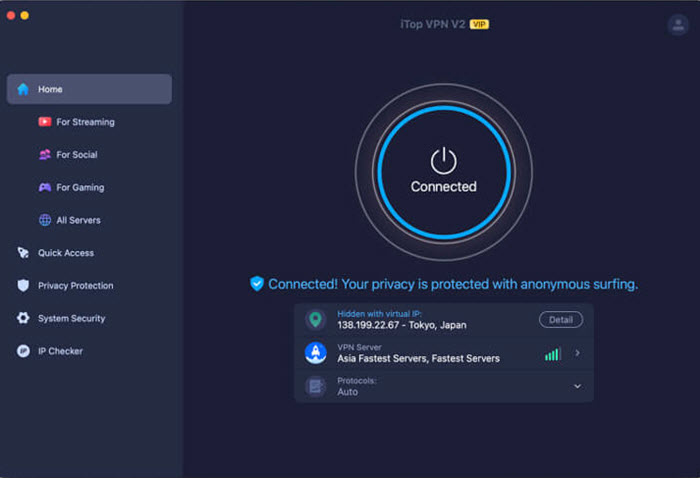
Are you looking to unblock websites on your Mac without spending any money? With a free VPN, you can access blocked content and browse the internet freely. However, not all free VPNs are created equal, and it’s important to choose a reliable and secure option.
One of the best free VPNs for Mac is NordVPN. With a high rating and positive reviews from users, NordVPN is a top recommendation for privacy and protection. It offers fast speeds, unlimited data usage, and a number of protocols to keep your internet usage private and secure.
If you haven’t used a VPN before, it’s quite simple. You just need to download and install the app or program on your Mac, create an account, and connect to a server. The VPN will hide your IP address and encrypt your data, allowing you to access websites that may be blocked in your region.
Another good option for Mac users is Atlas VPN. Although it has a 3-star rating, it offers fast and unlimited connection speed and access to multiple servers in different countries. Plus, with its kill switch feature and British Virgin Islands-based developer, your privacy is ensured.
If you’re on a budget-conscious, the performance and access to blocked content are must-haves. These free VPNs for Mac provide a good solution for unblocking websites and protecting your privacy.
Get the Best Free VPN App for Mac
If you’re in the business of protecting your personal data and keeping it safe online, then a free VPN for Mac is a must-have. With the increasing number of internet threats like data leaks and trackers, it’s not enough to rely on your Mac’s built-in security features. Plus, using a VPN can provide additional benefits like hiding your IP address and bypassing geo-restrictions, allowing you to access content that may not be available in your location.
But with so many VPN providers out there, which one should you choose? If you’re on a budget-conscious, trial options are a great way to test out different VPN services before committing to a paid plan. Here are some of the best free VPN apps for Mac that offer trials:
1. NordVPN
NordVPN is often claimed to be one of the best VPN providers in the market, and their free trial option for Mac users is no exception. With a simple and user-friendly interface, NordVPN offers advanced security features like double encryption and a strict no-logs policy to keep your data safe. Plus, you can connect to multiple locations and enjoy fast and stable connections.
2. AtlasVPN
If you’re into streaming, AtlasVPN offers a free trial for Mac users that is worth considering. With their British server locations, you can bypass geo-restrictions and access content from platforms like Amazon Prime and Netflix. The free trial lasts for 6 days and provides a relatively high rating for free VPN services.
3. IKEv2 VPN
If you need a free VPN service for Mac that is simple and easy to use, IKEv2 VPN is a good option. With their free trial, you can enjoy a secure and private browsing experience without needing to download any files or worry about advanced settings. Just set it up and you’re good to go.
In conclusion, getting a free VPN app for Mac can provide you with the security and privacy you need while browsing the internet. Just make sure to choose a reputable provider that offers a trial period, so you can test out their service and see if it meets your needs.
Enjoy Fast and Reliable VPN Connections on Mac for Free
If you are a Mac user and want to protect your online privacy and secure your internet usage, using a free VPN is a great option. With multiple VPN providers available, finding the right one can be a challenge. However, there are some highly rated free VPNs for Mac that offer fast and reliable connections, ensuring a secure browsing experience.
ProtonVPN
ProtonVPN is a free VPN provider that offers basic security features with a limit on monthly usage. With servers based in multiple locations, ProtonVPN provides fast and reliable connections. Its impeccable security features include encryption and obfuscated servers, which protect your online activities. While the free plan has a limit on usage, it is a great option to start with and upgrade to its premium plans for more features.
Hotspot Shield
Hotspot Shield is another popular free VPN for Mac that offers fast and secure connections. Its free plan provides access to a limited number of server locations, but it is still reliable for day-to-day internet usage. Hotspot Shield uses secure protocols like IKEv2, ensuring a secure session while browsing the web. It also offers premium plans with better features and enhanced security.
TunnelBear
TunnelBear is a free VPN that offers a relatively generous data limit for its users. With its easy-to-use program for Macs, getting started is simple and hassle-free. TunnelBear provides secure and fast connections, keeping your online activities private and secure. While the free plan has its limitations, it is a great option if you want to try out a VPN without committing to a paid subscription.
Overall, these free VPNs for Mac are great options for users who want to enjoy fast and reliable VPN connections without any cost. While they may have some limitations and restrictions compared to their paid counterparts, they still provide basic security and privacy features. So, select the one that suits your requirements and start enjoying a secure browsing experience on your Mac.
Free VPNs for Mac: What to Watch Out For
When looking for a free VPN for Mac, it’s important to be cautious and aware of potential limitations and risks. While there are many options available, not all of them provide a complete and secure browsing experience.
One thing to watch out for is obfuscated privacy claims. Some VPNs may promise complete privacy and anonymity, but in reality, they may keep logs of your online activity or share your data with third parties. It’s crucial to carefully read their privacy policy and terms of service before trusting them with your sensitive information.
Another aspect to consider is the number of locations and server connections offered by the VPN. Some free VPNs limit the number of server locations you can connect to, which can be restricting if you need access to specific content or want to bypass geographical restrictions.
Additionally, speed can be an issue with free VPNs. While they may claim to offer fast and unlimited speeds, some of them may throttle your connection or have slow server response times, resulting in a frustrating browsing experience.
It’s also important to be cautious of free VPNs that require you to provide personal information, such as your email address, before allowing you to use their service. This could potentially put your privacy at risk or lead to unwanted spam emails.
Furthermore, some free VPNs may include limitations on data usage or file transfer size, which can be inconvenient if you rely on VPN for large file downloads or video streaming.
In conclusion, while there are free VPN options available for Mac users, it’s essential to be aware of their limitations and potential risks. Always prioritize your privacy and security when choosing a VPN and consider investing in a paid VPN service if you require more advanced features and a guarantee of complete privacy.
Frequently Asked Questions about Free VPNs for Mac
1. Can I use a free VPN program on my Mac?
Yes, there are many free VPN programs available for Mac users. These programs are designed to provide you with a secure and private internet connection on your Mac computer.
2. Are all free VPNs for Mac suitable for users aged 4 and above?
While most free VPNs have age restrictions of 4+, it’s recommended to check the specific age requirement of each program before downloading it. Some VPNs may have different age restrictions based on their features and content.
3. Is it safe to use a free VPN on Mac?
Using a free VPN on your Mac is generally safe, as long as you choose a reliable and reputable VPN provider. However, it is important to note that free VPNs may have limitations and may not offer the same level of security and privacy as paid VPNs.
4. Can free VPNs really protect my privacy?
Free VPNs can help protect your privacy to a certain extent. They can hide your IP address, encrypt your internet traffic, and prevent third-party trackers from monitoring your online activities. However, be aware that some free VPNs may collect and share your personal data for advertising purposes.
5. Are free VPNs really fast?
While some free VPNs can offer relatively fast speeds, others may be slower due to the high demand of users on their servers. If speed is a priority for you, it is recommended to choose a paid VPN or consider upgrading to a premium plan of a free VPN.
6. Can free VPNs completely protect me from DNS leaks?
Most reputable free VPNs have built-in protection against DNS leaks. However, it is always a good idea to check the reviews and ratings of a VPN program to ensure its reliability and effectiveness in preventing leaks.
7. Can I use a free VPN to access streaming services like Netflix and Hulu?
While some free VPNs may offer access to streaming services, most of them have limitations and may not be able to bypass the geo-restrictions imposed by these platforms. If uninterrupted access to Netflix, Hulu, and other streaming services is important to you, it is recommended to choose a paid VPN.
8. Are my privacy and account information safe when using a free VPN on Mac?
Using a reputable and trustworthy free VPN should keep your privacy and account information safe. However, it’s always a good practice to regularly review and update your account security settings and passwords to ensure the highest level of protection.
9. Can I use multiple VPNs on my Mac?
Yes, you can use multiple VPNs on your Mac. However, it’s important to note that using multiple VPNs simultaneously may lead to conflicts and result in connection issues. It is recommended to use one VPN at a time for the best performance and security.
10. Which free VPN is the best for Mac?
There are many free VPNs available for Mac, each with its own features and limitations. Some popular options include ExpressVPN, which offers a 30-day money-back guarantee, and UrbanVPN, which provides access to Netflix and Hulu. Ultimately, the best free VPN for Mac would depend on your specific needs and priorities.
FAQ:
What is a VPN and why do I need it?
A VPN, or Virtual Private Network, is a secure connection that allows you to browse the internet privately and securely. It encrypts your internet traffic and masks your IP address, making it difficult for anyone to track your online activities. A VPN is especially useful when using public Wi-Fi networks, as it protects your sensitive information from being intercepted by hackers.
How does a free VPN with trial for Mac work?
A free VPN with trial for Mac works by providing you with a limited period of time to test out the VPN service before deciding whether to purchase a subscription. During the trial period, you can use the VPN to protect your privacy, access geo-restricted content, and browse the internet anonymously. Once the trial period is over, you can choose to continue using the free version of the VPN with certain limitations or upgrade to a paid subscription for more features and better performance.
Are there any limitations to using a free VPN with trial for Mac?
Yes, there are usually limitations when using a free VPN with trial for Mac. These limitations can include a limited number of server locations to choose from, slower connection speeds, and limited data usage. Some free VPNs also display ads or impose restrictions on certain activities, such as torrenting or streaming. However, these limitations can vary depending on the VPN provider, so it’s important to read the terms and conditions before signing up for a free trial.
Can I use a free VPN with trial for Mac to access geo-restricted content?
Yes, you can use a free VPN with trial for Mac to access geo-restricted content. By connecting to a VPN server in a different country, you can bypass the restrictions imposed by certain websites or streaming platforms and access content that is not normally available in your region. However, it’s worth noting that some streaming platforms have become more sophisticated in detecting VPN usage and may block certain VPN servers. In such cases, you may need to try different servers or consider upgrading to a paid VPN subscription.
Is it safe to use a free VPN with trial for Mac?
Using a free VPN with trial for Mac can be safe, but it depends on the VPN provider you choose. While there are many reputable VPN services that offer free trials, there are also some that are less trustworthy. It’s important to do your research and choose a VPN that has a strong track record of protecting user privacy and has positive reviews from other users. Additionally, you should make sure that the VPN uses strong encryption protocols and has a clear privacy policy that outlines how your data is handled.
What are the advantages of upgrading to a paid VPN subscription?
Upgrading to a paid VPN subscription offers several advantages over using a free VPN with trial for Mac. Paid VPNs generally offer faster connection speeds, a larger number of server locations to choose from, and unlimited data usage. They also often have better customer support and more advanced security features, such as kill switches and ad-blocking. Additionally, paid VPNs are less likely to display ads or impose restrictions on certain activities, giving you a more seamless and unrestricted browsing experience.
How do I choose the best free VPN with trial for Mac?
When choosing the best free VPN with trial for Mac, there are several factors to consider. Firstly, you should look for a VPN that has a good reputation and positive reviews from other users. It’s also important to choose a VPN that offers a sufficient number of server locations and has fast connection speeds. Additionally, you should check whether the VPN imposes any limitations on data usage or restricts certain activities. Lastly, take into account the level of customer support provided by the VPN provider, as this can be important if you encounter any issues while using the VPN.
Videos:
Stop using VPNs for privacy.
Stop using VPNs for privacy. by Wolfgang’s Channel 3 years ago 7 minutes, 32 seconds 2,460,394 views
