ExpressVPN: The Top Choice for Chrome VPN Extensions

If you are looking for a reliable and secure way to browse the internet, especially while using Google Chrome, then you should consider using a VPN extension. There are many VPN extensions available in the Chrome Web Store, each with its own set of features and benefits. In this article, we will take a look at some of the best VPN extensions for Chrome in 2023.
One of the top VPN extensions for Chrome is Surfshark. With Surfshark, you can enjoy an open and unrestricted internet, as it allows you to bypass geo-blocking and censorship. The extension also provides high-speed connections, so you can surf the web without any slowdowns. Additionally, Surfshark offers strong encryption to keep your data protected while browsing.
Another great VPN extension for Chrome is ProtonVPN. This VPN service is known for its strong security features and user-friendly interface. ProtonVPN allows you to avoid unwanted surveillance and protect your privacy online. It also includes a built-in ad blocker and malware scanner, so you can browse the web without having to worry about ads or malware.
Hola VPN is a free VPN extension for Chrome that also deserves a mention. While Hola VPN may not offer the same level of security and privacy as paid VPN services, it is still a popular choice for many users. Hola VPN works by routing your internet traffic through other users’ connections, which allows you to access blocked websites and content. However, it’s important to note that using a free VPN service like Hola VPN may come with certain limitations and risks.
In conclusion, choosing the best VPN extension for Chrome depends on your particular needs and preferences. Whether you’re looking for powerful security features, fast and reliable connections, or the ability to access geo-blocked content, there is a VPN extension for you. Just remember to do your research and check user reviews before making a decision. By using a VPN extension, you can ensure that your online activities are protected and your browsing experience is enhanced.
Stay Secure and Private Online
When it comes to online security and privacy, using a reliable VPN extension can greatly enhance your protection. There are several options available, but not all VPN extensions are created equal.
ProtonVPN: ProtonVPN is a well-known and highly recommended VPN extension for Chrome. It offers fast speeds and a strict no-logs policy, making it an excellent choice for those who value their privacy. You should definitely consider ProtonVPN if you want a secure and private browsing experience.
HideMe: HideMe is another great VPN extension for Chrome, especially for those on a budget. It offers affordable plans with extra features to protect your online activity. One of its best features is its strict no-logs policy, which ensures that your data remains private.
NordVPN: NordVPN is one of the most popular VPN providers, and its Chrome extension is no exception. It offers lightning-fast speeds and unblocks streaming services, making it ideal for those who enjoy online entertainment. With NordVPN, you can stay private and secure while keeping hackers at bay.
Atlas VPN: Atlas VPN is a high-quality VPN extension that offers a free plan with no limits on data or speed. It encrypts your traffic and keeps you safe from prying eyes. If you’re looking for a reliable and free VPN extension, Atlas VPN is definitely worth considering.
Hydra VPN: Hydra VPN is another great option if you’re looking for a VPN extension with high-quality encryption. It offers a free plan with 8 hours of free VPN connection per day, making it a valuable choice for those who don’t want to spend money on a VPN.
Before you download any VPN extension, there are a few important things to consider. First, make sure the extension you choose has a money-back guarantee in case you’re not satisfied with its performance. Second, avoid using free VPN extensions that may sell your data or have other limitations.
Using a VPN extension for Chrome can help you protect your privacy and stay safe online. With the right VPN, you can encrypt your traffic, keep your data private, and avoid unwanted surveillance. Consider the above choices and make sure to choose the best VPN extension for your needs.
Protect Your Data with NordVPN
In today’s digital age, protecting your data and privacy is more important than ever. With the increasing number of cyber threats and the potential for data breaches, it’s crucial to take steps to secure your online activities.
NordVPN: The Best VPN Extension for Chrome
When it comes to the best VPN extensions for Chrome, NordVPN stands out as the top choice. With servers in 59 countries, NordVPN allows you to browse the web securely and anonymously. It also grants you access to geo-restricted content from libraries all around the world.
NordVPN is known for its strict privacy policy and commitment to keeping your data safe. The company is based in Panama, a country that is not willing to do data retention or surveillance, ensuring that your online activities remain private.
One of the standout features of NordVPN is its Double VPN technology. This means that your internet traffic passes through two servers, providing an extra layer of security. It also prevents your real IP address from being exposed, spoofing your location and allowing you to surf the web more securely.
What’s more, NordVPN supports up to six simultaneous connections, so you can protect all your devices with just one account. The VPN apps are available for various operating systems, including Windows, macOS, Android, and iOS.
Why NordVPN is the Best
NordVPN’s advanced features and competitive price make it the best VPN for Chrome. It offers a 30-day money-back guarantee, allowing you to try it out risk-free. If you’re not satisfied, you can get a full refund.
Additionally, NordVPN has undergone third-party audits to verify its privacy and security practices. This ensures that your data is handled securely and that there are no trackers or ads following your online activities.
NordVPN also has a large network of servers, ensuring that you always have a fast and reliable connection. With its strong encryption and zero-logs policy, you can trust that your data will remain protected.
In summary, if you’re looking for a powerful VPN extension for Chrome, NordVPN is the best choice. Its strict privacy policy, advanced security features, and large network of servers make it the ideal option to keep your data and privacy secure while browsing the web.
Access Restricted Content Easily
When you’re looking to access restricted content online, using a VPN is your best option. VPNs, or virtual private networks, are software that create a secure and private connection between your browser and the internet. They allow you to browse the web without any restrictions imposed by your country or internet service provider.
There are many VPN extensions available for Chrome, and it can be overwhelming to choose the right one. To make sure you’re getting the best, it’s important to review the features and user reviews of each option. Two great options to consider are CyberGhost and ExpressVPN.
1. CyberGhost
CyberGhost is a user-friendly and easy-to-use VPN extension. It includes extra features like malware and strict no-logs policies to protect your online privacy. It has a large number of servers in different countries, so you can easily bypass country restrictions and access content from around the world. Furthermore, CyberGhost offers affordable and budget-friendly pricing plans.
2. ExpressVPN
ExpressVPN is known for its fast and reliable connection. With servers located in multiple countries, you can expect a fast and secure browsing experience. ExpressVPN uses WireGuard tunnelling protocol to ensure your traffic is protected. They also have a split-tunnelling feature that allows you to choose which traffic goes through the VPN and which doesn’t. ExpressVPN offers a 30-day money-back guarantee, so you can try it out with confidence.
In conclusion, adding a VPN extension to your Chrome browser is a great way to access restricted content easily. Whether you choose CyberGhost or ExpressVPN, you can be sure that your browsing experience will be protected and your online privacy will be maintained. Consider your budget, the features you need, and the location you want to access when making your decision. With the right VPN provider, you can browse the internet without any limitations or dangers.
Bypass Internet Censorship with NordVPN
When it comes to browsing the internet, every user needs a reliable VPN extension to bypass internet censorship and access blocked websites. NordVPN is one of the best options available for users who want a secure and powerful tool to bypass these restrictions. With many features and a user-friendly interface, NordVPN is just what every user needs to regain their online freedom.
NordVPN allows users to access websites and content that may be blocked in their country or region. By allowing users to connect to servers in different locations, NordVPN helps users bypass geo-restrictions and access the content they want. Whether it’s streaming services like Netflix or other websites with restricted access, NordVPN provides a reliable solution to bypass these limitations.
With NordVPN, users can also enjoy a high level of security. The service uses strong encryption protocols to protect user data and keep it private. NordVPN does not keep logs of user activity, ensuring that users’ browsing history and online traffic remain anonymous and secure. This level of privacy is crucial in today’s digital age, where there are many dangers and threats to consider.
The NordVPN extension for Chrome is easy to install and use. It comes with a user-friendly interface that is intuitive and great-looking. The extension allows users to control their VPN connection and select the server they want to connect to. NordVPN also offers split tunneling, a feature that allows users to choose which apps or websites go through the VPN and which ones use their regular internet connection.
One of the best features of NordVPN is its large server network. With over 5,000 servers in more than 60 countries, users can access content from all around the world. This allows users to bypass internet censorship and access blocked websites no matter where they are located. It also ensures a fast and reliable connection, making NordVPN a top choice for users looking for speed and quality.
When it comes to pricing, NordVPN offers different plans to suit every user’s needs. Users can choose from monthly, yearly, or multi-year subscriptions, each offering different pros and cons. The longer the subscription, the more value for your money you get. NordVPN also offers a 30-day money-back guarantee, allowing users to test the service and make sure it meets their needs.
In conclusion, NordVPN is a powerful VPN extension for Chrome that allows users to bypass internet censorship and access blocked websites. Its user-friendly interface, strong security protocols, and large server network make it a reliable choice for users looking for a VPN solution. Whether you want to stream Netflix, protect your privacy, or bypass geo-restrictions, NordVPN is the best option to take you through 2023 and beyond.
Enjoy High-Speed Streaming with NordVPN
If you are looking for a VPN that can provide high-speed streaming and advanced security features, NordVPN is a top choice. With NordVPN, you can enjoy fast and secure internet connections, allowing you to stream your favorite content without any interruptions.
NordVPN offers a wide range of servers to choose from, with over 4,500 servers in 62 countries. This vast network ensures that you can always find a server that matches your needs, whether you want to unblock popular streaming platforms like Netflix or protect your data from unwanted access.
One of the great features of NordVPN is its easy-to-use interface. You don’t need to be a tech expert to set up and use NordVPN on your Chrome browser. With just a few clicks, you can install the NordVPN extension and start enjoying the benefits of a secure and private internet browsing experience.
In addition to its user-friendly interface, NordVPN also offers a suite of privacy features to ensure your data is secure. With NordVPN’s advanced encryption protocols and no-logs policy, you can trust that your online activities are protected from prying eyes.
Another key advantage of NordVPN is its fast connection speeds. With NordVPN, you can enjoy high-speed streaming without any buffering or slowdowns. This is especially important when you want to watch HD or 4K content on platforms like Netflix, as slow speeds can lead to a frustrating viewing experience.
In terms of pricing, NordVPN offers different plans to suit your needs. You can choose between a monthly, yearly, or multi-year plan, and there is also a 30-day money-back guarantee to give you peace of mind. Considering the features and security that NordVPN offers, it is a great value for the price.
In conclusion, if you are looking for a VPN extension for Chrome that provides fast and secure streaming, NordVPN is a top choice. With its advanced features, vast server network, and user-friendly interface, NordVPN is a popular and highly recommended option for anyone who values their privacy and wants to enjoy a high-speed internet browsing experience.
Choose from Thousands of Servers Worldwide
When it comes to choosing a VPN extension for Chrome, there are plenty of options available. With thousands of servers worldwide, you can easily find a VPN extension that meets your needs and provides a secure browsing experience.
1. ExpressVPN
ExpressVPN is an intuitive VPN extension for Chrome that offers a wide range of server locations across the globe. With 1-click access to servers in over 90 countries, you can securely browse the internet without any restrictions. The advanced encryption technology ensures that your data is protected from any potentially dangerous threats.
2. CyberGhost
CyberGhost is another popular choice for Chrome users looking for a fast and reliable VPN. With servers in over 80 countries, you can expect lightning-fast speeds and anonymous browsing. The option to spoof your location allows you to access services that may be restricted in your country.
3. NordVPN
NordVPN is a highly-rated VPN provider that offers both free and paid options. With over 5,400 servers in 59 countries, you have plenty of choices when it comes to securely accessing the internet. The advanced encryption protocols and no-log policy ensure that your browsing activity remains private and secure.
Whether you are looking to access geo-restricted content, protect your online privacy, or simply browse the internet without any unwanted restrictions, using a VPN extension for Chrome is a valuable option. With a wide range of server locations, fast speeds, and advanced encryption technology, you can safely browse the internet without compromising your security.
Choose the VPN extension that best suits your needs and enjoy seamless browsing with the added value of global server options.
Keep Your Online Activities Anonymous
When it comes to browsing the internet, especially through Chrome, it’s important to ensure that your online activities remain anonymous and secure. One way to achieve this is by using VPN services, and luckily, there are several VPN extensions available for Chrome.
1. ExpressVPN
ExpressVPN is one of the best VPN extensions for Chrome, offering a full user account with a wide range of servers to choose from. With ExpressVPN, you can expect high-quality service with no-logs policy, keeping your online activities private and secure.
2. CyberGhost
CyberGhost is another popular VPN extension for Chrome that offers a wide range of servers to choose from. This service is well-known for its strong privacy features, such as a kill switch and DNS leak protection, ensuring that your online activities are shielded from hackers and trackers.
3. ProtonVPN
If privacy is your main concern, ProtonVPN is a great option. It uses the secure WireGuard protocol, which provides fast and secure connections. ProtonVPN also offers a free plan, making it suitable for users who want to try out the service before having a paid account.
4. Atlas VPN
Atlas VPN is a lesser-known VPN extension for Chrome, but it offers a tremendous amount of features. With Atlas VPN, you can avoid geo-blocking and gain access to streaming services like Netflix. Additionally, it ensures your privacy by providing a no-logs policy and encryption between your device and the internet.
In conclusion, using a VPN extension for Chrome is a great way to keep your online activities anonymous and secure. Whether you choose ExpressVPN, CyberGhost, ProtonVPN, or Atlas VPN, you can be sure that your privacy will be protected. So, take control of your online privacy today and browse the internet with peace of mind.
Prevent Tracking and Targeted Advertising
One of the well-known risks of browsing the internet is the tracking of your online activities by various third-party entities. This is where VPN extensions can add value to your browsing experience, and in particular, protect your privacy and prevent targeted advertising.
When you connect to the internet, your device becomes open to various online threats that can compromise your personal information. By using a VPN extension, you can shield your connection and browse securely without worrying about your data being sold or your online activities being tracked.
There are several VPN extensions available for Chrome that offer a range of features to suit your particular needs. For example, Hola VPN allows you to access content from different regions, such as Netflix, without any restrictions. NordVPN is another powerful option with advanced protocols and high-speed connection.
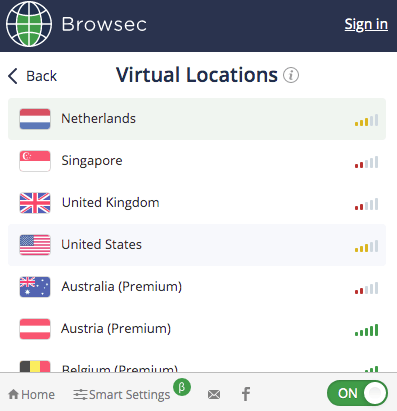
One key feature of VPN extensions is the ability to choose the location of your connection. This feature-packed option allows you to select a virtual location from multiple provided countries, such as the Netherlands, to ensure your browsing experience is more secure.
Before you download a VPN extension, it’s important to consider the speed and protocols it offers. Some VPN extensions might slow down your internet connection, so you should choose one that is known for its fast speed. Additionally, look for user-friendly settings and a clear privacy policy to keep your information secure.
In conclusion, using a VPN extension for Chrome makes browsing the internet more secure and prevents tracking and targeted advertising. With well-known options like Hola and NordVPN, you can enjoy a full browsing experience without compromising your privacy. Upgrade your browsing experience by downloading a VPN extension and feel the difference it makes in protecting your online activities.
Stay Safe on Public Wi-Fi Networks
When using public Wi-Fi networks, it is important to take precautions to protect your personal information and ensure your online safety. One effective way to do this is by using a VPN extension for your Chrome browser. By encrypting your internet connection and hiding your IP address, a VPN can help keep your data secure from hackers and other malicious actors on the network.
One well-known VPN extension is Hideme. It offers a user-friendly interface and fast connection speeds, making it a popular choice for Chrome users. Hideme also has a no-logs policy, ensuring that your online activity remains private and secure.
Another option is Surfshark, a feature-packed VPN extension that not only protects your online privacy but also unblocks restricted content on popular streaming platforms like Netflix. With servers in over 60 countries, Surfshark allows you to bypass geo-restrictions and access content from anywhere in the world.
Private Internet Access (PIA) is another reliable VPN extension for Chrome. It has a vast network of servers spread across 29 countries, ensuring a fast and reliable connection wherever you are. PIA also offers advanced features like DNS leak protection and an ad blocker, adding an extra layer of security to your browsing experience.
When choosing a VPN extension for Chrome, it’s important to consider factors like speed, security, and the ability to access geo-restricted content. Additionally, you may want to check for a kill switch feature, which ensures that your internet connection is automatically severed if the VPN connection drops.
In conclusion, using a VPN extension for Chrome is a great way to stay safe on public Wi-Fi networks. Whether you’re browsing in a coffee shop or accessing sensitive information on the go, a VPN can help protect your data and ensure your online privacy. Take the time to explore different options and find the one that best suits your needs.
Encrypt Your Internet Connection
When it comes to securing your online activities, using a trusted VPN extension for Chrome could be the solution you are looking for. By using a VPN, you can encrypt your internet connection and ensure that your data remains private and secure.
One of the tremendous advantages of using a VPN proxy is the ability to remain anonymous online. By rerouting your internet traffic through a different server in another country, you can mask your real IP address and protect your identity. This is especially important for those who are concerned about their online privacy or want to access geo-restricted content.
Before choosing a VPN extension for Chrome, it’s essential to look for one that offers the features you need. Some unwanted VPN providers may collect your data, while others may have limited server options. Therefore, it’s crucial to choose a reliable VPN provider that does not log your activities and offers a wide range of server locations worldwide.
One well-known VPN extension for Chrome is NordVPN. With over 5,000 servers in more than 60 countries, NordVPN offers top-notch security and privacy features. It uses advanced encryption protocols to ensure that your connection is always secure. Additionally, NordVPN allows you to split your connection between different servers, enhancing both speed and security.
Another popular VPN extension is ProtonVPN. ProtonVPN provides a free option that offers enough features for most users. However, if you want advanced features like extra protocols and a reliable connection, the paid option is a better choice. ProtonVPN also ensures that your data is never sold or shared with third parties, giving you peace of mind regarding your privacy.
If you are looking for a VPN extension that unblocks streaming services like Netflix and Google libraries, 6-Atlas VPN is worth considering. 6-Atlas VPN offers a fast and reliable connection, allowing you to watch videos and access content from different countries without any restrictions. The service also provides a 30-day money-back guarantee, ensuring customer satisfaction.
In conclusion, there are many VPN extensions for Chrome to choose from, each offering its own set of features and benefits. Whether you are concerned about your privacy, want to access geo-restricted content, or just need a reliable and secure connection, a VPN extension can make all the difference. By encrypting your internet connection, you can ensure that your data remains private and secure, no matter where in the world you are browsing from.
Experience a User-Friendly Interface
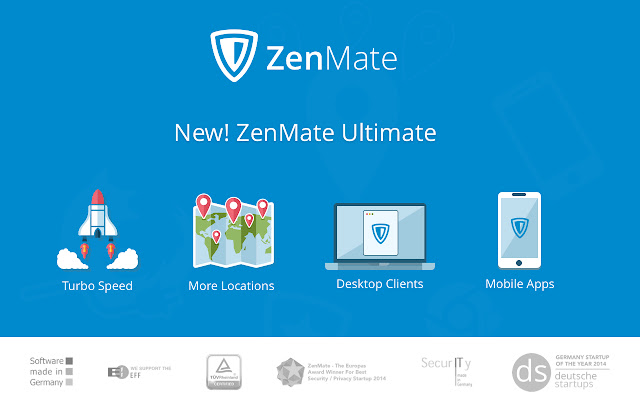
When choosing a VPN extension for Chrome, it is important to consider the user interface. The best VPN extensions provide a user-friendly experience, making it easy for even the least tech-savvy individuals to navigate and use the advanced features.
One option that ensures a user-friendly interface is the Atlas VPN extension. With a simple design and intuitive layout, it is much easier to customize the VPN settings and connect to different server locations.
Not all VPN extensions provide a user-friendly interface, with some appearing outdated and difficult to navigate. It is important to avoid these extensions, as they may not provide the necessary features to browse the internet securely and privately.
The best VPN extensions often offer a free version, which is limited in terms of server locations and available bandwidth, but still provides a decent level of security. However, for those who need more advanced features, such as unlimited data and access to a greater number of server locations, the option to upgrade to a paid version is usually available.
By choosing a user-friendly VPN extension, you can browse the internet securely, avoid any out-of-date software or dangerous browsing dangers, and ensure your privacy while online. With a user-friendly interface, you can easily customize the encryption protocol, check the available server locations, and choose the country you want to route your browsing through.
Overall, a user-friendly interface is a key feature to look for when choosing a VPN extension for Chrome. It makes the browsing experience much more enjoyable and hassle-free, providing an extra layer of security and privacy for those who use the internet regularly.
No Log Policy for Maximum Privacy
When it comes to online privacy, keeping your activities anonymous is of utmost importance. Many internet users are concerned about their data being tracked by third-party companies or even by big players like Google. However, having a VPN with a strict no-log policy can provide much-needed peace of mind.
An anonymous VPN ensures that your activities are not tracked or logged by the VPN provider. This means that even if someone tries to monitor your online behavior, they won’t be able to trace it back to you. With advanced encryption and a no-log policy, you can protect your privacy and surf the internet without worrying about your personal information being stored or shared.
Chrome extensions like Surfshark, NordVPN, and ProtonVPN are among the most popular options when it comes to VPNs with a no-log policy. These VPN providers offer a suite of features that are designed to keep your data safe and secure.
- Surfshark: Surfshark’s no-log policy ensures that your online activities remain private and anonymous. With its Chrome extension, you can protect your data and browse the internet with peace of mind.
- NordVPN: NordVPN is another VPN provider that takes privacy seriously. Their no-log policy, combined with advanced encryption, provides an extra layer of protection for your online activities.
- ProtonVPN: ProtonVPN is known for its commitment to privacy. They offer a no-log policy and strong encryption to ensure that your online activities remain secure and anonymous.
Regardless of which VPN provider you choose, having a no-log policy is crucial if you want to protect your privacy online. By encrypting your internet connection and shielding your activities from trackers and malicious entities, a VPN with a strict no-log policy can help you browse the web securely.
Secure Your Chrome Browsing Experience
When it comes to browsing the internet, privacy should never be compromised. With the increasing number of cyber threats and data breaches, it’s essential to protect your online activities. One way to ensure your privacy is by using a VPN extension for Chrome.
There are many VPN extensions available in the Chrome Web Store, but not all of them provide the same level of security and speed. Whether you want to access geo-restricted content, avoid warnings about malicious websites, or simply browse the internet privately, having a reliable VPN extension is crucial.
1. ProtonVPN
ProtonVPN is a popular VPN extension that comes with advanced features. It encrypts your internet traffic and hides your IP address, ensuring your browsing activities remain private and secure. It also allows you to choose from a large number of countries, including the Netherlands, for accessing geo-restricted content. With its user-friendly interface, ProtonVPN is easy to use even for beginners.
2. NordVPN
NordVPN is another top-rated VPN extension for Chrome. It offers fast and reliable connection speeds, making it ideal for streaming media and browsing websites without any slowdowns. NordVPN uses its patented technology called Hydra, which ensures that your data is encrypted and protected from prying eyes. Additionally, NordVPN has a strict no-logs policy, meaning it doesn’t store any information about your browsing activity.
3. Atlas VPN
Atlas VPN is a free VPN extension for Chrome that provides a secure and private browsing experience. While it includes a freemium model, it still offers 8-free locations to choose from, and the speeds are decent for general browsing. Atlas VPN encrypts your traffic and allows you to bypass geo-restrictions, making it a useful tool for accessing content from different countries.
In conclusion, these VPN extensions for Chrome can greatly enhance your browsing experience by providing privacy, security, and access to geo-restricted content. Whether you want to remain anonymous, avoid warnings about malicious websites, or stream content from Netflix and other platforms, using a VPN extension is a smart decision. Just make sure to check for updates regularly and stay up-to-date with the latest features for a seamless and protected browsing experience.
Protect Yourself from Malicious Websites
As the internet continues to evolve, so do the dangers it presents. Malicious websites are becoming more sophisticated in their attempts to steal personal information, install malware, and carry out online scams. It is crucial to take measures to protect yourself from these threats. One effective way to do so is by using a VPN extension for Chrome.
A VPN, or Virtual Private Network, provides a secure connection between your device and the internet. By encrypting your data and routing it through servers in different locations, a VPN protects your online privacy and masks your true IP address.
While there are numerous VPN options available, choosing the right one for your needs can be a challenge. Atlas VPN is a popular and feature-packed VPN extension for Chrome that offers both free and premium versions. The free version provides access to 3 server locations, while the premium version includes 6. Atlas VPN also makes privacy a priority, as it does not keep logs of your online activities.
One of the limitations of many VPNs is their impact on internet speed. Thankfully, Atlas VPN is user-friendly and provides fast and stable connections. This ensures that you can browse the web, stream content, and download files without experiencing significant slowdowns.
Another advantage of using a VPN extension for Chrome is that it allows you to bypass geo-restrictions. This means that you can access regionally restricted content, such as Netflix libraries from different countries. Atlas VPN is an excellent option for this, as it has multiple server locations and is capable of bypassing strict content blocking.
Regardless of which VPN you choose, it is essential to always be cautious when browsing the internet. While a VPN adds an extra layer of protection, it doesn’t guarantee complete security. It is important to be aware of the dangers of clicking on suspicious links, downloading unknown files, or providing personal information on unsecure websites. Constant vigilance is the best defense against online threats.
In conclusion, using a VPN extension for Chrome can significantly enhance your online security and protect you from malicious websites. Atlas VPN is a budget-friendly and feature-packed option that offers both free and premium versions. By encrypting your data and providing a secure connection, a VPN allows you to browse the web anonymously and access regionally restricted content. However, it is crucial to always exercise caution when browsing the web, regardless of whether you have a VPN or not.
Unblock Websites and Apps
When it comes to accessing blocked content on the internet, there are both free and paid VPN extensions available for Chrome that can help you bypass restrictions and unblock websites and apps.
Intuitive and User-friendly
One of the great choices for a VPN extension is NordVPN due to its high-quality service and intuitive user interface. With NordVPN, you can easily connect to a plethora of locations, making it easier to choose the optimal option for your needs and avoid internet restrictions.
Enhanced Security and Privacy
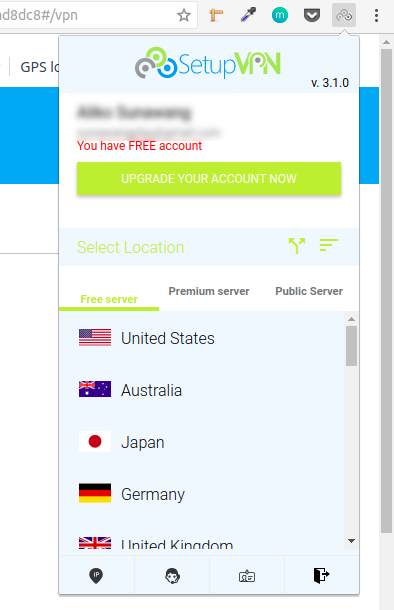
Another notable option to consider when choosing a VPN extension is ExpressVPN. This extension encrypts your internet traffic, protecting you from hackers, trackers, and other dangers. It also provides an upgraded protocol that masks your IP address and prevents WebRTC leaks, ensuring your online activities remain private and secure.
Avoiding Lesser-known Extensions
While there are many VPN extensions available, it’s important to note that not all of them provide the same level of security and privacy. Extensions like Hola may offer easy-to-use features but may not be as reliable or trustworthy as more established options like NordVPN or ExpressVPN.
Full Protection with CyberGhost
CyberGhost is a VPN extension that offers a high level of security and protection. It encrypts your internet traffic and allows you to browse safely. With over 6,000 servers in almost 90 countries, CyberGhost provides a great number of options for securely accessing blocked content and maintaining your privacy.
Conclusion
When it comes to choosing a VPN extension for Chrome, it’s important to consider the options provided. NordVPN, ExpressVPN, and CyberGhost are among the top choices, offering intuitive interfaces, high-level security, and a wide range of server locations. By choosing the right VPN extension, you can securely and privately browse the internet, unblock websites and apps, and avoid potential dangers along the way.
Enjoy Unlimited Bandwidth
When it comes to VPN extensions for Chrome, there are many options to choose from. Whether you are concerned about your privacy, want to bypass geo-restrictions, or simply want to enhance your browsing experience, using a VPN can be a great solution. One popular VPN extension is ProtonVPN, which offers unlimited bandwidth for its users.
With ProtonVPN, you can enjoy fast and secure browsing without worrying about hitting any limits. Unlike other VPNs that may restrict your bandwidth after a certain amount of data usage, ProtonVPN allows you to browse, stream, and download as much as you want. This is especially useful for users who consume a large amount of data or frequently engage in activities that require a lot of bandwidth.
Additionally, ProtonVPN is known for its strong security features. It uses top-of-the-line encryption to protect your data from hackers and malware, ensuring that your online activities are safe and private. Moreover, ProtonVPN’s strict no-logs policy means that your browsing history and personal information will never be recorded or sold to third parties.
In addition to ProtonVPN, there are many other VPN extensions for Chrome that offer unlimited bandwidth. ExpressVPN, NordVPN, and Hotspot Shield are just a few examples. These VPNs are also well-known for their reliability, user-friendly interfaces, and worldwide server presence, allowing you to connect to the internet with ease no matter where you are in the world.
In conclusion, using a VPN extension for Chrome can greatly enhance your browsing experience by providing unlimited bandwidth, strong security features, and the ability to connect to servers all over the world. Whether you choose ProtonVPN or any other VPN mentioned above, you can expect a reliable and user-friendly experience that keeps you safe and anonymous online.
24/7 Customer Support Available
When it comes to choosing a VPN extension for Chrome, one important factor to consider is the availability of customer support. Whether you have a question about installation, need assistance troubleshooting an issue, or simply want to learn more about the features of a VPN, having access to reliable customer support can make a big difference in your experience.
With 24/7 customer support, you can rest assured knowing that help is always just a click away. Whether it’s the middle of the night or early morning, you can reach out to a knowledgeable support team who can guide you through any problems you may encounter.
Many VPN providers offer customer support through various channels, including live chat, email, and phone. Some even have dedicated forums or online communities where users can discuss common issues and seek assistance from other users or support staff.
Regardless of which VPN extension you choose, having access to 24/7 customer support is an important feature to consider. It ensures that you can get the help you need, when you need it, regardless of your location or time zone.
FAQ:
What are VPN extensions for Chrome?
VPN extensions for Chrome are small software programs that you can add to your Chrome browser to enhance your online security and privacy. These extensions create a virtual private network (VPN) that encrypts your internet traffic, making it difficult for anyone to intercept or monitor your online activities.
Why should I use a VPN extension for Chrome?
There are several reasons why you should use a VPN extension for Chrome. Firstly, it enhances your online security by encrypting your internet traffic and protecting your personal information from hackers and cybercriminals. Secondly, it allows you to bypass geo-restrictions and access blocked websites or content. Additionally, a VPN extension can prevent your internet service provider (ISP) from tracking your online activities and selling your data to advertisers.
How do I install a VPN extension on Chrome?
Installing a VPN extension on Chrome is a simple process. First, open your Chrome browser and go to the Chrome Web Store. Search for the VPN extension you want to install, such as “ExpressVPN” or “NordVPN”. Click on the extension and then click on the “Add to Chrome” button. After the installation is complete, the VPN extension will appear as an icon next to your address bar. Click on the icon to activate the VPN and choose a server location.
Are VPN extensions free?
Some VPN extensions offer a free version with limited features, while others require a paid subscription to access all the features and server locations. Free VPN extensions often have restrictions on data usage, speed, or server selection. If you need advanced features and unrestricted access to servers worldwide, it is recommended to choose a paid VPN extension.
Can I use a VPN extension to stream geo-blocked content?
Yes, a VPN extension can help you bypass geo-blocked content and access streaming platforms like Netflix, Hulu, or BBC iPlayer from anywhere in the world. By connecting to a server in a different country, you can mask your IP address and make it appear as if you are browsing from that country. This allows you to overcome geographical restrictions and enjoy a wider range of content.
Is it legal to use a VPN extension?
Using a VPN extension is generally legal in most countries. VPNs are widely used to enhance online security and privacy. However, it is important to note that using a VPN to engage in illegal activities, such as hacking, copyright infringement, or accessing illegal content, is still illegal and can have legal consequences.
Videos:
5 Best FREE VPNs for Chrome in 2023 (100% Safe) 🎯
5 Best FREE VPNs for Chrome in 2023 (100% Safe) 🎯 by Techouse 1 year ago 15 minutes 38,208 views
Get Unlimited Free VPN on Google Chrome
Get Unlimited Free VPN on Google Chrome by Clinton Tech Tips 3 months ago 5 minutes, 33 seconds 1,833 views
How to Add FREE and Best VPN for Google Chrome – Lifetime Free VPN!
How to Add FREE and Best VPN for Google Chrome – Lifetime Free VPN! by Easy Classes 10 months ago 3 minutes, 41 seconds 20,445 views
