ExpressVPN Chrome Extension In 2023 Setup Guide – Final Verdict
In 2023, ExpressVPN released its long-awaited Chrome extension, providing users with a convenient and secure way to browse the internet. This extension, available in a zipped file that you can easily install, is the perfect solution for those who want to enhance their online security without sacrificing speed.
If you’re wondering how to set up the ExpressVPN Chrome extension, look no further. In this comprehensive guide, we’ll mention all the features you can expect from this extension and walk you through the step-by-step installation process.
Based on the latest technology and working seamlessly with the ExpressVPN app, the Chrome extension works by creating a secure and encrypted connection between your browser and the internet. With this added layer of security, you can browse the web without worrying about your online activities being tracked or intercepted.
When you first start the setup process, ExpressVPN will ask you to sign in with your existing account or create a new one. It’s important to note that if you’re already connected to a public Wi-Fi network, it’s recommended to enable the extension before entering any sensitive information.
During the installation, ExpressVPN will also ask for your permission to access your browsing history and online information. This is essential for the extension to function properly and provide you with the highest level of security.
Once the installation is complete, you’ll be able to enjoy all the benefits of the ExpressVPN Chrome extension. With just a few clicks, you can connect to any of ExpressVPN’s dedicated servers, ensuring a fast and secure browsing experience. Plus, the extension allows you to easily switch between different server locations to access geo-restricted content, such as Netflix.
In summary, the ExpressVPN Chrome extension is a must-have tool for anyone concerned about their online security. With its easy setup process and convenient features, you can browse the internet in a secure and private manner. So, why wait? Get the ExpressVPN Chrome extension today and enjoy the peace of mind it brings.
If you face any issues during the setup or encounter any problems with the extension, ExpressVPN has a dedicated support team ready to assist you. Simply contact them through their website or submit a support ticket, and they’ll promptly help you resolve any doubts or difficulties.
In conclusion, the ExpressVPN Chrome extension is a game-changer in the world of online security. Its seamless integration with the ExpressVPN app, along with its fast and reliable connection, makes it the ideal tool for those who want to browse the internet with peace of mind.
So, if you’re still wondering whether you should use the ExpressVPN Chrome extension, the answer is a resounding “yes!” Don’t compromise your online security any longer – take control of your privacy and start browsing the web securely today.
The final verdict is clear: The ExpressVPN Chrome extension is an essential addition to anyone’s browsing arsenal. Try it out and experience the difference for yourself!
ExpressVPN Chrome Extension Setup Guide – Final Verdict
If you’re wondering how to set up the ExpressVPN Chrome extension, you’re in luck. This final verdict will guide you through the simple steps to start using this powerful VPN tool with ease.
Step 1: Download and Install
To get started, head over to the Chrome Web Store and download the ExpressVPN Chrome extension. Once downloaded, enable the extension in your browser by clicking on the “Add to Chrome” button.
Step 2: Sign In and Connect

After installation, sign in to your ExpressVPN account using your registered email and password. Once you’re logged in, simply click on the ExpressVPN icon in your Chrome toolbar to open the extension. From there, select a server from the available locations and click the “Connect” button to establish a secure VPN connection.
Step 3: Enjoy Secure Browsing
Once connected, the ExpressVPN Chrome extension works seamlessly in the background, allowing you to browse the internet securely and privately. It encrypts your data transmission, ensuring your files and online activities are protected from hackers and cyber threats.
Additional Features
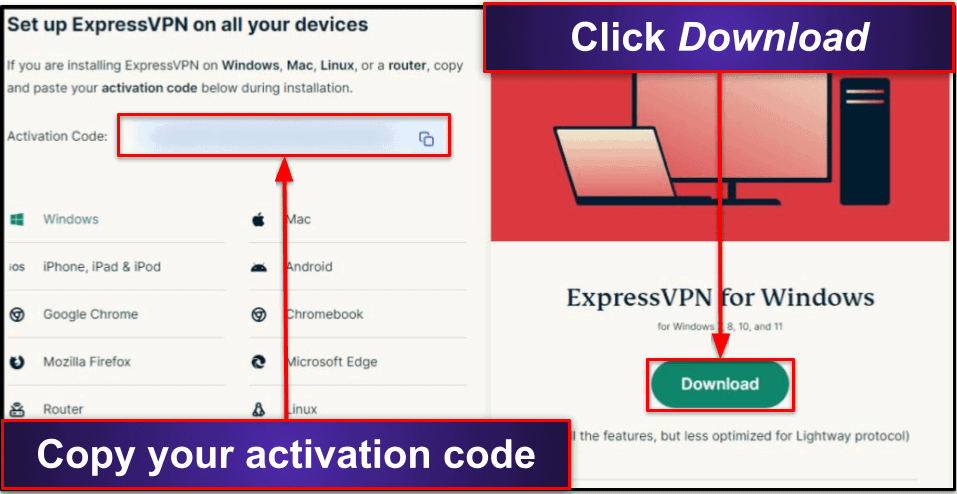
The ExpressVPN Chrome extension provides additional functionality such as bypassing geo-restrictions, allowing you to access streaming platforms like Netflix and conveniently browse across different digital locations. You can also clear cookies and browser history with just a few clicks, keeping your online presence clean and private.
Contact Support
If you encounter any problems during setup or while using the ExpressVPN Chrome extension, the company’s support team is available 24/7 to assist you. You can contact them through email, live chat, or even reach out to the active community on sites like Reddit.
In summary, the ExpressVPN Chrome extension is a must-have for anyone looking to enhance their online security and privacy. Its easy setup process, dedicated servers, and additional features make it a top choice for Chrome users. Don’t let slow or unsafe public Wi-Fi networks hold you back – get the ExpressVPN Chrome extension and enjoy a hassle-free and secure browsing experience.
ExpressVPN Chrome Extension: A Reliable VPN Solution
The ExpressVPN Chrome extension is a secure and reliable VPN solution that adds an extra layer of protection to your internet browsing experience. With this extension, you can access ExpressVPN’s global network of servers to encrypt your internet traffic, ensuring your online activities remain private and secure.
One of the key advantages of using the ExpressVPN Chrome extension is its ease of use. Without the need for additional software or configurations, you can simply install the extension and start using it right away. This makes it a convenient choice for both beginners and experienced users.
The ExpressVPN Chrome extension not only helps you browse the internet securely, but it also provides additional functionalities. For example, you can easily switch between different server locations to access geo-restricted content or to improve your internet speed. You can also choose to connect to a dedicated server optimized for streaming services like Netflix.
If you’re wondering about the speed and performance of the ExpressVPN Chrome extension, you can rest assured that it won’t slow down your internet connection. The extension is designed to provide fast and reliable access to the internet, ensuring you can browse, stream, and download files without any noticeable slowdown.
ExpressVPN is a reputable company with a strong commitment to user privacy. Their Chrome extension is no exception, as it allows you to browse the internet without leaving any trace of your online activities. This is especially important when using public Wi-Fi networks or facing potential tracking and surveillance.
Why Choose ExpressVPN Chrome Extension
- Easy setup and launching without the need for additional configurations
- Secure and private browsing experience with encryption
- Access to a global network of servers for improved internet speed and access to geo-restricted content
- Dedicated servers optimized for streaming services like Netflix
- Fast and reliable internet connection without noticeable slowdown
- Enhanced privacy and protection when using public Wi-Fi
With all these features and benefits, it’s no doubt that the ExpressVPN Chrome extension is a reliable VPN solution of choice for many users. Whether you’re already an ExpressVPN user or considering trying out their services, the Chrome extension is a convenient and effective way to keep your internet activities secure and private.
If you have any questions or need assistance with the ExpressVPN Chrome extension, their customer support is always ready to help. You can contact them directly through their website or browse through community resources like Reddit and the ExpressVPN app for additional support and stats.
In summary, the ExpressVPN Chrome extension is a reliable tool for anyone looking to enhance their online privacy and security. Its easy setup, fast speed, and additional functionalities make it a popular choice among users. So why wait? Give it a try and experience the benefits for yourself.
Setting Up ExpressVPN Chrome Extension
ExpressVPN Chrome Extension is a powerful tool that allows you to secure and encrypt your internet connection while browsing the web using the Chrome browser. Setting up the extension is a straightforward process that can be done in a few simple steps. In this guide, we will walk you through the process of setting up the ExpressVPN Chrome Extension and how to maximize its features.
Step 1: Downloading the Extension
The first step in setting up the ExpressVPN Chrome Extension is to download the extension files. You can find the extension in the Chrome Web Store by searching for “ExpressVPN” or by visiting the ExpressVPN website and navigating to the “Apps & Clients” section. Once you find the extension, click on the “Add to Chrome” button to start the download.
Step 2: Installing the Extension
After the download is complete, the extension file will be zipped. To install the extension, you need to extract the files from the zip archive. You can do this by double-clicking on the downloaded file or by using a file extraction software. Once the files are extracted, you can proceed to install the extension.
- Open the Chrome browser and click on the three-dot menu in the top-right corner.
- Select “More tools” from the dropdown menu and then click on “Extensions”.
- In the Extensions tab, enable the “Developer mode” by toggling the switch in the top-right corner.
- Click on the “Load unpacked” button and select the folder where you extracted the extension files.
- The ExpressVPN Chrome Extension will now be installed and ready to use.
Step 3: Configuring the Extension
Once the extension is installed, you can start configuring it to get the most out of its features. Click on the ExpressVPN icon in the Chrome toolbar to open the extension interface. From there, you can select the server location you want to connect to, enable features like split tunneling and DNS leak protection, and customize your preferences.
ExpressVPN is known for its fast and reliable network, so you can expect excellent browsing speed while using the extension. It also provides support for streaming services like Netflix, allowing you to access geo-restricted content without any issues. If you ever face any difficulties or need additional support, you can contact ExpressVPN’s customer service.
In conclusion, the ExpressVPN Chrome Extension is a valuable tool that enhances your browsing experience by providing a secure and private internet connection. With its easy setup process and convenient features, you can enjoy browsing the web without any worries.
Step-by-Step Guide to Install ExpressVPN Chrome Extension
If you are wondering how to install the ExpressVPN Chrome Extension, this step-by-step guide will walk you through the process.
1. Sign up for ExpressVPN
To start, you will need to sign up for an ExpressVPN account if you don’t have one already. You can do this by visiting the ExpressVPN website and following the signup process.
2. Download the Extension Files
Once you are signed up and ready to go, you can download the latest version of the ExpressVPN Chrome Extension. Look for the zipped files and download them to your computer.
3. Extract the Files
After the download is complete, extract the files from the zipped folder. This can usually be done by right-clicking on the folder and selecting “Extract All” or a similar option.
4. Enable Developer Mode in Chrome
Now, open Google Chrome and navigate to the extensions page. To do this, enter “chrome://extensions” in the address bar. Then, enable Developer Mode by toggling the switch in the top right corner.
5. Load Unpacked Extension
After enabling Developer Mode, click on the “Load Unpacked” button that appears. This will allow you to select the ExpressVPN extension files that you extracted in step 3.
6. Select the Extension Folder
A file browser will open, prompting you to select the folder where you extracted the ExpressVPN extension files. Locate the folder and select it.
7. Connect to a Server
Once the extension is added, you will see the ExpressVPN icon in your Chrome toolbar. Click on it to open the extension interface. From there, sign in with your ExpressVPN account credentials and select a server location to connect to.
8. Start Browsing with ExpressVPN
Now that you are connected to a server, you can start browsing the internet securely and privately. The ExpressVPN Chrome Extension helps to provide additional security and speed up your internet connection.
If you encounter any issues with the installation or setup process, don’t hesitate to contact ExpressVPN support for assistance. They will be able to guide you through any troubleshooting steps.
Activating ExpressVPN Chrome Extension
If you are wondering how to activate the ExpressVPN Chrome extension, you are at the right place. This guide will provide you with step-by-step instructions to get the extension up and running on your browser.
To start, make sure you already have the ExpressVPN app installed on your device. If not, you can download the latest version from the official website or your preferred app marketplace.
Once you have the ExpressVPN app ready, you can proceed to download the ExpressVPN Chrome extension. It is available in the Chrome Web Store, so simply search for “ExpressVPN” and select the extension. Click on “Add to Chrome” to start the installation process.
After the extension is installed, click on the ExpressVPN icon in your browser’s toolbar. This will open a pop-up window where you can log in to your ExpressVPN account. Enter your username and password, and click “Sign In”.
Once you are signed in, you can enable the ExpressVPN Chrome extension by toggling the switch to the “On” position. This will activate the extension and connect you to the nearest ExpressVPN server, ensuring a secure and private browsing experience.
The ExpressVPN Chrome extension offers additional features like a built-in Speed Test, Smart Location selection, and support for split tunneling. You can conveniently access these features through the extension menu.
If you encounter any issues or need further assistance, you can contact ExpressVPN’s customer support team. They are available 24/7 and will be happy to assist you in resolving any problems.
In summary, activating the ExpressVPN Chrome extension is a simple process that helps to enhance the security and privacy of your internet browsing. By connecting to ExpressVPN servers across various locations, you can enjoy a fast and secure internet connection, no matter where you are.
Enjoying Secure Browsing with ExpressVPN Chrome Extension
Browsing the internet has become an integral part of our daily lives. However, it is crucial to prioritize online security, especially when accessing sensitive information and personal data. ExpressVPN Chrome Extension provides a reliable and efficient solution to ensure a secure browsing experience.
Based on the latest technology, ExpressVPN Chrome Extension offers a wide range of features and functionalities. Whether you are using Windows or Mac, this extension allows you to keep your online activities anonymous and protected. You can easily download and enable the extension on your preferred browser, making it convenient for users.
One of the key reasons why ExpressVPN Chrome Extension is highly recommended is its commitment to security. With their extensive network of servers, ExpressVPN ensures that your data is encrypted and transmitted through a secure channel. This prevents any potential attacks or breaches from external sources.
Furthermore, ExpressVPN Chrome Extension offers a fast and reliable connection. If you are facing slow internet speed, the extension can optimize your network settings to enhance your browsing experience. This ensures that you can access websites and download files without any delays or interruptions.
In addition to security and speed, ExpressVPN Chrome Extension also provides access to geo-restricted content. Whether you want to stream movies on Netflix or access blocked websites, this extension allows you to easily bypass any restrictions. By selecting a server from ExpressVPN’s extensive network, you can enjoy your favorite content without compromising your security.
- Easy setup: The ExpressVPN Chrome Extension can be easily installed and configured on your browser. Simply follow the step-by-step instructions and start browsing securely within minutes.
- Improved privacy: By using the ExpressVPN Chrome Extension, your online activities and personal information are kept private. This gives you peace of mind while browsing the internet.
- Reliable customer support: ExpressVPN offers excellent customer support to assist users with any issues or concerns they may have. You can contact their support team through various channels, including email, live chat, or phone.
In conclusion, ExpressVPN Chrome Extension is an excellent choice for anyone looking to enhance their online security and enjoy a seamless browsing experience. With its advanced features and wide range of functionalities, this extension is a must-have for individuals who prioritize their privacy and security on the internet.
Using ExpressVPN Chrome Extension for Geo-Spoofing
If you are wondering how to access websites and content that are blocked or restricted in your country, the ExpressVPN Chrome extension is the perfect solution. With this extension, you can easily bypass geographical restrictions and access sites such as Netflix, Hulu, and more without any hassle.
Setting up the ExpressVPN Chrome extension is a straightforward process. First, make sure you have the latest version of the ExpressVPN app installed on your device. Then, select the “Chrome” option from the list of available browsers during the setup. Follow the instructions provided by ExpressVPN to enable the extension for your browser.
The ExpressVPN Chrome extension does not slow down your internet speed and ensures the security of your online activities. It offers a network of servers across the globe, allowing you to choose the most suitable location for geo-spoofing. You can select servers in different countries to access region-locked content.
One key feature of the ExpressVPN Chrome extension is its compatibility with various devices. Whether you are using Windows, Mac, or Linux, the extension works seamlessly on all platforms. It also supports routers such as eero, making it a versatile and convenient option for all users.
If you encounter any issues with the ExpressVPN Chrome extension, there are several resources available for troubleshooting. You can refer to the ExpressVPN repository on GitHub, where you will find helpful information and step-by-step instructions. Additionally, you can seek assistance from the ExpressVPN community on platforms like Reddit for further support.
In conclusion, the ExpressVPN Chrome extension is a reliable and user-friendly tool for geo-spoofing. It provides secure and fast internet access, unlocks blocked content, and offers a wide range of server options. Whether you are planning to access restricted websites or simply need to keep your online activities private, this extension is worth considering.
Why Choose ExpressVPN Chrome Extension in 2023?
ExpressVPN is one of the most popular VPN services available, and their Chrome extension provides an additional layer of security and functionality for users.
With ExpressVPN Chrome extension, you can easily sign up and start using their VPN service without the need to download any additional files. The extension works seamlessly with the desktop app, so if you’re already an ExpressVPN user, you can simply install the extension and get ready to go.
One of the main reasons to choose ExpressVPN in 2023 is its clear commitment to keeping user data private and secure. The company is based in the British Virgin Islands, which has no data retention laws, allowing ExpressVPN to provide a truly log-free experience.
ExpressVPN Chrome extension offers a dedicated server network with fast speeds, making it ideal for streaming and downloading files. Whether you’re using Netflix or any other streaming platform, ExpressVPN allows you to bypass geo-restrictions and access content from different locations.
Another reason to choose ExpressVPN Chrome extension is its compatibility with other browsers, such as Firefox and Safari. This flexibility allows you to use ExpressVPN’s features conveniently, no matter which browser you prefer.
ExpressVPN Chrome extension also provides additional features like split tunneling, which allows you to choose which websites or apps use the VPN. This can be useful if you want to keep some traffic local while using the VPN for specific purposes.
In conclusion, if you’re looking for a reliable VPN solution in 2023, ExpressVPN Chrome extension is definitely worth considering. With its advanced features, dedicated server network, and commitment to user privacy, ExpressVPN provides a secure and seamless browsing experience.
ExpressVPN Chrome Extension: Speed and Performance
The ExpressVPN Chrome extension is designed to provide users with fast and reliable VPN connections. Whether you’re browsing the internet, streaming video, or downloading files, speed and performance are crucial for a smooth online experience.
With ExpressVPN’s vast server network, you can select from a wide range of servers based on your specific needs. This allows you to connect to a dedicated server that offers excellent speed and stability, ensuring a seamless browsing experience without any lag or buffering.
One of the key features of the ExpressVPN Chrome extension is its ability to provide exceptional speed while keeping your internet connection secure. The extension encrypts your internet traffic, protecting your data from potential hackers and cyber threats.
Another advantage of using the ExpressVPN Chrome extension is the ability to conveniently switch between different server locations without interrupting your browsing session. Whether you want to access geo-blocked content or simply change your virtual location, you can do so with just a few clicks.
ExpressVPN also provides additional functionality to track and monitor your VPN connection’s speed and performance. You can view real-time stats, such as your connection speed, data usage, and server latency, helping you optimize your browsing experience.
In case you encounter any technical issues or need support, ExpressVPN offers excellent customer support services. You can contact their dedicated team of experts for guidance and troubleshooting assistance.
Overall, the ExpressVPN Chrome extension offers top-notch speed, performance, and security for your online activities. Whether you’re working on important files, streaming videos, or simply browsing the web, the extension ensures a smooth and reliable VPN connection.
ExpressVPN Chrome Extension: Security Features

The ExpressVPN Chrome Extension is packed with a range of security features to ensure your digital privacy and protect your online browsing. With its seamless integration into the Chrome browser, this extension is ready to provide you with a secure and private internet experience.
ExpressVPN Server Network
One of the key security features of the ExpressVPN Chrome Extension is its extensive server network. With servers located in over 160 locations across 94 countries, you have the flexibility to choose the server that suits your needs. This ensures that your online activities remain anonymous and protected from prying eyes.
ExpressVPN’s Trusted Encryption
ExpressVPN uses top-of-the-line encryption protocols to safeguard your data and protect your online privacy. By encrypting your internet traffic, this extension ensures that your personal information and browsing activities cannot be intercepted or accessed by unauthorized parties.
Additional Security Features
In addition to its server network and encryption protocols, the ExpressVPN Chrome Extension offers several other security features. These include a kill switch, which automatically disconnects your internet connection if the VPN connection drops, and DNS leak protection to prevent any accidental leaks of your DNS information.
The extension also provides split tunneling, which allows you to route only specific traffic through the VPN, and a built-in speed test to help you find the fastest server. Moreover, it regularly updates its code to address any security vulnerabilities and ensure the highest level of protection for its users.
Why Choose ExpressVPN Chrome Extension?
There are several reasons why ExpressVPN Chrome Extension is a popular choice among users. Its reputation as a reliable and trustworthy VPN provider, coupled with its robust security features, makes it an excellent choice for those seeking online privacy and security.
Whether you’re using public Wi-Fi, accessing geo-restricted content, or simply browsing the web, the ExpressVPN Chrome Extension is designed to give you peace of mind and keep your data safe from any potential threats.
ExpressVPN Chrome Extension: Enhanced Privacy
The ExpressVPN Chrome extension is a must-have for anyone who values their privacy online. With the increasing number of cyber threats and data breaches in 2023, it is crucial to take proactive steps to protect your personal information.
By using the ExpressVPN Chrome extension, you can select a dedicated server based on your location and ensure that your internet connection is secure. This extension helps you browse the internet anonymously and gives you additional security when using public WiFi networks.
One of the best features of the ExpressVPN Chrome extension is its ease of use. Simply enable the extension in your browser, sign in with your ExpressVPN account, and you’re ready to go. No need to install any additional software or worry about complex configurations.
Furthermore, the ExpressVPN Chrome extension offers blazing fast speeds, ensuring that your browsing experience is not slowed down. This is especially important when streaming or downloading large files.
If you encounter any issues or have any questions, ExpressVPN provides dedicated customer support. You can contact their team via email or live chat, and they will be happy to assist you.
So, why should you use the ExpressVPN Chrome extension? It’s simple. It keeps your internet connection secure, enables anonymous browsing, and offers fast speeds. Whether you’re browsing at home or on the go, this extension is a must-have for anyone who values their privacy and security online.
ExpressVPN Chrome Extension: Simplicity and Intuitiveness
The ExpressVPN Chrome extension is dedicated to providing a simple and intuitive experience for users. With its user-friendly interface, even those who are not tech-savvy can easily navigate and utilize the extension.
One of the key advantages of the ExpressVPN Chrome extension is its speed. Unlike some VPNs which can slow down your internet connection, ExpressVPN ensures fast and secure browsing without compromising on speed.
If you are wondering how to set up the ExpressVPN Chrome extension, the process is quite straightforward. Simply sign up for an ExpressVPN account, select the Chrome extension option during the sign-up process, and download the extension. Once downloaded, it seamlessly integrates into your browser, providing instant access to a secure and private internet connection.
ExpressVPN’s Chrome extension works seamlessly with their existing servers, ensuring a reliable and secure connection for users across the globe. Whether you are accessing public Wi-Fi or simply want to browse the web without being tracked, the ExpressVPN Chrome extension has you covered.
Another noteworthy aspect of the ExpressVPN Chrome extension is its compatibility. It not only works on Windows, but it can also be used on other operating systems, giving users the flexibility they need.
If you are already using the ExpressVPN application and wondering why you should download the extension, let us mention some of its key features. The extension offers a code-based interface called CodeSpace, where users can access and modify files in their Github repositories without leaving their browser. This functionality is especially useful for developers and those who regularly work with code.
In conclusion, the ExpressVPN Chrome extension provides a simple, secure, and intuitive way to get the most out of your VPN. With its fast speed, compatibility, and additional features like CodeSpace, it is a valuable addition to ExpressVPN’s already impressive lineup of services.
ExpressVPN Chrome Extension: Compatibility and Flexibility
The ExpressVPN Chrome extension is designed to work seamlessly with the Google Chrome browser, providing users with a convenient and secure way to browse the internet. This extension is compatible with both Windows and Mac operating systems, ensuring that users can easily integrate it into their preferred browser.
With a vast network of servers located in different branches around the world, ExpressVPN offers users the flexibility to select the server location that suits their needs. This allows for a faster and more reliable internet connection as users can connect to the server that is closest to their physical location. Additionally, the extension provides a clear and user-friendly interface, making it easy for users to navigate and set up.
When it comes to security, the ExpressVPN Chrome extension is ready to keep your digital information safe. The extension uses encryption to protect your data from potential threats and ensures that your browsing activities remain private. This added layer of security helps to prevent unauthorized access to your personal information and keeps your online activities anonymous.
In terms of additional features, the ExpressVPN Chrome extension has several notable ones. It allows users to block ads and trackers, enabling a smoother and faster browsing experience. The extension also provides the option to split tunnel, which means that users can selectively route their internet traffic through the VPN, allowing them to access local network resources without compromising their online security.
If you are facing any issues or have any doubts about the ExpressVPN Chrome extension, the company’s support team is ready to assist you. They provide comprehensive documentation and support resources, including a dedicated FAQ section, troubleshooting guides, and a community forum where users can interact and get assistance.
In conclusion, the ExpressVPN Chrome extension is a valuable tool for anyone looking to enhance their browsing experience and ensure their online security. With its compatibility, flexibility, and arsenal of features, the extension is a reliable choice for users who want to stay connected and protected while using the Chrome browser.
ExpressVPN Chrome Extension: Customer Support
When it comes to customer support, the ExpressVPN Chrome extension works hard to provide a seamless experience for its users. Whether you have an issue with the setup, connection, or any other aspect of the extension, their support team is ready to assist you.
If you encounter any problems while using the extension, you can reach out to ExpressVPN’s customer support through their website or directly through the extension itself. They offer a live chat feature, where you can chat with a representative in real-time to get immediate help.
ExpressVPN’s customer support team is knowledgeable and responsive, ensuring that you receive prompt assistance for any issues you may be facing. They can guide you through the process of setting up the extension, troubleshooting connection problems, and provide solutions tailored to your specific needs.
Whether you’re having trouble accessing Netflix through the extension or need help selecting the best server for your needs, ExpressVPN’s customer support is there to enable a smooth experience. They also provide step-by-step instructions and video tutorials to assist you in getting started with the extension.
In addition to their live chat support, ExpressVPN has an extensive knowledge base on their website. This includes FAQs, troubleshooting guides, and setup instructions for various devices and browsers. You can also find information on how to enable the extension on specific routers, like eero, for a secure Wi-Fi network.
ExpressVPN’s customer support team is available 24/7, ensuring that you can easily resolve any problem you may encounter. With their help, you’ll be able to fully enjoy the features and benefits of the ExpressVPN Chrome extension, without any hassle or frustration.
ExpressVPN Chrome Extension: Pricing Plans
When it comes to pricing plans, the ExpressVPN Chrome Extension offers a variety of options to choose from. Whether you’re a casual user or a power user, there’s a plan that will suit your needs and budget.
First, let’s start with the free version. ExpressVPN does offer a free version of their Chrome extension, but it has some limitations. While you can still enjoy basic features like security and privacy, the free version has a limited number of server locations and slower speed compared to the paid plans.
For those who are looking for more advanced features and enhanced performance, the paid plans are the way to go. ExpressVPN offers three different pricing plans, with discounts available for longer subscription periods. With these plans, you can enjoy unlimited server locations and faster speeds, allowing you to access content from across the globe and stream your favorite shows on Netflix without any buffering.
ExpressVPN also offers excellent customer support, so if you ever run into any issues or have any questions, their team is always ready to help. They have a live chat support feature on their website, as well as a support center with helpful resources and tutorials.
To sign up for the ExpressVPN Chrome Extension, you can conveniently download the app from the Google Chrome Web Store. Once installed, you can easily enable and configure the extension through your Chrome browser settings. ExpressVPN also provides clear instructions on how to set up the extension, so even if you’re not tech-savvy, you should have no problems getting started.
Overall, the ExpressVPN Chrome Extension is a great addition to your digital toolbox if you’re concerned about online security and privacy. With its easy setup, fast speed, and reliable network, you can browse the web with confidence and peace of mind.
So, if you’re wondering which VPN extension to choose for your Chrome browser, ExpressVPN should definitely be on the top of your list. Its features, speed, and security make it a popular choice among users worldwide. Give it a try and experience the difference yourself!
ExpressVPN Chrome Extension: User Reviews
ExpressVPN’s Chrome extension has received positive feedback from users who have tried it. Many have mentioned the convenience it offers, allowing them to quickly connect to a server and start browsing securely.
The functionality of the extension has been praised, with users mentioning that they could easily select a server, download files, and use their favorite browsers without any issues.
Users have also mentioned that the Chrome extension works well with other VPN protocols, such as Xcode and digital servers.
Some users have noted that the extension can sometimes be slow, especially when connecting to a server in a distant location. However, this has not been a major issue for most users.
One important feature that users appreciate is the ability to easily enable/disable the VPN with just a click, making it convenient for quick access to secure browsing.
The extension has also been praised for its security features, with users mentioning that it helps keep their online activities private and protects them from potential threats.
In conclusion, the ExpressVPN Chrome extension has been well-received by users and provides a reliable and convenient way to browse the internet securely.
ExpressVPN Chrome Extension: Feedback and Ratings
When it comes to the ExpressVPN Chrome Extension, feedback and ratings from users across the digital landscape play a significant role in determining its reliability and effectiveness. With branches in different parts of the world, ExpressVPN has gained a formidable name in the VPN industry, launching various products to enhance internet security and privacy.
In terms of ratings, the ExpressVPN Chrome Extension receives positive feedback from users who have used it on both Windows and Mac platforms. According to stats based on user reviews, the extension is rated highly for its secure browsing experience and ease of use. Users mention that it provides an extra layer of security while browsing the internet.
One of the main benefits of the ExpressVPN Chrome Extension is that it offers a secure and private browsing experience without having to rely solely on the company’s desktop app. There is no doubt that the ExpressVPN Chrome Extension offers a seamless browsing experience without any compromise on security.
One notable feature of the ExpressVPN Chrome Extension is its ability to work alongside other security tools and platforms. This means that users can still enjoy the benefits of ExpressVPN’s secure browsing even when facing problems with their eero WiFi network or other internet connectivity issues. Users simply have to contact ExpressVPN’s support team, and they will guide them through the setup process.
Another advantage of the ExpressVPN Chrome Extension is its compatibility with streaming services like Netflix. Users can bypass geo-restrictions and access content from different regions without any issues. This feature has been highly praised by users who have faced problems accessing certain content on other VPN platforms.
For developers and tech-savvy users, the ExpressVPN Chrome Extension offers a repository of code files and documentation on GitHub. This allows users to stay up-to-date with the latest version of the extension and select the version that works best for their needs. The GitHub repository also provides a platform for users to contribute to the development of the extension, providing feedback and suggestions for improvement.
In conclusion, the ExpressVPN Chrome Extension has received positive feedback and ratings from users worldwide. Its ability to provide a secure and private browsing experience, compatibility with streaming services, and options for developers make it a reliable choice for those in search of enhanced online security.
Latest commit: Updates and Improvements to ExpressVPN Chrome Extension
The ExpressVPN Chrome Extension has recently undergone updates and improvements, ensuring that it continues to provide users with a seamless and secure browsing experience. This latest commit includes enhancements to the extension’s functionality and overall performance.
The company behind ExpressVPN is dedicated to keeping their servers up-to-date and ready to handle the increasing demands of internet users. With this latest commit, the extension is optimized to deliver faster connection speeds, ensuring that users can browse and stream without any slowdowns.
Users who already have the ExpressVPN Chrome Extension downloaded and installed will automatically receive these improvements. They should notice a clear difference in the speed and reliability of their connection, as well as additional features that enhance their browsing experience.
The improved ExpressVPN Chrome Extension works in conjunction with the ExpressVPN app, allowing users to connect to a server of their choice and browse the internet securely. Through the extension, users can easily select the server they want to connect to, making it convenient and user-friendly.
The ExpressVPN Chrome Extension also offers advanced features such as split tunneling and DNS leak protection, ensuring that users’ online activities remain private and secure. These features are especially useful for individuals who want to access geo-restricted content or who are concerned about their online privacy.
ExpressVPN is known for its commitment to user satisfaction and continuous improvement. Their team regularly reviews and updates the extension to provide the best possible browsing experience. Users can rest assured that the latest commit to the ExpressVPN Chrome Extension incorporates the most recent improvements and enhancements.
If you’re already using ExpressVPN and have the Chrome extension installed, it’s highly recommended to update to the latest version. This will ensure you have access to the most up-to-date features, as well as any bug fixes or security patches that have been implemented.
In summary, the latest commit to the ExpressVPN Chrome Extension brings a range of updates and improvements to enhance its functionality and performance. Whether you’re already a user or considering downloading the extension, you can trust that it will provide a secure and efficient browsing experience.
Вопрос-ответ:
What is a Chrome extension?
A Chrome extension is a small software program that extends the functionality of the Google Chrome web browser. It can add features, modify the appearance, or enhance user experience on the browser.
How does ExpressVPN Chrome extension work?
The ExpressVPN Chrome extension is a tool that allows you to easily connect to and control your ExpressVPN service directly from your Chrome browser. It encrypts your internet traffic and routes it through ExpressVPN’s secure servers, providing you with anonymity and protection while browsing the web.
Is ExpressVPN Chrome extension free to use?
No, the ExpressVPN Chrome extension is not free. It requires a subscription to ExpressVPN’s service, which comes with a monthly or yearly fee.
How do I set up ExpressVPN Chrome extension?
To set up the ExpressVPN Chrome extension, you first need to have an active subscription to ExpressVPN. Then, you can download and install the extension from the Chrome Web Store. Once installed, you need to log in to your ExpressVPN account and follow the on-screen instructions to connect to a server.
Can I use ExpressVPN Chrome extension on my mobile device?
No, the ExpressVPN Chrome extension is only available for use on the Google Chrome web browser. However, ExpressVPN does offer apps for various mobile devices, including Android and iOS.
What are the benefits of using ExpressVPN Chrome extension?
Using the ExpressVPN Chrome extension offers several benefits, including enhanced privacy and security while browsing the web, access to geo-restricted content, bypassing censorship, and protection against hackers and malicious websites.
Is the ExpressVPN Chrome extension easy to use for beginners?
Yes, the ExpressVPN Chrome extension is designed to be user-friendly and intuitive. It has a simple interface that allows even beginners to connect to a VPN server with just a few clicks.
Видео:
Wie funktioniert ExpressVPN 2023 – Kauf, Installation & Setup Tutorial
Wie funktioniert ExpressVPN 2023 – Kauf, Installation & Setup Tutorial by VPN Bewertung 1 month ago 4 minutes, 45 seconds 307 views
How to get ExpressVPN FOR FREE | ExpressVPN FREE guide 2023
How to get ExpressVPN FOR FREE | ExpressVPN FREE guide 2023 by CyberNews 2 weeks ago 5 minutes, 22 seconds 4,574 views
What’s ExpressVPN Chrome extension? How to install & use it on Google Chrome?
What’s ExpressVPN Chrome extension? How to install & use it on Google Chrome? by HowtoFixDllExeErrors 1 year ago 1 minute, 23 seconds 408 views
