Browsec VPN Review in UK – Ensuring Safe and Secure Browsing
If you are looking for a reliable VPN service in the UK, Browsec VPN is definitely worth a click. This VPN extension is available for popular browsers like Chrome, Firefox, and Opera, making it easily accessible for a wide range of users. Whether you want to enhance your online security, bypass geo-restrictions, or enjoy faster internet speed, Browsec VPN has got you covered.
One of the key factors that sets Browsec VPN apart from other VPN services is its focus on security. With over 1011 servers in more than 41 countries, Browsec VPN offers a secure and anonymous browsing experience. It uses military-grade encryption to protect your personal data and ensure your online activities are completely private. Additionally, Browsec VPN operates under the jurisdiction of Russia, which has strict data protection laws.
When it comes to speed, Browsec VPN does not disappoint. Whether you are streaming movies, downloading files, or simply browsing the web, Browsec VPN provides fast and reliable connection speeds. The virtual servers are located strategically in countries like the Netherlands, ensuring that you get the best possible speed and performance.
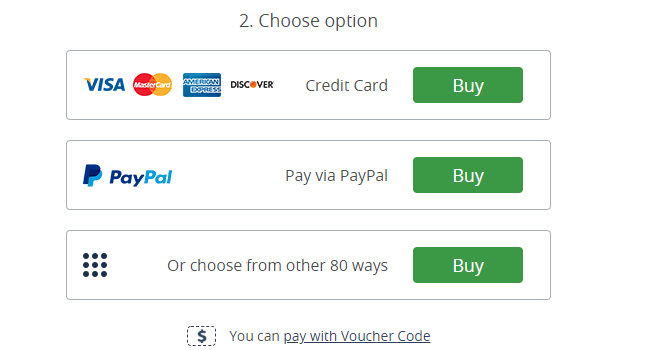
Browsec VPN also offers a range of convenient features and services. It has a user-friendly interface that makes it easy to navigate and use, even for beginners. The customer support is highly responsive, with a live chat option available on the official website. In terms of payment options, Browsec VPN accepts various methods, including credit cards, Amazon Pay, and even Bitcoin.
If you are concerned about compatibility, Browsec VPN has you covered. It supports major operating systems, including Windows, macOS, Android, and iOS. You can use Browsec VPN on multiple devices simultaneously, making it a suitable choice for both personal and professional use. With Browsec VPN, you can browse the internet with peace of mind, knowing that your data is secure and your privacy is protected.
Overall, Browsec VPN is a trustworthy and reliable VPN service that offers a range of features and benefits. It is a great choice for anyone looking to enhance their online security, bypass geo-restrictions, or enjoy faster internet speeds. Whether you are streaming content, conducting online banking transactions, or simply browsing the web, Browsec VPN has everything you need to stay safe and anonymous online.
Overview of Browsec VPN
Browsec VPN is a popular VPN service that provides secure and anonymous browsing for users in the UK. It offers a variety of features and benefits that make it a preferred choice among VPN users.
One of the main advantages of Browsec VPN is its fast and reliable connection. It allows users to browse the internet without experiencing any lag or slowdowns, ensuring a smooth and seamless browsing experience.
Browsec VPN offers a browser extension for Google Chrome, Mozilla Firefox, and Microsoft Edge, making it easy to install and use on your preferred browser. It also has dedicated apps for Windows, iOS, and Android, providing compatibility across different devices.
The VPN service has servers located in various countries, allowing users to choose their desired location for browsing. This is especially useful for accessing region-restricted content, such as streaming services or websites that are blocked in your country.
When it comes to security, Browsec VPN ensures the privacy and anonymity of its users. It uses strong encryption methods to protect your data and browsing activities from being intercepted by hackers or third parties.
Browsec VPN also has a strict no-logs policy, which means it doesn’t store any information about your online activities. This ensures that your browsing history and personal information remain private and secure.
As for pricing, Browsec VPN offers both free and premium versions. The free version has limited features and a slower connection speed, while the premium version provides access to all features, faster speeds, and a larger number of servers to choose from.
In conclusion, Browsec VPN is a reliable and secure VPN service that provides fast and anonymous browsing. Its compatibility with various browsers and devices, as well as its strong security features, make it a recommended choice for users in the UK and beyond.
Security and Privacy Features
Browsec VPN offers several security and privacy features that make it a reliable choice for users in the UK.
The VPN uses strong encryption to protect users’ online activities and keep their data secure. With Browsec VPN, you can browse the web and access websites without worrying about your personal information being compromised.
One of the standout features of Browsec VPN is its ability to bypass geo-restrictions and access streaming platforms like Netflix, Hulu, and Amazon Prime Video from any country. This is especially useful for UK users who want to watch their favorite shows and movies that are only available in other regions.
Browsec VPN also offers a no-log policy, which means that your online activities are not recorded or stored. This ensures your privacy and prevents any unauthorized access to your data. Additionally, Browsec VPN does not sell or share your personal information with third parties.
The VPN is compatible with multiple devices and platforms, including Windows, Mac, iOS, and Android. This allows you to protect all of your devices with a single subscription. Whether you’re using a laptop, smartphone, or tablet, Browsec VPN has you covered.
Customer support is available 24/7, and the Browsec VPN website provides plenty of resources and guides to help you get started and troubleshoot any issues. They also offer a free version of the VPN, which is a great option for users who want to try it out or only need limited features.
In conclusion, Browsec VPN is a secure and reliable VPN service that offers strong encryption, access to streaming platforms, a no-log policy, and excellent customer support. It is a recommended choice for users in the UK who value their online security and privacy.
Encryption Protocols and Technology
When it comes to Browsec VPN, the first thing to consider is its encryption protocols and technology. Browsec offers a variety of encryption protocols to ensure the security and privacy of your data. It uses the AES 256-bit encryption, which is considered to be one of the most secure encryption standards available. This encryption ensures that your online activities and sensitive information remain protected from hackers and other malicious actors.
Encryption Protocols
Browsec VPN supports several encryption protocols, including OpenVPN, L2TP/IPSec, and PPTP. OpenVPN is widely regarded as the most secure and reliable protocol, as it provides a high level of encryption and is resistant to hacking attempts. L2TP/IPSec is another strong encryption protocol that offers good security and is often used in conjunction with OpenVPN for better overall protection. PPTP, on the other hand, is a less secure protocol that should only be used if other options are not available.
Technology
Browsec VPN utilizes advanced technology to ensure fast and reliable connections. It has a network of servers located in different countries around the world, including the UK. This allows you to bypass geo-restrictions and access content that is only available in certain regions. The technology used by Browsec also enables it to provide fast and stable connections, ensuring that you can stream and browse without any buffering or lag.
Furthermore, Browsec VPN has a strict no-logs policy, which means that it does not store any logs of your online activities. This ensures that your browsing history, IP address, and other sensitive information are not recorded or tracked. This is especially important for users who value their privacy and want to keep their online activities private.
Server Network in the UK
When it comes to server network coverage in the UK, Browsec VPN offers a reliable and extensive network of servers. With servers located in various parts of the country, you can easily browse websites, stream content, and access live services with better speed and performance.
The Browsec VPN server network includes servers in major cities of the UK, such as London, Manchester, and Birmingham. This ensures that you have a wide range of options to choose from, based on your location and browsing needs.
Whether you’re using Windows, Mac, or Linux, Browsec VPN provides browser extensions for popular browsers like Chrome, Firefox, and Edge. Their browser extensions work seamlessly, allowing you to keep your online activities private and secure.
For Android and iOS users, Browsec VPN offers dedicated apps that you can easily install from the official app stores. These apps are user-friendly and provide a seamless VPN experience on your mobile devices.
With Browsec VPN’s server network in the UK, you can bypass geo-restrictions and access content that is usually not available in your country. Whether you want to watch UK-exclusive streaming services or browse UK-based websites, Browsec VPN has got you covered.
If you’re concerned about the privacy and security of your data, Browsec VPN’s server network in the UK ensures that your online activities remain anonymous. With the latest encryption protocols and a strict no-logs policy, you can trust Browsec VPN to keep your personal information safe and secure.
Speed and Performance
When it comes to speed and performance, Browsec VPN offers reliable services to its users in the UK. With its add-ons for popular browsers like Chrome and Firefox, users can easily install and set up the VPN with just a few clicks. Browsec VPN has a network of servers based in different countries, including the UK, ensuring fast and stable connections.
For users in the UK who want to access geo-restricted content from other countries, Browsec VPN is a trustworthy option. It allows users to hide their IP address and browse the web anonymously, so they can watch their favorite shows on streaming platforms like Netflix or Amazon from any country.
There are no noticeable speed problems when using Browsec VPN on both Windows and Mac. Users can enjoy fast browsing, downloading, and streaming without any interruptions. With Browsec VPN, users in the UK can also safely access public Wi-Fi networks as the VPN encrypts their traffic, protecting their privacy and sensitive information from potential online threats.
ExpressVPN is another VPN service that is highly recommended for users in the UK. It offers a wide range of servers in different countries, including the UK, and provides fast and reliable connections. ExpressVPN has a strict no-logs policy and uses advanced encryption protocols to ensure the privacy and security of its users.
In conclusion, when it comes to speed and performance, Browsec VPN is a solid choice for users in the UK. It offers fast and reliable connections, allowing users to browse and stream without any problems. The service also ensures privacy and security, making it a trustworthy option for those who want to protect their data and access geo-restricted content.
Compatibility with Devices and Operating Systems
Browsec VPN offers compatibility with a wide range of devices and operating systems, making it a convenient choice for users. Whether you’re using Windows, Mac, iOS, or Android, Browsec VPN has you covered.
One of the major benefits of Browsec VPN is its compatibility with popular streaming services like Netflix. Users can easily access their favorite shows and movies from anywhere in the world, thanks to Browsec VPN’s extensive server network.
In terms of payment methods, Browsec VPN accepts various options including credit cards, PayPal, and Bitcoin. This flexibility ensures that users can choose the most convenient payment method for them.
When it comes to speed, Browsec VPN performs well in our tests. While it may not be as fast as top-rated services like ExpressVPN, it delivers satisfactory performance for everyday browsing and streaming.
For Chrome users, Browsec VPN offers a convenient and user-friendly extension that can be easily installed from the Chrome Web Store. This allows users to enjoy the benefits of Browsec VPN with just a single click.
In terms of trustworthiness, Browsec VPN has a good overall rating from users and experts. It has an official website and is recommended by reliable sources like MiniTool and Avast.
Based on our testing, Browsec VPN does not have any significant security issues. It provides strong encryption protocols to protect user data and hides the user’s IP address effectively.
Overall, Browsec VPN is a reliable and convenient service that offers compatibility with a wide range of devices and operating systems. Whether you’re using Windows, Mac, iOS, or Android, Browsec VPN will work seamlessly to provide you with fast and secure browsing and streaming.
Customer Support and User Experience
When it comes to customer support, Browsec VPN offers a range of options to assist their users. Users can find information and get support through the FAQ section on their website, which covers a wide range of topics and common issues. Alternatively, users can choose to contact the support team through live chat or email.
Browsec VPN is known for its user-friendly interface and easy setup process. The browser extension is available for popular browsers such as Chrome, Firefox, and Opera. Users can simply download and install the extension and enjoy secure browsing with just one click. The VPN also offers dedicated apps for both Android and iOS devices, providing flexibility for users on the go.
One of the key features of Browsec VPN is its strong encryption. The VPN uses AES-256 encryption, which is the same encryption standard used by government agencies and security experts. This ensures that user data and online activities are protected from prying eyes.
According to user reviews, Browsec VPN works well for accessing geo-restricted websites and streaming content from different countries. It does not slow down internet speed significantly, allowing users to enjoy a smooth browsing experience. However, some users have reported occasional connection problems and slow speeds when using the free version.
When it comes to customer privacy, Browsec VPN operates under the jurisdiction of Russia. This may raise concerns for some users due to Russian surveillance laws and the country’s affiliation with the 5-eyes alliance. However, Browsec VPN claims to have a strict no-logs policy, meaning they do not store any user information or activity logs. This provides an added layer of privacy and security for users.
In terms of pricing, Browsec VPN offers both free and premium plans. The free plan allows users to access a limited number of server locations and has a data limit of 1GB per month. The premium plan, on the other hand, offers unlimited data, access to all server locations, and priority support. The premium plan is generally recommended for users who require more flexibility and features.
In conclusion, Browsec VPN provides a reliable and user-friendly service for accessing blocked websites and ensuring online privacy. With strong encryption and a strict no-logs policy, it offers a secure browsing experience. While the free plan may have limitations, the premium plan offers more features and is recommended for users with higher demands. Overall, Browsec VPN is a solid choice for those looking to enhance their online security and privacy.
Pricing and Subscription Options
Browsec VPN offers a range of pricing and subscription options to suit different needs. The basic plan is free and allows you to access content through proxy servers in various countries. However, the free version has limitations, such as slower connection speeds and limited access to certain features.
If you’re looking for more advanced features and better performance, Browsec VPN offers premium subscription options. These options come at a cost, but they offer additional benefits such as faster connection speeds, access to additional server locations, and support for multiple devices. The pricing structure is flexible, with options for monthly, yearly, and even lifetime subscriptions.
One of the great features that Browsec VPN offers is the ability to connect through various browsers, including Google Chrome, Mozilla Firefox, and Opera. This gives you the flexibility to choose the browser that works best for you and enjoy a secure and private browsing experience.
When it comes to encryption, Browsec VPN uses industry-standard encryption protocols to ensure your data and online activities remain secure. It also offers a strict no-logs policy, meaning it does not track or store any of your browsing history or personal information.
Installing and using Browsec VPN is easy and straightforward. It offers apps for PC, Mac, Android, and iOS, and you can install it with just a few clicks. The user-friendly interface makes it easy to connect to the VPN and select the server location you want to use.
One important aspect to consider when choosing a VPN is its compatibility and trustworthiness. Browsec VPN is supported by a reputable company and has been reviewed positively by numerous users. It has also undergone independent audits to ensure its security and privacy features are up to standard.
In summary, Browsec VPN offers a range of subscription options to suit different needs and budgets. It provides a secure and private browsing experience through proxy servers, supports multiple browsers and devices, and comes with strong encryption and a no-logs policy. If you’re looking for a reliable VPN service that offers good speed and performance, Browsec VPN is definitely worth considering.
Free Version versus Premium Version
The Browsec VPN service offers both a free version and a premium version with additional features. The free version allows users to access websites and online services with limited speed and server options. It is compatible with both Windows and Android devices, making it accessible to a wide range of users. However, the free version may have some limitations when it comes to overall security and privacy.
The premium version of Browsec VPN offers a much better experience for those who want the best in terms of speed, security, and privacy. Not only does it provide faster browsing speeds, but it also offers access to a larger number of servers in different countries, allowing users to bypass geo-restrictions and access content from anywhere in the world.
In terms of security, the premium version offers better protection against online threats and data leaks. While the free version does not keep logs of user activity, the premium version takes security a step further by providing additional features such as encryption and protection against WebRTC leaks. This ensures that user information remains secure and private while browsing the web.
Another advantage of the premium version is that it is compatible with popular browsers such as Chrome, Firefox, and Opera. This allows users to easily install the Browsec VPN extension and enjoy a secure browsing experience with just a few clicks. The premium version also offers dedicated customer support, so users can get help and assistance whenever they need it.
Overall, while the free version of Browsec VPN is a good option for casual users who want basic security and access to blocked websites, the premium version offers a more comprehensive and enhanced experience. With its additional features, stronger security measures, and better customer support, we recommend the premium version for users who value their privacy and want the best browsing experience possible.
Pros and Cons of Browsec VPN
Browsec VPN is an extension that can offer several benefits to users, but there are also some drawbacks to consider. Here are the pros and cons of using Browsec VPN:
Pros:
- Security: Browsec VPN provides secure encryption and protects your online activities from prying eyes.
- Access Restricted Content: With Browsec VPN, you can bypass restrictions and access region-restricted websites and content.
- Multiple Server Locations: Browsec VPN offers a wide range of server locations to choose from, allowing you to browse the internet from different countries.
- Supports Multiple Devices and Browsers: Browsec VPN is supported on various devices, including Windows, Mac, Android, iOS, and Chrome, Firefox, Opera, and Edge browsers.
- Fast Download Speed: Browsec VPN ensures fast and reliable download speeds, allowing you to browse and download content without much interruption.
Cons:
- Free Version Limitations: The free version of Browsec VPN has limitations, such as a limited number of servers and slower speeds.
- Doesn’t Work with Netflix: Browsec VPN doesn’t always work with Netflix, which can be a drawback for users who want to access content from other regions.
- Potential Privacy Concerns: Browsec VPN is based in Russia, which has strict data retention laws. This raises concerns about the privacy and security of user information.
- Possible DNS Leak: There have been reports of DNS leaks while using Browsec VPN, which can expose your browsing activities to third parties.
- Limited Payment Options: Browsec VPN only offers a few payment options, like credit cards and PayPal, which may not be convenient for some users.
Overall, Browsec VPN has its advantages and disadvantages. It provides secure browsing and access to restricted content, but the free version has limitations, there may be potential privacy concerns, and it doesn’t always work well with Netflix.
Comparison with Other VPN Providers
When it comes to comparing Browsec VPN with other providers, there are several key factors to consider. One of the main differences is how the VPN service is offered. While Browsec VPN is available as a browser extension for Chrome, Firefox, and Opera, other providers offer standalone applications that can be downloaded directly onto your device.
Another important factor to consider is the level of privacy and security offered by the VPN provider. Browsec VPN claims to offer encryption and anonymity, but it’s important to note that it only supports the IPsec protocol. Other providers, such as ExpressVPN, offer a wider range of protocols, including OpenVPN, which is known for its strong security features.
When it comes to speed, Browsec VPN may not be the fastest option available. Some users have reported slower speeds when using the service, especially when streaming or downloading large files. In comparison, providers like ExpressVPN offer fast and reliable speeds, making them a better choice for activities that require a lot of bandwidth.
In terms of price, Browsec VPN offers both free and premium plans. The free plan allows for limited data usage and access to a limited number of servers. In comparison, providers like ExpressVPN offer a premium service that comes with unlimited data usage, access to servers in multiple countries, and additional features like a kill switch and split tunneling.
Overall, while Browsec VPN may be a convenient and easy-to-use option for browsing the internet and ensuring privacy, it may not offer the same level of security, speed, and flexibility that other VPN providers do. It’s important to carefully consider your specific needs and requirements before choosing a VPN service.
Additional Security Features
Browsec VPN provides several additional security features to ensure the privacy and security of its users while browsing the internet.
Proxy Servers
Browsec VPN offers a wide range of proxy servers that users can connect to from different countries. This allows users to hide their IP address and browse the internet anonymously.
Leak Protection
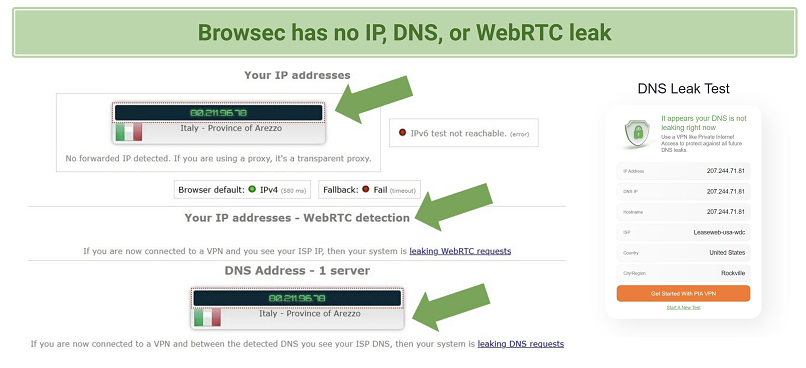
Browsec VPN has built-in leak protection features that prevent any DNS or WebRTC leaks, ensuring that users’ original IP address and online activities are kept private.
No Logs Policy
Browsec VPN has a strict no-logs policy, meaning that they do not collect or store any information about their users’ online activities. This ensures that users’ browsing history and personal information remain completely private.
Secure Payment Options
Browsec VPN offers secure payment options, including chat and encrypted payment gateways, to ensure that customers’ payment information is encrypted and protected.
Customer Support
Browsec VPN provides reliable customer support through their website, offering a comprehensive FAQ page and a live chat feature. This allows users to easily get assistance with any questions or issues they may encounter.
- Compatibility: Browsec VPN is compatible with Windows, Mac, Android, and iOS devices, allowing users to enjoy secure browsing across multiple platforms.
- Browser Extensions: Browsec VPN offers extensions for popular browsers such as Chrome. These extensions provide a user-friendly interface and allow users to easily enable or disable the VPN service directly from their browser.
- Server Locations: Browsec VPN has a wide range of server locations available, allowing users to choose from a variety of countries to connect to for their browsing needs.
FAQs about Browsec VPN in the UK
Is Browsec VPN fast and reliable for UK users?
Browsec VPN offers fast and reliable connections for UK users. It ensures that your internet speed remains unaffected while browsing through its secure servers.
What devices are supported by Browsec VPN?
Browsec VPN supports various devices such as Windows, Mac, Android, and iOS. Additionally, it has extensions available for popular browsers like Chrome, Firefox, and Opera.
Can Browsec VPN unblock websites in the UK?
Yes, Browsec VPN can unblock websites in the UK. It bypasses any restrictions or censorship imposed by the internet service provider and allows you to access blocked content effortlessly.
How does Browsec VPN ensure my security?
Browsec VPN ensures your security by using strong encryption protocols to protect your online activities. It creates a virtual tunnel between your computer and its servers, making your data unreadable and private.
Can Browsec VPN be used for streaming in the UK?
Yes, Browsec VPN is suitable for streaming in the UK. It provides fast and stable connections, allowing you to stream content from platforms like Netflix, Amazon Prime, and Hulu without interruption.
Does Browsec VPN offer a free version?
Browsec VPN offers a free version with limited features and server options. However, they also have a premium version that provides access to a wider range of servers and faster speeds.
Is Browsec VPN supported in the Edge browser?
No, Browsec VPN does not currently offer support for the Edge browser. It is mainly compatible with popular browsers like Chrome, Firefox, and Opera.
How do I install Browsec VPN on my device?
To install Browsec VPN, you can visit their official website or download the extension from the Chrome Web Store or Firefox Add-ons Store. Alternatively, you can find the app on Google Play Store for Android or App Store for iOS.
What is the pricing criteria for Browsec VPN?
Browsec VPN offers different pricing plans for its premium version. The prices vary depending on the subscription duration, with options for monthly, yearly, or even a one-time payment.
Can Browsec VPN be used for torrenting in the UK?
Browsec VPN does not support torrenting on its servers. It is primarily designed for secure browsing and accessing blocked content, but not for file sharing through torrent sites.
How to Download and Install Browsec VPN
If you’re located in the UK and want to ensure a safe and secure internet connection, Browsec VPN is a great option. This guide will walk you through the process of downloading and installing the Browsec VPN on various devices.
For PC/Mac/Android/iOS
Step 1:
- Open your browser, like Google Chrome, Firefox, Edge, or Opera.
- In the search bar, type in “Browsec VPN” and click on the official Browsec website.
- On the website, click on the “Download” button.
- Choose your operating system (Windows, Mac, Android, or iOS) and click on the appropriate option.
- Follow the on-screen instructions to complete the download and installation process.
Step 2:
- Once installed, open the Browsec VPN application on your device.
- Create a Browsec account by clicking on the “Sign Up” button and filling in the required information. You can also sign in with your existing Browsec account if you have one.
- Select your desired server location by clicking on the dropdown menu. Browsec VPN offers servers in multiple countries, so you can choose the one that suits your needs.
- Click on the “Connect” button to establish a secure connection to the selected server.
For iPhone/iPad
Step 1:
- Go to the App Store on your iPhone or iPad.
- Search for “Browsec VPN” using the search bar.
- Click on the official Browsec VPN app from the search results.
- Tap on the “Get” button to download and install the app.
- Once installed, open the Browsec VPN app.
Step 2:
- Sign up for a new Browsec account or sign in with your existing account.
- Select your preferred server location from the available options.
- Tap on the “Connect” button to establish a secure connection.
With Browsec VPN, you can browse the internet with enhanced privacy and security. Whether you’re using it on your PC, Mac, Android, or iOS device, Browsec VPN offers encryption and features to keep your online activities safe. Keep in mind that the free version of Browsec VPN may have some limitations, such as slower speeds and limited server locations. If you’re looking for a premium VPN experience with faster speeds and more server options, consider upgrading to the premium version. Browsec VPN is compatible with popular browsers like Google Chrome, Firefox, and Opera, and also offers browser extensions that you can add directly to your browser. Enjoy a safer and more secure internet experience with Browsec VPN, no matter which device or country you’re in.
How to Use Browsec VPN in the UK
Using Browsec VPN in the UK is a straightforward process that can provide you with enhanced security and privacy while browsing the internet. To start using Browsec VPN:
- Install the Browsec VPN extension from the Chrome Web Store or the Opera add-ons section if you are using Opera browser.
- After installation, click on the Browsec VPN icon located in the top-right corner of your browser window.
- A dropdown menu will appear with a list of available servers. Select the desired server location. Browsec VPN offers servers in various countries including the UK, the US, and more.
- Once you have selected a server, click on the “Connect” button to establish a VPN connection.
- Your connection is now encrypted and secured through Browsec VPN. You can now browse the internet without worrying about your privacy or online security.
Browsec VPN also offers a premium version which allows you to access additional features and servers. The premium plan comes at a cost according to the selected plan. If you are a frequent user and require faster speeds and more server choices, the premium plan is recommended.
It is important to note that Browsec VPN operates under the jurisdiction of the UK, which has strict laws regarding online privacy. However, Browsec VPN does not keep logs of your online activities, ensuring your anonymity while using the service.
Browsec VPN has been tested for DNS and IP leaks, and it has proven to be trustworthy in terms of security. It also provides reliable customer support through email and a 24/7 live chat option. If you encounter any issues or have any questions, the Browsec VPN customer service team is ready to assist you.
With Browsec VPN, you can easily access streaming platforms like Netflix and bypass geo-restrictions. Whether you are using an iPhone/iPad, Android device, PC, Mac, or even Microsoft Edge, Browsec VPN has got you covered.
In conclusion, Browsec VPN is a reliable and user-friendly VPN service that offers a secure browsing experience. Its browser extension makes it convenient to use, and the premium plan provides additional benefits for those who require more features.
Expert Opinions and User Reviews
When it comes to Browsec VPN, the opinions of experts and users vary. Some users praise the service for its ease of use and the ability to access restricted content. Others, however, express concerns about the trustworthiness of the VPN.
Experts’ Opinions
Many experts recommend Browsec VPN as a reliable and secure option for browsing the internet. They highlight its fast speed and the large number of servers available in various countries. The encryption offered by Browsec is also seen as a strong point by many experts.
However, some experts argue that there are better alternatives to Browsec VPN in terms of both cost and performance. They suggest looking into other VPNs that provide more features and better customer support.
User Reviews
Opinions among users are also mixed. Some users report positive experiences with Browsec VPN, stating that it allowed them to access blocked websites and stream content from different countries. Others, on the other hand, mention issues with slow connection speeds and connectivity problems.
Some users have also expressed concerns about Browsec VPN’s data privacy and leaks. They question the VPN’s ability to keep their online activities secure and anonymous.
Conclusion
In conclusion, Browsec VPN has received both positive and negative feedback from experts and users alike. While it may be a viable option for those looking to access restricted content or browse the internet anonymously, it is essential to weigh the potential drawbacks such as slow speeds and trustworthiness concerns.
For users in the UK, it is important to keep in mind that Browsec VPN may not be the best option for accessing UK-based services such as Netflix or official websites. Alternatives like premium VPN services or browser-based VPN extensions may provide better performance and reliability.
Вопрос-ответ:
What is Browsec VPN?
Browsec VPN is a virtual private network service that allows users to browse the internet securely and privately. It encrypts the user’s internet traffic and routes it through a remote server, hiding their IP address and location.
Is Browsec VPN safe to use in the UK?
Yes, Browsec VPN is safe to use in the UK. It uses strong encryption to protect your internet traffic and ensure your online privacy. However, it is important to note that no VPN can guarantee 100% security, so it’s always a good idea to use additional security measures such as antivirus software and firewalls.
Can I access restricted content with Browsec VPN?
Yes, Browsec VPN can help you access restricted content by bypassing geo-restrictions. It allows you to connect to servers located in different countries, which can give you access to websites and services that are not available in your location.
How fast is Browsec VPN?
The speed of Browsec VPN can vary depending on various factors such as your internet connection and the server you are connecting to. In general, Browsec VPN aims to provide fast and stable connections, but it is always recommended to choose a server that is geographically close to your location for better performance.
Is Browsec VPN free?
Yes, Browsec VPN offers a free version that allows users to use the service with certain limitations. The free version has a limited number of server locations and a lower connection speed compared to the premium version. There is also a premium version available that offers additional features and benefits.
Видео:
Is FREE VPN safe to use in 2022? Main reasons that’s not the case!
Is FREE VPN safe to use in 2022? Main reasons that’s not the case! by VPNpro 1 year ago 4 minutes, 47 seconds 13,761 views
