2023 Guide: How to Setup and Use ExpressVPN on PS4
Welcome to our comprehensive guide on how to setup and use ExpressVPN on your PS4 gaming console. In this guide, we will walk you through the steps to install and configure ExpressVPN on your PS4, so you can enjoy a more secure and private gaming experience. Whether you want to access blocked websites, improve your gaming connection, or protect your personal information, ExpressVPN is a good choice.
One of the key features of ExpressVPN is its vast network of servers. With servers in more than 160 locations across 94 countries, you can easily find a server that suits your needs. ExpressVPN also offers local servers for popular gaming platforms like PlayStation, Xbox, and PC. Additionally, ExpressVPN frequently adds new servers and updates existing ones to ensure a fast and reliable connection.
Setting up ExpressVPN on your PS4 is a simple process. First, you’ll need to purchase an ExpressVPN subscription, which can be done via their website. Once you have your account, you can follow the steps below to setup ExpressVPN on your PS4:
- Go to the PlayStation Store on your PS4 and search for ExpressVPN.
- Download and install the ExpressVPN app.
- Once the app is installed, open it and select “Sign in” using your ExpressVPN account credentials.
- Enter the activation code shown on your TV screen into the ExpressVPN website.
- Submit the activation code and you’ll be prompted to enter an email address for account recovery.
- Once your account has been verified, you can start using ExpressVPN on your PS4.
ExpressVPN offers two options for setting up on your PS4: using the built-in DNS settings or setting up ExpressVPN on your router. If you choose to use the DNS settings, you’ll need to manually enter the DNS server addresses provided by ExpressVPN. On the other hand, setting up ExpressVPN on your router allows all devices on your network, including your PS4, to benefit from the VPN service.
While ExpressVPN is a paid service, it also offers a 30-day money-back guarantee, so you can try it risk-free. The service makes use of smart DNS technology called MediaStreamer, which allows you to access geo-restricted content on platforms like Netflix and Amazon Prime. ExpressVPN also does not keep logs of your activity, ensuring your privacy and security.
In conclusion, if you’re looking to improve your gaming experience on your PS4, these steps will guide you through setting up and using ExpressVPN. With its wide range of servers, secure connections, and user-friendly setup, ExpressVPN is a good choice for gamers looking to enhance their gaming experience and protect their personal information.
3 Guide: How to Setup and Use ExpressVPN on PS4
Setting up and using ExpressVPN on your PS4 can greatly improve your gaming experience by allowing you to access blocked content and keep your online activities safe. This guide will walk you through the steps to set up ExpressVPN on your PS4.
Step 1: Sign up for an ExpressVPN account
The first step is to sign up for an ExpressVPN account. ExpressVPN offers a variety of subscription plans, so you can choose the one that best fits your needs. Once you have created your account, you’ll receive an email with your account details.
Step 2: Get your ExpressVPN DNS and server IP addresses
To set up ExpressVPN on your PS4, you’ll need to know the DNS and server IP addresses. You can find this information in the ExpressVPN setup guides. These addresses are used to connect your PS4 to the ExpressVPN network and keep your online activities secure.
Step 3: Configure your PS4 network settings
To configure your PS4 network settings, go to the “Settings” menu and click on “Network.” Select “Set Up Internet Connection” and choose the connection method you’ll be using. If you’re using an ethernet cable, choose “Use a LAN Cable.” If you’re using Wi-Fi, select your preferred Wi-Fi network.
Next, select “Custom” for the IP address settings. When asked about the DHCP hostname, choose “Do Not Specify.” For the DNS settings, select “Manual.” Enter the ExpressVPN DNS addresses you obtained earlier. Leave the MTU settings as “Automatic.” Complete the remaining steps to finish configuring your network settings.
Step 4: Connect to ExpressVPN on your PS4
Once your network settings are configured, you can connect to ExpressVPN on your PS4. Go to the “Settings” menu and click on “Network.” Select “Set Up Internet Connection” again, and this time choose “Use a LAN Cable” or “Use Wi-Fi” depending on your preferred connection method.
On the next screen, select “Custom” for the IP address settings. When asked about the DHCP hostname, choose “Do Not Specify.” For the DNS settings, select “Manual” and enter the ExpressVPN server IP addresses you obtained earlier.
Complete the remaining steps to finish the connection setup. Once the setup is complete, your PS4 will be connected to ExpressVPN, and you’ll be able to access restricted content and play games with improved speed and security.
Step-by-Step Instructions for Setting Up ExpressVPN on PS4
If you’re looking to enhance your gaming experience on the PS4, using ExpressVPN is a perfect choice. With its lightning-fast servers and secure connection, you’ll enjoy a lag-free and protected gaming session. Follow these step-by-step instructions to set up ExpressVPN on your PS4:
- Purchase an ExpressVPN subscription: First, you need to sign up for an ExpressVPN service. Choose a plan that suits your needs and proceed with the payment.
- Install ExpressVPN on your router: To use ExpressVPN on your PS4, you’ll need to set it up on your router. Visit the ExpressVPN website and find the appropriate instructions for your router model. These pre-configured settings will allow all devices connected to the router to use the VPN.
- Get your ExpressVPN login credentials: Once you’ve purchased the subscription, you’ll receive an email with your ExpressVPN account details. Make note of your username and password for later use.
- Enter ExpressVPN settings on your router: Access your router’s configuration menu and locate the ExpressVPN settings. Enter your ExpressVPN username and password, as well as the server address you wish to connect to. Save the changes.
- Connect your PS4 to the router: Connect your PS4 to the router using an ethernet cable or via a wireless connection. Make sure your PS4 is turned on and connected to the same network as your router.
- Configure network settings on your PS4: On your PS4, go to the settings menu and navigate to the network settings. Choose the option to set up a new internet connection. Select either Wi-Fi (if you’re using a wireless connection) or LAN (if you’re using an ethernet connection).
- Select “Custom” setup: Choose the custom setup option and select the network you would like to use for the connection. If you’re using Wi-Fi, enter your Wi-Fi network password. If you’re using an ethernet cable, the PS4 will automatically detect the connection.
- Configure network settings manually: Select the “Manual” option to manually enter the network settings. Set the IP address to automatic, set the DHCP hostname to “Do Not Specify,” and leave the DNS settings on automatic.
- Connect to the internet: After configuring the network settings, select the option to connect to the internet. Your PS4 will perform a quick test to ensure the connection is successful.
- Connect to the ExpressVPN server: Once the internet connection is established, go to the settings menu on your PS4 and navigate to the network settings again. Choose the option to configure the network connection and select the option to enable the use of a proxy server. Enter the ExpressVPN server address and port number provided by the service.
- Submit the changes and start playing: Save the changes and exit the settings menu. Your PS4 is now connected to ExpressVPN, providing a secure and fast gaming experience. Enjoy playing your favorite games while staying protected.
While the above steps outline the general procedure for setting up ExpressVPN on PS4, keep in mind that the specific steps may vary depending on your router model and the version of the PS4 software you’re using. If you encounter any issues during the setup process, consult ExpressVPN’s support resources or contact their customer service for assistance.
Setting up ExpressVPN on your PS4 allows you to bypass any geographically restricted content and enjoy a smoother gaming experience. Whether you’re playing Warzone, FF14, or any other game, using ExpressVPN ensures your connection remains secure and your gaming session uninterrupted.
Benefits of Using ExpressVPN on PS4
When it comes to gaming on your PS4, using ExpressVPN can bring a lot of benefits. Whether you’re playing online multiplayer games or streaming content, here are some reasons why using ExpressVPN is a great choice:
1. Enhanced Security:
By using ExpressVPN on your PS4, you can ensure that your gaming sessions and personal information are protected. ExpressVPN offers a secure and encrypted connection, making it difficult for hackers and other malicious entities to intercept your data.
2. Access to Geo-Restricted Content:
ExpressVPN allows you to access geo-restricted content on your PS4. Whether you want to watch Netflix shows that are only available in certain regions or play games that are limited to specific countries, ExpressVPN can help you bypass these restrictions and enjoy a wide range of content.
3. Stable and Fast Connection:
ExpressVPN provides a lightning-fast connection, which is essential for online gaming. With a stable connection, you can enjoy smooth gameplay and reduce lag. This is especially important when playing competitive games like Call of Duty: Warzone or Final Fantasy XIV.
4. Flexibility and Compatibility:
ExpressVPN is compatible with various devices and platforms, including PS4. Whether you’re gaming on a console or using a smart TV, ExpressVPN allows you to protect your connection and access blocked content on different devices.
5. Privacy and Anonymity:
ExpressVPN does not keep logs of your online activities, ensuring your privacy and anonymity. This means that your internet service provider (ISP) and other third parties won’t be able to track your gaming habits or access your personal data.
6. Easy Setup:
Setting up ExpressVPN on your PS4 is straightforward. Simply sign up for an account, install the ExpressVPN client on your router or directly on your console, and you’re good to go. ExpressVPN provides step-by-step guides on their website to help you through the setup process.
Conclusion:
Using ExpressVPN on your PS4 can greatly enhance your gaming experience. From improved security and privacy to access to geo-restricted content, the benefits are numerous. Make sure to take advantage of this service when setting up your console to enjoy a safe and unrestricted gaming environment.
How to Download and Install ExpressVPN on PS4
If you want to improve the security of your gaming experience and protect your online privacy while using your PlayStation 4, you must consider using ExpressVPN. ExpressVPN is a paid VPN service that can be easily set up and used on your PS4. In just a few steps, you can download and install ExpressVPN on your PS4 and enjoy a secure and private gaming session.
Step 1: Setting up ExpressVPN on a PC or Mac
Before you can install ExpressVPN on your PS4, you need to set it up on a computer. Follow these simple steps to get started:
- Go to the ExpressVPN website and sign up for an account.
- Download and install the ExpressVPN app on your PC or Mac.
- Launch the app and enter your login credentials.
- Select the VPN server location you prefer and connect to it.
- Make any necessary changes to the settings according to your preferences.
Step 2: Connecting your PS4 to the PC or Mac
Now that you have ExpressVPN set up on your computer, you can connect your PS4 to it. Here’s how:
- Connect your PS4 and your computer to the same local network via Ethernet or Wi-Fi.
- On your PS4, go to Settings > Network > Set Up Internet Connection.
- Select “Use a LAN Cable” if you’re using Ethernet or “Use Wi-Fi” if you’re using Wi-Fi.
- Choose “Custom” for the connection method and select the appropriate settings.
- When asked, select “Automatic” for IP Address Settings.
- Select “Do Not Specify” for DHCP Host Name.
- For DNS Settings, choose “Manual” and enter the primary and secondary DNS address provided by ExpressVPN.
- Leave other settings as they are and complete the setup process.
Step 3: Configuring ExpressVPN on your PS4
Now that your PS4 is connected to ExpressVPN, you can configure the settings. Follow these steps:
- On your PS4, go to Settings > Network > Set Up Internet Connection.
- Choose “Use Wi-Fi” or “Use a LAN Cable” depending on your preferred connection.
- Select “Custom” for the connection method and follow the on-screen instructions.
- When asked for the IP Address Settings, select “Automatic”.
- For the DHCP Host Name, choose “Do Not Specify”.
- For the DNS Settings, choose “Manual” and enter the primary and secondary DNS address provided by ExpressVPN.
- Keep the MTU Settings as “Automatic” and complete the setup process.
Once you have completed these steps, your PS4 will be connected to ExpressVPN, and you can enjoy a secure and private gaming experience. Remember to frequently update your ExpressVPN app to ensure you have the most updated security features. If you have any questions related to the setup or usage of ExpressVPN on your PS4, don’t hesitate to ask the ExpressVPN customer support via email or their dedicated support service.
Configuring ExpressVPN Settings on PS4
If you’re a gaming enthusiast, setting up ExpressVPN on your PS4 can significantly improve your gaming experience. By using this step-by-step guide, you can easily configure ExpressVPN settings on your PlayStation 4 console.
Step 1: Purchase and Install ExpressVPN
First, you’ll need to purchase and install ExpressVPN on your local device. ExpressVPN offers a variety of plans to choose from, so select the one that suits your needs. Once installed, make sure to keep your ExpressVPN app updated regularly for the best performance.
Step 2: Enter Your ExpressVPN Credentials
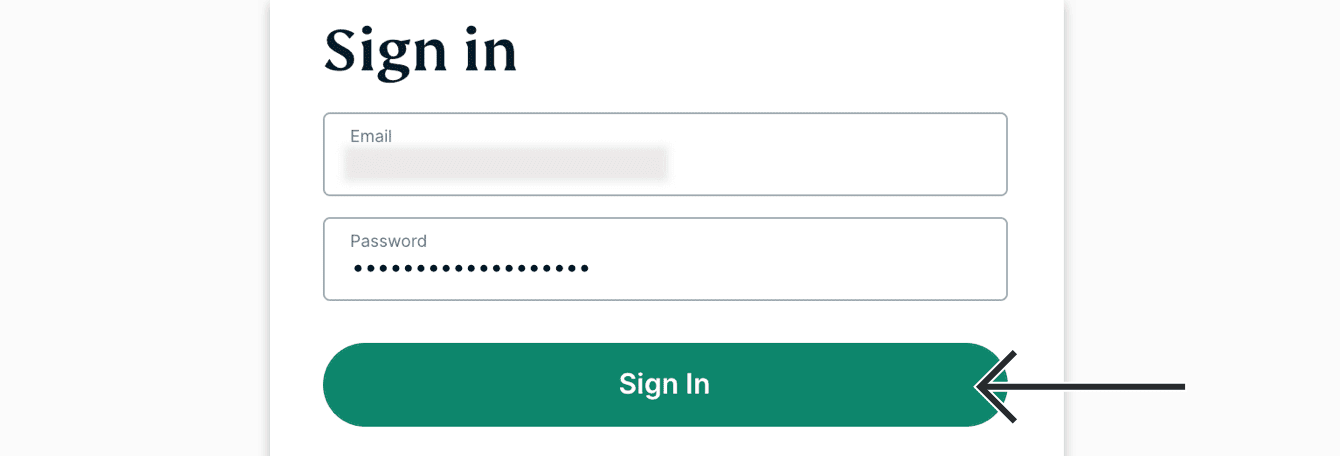
After launching ExpressVPN on your PS4, you’ll be prompted with a login screen. Simply enter your ExpressVPN credentials to get started. If you don’t have an account, you’ll need to sign up and create one first.
Step 3: Configure ExpressVPN Settings
In the main menu of the ExpressVPN app on your PS4, select “Settings” to access the options for configuring the VPN. Here, you can adjust various settings to optimize your gaming experience.
Step 4: Connecting to a Server
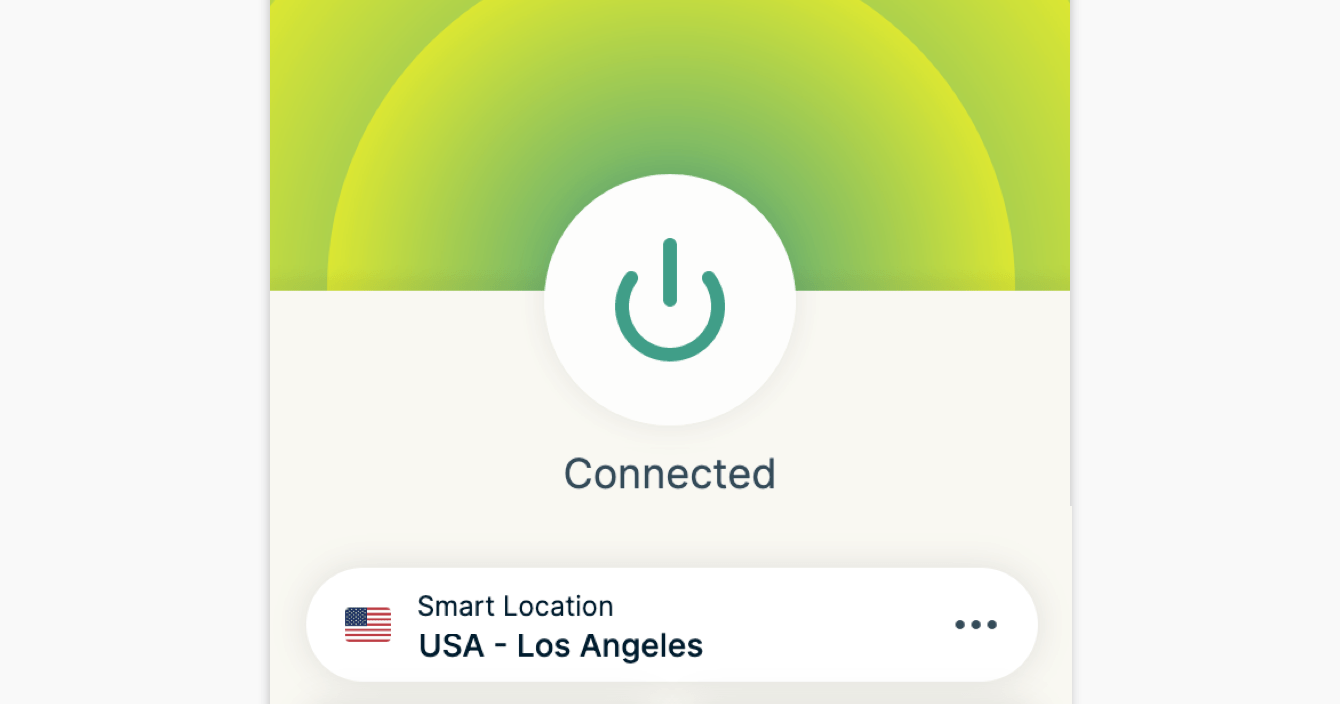
To connect to a server, select the “Server” option in the app’s menu. You’ll be presented with a list of available server locations. Choose the server that is closest to your location for the best performance. ExpressVPN also offers dedicated servers for gaming, so if you’ll be playing a specific game, consider using those.
Step 5: Using ExpressVPN on PS4
Once connected, you can start using ExpressVPN on your PS4. You’ll be able to play games online with improved speed and security. ExpressVPN even offers a feature called MediaStreamer, which allows you to access geo-restricted content on your PlayStation.
Conclusion
Setting up and using ExpressVPN on your PS4 is a simple process that can greatly enhance your gaming experience. By following the above steps, you can enjoy improved speed, security, and access to a wide range of games and content. Don’t hesitate to take advantage of ExpressVPN’s free updates and dedicated support to make the most out of your gaming sessions.
Changing Server Locations on ExpressVPN for PS4
If you’re an avid gamer using ExpressVPN on your PS4, there may come a time when you need to change server locations. Whether you want to improve your connection speed, bypass geo-restrictions, or access region-specific content, changing server locations can help optimize your gaming experience. Here’s how to do it:
Step 1: Launch the ExpressVPN app on your PS4
Make sure you have purchased and installed ExpressVPN on your PS4. If you haven’t done so, head to the ExpressVPN website to sign up for an account and follow the instructions to set it up on your console.
Step 2: Select the desired server location
Once you’re in the ExpressVPN app on your PS4, navigate to the server selection menu. This may vary depending on the app’s interface, but it’s usually located in the top corner of the screen.
Step 3: Choose a server from the available options
ExpressVPN for PS4 offers a wide range of server locations around the world. Select a server location that suits your needs, whether it’s for gaming, streaming, or other activities.
Step 4: Connect to the new server location
After selecting the server location, simply click on it to connect. ExpressVPN will take care of the rest, and your PS4 will be routed through the new server to provide you with improved speed, security, and access to geo-blocked content.
Changing server locations with ExpressVPN for PS4 is a simple and effective way to enhance your gaming experience. Whether you’re playing multiplayer games like Warzone or using your PS4 to stream content, a dedicated VPN like ExpressVPN can help you overcome any obstacles and unlock new possibilities.
Testing Connection Speed on ExpressVPN for PS4
When using ExpressVPN on your PS4, it’s important to ensure that your connection speed is fast and reliable. This guide will walk you through the process of testing your connection speed on ExpressVPN for PS4.
Step 1: Open the ExpressVPN app on your PS4
To start, open the ExpressVPN app on your PS4. If you haven’t installed it yet, you can download it from the PlayStation Store. Once the app is open, select the “Connect” button to establish a connection to the VPN server.
Step 2: Select a server location
Next, select a server location from the available options. It’s recommended to choose a server that is closest to your actual location for the best performance. ExpressVPN offers a wide range of server locations to choose from, allowing you to find the one that works best for you.
Step 3: Test your connection speed
After connecting to a server, you can now test your connection speed. ExpressVPN provides a built-in speed test feature that allows you to check the speed of your connection. Simply click on the “Speed Test” button to initiate the test. The speed test will analyze your ping, download speed, and upload speed.
Step 4: View the test results
Once the speed test is complete, you will be able to view the results on your screen. ExpressVPN will display the ping, download speed, and upload speed of your connection. You can use these results to evaluate the performance of your connection and make any necessary adjustments.
Conclusion
Testing your connection speed on ExpressVPN for PS4 is a simple and effective way to ensure that you’re getting the best gaming experience. By following the steps outlined above, you can easily check the speed of your connection and make any necessary improvements. ExpressVPN’s lightning-fast servers and secure network make it an ideal choice for PS4 gaming. Whether you’re playing FF14 or any other game, ExpressVPN is a reliable and feature-rich VPN service that offers excellent performance and security.
Common Issues and Troubleshooting ExpressVPN on PS4
1. Trouble with Initial Setup
If you have been experiencing difficulties with setting up ExpressVPN on your PS4, there are a few steps you can take to troubleshoot the issue. First, make sure you have received the setup email from ExpressVPN. This email contains important information and instructions for registering your gaming console with their service.
2. Unconfigured ExpressVPN App
One common issue is an unconfigured ExpressVPN app on your PS4. To resolve this, follow the step-by-step guides provided above to properly set up the ExpressVPN app on your PlayStation.
3. Blocked Content and Gaming Servers
If you frequently encounter blocked content or issues with gaming servers, it is essential to ensure that you have selected a server that supports gaming. ExpressVPN has dedicated servers for gaming, which provide good connection speeds and low latency. Make sure to select the appropriate server to improve your gaming experience.
4. Security and Privacy Concerns
When using ExpressVPN on your PS4, it is vital to prioritize security. Ensure that you have enabled the necessary security features within the ExpressVPN app, such as the Kill Switch and DNS Leak Protection. This will help protect your online gaming activity and ensure your privacy.
5. Connection Issues and Slow Speeds
If you are experiencing connection issues or slow speeds with ExpressVPN on your PS4, there are a few steps you can take to troubleshoot. Firstly, restart your PS4 and router to refresh the connection. Additionally, try connecting to different ExpressVPN servers to find the one that provides the best performance for your gaming needs.
6. Compatibility with Newer PlayStation Consoles
When considering using ExpressVPN on newer PlayStation consoles such as the PS5, keep in mind that the setup procedure may vary slightly from the steps outlined above. Make sure to refer to the updated setup guides provided by ExpressVPN specifically for these consoles.
7. Customer Support and Additional Help
If you have followed the troubleshooting steps above and are still experiencing issues with ExpressVPN on your PS4, or if you have any other related questions, it is recommended to contact ExpressVPN’s customer support. They will be able to assist you further and provide guidance tailored to your specific situation.
Conclusion
In conclusion, ExpressVPN is a perfect choice for PS4 players who want to access blocked content, enhance their online gaming experience, and ensure their privacy and security. By following the setup steps above and troubleshooting any issues that arise, you can enjoy a seamless and protected gaming experience on your PlayStation.
ExpressVPN vs. Other VPNs for PS4: What Sets It Apart?
ExpressVPN’s Domain Expertise: ExpressVPN has been a leading player in the VPN industry for years. With a focus on providing a secure and reliable service, they have established themselves as a trusted name in the field.
Uninterrupted Gaming Experience: ExpressVPN ensures that you can play your favorite games without any lag or latency. Their lightning-fast servers optimize your connection and provide a seamless gaming experience.
Compatibility with Multiple Platforms: ExpressVPN supports a wide range of devices and platforms, including PS4. Whether you’re playing on a console or a PC, ExpressVPN has got you covered.
Robust Security and Privacy: ExpressVPN takes your online security seriously. They keep no logs of your activities and provide advanced encryption to keep your personal information safe from hackers and other threats.
Bypassing Geo-restrictions: With ExpressVPN, you can easily access games and content that might be blocked in your region. They have a vast network of servers that allows you to connect to different locations around the world.
Easy Setup and Use: ExpressVPN provides a user-friendly interface and offers simple setup instructions, making it easy for even beginners to get started. They also offer 24/7 customer support to assist you with any questions or issues you may have.
Additional Features: ExpressVPN offers additional features like MediaStreamer, which allows you to set up VPN on devices that don’t support VPN natively. This feature is particularly useful for streaming media on platforms like Netflix.
Constantly Updated Servers: ExpressVPN regularly updates its servers to ensure optimal performance and to stay ahead of any potential VPN blocking measures. This way, you can always rely on their service to access your favorite games and content.
Value for Money: While ExpressVPN may have a higher price tag compared to some other VPNs, the quality of their service justifies the cost. With their excellent customer support and reliable network, ExpressVPN offers great value for your money.
No Login Required for Router Setup: When setting up ExpressVPN on your PS4, you don’t need to create an account or log in through the console. Just follow the simple instructions provided, and you’ll be good to go.
Pre-configured Routers for Easy Setup: ExpressVPN offers pre-configured routers that allow you to set up the VPN service directly on your router. This way, all devices connected to your network will automatically be protected by the VPN, including your PS4.
Great for Gaming Communities: ExpressVPN has proven to be a popular choice among gaming communities, particularly for games like Final Fantasy XIV (FFXIV). Their efficient server network can handle large groups of players, ensuring a smooth gaming experience for everyone involved.
ExpressVPN’s Compatibility with Different PS4 Models
If you’re an avid gamer looking to enhance your PlayStation 4 gaming experience, ExpressVPN is the right choice for you. ExpressVPN is compatible with all PS4 models, including the PS4, PS4 Slim, and PS4 Pro, making it a convenient and versatile option for all players.
ExpressVPN offers a smart and lightning-fast network that ensures smooth and uninterrupted gaming sessions. Whether you’re playing single-player games or engaging in multiplayer battles, ExpressVPN’s high-speed servers will provide a seamless gaming experience.
When it comes to security, ExpressVPN has you covered. With advanced encryption and a strict no-logs policy, ExpressVPN keeps your gaming sessions secure and your personal information private, protecting you from cyber threats and potential hacking attempts.
ExpressVPN’s compatibility with PS4 is made even more convenient with its easy setup process. You can quickly configure ExpressVPN on your PS4, whether you’re using Windows, Mac, or Linux. Simply follow the step-by-step instructions provided by ExpressVPN and you’ll be ready to play in no time.
Moreover, ExpressVPN’s MediaStreamer feature allows you to access and enjoy geo-restricted content while gaming. Whether it’s watching your favorite TV shows or accessing exclusive gaming events, ExpressVPN’s MediaStreamer will let you do it all with ease.
When it comes to gaming-related queries, ExpressVPN has a dedicated support team to assist you. Whether you need help with setting up ExpressVPN on your PS4 or have questions about specific settings, the support team is always there to provide you with prompt and helpful solutions.
So, if you want to take your PlayStation 4 gaming to the next level, consider using ExpressVPN. With its compatibility with different PS4 models, lightning-fast network, high-level security features, and exceptional customer support, ExpressVPN is the perfect choice for any gaming enthusiast.
Is It Legal to Use ExpressVPN on PS4?
Using ExpressVPN on your PS4 is fully legal and safe. ExpressVPN is a reputable name in the VPN industry and has been widely used by many individuals and companies alike. In fact, ExpressVPN offers dedicated client applications for various platforms including PS4, making it a smart and simple option for PS4 users.
Setting up ExpressVPN on PS4
ExpressVPN provides simple setups for connecting your PS4 to its servers. You can either set up ExpressVPN directly on your PS4 using the built-in VPN settings or use ExpressVPN on another device like a desktop or laptop and share the connection with your PS4 via a router.
Using ExpressVPN on your PS4 can improve your gaming experience in several ways:
- Access blocked websites: ExpressVPN can help you bypass any blocked websites or services on your local network.
- Enhanced security: By using ExpressVPN, you can ensure that your online activities on your PS4 are encrypted and secure.
- Improved gaming performance: By connecting to ExpressVPN’s servers, you can potentially reduce ping and latency, resulting in a smoother gaming experience, especially for games that require high-speed and low-latency connections like FF14.
ExpressVPN’s Features and Options
ExpressVPN offers a wide range of features and options for PS4 users:
- Dedicated servers: ExpressVPN has dedicated servers optimized for gaming, ensuring the best possible gaming experience.
- Variety of server locations: ExpressVPN has servers in multiple locations worldwide, allowing you to connect to the server that offers the best performance for your gaming needs.
- 24/7 customer support: ExpressVPN provides reliable customer support via email and live chat, so you can get assistance whenever you need it.
In conclusion, using ExpressVPN on your PS4 is legal, safe, and can greatly enhance your gaming experience. Whether you prefer to set up ExpressVPN directly on your PS4 or share the connection via a router, ExpressVPN offers the necessary features and dedicated servers to ensure a smooth and secure gaming experience.
Securing Your Online Gaming Experience with ExpressVPN on PS4
If you are an avid online gamer, ensuring the security of your gaming experience is of utmost importance. One effective way to achieve this is by using ExpressVPN on your PS4 gaming console.
Why Use ExpressVPN?
ExpressVPN is a popular and reliable Virtual Private Network (VPN) service that offers a range of features to enhance your online gaming experience. By using ExpressVPN on your PS4, you can:
- Securely connect to gaming servers without worrying about your personal information being logged or tracked.
- Access region-locked content and play games that might not be available in your country or region.
- Bypass network restrictions and play games even if your network has strict settings.
- Protect your online privacy by masking your IP address and encrypting your internet traffic.
Setting Up ExpressVPN on PS4
Setting up ExpressVPN on your PS4 is a simple and straightforward process. Follow these steps to get started:
- Purchase an ExpressVPN account and register your PS4 as one of the devices.
- Download and install the ExpressVPN app on your gaming console.
- Open the app and log in using your account credentials.
- Choose a server location that offers a good connection for gaming.
- Once connected, your PS4 will be protected by ExpressVPN.
Enjoying Secure Gaming with ExpressVPN

Now that you have set up ExpressVPN on your PS4, you can enjoy your online gaming sessions with added security and peace of mind. Whether you’re playing popular games like FF14, Call of Duty: Warzone, or even browsing the web on your console, ExpressVPN ensures that your personal information and online activities remain safe from prying eyes.
ExpressVPN’s smart and dedicated servers optimize your gaming experience by reducing lag and improving connection stability. Additionally, you can also access exclusive content and game updates that might not be available in your region.
Conclusion
Using ExpressVPN on your PS4 allows you to enhance your online gaming experience with added security and flexibility. By encrypting your internet traffic and masking your IP address, ExpressVPN keeps your gaming sessions safe from threats and restrictions.
So, take the necessary steps to secure your online gaming experience today by setting up ExpressVPN on your PS4. Enjoy playing your favorite games and exploring new gaming realms without compromising your privacy and data security.
ExpressVPN’s Customer Support for PS4 Users
When it comes to setting up and using ExpressVPN on your PS4, you may have some questions or encounter issues along the way. Luckily, ExpressVPN offers excellent customer support to assist you.
If you have any questions or need assistance with the setup procedure, you can reach out to ExpressVPN’s customer support via email. Their team is available 24/7 to help you with any queries or concerns you may have.
Setting up ExpressVPN on your PS4 is a simple and straightforward process. You can do it in just a few quick steps. First, you’ll need to purchase a subscription to ExpressVPN. Once you’ve paid and registered, you can follow the easy-to-use guide provided by ExpressVPN to set up the VPN on your PS4.
ExpressVPN offers a user-friendly interface that makes connecting to their servers a breeze. With over 3,000 servers in various locations around the world, you’ll have plenty of options to choose from. Whether you want to improve your gaming experience, bypass blocked content, or keep your online activities private, ExpressVPN has got you covered.
To connect to ExpressVPN on your PS4, you can choose between two options: using an ethernet cable or setting up a VPN connection on your router. If you opt for the ethernet cable method, simply connect one end to your PS4 and the other end to your router, and you’re good to go. If you prefer setting up a VPN connection on your router, ExpressVPN provides simple guidelines to help you through the process.
Once you’re connected to ExpressVPN on your PS4, you can enjoy lightning-fast speeds and a secure internet connection. Whether you’re playing online multiplayer games like Call of Duty: Warzone or exploring the vast world of Final Fantasy XIV, ExpressVPN will ensure that your gaming experience is smooth and lag-free.
ExpressVPN’s customer support is there to assist you if you encounter any difficulties along the way. If you’re having trouble with the setup or have any related questions, don’t hesitate to reach out to their team. They are dedicated to providing you with the best possible assistance to ensure a seamless VPN experience on your PS4.
In conclusion, ExpressVPN’s customer support is perfect for PS4 users who want to set up and use a VPN on their gaming console. With its user-friendly setup procedure and lightning-fast servers, ExpressVPN is a great choice for improving your gaming experience, accessing blocked content, and ensuring a secure internet connection. Don’t hesitate to contact ExpressVPN’s customer support if you have any questions or need assistance!
Protecting Your Personal Information with ExpressVPN on PS4
When it comes to protecting your personal information while gaming on your PS4, ExpressVPN is a reliable and efficient solution. With its easy setup and user-friendly interface, you can ensure that your online activities remain secure and your personal data is protected.
Setting up ExpressVPN on your PS4 is a simple process. Once you have subscribed to the service, you’ll receive a confirmation email with instructions on how to register and set up your account. By following the step-by-step guide, you can quickly configure ExpressVPN on your PS4 and enjoy a secure gaming experience.
Step 1: Install ExpressVPN on Windows or Mac
To get started, you’ll need to install ExpressVPN on your Windows or Mac device. ExpressVPN offers a lightning-fast and secure internet connection, making it the perfect choice for gamers. Simply follow the installation instructions provided, and you’ll be ready to move on to the next step.
Step 2: Set Up ExpressVPN on your PS4
After installing ExpressVPN on your computer, you can proceed to set it up on your PS4. This can be done by accessing the Network settings menu on your PS4 and selecting the “Set Up Internet Connection” option. From there, you’ll be asked to select your preferred connection method and enter your ExpressVPN username and password.
Once you have entered your credentials, you can select the “Do Not Use” option for the DNS settings and continue with the setup process. ExpressVPN will then provide you with a list of server locations to choose from. Simply select the server that is closest to your location for optimal performance.
Step 3: Enjoy Secure Gaming
Once the setup process is complete, you can now enjoy secure gaming on your PS4. ExpressVPN will automatically encrypt your internet connection and protect your personal information, ensuring that your online activities remain private and secure.
With ExpressVPN, you can also access geo-restricted gaming content and play games from different regions. By connecting to a server in a different country, you can bypass any restrictions and enjoy a wider selection of games.
ExpressVPN also offers a MediaStreamer service, which allows you to access streaming platforms on your PS4 without the need for VPN configuration. This is especially useful if you frequently use platforms like Netflix or Hulu while gaming.
In conclusion, if you are considering using a VPN to protect your personal information while gaming on your PS4, ExpressVPN is a top choice. Its easy setup process, lightning-fast servers, and secure internet connection make it a reliable option for gamers. Start protecting your personal data today and enjoy a secure gaming experience with ExpressVPN.
Using ExpressVPN on PS4 for Streaming Services
If you are a PS4 player who enjoys streaming services, using ExpressVPN can enhance your gaming experience. ExpressVPN, a popular and reliable VPN service, allows you to access blocked content and protect your online privacy. Here is a step-by-step guide on how to set up and use ExpressVPN on your PS4.
1. Create an ExpressVPN account
First, sign up for an ExpressVPN account by visiting their website. Once you have created an account, you will receive an activation code via email.
2. Install ExpressVPN on your PC or router
There are two options for setting up ExpressVPN on your network: using a router or installing it directly on your PC. For better security and convenience, it is recommended to install ExpressVPN on your router. However, if you prefer using it only on your PS4, you can install it on your PC.
3. Set up MediaStreamer DNS
If you want to access streaming services instead of playing games, you can use ExpressVPN’s MediaStreamer DNS. This service allows you to unblock a wide range of content on your PS4. Follow the steps provided by ExpressVPN to set up MediaStreamer DNS on your PS4.
4. Choose your preferred server
After setting up ExpressVPN on your PS4, you can choose your preferred server location. ExpressVPN offers servers in various countries worldwide, allowing you to access content from different regions.
5. Connect your PS4 to the VPN
To connect your PS4 to ExpressVPN, open the main menu on your PS4 and go to “Settings.” From there, navigate to “Network” and select “Set Up Internet Connection.” Choose “Use Wi-Fi” or “Use a LAN Cable” depending on your preference. Follow the on-screen instructions to connect your PS4 to the VPN using ExpressVPN’s credentials.
6. Enjoy streaming services with ExpressVPN
Once you have successfully connected your PS4 to ExpressVPN, you can now enjoy streaming services without any restrictions. ExpressVPN encrypts your internet traffic, ensuring your online activities remain private and secure.
In conclusion, using ExpressVPN on PS4 for streaming services is a simple and effective way to unlock a world of content. With ExpressVPN’s strong security features and wide server network, you can confidently stream your favorite shows and movies on your PS4 with ease.
Is ExpressVPN Worth the Investment for PS4 Gamers?
When it comes to protecting your online privacy and enhancing your gaming experience on the PlayStation 4, investing in a reliable VPN like ExpressVPN can be a game-changer. But is it worth the purchase for PS4 gamers? Let’s dive in and find out.
Enhanced Security and Privacy
One of the main reasons why ExpressVPN is worth the investment for PS4 gamers is the enhanced security and privacy it offers. With ExpressVPN, you can encrypt your internet connection, making it nearly impossible for anyone to intercept or monitor your online activities. This provides you with a safe gaming environment and peace of mind.
Improved Gaming Experience
Using ExpressVPN on your PS4 can also significantly improve your gaming experience. By connecting to a VPN server, you can bypass geographical restrictions, access region-locked content, and reduce gaming lag. This means you can enjoy playing your favorite games without any interruptions or limitations.
Access to Exclusive Content
If you’re a PS4 gamer who loves to explore different games and content, ExpressVPN can open up a whole new world for you. By connecting to different VPN servers around the world, you can access exclusive content that may not be available in your region. Whether it’s downloading demos, accessing different game versions, or unlocking in-game content, ExpressVPN can broaden your gaming horizons.
Easy Setup and User-Friendly Interface
Setting up and using ExpressVPN on your PS4 is incredibly easy. ExpressVPN provides a step-by-step setup guide, making it simple for even beginners to configure the VPN on their console. Additionally, ExpressVPN offers pre-configured routers that you can use for gaming instead of configuring it directly on your console. This makes the setup process even easier and more convenient.
Fast and Reliable Connection
ExpressVPN is known for its lightning-fast and reliable connection speeds. With its vast network of servers, you can choose the server that offers the best speed and performance for gaming. This ensures that you’ll have a smooth and uninterrupted gaming experience, without any lag or latency issues.
No Logs Policy
ExpressVPN has a strict no-logs policy, which means that it doesn’t keep any records of your online activities. This adds an extra layer of security and privacy, as your gaming sessions and personal information will remain private and protected.
Compatibility with Multiple Platforms
ExpressVPN is compatible with a wide range of platforms, including Windows, Mac, and Linux. This means that you can use ExpressVPN not only on your PS4 but also on your computer and other devices. This versatility makes ExpressVPN a valuable investment for gamers who want to protect their online privacy across all platforms.
Conclusion
In conclusion, ExpressVPN is definitely worth the investment for PS4 gamers. The enhanced security, improved gaming experience, access to exclusive content, easy setup process, fast connection speeds, no logs policy, and compatibility with multiple platforms make ExpressVPN a must-have service for any serious gamer.
Encrypting Your PS4 Traffic with ExpressVPN
When it comes to protecting your online privacy and securing your gaming experience, one important feature to consider is using a VPN. An ideal choice for PS4 players is ExpressVPN, which offers lightning-fast, secure connections and a user-friendly setup process. By connecting your PS4 to ExpressVPN, you can encrypt your traffic and enjoy a safer gaming environment.
Setting Up ExpressVPN on Your PS4
Setting up ExpressVPN on your PS4 is a straightforward process. Follow these steps:
- Sign up for an ExpressVPN account and register your email address.
- Purchase a subscription plan that suits your needs. ExpressVPN offers different plans for different devices and platforms.
- Once you have subscribed, go to the ExpressVPN website and find the setup guide for PS4.
- Follow the step-by-step guide to configure your PS4 network settings.
- Connect your PS4 to the VPN server of your preferred location.
- You are now ready to enjoy the benefits of encrypted gaming!
Why Use ExpressVPN for Gaming?
Using ExpressVPN for gaming brings several advantages:
- Improved Privacy: ExpressVPN does not keep logs of your online activities, ensuring your gaming sessions remain private.
- Enhanced Security: By encrypting your PS4 traffic, ExpressVPN protects your personal information from potential threats.
- Access to Geo-Restricted Content: ExpressVPN allows you to access gaming content that may be restricted in your region, expanding your gaming options.
- Reduced Lag and Ping: With ExpressVPN’s vast server network, you can connect to the server closest to your gaming server, reducing lag and improving ping.
- Frequently Updated Server Network: ExpressVPN frequently adds new servers, ensuring you have a wide range of options to choose from.
Overall, by encrypting your PS4 traffic with ExpressVPN, you can enjoy a secure and unrestricted gaming experience on your favorite console.
Comparison of ExpressVPN Pricing Plans for PS4 Users
When it comes to setting up and using ExpressVPN on your PlayStation 4 (PS4) for secure and anonymous gaming, there are various pricing plans available to choose from. ExpressVPN offers three different tiers of plans with varying features and subscription durations.
The first option is the “1 Month Plan,” which allows you to pay a monthly fee for unlimited access to ExpressVPN’s network. This plan is great if you only need the VPN service for a short period of time.
For those who are looking for a longer commitment, ExpressVPN also offers the “6 Month Plan” and the “1 Year Plan.” Both of these plans provide a discounted rate compared to the monthly plan, making them more cost-effective options for PS4 users.
ExpressVPN’s pricing plans include a range of features that can improve your gaming experience on the PlayStation 4. These features include a dedicated IP address, DDNS support, and access to a wide network of servers located in different countries.
Setting up ExpressVPN on your PS4 is a simple and straightforward process. You can follow the step-by-step instructions provided on ExpressVPN’s website or reach out to their customer support for help with any questions or issues that may arise during the setup procedure.
Once you have set up ExpressVPN on your PS4, you’ll be able to enjoy a secure and private gaming experience. ExpressVPN’s policy of not keeping logs ensures that your online activities and personal information are kept confidential.
In conclusion, ExpressVPN offers multiple pricing plans for PS4 users, allowing you to choose the option that best suits your gaming needs. Whether you’re playing FFXIV, browsing the internet, or accessing geo-restricted content on your PS4, ExpressVPN has you covered with its reliable and feature-rich service.
Can You Play FFXIV Using ExpressVPN?
ExpressVPN is a popular and reliable VPN service that allows you to play FFXIV and access geo-restricted content on your PS4 or PS5. While the setup procedure may vary slightly depending on your specific configuration, ExpressVPN offers a simple and user-friendly interface that makes it easy to get started.
The first step is to create an ExpressVPN account and choose a subscription plan. Once you have an account, you can download and install the ExpressVPN app on your PS4 or PS5. From the main menu, go to the “Settings” option and select “Network”. Then, choose the “Set Up Internet Connection” option, and select “Use a LAN Cable”.
From there, you’ll be prompted to choose your preferred connection method. You can either use the default settings or enter your own DNS server addresses. If you choose to use the default settings, ExpressVPN will automatically assign you a lightning-fast server for optimal gameplay.
If you prefer to customize your settings, you can use ExpressVPN’s MediaStreamer feature, which allows you to bypass VPN encryption and access content without sacrificing speed. To do this, you’ll need to configure your DNS settings manually. ExpressVPN provides step-by-step instructions on their website to help you with this process.
Another option is to use ExpressVPN with a VPN-enabled router. This allows you to protect multiple devices in your home network, including your gaming consoles. By setting up ExpressVPN on your router, you can ensure that all of your internet traffic is encrypted and secure, without the need to install any additional software on your PS4 or PS5.
It’s also worth noting that ExpressVPN offers a 30-day money-back guarantee, so if you’re not satisfied with the service, you can easily get a refund. Additionally, ExpressVPN has a strict no-logs policy, meaning that your online activities are not recorded or stored.
In conclusion, yes, you can play FFXIV using ExpressVPN. Whether you choose to set up ExpressVPN directly on your PS4 or PS5, or use a VPN-enabled router, ExpressVPN provides a secure and reliable solution for accessing geo-restricted content and protecting your online privacy while gaming.
Вопрос-ответ:
What is ExpressVPN’s MediaStreamer DNS?
ExpressVPN’s MediaStreamer DNS is a feature that allows you to unblock streaming services on devices that do not support VPN apps, such as gaming consoles like the PS4. By using the MediaStreamer DNS server IP address, you can enjoy the benefits of ExpressVPN’s network while using the internet on your PS4.
Can I use ExpressVPN on my PS4 without the MediaStreamer DNS?
No, you cannot use ExpressVPN directly on your PS4 without the MediaStreamer DNS. The PS4 does not support VPN apps, so the MediaStreamer DNS is necessary to route your internet traffic through the VPN server. This allows you to access regionally restricted content and enhance your online privacy and security on your PS4.
Do I need to have a separate ExpressVPN subscription for my PS4?
No, you do not need a separate ExpressVPN subscription for your PS4. Your ExpressVPN subscription allows you to connect multiple devices, so you can use the same account and credentials to set up ExpressVPN on both your PS4 and other devices.
Can I change the VPN server location on my PS4?
Yes, you can change the VPN server location on your PS4. In the ExpressVPN app for PS4, you can select a server location from the list of available options. Simply choose a server location that suits your needs and connect to it. This allows you to access content from different regions and bypass geoblocks on your PS4.
Is using ExpressVPN on my PS4 legal?
Using ExpressVPN on your PS4 is legal in most countries. VPNs are legal tools that allow users to protect their online privacy and bypass regional restrictions. However, it is important to note that using a VPN to engage in illegal activities is still against the law. Make sure to use ExpressVPN responsibly and within the legal boundaries of your country.
Видео:
How To Use Surfshark Tutorial [Complete Setup & How To Installation Guide]
How To Use Surfshark Tutorial [Complete Setup & How To Installation Guide] by VPN Schooling 1 day ago 3 minutes, 18 seconds 1,096 views
How to set up ExpressVPN on PlayStation 4
How to set up ExpressVPN on PlayStation 4 by ExpressVPN 2 years ago 3 minutes, 47 seconds 50,739 views
How to Use ExpressVPN in 2023 | LIVE Tutorial
How to Use ExpressVPN in 2023 | LIVE Tutorial by Geekman 8 months ago 4 minutes, 32 seconds 3,796 views
