ExpressVPN Review: Supported Platforms and Pricing
ExpressVPN is a leading provider of VPN services, offering excellent security and anonymity to its users. With servers in multiple locations around the world, including Australia, South America, and many other countries, ExpressVPN gives you the ability to browse the internet without any restrictions and without the fear of your personal information getting into the wrong hands.
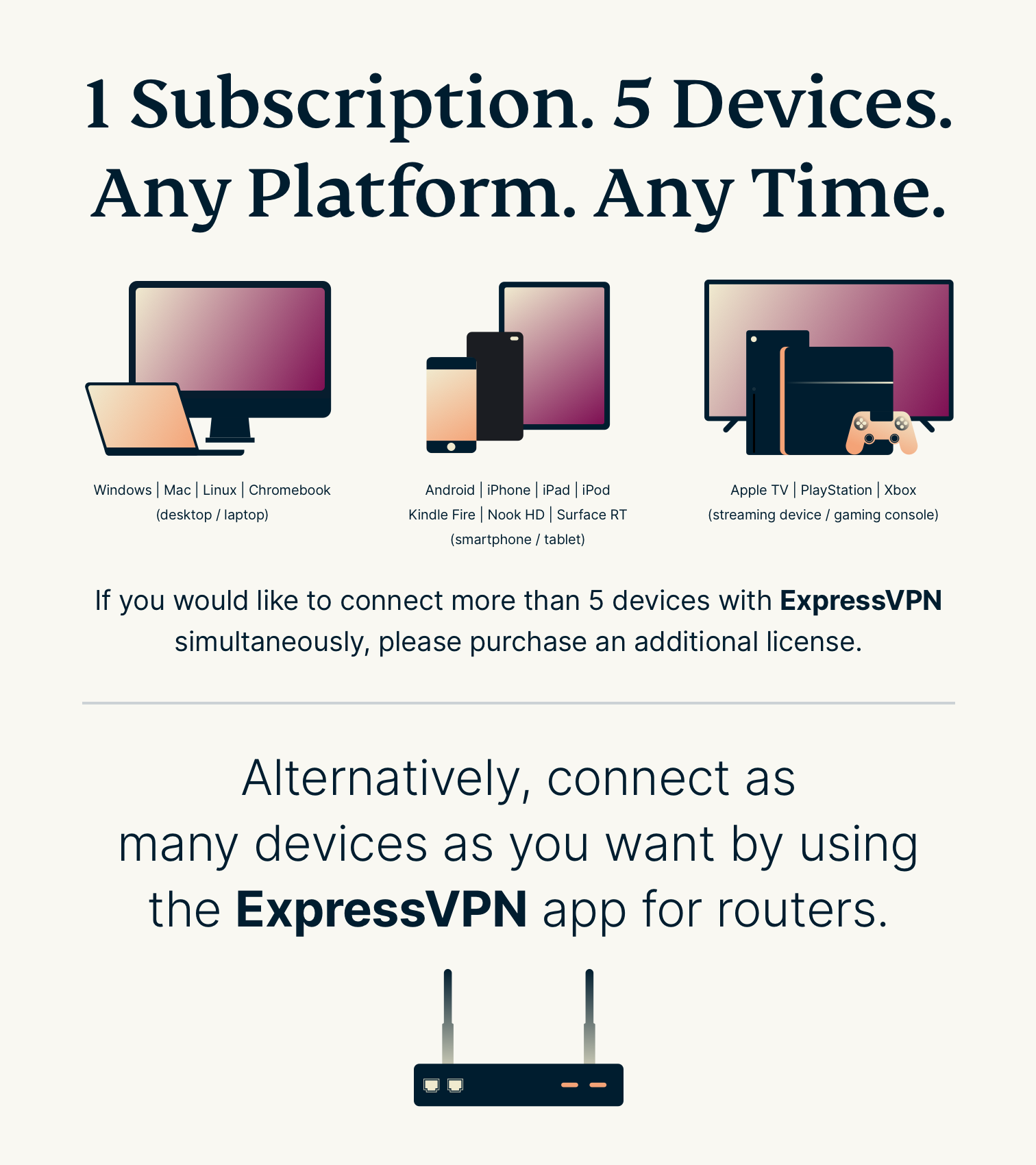
One of the key advantages of ExpressVPN is the wide range of platforms it supports. Whether you’re using a Windows or Mac computer, an Android or iOS device, or even a Kindle Fire, ExpressVPN has got you covered. It also offers browser extensions for Chrome, Firefox, and Safari, allowing you to utilize its services with ease.
ExpressVPN is also a great option for those looking to protect their entire network. It offers router support, which means you can connect all your devices to the VPN at once. This is especially useful if you have multiple devices connected to the internet and want to ensure the security and anonymity of all your online activities.
When it comes to performance, ExpressVPN delivers excellent speeds and connections. During our tests, we found that ExpressVPN offers faster download and upload speeds compared to many other VPN providers. This makes it a great option for streaming, torrenting, and online gaming.
ExpressVPN also offers a 30-day money-back guarantee, so if you’re not completely satisfied with the service, you can get a full refund. The company also splits its payment options, giving you the choice to pay monthly or annually, depending on your preference. The prices may vary depending on the plan you choose, but overall, ExpressVPN offers competitive prices for the level of service it provides.
In conclusion, ExpressVPN is a top-rated VPN provider that offers excellent security, anonymity, and support for a wide range of platforms. Whether you’re in Australia, South America, or anywhere else in the world, ExpressVPN gives you the ability to browse the internet with confidence. With its fast speeds, multiple server locations, and user-friendly interface, ExpressVPN is a great choice for anyone looking to enhance their online privacy and security.
ExpressVPN Review: Supported Platforms
Supported Devices and Applications
ExpressVPN offers a wide range of supported platforms, making it convenient for every user. You can use it on popular devices such as Nvidia Shield, ensuring that you are protected and anonymous while streaming your favorite content. ExpressVPN also provides applications for various operating systems, including Windows, Mac, Android, iOS, and more.
Optimized for Streaming and Speeds
ExpressVPN is perfect for streaming, as it offers optimized servers that provide fast and reliable speeds. Whether you want to watch content from Europe or stream videos from around the world, ExpressVPN has got you covered. You can enjoy uninterrupted streaming without any buffering issues.
High Level of Anonymity and Security
ExpressVPN gives you a high level of anonymity and security. With its strong encryption and no-logs policy, you can browse the internet and send messages without worrying about your privacy. ExpressVPN ensures that your personal information and online activities are protected, keeping you safe from hackers and leaks.
Wide Availability and Worldwide Routing
ExpressVPN is available in multiple countries worldwide, giving you the freedom to access geo-restricted content from anywhere. With ExpressVPN, you can bypass censorship and enjoy a wide variety of content. Its global network of servers ensures that you have a stable and reliable connection no matter where you are.
Easy to Use and Transparent
ExpressVPN is easy to use, even for first-time users. The interface is user-friendly and intuitive, making it simple to connect and navigate through the applications. ExpressVPN also offers transparent information about its services and policies, giving you peace of mind before buying a subscription.
Useful Tools and Features
ExpressVPN offers a variety of useful tools and features to enhance your online experience. These include split tunneling, which allows you to choose which internet traffic goes through the VPN, and a kill switch that automatically disconnects you from the internet if the VPN connection drops. These tools give you more control and customization over your VPN connectivity.
Conclusion
In conclusion, ExpressVPN is a highly recommended VPN solution supported on a wide range of platforms and devices. It offers optimized streaming speeds, strong anonymity and security features, worldwide availability, and useful tools. With ExpressVPN, you can enjoy a safe and fast internet connection, access geo-restricted content, and browse the web with peace of mind.
ExpressVPN won’t disappoint you with its performance and support. It is a market leader in the VPN industry and consistently receives positive reviews. Try ExpressVPN today and experience the difference it can make in your online browsing experience.
Supported Devices and Operating Systems
ExpressVPN provides compatibility with a wide range of devices and operating systems, making it easy for users to secure their internet connection on any device. Whether you are using a Windows, Mac, or Linux-based computer, ExpressVPN has you covered. They also have dedicated apps for iOS and Android devices, ensuring that you can protect your privacy and data while on the go.
For an alternative to the app-based interface, ExpressVPN also offers manual configurations which can be used on a variety of devices, including routers and smart TVs. This is perfect for those who prefer a more hands-on approach when choosing their VPN settings.
If you are a fan of streaming content, ExpressVPN has collected a list of platforms where their service is known to work. This includes popular streaming sites such as Netflix and Hulu, as well as other platforms like Amazon Prime Video and BBC iPlayer. ExpressVPN ensures that you can enjoy unlimited access to your favorite shows and movies, no matter where you are.
When it comes to security protocols, ExpressVPN supports the industry-standard OpenVPN protocol, as well as other options such as IKEv2 and L2TP/IPSec. They also provide AES-256 encryption, which is one of the most secure encryption methods available.
If you’re an Australian user, ExpressVPN has made it even easier for you to connect to their service. They have selected specific servers in Australia that are optimized for speed and reliability, ensuring that you can enjoy a seamless browsing experience.
If you are using an extra device not listed on their website, ExpressVPN provides helpful instructions on how to manually configure their VPN service. Whether it’s a Kindle Fire, Chromebook, or any other device, you can find step-by-step guides to get you connected.
In summary, ExpressVPN supports a wide range of devices and operating systems, providing easy and secure access to the internet for users around the globe. With their extensive list of supported platforms, fast and reliable connections, and top-notch security protocols, it’s no wonder that ExpressVPN is one of the most popular VPN services on the market.
Compatibility with Windows Devices
ExpressVPN is compatible with a wide range of Windows devices, including desktops, laptops, and tablets, running on the latest versions of the Windows operating system.
Supported Features
ExpressVPN supports all the features and functionalities available on Windows devices. From the moment you install the application, you can request access to servers in various countries, ensuring your online activities are protected with top-level encryption.
Every message and information collected by ExpressVPN is securely encrypted, ensuring that your data is safe, even when connected to a public Wi-Fi network.
User Experience
The user interface of the ExpressVPN application for Windows devices is intuitive and easy to use. The application can be configured to run on startup, so you’re always protected as soon as you turn on your computer.
ExpressVPN also supports split tunneling, which allows you to choose which applications use the VPN connection and which ones don’t. This is particularly helpful if you want to use other applications, such as torrenting clients, while connected to the VPN.
Compatibility with Other Devices
While ExpressVPN is primarily recommended for Windows devices, it is also compatible with a wide range of other devices. This includes popular devices such as Android smartphones and tablets, iOS devices, Mac computers, Amazon Kindle Fire tablets, and more.
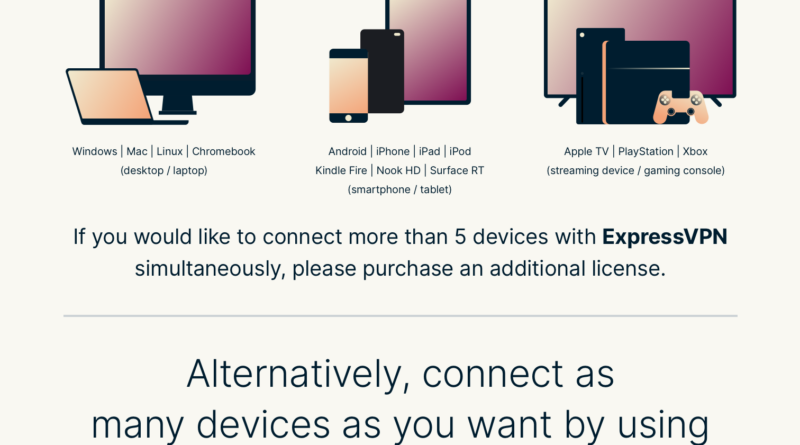
If you have multiple devices, you can connect up to five devices simultaneously using a single ExpressVPN account.
Connectivity and Speed
ExpressVPN delivers excellent connectivity and high-speed performance on Windows devices. This ensures that you can browse the internet, stream content, and download files without any interruption or slow speeds.
The company has a huge network of servers in various countries, offering users the option to connect to the server that is nearest to their location for the best performance.
Secure DNS and Protection
ExpressVPN ensures that your DNS queries are protected, preventing any outside party from monitoring your online activities. This feature helps to keep your internet browsing private and secure.
The automatic kill switch feature is another core component of ExpressVPN’s protection. It ensures that if your VPN connection is lost for any reason, your internet connection is immediately cut off to prevent any data leakage.
In terms of security, ExpressVPN uses the AES-256 encryption standard, which is considered to be one of the most secure encryption methods available.
Support and Money-Back Guarantee
If you ever encounter any issues while using ExpressVPN on your Windows device, their support team is available 24/7 to assist you. They can help with any technical difficulties or questions you may have.
ExpressVPN also offers a 30-day money-back guarantee. If you’re not satisfied with the service, you can simply request a refund within 30 days and get your money back.
Compatibility with Mac Devices
When it comes to compatibility, ExpressVPN offers a wide range of options for Mac users. Whether you’re running the latest macOS or an older version, you can easily install and use the ExpressVPN application on your Mac.
One of the primary advantages of using ExpressVPN on a Mac is its capability to bypass geo-restrictions. With this VPN, you can access popular streaming websites like Netflix and utilize a variety of applications without any limitations. ExpressVPN performs exceptionally well in delivering fast and reliable speeds, ensuring that you can enjoy your favorite shows and movies in high definition.
ExpressVPN offers a wide range of servers worldwide, giving Mac users the freedom to connect to a location that best suits their needs. Whether you need to browse the web privately or access regionally restricted content, ExpressVPN has you covered. Additionally, the application takes steps to ensure your online privacy by providing high-level encryption and logging zero user activity.
Furthermore, ExpressVPN has a user-friendly interface that is easy to navigate, making it simple to connect to a server with just a few touches. The application also offers a kill switch feature that automatically disconnects you from the internet if the VPN connection drops, protecting your privacy and preventing any potential data leaks. This is particularly useful when you’re using public Wi-Fi networks.
ExpressVPN offers various subscription plans, each providing different features and prices. Whether you’re a frequent traveler or someone who wants to ensure their online privacy, there’s a plan that suits your needs. The application can be installed on multiple devices, so you can use it on both your Mac and other platforms simultaneously.
In conclusion, ExpressVPN is a highly compatible VPN solution for Mac devices. It offers a wide range of features, performs well in terms of speed and security, and provides a user-friendly interface. By subscribing to ExpressVPN, Mac users can ensure their online privacy, bypass geo-restrictions, and enjoy a seamless browsing experience.
Compatibility with iOS Devices
ExpressVPN is fully compatible with iOS devices, including iPhones and iPads. The VPN can be easily installed from the App Store, and once installed, it offers a wide range of features that make it a great choice for iOS users.
One of the standout features of ExpressVPN is its ability to switch between different server locations with just a few taps. This means that users can easily access content from different countries and bypass geo-restrictions. ExpressVPN also offers a built-in speed-test feature, allowing users to find the fastest server location for better streaming and browsing experiences.
For those who are interested in privacy and security, ExpressVPN offers a kill switch feature that ensures your internet connection is encrypted and protected at all times. It also provides an array of security protocols, including OpenVPN, L2TP/IPsec, and IKEv2, ensuring that your data is always encrypted and your online activities are anonymous.
ExpressVPN is also compatible with other iOS features such as Touch ID, Siri, and iMessage. Users can enable these features to provide an extra layer of security and convenience.
The VPN is also compatible with other iOS devices such as Apple TV, allowing users to access a more extensive range of content on their television screens. ExpressVPN also offers tutorials and guides on its website to help users set up the VPN on their iOS devices.
In conclusion, ExpressVPN is an incredibly versatile and user-friendly VPN that is compatible with a wide range of iOS devices. Its support for iOS features, offering excellent security and privacy features, ensures that your online experience on iOS devices will be better and more secure.
Compatibility with Android Devices
If you’re an Android user, you’ll be glad to know that ExpressVPN supports this platform. You can easily activate ExpressVPN on your Android devices without any hassle. Whether you have a smartphone or a tablet, you can enjoy secure and private browsing with ExpressVPN.
ExpressVPN ensures that your Android devices are protected from any leaks while using the VPN service. With the various options available, you can choose different protocols such as OpenVPN or IKEv2 to effectively secure your connection.
In terms of compatibility, ExpressVPN seems to support a wide range of Android devices. This means that you can use ExpressVPN on popular Android-based platforms such as Samsung, Google Pixel, OnePlus, Xiaomi, and more.
ExpressVPN also provides easy-to-follow tutorials for Android users to set up the VPN on their devices. Whether you’re a beginner or an advanced user, you can easily configure ExpressVPN on your Android device and start enjoying fast and secure internet speeds.
With ExpressVPN on your Android device, you can browse the internet without any restrictions. It effectively bypasses any blocking or censorship, giving you access to all your favorite online services and applications.
If you’re concerned about your privacy while using Android applications, ExpressVPN has got you covered. It encrypts your internet traffic and ensures that your personal information is safe from any potential threats.
ExpressVPN also supports Android devices in terms of location options. You can choose from a wide range of servers located in different countries, including popular locations like the United States, Europe, and Australia. This gives you the flexibility to browse the internet as if you were located in a different country.
Furthermore, ExpressVPN allows you to change your IP address to an Australian one, which can be useful if you want to access geo-restricted content available only in Australia.
ExpressVPN supports various payment options for Android users, including credit cards, PayPal, and Bitcoin. This means that you can choose the payment method that suits you best.
When it comes to privacy and security, ExpressVPN has a strict no-logs policy. This means that your online activities and browsing history won’t be monitored or stored. You can enjoy your Android device without the risk of your data being collected.
ExpressVPN also provides 24/7 customer support for Android users. If you have any questions or issues, you can reach out to their support team and get assistance.
In conclusion, ExpressVPN is a great choice for Android users looking for a reliable and secure VPN service. With its compatibility, fast speeds, and comprehensive privacy features, ExpressVPN ensures that your Android devices are protected while browsing the internet.
Compatibility with Linux Devices
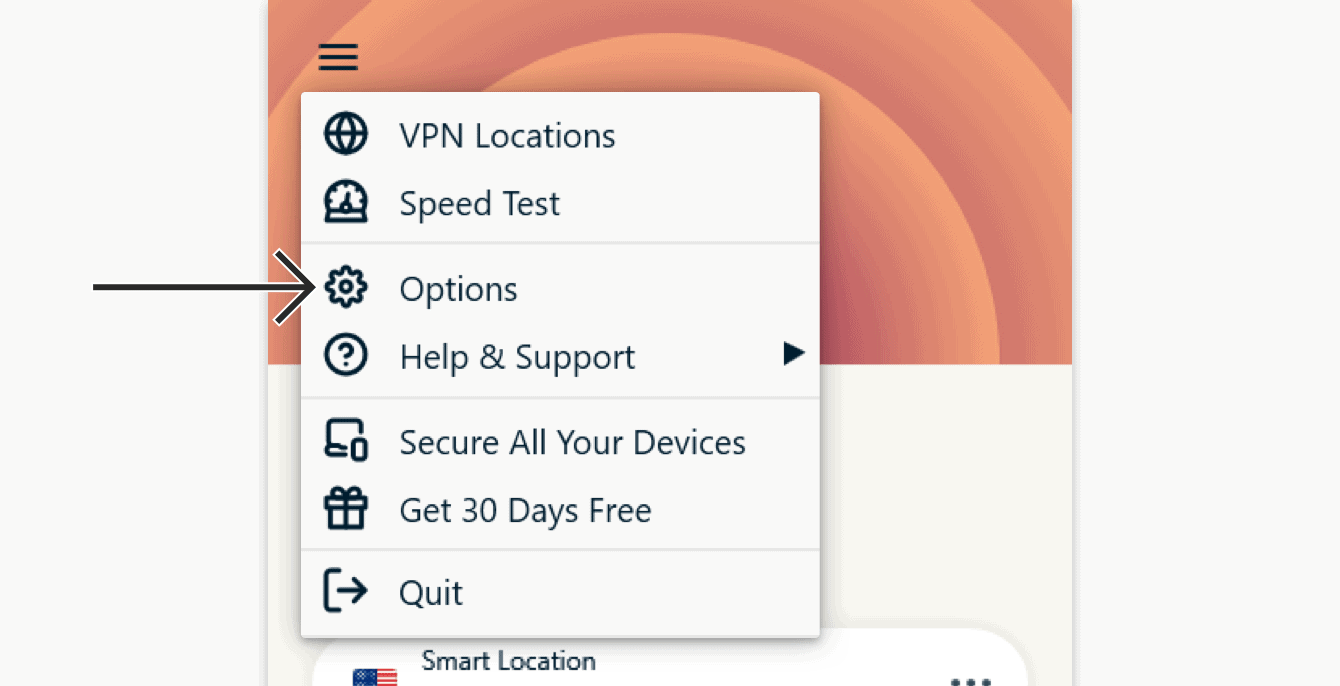
If you are a Linux user, you’ll be happy to know that ExpressVPN supports a wide range of Linux devices. Whether you are using Ubuntu, Fedora, or any other Linux distribution, ExpressVPN is the perfect choice for you. The client software is easy to install and the setup process is straightforward, ensuring that you can get connected to the VPN network within a matter of minutes.
ExpressVPN lets you enjoy the great speed and security features of its service while using your Linux device. With support for OpenVPN, you’ll have the option to switch between UDP and TCP protocols, depending on your needs. You won’t have to worry about your IP address being static, as ExpressVPN ensures that it keeps your online activities anonymized and secure.
One of the great advantages of ExpressVPN for Linux is that it supports a wide range of devices, including computers, laptops, and even routers. This means that you can effectively protect all devices connected to your network, ensuring that your sensitive data remains safe from hackers and unauthorized access.
Selected Linux distributions supported by ExpressVPN:

- Ubuntu
- Fedora
- Debian
- Mint
Whether you need a VPN for browsing, torrenting, or providing an extra layer of security, ExpressVPN has you covered. With its easy-to-use applications and top-notch customer support, you can rest assured that your Linux device is in good hands.
In comparison to other VPNs on the market, ExpressVPN offers competitive pricing plans that won’t break the bank. While there are cheaper options available, ExpressVPN is worth considering due to its wide range of features and excellent performance. If you’re looking to take your online security to the next level, ExpressVPN is the way to go.
In conclusion, ExpressVPN is a top-tier VPN service that supports a wide range of Linux devices. Whether you’re a casual user or a tech enthusiast, ExpressVPN is a reliable and trusted choice for protecting your online privacy and security. Don’t leave your Linux device vulnerable – get ExpressVPN today and enjoy a seamless and secure internet browsing experience.
Compatibility with Router Devices
If you’re looking to secure your whole network and not just individual devices, ExpressVPN offers excellent compatibility with router devices. By connecting your router to ExpressVPN, you can enjoy the benefits of a private and secure network for all the devices connected to it.
This feature is particularly useful if you have multiple devices in your home or office that you want to protect. By simply configuring your router to use ExpressVPN, you can ensure that all devices connected to the network are automatically protected. This includes common devices like smartphones, tablets, laptops, smart TVs, and gaming consoles.
In addition to providing overall network security, ExpressVPN also offers the advantage of fast speeds. As mentioned in the previous sections, ExpressVPN is known for its impressive connection speeds, making it suitable for streaming, downloading, and online gaming. By connecting your router to ExpressVPN, you can enjoy these fast speeds on all your devices.
Another major benefit of using ExpressVPN with router devices is the added layer of anonymity it provides. When your router is connected to ExpressVPN, your IP address is hidden and your online activity is encrypted. This means that your online browsing, streaming, and downloading activities are private and protected from hackers, malware, and other prying eyes.
If you’re concerned about the setup process, don’t worry. ExpressVPN provides detailed instructions on how to install and configure the VPN on various router models. The availability of supported routers may vary, but ExpressVPN has a long list of compatible devices, including popular models from companies like Linksys, Asus, D-Link, and TP-Link.
To summarize, using ExpressVPN with router devices offers the following benefits:
- Secure your whole network with a private and encrypted connection.
- Protect multiple devices, including smartphones, tablets, laptops, and gaming consoles.
- Enjoy fast connection speeds for streaming, downloading, and online gaming.
- Stay anonymous and protect your online activity from hackers and malware.
- Follow easy setup instructions provided by ExpressVPN for various router models.
In conclusion, if you’re looking to secure and enhance your network, ExpressVPN’s compatibility with router devices is a great solution. With its fast speeds, robust security, and user-friendly setup process, ExpressVPN is well-suited for protecting all your devices and ensuring a private and secure online session.
Compatibility with Gaming Consoles
ExpressVPN is a highly versatile VPN service that caters to the needs of gaming console users. Whether you’re a gaming enthusiast or just looking to enjoy a few rounds with friends, ExpressVPN has you covered.
One of the main advantages of using ExpressVPN with gaming consoles is that it can handle a wide range of requests and offers complete compatibility with major gaming platforms. You can easily configure ExpressVPN on your Playstation, Xbox, or Nintendo console, allowing you to access games and content from around the world in a simple and easy way.
With ExpressVPN, your gaming sessions are fully encrypted and anonymized, ensuring that your privacy and online activities remain protected. This means that you can enjoy lag-free gaming and fast load times without the concern of any monitoring or connectivity issues.
ExpressVPN also offers a dedicated app for Amazon Fire TV and Fire Stick devices, making it a great alternative for gamers who prefer to play on their TV screens. This app provides full access to the VPN’s huge server network and advanced encryption features, guaranteeing a secure and private gaming experience.
Furthermore, ExpressVPN deploys advanced security measures such as blocking malware, preventing DNS leaks, and securing your connection against potential threats. With a built-in DNS service, ExpressVPN ensures that your gaming console’s data stays protected from prying eyes.
Another great feature of ExpressVPN is its compatibility with routers. By installing the VPN onto your router, you can ensure that every device connected to your network benefits from the VPN’s encryption and privacy features. This means that all your gaming consoles, smartphones, tablets, and other devices will be protected without the need for individual installations.
In conclusion, ExpressVPN is a top choice for gamers who want to ensure their privacy and security while gaming online. Its compatibility with a wide range of gaming consoles, along with its strong encryption and privacy features, makes it an excellent choice for gamers worldwide.
Compatibility with Smart TVs
ExpressVPN is compatible with a wide range of devices, including smart TVs. This means that you can easily set up and use the VPN service on your television to access geo-restricted content, protect your online privacy, and enhance your streaming experience.
When it comes to using ExpressVPN on a smart TV, there are a few different options. You can either install the VPN app directly on your TV if it supports the platform, or you can set up the VPN on a router and connect your TV to that router. Both methods allow you to enjoy the benefits of ExpressVPN on your smart TV.
If your smart TV does not have a compatible ExpressVPN app, you can still benefit from the VPN service by using a VPN-enabled router. By setting up ExpressVPN on a router, you can ensure that all devices connected to that router are protected and can access international content. This is especially useful if you have multiple smart TVs or other devices that you want to use with the VPN.
ExpressVPN’s compatibility with smart TVs extends to a wide range of popular TV brands, including Samsung, LG, Sony, and more. Whether you have an Android-based smart TV, a webOS-based TV, or any other platform, ExpressVPN has you covered.
With ExpressVPN, you can switch between different server locations to access content from around the world. This gives you the ability to watch content that is normally unavailable in your region, such as American Netflix or Australian TV shows. The VPN service also gives you the option to prevent your ISP or other third parties from tracking your online activities and provides an additional layer of security.
In conclusion, ExpressVPN is a great choice for users who want to use a VPN with their smart TVs. The service offers compatibility with a wide range of TV brands and platforms, making it easy to set up and use. Whether you want to access geo-restricted content or simply protect your online privacy, ExpressVPN has the tools and features you need.
Compatibility with Firestick
ExpressVPN is a versatile VPN service that offers excellent compatibility with a wide range of devices, including Firestick. Whether you want to access geo-restricted content on your Amazon Firestick or ensure your online activities are secure, ExpressVPN has got you covered.
By using ExpressVPN, you can prevent your Internet Service Provider from tracking your online activities and protect your personal information. This is especially important when streaming content on Firestick, as your account and browsing history may be at risk of being accessed by third parties.
ExpressVPN can be easily installed on Firestick, making it a simple and convenient process. The VPN client is available for download on the Firestick app store, or you can manually install it by following the step-by-step instructions provided by ExpressVPN. Once installed, you can utilize the VPN to access a variety of streaming platforms and content, ensuring you have a secure and unrestricted viewing experience.
With ExpressVPN, you can also enjoy fast connection speeds on your Firestick. The VPN has optimized servers that provide excellent performance and reduce buffering when streaming content. This means you can enjoy a full range of movies, TV shows, and other media without experiencing any lag or interruptions.
ExpressVPN offers a range of pricing plans, including a 30-day money-back guarantee, so you can try the service risk-free. This allows you to test out the VPN on your Firestick and see if it meets your needs. If you’re not satisfied, you can easily switch to another VPN or request a refund.
In conclusion, ExpressVPN is an excellent VPN service that is compatible with Firestick. Its ease of installation, fast speeds, and strong security features ensure a seamless streaming experience. With ExpressVPN, you can enjoy a wide range of content on Firestick without compromising your privacy or security.
How to Set Up ExpressVPN on Different Devices
1. Interface
ExpressVPN provides an intuitive and user-friendly interface that makes it easy for users to set up the service on various devices. Whether you are a first-time user or an experienced VPN user, the interface is designed to simplify the setup process, ensuring a seamless experience.
2. Compatible Devices
ExpressVPN can be configured on a wide range of devices, including desktop and laptop computers, smartphones, tablets, and even some smart TVs. This means that no matter what device you are using, you can enjoy the benefits of ExpressVPN’s secure and private connection.
3. Setup Guides
To effectively set up ExpressVPN on different devices, the service provides comprehensive setup guides that walk users through the process step by step. These guides offer detailed instructions for each supported device, ensuring that even users with limited technical knowledge can easily configure the VPN.
4. Security and Privacy
ExpressVPN uses industry-standard encryption to protect users’ data, making it virtually impossible for hackers and cybercriminals to intercept or access their information. Additionally, ExpressVPN operates under a strict no-logs policy, meaning they do not collect or store any user activity logs, ensuring maximum privacy.
5. Speeds and Performance
ExpressVPN offers high-speed connections with no bandwidth restrictions, providing users with a seamless online experience. With speeds of up to 200 Mbps, ExpressVPN gives you the ability to stream, download, and browse without any lag or buffering.
6. Worldwide Server Network
ExpressVPN operates a large network of servers worldwide, which means you can connect to servers in different countries and bypass geo-restrictions. Whether you want to access content that is only available in a specific country or you want to protect your online identity, ExpressVPN offers a server network that is both reliable and efficient.
7. Helpful Features
ExpressVPN provides a range of helpful features that enhance the overall user experience. Some of these features include split tunneling, which allows users to selectively route their internet traffic through the VPN, and a kill switch, which ensures that your internet connection is automatically disabled if the VPN connection drops.
In conclusion, setting up ExpressVPN on different devices is a simple and straightforward process. With its user-friendly interface, comprehensive setup guides, and helpful features, ExpressVPN offers a service that is both easy to use and highly effective. Whether you are a beginner or an experienced VPN user, ExpressVPN provides the security, privacy, and speed that is essential for a reliable VPN experience.
Using ExpressVPN on Windows
ExpressVPN is a popular VPN service that offers a wide array of features and benefits for users on various platforms. When it comes to Windows, this VPN can provide a high level of privacy and anonymity.
ExpressVPN can be easily installed and set up on Windows devices, making it a straightforward option for users. With its user-friendly interface, connecting to one of the available VPN server locations is as simple as a click of a button.
Once connected, ExpressVPN routes your internet traffic through a secure tunneling protocol, providing an added layer of security. This means that your data is encrypted and protected from outside threats, ensuring that your online activities remain private.
ExpressVPN for Windows also offers a useful split tunneling function, which lets you choose which apps or programs should use the VPN connection and which should not. This can be particularly beneficial for users looking to access specific websites or services while maintaining a secure connection.
In terms of compatibility, ExpressVPN supports Windows 10, 8, and 7, ensuring that users with different versions of the operating system can benefit from its features. Additionally, ExpressVPN allows for simultaneous connections, so you can use it on multiple devices at the same time.
By subscribing to ExpressVPN’s annual plan, you can enjoy competitive pricing and save money in the long run. The service also offers a 30-day money-back guarantee, allowing you to try it out and see if it meets your needs.
In conclusion, using ExpressVPN on Windows provides users with a reliable and secure VPN solution. With its easy setup process, wide range of server locations, and strong encryption, ExpressVPN is a top choice for Windows users who value their privacy and want to browse the internet with peace of mind.
Using ExpressVPN on Mac
When it comes to using ExpressVPN on a Mac, you’ll be happy to know that it includes full support for the platform. The Mac version of ExpressVPN is specifically designed to work on all Apple Mac devices, including MacBook, iMac, Mac Pro, and Mac mini.
ExpressVPN supports the capability to tunnel your internet traffic through an encrypted connection, which helps to lock down your online activity and ensure your privacy and anonymity while using the internet on your Mac.
The Mac version of ExpressVPN operates on all the latest macOS systems and is compatible with both Intel and M1 processors. This means that whether you’re running macOS Big Sur, Catalina, or an older version, ExpressVPN will work seamlessly on your Mac.
Before buying ExpressVPN for your Mac, it’s important to note that the Mac version supports the OpenVPN and IKEv2/IPsec protocols. This provides you with multiple options for secure connections and faster speeds.
One of the key features of ExpressVPN on Mac is its easy-to-use client interface. The user-friendly client allows you to connect to ExpressVPN servers in just a few clicks, and it also provides a handy “Smart Location” feature that automatically selects the best server for you based on your location and needs.
ExpressVPN on Mac also offers the capability to request multiple IP addresses, giving you even more privacy and the ability to switch between different virtual locations. Additionally, ExpressVPN supports split tunneling, which allows you to choose which apps or services should use the VPN connection and which ones should bypass it.
ExpressVPN for Mac comes with a 30-day money-back guarantee, so you can try it out with confidence. Whether you’re looking to browse the web securely, access streaming services that are typically blocked in your region, or simply enhance your online privacy, ExpressVPN on Mac has got you covered.
In conclusion, ExpressVPN is a top-notch VPN service that offers a robust and reliable experience on Mac devices. With its wide range of features and compatibility across different macOS versions, it’s a great choice for anyone looking to enhance their online security and access blocked content.
Using ExpressVPN on iOS
If you are an iOS user, ExpressVPN is a great option for ensuring your online privacy and security. With support for iOS devices, you can use the VPN service on your iPhone or iPad, effectively protecting your online activities.
ExpressVPN is compatible with all iOS devices running iOS 10.0 or later. Whether you have the latest iPhone or an older iPad, you can enjoy the benefits of ExpressVPN on your device. The VPN service records no logs of your online activities, ensuring your privacy is maintained.
When using ExpressVPN on iOS, your internet traffic is encrypted and anonymized, making it difficult for anyone to intercept or trace your online activities. With the capability of tunneling your internet connection through a secure server, ExpressVPN ensures that your online traffic is hidden from prying eyes.
Installing ExpressVPN on your iOS device is a simple and straightforward process. You can simply download the ExpressVPN app from the App Store and follow the installation instructions. Once the app is installed, you can sign in using your ExpressVPN credentials and start using the VPN service.
ExpressVPN provides unlimited bandwidth and high-speed connections, allowing you to browse the internet, stream videos, and download files without any restrictions. The VPN service has optimized servers located in various countries around the world, ensuring that you can access content from anywhere.
One of the key features of ExpressVPN on iOS is its split tunneling capability. This means that you can choose which apps or websites you want to access through the VPN, while others can be accessed directly through your regular internet connection. This feature allows you to have more control over your online activities.
With ExpressVPN on iOS, you can also enjoy additional benefits such as protection against malware, a kill switch that automatically disconnects your internet connection if the VPN connection drops, and support for P2P file sharing, including torrenting.
In conclusion, if you are an iOS user looking for a reliable and secure VPN service, ExpressVPN is a great choice. With its strong encryption, speedy connections, and user-friendly interface, ExpressVPN ensures that your online activities remain private and secure. Install ExpressVPN on your iOS device and enjoy a safer and more anonymous browsing experience.
Using ExpressVPN on Android
ExpressVPN: ExpressVPN is a popular Virtual Private Network (VPN) service that offers secure and private internet access on various platforms, including Android devices.
Compatibility: ExpressVPN is compatible with many Android devices, including smartphones and tablets. It can be used on both Android versions, making it a versatile choice for Android users.
Installation: ExpressVPN can be easily installed on Android devices. Simply visit the Google Play Store and search for ExpressVPN. From there, download and install the app on your device.
User Interface: The ExpressVPN Android app has a user-friendly and straightforward interface. It includes a variety of features, such as an option to choose the best server location, an internet kill switch, and an auto-connect feature.
Performance: ExpressVPN performs well on Android devices, with fast and reliable connection speeds. It offers unlimited bandwidth, allowing users to browse and stream without restrictions. Additionally, ExpressVPN can bypass geo-restrictions and unblock websites, making it a great choice for accessing content from around the world.
Security: ExpressVPN uses strong encryption protocols to ensure a secure connection on Android devices. It also has a strict no-logs policy, which means that it doesn’t store any user activity or connection logs.
Additional Features: ExpressVPN offers additional features such as split tunneling, which allows users to choose which apps use the VPN connection and which apps access the internet directly. It also has a network lock feature, which prevents any internet traffic when the VPN connection drops.
Customer Support: ExpressVPN provides excellent customer support for Android users. There are detailed tutorials and guides available online, which can help users set up and troubleshoot any issues that may arise.
Pricing: ExpressVPN offers different pricing plans for Android users, including monthly, yearly, and multi-year subscriptions. While it may be slightly more expensive than some other VPN options, its performance and features make it worth the price.
Conclusion: Using ExpressVPN on Android devices is a recommended choice for anyone looking for a secure and reliable VPN connection. With its user-friendly interface, fast speeds, and strong security measures, ExpressVPN offers a great VPN experience for Android users.
Using ExpressVPN on Linux
If you are a Linux user, you’ll be happy to know that ExpressVPN supports this operating system. Whether you’re running Ubuntu, Fedora, or any other Linux distribution, you can easily set up and use ExpressVPN to protect your online activities.
Linux users can download and install ExpressVPN by following the straightforward steps listed on their website. Once installed, the interface is user-friendly and intuitive, making it easy for Linux users to navigate and utilize all the features offered by ExpressVPN.
With ExpressVPN on Linux, you can connect to servers in over 90 countries, giving you the capability to access websites and online services from virtually anywhere in the world. Your data is encrypted and transferred through secure servers, ensuring the privacy and security of your online activities.
One of the primary features of ExpressVPN is its ability to prevent your internet service provider from collecting your browsing data. This is particularly important in countries like China, where internet censorship and surveillance are prevalent. ExpressVPN lets Linux users browse the internet freely and privately, without worrying about their online activities being tracked or monitored.
ExpressVPN offers a range of subscription plans, allowing Linux users to choose the one that best suits their needs. With fast connection speeds, you can expect a smooth and seamless online experience, whether you’re streaming videos, downloading files, or browsing websites.
In conclusion, if you’re a Linux user, using ExpressVPN is a recommended option to enhance your online privacy and security. It provides a reliable and user-friendly platform, with a wide range of server locations worldwide. Protect your online activities and enjoy the internet freely with ExpressVPN on Linux.
Using ExpressVPN on Router
Why Should You Use ExpressVPN on Your Router?
If you want to extend the benefits of ExpressVPN to all devices in your home, using it on your router is a great solution. By configuring ExpressVPN on your router, you can ensure that all devices connected to the router benefit from the privacy, security, and enhanced functionality provided by the VPN service.
Supported Routers and Configurations
ExpressVPN supports a wide range of routers and provides detailed tutorials on how to set up their service on various router models. You can find step-by-step instructions on their website, making it easy to configure your router. It is important to note that not all router models are compatible, so you should check the list of supported routers before making a purchase.
Benefits of Using ExpressVPN on Your Router
- Protects all connected devices: By connecting to ExpressVPN on your router, you can ensure that all devices, including smartphones, tablets, computers, smart TVs, and gaming consoles, are protected and encrypted.
- Access to blocked content: With ExpressVPN on your router, you can bypass censorship and geo-restrictions, accessing blocked content from anywhere in the world.
- Increased speed: By using ExpressVPN on your router, you can enjoy faster internet speeds as the VPN eliminates ISP throttling and optimizes your connection.
- More simultaneous connections: With ExpressVPN on your router, you can connect more devices simultaneously than the number of devices supported by the VPN service.
Setting Up ExpressVPN on Your Router
Setting up ExpressVPN on your router involves a few simple steps. First, you need to choose a supported router model and download the necessary firmware from ExpressVPN’s website. Then, follow the provided tutorials to configure your router with ExpressVPN. Once the router is configured, all devices connected to it will be automatically secured and encrypted.
Things to Consider
Before setting up ExpressVPN on your router, there are a few factors to consider:
- Router compatibility: Make sure your router model is supported by ExpressVPN before buying.
- Router processing power: Some older or lower-end routers may struggle to handle the encryption and routing demands of a VPN. Consider upgrading your router if necessary.
- VPN connectivity: While ExpressVPN offers excellent connectivity, there may be occasional drops in connection. It is important to check for firmware updates and follow troubleshooting steps provided by ExpressVPN if you encounter any connectivity issues.
In conclusion, using ExpressVPN on your router allows you to extend the benefits of the VPN service to all devices in your home. By providing protection, access to blocked content, increased speed, and more simultaneous connections, ExpressVPN on your router enhances your online experience. Follow the setup instructions and consider compatibility and router processing power to ensure smooth and secure browsing.
Вопрос-ответ:
Is ExpressVPN compatible with all devices?
Yes, ExpressVPN is compatible with a wide range of devices including Windows, Mac, iOS, Android, Linux, routers, game consoles, and smart TVs.
Can ExpressVPN be used on multiple devices simultaneously?
Yes, ExpressVPN allows you to connect up to 5 devices simultaneously under one account, regardless of the platform.
Which platforms can be unblocked using Private Internet Access?
Private Internet Access can unblock platforms such as Netflix, Hulu, Amazon Prime Video, BBC iPlayer, and more, allowing you to access geo-restricted content.
Are there any limitations on the devices that can be unblocked with Private Internet Access?
No, Private Internet Access can be used to unblock platforms on multiple devices including Windows, Mac, iOS, Android, Linux, routers, and smart TVs without any limitations.
Does ExpressVPN support gaming consoles?
Yes, ExpressVPN supports gaming consoles such as Xbox, PlayStation, and Nintendo Switch, allowing you to secure your online gaming experience and access games from different regions.
Can Private Internet Access unblock streaming services on smart TVs?
Yes, Private Internet Access can unblock streaming services on smart TVs, making it easy for you to watch your favorite shows and movies on the big screen.
Видео:
Express VPN Review what is express vpn used for?
Express VPN Review what is express vpn used for? by OnlyVpn’s-6 3 months ago 2 minutes, 31 seconds 1,872 views
