Switch between Local and VPN Network with Ease using VPN Router Setup

The Sabai Router offers an easy and efficient way to switch between your local network and a VPN network. With this setup, you can enjoy the benefits of a VPN network while still having access to your local network and devices. Whether you want to improve the security of your internet connection or access region-restricted content, the VPN Router Setup has got you covered.
To set up the VPN Router, you simply need to open the admin interface of your Sabai router and choose the VPN provider you want to use. You can choose from a range of providers, such as OpenVPN or PPTP, depending on your preferences. Once you have selected your provider, you can easily set up the VPN connection by entering the necessary information, such as the server address and port.
Once the VPN connection is set up, you can seamlessly switch between your local network and the VPN network. Simply connect your device to the VPN router, and you will be connected to the VPN network. If you want to switch back to your local network, all you need to do is disconnect from the VPN router.
The VPN Router Setup allows you to enjoy the benefits of a VPN network, such as improved security and access to region-restricted content, while still having complete control over your local network. Whether you want to unlock geo-restricted content or simply have a more secure internet connection, the VPN Router Setup is the perfect solution.
With the VPN Router Setup, you can switch between your local network and a VPN network anytime and anywhere. Whether you are at home or on the go, you can easily switch between networks with just a few clicks. Say goodbye to complicated setup processes and enjoy a seamless and efficient VPN experience with the Sabai Router.
Switch seamlessly between local and VPN network on any device anytime
With Sabai VPN Router Setup, you can easily switch between your local network and a VPN network on any device, providing you with a complete range of features and benefits.
Using the Sabai VPN Router Setup, you have the option to choose between multiple VPN providers, either using the built-in provider or setting up your own provider. This gives you the flexibility to unlock a wide range of internet content and improve your online security.
Once your VPN provider is set up, you can simply switch between your local network and the VPN network with the click of a button. You can either connect to the VPN network using the OpenVPN protocol or the PPTP protocol, depending on your preference and the capabilities of your VPN provider.
The Sabai VPN Router Setup provides a dual network setup, allowing you to have both your local network and the VPN network connected at the same time. This means that you can access resources on both networks without having to constantly switch between them.
To make sure that your VPN network is always connected and secure, the Sabai VPN Router Setup includes a range of admin tools and features. You can configure port forwarding to open up specific ports on your router, allowing you to access services on your local network while connected to the VPN network.
If you’re not sure how to set up your VPN provider using the Sabai VPN Router Setup, you can find step-by-step instructions and video tutorials on the Sabai website. There is also a support forum where you can ask questions and get help from other users.
With the Sabai VPN Router Setup, you can switch seamlessly between your local network and the VPN network on any device, anytime. Whether you’re at home, at work, or on the go, you can enjoy the benefits of a VPN connection without any hassle.
How to Set up PPTP on your Sabai VPN Router
If you want to improve the security and privacy of your internet connection, setting up PPTP on your Sabai VPN Router is a great option. PPTP (Point-to-Point Tunneling Protocol) is a widely used VPN protocol that allows you to connect to a VPN network. With PPTP, you can switch between your local network and VPN network seamlessly, and enjoy the benefits of both.
Step 1: Access the admin panel of your Sabai VPN Router
To set up PPTP on your Sabai VPN Router, you need to open the admin panel. Simply open your internet browser and enter the IP address of your router. Then, enter the default login credentials to access the admin panel.
Step 2: Find the PPTP setup page
Once you are connected to the admin panel, find the PPTP setup page. You can find it under the ‘VPN’ section of the admin panel. Click on the PPTP setup page to proceed.
Step 3: Complete the PPTP setup
On the PPTP setup page, you will see a range of options to complete the setup. Enter the necessary information provided by your VPN provider, such as the server address and port. Make sure to choose the PPTP protocol and set the authentication to ‘Auto’. If you have a dual provider setup, you can also set up an additional PPTP connection.
Step 4: Save the settings and enjoy the benefits
Once you have entered all the required information, click on the ‘Save’ button to save the settings. Your Sabai VPN Router will now be set up with PPTP, and you can enjoy the benefits of a secure and private VPN network. You can now switch between your local network and VPN network anytime you want to using the PPTP protocol.
The Benefits of a Dual Router Setup
A dual router setup offers a range of benefits for users who need to easily switch between a local network and a VPN network. By using two separate routers, it allows for seamless switching and enhanced security. Here are some of the key benefits of this setup:
Improved Security
One of the main benefits of a dual router setup is improved security. By using a separate router for your VPN connection, you can keep your local network separate from the VPN network. This ensures that your sensitive files and personal information are protected while you are connected to the internet. You can also choose different VPN providers for each router to further enhance security.
Effortless Switching
With a dual router setup, switching between your local network and the VPN network is incredibly easy. By simply connecting to either the local router or the VPN router, you can instantly switch between the two networks. This is particularly useful when you need to access certain websites or services that may be blocked or restricted in your local network. You can switch to the VPN network to unlock these websites and then switch back to the local network for regular browsing.
Expanded Network Features
A dual router setup also allows you to enjoy the full range of features offered by both your local router and your VPN provider. You can set up specific port forwarding rules, configure advanced network settings, and enjoy the benefits of both networks. For example, you can use the local router for local file sharing and the VPN router for secure internet browsing. This flexibility allows you to make the most of your network and tailor it to your specific needs.
Complete Control
By using a dual router setup, you have complete control over your network. You can choose the VPN provider that best fits your needs and easily switch between different providers if necessary. You can also configure the routers to suit your preferences, such as using OpenVPN or PPTP protocols. Additionally, having two routers allows you to manage the network traffic more efficiently and ensure that each device is connected to the appropriate network.
In conclusion, a dual router setup provides numerous benefits for users who need to switch between a local network and a VPN network. It offers improved security, effortless switching, expanded network features, and complete control over your network. If you want to learn more about how to set up a dual router configuration using a Sabai VPN router, please check out the admin documentation or reach out to our support team for more information.
DUAL ROUTER SETUP + VPN
By using a Dual Router Setup with a VPN, you can seamlessly switch between a local network and a VPN network, with just a few simple steps. This setup allows you to choose between your regular internet connection and a secure VPN connection, depending on your needs.
1. Set up your routers
To configure the Dual Router Setup, you will need two routers – one for your local network and one specifically dedicated to the VPN connection. Sabai Technology offers a range of routers that are compatible with this setup.
2. Choose your VPN provider
You will need to sign up with a VPN provider that supports OpenVPN or PPTP protocols. OpenVPN is recommended for its security and reliability. Look for a provider that offers a complete setup guide and the necessary files to configure the VPN on your router. Sabai VPN Router Setup offers a list of recommended VPN providers.
3. Connect and configure your routers
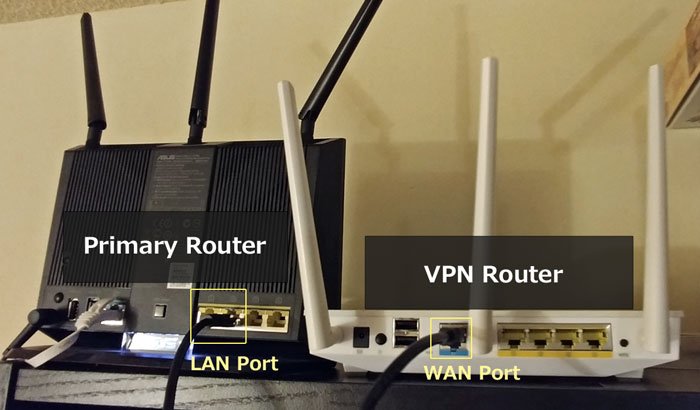
Connect your main router to your modem, and then connect the Sabai router (dedicated to the VPN) to one of the LAN ports on your main router. Access the admin panel of your Sabai router using a web browser, and follow the instructions provided by your VPN provider to configure the VPN settings on your Sabai router.
4. Switch between local and VPN network
Once your routers are set up and connected, you can easily switch between your local network and the VPN network. Simply access the admin panel of your Sabai router and choose whether you want to be connected to the local network or the VPN network. This allows you to enjoy the benefits of the VPN, such as encrypted internet browsing and access to region-restricted content, whenever you want.
5. Unlock the full potential of your devices
With the Dual Router Setup + VPN, you can unlock the full potential of your devices. Use the VPN network to improve your online privacy and security, or switch to the local network for faster speeds and unrestricted access to local resources.
For more information and a step-by-step guide on how to set up the Dual Router Setup + VPN using Sabai routers, please visit the Sabai Technology website.
How Can A Dual Router Setup Improve Your Network
A dual router setup can greatly improve your network and provide a range of benefits that a single router may not be able to offer. With a dual router setup, you can seamlessly switch between your local network and a VPN network for enhanced security and privacy.
One popular option for a dual router setup is the Sabai VPN Router, which is designed to make the setup process easy and efficient. By using a Sabai VPN Router, you can make sure that any device connected to your network can take advantage of the benefits of a VPN.
Using a dual router setup, you can have one router dedicated to your local network and another router specifically set up for VPN use. This means that you can choose to use either your local network or the VPN network for internet access, depending on your needs.
The dual router setup also allows you to connect to different VPN providers for added flexibility. You can easily switch between different VPN providers to find the one that best meets your needs, whether it’s for unlocking geo-restricted content or improving your online security.
The setup process for a dual router setup can be completed by following a few simple steps. First, you need to connect your primary router to your Sabai VPN Router using a wire connection. Then, you need to configure the Sabai VPN Router with the necessary VPN provider information.
Once the setup is complete, you can then use the Sabai VPN Router to switch between your local network and the VPN network anytime you want. By simply connecting to the appropriate port and using the provided admin interface, you can easily switch between the two networks.
Using a dual router setup with a Sabai VPN Router can improve your network in several ways. It can provide you with enhanced privacy and security when browsing the internet, as well as the ability to unlock geo-restricted content. With the dual router setup, you can make sure that your network is always connected to the VPN, ensuring that all devices on your network benefit from its features.
How to Set up OpenVPN on your Sabai VPN Router
Switching between your local network and a VPN network can be done effortlessly with the help of Sabai VPN router. By setting up OpenVPN on your Sabai VPN router, you can easily switch between the two networks without any hassle.
To set up OpenVPN on your Sabai VPN router, follow these simple steps:
1. Find your Sabai VPN router admin page
First, find the admin page of your Sabai VPN router. This can usually be accessed by typing the router’s IP address into your web browser.
2. Set up OpenVPN using Sabai VPN router’s admin page
Once you are on the admin page of your Sabai VPN router, navigate to the OpenVPN setup section. Here, you will have the option to set up OpenVPN manually or use a pre-configured provider setup. Choose the option that suits you.
3. Enter your OpenVPN information
If you choose to set up OpenVPN manually, you will need to enter your OpenVPN provider’s information including the server IP address, username, password, and any additional settings required.
4. Make sure the OpenVPN setup is complete
Once you have entered all the necessary information, make sure the OpenVPN setup is complete by clicking on the “Apply” or “Save” button. This will save the settings and apply them to your Sabai VPN router.
5. Unlock the benefits of OpenVPN
Once the setup is complete, you can now enjoy the benefits of OpenVPN on your Sabai VPN router. With OpenVPN, you can switch between your local network and the VPN network seamlessly.
OpenVPN not only allows you to switch between networks, but it also offers additional features such as improved security and privacy. You can choose between different VPN providers and make sure you are connected to the one that suits your needs the most.
By using OpenVPN on your Sabai VPN router, you can have the best of both worlds – the freedom and convenience of your local network and the added security and privacy of a VPN.
FAQ:
Why would I need to switch between local and VPN network?
There are several reasons why you might need to switch between the local and VPN network. One possible reason is that you want to access content that is only available in certain regions, and therefore need to switch to a VPN server in that region. Another reason could be that you want to protect your online privacy and security, and using a VPN allows you to encrypt your internet traffic and hide your IP address. Additionally, you might need to switch to a local network to access devices or services that are only available on your local network, such as a printer or file server.
How can I switch between the local and VPN network?
To switch between the local and VPN network, you will need to set up a VPN router. A VPN router is a router that has a VPN client installed on it, allowing all devices connected to the router to use the VPN connection. Once you have set up your VPN router, you can easily switch between the local and VPN network by connecting or disconnecting the VPN on your router. This can usually be done through the router’s web interface or a dedicated app provided by the VPN service.
What are the benefits of using a VPN router for switching between networks?
Using a VPN router for switching between networks offers several benefits. Firstly, it allows you to easily switch between the local and VPN network without having to manually configure each device. This saves time and ensures that all devices connected to the router are using the same VPN connection. Secondly, using a VPN router provides a secure and encrypted connection for all devices on your network, enhancing your online privacy and security. Finally, a VPN router allows you to access region-restricted content on any device connected to the router, without having to install a VPN client on each device.
Are there any limitations or drawbacks of using a VPN router for switching between networks?
While using a VPN router for switching between networks offers many benefits, there are some limitations and drawbacks to consider. One limitation is that all devices connected to the router will be using the same VPN connection, which may not be desirable in some cases. For example, if you want to access content from multiple regions simultaneously, a VPN router may not be the best solution. Additionally, setting up and configuring a VPN router can be more complex and technical compared to using a VPN client on individual devices. Finally, using a VPN router may introduce some network speed and performance issues, depending on the capabilities of the router and the VPN service.
Videos:
How to create a VPN server with TP Link Omada routers ER605 ER7206
How to create a VPN server with TP Link Omada routers ER605 ER7206 by Technology Moments 1 year ago 5 minutes, 23 seconds 71,867 views
