How to Find and Use ExpressVPN Activation Code in 2023
Whether you’re a new or existing user of ExpressVPN, it’s important to have the correct activation code to activate and use the VPN service on your devices. If you’ve been using ExpressVPN for a while and your activation code has expired, don’t worry! In this guide, we’ll show you how to find and use a new activation code so you can continue enjoying the benefits of ExpressVPN.
If you were asked to enter an activation code and you already have one, but it’s no longer working, there are a few steps you can take to find a new one. The first thing you can try is to check your email or any other communication from ExpressVPN support. They might have sent you a new code along with instructions on how to activate it. If you can’t find any information there, you can visit the ExpressVPN support website and search for a guide on how to find your activation code.
If you’ve tried the above steps and still can’t find a new activation code, please contact ExpressVPN support for further assistance. They can help you determine if your current subscription is still valid and if you need to renew it. They can also provide you with a new activation code if necessary.
Once you have a valid activation code, the next step is to enter it into the ExpressVPN application on your device. Make sure that you have the correct code and enter it correctly to avoid any issues. If you’re not sure how to enter the code, you can refer to the instructions provided by ExpressVPN or the guide you found earlier.
After entering the activation code, you should be able to activate and use ExpressVPN on your device. You can now enjoy a secure and private internet connection, preventing any unauthorized access to your online activities. Take your time and make sure to follow the guide carefully to ensure a successful activation process.
In conclusion, finding and using an ExpressVPN activation code is an important process if you want to continue using the VPN service on your devices. Whether you’re a new or existing user, it’s important to have a valid code to activate the service. If your current code has expired, you’ll need to find a new one by contacting ExpressVPN support or following their guides. Once you have a new activation code, make sure to enter it correctly in the application to activate ExpressVPN on your device.
How to Find and Use ExpressVPN Activation Code in 2023
Finding the Activation Code
If you’ve decided to use ExpressVPN and need an activation code, you can find it by following a few simple steps. First, make sure you have signed up for an account with ExpressVPN. Once you’re signed in, navigate to the “My Account” section and look for the “Subscription” tab. Here, you will find all the information related to your account, including the activation code.
Using the Activation Code
Now that you have the activation code, you can proceed with the installation of ExpressVPN. Whether you’re using a desktop or mobile device, the process is straightforward. Start by downloading the ExpressVPN application for your operating system. Once downloaded, run the installer and follow the on-screen instructions to complete the installation.
When you launch the application for the first time, you’ll be asked to enter your login credentials. Provide the email address and password associated with your ExpressVPN account. Once you’ve signed in, you will be prompted to enter the activation code. Simply copy and paste the code from “My Account” into the relevant field, and click “Activate” to finalize your registration.
Activation Code Expiration
It’s important to note that activation codes do have an expiration date. If you find that your code has expired, you may need to contact ExpressVPN support for assistance. They can help you with finding a valid and working code. It’s also recommended to check if there are any ongoing promotions or free trial offers that you can take advantage of.
Additionally, if you have an existing subscription with ExpressVPN, you might not need to enter a new activation code. In this case, the application will automatically recognize your credentials and activate the VPN without the need for an additional code.
My Activation Code Expired
If your ExpressVPN activation code has expired, you will need to renew or find a new code to continue using the service.
When your activation code expires, it means that the time period for which your code was valid has passed, and you are no longer able to use it to activate the ExpressVPN application. This can happen if you have used the code before or if it has reached its expiration date.
If you have already used the activation code on all your devices, you may need to contact ExpressVPN support for further assistance. They can guide you through the process of obtaining a new activation code or help troubleshoot any issues preventing you from activating the application.
Before reaching out to support, you can also try reinstalling the ExpressVPN application on your device. Sometimes, reinstalling the application can resolve activation issues. Ensure that you have the correct activation code and enter it correctly during the installation process.
In case you need to find a new activation code, you can check your ExpressVPN account or any emails you received from ExpressVPN when you initially signed up. There might be information on where to find a new code or how to activate your existing account. Also, ExpressVPN might offer free activation codes from time to time, so it’s worth checking their website or other promotional channels for any ongoing offers.
If you decide to use other VPNs, make sure to review their activation codes and whether they offer free codes or have similar activation processes. Each VPN may have different systems in place for activation, so it’s essential to do your research and choose the one that suits your needs best.
When Do I Need to Use My Activation Code
There are several situations in which you will need to use your activation code for ExpressVPN. Understanding these situations will help you make the most of your VPN service and ensure that it is activated correctly on your devices.
1. When you first sign up for ExpressVPN
When you sign up for ExpressVPN, you will be provided with an activation code that you need to enter during the installation process on your device. This code will activate the VPN service and allow you to start using it for free. It is important to enter the correct activation code to ensure that your subscription is valid.
2. When your activation code expires
If your activation code has expired, you will need to find a new code to activate ExpressVPN on your device. The activation code typically expires after a certain period of time, so it is important to keep track of when your code expires and request a new one if needed.
3. When installing ExpressVPN on a new device
If you decide to install ExpressVPN on a new device, you will need to enter your activation code during the installation process. This applies to both new devices that you have just purchased, as well as existing devices that you want to use with ExpressVPN for the first time.
4. When entering your activation credentials
If you are entering your activation credentials and they are not being accepted, you may need to re-enter your activation code. Double-check that you have entered the correct code and try again. If you are still experiencing issues, contact ExpressVPN support for further assistance.
5. When your VPN is not working properly
If your ExpressVPN is not working as expected, your activation code may be one of the causes. Check if your code is still valid and enter it again to ensure that your VPN service is activated correctly. If the problem persists, contact ExpressVPN support for troubleshooting help.
In conclusion, your activation code is an essential component of using ExpressVPN. You need to enter it during the installation process, when your code expires, when installing on new devices, when entering your activation credentials, and when troubleshooting VPN issues. Make sure you have a valid activation code to enjoy the benefits of ExpressVPN on all your devices.
Find and Use Your ExpressVPN Activation Code
When your ExpressVPN activation code expires, you need to find and enter a new one to continue using the service. If you’re not sure where to find this information, don’t worry, that’s what we’re here for!
First, make sure you have your ExpressVPN credentials handy. You’ll need your username and password to activate your service. If you don’t have an account yet, you can sign up for a free trial or purchase a subscription.
To get your activation code, sign in to your ExpressVPN account on their website. Once you’ve logged in, go to the “My Account” page. Here, you’ll find your activation code under the “Subscription” section. If you have multiple devices linked to your account, you can also view and manage their activation codes here.
Once you have your activation code, it’s time to enter it into your ExpressVPN application. Make sure you have the correct version of the application installed on your device—you can find the download links on the ExpressVPN website. When you open the application, you’ll be prompted to enter your activation code. Simply enter the code in the designated field and click “Activate” or “Submit.”
If you have the ExpressVPN application already installed but it’s not working, you can try entering the activation code again to see if that resolves the issue. Sometimes, an expired or incorrect code can prevent the VPN from working correctly. In this case, uninstalling and reinstalling the application might also help.
If you still need help or have any other questions, ExpressVPN provides comprehensive support to guide you through the activation process. They have a dedicated support team that is available 24/7 to assist you with any issues you may encounter.
Find Your Activation Code
When you sign up for ExpressVPN, you will receive an activation code that is necessary to activate your account. This code is provided by ExpressVPN and ensures the security and validity of your subscription. However, there may be situations where you need to find your activation code, especially if it has expired or you are installing the application on a new device.
If you have signed up for a free trial of ExpressVPN, you do not need an activation code. The free trial does not require activation and allows you to use the service without any restrictions. However, if you decide to subscribe to the paid version after the trial, you will then need to enter the activation code.
If your activation code has expired or you are not sure whether it is still valid, you can try finding it in your account information. ExpressVPN provides a guide on how to find and use the activation code, which can be accessed through their support page. This guide will walk you through the steps to locate your activation code, as well as how to enter it correctly.
When searching for your activation code, make sure you have the correct email address associated with your ExpressVPN account. If you are an existing user, you might find the code in the email you received when you first signed up. If you still can’t find it, you can contact ExpressVPN support for assistance.
Remember, activating your ExpressVPN subscription is important to ensure that you can use all the features and benefits of the service. So, if your activation code has expired or you cannot find it, take the necessary steps to obtain a valid code and activate your account to start enjoying a secure and private browsing experience.
When Do You Need to Use ExpressVPN Activation Code
If you have decided to use ExpressVPN, you will need to activate it with an Activation Code. The activation code is a unique set of characters and numbers that allows you to activate and use the VPN service on your device.
So when do you actually need to use the ExpressVPN Activation Code? Well, you will need it when you install ExpressVPN on a new device. During the installation process, you will be asked to enter the Activation Code. This code ensures that only valid users can activate and use the ExpressVPN application.
If your Activation Code has expired or is not working, you might need to find a new valid code. You can try contacting the ExpressVPN support team for help in this case. They can guide you on how to find a new code or troubleshoot any issues preventing you from entering a valid and working Activation Code.
It is important to note that the Activation Code is unique to each user and device. So, if you have already signed up for ExpressVPN and have an existing Activation Code, you do not need to go searching for a new one. You can simply use your existing code to activate ExpressVPN on any new device that you decide to use.
In conclusion, the ExpressVPN Activation Code is a crucial piece of information that you need to activate and use ExpressVPN on your devices. Whether you are installing it for the first time or using it on a new device, you will need a valid and working Activation Code. Remember to keep your Activation Code safe and secure, as it is the key to accessing the benefits and features of ExpressVPN.
Can You Get ExpressVPN Activation Code for Free?
If you’re looking to activate ExpressVPN, you might be wondering if you can get an activation code for free. In this guide, we’ll address this question and provide you with information that can help you decide whether or not to try and find a free activation code.
Firstly, it’s important to note that ExpressVPN is a premium service that requires a valid activation code to use. While there are websites or forums that claim to offer free activation codes, it’s important to be cautious. These codes are often pirated or invalid, and using them may result in legal consequences or compromise the security of your devices.
ExpressVPN activation codes are unique and tied to your account. When you sign up for ExpressVPN, you’ll receive an activation code that you need to enter into the application to activate it. If your activation code has expired or you can’t find it, you can contact ExpressVPN support for assistance.
ExpressVPN operates on a subscription basis, so in order to use it, you need to have a valid subscription and activation code. The company does not provide free codes or trials for their service, but they offer a 30-day money-back guarantee, so you have the option to try ExpressVPN risk-free for a limited time.
In conclusion, while you might come across websites or individuals claiming to provide free ExpressVPN activation codes, it’s not recommended to use them. Instead, it’s best to sign up for a valid subscription and activate the service using the correct code provided by ExpressVPN. This ensures that you are using a legitimate and secure VPN solution to protect your online privacy and security.
ExpressVPN Activation Code Not Working – Try This
If you’re having trouble activating your ExpressVPN code, there are a few things you can do to find a solution. Firstly, make sure you have a valid activation code. If you received the code from a third party or online source, it might not be a genuine or working code.
Additionally, check if you’ve entered the code correctly. Double-check for any typos or mistakes in the code you’ve entered. Even a small error can prevent the activation from working. If you’ve entered the correct code but it’s still not working, it could be a problem on ExpressVPN’s end.
Another possibility is that your existing activation code has expired. Activation codes usually have a specific validity period, after which they expire and can no longer be used. If your code is expired, you’ll need to obtain a new one. You can find information on how to get a new activation code through the ExpressVPN support page.
If you still need help and all the above solutions haven’t worked, it’s possible that there’s an issue with your account or the application itself. You might want to reach out to ExpressVPN’s customer support for further assistance. They can guide you through the process and provide any additional information you might need.
In any case, make sure you have a valid and working activation code before trying to install and use ExpressVPN. Using a free or expired code will not allow you to activate the application, and you won’t be able to use it with full functionality. So, if you’re experiencing issues with your activation code, try the suggestions mentioned above and contact ExpressVPN support if needed.
Final Thoughts
When it comes to finding and using ExpressVPN activation codes, it can be a little confusing, but with a little help, you can easily address any issues or concerns you might have.
If your activation code has expired, don’t worry, you’re not alone. Many users encounter this problem, and it’s not always clear how to proceed. Well, the first thing you should do is check if you entered the code correctly. Any small mistake can prevent the code from working, so double-check for typos or other errors.
If you’re still having trouble activating your ExpressVPN, you might need to reach out to their support team for assistance. They can guide you through the process and provide any additional information or credentials you may need to get your VPN up and running again.
In some cases, you may have an existing account with ExpressVPN and already signed in on multiple devices. In that case, you’ll need to decide whether you want to activate the new device using one of your existing slots or free up space by deactivating one of your other devices.
When it comes time to find a new activation code, there are a few options you can try. One is to check if any websites or forums are offering free codes. Be cautious, though, as these codes may not be valid or could be linked to other users’ accounts.
If you’re not having any luck with free codes, you can also consider purchasing an activation code from a trusted source. This ensures that you’re getting a valid and working code for your ExpressVPN application.
Final thoughts on using ExpressVPN activation codes: it’s always a good idea to keep track of when your code expires so that you can be proactive in renewing it. That way, you won’t experience any interruptions in your VPN service.
In summary, while finding and using ExpressVPN activation codes can sometimes be a bit tricky, there are ways to overcome any obstacles you may encounter. Whether you need to activate a new device, renew an expired code, or troubleshoot any issues, ExpressVPN’s support team is there to assist you and ensure you can enjoy a secure and private browsing experience.
How to Find Your ExpressVPN Activation Code
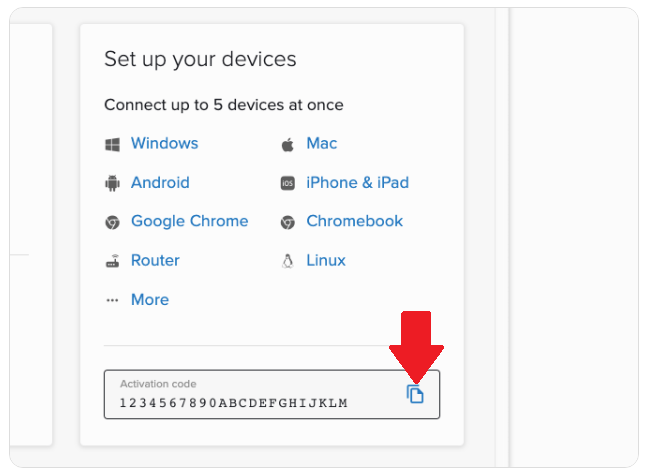
If you’ve recently signed up for ExpressVPN and are having trouble finding your activation code, this guide will help you locate it. Whether you’re a new user or have been using the VPN for a while, there are a few different ways to find your activation code, depending on the device you’re using.
For New Users
If you’ve just signed up for ExpressVPN, you will receive an email containing your activation code. Make sure to check your inbox, including any spam or junk folders, for this email. Once you’ve found the email, you can proceed to enter the activation code to start using the VPN.
For Existing Users
If you’ve been using ExpressVPN and can’t find your activation code, you can retrieve it from within the application. Open the ExpressVPN app on your device and sign in with your credentials. Once signed in, go to the “My Account” or “Account” section, where you should find the activation code listed. If you still can’t locate it, you may need to contact ExpressVPN support for further assistance.
In case you receive an error message stating that your activation code is not valid or expired, there are a few things you can try. First, double-check that you’ve entered the correct code. It’s easy to make a typo, so carefully enter the code to ensure accuracy. Additionally, ensure that you’re using the latest version of the ExpressVPN application, as older versions may have compatibility issues with newer activation codes.
If none of these steps are working, it might be a technical issue with your device or system preventing the activation code from being recognized. In this case, reaching out to ExpressVPN support will be your best option for troubleshooting the issue.
In summary, finding your ExpressVPN activation code is crucial for activating and using the VPN on your devices. Whether you’re a new user or have been using the service for a while, there are various methods to locate your activation code. Make sure to keep this information handy in case you need to find or re-enter your activation code in the future.
Find and Use ExpressVPN Activation Code
If you are an existing user of ExpressVPN, you probably already know the importance of an activation code. This code is what you need to enter in order to activate your ExpressVPN subscription. However, if your activation code has expired or you have lost it, this guide will help you find and use a new one.
Find a Valid Activation Code
If you have a valid activation code, you can use it to activate your ExpressVPN subscription. There are a few ways you can find a valid activation code:
- Check your email: ExpressVPN might have sent you an activation code when you signed up. Search your inbox for any emails from ExpressVPN and look for the activation code.
- Contact customer support: If you can’t find your activation code, you can reach out to ExpressVPN customer support for assistance. They will be able to provide you with a new activation code.
- Find a free activation code: There are websites and forums where you can find free ExpressVPN activation codes. However, be cautious when using these codes as they may not be valid or could potentially be preventing you from activating your subscription.
Use Your Activation Code
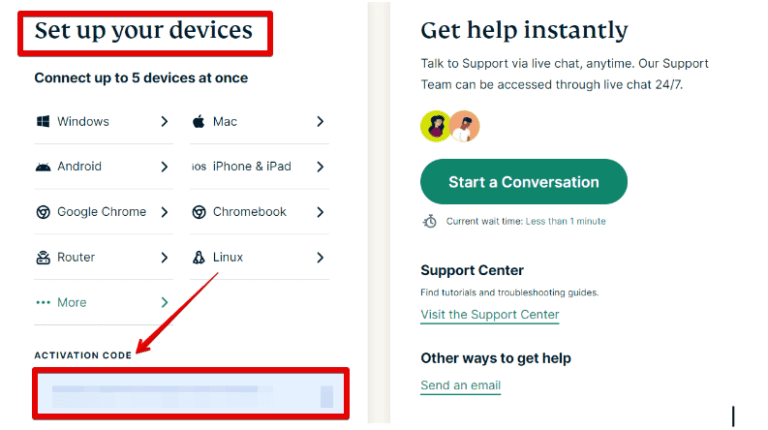
Once you have a valid activation code, follow these steps to activate your ExpressVPN subscription:
- Open the ExpressVPN application on your device.
- Click on the “Sign In” button.
- Enter your ExpressVPN credentials to sign in.
- At the activation screen, enter your activation code.
- Click on the “Activate” button.
If you have entered the correct activation code, your ExpressVPN subscription should now be activated. You can use ExpressVPN on multiple devices and enjoy the benefits of a secure and private internet connection.
If you still have trouble finding or using your activation code, you can try reinstalling the ExpressVPN application or contact their support team for further assistance. Remember, it’s important to use a valid activation code to ensure that your subscription is active and working properly.
FAQ:
How do I find my ExpressVPN activation code?
You can find your ExpressVPN activation code by logging into your ExpressVPN account on their website. Once logged in, go to the “My Account” section and you should see your activation code listed there. If you are unable to find it, you can also contact the ExpressVPN support team for assistance.
Can I use the same activation code on multiple devices?
No, each activation code is only valid for one device. If you want to use ExpressVPN on multiple devices, you will need to purchase a separate license or subscription for each device. This ensures that each device has its own unique activation code.
What should I do if my ExpressVPN activation code has expired?
If your ExpressVPN activation code has expired, you will need to renew your subscription. You can do this by logging into your ExpressVPN account and going to the “My Account” section. From there, you can choose to renew your subscription and you will be given a new activation code. Make sure to enter the new activation code into the ExpressVPN app on your device to continue using the service.
Is it possible to find a free activation code for ExpressVPN?
No, ExpressVPN is a premium VPN service and they do not offer free activation codes. This is because providing a secure and reliable VPN service requires a significant investment in infrastructure and resources. The subscription fees help to cover these costs and ensure that you receive a high-quality service.
What are the benefits of using ExpressVPN?
There are several benefits of using ExpressVPN. Firstly, it provides a secure and encrypted connection, protecting your online privacy and ensuring that your personal information remains private. Secondly, it allows you to bypass geographical restrictions and access content that may be blocked in your region. Thirdly, it offers fast connection speeds, which is important for activities such as streaming and online gaming. Finally, it has a large network of servers located in different countries, giving you a wide range of options for connecting to the internet.
Videos:
ExpressVPN COUPON CODE | GET ACTIVATION CODE | PROMO CODE
ExpressVPN COUPON CODE | GET ACTIVATION CODE | PROMO CODE by The Tech Roost 10 months ago 3 minutes, 50 seconds 23,453 views
