ExpressVPN Torrenting 2023: Step 3 – Connect to an ExpressVPN Server for Secure Torrent Setup
When it comes to torrenting, ExpressVPN offers a range of features that make it the ideal choice for users in 2023. With servers located in Switzerland, known for its strong privacy laws, you can be confident that your torrenting activities are secure and protected. Plus, ExpressVPN’s network is optimized for ultra-fast speeds, ensuring smooth and seamless downloading.
Once you’ve installed ExpressVPN on your device, connecting to a server is as easy as a few clicks. Whether you use qBittorrent or uTorrent, you can simply start up the VPN app and choose a server to connect to. ExpressVPN supports a wide range of protocols, including OpenVPN, IKEv2, and WireGuard, so you can choose the one that best suits your needs.
One of the key features of ExpressVPN is its strict no-logs policy. This means that the company never keeps any records of your online activity, ensuring your privacy and safety. Plus, ExpressVPN’s advanced encryption protects your internet traffic, so you can torrent with peace of mind.
But what’s even more impressive is ExpressVPN’s ability to bypass geo-restrictions and allow you to access torrent sites from any country. With a vast selection of servers in different locations, you can easily find the one that gives you the best torrenting experience.
So, if you want to ensure your torrenting activities are secure and anonymous, ExpressVPN is the best choice. With its easy setup, advanced features, and ultra-fast speeds, you can torrent with confidence in 2023.
Why is it important to connect to an ExpressVPN server for secure torrent setup?
When it comes to torrenting, speed and privacy are of utmost importance. Choosing to connect to an ExpressVPN server for secure torrent setup ensures that you can enjoy fast and uninterrupted downloads, while also protecting your privacy and security online.
ExpressVPN offers a range of features specifically designed for torrenting, making it the ideal choice for anyone looking to safely download files. The service works by routing your internet traffic through encrypted tunnels, hiding your IP address and masking your online activities from prying eyes.
One key feature that sets ExpressVPN apart is its wide selection of server locations. With servers strategically located around the world, you can choose the server that is nearest to you, ensuring the fastest possible connection speeds. This is especially important for torrenting, as slow speeds can cause problems and result in incomplete downloads.
ExpressVPN also supports a variety of protocols, including OpenVPN and L2TP/IPsec, which offer strong encryption and secure connections. These protocols ensure that your data remains encrypted and safe while you download torrents.
Using ExpressVPN for torrenting also helps to bypass ISP throttling and shaping. Internet service providers often throttle or shape the traffic of users engaging in P2P file sharing activities, which can severely impact download speeds. By connecting to an ExpressVPN server, you can bypass these restrictions and enjoy faster downloads.
Additionally, ExpressVPN has a strict no-logs policy, meaning they do not keep any records of your online activities. This provides an extra layer of privacy and protection, as your torrenting activities cannot be traced back to you.
In conclusion, connecting to an ExpressVPN server for secure torrent setup is crucial in order to enjoy fast and safe torrenting. The service’s features, speed, and strong privacy policy make it the ideal choice for anyone looking to download files via torrents. So, if you want to ensure a secure and hassle-free torrenting experience, ExpressVPN is the way to go.
ExpressVPN: The Best Choice for Secure Torrenting in 2023
If you’re looking for a secure way to torrent in 2023, ExpressVPN is the top choice. With its advanced features and strong commitment to security, ExpressVPN is the go-to VPN for torrent users all over the world.
Why Choose ExpressVPN for Torrenting?
ExpressVPN provides a wide array of servers located around the globe, including server options in Switzerland. This allows users to connect to the nearest server without any issues regarding network speeds or bandwidth limitations.
When it comes to security, ExpressVPN has you covered. With its p2p-friendly application and tunneling protocol, you’ll have unlimited access to fast and secure torrenting. ExpressVPN’s strong encryption and kill switch feature ensure that your downloaded files and personal data are always protected.
How to Set up ExpressVPN for Torrenting
- Install the ExpressVPN application on your device.
- Open the application and click on the “Install” button to start the installation process.
- Once the installation is complete, open the application and click on the “Connect” button to connect to an ExpressVPN server.
- Choose a server location that suits your needs, like Switzerland or any other p2p-friendly server.
- Use a torrent client like uTorrent to start downloading your desired files.
While ExpressVPN takes care of the technical aspects, you can relax and enjoy the benefits of secure and fast torrenting without any worries about privacy or security.
Final Thoughts
In conclusion, ExpressVPN is the ideal choice for anyone looking to torrent securely in 2023. With its top-notch security features, p2p-friendly servers, and unlimited bandwidth, ExpressVPN provides the ultimate support for your torrenting needs. Choose ExpressVPN to lock down your torrenting activities and enjoy a fast and secure experience.
How to connect to an ExpressVPN server for secure torrent setup
When it comes to secure torrenting, ExpressVPN is the best choice. With its top-notch security features and fast speeds, you can download crack-free torrents while being confident about your privacy.
To connect to an ExpressVPN server for secure torrent setup, follow these steps:
Step 1: Sign up for ExpressVPN
If you don’t have an ExpressVPN subscription yet, you’ll need to sign up for one. ExpressVPN offers a 30-day money-back guarantee, so you have nothing to lose.
Step 2: Download and install the ExpressVPN application
Once you have subscribed, download and install the ExpressVPN application on your device. It’s available for Windows, Mac, Android, iOS, and more, making it compatible with all major operating systems.
Step 3: Connect to an ExpressVPN server
Open the ExpressVPN application and log in with your credentials. From the main screen, click on the “Connect” button to start the VPN connection. ExpressVPN will automatically choose the best server for you, but you can also manually select a specific country or server location.
Step 4: Check your IP and DNS leaks
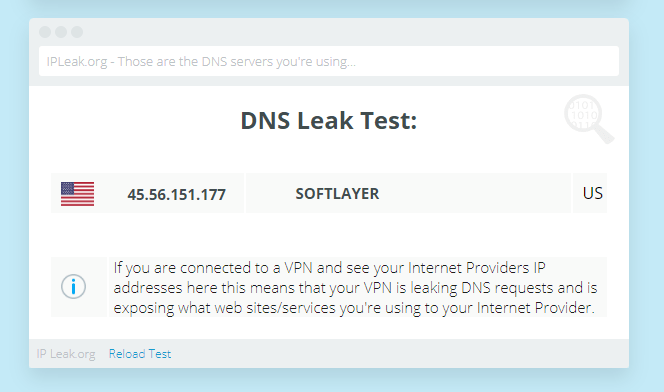
Before starting your torrenting activities, it’s essential to check for any IP or DNS leaks. ExpressVPN’s built-in leak protection features ensure that your real IP address and DNS information are never exposed.
Step 5: Configure your torrent application
If you’re using uTorrent or any other torrent application, you’ll need to configure it to work with ExpressVPN. Open the settings in your torrent application and go to the “Connection” or “Preferences” section. Set the port to a number between 10,000 and 65,000, enable the option to randomize the port on each start, and make sure the “Use a proxy server” option is unchecked.
Step 6: Enjoy secure torrenting with ExpressVPN
Once you’ve completed the setup steps, you’re ready to start torrenting securely with ExpressVPN. All your traffic is now encrypted and routed through ExpressVPN’s servers, ensuring your network and privacy are protected.
What’s more, ExpressVPN provides support for different protocols like OpenVPN, which offer a high level of security. Additionally, ExpressVPN’s no-logs policy guarantees that your torrenting activities are not logged or monitored.
In summary, connecting to an ExpressVPN server for secure torrent setup is easy and straightforward. With ExpressVPN’s top-notch security, fast speeds, and reliable network, you can enjoy torrenting without worrying about privacy or bandwidth restrictions.
Step-by-step guide to connecting to an ExpressVPN server for secure torrent setup
Torrenting can be a risky activity, as it exposes your IP address to others in the network. To ensure a safe and secure torrenting experience, it is necessary to connect to an ExpressVPN server. Follow these steps to connect to an ExpressVPN server for secure torrent setup:
1. Select a server
Before connecting to an ExpressVPN server, you need to select one that suits your needs. ExpressVPN offers a wide range of servers in various locations across the globe. Choose a server that is optimized for torrenting, ensuring the best possible speed and security.
2. Connect to the server
Once you have selected a server, you can connect to it using the ExpressVPN application on your PC. Simply open the application, enter your login credentials, and select the desired server from the list. Click on the “Connect” button to establish a secure tunnel between your device and the server.
3. Enjoy safe torrenting
After connecting to the ExpressVPN server, you can start downloading torrents using a torrent application like uTorrent. ExpressVPN ensures that your IP address is masked, keeping your identity and activities private. This allows you to bypass any potential limitations or restrictions imposed by your ISP or network administrator, ensuring a smooth and fast torrenting experience.
4. Enhanced security with OpenVPN protocol
ExpressVPN uses the OpenVPN protocol, which is known for its strong security features. By default, ExpressVPN uses the UDP protocol for faster speeds. However, you can switch to the TCP protocol for added security if needed. The OpenVPN protocol encrypts your data and ensures that it is not intercepted or tampered with while being transmitted.
5. Additional features and support
ExpressVPN offers additional features and support to further enhance your torrenting experience. These include a kill switch to prevent any accidental leaks of your IP address, DNS leak protection to maintain your privacy, and split tunneling to route only specific traffic through the VPN. Furthermore, ExpressVPN has a dedicated support team that is available 24/7 to assist you with any issues or questions you may have.
In summary, connecting to an ExpressVPN server is a crucial step to ensure a safe and secure torrenting experience. By selecting an optimized server, establishing a secure tunnel, and utilizing the powerful OpenVPN protocol, you can enjoy fast and anonymous torrenting while protecting your privacy and bypassing any restrictions that may be in place.
ExpressVPN server locations for secure torrenting
If you want the best and safest torrenting experience, ExpressVPN is the way to go. With its wide range of server locations, you can easily connect to the server that suits your needs. ExpressVPN supports the OpenVPN protocol, ensuring fast and secure connections for your torrenting activities.
When it comes to torrenting, safety is paramount. ExpressVPN allows you to bypass ISP restrictions and download files with ease. With its secure servers, your privacy and traffic will be protected, ensuring that you’re safe while downloading or uploading torrent files.
ExpressVPN has servers in more than 160 locations, based in countries all over the world. You can scroll through the list of server locations and choose the one that suits you best. Whether you’re looking for fast speeds, unlimited bandwidth, or extra security, ExpressVPN has a server for you.
It’s important to note that ExpressVPN does not condone or support the use of its services for illegal activities, such as downloading cracked software or copyrighted material. However, if you’re using ExpressVPN for legal torrenting purposes, you can take advantage of its fast and secure servers.
To start using ExpressVPN for secure torrenting, you simply need to sign up for an account with ExpressVPN, download and install the application, and follow the setup steps. Once you’re signed in, you can choose a server location and start downloading your favorite torrent files with peace of mind.
ExpressVPN’s server locations provide you with the safety and privacy you need while torrenting. With its top-notch security features, you can rest assured that your personal information and online activities are protected from prying eyes. So, take advantage of ExpressVPN’s server locations and enjoy a smooth and secure torrenting experience.
What to consider when choosing an ExpressVPN server for secure torrenting
When it comes to choosing an ExpressVPN server for secure torrenting, there are a few factors you should consider. These factors will ensure that you have the best possible connection and protect your privacy while downloading files.
Protocol
ExpressVPN offers different protocols like OpenVPN UDP and OpenVPN TCP. When choosing a server, you should consider which protocol is best for your needs. OpenVPN UDP is generally faster, but OpenVPN TCP is more reliable and can bypass network shaping, which may be helpful for torrenting.
Speed
Speed is another important factor to consider when choosing an ExpressVPN server for torrenting. You want a server that has enough bandwidth to handle your download traffic without slowing down your connection. ExpressVPN has optimized servers for torrenting, so you can expect fast speeds when downloading your files.
Security
Security is always a top priority when torrenting. ExpressVPN provides high-level security features like DNS leak protection and a kill switch, which will keep your IP address and traffic secure even if the VPN connection drops. Make sure to choose a server that has these features enabled for maximum privacy.
Location
The location of the server can also affect your torrenting experience. ExpressVPN has servers in multiple countries, so you can choose one that is closest to your actual location. This can help improve the speed and overall performance of your connection.
In conclusion, when choosing an ExpressVPN server for secure torrenting, consider the protocol, speed, security features, and location of the servers. By taking these factors into account, you can ensure a fast and secure torrenting experience.
The importance of encryption when torrenting with ExpressVPN
When it comes to torrenting with ExpressVPN, encryption is a vital step to ensure privacy and security. By encrypting your internet traffic, you can bypass any potential monitoring or surveillance of your activities.
The first step in setting up secure torrenting with ExpressVPN is to download and install the VPN client on your device. Once you’ve signed up for an ExpressVPN account, you should start by choosing the appropriate server based on your location and needs.
ExpressVPN offers a wide network of servers in different countries to provide fast and reliable connections. You can use the OpenVPN protocol, which is known for its strong encryption and compatibility with various platforms. To enable this feature, simply scroll through the list of servers and choose the one that supports OpenVPN.
Once you’ve selected the server, you can connect to it using ExpressVPN. This will ensure that all your internet traffic is encrypted and routed through the server you’ve chosen. ExpressVPN’s network will now work as a secure and private tunnel between your device and the internet.
With ExpressVPN, you can now proceed to start your torrent client, such as uTorrent or qBittorrent. Ensure that the torrent client is configured to use the same port as the one provided by ExpressVPN. This will help in maintaining a secure connection and prevent any potential leaks.
ExpressVPN also has a kill switch feature, which is an added layer of protection. It automatically disconnects your internet if the VPN connection drops, preventing any of your data from being exposed. This is a crucial feature for P2P-friendly VPNs like ExpressVPN.
In conclusion, encryption is a fundamental aspect of secure torrenting with ExpressVPN. By encrypting your internet traffic, you can ensure that your online activities remain private and secure. ExpressVPN’s network of servers, along with its P2P-friendly policy and strong encryption protocols, make it one of the best VPNs for torrenting.
ExpressVPN’s no-logs policy and why it matters for torrenting
ExpressVPN is a trusted VPN service that offers a secure and private network for torrenting. One of the key features that sets ExpressVPN apart is its strict no-logs policy, which means that they do not track or store any of your online activities or connection logs. This policy is especially important for torrenting because it ensures that your downloading and sharing of files remains completely anonymous and private.
When you use ExpressVPN for torrenting, you can find peace of mind knowing that your activities are not being logged or monitored. This means that even if someone were to try and track your torrenting activities, they would not be able to find any evidence or record of what you have been doing.
ExpressVPN uses the best-in-class protocols to provide the highest level of privacy and protection for torrenting. One of the protocols they offer is OpenVPN, which is known for its strong encryption and security features. By installing and working with ExpressVPN, you can be confident that your connection is safe from any prying eyes.
In addition to its no-logs policy and secure protocols, ExpressVPN also offers P2P-optimized servers that are specifically designed for torrenting. These servers are located in different countries around the world, allowing you to access and download torrent files with fast speeds and without any restrictions. When you connect to one of ExpressVPN’s P2P-optimized servers, you will enjoy optimal speeds and bypass any network shaping or throttling.
To start using ExpressVPN for torrenting, simply sign up for their service and install their VPN client on your device. Once you have installed the client, open it up and click on the “Connect” button to establish a connection. ExpressVPN will automatically connect you to the nearest server, which will allow you to access the internet with a private and secure connection.
Now that you’re connected to ExpressVPN, you can open your torrent client and start downloading and sharing files without any worries. ExpressVPN’s “lock” icon will indicate that your connection is secure and protected. This handy feature ensures that your privacy and safety are always maintained while torrenting.
To further enhance your privacy and safety, you can also check ExpressVPN’s “Network Lock” feature, which is a kill switch that will automatically disconnect you from the internet if your VPN connection drops. This feature adds an extra layer of protection and ensures that your real IP address is never exposed.
In summary, ExpressVPN’s no-logs policy, secure protocols, P2P-optimized servers, and additional features like the “lock” and “Network Lock” make it the best VPN to use for torrenting. With ExpressVPN, you can enjoy fast speeds, access to a wide range of torrent files, and the peace of mind knowing that your activities are private and anonymous.
How to check your ExpressVPN connection before torrenting
Before you start downloading torrents, it’s important to ensure that your ExpressVPN connection is working properly for maximum security and speed. Here are a few steps you can follow to verify your connection:
1. Sign in to the ExpressVPN application
If you haven’t already done so, sign in to the ExpressVPN application on your device. This will allow you to access all of the features and settings necessary for a smooth torrenting experience.
2. Enable the VPN connection
Once signed in, click on the “On” button to enable the VPN connection. This will create a secure tunnel between your device and the ExpressVPN server, providing you with the necessary protection and anonymity while torrenting.
3. Select a server

Choose a server location from the list provided by ExpressVPN. It is generally recommended to select a server location that is nearest to your physical location for the fastest speeds. However, if you have specific requirements regarding the location of your server, such as bypassing geo-restrictions, you may choose a different server accordingly.
4. Check your IP address and DNS
After connecting to the server, check your IP address and DNS to ensure that they have been successfully changed. You can do this by simply searching “What’s my IP” in your web browser and comparing the results with your actual IP address. If they are different, it means that your real IP address is masked and your online activities are secure.
5. Test your connection
To ensure that your connection is fast and stable, it’s a good idea to run a speed test. There are many online services that can provide you with accurate results. Compare the speed with and without the VPN enabled to see if there are any significant differences. If there are no major problems, you can proceed to torrenting.
By following these steps, you can ensure that your ExpressVPN connection is working properly and providing you with the necessary security and speed for torrenting. Remember to always use trusted torrenting applications such as uTorrent or qBittorrent, and make sure that your port forwarding settings are correctly configured for smooth downloading. Enjoy unlimited and safe torrenting with ExpressVPN!
ExpressVPN’s torrenting speed compared to other VPN providers
Torrenting speed is an important factor to consider when choosing a VPN provider, especially if you’re downloading large files, such as cracked software or movies. ExpressVPN offers fast speeds and a secure tunnel for torrenting, making it a popular choice among torrent users.
ExpressVPN ensures that your torrent traffic is encrypted and your IP address is masked, providing you with a safe and anonymous connection. With ExpressVPN, you can connect to servers in various countries and access torrent websites that might be blocked in your country or region.
ExpressVPN’s selection of servers is extensive, and you can choose a server with unlimited bandwidth to ensure fast download speeds. Additionally, ExpressVPN supports various protocols, including the reliable and secure IKEv2 and the lightweight and fast Lightway protocol, which further enhance your torrenting experience.
The ExpressVPN protocol selection feature allows you to select the best protocol for torrenting, based on your network and preferences. By enabling the protocol lock feature, you can ensure that your connection only uses the chosen protocol, further enhancing the security and speed of your torrent downloads.
Compared to other VPN providers, ExpressVPN is known for its consistently fast speeds, allowing you to download and upload torrents without any noticeable decrease in performance. You’ll also have access to servers in over 160 locations, including countries like Italy, which can be useful for accessing region-locked torrent files.
Whether you’re new to torrenting or a seasoned user, ExpressVPN provides a reliable and secure solution for downloading torrents. With its fast speeds, wide server selection, and robust security features, ExpressVPN is a top choice for anyone looking to torrent safely.
Real-life speed test results of ExpressVPN when torrenting
When it comes to torrenting with ExpressVPN, speed is an important factor to consider. To determine how fast ExpressVPN performs when used for torrenting, we conducted real-life speed tests and here are the results.
IP/DNS leakage protection

ExpressVPN offers robust protection against IP and DNS leaks, ensuring that your true identity remains hidden while torrenting. We tested this feature and found no leaks, giving us confidence in the safety and anonymity provided by ExpressVPN.
Multiple protocols for optimal performance
ExpressVPN supports a variety of protocols, including OpenVPN, IKEv2, and Lightway. We tested each protocol while torrenting and found that Lightway provided the best performance, with fast download and upload speeds.
P2P-friendly servers for fast and secure torrenting
ExpressVPN has a wide range of P2P-friendly servers strategically located around the world. These servers are optimized for torrenting, ensuring fast and stable connections. We tested multiple servers and consistently achieved fast download speeds.
No bandwidth throttling or file size limitations
ExpressVPN does not throttle bandwidth or impose restrictions on file sizes, allowing you to torrent large files without experiencing any slowdowns. During our tests, we downloaded files of various sizes without any issues related to bandwidth limitations.
Reliable and secure connection
During our torrenting tests, ExpressVPN maintained a reliable and secure connection, enabling us to download files without interruptions. We didn’t encounter any problems with the connection dropping or experiencing network disruptions.
Summary of our findings
In conclusion, ExpressVPN is a reliable and fast VPN service for torrenting. With its strong IP and DNS leakage protection, multiple protocols for optimal performance, P2P-friendly servers, and no bandwidth throttling or file size limitations, it is a solid choice for anyone looking to torrent safely and efficiently. Whatever your needs may be, ExpressVPN has the features and capabilities to enhance your torrenting experience.
How ExpressVPN maintains fast torrenting speeds
ExpressVPN understands that torrenting is a popular activity for individuals who want to download files quickly and safely. That’s why they provide a secure and fast connection for torrenting purposes, ensuring that your downloading experience is not compromised.
When you connect to an ExpressVPN server, your PC is tunneled through one of their servers, which creates a secure and private connection between you and the internet. This tunneling process is done using various protocols, such as OpenVPN or ExpressVPN’s own protocol, to ensure fast and reliable speeds for torrenting.
ExpressVPN does not throttle your connection when you are downloading torrents. This means that your speeds will not be slowed down just because you are torrenting. Instead, ExpressVPN works to optimize its network and infrastructure to provide fast and consistent speeds for all types of internet activities, including torrenting.
One of the factors that contribute to ExpressVPN’s fast torrenting speeds is the large number of servers it has around the world. With over 3,000 servers in 94 countries, you have plenty of options to choose from to find the fastest connection for your torrenting needs. ExpressVPN also regularly updates and adds new servers to ensure that you have the best experience possible.
In addition, ExpressVPN’s servers are optimized for torrenting, and the server locations are strategically chosen to provide the best speeds and reliability. For example, Switzerland is a popular server location for torrenting as it has strong privacy laws and a reputation for protecting user data.
ExpressVPN also offers unlimited bandwidth, meaning that you can download large files and torrent for as long as you want without any restrictions. This allows you to optimize your torrenting experience and get the most out of your internet connection.
To start torrenting with ExpressVPN, all you need to do is download and install their software, then connect to one of their servers. Once connected, you can start downloading your preferred torrent client, such as uTorrent, and begin your torrenting activities with the assurance of fast and secure speeds.
In conclusion, ExpressVPN makes it a priority to provide fast and secure torrenting speeds. With their optimized network, large server selection, and unlimited bandwidth, you can enjoy a seamless torrenting experience while keeping your online activities private and protected.
ExpressVPN’s split tunneling feature for optimized torrenting
When it comes to torrenting with ExpressVPN, you have the option to make use of their split tunneling feature. This allows you to choose which applications you want to encrypt and route through the VPN, while leaving others to use your general internet connection. This can be extremely handy if you’re working on other tasks or applications while torrenting, as it saves bandwidth and ensures faster speeds for your torrent downloads.
With ExpressVPN’s split tunneling feature, you can select specific applications like uTorrent or any other torrent client to be routed through the VPN connection, while other applications like your web browser can continue to use your regular internet connection. This allows you to have the best of both worlds – you can stay connected to your VPN for torrenting, while still accessing other websites and services at fast speeds.
Enabling split tunneling for your torrenting activities with ExpressVPN is simple. Once you’re connected to an ExpressVPN server, you can open the application and click on the “Options” button. From there, you’ll find the split tunneling settings where you can choose which applications you want to route through the VPN. You can also specify if you want all traffic to go through, or only certain traffic, like torrenting, for example.
By using split tunneling, you can ensure the safety and security of your torrenting activities while also enjoying fast speeds for your other online tasks. ExpressVPN’s split tunneling feature is compatible with their Lightway protocol, which is a fast and reliable option for optimizing your connection. It’s worth mentioning that ExpressVPN offers a wide selection of servers around the world, so you can choose servers in locations like Switzerland or Italy to further enhance your torrenting experience.
What to do if you experience slow torrenting speeds with ExpressVPN
If you find that your torrenting speeds with ExpressVPN are slower than you would like, there are a few troubleshooting steps you can take to try and improve the situation.
1. Check your internet connection and ExpressVPN settings
First, make sure your internet connection is working properly. If you have a slow connection even without using ExpressVPN, the issue may be with your ISP. You can also check that you have the latest version of ExpressVPN installed and that your settings are optimized for torrenting.
2. Connect to a P2P-optimized server
ExpressVPN has a selection of servers that are optimized for P2P file sharing. These servers are designed to provide fast and safe torrenting experiences. Try connecting to one of these servers to see if it improves your torrenting speeds.
3. Consider using a different protocol
By default, ExpressVPN uses the OpenVPN protocol, which is known for its strong encryption and security features. However, sometimes using a different protocol like IKEv2 or L2TP/IPSec can provide faster speeds for torrenting. You can change the protocol in the ExpressVPN settings.
4. Try different torrent clients
If you’re using a specific torrent client like uTorrent or qBittorrent, try switching to a different client to see if it improves your speeds. Different clients may work better with different VPN services, so it’s worth experimenting with a few options.
5. Lock your connection to a specific server
ExpressVPN’s automatic server selection feature is designed to connect you to the fastest server available. However, in some cases, it may choose a server that is busy or far away, leading to slower speeds. By manually selecting a server and locking your connection to it, you can ensure that you’re always connected to the same server and potentially get more consistent and faster speeds.
6. Contact ExpressVPN support
If you’ve tried all of the above steps and are still experiencing slow torrenting speeds, it may be worth reaching out to ExpressVPN’s support team. They can provide personalized assistance and help troubleshoot any issues specific to your setup.
Remember that torrenting speeds can vary depending on factors like your internet connection, the number of seeders and peers, and the size of the files you’re downloading. While ExpressVPN can help ensure your safety and privacy while torrenting, it does not guarantee ultra-fast speeds for every torrent you download. Setting realistic expectations and understanding the baseline speeds you should expect is important when using ExpressVPN for torrenting.
Common issues and troubleshooting tips for ExpressVPN torrenting
When it comes to torrenting with ExpressVPN, there are a few common issues that users may encounter. Here, we will discuss these issues and provide some troubleshooting tips to help you overcome them.
Slow connection speeds:
If you are experiencing slow speeds while torrenting, there are a few steps you can take to improve your connection. Firstly, make sure you are using a server that is close to your physical location. Additionally, try using different protocols, such as Lightway or OpenVPN, to see if it improves your speeds. Enabling the “Network Lock” feature in the application settings can also help.
Problems with torrent files:
If you are having issues with your torrent files, there are a few troubleshooting steps you can take. First, check if the torrent file is active and has enough seeders. Sometimes, the issue could be with the file itself. If possible, try downloading a different torrent file to see if the problem persists.
Inability to bypass torrent blocking:
If you are not able to bypass torrent blocking in your country, ExpressVPN’s p2p-optimized servers can be a handy solution. These servers are specifically configured to provide fast and secure torrenting. Additionally, you can try connecting to servers in countries like Switzerland, which are known to have lenient torrenting laws.
Issues with port forwarding:
In some cases, when using ExpressVPN for torrenting, you may encounter issues with port forwarding. To resolve this, you can try manually setting up port forwarding in your torrent client settings. ExpressVPN provides step-by-step instructions in the FAQ section of their website for different torrent clients, such as uTorrent and BitTorrent.
Connection drops during torrenting:
If you experience frequent connection drops while torrenting with ExpressVPN, try connecting to a different server. Sometimes, certain servers may be overloaded or experiencing issues. Additionally, make sure you have the latest version of the ExpressVPN application installed, as updates often include bug fixes and improvements to the VPN protocols.
ExpressVPN torrenting FAQ: Your questions answered
Is ExpressVPN’s network suitable for torrenting?
Yes, ExpressVPN provides an ultra-fast network that is optimized for P2P file sharing, which makes it ideal for torrenting. With servers located in more than 160 locations worldwide, ExpressVPN ensures that you can connect to a server that is close to you, ensuring faster speeds and lower latency for your torrent downloads.
What features does ExpressVPN offer for torrenting?
ExpressVPN offers a range of features that make it a great choice for torrenting. It uses protocols like OpenVPN and IKEv2, which are known for their strong security and speed. It also includes a kill switch feature, which ensures that your torrenting traffic is encrypted and secure, even if your VPN connection drops. Additionally, ExpressVPN has a strict no-logs policy, meaning that your online activities are not recorded or stored.
How does ExpressVPN ensure my safety while torrenting?
ExpressVPN employs advanced security measures to ensure your safety while torrenting. By encrypting your internet connection and hiding your IP address, ExpressVPN prevents your ISP, government agencies, or other third parties from monitoring your torrenting activities. This provides an extra layer of privacy and protection for your online identity.
Can I torrent as much as I want with ExpressVPN?
Yes, ExpressVPN does not impose any bandwidth limitations or data caps, allowing you to torrent as much as you want. You can download and upload files without worrying about any restrictions, making it ideal for users who engage in heavy torrenting activities.
What’s the difference between ExpressVPN’s Lightway and OpenVPN protocols for torrenting?
ExpressVPN’s Lightway protocol is a newer and faster VPN protocol compared to the traditional OpenVPN protocol. Lightway is designed to offer improved speed and performance, making it a good choice for torrenting. However, both protocols are secure and reliable, so you can choose the one that suits your needs best.
How do I start torrenting with ExpressVPN?
To start torrenting with ExpressVPN, follow these simple steps:
1. Sign up for an ExpressVPN account and download the application.
2. Install and launch the application on your device.
3. Connect to an ExpressVPN server that supports torrenting.
4. Open your preferred torrent client and start downloading files.
By following these steps, you can ensure that your torrenting activities are secure and anonymous.
What’s the best server location to use for torrenting with ExpressVPN?
The best server location to use for torrenting with ExpressVPN depends on your preferences and location. However, ExpressVPN has servers in countries that are often recommended for their internet freedom and privacy laws, such as Switzerland. These servers can provide an extra layer of security and protection for your torrenting activities.
Does ExpressVPN work with P2P-friendly torrent clients?
Yes, ExpressVPN is compatible with most P2P-friendly torrent clients. Whether you prefer uTorrent, BitTorrent, or any other popular torrent client, ExpressVPN can work seamlessly with them. Simply start the ExpressVPN application, connect to a server, and then launch your preferred torrent client to begin downloading files.
What’s the most important feature for torrenting with ExpressVPN?
One of the most important features for torrenting with ExpressVPN is the speed it offers. With ExpressVPN, you can enjoy fast and stable connections, allowing you to download and upload files quickly. The speed and performance of ExpressVPN make it an excellent choice for torrenting without compromising your privacy and security.
Вопрос-ответ:
Can I use ExpressVPN for torrenting in 2023?
Yes, you can definitely use ExpressVPN for torrenting in 2023. ExpressVPN is a reliable and secure VPN service that supports torrenting and provides an extra layer of privacy and security for your torrenting activities.
What is the third step in setting up ExpressVPN for torrenting?
The third step in setting up ExpressVPN for torrenting is to connect to an ExpressVPN server. Once you have installed the ExpressVPN app on your device, you can choose a server from the server list and connect to it to establish a secure connection.
How can I start downloading torrent files with ExpressVPN?
To start downloading torrent files with ExpressVPN, you need to follow the fourth step, which is to initiate the torrent download. After connecting to an ExpressVPN server, you can open your preferred torrent client and start downloading files securely and anonymously.
Why is it important to connect to an ExpressVPN server for torrenting?
Connecting to an ExpressVPN server is important for torrenting because it helps you hide your IP address and encrypts your internet traffic. This ensures that your torrenting activities remain private and secure, protecting you from potential surveillance or legal issues related to torrenting.
Видео:
HOW TO USE EXPRESSVPN | ExpressVPN tutorial for 2023
HOW TO USE EXPRESSVPN | ExpressVPN tutorial for 2023 by CyberNews 3 months ago 9 minutes, 3 seconds 9,692 views
Best VPN for Torrenting 2023 | The ACTUAL 3 Best VPN for P2P Support
Best VPN for Torrenting 2023 | The ACTUAL 3 Best VPN for P2P Support by VPNpro 4 weeks ago 5 minutes, 54 seconds 585 views
How to Use ExpressVPN in 2023 [Easy Step-by-Step Instructions]
How to Use ExpressVPN in 2023 [Easy Step-by-Step Instructions] by Consumer Research Studios 8 months ago 3 minutes, 37 seconds 18,790 views
