Cisco AnyConnect Secure Mobility Client for Windows – Download Cisco VPN Client – Best Software & Apps

When it comes to secure and encrypted browsing, one should always take the necessary precautions. Cisco AnyConnect Secure Mobility Client for Windows is an easy-to-use application that allows you to connect to a private network with just one click.
Whether you are working from home or in a corporate environment, Cisco AnyConnect Secure Mobility Client provides the security and ease of use that you need. With its user-friendly interface, you can configure the VPN module in a few simple steps and stay protected while accessing the web.
One of the best features of Cisco AnyConnect Secure Mobility Client is its ability to work with both Windows and Mac operating systems. So, no matter what device you are using, you can connect to a secure network and protect your data.
While there are many VPN providers out there, Cisco AnyConnect Secure Mobility Client is often considered the best option. It offers a subscription-based service that ensures your privacy and keeps your online activity encrypted. With its easy setup and troubleshooting utility, you can stay connected and protected without any hassle.
Cisco AnyConnect Secure Mobility Client for Windows

The Cisco AnyConnect Secure Mobility Client for Windows is a powerful solution that allows users to stay connected to their network from anywhere, without compromising security. With this software, you can easily connect to your network through a virtual private network (VPN) and access resources, files, and applications as if you were on your desktop.
Whether you are working from home, traveling, or in a remote location, the Cisco AnyConnect client enables you to securely access your network and resources. It offers a subscription-based service with unlimited usage, making it the best choice for individuals and organizations looking to protect their data and network.
With the Cisco AnyConnect client, you can take advantage of enhanced security features such as encryption, authentication, and advanced malware protection. It goes beyond traditional VPN solutions and provides a more comprehensive and secure way to connect to your network.
In addition to its powerful security features, the Cisco AnyConnect client also offers diagnostic and troubleshooting tools to help you resolve any network issues quickly. Whether you are using Windows or Macs, you can easily configure the client to work with your specific network setup, ensuring a seamless connection.
The Cisco AnyConnect client also integrates with other Cisco services such as Webex and Umbrella, providing a complete networking and security solution. It allows you to seamlessly switch between different VPN connections, whether you are using Cisco AnyConnect, Shimo, HMA, CyberGhost, or Hoxx, ensuring you have the best and fastest connection available.
Overall, the Cisco AnyConnect Secure Mobility Client for Windows is the best solution for individuals and organizations looking for a secure, reliable, and easy-to-use VPN client. Download the latest version today and experience the power and mobility it offers while staying connected with your network.
Download Cisco VPN Client
Cisco VPN Client is a powerful application that allows you to securely connect to virtual private networks (VPN) to protect your data and ensure your online privacy. With Cisco VPN Client, you can stay connected and access your network resources from anywhere, whether you’re at home, at the office, or on the go.
There are several software options available when it comes to VPN clients, but Cisco VPN Client is one of the most reliable and trusted solutions. It offers fast and easy connectivity to VPN endpoints, ensuring that your data is encrypted and your online activities are secure.
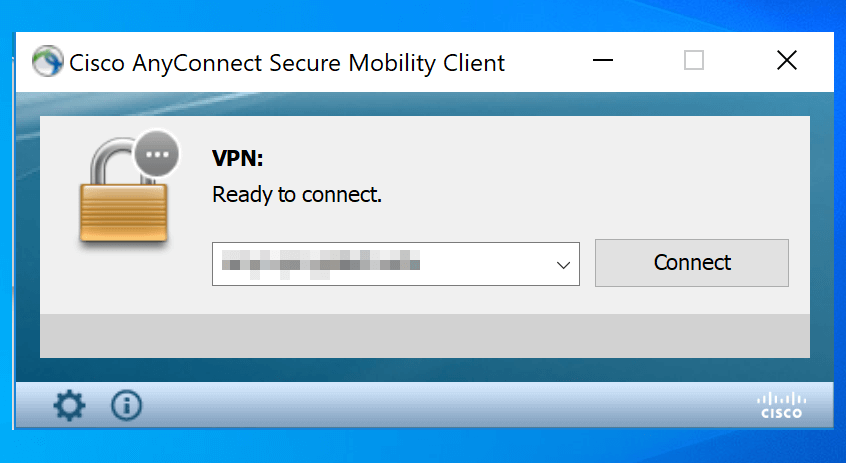
When you download and install Cisco VPN Client, you can easily connect to the VPN by simply starting the application and clicking on the “Connect” button. The user-friendly interface makes it easy to use, even for those who are not familiar with VPN technology.
Whether you’re using Windows, Chrome OS, or any other supported device, Cisco VPN Client is compatible with a wide range of operating systems, making it a versatile tool that can be used across different platforms.
In addition to its ease of use, Cisco VPN Client also provides troubleshooting tools, which can help you diagnose and resolve any issues you might encounter while using the application. This ensures that you have a seamless and uninterrupted VPN experience.
If you’re looking for an even more convenient way to protect your data and stay secure online, you can also download and install Cisco VPN Client’s Chrome extension, which allows you to connect to VPN endpoints directly from your Chrome browser.
Overall, Cisco VPN Client is a must-have utility for anyone who wants to ensure their online privacy and security. With its powerful encryption and easy-to-use interface, you can connect to virtual private networks with ease and enjoy a faster and more secure browsing experience.
Best Software & Apps
1. Cisco AnyConnect Secure Mobility Client
The Cisco AnyConnect Secure Mobility Client is a VPN client application that provides secure, encrypted connections for remote workers. It is available for Windows and Macs, and offers a range of security and transport options to meet the needs of different users.
2. CyberGhost VPN
CyberGhost VPN is a subscription-based virtual private network service that offers enhanced security and privacy for browsing the web. It allows users to hide their IP address and encrypt their internet connection, ensuring that their online activity remains private and secure.
3. Betternet VPN
Betternet VPN is a free VPN utility that provides fast and secure connections. It allows users to access blocked websites, protect their online privacy, and browse the web anonymously. Betternet VPN is easy to install and use, and is available for Windows, Mac, iOS, and Android devices.
4. Cisco VPN Client
The Cisco VPN Client is a software application that enables users to establish secure, encrypted connections to remote networks. It is commonly used by businesses and organizations to provide secure access to internal resources for remote workers. The Cisco VPN Client offers a user-friendly interface and can be easily configured by administrators.
5. Browsec VPN
Browsec VPN is a virtual private network service that allows users to browse the web securely and anonymously. It offers a range of security and privacy features, including encryption of internet traffic and protection against tracking and surveillance. Browsec VPN is available as a browser extension for Chrome, and can be easily enabled and disabled with the click of a button.
6. Webex Meetings
Webex Meetings is a subscription-based web conferencing service that provides users with a flexible and easy-to-use platform for virtual meetings and collaboration. It offers features such as screen sharing, video conferencing, and file sharing, allowing users to connect and collaborate from anywhere on any device.
7. Cisco Application Policy Infrastructure Controller – Enterprise Module
The Cisco Application Policy Infrastructure Controller – Enterprise Module, also known as APIC-EM, is a software application that provides centralized network management and automation. It allows administrators to easily configure and manage network devices, monitor network traffic, and troubleshoot network issues.
Should you download it
If you are looking for a secure and reliable VPN client for Windows, Cisco AnyConnect Secure Mobility Client is a great option to consider. With its strong encryption and advanced networking features, this client provides a private and safe environment for your online activities.
One of the key benefits of Cisco AnyConnect is its easy-to-use interface. It is designed to provide a fast and safe connection without requiring any advanced technical knowledge. With just a few clicks, users can select the desired VPN server and connect to the internet securely.
In addition to Cisco AnyConnect, there are other VPN clients available in the market such as CyberGhost, Betternet, and Browsec. However, Cisco AnyConnect stands out due to its powerful features and reliable performance.
If you’re looking for a trial version or a free option, CyberGhost and Betternet offer subscription-based services with a free trial for a limited period. But if you need more advanced features and better security, Cisco AnyConnect is the way to go.
If you encounter any issues while using Cisco AnyConnect, you can always refer to the FAQ and troubleshooting sections on the official webpage for assistance. The utility also offers a dedicated support module where you can get help from a Cisco administrator.
In conclusion, if you’re in search of a VPN client that offers secure encryption, fast connection, and an easy-to-use interface, Cisco AnyConnect Secure Mobility Client is a top choice. With its world-class security features and compatibility with a wide range of devices, it provides a safe and private browsing experience. So go ahead and download Cisco AnyConnect to connect to the internet without any worries!
Вопрос-ответ:
What is Cisco AnyConnect Secure Mobility Client?
Cisco AnyConnect Secure Mobility Client is a virtual private network (VPN) client that allows users to securely access resources on the corporate network from anywhere in the world. It provides a secure connection between the user’s device and the corporate network, ensuring that data transmitted over the internet is encrypted and protected.
Can I download Cisco AnyConnect Secure Mobility Client for Windows?
Yes, Cisco AnyConnect Secure Mobility Client is available for download for Windows operating systems. You can download it from the official Cisco website or from trusted software download platforms. Make sure to choose the correct version that is compatible with your Windows operating system.
What are the system requirements for Cisco AnyConnect Secure Mobility Client on Windows?
The system requirements for Cisco AnyConnect Secure Mobility Client on Windows may vary depending on the version you are using. Generally, it requires a Windows operating system (such as Windows 10, Windows 8, or Windows 7) with a compatible processor, memory, and disk space. It is recommended to check the official Cisco website or the product documentation for the specific system requirements of the version you are interested in.
Is Cisco AnyConnect Secure Mobility Client free to use?
Cisco AnyConnect Secure Mobility Client is not available for free. It is a paid VPN client that requires a valid license to use. The cost of the license may vary depending on the number of users and the duration of the license. You can contact Cisco or an authorized Cisco partner for more information about pricing and licensing options.
What are the alternatives to Cisco AnyConnect Secure Mobility Client for Windows?
There are several alternatives to Cisco AnyConnect Secure Mobility Client for Windows, such as OpenVPN, NordVPN, and ExpressVPN. These VPN clients also provide secure access to resources on the corporate network and offer features like encryption, anonymity, and bypassing of geographical restrictions. It is recommended to research and compare different VPN clients to choose the one that best suits your needs.
Видео:
How to Install Cisco AnyConnect Secure Mobility Client on a Windows Computer in සිංහල
How to Install Cisco AnyConnect Secure Mobility Client on a Windows Computer in සිංහල by Makuluwa | මකුළුවා | 2 months ago 4 minutes, 11 seconds 116 views
DONIDCR VERSP-MIS ACCESS USING VPN
DONIDCR VERSP-MIS ACCESS USING VPN by Marsyangdi Rural Municipality 4 months ago 8 minutes, 19 seconds 722 views
Cisco Tech Talk – Configure AnyConnect VPN Client on a Windows Computer
Cisco Tech Talk – Configure AnyConnect VPN Client on a Windows Computer by Cisco 1 year ago 5 minutes, 16 seconds 22,555 views
