Understanding the Reasons Behind the Closure of the Client for Checkpoint Endpoint Security VPN
The Check Point Remote Access VPN provides secure remote access to internal network resources using the Check Point VPN client. This client is used by many organizations around the world to allow their employees to securely connect to their internal network from remote locations. However, there are times when the client for Checkpoint Endpoint Security VPN may be closed or unavailable. This article explores the reasons behind the closure of the client and delves into the features of the Check Point Remote Access VPN.
One possible reason for the closure of the client is that it may have reached its end of life. Software and applications often have a limited lifespan, and after a certain number of years, they are no longer supported or maintained by their developers. It is possible that Check Point has decided to discontinue the client and focus on newer products and technologies.
Another reason for the closure of the Checkpoint Endpoint Security VPN client could be that the company is coming up with a new and improved version. Software companies regularly update their products to add new features, enhance security, and improve performance. It is possible that Check Point is working on a new version of the client that will provide better VPN features and capabilities.
It is also important to note that the Check Point Remote Access VPN has several modes of operation. The client can be used in two main modes: full tunnel mode and split tunnel mode. In full tunnel mode, all network traffic from the client is sent through the VPN connection to the internal network. In split tunnel mode, only traffic destined for the internal network is sent through the VPN, while other traffic goes directly to the internet.
Additionally, the Check Point Remote Access VPN allows network administrators to define rules and policies for each VPN connection. This can include properties such as the level of encryption to be used, the ability to allow or block certain types of traffic, and the ability to enforce specific security profiles. These settings can be configured within the Check Point management console and applied to the VPN gateways.
In conclusion, while the client for Checkpoint Endpoint Security VPN may be closed or unavailable at times, it is important to understand the reasons behind it. Whether it is due to the end of life of the client, the development of a new version, or other factors, the Check Point Remote Access VPN continues to provide secure remote access to internal network resources for trusted users.
Why is the Client for Checkpoint Endpoint Security VPN Closed?
Introduction
The Checkpoint Endpoint Security VPN is widely used by organizations to securely connect remote devices to the internal network. However, there may be situations where the client for Checkpoint Endpoint Security VPN is closed or not functioning properly. In this article, we will explore the reasons why this might happen and potential solutions.
1. Connection Issues
One of the common reasons for the client being closed is a connection problem. When the client cannot establish a connection with the VPN gateway, it will automatically close. This could happen due to network issues, incorrect configuration, or a problem with the VPN gateway itself.
2. Compatibility Problems
Another possible reason for the client being closed is compatibility issues. The client may not be compatible with the operating system or version that is being used. For example, if the client is designed for Windows and you are using Ubuntu, it may not work properly and close unexpectedly.
3. Security Policies
Check Point Remote Access VPN features several security policies that allow administrators to configure how the VPN client behaves. It is possible that a specific security policy is in place that closes the client under certain conditions. For example, if the client is not up-to-date or does not meet certain security requirements, it may be closed.
4. Configuration Errors
Incorrect configuration of the client can also lead to its closure. If the client is not configured correctly, it may not be able to establish a connection or maintain it. Ensure that the client is configured with the correct VPN gateway address and encryption profile to avoid any issues.
5. Firewall or Antivirus Restrictions
Firewalls and antivirus software on the device can sometimes interfere with the functioning of the VPN client. They may block the necessary network traffic or identify the client as a potential security threat, leading to its closure. Make sure that the necessary exceptions are added to the firewall or antivirus software to allow the VPN client to function properly.
6. User Permissions
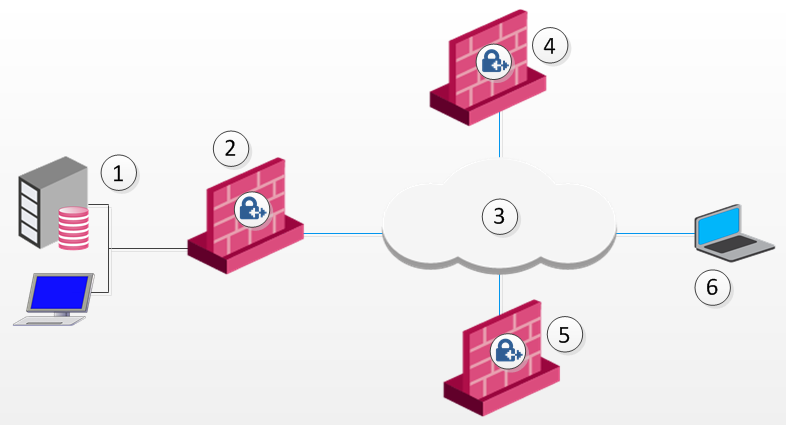
User permissions can also play a role in the closure of the VPN client. If the user does not have the necessary permissions to use the client or access the VPN network, it may be closed. Check the user’s permissions and ensure that they have the ability to connect to the VPN gateway.
In conclusion, there are several reasons why the client for Checkpoint Endpoint Security VPN may be closed. It could be due to connection issues, compatibility problems, security policies, configuration errors, firewall or antivirus restrictions, or user permissions. Troubleshooting each of these points will help identify and resolve the issue, allowing the client to function properly and establish a secure connection to the VPN gateway.
Exploring Check Point Remote Access VPN Features
Check Point Remote Access VPN offers a range of features that enhance the security and connectivity options for users. By understanding and utilizing these features, businesses can ensure a reliable and secure remote access to their network resources.
Multiple Modes of Remote Access:
Checkpoint Remote Access VPN supports different modes of access, including client-to-site, site-to-site, and mobile access. Each mode caters to specific use cases, providing users with the flexibility to choose the most suitable option based on their requirements.
Enhanced Security:
With Check Point Remote Access VPN, organizations can rest assured that their data and network are safeguarded against threats. The use of encryption ensures that sensitive information remains secure during transmission, and the ability to define granular access control policies gives administrators full control over who can access the network resources.
Integration with Check Point Gateways:
Check Point Remote Access VPN seamlessly integrates with Check Point gateways, allowing organizations to extend their existing security infrastructure to remote users. This integration ensures that the same level of protection and security policies are applied across the entire network.
Flexible Authentication Options:
Checkpoint Remote Access VPN supports a wide range of authentication methods, including username/password, certificate-based authentication, and multi-factor authentication. This flexibility enables organizations to choose the most appropriate authentication method based on their security requirements and user preferences.
Endpoint Security Features:
The Check Point Remote Access VPN client also provides additional endpoint security features to protect devices accessing the network. These features include anti-malware protection, content awareness, and data loss prevention, ensuring that devices connecting to the network are secure and compliant.
Seamless Roaming and High Availability:
Checkpoint Remote Access VPN supports seamless roaming, allowing users to maintain their VPN connection even when transitioning between different networks. Additionally, the high availability feature ensures uninterrupted access to network resources, even in the event of a gateway failure.
Centralized VPN Management:
Organizations can centrally manage and monitor their remote access VPN deployment using the Check Point Security Management Server. This provides a unified view of all remote access connections, simplifying administration and troubleshooting.
Efficient Bandwidth Management:
Check Point Remote Access VPN includes features to optimize the utilization of bandwidth. Through compression and traffic prioritization, organizations can ensure that critical applications and services receive proper bandwidth allocation without impacting overall network performance.
Compatibility with Multiple Platforms:
The Check Point Remote Access VPN client is available for various operating systems, including Windows, macOS, Linux (Ubuntu), and mobile platforms like iOS and Android. This wide compatibility allows users to connect securely from different devices, ensuring a seamless and consistent user experience.
Check Point Remote Access VPN Features
Check Point Remote Access VPN provides a secure and convenient way for users to connect to their organization’s internal network when working remotely. With its advanced features, it ensures a reliable and encrypted connection between the user and the trusted gateway.
Flexible Connection Modes
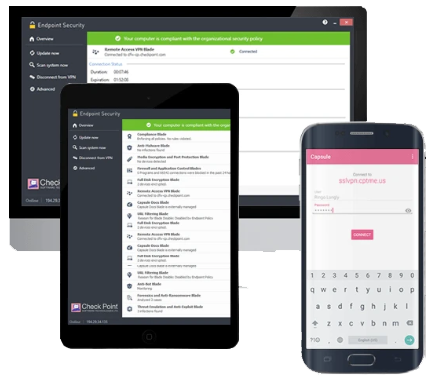
Users can choose between different connection modes based on their specific needs and requirements. These modes include full tunnel mode, split tunnel mode, and limited access mode. Each mode offers different levels of security and control over the network traffic.
Multiple Gateways
In a large organization with multiple locations, Check Point Remote Access VPN allows users to connect to different gateways. This feature enables users to access resources and services located in different points of the network, such as the headquarters in New York and a branch office in Paris.
Trusted Access Control
Check Point Remote Access VPN ensures that only authorized users can connect to the internal network. It verifies the user’s identity and credentials before granting access. Additionally, it allows network administrators to define access policies and restrictions based on user profiles, ensuring that only the right people have access to sensitive information.
Enhanced Security Features
Check Point Remote Access VPN incorporates various security features to protect the user’s connection and data. It uses encryption to secure the traffic between the client and the gateway, making it unreadable to unauthorized parties. It also blocks malicious content and threats, ensuring a safe browsing experience for the user.
Visitor Mode
Check Point Remote Access VPN offers a visitor mode that allows external visitors, such as partners or consultants, to securely access specific resources and services of the internal network. This feature ensures that their connection is isolated from the internal network and prevents any potential risks or breaches.
Compatibility and Ease of Use
Check Point Remote Access VPN is compatible with various operating systems, including Windows, macOS, Android, and Ubuntu. It provides an intuitive user interface and easy-to-follow setup instructions, allowing users to quickly establish a secure connection to their organization’s network.
By providing these advanced features, Check Point Remote Access VPN has become a trusted solution for organizations of all sizes, ensuring secure and reliable remote access for employees and external visitors.
Вопрос-ответ:
Why is the Client for Checkpoint Endpoint Security VPN Closed?
The Checkpoint Endpoint Security VPN client may be closed due to various reasons, including system inactivity, a network connection issue, or the client being manually closed by the user. It is important to check if the system is idle, the network connection is stable, and if the client was accidentally closed before troubleshooting further.
What are the features of Check Point Remote Access VPN?
Check Point Remote Access VPN offers a range of features for secure and convenient remote access. Some of its key features include encrypted communications, multi-factor authentication, endpoint compliance scanning, centralized management, and seamless integration with other Check Point security products. These features ensure that remote users can securely access corporate resources while maintaining the highest level of security.
How can I resolve issues with the Checkpoint Endpoint Security VPN Client?
To resolve issues with the Checkpoint Endpoint Security VPN client, you can try several troubleshooting steps. First, check your network connection to ensure it is stable. You can also try restarting the client or reinstalling it. If the issue persists, you may need to contact your IT department or Check Point support for further assistance. They can help diagnose the problem and provide specific solutions based on your network configuration.
Can I use Check Point Remote Access VPN on multiple devices simultaneously?
Yes, you can use Check Point Remote Access VPN on multiple devices simultaneously. The VPN client allows you to establish secure connections from different devices, such as laptops, smartphones, and tablets, to your corporate network. This flexibility enables you to work remotely and securely access corporate resources from any device, regardless of your location.
Does Check Point Remote Access VPN support multi-factor authentication?
Yes, Check Point Remote Access VPN supports multi-factor authentication (MFA). MFA adds an extra layer of security by requiring users to provide additional proof of identity, such as a one-time password generated by a mobile app, a fingerprint scan, or a smart card. This helps to prevent unauthorized access to corporate resources and enhances the overall security of remote connections.
Видео:
Configuring a Check Point Security Gateway for Remote Access.
Configuring a Check Point Security Gateway for Remote Access. by Check Point UK & Ireland 3 years ago 10 minutes, 34 seconds 5,814 views
Download & Install Check Point Remote Access VPN (For Windows Users) Step by Step
Download & Install Check Point Remote Access VPN (For Windows Users) Step by Step by I.T PLUS SOLUTIONS 9 months ago 4 minutes, 37 seconds 1,050 views
