Top 5 Mozilla Firefox VPN Add-ons for 2023: The Best VPN for Firefox FAQs
If you’re a Mozilla Firefox user, you probably know the advantage of using add-ons to enhance your browsing experience. When it comes to VPNs, that’s no different. With the average person spending more time online than ever before, having a VPN is essential to ensure your online activities are protected. Here, we’ve compiled a list of the top 5 Mozilla Firefox VPN add-ons for 2023 to help you find the best VPN solution for your needs.
Mozilla Firefox offers a wide range of VPN add-ons, and after extensive analysis, we’ve installed and tested dozens of them. After careful consideration, we’ve decided on the top 5 VPN add-ons that offer the best support, speed, and advanced capabilities for browsing the web. Whether you’re using Firefox on a desktop operating system or on the latest Apple or iOS devices, we’ve got you covered.
One of the top VPN add-ons that made our list is Surfshark. This VPN add-on not only offers great bandwidth and speed-optimized servers, but it also provides advanced encryption to ensure your online activities remain private and protected. With Surfshark, you can also stream movies and videos without any bandwidth limitations, making it a top recommendation for Firefox users.
Besides Surfshark, there are also other excellent VPN add-ons that made it to our list. From preventing trackers from recording your browsing history to ensuring your data stays secure when using public Wi-Fi, these add-ons have everything you need to enhance your online experience.
Top 5 Mozilla Firefox VPN Add-ons for 2023

If you’re a Mozilla Firefox user and in need of a reliable VPN, you’re in luck. There are several VPN add-ons available for Firefox that can help you ensure your online security and privacy. Here, we have ranked the top 5 VPN add-ons for Firefox based on their features, reliability, and performance.
1. NordVPN
NordVPN is a highly popular and widely used VPN service, and its Firefox add-on is no exception. This add-on offers advanced features and a speed-optimized server network, making it a great option for streaming movies and bypassing geo-restrictions. NordVPN also blocks ads and provides strong encryption to ensure your online activities are secure.
2. Opera VPN
Opera VPN is a built-in VPN extension for the Opera browser, but it’s also available as an add-on for Firefox. It guarantees fast and secure browsing experience and offers a wide range of features, including a free VPN. Opera VPN is known for its no-log policy and DNS leak protection, making it a reliable option for users who prioritize privacy.
3. HideMe VPN
HideMe VPN is another popular VPN service that offers a Firefox add-on. This add-on provides a secure and encrypted connection, allowing you to browse the web without revealing your real IP address. HideMe VPN also has an extensive server network and supports multiple devices, giving you flexibility in choosing the devices you want to protect.
4. ExpressVPN
ExpressVPN is a top-rated VPN service that also offers a Firefox add-on. The add-on provides a secure and fast connection, keeping your online activities private and protected. ExpressVPN has servers in multiple countries, allowing you to bypass geo-restrictions and access content from around the world. The add-on is regularly updated, ensuring the best performance and security.
5. DAZN VPN
DAZN VPN is a VPN service that specializes in streaming sports events. Its Firefox add-on allows you to access popular streaming platforms like DAZN and watch live sports from anywhere in the world. The add-on is easy to use and has a user-friendly interface, making it a convenient option for sports enthusiasts.
In conclusion, these are the top 5 Mozilla Firefox VPN add-ons for 2023. Each add-on offers its own unique features and guarantees a secure browsing experience. Whether you’re looking for advanced encryption, fast streaming capabilities, or extensive server networks, there’s an add-on on this list that will suit your needs.
The Best VPN for Firefox FAQs
1. What’s the difference between a VPN and a firewall?
A VPN, or Virtual Private Network, is a tool that allows you to create a secure and private connection to the internet. It encrypts your internet traffic and routes it through a remote server, hiding your IP address and protecting your data from spying eyes. On the other hand, a firewall is a security measure that blocks unauthorized access to your computer or network, acting as a barrier between your device and the internet.
2. When should I use a VPN with Firefox?
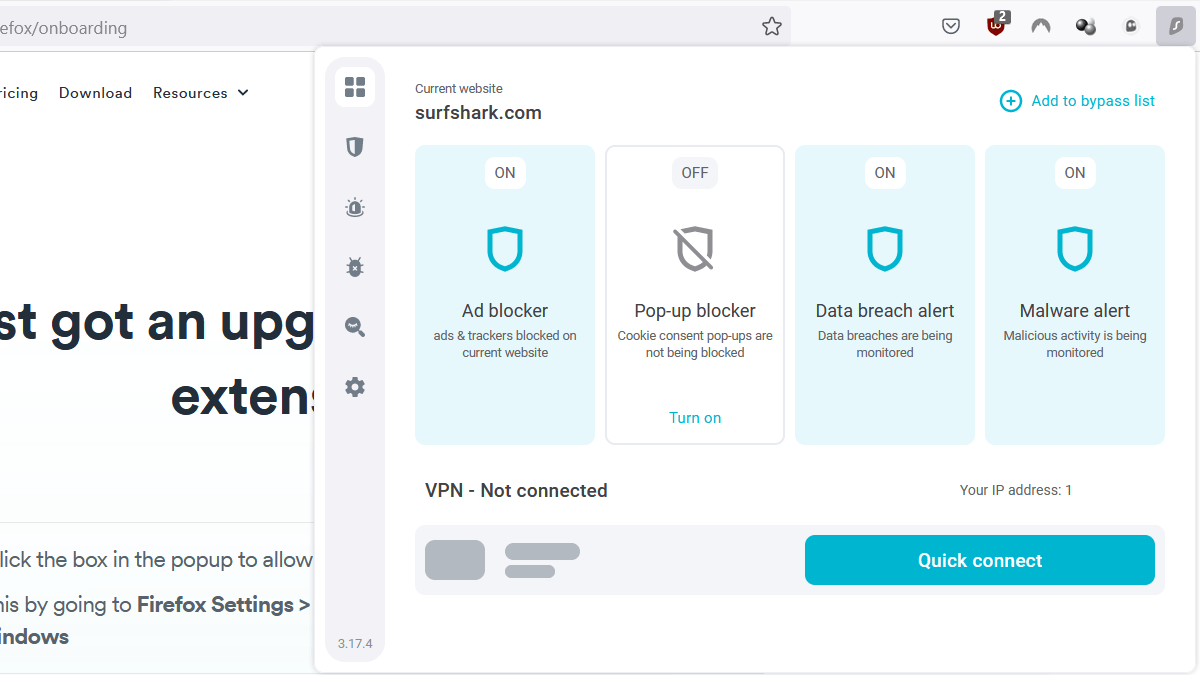
You should consider using a VPN with Firefox when you want to protect your online privacy and security. A VPN can hide your browsing activity from ISPs, prevent websites from tracking your location, and bypass content restrictions. It’s especially useful when using public Wi-Fi networks, as it encrypts your data and prevents potential hackers from intercepting it.
3. What’s the fastest VPN for Firefox?
When it comes to speed-optimized VPNs for Firefox, there are several options to consider. One of the fastest VPNs is WireGuard, which is known for its quick connection times and efficient performance. Other speed-optimized VPNs include HideMe and Opera VPN. However, the actual speed you experience may vary depending on factors such as your internet connection, server location, and the VPN provider’s infrastructure.
4. Can I use a VPN add-on with Firefox?
Yes, you can use VPN add-ons with Firefox to enhance your online privacy and security. These add-ons are quick to install and provide an easy way to connect to a VPN server directly from your browser window. Some popular VPN add-ons for Firefox include NordVPN, ExpressVPN, Windscribe, and Surfshark.
5. What are some tips for using a VPN with Firefox?
– Test the VPN’s features and speeds before committing to a long-term subscription, as not all VPNs are created equal.
– Consider the jurisdiction and privacy policy of the VPN provider to ensure they respect your privacy rights.
– Create a separate, anonymous account for your VPN to avoid linking your online activity to your personal accounts.
– Use advanced features like split tunneling to control which apps or websites go through the VPN.
– Be aware that using a VPN can sometimes result in slower internet speeds due to the encryption and routing processes.
Setting up a Firefox VPN extension on your computer
If you want to protect everything you do online and prevent spying on your activities, setting up a Firefox VPN extension on your computer is a smart choice. With a VPN, your internet connection will be encrypted, keeping your data protected from prying eyes. Additionally, a VPN allows you to bypass geoblocks and access websites and streaming services that may be restricted in your region.
There are many VPN extensions available for Firefox, but here are the top 5 VPN add-ons to consider:
- NordVPN: With its user-friendly interface and advanced features like Split Tunneling, NordVPN is a popular choice among Firefox users. Its vast server network ensures smooth streaming and offers strong privacy protection.
- TunnelBear: TunnelBear is known for its simple setup and user-friendly interface. It offers both a free and a paid version, making it a popular choice for those who are new to VPNs or want a budget-friendly option.
- HideMe: HideMe is a reliable VPN extension that offers strong encryption and a strict no-logs policy. It allows you to choose from multiple server locations and ensures your online activities are protected.
- Windscribe: Windscribe not only provides VPN services but also includes a built-in firewall and ad-blocker. This all-in-one solution offers excellent privacy protection and is known for its user-friendly interface.
- ExpressVPN: Although not an official Mozilla Firefox extension, ExpressVPN can be connected to Firefox through its app. It offers fast speeds, strong privacy protection, and the ability to bypass geoblocks for popular streaming platforms like Netflix and Amazon Prime Video.
Once you have chosen the VPN extension that suits your needs, setting it up on your Firefox browser is usually straightforward. Simply search for the extension in the Firefox Add-ons store, install it, and follow the instructions provided by the VPN provider. The VPN extension will then appear in your Firefox toolbar, allowing you to easily toggle it on and off as needed.
FAQs
- How does a Firefox VPN extension work?
- Why is privacy important while browsing the internet?
- Can I use a Firefox VPN extension on multiple devices?
- Should I test my VPN extension for malware?
- Are VPN extensions better than VPN services?
A Firefox VPN extension works by creating a secure and encrypted tunnel between your computer and the VPN server. All your internet traffic is routed through this tunnel, making it impossible for anyone to intercept or spy on your online activities.
Privacy is important while browsing the internet because it prevents your personal information from being collected and used without your consent. It also allows you to browse the web without restrictions and access content that may be blocked in your region.
Most VPN extensions are compatible with multiple devices and operating systems. You can choose the VPN extension that supports your specific device or system, ensuring that all your devices are protected.
While most VPN extensions go through stringent security checks, it’s always a good idea to test your VPN extension for malware. You can use reputable antivirus software or malware scanning tools to ensure that your VPN extension is safe to use.
Both VPN extensions and VPN services have their own advantages and disadvantages. VPN extensions offer convenience and easy setup, while VPN services often provide more advanced features and better performance in the long run. It’s important to choose the option that best suits your needs.
FAQ:
Which VPN add-on is the best for Firefox?
According to the article, the top 5 VPN add-ons for Firefox in 2023 are NordVPN, ExpressVPN, CyberGhost VPN, Private Internet Access (PIA), and Surfshark. All of these VPN add-ons have their own strengths and features, so the best one for you would depend on your specific needs and priorities.
What are some key features of NordVPN?
NordVPN offers a wide range of features, including high-speed servers in diverse locations, strong encryption protocols, a strict no-logs policy, and the ability to bypass geo-restrictions and access blocked content. It also has a user-friendly interface and supports multiple devices simultaneously. Additionally, NordVPN provides advanced security features like double VPN and Onion over VPN for an extra layer of privacy.
Is ExpressVPN compatible with Firefox on all operating systems?
Yes, ExpressVPN is compatible with Firefox on various operating systems, including Windows, Mac, Linux, and Android. It also offers browser extensions for Firefox on these platforms, allowing for convenient and secure browsing. However, it’s important to check the system requirements and specific compatibility details on the ExpressVPN website to ensure it works with your particular device.
Can CyberGhost VPN be used for free?
CyberGhost VPN offers both free and premium options. The free version allows limited access to servers and has certain restrictions, such as slower speeds and fewer features. To enjoy the full range of benefits, including enhanced security, unlimited bandwidth, and access to a wider server network, you would need to subscribe to their premium plan.
What makes Private Internet Access (PIA) stand out among the VPN add-ons?
Private Internet Access (PIA) is known for its strong emphasis on privacy and security. It provides a range of features like IP cloaking, encryption, and ad-blocking to ensure a safe browsing experience. PIA also boasts a large network of servers in multiple countries, allowing users to easily switch between different locations. Additionally, it offers affordable pricing options and supports simultaneous connections on multiple devices.
Does Surfshark offer a money-back guarantee?
Yes, Surfshark offers a 30-day money-back guarantee to its users. This means that if you’re not satisfied with the VPN add-on within the first 30 days of purchase, you can request a refund and get your money back. This gives users the opportunity to try out Surfshark and see if it meets their needs and expectations without any financial risk.
What are the system requirements for using these VPN add-ons on Firefox?
The system requirements for using these VPN add-ons may vary slightly depending on the specific add-on and your operating system. However, in general, you would need a device (computer, smartphone, tablet) running Firefox as the browser. It’s recommended to have the latest version of Firefox installed for better compatibility. Additionally, a stable internet connection is required, and certain VPN add-ons may have additional requirements or recommendations for optimal performance.
Videos:
The ULTIMATE Browser Tier List (Based Tier to Spyware Tier)
The ULTIMATE Browser Tier List (Based Tier to Spyware Tier) by Eric Murphy 3 months ago 39 minutes 56,788 views
