
How to Verify If Your VPN Is Functioning Properly: Steps, Solutions, and Conclusion
When it comes to using a Virtual Private Network (VPN), there are a few factors you should consider to ensure that your internet traffic goes through a secure and private connection. One of the most important aspects to check is whether your VPN is actually working as advertised. In this article, you’ll learn how to check if your VPN is working and understand the difference between residential IP and datacenter IP.
First and foremost, you should check for any IP leaks. Your VPN is supposed to encrypt your internet traffic and hide your real IP address. If there are any leaks, it means that your original IP address or other identifying information is visible to the websites or services you’re accessing. To ensure that your VPN is working correctly, you can use a tool or service that generates a test IP address and checks for any leaks.
Another step you can take is to test your VPN connection by accessing different websites or services while connected to the VPN. You can check if the IP address displayed on these websites matches the one provided by your VPN service. If there are significant differences or discrepancies, it could indicate a deficiency in your VPN’s functionality.
When it comes to residential IP versus datacenter IP, there are a few things to consider. Residential IPs are assigned to individual internet users and are associated with physical addresses. Datacenter IPs, on the other hand, are generated by data centers and are not associated with any specific physical location. Residential IPs can provide a more seamless browsing experience, while datacenter IPs may offer faster and more stable connections. Choosing between these types of IPs depends on your specific needs and the situation you’re in.
In conclusion, checking if your VPN is working is crucial to ensure the privacy and security of your internet traffic. By following the steps mentioned above, you can verify if your VPN is functioning correctly and if there are any leaks or discrepancies. Additionally, understanding the difference between residential IP and datacenter IP can further help you make an informed decision when choosing a VPN service.
Note: These are general guidelines and the specific steps and tools required may vary depending on the VPN service you’re using. It’s always recommended to refer to your VPN provider’s documentation or support for more accurate instructions.
How to Check If Your VPN Is Working: Steps, Solutions, and Verdict
When it comes to internet security, using a VPN is a popular solution in today’s digital age. However, there may be situations where you need to check if your VPN is actually working as intended. In this article, we will explore the steps, solutions, and verdict on how to check the status of your VPN.
Step 1: Test your IP address
The first step in checking your VPN is to verify the IP address you’re using. There are two types of IP addresses – residential and datacenter. Residential IP addresses are generated by internet service providers and are more commonly associated with individual users, while datacenter IP addresses are assigned by a hosting service and are typically used for commercial purposes.
Step 2: Check for leaks
One way to ensure your VPN is working is to check for any IP leaks. An IP leak occurs when your real IP address is exposed, compromising your anonymity. There are various online tools available that can help you test for leaks and detect any deficiencies in your VPN’s encryption.
Step 3: Test your connection to a server
If you’re using a VPN service, it’s important to test your connection to a server. This can be done by connecting to a server in a different location and checking if your IP address changes accordingly. This step will help you ensure that your traffic is being routed through the VPN and that your IP address is not being leaked.
Solution: Residential IP versus Datacenter IP
Understanding the difference between residential and datacenter IP addresses is crucial when dealing with VPNs. Residential IPs are often advertised as more secure and reliable, as they are associated with individual users. On the other hand, datacenter IPs may be more prone to being flagged or blocked by certain websites due to their commercial nature.
Verdict
Checking the status of your VPN is a vital step to ensure your online security and privacy. Following the steps outlined in this article will help you determine if your VPN is working as intended. Remember to test your IP address, check for leaks, and test your connection to a server. Understanding the difference between residential and datacenter IP addresses will also help you choose the right type of IP for your specific needs.
Residential IP vs Datacenter IP
When using a VPN service, you may come across the terms “residential IP” and “datacenter IP”. These two types of IP addresses can have significant differences and understanding them is essential for effectively using a VPN.
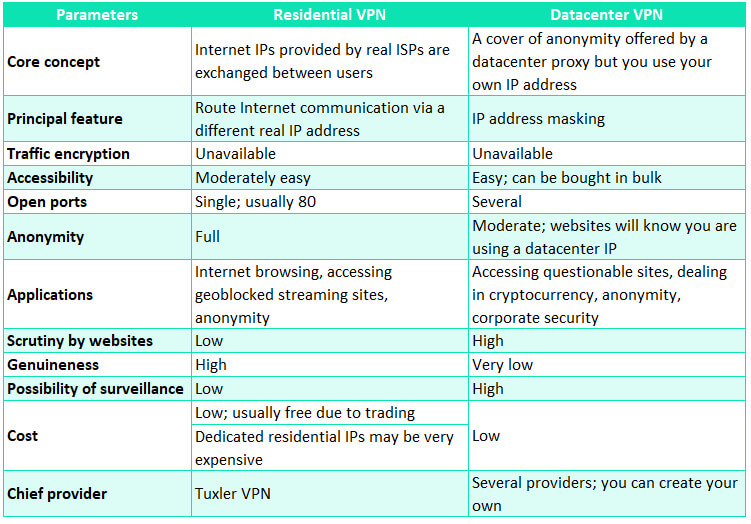
Residential IP: A residential IP address is linked to a physical location, typically assigned by an Internet Service Provider (ISP). When connected to a VPN using a residential IP, your internet traffic appears as if it is coming from a regular household or business.
Datacenter IP: A datacenter IP address, on the other hand, is assigned to a server located in a data center. This type of IP is typically used by businesses for hosting websites, servers, or other online services. When using a datacenter IP with a VPN, your internet traffic appears as if it is originating from a datacenter location.
Why it matters: The type of IP address you use can affect your online activities, as well as how you are perceived by online platforms and services. While both residential and datacenter IPs have their advantages and disadvantages, there are situations where one may be more suitable than the other.
Residential IP for anonymity: If your goal is to maintain anonymity online and blend in with regular internet users, using a VPN with a residential IP is a better choice. This is because residential IPs are associated with real-world locations and are less likely to raise suspicion.
Datacenter IP for speed and accessibility: On the other hand, if speed and accessibility are your top priorities, a datacenter IP may be more suitable. Datacenter IPs often offer faster connection speeds and easier access to geo-restricted content, as they are less likely to be blacklisted or restricted by online platforms.
Checking if it’s working: To ensure that your VPN is working and properly disguising your IP address, you can use various tools and steps. This may include checking your IP address before and after connecting to the VPN, testing for IP leaks, and verifying that your internet traffic is properly encrypted.
Verdict: Ultimately, the choice between a residential IP and datacenter IP depends on your specific needs and priorities. Understanding the differences and potential challenges associated with each type can help you make an informed decision when choosing a VPN service.
Steps to Check Your VPN IP Type
If you are using a VPN service to ensure your online privacy and security, it is important to know what type of IP address your VPN is providing. There are two types of IP addresses commonly used by VPN providers – residential IP and datacenter IP. Each type has its own advantages and disadvantages, so it is vital to understand which one you are using. Follow these steps to check your VPN IP type:
Step 1: Connect to a VPN server
The first step is to connect to a VPN server using your VPN service. Make sure you are connected successfully before proceeding to the next steps.
Step 2: Use a tool to check your IP address
Once you are connected to the VPN server, you can use a tool such as “What Is My IP Address” to check your IP address. This will show you the IP address that is being generated by your VPN service.
Step 3: Determine the type of IP address
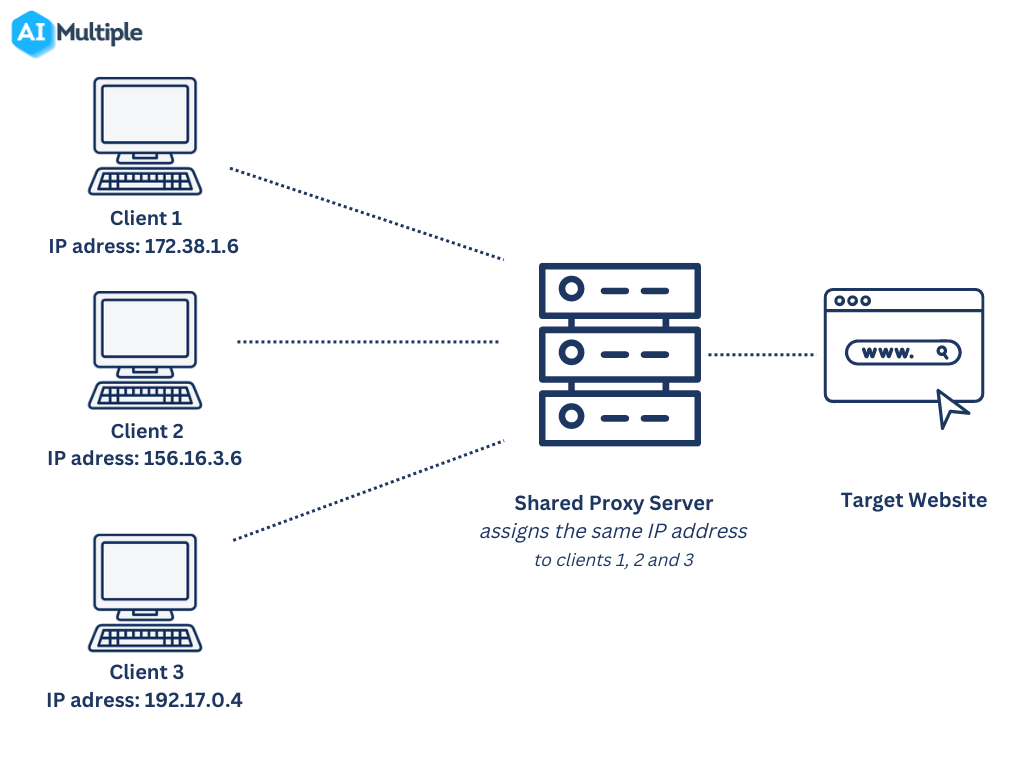
After checking your IP address, you can determine the type of IP address being used. If the IP address starts with numbers commonly associated with residential addresses, such as 192.168.xxx.xxx, it is a residential IP address. On the other hand, if the IP address starts with numbers commonly associated with datacenters, such as 162.255.xxx.xxx, it is a datacenter IP address.
Step 4: Read about the IP type
Once you have determined your IP address type, it is important to read about the pros and cons of that IP type. This will help you understand the implications and limitations of using that specific IP type with your VPN service.
Step 5: Check for IP leaks
In addition to checking your IP type, it is also crucial to check for any IP leaks. IP leaks can occur when your real IP address is revealed despite using a VPN. There are online tools available that can help you test for IP leaks and ensure your VPN is working properly.
Check Your VPN IP Type with Confidence
By following these steps, you can easily check the type of IP address your VPN service is providing. Knowing the IP type will give you a better understanding of the network infrastructure your VPN is using and the potential limitations or advantages associated with it. Whether you have a residential IP or a datacenter IP, it is important to ensure your VPN is functioning as expected to keep your online activities secure and private.
Our Verdict
If you’re in a situation where you need to check if your VPN is working, there are a few steps you can take to ensure that everything is functioning as it should.
First, you can use an online tool to check your IP address. This will let you know if you’re getting the IP address that your VPN is supposed to provide. If you’re not seeing the IP address associated with your VPN service, there may be an issue with your connection.
Next, you can check to see if your internet connection is encrypted. This is an important step to take, as encryption is one of the main reasons why you should use a VPN in the first place. There are various online tools available that can test the encryption of your connection, so you can be sure that your traffic is secure.
You should also check for any leaks of your IP address while using your VPN. This can happen if your VPN service has any deficiencies, or if there are changes in the server setup. There are online tools that can check for IP address leaks, so you can be confident that your true IP address is not being exposed.
In terms of the type of IP address you should use, there are pros and cons to both residential IP addresses and datacenter IP addresses. Residential IP addresses are generally more reliable and less likely to be flagged as suspicious, but they can be more expensive. On the other hand, datacenter IP addresses are cheaper and easier to obtain, but they may be more likely to be blocked or blacklisted.
In conclusion, checking if your VPN is working involves taking a few steps to ensure that your connection is secure and your IP address is properly masked. By following the steps outlined above and using the recommended tools, you can have peace of mind knowing that your VPN is functioning correctly and keeping your online activities private.
Why Should You Check Your VPN IP Type
When it comes to dealing with the situation of using a VPN, there are steps you should take to ensure that your VPN is working properly. One important aspect to consider is the type of IP address you have. There can be two types of IP addresses associated with a VPN: residential IP or datacenter IP. Understanding why you should check your VPN IP type will help you make informed decisions about your VPN service.
Residential IP vs Datacenter IP
First, let’s understand what a residential IP and a datacenter IP mean. A residential IP address is generated by users’ internet service providers (ISPs) and is associated with a specific physical location. On the other hand, a datacenter IP address is obtained from a server and is not tied to a specific residential location.
Why does this distinction matter? Well, it goes hand in hand with how VPNs work. When you use a VPN, it encrypts your internet traffic and sends it through a server. If you’re looking for privacy and anonymity, a residential IP can be more advantageous as it appears more like a regular internet user’s IP address. However, datacenter IPs may offer faster and more stable connections, making them preferable for certain tasks like streaming or gaming.
Checking Your VPN IP Type
Now that you know the difference between residential and datacenter IPs, why should you check your VPN IP type? Here’s why:
- Ensure Privacy and Anonymity: Checking your VPN IP type will help you confirm if you’re getting the advertised residential IP or datacenter IP. This is crucial if you want to ensure your online activities remain private and anonymous.
- Prevent IP Leaks: Sometimes, a VPN may have a deficiency and fail to hide your true IP address. By checking your VPN IP type, you can identify any potential leaks and take appropriate action to fix them.
- Learn How Your VPN Works: Understanding your VPN IP type will enable you to learn more about how your VPN service routes and handles your internet traffic. This knowledge can help you troubleshoot any issues that may arise while using the VPN.
In conclusion, checking your VPN IP type is an essential step to ensure your privacy, prevent IP leaks, and understand how your VPN service works. Whether you prefer a residential IP or a datacenter IP, knowing what type of IP address you have will help you make informed decisions about your VPN experience.
How to Deal with This Situation
If you’re unsure whether your VPN is working properly, there are several steps you should take to test its functionality and address any potential issues. By following these steps, you can learn how to ensure that your VPN is working as advertised.
Step 1: Check Your IP Address
The first step you should take is to check the IP address you’re getting while connected to your VPN server. If your VPN is working correctly, the IP address should be different from your original IP address. This is an important test to determine if your VPN is encrypting your traffic and providing you with a new virtual location.
Step 2: Test for DNS Leaks
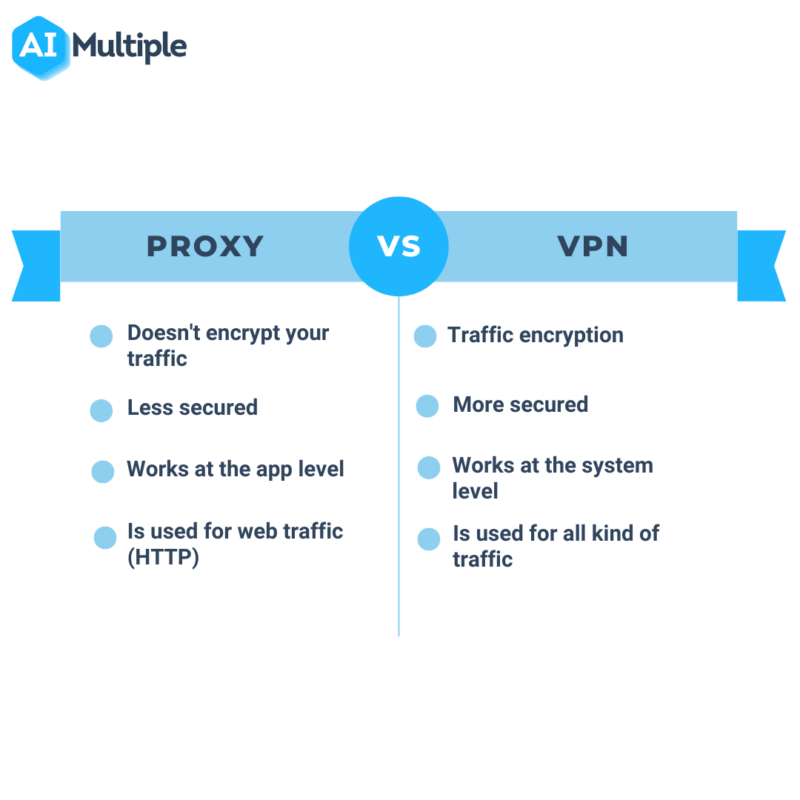
While testing your VPN, you should also check for DNS leaks. DNS leaks can occur when your internet service provider (ISP) can still see the websites you’re accessing, even if you’re using VPN. To test for DNS leaks, there are tools available that can help you check if your DNS requests are going through your VPN or your ISP.
Step 3: Verify the VPN Protocol and Encryption
Another important step in checking if your VPN is working properly is to verify the protocol and encryption being used. Most VPN services offer various protocols, such as OpenVPN or L2TP/IPsec, each with different levels of security. Make sure you’re using the recommended protocol and encryption for optimal security.
Step 4: Use a Website Testing Tool
If you’re still unsure about the functionality of your VPN, you can use online testing tools designed specifically to check the effectiveness of your VPN connection. These tools can provide you with information about your IP address, location, and any potential IP or DNS leaks.
Verdict: Residential IP vs. Datacenter IP
When it comes to choosing between a residential IP and a datacenter IP for your VPN, there are factors to consider. Residential IPs are generally more reliable and have less risk of being blocked by websites. On the other hand, datacenter IPs can offer faster speeds and more IP address availability. Ultimately, the decision depends on your specific needs and the level of anonymity and access you require.
How to Check if a VPN IP is Residential or Datacenter
If you’re using a VPN service, it’s essential to know whether your IP address is residential or datacenter. The type of IP address you have can impact your online experience, so it’s important to understand the differences between the two.
Residential IP versus Datacenter IP: A residential IP is an IP address assigned to a physical residential location. On the other hand, a datacenter IP is an IP address assigned to a server located in a datacenter. While both can be used with a VPN service, there are some key differences to consider.
Checking your IP Address:
One way to determine if your VPN IP is residential or datacenter is by using an IP address lookup tool. These tools provide information about the location and type of IP address you are using.
Steps to check your IP address:
- Find a reliable IP address lookup tool.
- Visit the tool’s website.
- Enter your IP address in the provided field.
- Click the “Search” or “Lookup” button.
- Review the results to see if your IP address is identified as residential or datacenter.
What to look for: When checking your IP address, look for information generated by the tool that indicates whether your IP address is residential or datacenter. This information should be clearly specified in the results.
Why it’s important:
Knowing whether your VPN IP is residential or datacenter is important for several reasons.
- Online anonymity: Residential IP addresses are generally considered more anonymous than datacenter IP addresses, as they are associated with real locations.
- Blocking prevention: Some websites and online services may block access from datacenter IP addresses to prevent spam or fraudulent activities.
- Performance: Residential IP addresses may offer better performance since they are associated with fewer users and are less likely to be blacklisted.
- Data leaks: Using a datacenter IP address may increase the risk of data leaks, as datacenters are more prone to security breaches.
In conclusion, checking your VPN IP address to determine whether it is residential or datacenter is crucial for ensuring your online privacy and experience. By following the steps outlined above, you can learn more about the type of IP address you have and make informed decisions about your VPN service.
If you’re not getting the desired results or need further assistance, consider contacting your VPN service provider for more information on their IP address offerings and how they handle residential versus datacenter IPs.
Вопрос-ответ:
How can I check if my VPN is working?
There are several ways to check if your VPN is functioning properly. One of the easiest ways is to visit a website that displays your IP address, such as whatismyip.com. Before and after connecting to the VPN, compare the IP addresses shown. If they are different, it means your VPN is working correctly. Additionally, you can check if your VPN is leaking your IP address by using websites like dnsleaktest.com or ipx.ac. These sites will show you if your DNS requests are being leaked, indicating a problem with your VPN connection.
What should I do if my VPN is not working?
If your VPN is not working, there are a few steps you can take to troubleshoot the issue. First, check your internet connection to ensure you are properly connected to the internet. If your internet connection is working fine, try connecting to a different VPN server. Sometimes certain servers may be experiencing issues, and connecting to a different server can resolve the problem. Additionally, try restarting your computer or mobile device and then reconnecting to the VPN. If none of these steps work, you may need to contact your VPN provider’s support team for further assistance.
What is the difference between a residential IP and a datacenter IP?
A residential IP is an IP address that is assigned to a device within a residential network, typically provided by an ISP (Internet Service Provider). It is associated with a physical location and is commonly used by individuals. On the other hand, a datacenter IP is an IP address provided by a datacenter or hosting provider. It is not associated with a specific physical location and is commonly used by businesses or organizations. The main difference between the two is the type of network they are associated with and the purpose they serve.
Can I use a VPN to bypass geo-restrictions?
Yes, you can use a VPN to bypass geo-restrictions. With a VPN, you can connect to a server in a different country and access online content that is normally restricted in your location. For example, if a streaming service is only available in the United States, you can use a VPN to connect to a US server and access the service as if you were located in the US. However, it is important to note that bypassing geo-restrictions may violate the terms of service of certain websites or streaming platforms, so it is always recommended to use a VPN within the legal boundaries.
How can I improve the speed of my VPN connection?
There are several ways to improve the speed of your VPN connection. First, you can try connecting to a server that is closer to your physical location. The closer the server, the lower the latency and the faster the connection speed. Additionally, you can try using a wired Ethernet connection instead of Wi-Fi, as Ethernet tends to provide a more stable and faster connection. Disabling unnecessary background applications and processes that consume bandwidth can also help improve VPN speed. If none of these steps work, you may need to consider upgrading your internet plan to a higher speed package.
Видео:
How to check if your connection (VPN/proxy) is encrypted
How to check if your connection (VPN/proxy) is encrypted by EZOVERDOSE 7 years ago 3 minutes, 59 seconds 28,963 views
Check if your VPN is working | NordVPN
Check if your VPN is working | NordVPN by NordVPN 3 years ago 1 minute, 27 seconds 63,914 views
