Download Azure – Best Software Apps

Looking for the best software apps to enhance your Azure experience? Look no further! With the Azure VPN Client, you can easily connect to Azure and enjoy a seamless cloud gaming experience on your mobile device. Whether you’re a gamer or a business professional, Azure has you covered.
The My Prayer app is an essential tool for anyone looking to connect with their spirituality. This free application allows you to stay connected with your faith through prayer, reminders, and community support. Download the My Prayer app from the Azure app store and start your spiritual journey today.
Are you a fan of Roblox? Then the Project xCloud – Free Roblox Program is perfect for you. This app allows you to connect to Azure and play Roblox games from anywhere, at any time. Stay connected to the Roblox community and enjoy your favorite games on the go.
If you’re interested in mining for resources, then Azure Mines is the game for you. This open source solution for big data computing allows you to mine for valuable resources and create your own virtual world. Explore the depths of Azure Mines and see what treasures you can uncover.
The Azure VPN Client for Windows is the answer to all your connectivity problems. If you’re having trouble connecting to Azure, this client will help you troubleshoot and get back on track. Don’t let a service that has not been started stop you from enjoying the benefits of Azure. Download the Azure VPN Client for Windows and connect with ease.
Looking for a free Android app to enhance your Azure experience? Look no further than Azure Droid. This app allows you to stay connected to Azure and access all your favorite applications on the go. Whether you’re a business professional or a gaming enthusiast, Azure Droid has something for everyone.
Apache Hadoop is the open source solution for big data computing. With Apache Hadoop, you can analyze and process large volumes of data with ease. Whether you’re a business professional or a data scientist, Apache Hadoop has the tools you need to make sense of your data.
Download Azure – Best Software Apps
Connect to Azure through the Azure VPN Client: Azure provides a seamless way to connect to its cloud services through the Azure VPN Client. This client enables users to securely access their resources in the Azure cloud from anywhere.
Open the cloud to a world of possibilities: With Azure, you can open up your applications, data, and services to the cloud. By utilizing Azure’s vast array of tools and technologies, you can scale your infrastructure, optimize your processes, and take advantage of the flexibility and availability of the cloud.
Xcloud: Microsoft’s entry into cloud gaming for mobile: With the Xcloud project, Microsoft aims to enable gamers to play their favorite games on any mobile device. By downloading the Xcloud application, gamers can connect to Microsoft’s cloud gaming platform and enjoy high-quality gaming experiences on the go.
Free Roblox program: Azure Mines: Azure Mines is a free Roblox program that allows users to explore and mine valuable resources in a virtual world. By connecting to Azure, players can access a vast array of game mechanics and features, making their mining adventures even more exciting.
Azure VPN Client for Windows: The service has not been started
Azure VPN Client for Windows provides a secure and reliable way to connect to Azure’s cloud services. If you are experiencing issues with the service not starting, it is recommended to check your system settings, verify your internet connection, and ensure that all necessary prerequisites are met.
Azure Droid – Free Android App: Azure Droid is a free Android app that allows users to connect to Azure’s cloud services on their mobile devices. By downloading this app, users can easily access their Azure resources, manage their applications, and monitor their cloud services from anywhere.
Apache Hadoop – Open source solution for big data computing: Apache Hadoop is an open-source software framework that allows for distributed processing of large datasets across clusters of computers. With Hadoop, organizations can efficiently analyze and process big data, enabling them to gain valuable insights and make data-driven decisions.
Connect to Azure Through the Azure VPN Client
Azure VPN Client is a program that allows you to connect to Azure, Microsoft’s cloud gaming entry for mobile, through a virtual private network (VPN). This client provides a secure and encrypted connection between your device and the Azure cloud, enabling you to access and interact with Azure services and applications.
How to Connect?
- Download and install the Azure VPN Client on your Windows device.
- Open the Azure VPN Client program.
- Enable the VPN service if it has not been started.
- Connect to Azure by entering your Azure credentials.
Once connected, you can access a wide range of Azure services and applications, such as Azure Mines, a free Roblox program that allows you to mine resources and discover hidden treasures in a virtual world. You can also access Project xCloud, Microsoft’s cloud gaming service, and enjoy playing games from your Azure-enabled device.
The Benefits of Using Azure VPN Client
- Secure connection: The Azure VPN Client provides a secure and encrypted connection, ensuring that your data is protected during transmission.
- Distributed computing: With Azure, you can leverage its distributed computing capabilities to handle big data and perform complex computations.
- Flexibility: The Azure VPN Client enables you to connect to Azure from anywhere, allowing you to work on your projects or access applications remotely.
- Easy setup: The Azure VPN Client is easy to download and install, making it accessible for users of all levels.
Whether you are using Azure for gaming, distributed computing, or accessing applications, the Azure VPN Client is an essential tool for connecting to the Azure cloud securely and efficiently.
Microsoft’s cloud gaming entry for mobile
Microsoft xCloud: A Revolutionary Gaming Experience
Microsoft has introduced an innovative project called xCloud, which aims to revolutionize the gaming industry by providing cloud-based gaming experiences on mobile devices. This project has been developed by Microsoft and allows gamers to play their favorite games through the power of the cloud.
Cloud Gaming on Mobile Devices
The xCloud project offers users the ability to connect to Microsoft’s cloud infrastructure and stream games directly to their mobile devices. This allows gamers to play high-quality, graphics-intensive games without the need for a powerful gaming console or PC.
Enhanced Gaming Experience Anytime, Anywhere
By utilizing the xCloud client, gamers can enjoy their favorite games on the go. Whether traveling or waiting in line, gamers can connect to the cloud and access their game library, ensuring an enhanced gaming experience anytime and anywhere.
Benefits of the Azure VPN Client
The Azure VPN Client for Windows enables users to securely connect to Microsoft’s Azure cloud platform and access cloud-based services. This client provides a secure virtual private network (VPN) connection that ensures data privacy and protection while connected to the cloud.
Seamless Integration with Azure Mines
Azure Mines, an open-source solution for data computing and mining, can be connected to using the Azure VPN Client. This allows for seamless integration of cloud data computing and analysis with the power of Azure’s infrastructure.
Roblox: A Popular Gaming Platform
Roblox is a popular gaming platform that offers a wide variety of games created by its user community. The xCloud project has tried to bring the Roblox gaming experience to mobile devices, allowing players to access and play Roblox games through the xCloud client.
Distributed Computing with Apache Hadoop
Apache Hadoop, an open-source solution for big data computing and analysis, has been integrated with the Azure cloud platform. This allows for distributed computing and processing of large data sets, enabling businesses to efficiently analyze and gain insights from their data.
Conclusion
Microsoft’s xCloud project has brought cloud-based gaming to mobile devices, allowing gamers to enjoy their favorite games on the go. By using the Azure VPN Client, gamers can connect to the Azure cloud platform and access cloud-based services such as Azure Mines and Roblox. This integration of gaming and cloud computing technology offers new possibilities for the gaming industry and data analysis.
My Prayer
Connecting to Azure through the Azure VPN Client
If you have been trying to connect to Azure through the Azure VPN Client but it is not working, then this guide is for you. Follow these steps to enable the Azure VPN Client and connect to Azure:
- Open the Azure VPN Client application on your Windows device.
- If the service has not been started, click on the “Start” button to initiate the connection.
- Once the Azure VPN Client service has started, click on the “Connect” button to establish a connection to Azure.
- Enter your Azure credentials to authenticate and connect to the Azure cloud.
- Once connected, you can access your gaming applications, such as Project xCloud and Roblox, through the Azure cloud platform.
By connecting to Azure, you can enjoy the benefits of distributed computing and big data processing with tools like Apache Hadoop. This open source solution for big data computing allows you to work with large amounts of data and optimize your gaming experience.
Using Azure Mines on Roblox
If you are a fan of Roblox and haven’t tried Azure Mines yet, you’re missing out! Azure Mines is a free Roblox program that allows you to explore an open world mining game. You can mine different resources, upgrade your tools, and discover hidden treasures in the vast underground mines.
To play Azure Mines, simply search for it in the Roblox app or website. Once you’re in the game, you can connect with other players, join teams, and work together to mine ores and earn points. It’s a fun and addictive game that will keep you entertained for hours!
Microsoft’s Entry into Cloud Gaming with Project xCloud
Microsoft’s cloud gaming entry for mobile, known as Project xCloud, is revolutionizing the way we play games. With Project xCloud, you can stream and play high-quality games directly from the cloud on your mobile device. This means you don’t need to download or install the games, saving you valuable storage space.
Project xCloud works through the Azure cloud platform, utilizing its powerful infrastructure to enable seamless gaming experiences. Whether you’re a casual gamer or a hardcore enthusiast, Project xCloud offers a wide range of games for you to enjoy anytime, anywhere. Simply connect to Azure through the Azure VPN Client, start the Project xCloud app, and immerse yourself in the world of cloud gaming!
In conclusion, Azure and its various services and applications provide endless possibilities for gamers and developers alike. From connecting to Azure through the Azure VPN Client, to exploring open world games like Azure Mines on Roblox, to experiencing the future of gaming with Microsoft’s Project xCloud, Azure is the answer to all your gaming needs.
Project xCloud – Free Roblox Program
The Project xCloud is a free cloud gaming solution developed by Microsoft. This program allows users to play Roblox games on their Windows devices by connecting to the Azure cloud through the Azure VPN Client. With xCloud, gamers can enjoy a wide variety of Roblox games without the need to download them on their local machines. This cloud-based solution provides an easy and convenient way to access and play Roblox games from anywhere, anytime.
By using the Azure VPN Client, users can connect to the xCloud gaming service and stream Roblox games directly to their devices. This client provides a secure and reliable connection to the Azure cloud, ensuring smooth gameplay and minimal latency. With the xCloud program, gamers can experience high-quality graphics and immersive gameplay, all powered by the distributed computing capabilities of the Azure cloud.
Downloading the xCloud app is easy. Simply search for “xCloud” in your app store and download the application to your Windows device or Android phone. Once downloaded, you can connect to the Azure cloud through the Azure VPN Client and start playing your favorite Roblox games. The xCloud program is completely free to use, making it accessible to all Roblox fans.
Microsoft’s Project xCloud is an innovative entry in the cloud gaming market, offering a cost-effective and convenient solution for gaming enthusiasts. Whether you’re a casual player or a hardcore gamer, xCloud provides a seamless gaming experience with access to a vast library of Roblox games. Try the xCloud program today and immerse yourself in the world of Roblox gaming!
Azure Mines
Work and play with Azure Mines
Azure Mines is an open-world mining game that allows players to explore and extract valuable resources from a virtual world. It is a popular game enjoyed by millions of players worldwide.
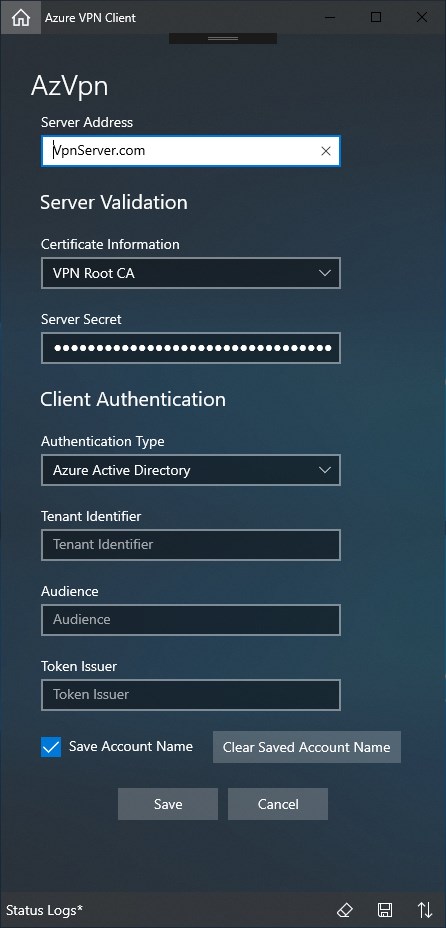
Connect to Azure Mines through the Azure VPN Client
If you want to play Azure Mines from a remote location, you can connect to the game through the Azure VPN Client. This allows you to securely access the game and enjoy uninterrupted gameplay.
A fun and engaging gaming experience
Azure Mines provides a thrilling gaming experience with its immersive gameplay and stunning graphics. Players can dive deep into the mines, fight off enemies, and uncover hidden treasures.
An application for big data processing
Azure Mines is not just a game, but also a powerful application for processing big data. It utilizes the distributed computing power of Apache Hadoop to efficiently handle large amounts of data for mining operations.
An answer to the gaming needs of mobile users
Microsoft’s entry into cloud gaming, Project xCloud, allows users to play Azure Mines and other games on their mobile devices. This provides a convenient and accessible way to enjoy gaming on the go.
A popular game loved by Roblox players
Azure Mines is a highly rated and beloved game within the Roblox community. It offers an interactive and addictive gameplay experience that keeps players hooked for hours.
My Prayer – an app for staying connected
Stay connected to your mining project with My Prayer. This mobile app allows you to receive notifications about updates, progress, and important events related to your Azure Mines project.
The Azure VPN Client for Windows
The Azure VPN Client is a Windows application that enables users to securely connect to Azure Mines and other Azure services. It ensures that your connection is encrypted and protected from unauthorized access.
Azure VPN Client for Windows
The Azure VPN Client for Windows is a project developed by Microsoft to enable users to connect to the Azure cloud through a secure virtual private network (VPN) connection. With this client, users can easily access and work on their cloud-based applications and data.
Using the Azure VPN Client for Windows, users can connect to the Azure cloud through an encrypted VPN tunnel. This ensures that their data and connection are secure from unauthorized access. The client provides an easy-to-use interface that allows users to connect to the Azure cloud with just a few clicks.
Microsoft’s cloud gaming entry, Project xCloud, also utilizes the Azure VPN Client for Windows to connect gamers to their favorite games. By downloading and installing the client, gamers can connect to Microsoft’s cloud gaming service and play their favorite games on any Windows device, including mobile devices.
In addition to gaming, the Azure VPN Client for Windows is also used by other applications and services, such as the Azure Mines program on Roblox. By connecting to the Azure cloud through the VPN client, players can access and work on their mines in a distributed and collaborative environment.
For those who have downloaded and installed the Azure VPN Client for Windows but are encountering issues, such as the “The service has not been started” error, there is a solution. Users can try enabling the service manually by going to the Services application in Windows and starting the “Azure VPN Client – The service has not been started” service.
The Azure VPN Client for Windows is also available as a free Android app called Azure Droid. This mobile app allows users to connect to Azure and access their cloud-based applications and data on-the-go. With Azure Droid, users can stay connected to the Azure cloud and work from anywhere.
In summary, the Azure VPN Client for Windows is a crucial tool for connecting to the Azure cloud. Whether for gaming, accessing distributed data, or working on cloud-based applications, this client provides an easy and secure way to connect to Azure and enjoy its benefits.
Azure VPN Client – The service has not been started
The Azure VPN Client is an essential tool for connecting to Azure through a virtual private network. It allows users to securely access their resources in the cloud, whether it’s for mobile gaming, data computing, or other cloud-based applications.
However, there may be instances when users encounter the error message “The service has not been started” while trying to connect to Azure through the VPN client. If you’ve encountered this issue, here’s how you can resolve it:
1. Check your connection
Ensure that you have a stable internet connection and that you’re properly connected to the network. A weak or intermittent connection can prevent the Azure VPN Client from starting successfully.
2. Enable the Azure VPN service
If the service has not been started, you’ll need to manually enable it. Go to the Azure portal and navigate to the Virtual Network Gateway associated with your VPN client. Then, enable the Azure VPN service from the settings.
3. Download and install the latest Azure VPN Client
Make sure that you have the latest version of the Azure VPN Client installed on your Windows device. You can download it from the official Microsoft website. Updating to the latest version may resolve any compatibility issues or bugs causing the service to not start.
4. Reach out for support
If you’ve tried the above steps and are still unable to start the Azure VPN Client, it might be useful to seek assistance from the Azure support team. They can provide you with specific troubleshooting steps or address any underlying issues that may be causing the problem.
By following these steps, you should be able to resolve the “The service has not been started” error and successfully connect to Azure through the Azure VPN Client.
Azure Droid – Free Android App
Azure Droid is a free Android application that allows users to connect to the Azure cloud computing platform. With Azure Droid, users can easily access and manage their Azure resources, such as virtual machines, databases, and storage services, directly from their mobile devices.
The app enables users to connect to Azure through the Azure VPN client, ensuring secure and encrypted communication. This is especially useful for businesses or individuals who need to access their Azure resources while on the go or from remote locations.
Azure Droid also provides easy integration with other Azure services, such as Azure Mines, a distributed data mining solution for large datasets. Users can download and install Azure Mines directly from the app, enabling them to analyze and process large amounts of data efficiently.
The application supports Microsoft’s cloud gaming entry for mobile, Project xCloud, allowing users to stream and play their favorite Xbox games on their Android devices. By connecting to Azure through the Azure VPN client, users can enjoy seamless gameplay and access their gaming library wherever they are.
Azure Droid has been widely praised by users for its user-friendly interface and smooth performance. It is a valuable tool for anyone who wants to stay connected to their Azure resources and make the most of the cloud computing capabilities provided by Microsoft.
Apache Hadoop – Open Source Solution for Big Data Computing
Apache Hadoop is an open-source solution that enables distributed computing for big data. It allows users to process large amounts of data across clusters of computers, making it suitable for handling the vast amounts of information generated from various sources.
By using Apache Hadoop, organizations can store, process, and analyze data in a scalable and reliable manner. It provides a framework that allows users to write applications that can run on large clusters of commodity hardware.
Hadoop consists of two main components: Hadoop Distributed File System (HDFS) and Hadoop MapReduce. HDFS is a distributed file system that can store data across multiple machines, ensuring data reliability and availability. MapReduce is a programming model that allows users to write algorithms to process large datasets in parallel.
Apache Hadoop has become the go-to solution for big data computing due to its ability to handle massive amounts of data and its scalability. It has been used by various organizations, including Microsoft, to process and analyze large datasets efficiently.
In conclusion, Apache Hadoop is an open-source solution that enables distributed computing for big data. Its ability to process and analyze large datasets makes it a valuable tool in today’s data-driven world.
FAQ:
How can I download Azure?
You can download Azure by visiting the official Microsoft website and following the instructions for downloading and installing the software.
What is the Azure VPN Client and how does it work?
The Azure VPN Client is a software application that allows users to connect to the Azure cloud platform through a secure virtual private network (VPN). It allows users to access resources and services on Azure securely and privately.
How can I connect to Azure through the Azure VPN Client?
To connect to Azure through the Azure VPN Client, you need to first install and launch the client software on your device. Then, you will need to provide your Azure credentials and select the Azure region you want to connect to. Once connected, you will be able to access Azure resources and services through the secure VPN connection.
What is Microsoft’s cloud gaming entry for mobile?
Microsoft’s cloud gaming entry for mobile is a service called Project xCloud. It allows users to stream and play high-quality video games on their mobile devices without the need for a powerful gaming console or computer. Users can access a wide range of games and play them on their mobile devices with the help of cloud computing technology.
What is Azure Mines?
Azure Mines is a game that allows players to mine various resources in a virtual world. It is a popular game on the Roblox platform where players can explore different mining areas, collect valuable resources, and upgrade their mining equipment. The game offers a unique and immersive mining experience for players of all ages.
What should I do if the Azure VPN Client for Windows shows the error message “The service has not been started”?
If you encounter the error message “The service has not been started” when using the Azure VPN Client for Windows, you can try restarting your device and relaunching the client software. If the issue persists, you may need to check your network connection and ensure that the necessary VPN services are running on your device.
What is Apache Hadoop and how does it work?
Apache Hadoop is an open-source solution for big data computing. It provides a distributed storage and processing framework that allows users to store and analyze large volumes of data across multiple servers. Hadoop uses a scalable and fault-tolerant architecture, making it ideal for handling big data workloads. It consists of two main components: the Hadoop Distributed File System (HDFS) for storing data and the MapReduce programming model for processing data in parallel.
Videos:
free panel azure no credit card no number 100%😮
free panel azure no credit card no number 100%😮 by chess for win 2 days ago 7 minutes, 31 seconds 137 views
