
Does Using a VPN Hide Your IP Address? Learn How VPNs Protect Your Online Identity
When it comes to online privacy and security, one of the first questions that comes to mind is whether using a VPN can hide your IP address. To determine whether VPNs protect your online identity, it’s important to understand what an IP address is and how VPNs work.
Your IP address is a unique identifier that is assigned to your devices when they connect to the internet. It can reveal information about your location and can be used to track your online activities. This is why many people want to hide their IP address.
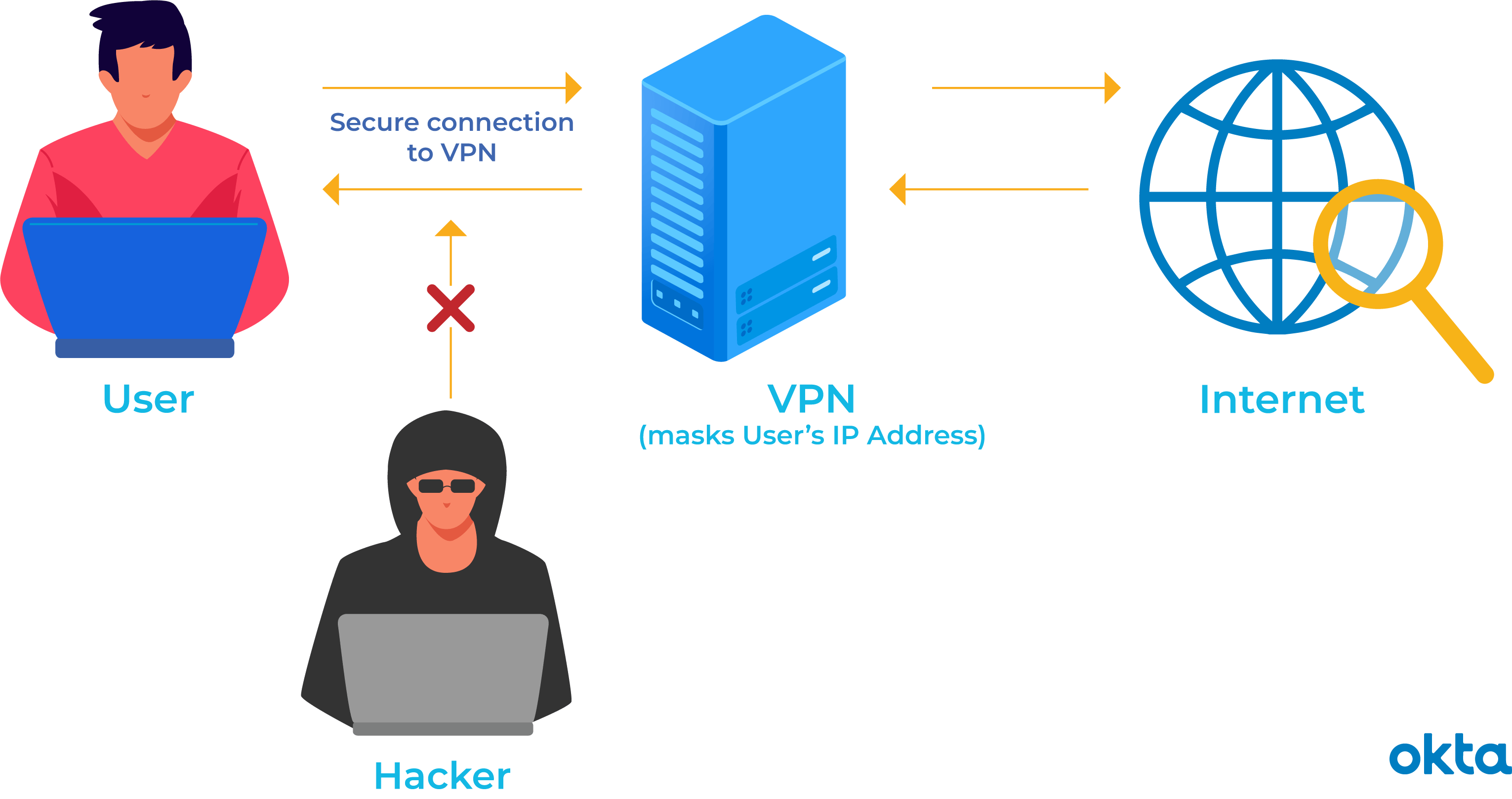
A VPN, or Virtual Private Network, can help disguise your IP address by routing your internet traffic through a server located in a different location. When you connect to a website or online service through a VPN, your internet traffic is encrypted and sent through the VPN’s server, making it appear as if you are accessing the internet from that server’s location.
By hiding your real IP address and masking it with the IP address of the VPN server, VPNs help you maintain anonymity and avoid restrictions that may be imposed by your ISP or other networks. Additionally, VPNs can also help protect your online identity by providing an additional layer of encryption, ensuring that your data is secure and private.
Does Using a VPN Hide Your IP Address?
When you connect to the internet, your device is assigned a unique identifier called an IP address. This IP address can reveal not only your approximate location but also your online activity history. However, by using a VPN (Virtual Private Network), you can effectively hide your IP address and protect your online identity.
A VPN works by creating a secure and encrypted connection between your device and the websites or online services you are accessing. Instead of connecting directly to the internet, your device connects to a VPN server first. The VPN server then masks your IP address and assigns you a different one from its network. This makes it difficult for anyone to determine your actual IP address, ensuring your online activity remains private and your identity is protected.
So, when you use a VPN, it effectively acts as a middleman between your device and the websites you visit. This means that any website or online service you access will only see the VPN server’s IP address, not your real IP address. They will also be unable to track your online activity history or determine your actual location.
Many people use VPNs to access geo-restricted content, protect their online banking and financial transactions, or simply browse the internet in a more secure and private manner. VPNs can also be helpful in countries where internet censorship is prevalent, as they allow users to bypass restrictions and access blocked websites.
It’s important to note that while VPNs hide your IP address, they do not make you completely anonymous online. Your internet service provider (ISP) can still see that you are using a VPN, and in some cases, VPN providers may keep logs of your online activity. However, a reputable VPN provider will have strict privacy policies in place to ensure that your data is kept secure and private.
In summary, using a VPN can effectively hide your IP address and protect your online identity. It creates a secure and encrypted connection that ensures your online activity remains private and your real IP address is hidden. However, it’s important to choose a reliable VPN provider and be aware of the limitations of VPNs in terms of complete online anonymity.
Learn How VPNs Protect Your Online Identity
What’s a VPN?
A VPN, or Virtual Private Network, is a service that allows you to obtain a safe and secure connection to the internet. It works by creating a private network from a public internet connection, making it difficult for others to track your online activity or obtain your personal information.
How Does a VPN Protect Your Online Identity?
When you use a VPN, your IP address is hidden and replaced with a different one. This means that websites you visit only see the IP address of the VPN server instead of your own. It also encrypts your internet traffic, ensuring that your online activity is secure and cannot be intercepted or monitored.
Why Should You Use a VPN?
Using a VPN is essential for protecting your online identity and privacy. It allows you to browse the internet anonymously, keeping your personal information safe from hackers and data breaches. Additionally, a VPN can help you bypass geographic restrictions and access content that may be blocked in your location.
How Does a VPN Work?
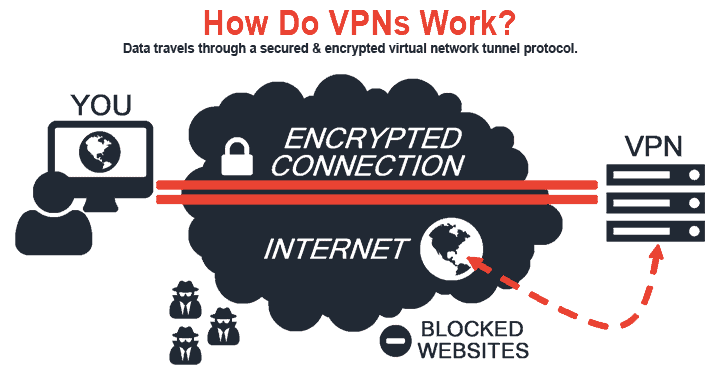
When you connect to a VPN server, your internet traffic is routed through an encrypted tunnel. This tunnel ensures that your data is protected from anyone trying to intercept it. This also means that your internet service provider (ISP) cannot track or monitor your online activity. Instead, they only see that you are connected to a VPN.
Does Using a VPN Slow Down Your Internet Speed?
While using a VPN may slow down your internet speed slightly, the impact is usually minimal. VPN providers strive to ensure fast and reliable connections, but the distance between your location and the VPN server can affect speed. However, the added security and privacy benefits of using a VPN outweigh any potential speed decrease.
What Additional Benefits Can You Get from Using a VPN?
Apart from protecting your online identity, a VPN can also help you avoid targeted ads, keep your personal information private, and hide your internet browsing history. It can also provide access to geo-restricted content, such as streaming services or websites that may be blocked in certain regions.
How Can You Change Your IP Address with a VPN?
To change your IP address with a VPN, simply open the VPN application or client on your device and connect to a VPN server of your choice. Once connected, your IP address will be replaced by the IP address of the VPN server, keeping your online identity hidden.
How Can a VPN Protect Your Online Identity on Different Devices?
A VPN can be used on various devices, including computers, smartphones, and tablets. By installing the VPN application or configuring it manually on each device, you can ensure that your online identity and data is protected, no matter what device you are using to access the internet.
What’s the Bottom Line?
Using a VPN is an effective way to protect your online identity and ensure your internet activity remains private and secure. With a VPN, you can browse the internet anonymously, avoid targeted ads, access geo-restricted content, and keep your personal information safe from hackers and data breaches.
How Does a VPN Hide Your IP Address
A VPN, or virtual private network, is a service that helps ensure the safe and secure transmission of data between devices over networks. One of the main functions of a VPN is to hide your IP address. But how exactly does a VPN accomplish this?
Masking Your IP Address
When you connect to the internet without a VPN, your IP address is like your online identity. It can be used to track your location, access your search history, and determine what websites you visit. But when you use a VPN, it acts as a cover, hiding your IP address and keeping your online activities private.
A VPN accomplishes this by utilizing encryption. Encryption works by encoding your data into a different format that can only be decoded with a specific key. This ensures that even if your data is intercepted, it will appear as a jumble of unreadable information.
Changing Your IP Address
When you connect to a VPN server, it assigns you a new IP address. This IP address is different from your actual IP address, making it difficult for anyone to trace your online activities back to you.
By changing your IP address, a VPN allows you to access websites and services that may be restricted in your location. For example, if a website is only available in the United States, you can use a VPN to connect to a server in the US and access the website as if you were located there.
Keeping Your Online Identity Hidden
The main purpose of a VPN is to disguise your online identity and protect your privacy. By hiding your IP address and encrypting your data, a VPN ensures that your online activities remain anonymous and secure.
Additionally, using a VPN can help avoid speed throttling. Internet service providers (ISPs) sometimes limit the speed of certain activities, such as streaming or downloading files. However, when you’re using a VPN, your activities are hidden from your ISP, so they can’t determine what you’re doing and therefore can’t throttle your speed.
In conclusion, a VPN is a valuable tool for protecting your online identity and ensuring your privacy. By hiding your IP address and encrypting your data, a VPN enables you to use the internet safely and securely, without leaving a trace of your online activities.
How to Use a VPN
Using a VPN is a simple and effective way to protect your online identity and ensure your privacy while browsing the internet. Here are the steps on how to use a VPN:
- Choose a VPN Provider: Start by selecting a reputable VPN provider that offers the features and security you need.
- Download and Install the VPN App: Once you’ve chosen a VPN, download and install their app on your device. Most VPN providers offer apps for various operating systems and devices.
- Open the VPN App: Launch the VPN app after installation. You will be prompted to sign in or create an account if you haven’t done so already.
- Select a Server Location: Choose a server location from the available options. This will be the virtual location that websites and online services will see when you’re connected to the VPN.
- Connect to the VPN: Click on the “Connect” button to establish a connection with the VPN server. Once connected, your IP address will be masked, and your internet traffic will be encrypted.
- Browse the Web: Now that you’re connected to the VPN, you can browse the web with an added layer of privacy and security. Your online activities will be encrypted and hidden from your ISP and other networks.
- Enjoy Access to Restricted Content: VPNs allow you to bypass website restrictions and access geo-blocked content. With a VPN, you can avoid missing out on any content that may be hidden or restricted in your region.
- Disconnect and Reconnect: When you no longer need the VPN, simply disconnect from the server. You can reconnect to the VPN at any time to protect your online identity again.
By using a VPN, you can ensure that your online activities are private and secure, even when connected to public Wi-Fi networks. The encryption provided by the VPN helps to protect your sensitive data and prevents others from tracking your online movements. So, whether you’re concerned about security, privacy, or accessing restricted content, a VPN is a valuable tool to have.
Additional FAQs
What is an IP address?
An IP address (Internet Protocol address) is a unique numerical label assigned to each device connected to a computer network. It serves as an identification number for the device and allows it to communicate with other devices on the network.
Does using a VPN hide your IP address?
Yes, using a VPN (Virtual Private Network) can hide your IP address. When you connect to a VPN server, your internet traffic is routed through that server, effectively hiding your original IP address. Instead, websites and online services see the IP address of the VPN server, making it appear as if you are browsing from a different location.
How does a VPN work to protect your online identity?
A VPN works by creating a secure connection between your device and the VPN server. This connection encrypts your internet traffic, ensuring that it cannot be intercepted or accessed by anyone else. By hiding your IP address and encrypting your data, a VPN helps protect your online identity and keep your internet activity private.
What are the advantages of hiding your IP address?
Hiding your IP address has several advantages. First, it helps ensure your online privacy and keeps your internet activity hidden from your ISP (Internet Service Provider) and other third parties. Second, it allows you to bypass geo-restrictions imposed by websites and online services, giving you access to content that may be blocked in your location. Finally, hiding your IP address can help protect against hacking and identity theft, as it makes it harder for malicious actors to track and target your online presence.
Can a VPN slow down your internet speed?
Using a VPN can sometimes result in a slight decrease in internet speed. This is mainly due to the additional steps involved in encrypting and routing your internet traffic through a VPN server. However, the speed reduction is usually minimal and may not be noticeable, especially if you choose a VPN server that is geographically close to your physical location. Additionally, a high-quality VPN provider will often have optimized servers and advanced technologies in place to minimize the impact on internet speed.
Do all VPNs hide your IP address?
Yes, all VPNs hide your IP address by routing your internet traffic through their servers. However, it is important to note that not all VPNs are created equal in terms of the level of protection and privacy they offer. It is recommended to choose a reputable VPN provider that has a strong track record of protecting user privacy and maintaining a secure network.
Ensure That Your Online Identity Is Safe
With the purpose of protecting your online identity and keeping your personal information hidden, using a VPN is essential. When you connect to the internet, your IP address is like your digital fingerprint, providing networks with information about your location, activity, and even browsing history. However, when you utilize a VPN, it works as a virtual cover, disguising your IP address and keeping it hidden from prying eyes.
A VPN, or Virtual Private Network, operates by creating a secure and encrypted connection between your device and the internet. This means that when you connect to the internet with a VPN, any data sent or received is encrypted and cannot be easily accessed or intercepted by anyone, including your ISP or cybercriminals. It ensures that your online identity is protected and your browsing activity remains private.
Additionally, using a VPN allows you to bypass certain geographical restrictions that may be imposed on certain websites or online content. For example, if a website or streaming service is only available in a specific country, using a VPN can help you access that content by masking your IP address and making it appear as though you are located in a different location.
Furthermore, not only does a VPN help protect your online identity and provide access to restricted content, but it also protects your data from potential hackers or cyber threats. By encrypting your internet connection, a VPN adds an extra layer of security, ensuring that your sensitive information, such as passwords or financial details, stays safe from prying eyes.
In summary, using a VPN is a crucial step in ensuring that your online identity is safe. It helps hide your IP address, protects your data with encryption, and allows you to access restricted content. By utilizing a VPN service, you can browse the internet with peace of mind, knowing that your privacy and security are being safeguarded.
Do Virtual Private Networks Slow Down Internet Speed?
When it comes to using a Virtual Private Network (VPN), one common concern that many people have is whether or not it will slow down their internet speed. Understanding how VPNs work can help determine the impact they may have on your browsing experience.
How VPNs Work
VPNs are designed to protect your online activity and privacy by creating an encrypted connection between your device and a private server. This encryption helps disguise your IP address and keeps your internet service provider (ISP) from seeing your online activities. Additionally, VPNs allow you to choose a different location, so it appears as if you are browsing from a different geographic area.
Does Using a VPN Slow Down Internet Speed?
The short answer is that it depends. While using a VPN can slow down your internet speed to some extent, the impact is typically minimal if you choose a reliable and well-established VPN service. The speed difference may be more noticeable when accessing websites with heavy content, or if you’re connected to a VPN server in a location far away from your actual location.
However, many VPN providers offer high-speed connections and use advanced technologies to help optimize your browsing experience. They employ various techniques to ensure that your internet speed isn’t significantly affected, such as using faster servers, optimizing their network infrastructure, and implementing efficient encryption protocols.
- Optimizing VPN Speed: To optimize your VPN speed, you can try connecting to a server that is closer to your location or using a server that is less busy. This may help you obtain better speeds and reduce latency.
- Choosing the Right VPN: It’s important to choose a reputable VPN service that has good reviews and a track record of providing fast, reliable connections.
- Understanding the Purpose: Remember that the main purpose of using a VPN is to protect your online security and privacy, so if some speed reduction occurs, it is often seen as a worthwhile trade-off.
Why Use a VPN Despite Potential Speed Reduction?
Despite the potential for a slight reduction in speed, there are several reasons why using a VPN is still beneficial:
- Protecting Your Online Identity: VPNs help keep your online activities hidden from prying eyes, making it more difficult for others to track your internet activity.
- Bypassing Geographical Restrictions: With a VPN, you can bypass geographic restrictions and access websites or content that may be blocked in your current location.
- Securing Public Wi-Fi Connections: VPNs encrypt your connection, preventing hackers from intercepting your data when connected to public Wi-Fi networks.
- Keeping Your Internet History Private: By using a VPN, you can avoid leaving a trail of your browsing history, as your IP address is hidden.
Overall, while using a VPN may slightly slow down your internet speed, the benefits it provides in terms of privacy, security, and access to restricted content often outweigh this potential drawback. Choosing a reliable VPN service and optimizing your connection can help ensure that your browsing experience remains fast and secure.
Why my external IP doesn’t change when I am connected to a VPN
When you connect to a VPN, one of the main benefits is the ability to hide your IP address and protect your online identity. However, you may notice that your external IP address doesn’t change when you are connected to a VPN. This can be confusing, but there are several reasons for this.
1. Different IP address within the VPN: When you connect to a VPN, you are assigned a new IP address within the VPN network. This IP address is different from your external IP address that is visible to websites and online services.
2. The speed of your Internet connection: Before connecting to a VPN, your Internet speed may be fast, and websites can quickly determine your IP address. However, when you connect to a VPN, your traffic is routed through the VPN server, which can sometimes slow down your Internet speed. As a result, websites may still see your original IP address because the VPN server hasn’t had a chance to fully mask it yet.
3. Limitations of VPN technology: While VPNs are designed to protect your online privacy and hide your IP address, they are not foolproof. Some websites and online services are able to determine your IP address even when you’re connected to a VPN. This can happen if the website uses advanced techniques to obtain your IP address or if the VPN server does not fully disguise it.
4. Location-based restrictions: Another reason why your external IP address may not change when using a VPN is because certain websites or online services use geolocation to determine your location. This can still be detected even if your IP address is masked.
5. Keeping your browsing activity private: Even though your external IP address doesn’t change when connected to a VPN, the VPN still provides encryption and ensures that your browsing activity is private. This means that your internet service provider (ISP) won’t be able to see what websites you visit or track your online behavior.
While it can be frustrating that your external IP address doesn’t change when using a VPN, it’s important to remember that the primary goal of a VPN is to protect your online identity and keep your browsing activity safe. By utilizing encryption and masking your IP address within the VPN network, you can avoid restrictions, hide your location, and protect your online privacy.
Is a VPN Encryption Enough to Protect Your IP Address From Your ISP
When it comes to protecting your IP address from your ISP, VPN encryption can play a crucial role. While VPNs are primarily used to hide your IP address and ensure online privacy, their encryption capabilities add an additional layer of security.
VPN encryption works by disguising and securing your internet traffic, making it difficult for anyone, including your ISP, to determine your browsing history or track your online activities. When you connect to a VPN server, your data is encrypted and sent through a secure tunnel that masks your true IP address.
However, relying solely on VPN encryption may not be enough to protect your IP address from your ISP. While a VPN can help you avoid speed throttling, access geo-restricted content, and keep your online activities private, it doesn’t necessarily hide your IP address from your ISP completely.
Your ISP can still see that you are utilizing a VPN and may be able to determine your general location. Additionally, if your VPN connection drops or fails, your true IP address may be exposed, and your ISP can see your online activities.
So, while VPN encryption is a powerful tool for online privacy, it’s important to understand that it may not be foolproof in hiding your IP address from your ISP.
To ensure maximum protection of your IP address, it’s recommended to use additional measures such as DNS leak protection, a kill switch, or choosing a VPN provider that has a strict no-logs policy. These additional features can help cover potential vulnerabilities and enhance your online privacy.
In conclusion, while VPN encryption can help protect your IP address from your ISP to a certain extent, it’s important to combine it with other security measures to ensure complete online privacy. Consider utilizing additional features and choosing a reliable VPN provider to keep your IP address and online activities safe and hidden.
What’s the Purpose of Hiding Your IP?
When you connect to the internet, your IP address is like your online identity. It tells websites and online services where you are located and allows them to track your online activity. However, by utilizing a VPN (Virtual Private Network), you can hide your IP address and protect your online identity.
One of the main reasons why people use VPNs is to access websites and online content that is otherwise restricted in their region. By connecting to a VPN server in a different location, you can disguise your true location and gain access to content that may be blocked in your country.
Another reason to hide your IP address is to maintain your privacy online. When you are connected to the internet without a VPN, your IP address can be used to determine your physical location and track your online activities. By using a VPN, your IP address is masked, making it difficult for anyone to trace your online activities back to you.
In addition to privacy, hiding your IP address can also help protect you from cyber threats. When your IP address is hidden, hackers and cybercriminals may find it more challenging to target you or gain access to your device. This added layer of security can help safeguard your personal information and prevent unauthorized access.
Furthermore, hiding your IP address with a VPN can improve your online speed and performance. Some Internet Service Providers (ISPs) may throttle or slow down your internet speed based on your IP address activity. By using a different IP address through a VPN, you can avoid this throttling and enjoy faster and smoother internet browsing.
Overall, hiding your IP address with a VPN is a practical way to protect your online identity, maintain your privacy, access restricted content, and enhance your internet speed and security. It is a valuable tool for anyone who wants to maintain control over their internet experience and stay safe while browsing the web.
Is My Search History Safe With a VPN
When using a VPN, your search history is protected and kept safe from prying eyes. The VPN encrypts your internet connection, ensuring that your online activities, including your search history, are hidden from anyone trying to access them.
With a VPN, your search history is no longer tied to your device’s IP address. Instead, it is sent through a virtual network of servers located in different locations. This means that anyone trying to obtain your search history will only see the IP address of the VPN server you are connected to, rather than your own.
So, even if someone were to intercept your search history request, they would only find encrypted data that is difficult to decipher. This provides an extra layer of security to ensure that your search history remains private and hidden from external networks.
It’s important to note that while a VPN can help protect your search history from being traced back to your IP address, it doesn’t guarantee complete anonymity. If law enforcement or other entities with enough resources and purpose request the VPN provider’s logs, they may be able to link your search history to your VPN usage. However, this is highly unlikely for the average user.
Overall, using a VPN is a valuable tool to protect your search history and maintain your online privacy. It helps ensure that your personal information, browsing habits, and search queries are hidden from prying eyes. So, if you value your privacy and want to keep your online activities hidden, using a VPN is a gold standard solution.
FAQs
- Does using a VPN hide my IP address?
- How do VPNs protect my search history?
- Does using a VPN slow down my internet speed?
Yes, when you connect to a VPN, your IP address is masked and replaced with the IP address of the VPN server you are connected to. This helps hide your real IP address from websites and online services.
VPNs protect your search history by encrypting your internet connection and routing it through a virtual network of servers. This makes it difficult for anyone to intercept and decipher your search history request, ensuring its privacy.
Although using a VPN can slightly slow down your internet speed due to the encryption and routing process, many modern VPN services are designed to ensure minimal impact on your browsing experience. If you choose a reputable VPN provider and connect to a nearby server, the speed difference is often negligible.
Вопрос-ответ:
Does using a VPN hide my IP address?
Yes, using a VPN hides your IP address. When you connect to a VPN server, your internet traffic is routed through an encrypted tunnel, making it appear as if it is coming from the VPN server’s IP address instead of your own. This ensures that your online activities are anonymous and your real IP address is hidden from websites and online services.
How does a VPN protect my online identity?
A VPN protects your online identity by encrypting your internet traffic and routing it through a remote server. This prevents anyone from intercepting or monitoring your online activities. Additionally, by masking your IP address, a VPN makes it difficult for websites and online services to track or trace your online identity back to your real IP address.
Can I still be tracked if I use a VPN?
While using a VPN makes it significantly harder to track your online activities, it is not completely foolproof. Some advanced tracking techniques can still identify VPN usage and potentially link it back to your real IP address. However, for most regular online activities, a VPN provides a high level of anonymity and protection.
Are there any downsides to using a VPN?
While VPNs offer many benefits, there are some potential downsides to consider. VPNs can slightly decrease your internet speed due to the encryption and routing process. Additionally, some websites and online services may block or restrict access from VPN IP addresses. It’s also important to choose a reliable and trustworthy VPN provider to ensure your privacy and security.
Is it legal to use a VPN?
Yes, using a VPN is legal in most countries. However, it’s important to note that the legality of VPN usage can vary depending on your location and the specific activities you engage in while using a VPN. It’s always best to consult local laws and regulations to ensure you are using a VPN within the legal boundaries.
Can I use a VPN on my mobile device?
Yes, you can use a VPN on your mobile device. Most VPN providers offer apps for both iOS and Android devices. By using a VPN on your mobile device, you can protect your online identity and data while browsing the internet, using public Wi-Fi networks, or accessing geo-restricted content.
Видео:
How do I hide my IP address? | 3 effective ways to hide your IP!
How do I hide my IP address? | 3 effective ways to hide your IP! by VPNpro 1 year ago 3 minutes, 57 seconds 86,594 views
what is an IP Address? // You SUCK at Subnetting // EP 1
what is an IP Address? // You SUCK at Subnetting // EP 1 by NetworkChuck 1 year ago 18 minutes 875,788 views
