Demystifying AWS Client VPN Pricing: A Detailed Guide to Calculating Costs
Using AWS Client VPN provides a secure and reliable connection to your resources on the AWS cloud. However, it’s important to understand the pricing structure of AWS Client VPN to avoid any surprises when it comes to costs. The pricing is based on the usage and the number of connections, and it’s important to know how it is calculated.
When it comes to the cost of AWS Client VPN, you are charged based on the number of active client connections per hour. For example, if you have 5 client connections active for one hour, you will be charged for those 5 connections.
It’s also worth mentioning that the pricing for AWS Client VPN is based on a tiered model. This means that as you increase the number of active client connections, the price per connection decreases. So, the more connections you have, the lower the cost per connection will be.
As a result, it’s important to consider the number of client connections you’ll need and plan accordingly. If you have a large number of client connections, it may be more cost-effective to use AWS Client VPN. On the other hand, if you only have a few connections, it may be more cost-efficient to use an alternative solution.
To get a better idea of the pricing and how it may impact your costs, it’s helpful to look at an example. Let’s say you have 10 client connections active for one hour. Based on the tiered pricing structure, the total cost for that hour would be the sum of the cost for the first 5 connections and the cost for the remaining 5 connections.
In conclusion, understanding the pricing of AWS Client VPN is crucial to ensure you have a clear idea of the costs associated with using this service. By considering factors such as the number of client connections and the tiered pricing structure, you can make an informed decision and avoid any unnecessary expenses.
Understanding the Pricing of AWS Client VPN
If you are confused about the pricing of AWS Client VPN and want to know how it is calculated, this article will provide you with a detailed explanation. AWS Client VPN pricing is based on two main factors: the number of connections and the data transfer usage.
Firstly, let’s talk about the number of connections. AWS charges you for each active client connection per hour. For example, if you have 10 client connections for one hour, you will be charged for 10 connections in total. It is important to note that you are billed per hour, so if you have client connections that are active for only a few minutes within an hour, you will still be charged for the whole hour.
Secondly, let’s discuss the data transfer usage. AWS charges you for the data transferred in and out of your client VPN endpoint. The data transfer is measured in gigabytes (GB) and is charged on an hourly basis. For example, if you transfer 1 GB of data in and out of your client VPN endpoint in one hour, you will be charged for that 1 GB of data.
To calculate the total cost of AWS Client VPN usage, you can use the AWS Pricing Calculator or refer to the AWS Client VPN Pricing page. Additionally, you can find helpful information through forums and discussion platforms like Reddit, where other AWS users share their experiences with pricing and costs. However, it is important to note that the information provided on these platforms should be considered as user opinions and not official advertising from AWS.
In summary, the pricing of AWS Client VPN is based on the number of connections and the data transfer usage. You are charged per hour for each active client connection, and the data transferred in and out of your client VPN endpoint is also charged on an hourly basis. By understanding the factors that contribute to the cost, you’ll be able to calculate the total pricing of using AWS Client VPN for your needs.
Overview of AWS Client VPN
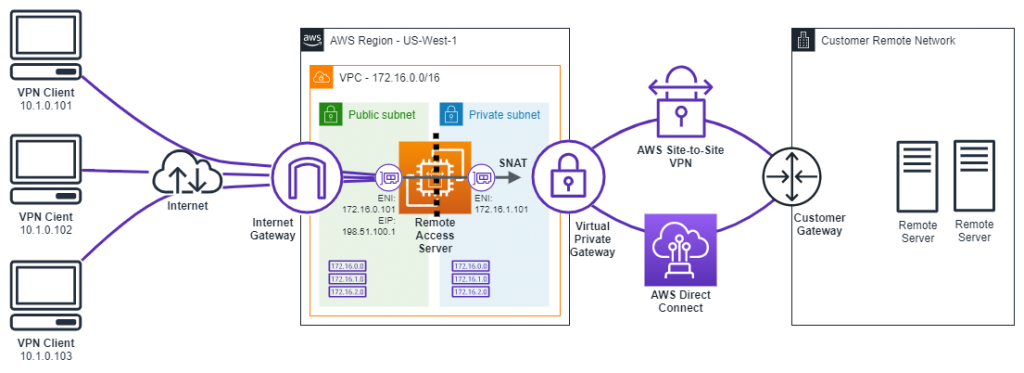
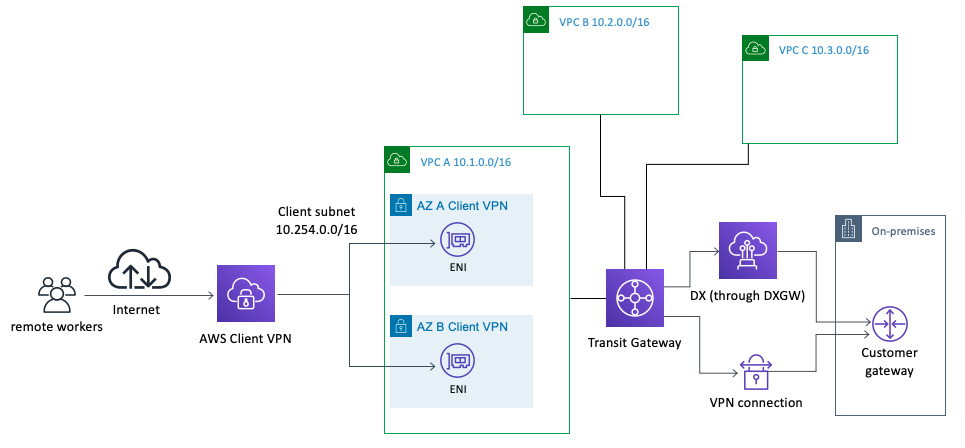
AWS Client VPN is a fully managed service that allows clients to securely access resources in their VPC (Virtual Private Cloud) networks. It provides an encrypted connection between the client and the VPC, ensuring the privacy and security of data transmitted over the internet.
The pricing of AWS Client VPN is based on a few factors. First, there is an hourly charge for each client connection. This means that you are billed for the time your clients are connected to the VPN. The pricing model is designed to provide flexibility, as you only pay for the resources you actually use.
To calculate the cost, you need to know the number of client connections and the duration of each connection. For example, if you have 10 clients connected for 4 hours each, the total duration would be 40 hours. Based on the hourly pricing, you can then calculate the total cost.
It’s important to note that AWS Client VPN pricing is separate from the costs associated with running your VPC. The pricing for the VPN service is only for the VPN itself and does not include any other AWS services used in conjunction with it, such as EC2 instances or S3 storage.
To avoid confusion, it’s recommended to use the AWS pricing calculator or consult the AWS documentation for specific pricing details. Additionally, you can find information and experiences shared by other users on forums like Reddit to get insights into their pricing and cost calculations.
In conclusion, AWS Client VPN offers a secure way for clients to connect to your VPC networks. The pricing is based on the number of client connections and the duration of each connection. By understanding the cost calculation and considering other factors like data transfer and AWS resources used, you can estimate the total pricing for your AWS Client VPN setup.
Benefits of Using AWS Client VPN
One of the major benefits of using AWS Client VPN is its cost-effective pricing model. Unlike other VPN solutions, which charge based on the number of connections or data transferred, AWS Client VPN provides a total pricing based on the number of client connections and the time they spend connected.
For example, let’s say a company has 20 client VPN connections and each client is connected for 100 hours per month. Using AWS Client VPN, the company will only be charged for the total number of client VPN connections and the total time they spend connected, rather than the data transferred during that time.
This pricing model can result in significant cost savings, especially for companies with a large number of client VPN connections or for those who have clients who are connected for long periods of time.
Furthermore, AWS Client VPN allows users to easily manage and monitor their client VPN connections through the AWS Management Console. This makes it convenient to track the usage and performance of the VPN and identify any potential issues or bottlenecks.
Additionally, as AWS Client VPN is integrated with other AWS services, users can leverage the scalability and reliability of the AWS infrastructure. This ensures that their VPN connections are secure and reliable, and can handle high volumes of traffic without any performance degradation.
In conclusion, AWS Client VPN offers a cost-effective, scalable, and reliable solution for companies looking to provide secure remote access to their resources. By using AWS Client VPN, businesses can accurately calculate their VPN costs, easily manage their client VPN connections, and benefit from the scalability and reliability of the AWS infrastructure.
How to Calculate Costs for AWS Client VPN
To understand the pricing of AWS Client VPN, you need to consider a few factors. Firstly, the number of client connections is important as it determines the cost. AWS charges per active client connection per hour. For example, if you have 10 client connections for an hour, you’ll be charged for 10 connections.
Another factor to consider is the duration of each client connection. If clients stay connected for longer periods of time, the costs will be higher. AWS charges for the total time each client is connected, so it’s important to keep track of the usage.
In addition to the client connections, AWS also has a fixed hourly cost for using the Client VPN service. This cost is independent of the number of client connections and is charged per hour. It’s important to factor in this fixed cost when calculating the overall cost of using AWS Client VPN.
In order to calculate the total cost, you can use the AWS Pricing Calculator. This tool allows you to estimate the cost based on your specific requirements. You’ll need to input the number of client connections, the duration of each connection, and the fixed hourly cost. The calculator will then provide you with an estimate of the total cost.
It’s worth noting that the pricing for AWS Client VPN can be subject to change, so it’s important to regularly check for any updates or changes to the pricing structure. Additionally, AWS provides a detailed breakdown of the pricing on their official website, which can be helpful for further understanding the costs associated with using AWS Client VPN.
Factors Affecting AWS Client VPN Pricing
Cost based on usage: The pricing of AWS Client VPN is determined by several factors that affect the cost for using the service. One of the main factors is the usage, which is calculated based on the time the VPN is active and the amount of data transferred. AWS charges an hourly rate for the VPN connection, and this cost can add up quickly if the VPN is used extensively.
Number of connections: Another factor that can impact the pricing of AWS Client VPN is the number of connections that are established. Each active client connection will be billed separately, so the total number of connections will affect the total cost. If multiple clients are connecting simultaneously, the pricing will increase accordingly.
VPN advertising: AWS Client VPN also offers the capability to advertise routes to connected clients. This feature allows clients to access resources in a VPC that is connected to the VPN. However, advertising routes can impact the pricing, as the data transfer for the advertised routes will be considered in the cost calculation. Clients should be aware of this when using the VPN for accessing resources outside of the VPC.
Confused about pricing? If you’re unsure about the pricing of AWS Client VPN, you can refer to the official AWS documentation or seek help from the AWS community. Reddit, for example, is a great platform to ask questions and get advice from other users who may have had similar experiences with AWS Client VPN pricing. Getting insights from others can help you understand the factors that contribute to the pricing and make informed decisions.
Example of pricing: To provide an example, let’s say you have a client VPN setup on AWS and you only use it for one hour each day. If there are three active connections during that time, the total cost for that hour would be the hourly rate multiplied by the number of connections (3 in this case). However, if you also advertise routes to the connected clients, the data transfer for the advertised routes will be included in the calculation, resulting in additional costs.
AWS Client VPN Pricing: In summary, the pricing of AWS Client VPN is based on factors such as usage, the number of connections, and VPN advertising. Understanding these factors will help you gauge the cost implications of using the service and make informed decisions. It is important to carefully consider these factors and consult the documentation or community forums like Reddit to gain a better understanding of AWS Client VPN pricing.
Pricing Models for AWS Client VPN
When it comes to pricing models for AWS Client VPN, there are a few key factors to consider. The first is the number of connections you require. AWS offers different pricing tiers based on the number of connections you need for your VPN. It’s important to know how many connections you’ll need in order to determine the pricing model that best suits your needs.
Another factor to consider is the duration of your VPN usage. AWS charges for AWS Client VPN on an hourly basis. This means that the longer you use the VPN, the more you’ll be charged. It’s important to keep this in mind when calculating the total cost of your VPN usage.
Additionally, AWS calculates the cost of AWS Client VPN based on the amount of data transferred. If your VPN is transferring a large amount of data, this can result in higher charges. It’s important to be aware of the amount of data your VPN is processing in order to accurately estimate the total cost.
Lastly, it’s important to note that AWS Client VPN pricing is separate from other AWS services. For example, if you are using AWS Client VPN for connection to an EC2 instance, you will be charged separately for both the VPN and the EC2 instance. It’s important to factor in these additional costs when calculating the total cost of your AWS Client VPN usage.
In summary, when it comes to understanding the pricing models for AWS Client VPN, it’s important to consider the number of connections, duration of usage, data transfer, and any additional charges for other AWS services. By taking these factors into account, you can accurately calculate the cost of your AWS Client VPN usage and ensure that you are getting the best pricing model for your needs.
Comparing AWS Client VPN Costs with Other VPN Services
When it comes to choosing a VPN service, cost is an important factor to consider. AWS Client VPN offers a flexible pricing model that allows you to pay based on your usage. Unlike some other VPN services that charge a fixed monthly fee, AWS Client VPN pricing is calculated by the hour.
Hourly Pricing
With AWS Client VPN, you’ll only pay for the time you use. For example, if you only use the VPN for one hour, you’ll only be charged for that hour. This pay-as-you-go model can be more cost-effective for businesses that have sporadic VPN usage.
Many other VPN services charge a monthly fee, regardless of whether you actually use the VPN during that time. This can result in wasted costs for businesses that only need a VPN occasionally.
Comparing Costs
To get a better understanding of how AWS Client VPN pricing compares to other VPN services, let’s take a look at an example. If you have 10 client VPN connections and each connection is active for an average of 8 hours per day, you can calculate the total cost for a month.
Let’s assume the hourly cost for AWS Client VPN is $0.05. The total cost for the month would be 10 connections * 8 hours * 30 days * $0.05/hour = $120.
Comparing this to other VPN services, you’ll find that AWS Client VPN can be a more cost-effective option. Many VPN services charge a fixed monthly fee per user or connection, which can quickly add up for businesses with multiple users or connections.
Furthermore, with AWS Client VPN, you have the flexibility to adjust your usage and scale up or down as needed. This can result in additional cost savings for businesses that have varying VPN needs.
In conclusion, when comparing the costs of AWS Client VPN with other VPN services, it’s important to consider the pricing model, the number of connections needed, and the actual usage patterns. AWS Client VPN offers a flexible and cost-effective solution for businesses of all sizes.
Tips for Optimizing Costs with AWS Client VPN
If you are using AWS Client VPN for your app or business, optimizing costs is crucial. Here are some tips to help you minimize your expenses:
1. Estimate the Number of Connections
Before subscribing to AWS Client VPN, it is essential to understand how many connections you will require. By having a clear idea of the number of connections you need, you can avoid overestimating and paying for unused connections.
2. Consider Hourly Pricing
AWS Client VPN pricing is based on an hourly rate. To optimize costs, make sure you know the total number of hours you require the VPN service each month. By accurately estimating this time, you can avoid unnecessary charges.
3. Use Reddit for Pricing Guidance
If you’re confused about AWS Client VPN pricing or want to get insights from other users, visit online communities like Reddit. Here, you can find discussions and experiences shared by others who have used the service. This can help you gain a better understanding of the costs and potential optimizations.
4. Take Advantage of Multi-AZ Deployments
When deploying AWS Client VPN, consider using multi-AZ (Availability Zone) deployments. This distributes your VPN endpoints across multiple AZs for added redundancy. While it may increase initial costs, this setup can mitigate downtime and potential loss of connectivity.
5. Monitor and Adjust Usage
Regularly monitor and analyze your VPN usage to identify any unnecessary connections or usage patterns. By reviewing and adjusting your usage, you can optimize costs and ensure that you are only paying for what you truly need.
Case Studies: Real-world Examples of AWS Client VPN Pricing
One example of AWS Client VPN pricing can be seen through a case study of Reddit, the popular online community and social news aggregation website. Reddit uses AWS Client VPN to provide secure remote access for its employees and moderators. With a large number of users connecting to the VPN at any given time, Reddit opted for the on-demand pricing model.
Under the on-demand pricing model, Reddit is only charged for the total number of client VPN connections it has active in any given hour. This means that if there are 100 active connections in one hour, Reddit will only be charged for those 100 connections. If the number of active connections decreases to 50 in the next hour, the cost will be based on those 50 connections. This pricing model allows Reddit to scale its VPN usage and costs based on its needs.
As a result of using AWS Client VPN with on-demand pricing, Reddit is able to control its costs and only pay for the VPN connections it actually uses. The flexibility of the on-demand pricing model allows Reddit to adjust its VPN usage as needed without incurring unnecessary expenses. This case study highlights the cost-effectiveness of AWS Client VPN for organizations with varying connection demands.
Another example of AWS Client VPN pricing can be seen through an advertising company that provides mobile in-app advertising services. The company has a large team of remote employees who require secure access to the company’s resources and systems. However, the company’s VPN usage is more consistent and predictable, with a consistent number of active connections throughout the day.
For this company, the hourly pricing model of AWS Client VPN is ideal. With this pricing model, the company pays a fixed hourly rate for each active client VPN connection. This allows the company to accurately forecast and budget its VPN costs based on the number of connections it needs for its remote team. The hourly pricing model provides clarity and predictability for the company, ensuring that the VPN costs are in line with its budget.
In both of these case studies, the pricing model of AWS Client VPN is tailored to the specific needs of the organizations. Whether it is the on-demand pricing model for fluctuating connection demands or the hourly pricing model for consistent usage, AWS Client VPN provides flexibility and cost control for businesses of all sizes.
FAQs: Common Questions about AWS Client VPN Pricing
How is the pricing of AWS Client VPN calculated?
The pricing of AWS Client VPN is based on two components: active client connections and data transfer. You are charged for the total number of active client connections per hour, as well as for the data transferred through the VPN during that time. These costs are calculated separately and added together to determine the total cost.
Do I only pay for the active client connections or the data transfer as well?
You are charged for both the active client connections and the data transfer. The pricing of AWS Client VPN takes into account both components separately, so you’ll see a cost breakdown for each of them on your bill. It is important to consider both factors when estimating your monthly expenses.
How is the cost for active client connections calculated?
The cost for active client connections is based on the number of connections you have during a particular hour. AWS Client VPN pricing is charged on an hourly basis, so you pay for the highest number of concurrent connections you had during each hour of the billing period. The total cost is then calculated by summing up the costs for each hour.
What happens if my active client connections change frequently?
If your active client connections change frequently throughout the billing period, you will be charged based on the highest number of concurrent connections during each hour. This means that if you have a high number of connections at any point in time, even if it’s for a short duration, you’ll be charged for that maximum number of connections for that hour.
Where can I find more information about AWS Client VPN pricing?
AWS provides detailed documentation about the pricing of AWS Client VPN on their website. You can find the pricing information in the AWS Pricing Calculator or in the AWS Management Console. Additionally, you can find discussions and insights about AWS Client VPN pricing on platforms like Reddit, where users share their experiences and knowledge with the community.
Is there a free tier available for AWS Client VPN?
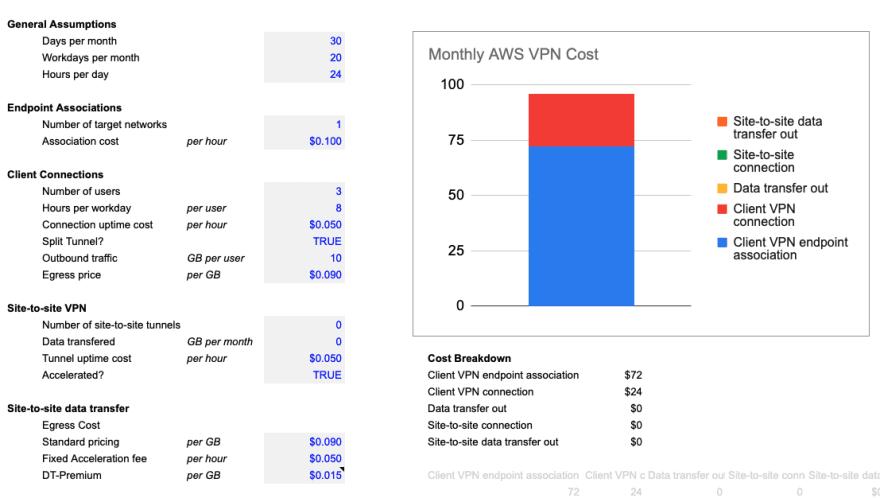
Currently, there is no free tier available for AWS Client VPN. All usage of the service is considered paid and will be charged accordingly. It’s important to understand the pricing structure and estimate the costs based on your anticipated usage to avoid any surprises on your bill.
Understanding the Variables in AWS Client VPN Pricing
Variety of Factors
When it comes to AWS Client VPN pricing, there are various factors to consider. The total cost is based on the number of hours the VPN connection is active, the number of client connections, and the data transferred.
Hourly Cost Calculation
The hourly cost for AWS Client VPN is calculated by multiplying the hourly rate by the number of hours the VPN connection is active. This means that you are only charged for the time the VPN is running and not for any downtime.
Client Connections
The number of client connections also plays a role in the pricing. AWS Client VPN charges separately for each active client connection per hour. This means that if you have multiple clients connecting to the VPN at the same time, you will be charged for each connection.
Data Transfer Costs
In addition to the hourly cost, data transfer is also a factor in the pricing. AWS Client VPN charges for both incoming and outgoing data transfer. The data transfer costs are calculated based on the amount of data transferred in gigabytes.
Understanding the Pricing Result
To understand the pricing result, you need to consider the total number of hours the VPN connection is active, the number of client connections, and the data transferred. By factoring in these variables, you can calculate the total cost of using AWS Client VPN.
Example to Demonstrate Pricing
Let’s say you have a VPN connection that is active for 10 hours, with 5 client connections and a total data transfer of 100 GB. Based on AWS Client VPN pricing, you’ll be charged for the 10 hours of usage, the 5 client connections per hour, and the 100 GB of data transfer.
Searching for Information
If you’re confused about AWS Client VPN pricing and want more information, you can check the AWS website or visit community forums like Reddit. These platforms provide valuable insights and experiences from other users who can help clarify any doubts you may have about the pricing.
Conclusion
Understanding the variables in AWS Client VPN pricing is crucial to accurately calculate the total cost. By taking into account the hours of usage, the number of client connections, and the data transferred, you can determine the pricing result for your specific needs.
How to Estimate AWS Client VPN Costs for Different Scenarios
When planning to use AWS Client VPN, it is essential to understand how the costs are calculated and estimate them for different scenarios. AWS Client VPN pricing is based on several factors, including the number of connections, connection hours, and data transfer. By considering these factors, you can get an accurate estimate of the costs involved and make informed decisions.
1. Number of Connections:
The first factor to consider is the number of connections you require for your application or service. Depending on the number of users or devices that need to access the VPN, you can estimate the total number of connections. Remember that AWS Client VPN pricing is based on the number of active connections at any given time.
2. Connection Hours:
Another factor to consider is the duration for which the connections will be active. AWS Client VPN pricing is calculated on an hourly basis, so it’s crucial to estimate the number of connection hours required per month. This estimation will help you determine the overall cost of using the AWS Client VPN service.
3. Data Transfer:
In addition to the number of connections and connection hours, data transfer is also a significant factor in determining the costs. AWS Client VPN pricing includes the data transfer both inbound and outbound. Depending on the amount of data transferred, you can estimate the data transfer costs and include them in your overall cost calculation.
By considering these factors and using the AWS Client VPN pricing calculator or exploring the pricing documentation, you can estimate the costs for different scenarios. For example, if you’re running a small application where only a few users need access to the VPN, the costs might be minimal. However, if you have a large-scale application like Reddit and need to provide VPN access to a significant number of users, the costs could be higher.
It’s important to note that AWS Client VPN pricing can be different for each AWS region, so it’s essential to choose the region that best suits your requirements and budget. Additionally, AWS provides different pricing options, such as on-demand and reserved instances, which can further affect your overall costs.
To summarize, estimating AWS Client VPN costs for different scenarios involves considering the number of connections, connection hours, and data transfer. By accurately estimating these factors and using the AWS pricing information, you can make informed decisions and avoid any confusion or unexpected costs.
Hidden Costs to Consider when Using AWS Client VPN
AWS pricing model: When using AWS Client VPN, it’s important to understand the pricing structure to avoid any surprise costs. AWS Client VPN is charged based on three factors:
- Number of connections
- Data transferred
- Authorization rules processed
Know your cost: It’s crucial to know exactly how much it will cost to use AWS Client VPN for your application. Take time to calculate the total cost by considering the number of connections you anticipate, the amount of data transferred, and the number of authorization rules processed.
Hidden costs: While AWS Client VPN provides an easy way to connect to your AWS resources securely, there are some hidden costs to be aware of.
- Idle connections: AWS charges for idle connections, meaning that if a client is connected but not actively using the VPN, you will still be billed for it. Make sure to disconnect any unused connections to avoid unnecessary charges.
- Data transfer costs: Apart from the hourly pricing, AWS also charges for the data transferred through the VPN. Be aware of the data usage of your application and calculate the additional costs accordingly.
Confusion with other AWS services: It’s important to not confuse AWS Client VPN costs with other AWS services. For example, if you use AWS Client VPN to access resources hosted on AWS EC2 instances, you will be charged separately for both the Client VPN and the EC2 instances.
Real-life example: To better understand the potential hidden costs, consider a scenario where a Reddit-like application is hosted on AWS and uses AWS Client VPN. Apart from the hourly pricing for the VPN, additional data transfer costs should be considered based on the usage of the application, such as user posts, comments, and media uploads. It’s crucial to take into account the potential increase in data transfer and calculate the total cost accordingly.
AWS Client VPN vs. Traditional VPN: A Cost Comparison
When it comes to pricing, there are significant differences between AWS Client VPN and traditional VPN services. With AWS Client VPN, you are charged based on the number of active client connections and the duration of these connections. This means that you pay an hourly rate for each client connected to the VPN.
On the other hand, traditional VPN pricing models often rely on bandwidth usage or a fixed subscription fee. This means that you may be charged for the amount of data transferred over the VPN or for a fixed period of time, regardless of the number of clients connected.
It’s important to consider your specific needs when choosing between AWS Client VPN and a traditional VPN. For example, if you have a large number of clients connecting to the VPN for short periods of time, the hourly pricing of AWS Client VPN may be more cost-effective. Conversely, if you have a smaller number of clients with continuous connections, a traditional VPN may provide a more predictable and possibly lower cost.
To help you better understand the pricing comparison, consider the following example. If you have 10 clients connecting to the VPN for 30 minutes each, the total cost with AWS Client VPN would be calculated by multiplying the number of clients (10) by the duration (0.5 hour) and the hourly rate. On the other hand, a traditional VPN may charge a fixed monthly fee or advertise pricing based on different tiers of bandwidth usage.
In conclusion, it’s important not to get confused by the different pricing models of AWS Client VPN and traditional VPN services. Consider your specific needs, the number of clients and their connection time, to get a clear understanding of the total cost involved. By analyzing the pricing, you’ll know which option is most economical and suitable for your requirements.
How to Monitor and Control AWS Client VPN Costs
When using AWS Client VPN, it is important to monitor and control your costs to avoid any surprises on your billing statement. AWS Client VPN is charged based on several factors, including the number of client connections and the amount of data transferred.
To monitor your AWS Client VPN costs, you can use various tools and features provided by AWS. You can start by using the AWS Cost Explorer, which allows you to view and analyze your total costs over time. This will give you a clear understanding of how much you are being charged for your VPN usage.
Another useful tool is the AWS VPN Monitoring Dashboard, which provides real-time visibility into your VPN usage. It allows you to monitor the number of active client connections, the amount of data transferred, and other metrics that are important for cost control.
If you find that your AWS Client VPN costs are too high, there are several steps you can take to optimize and reduce your costs. It is important to review your VPN usage and identify any unnecessary client connections or high data transfer volumes. You can then terminate the connections that are not needed and implement data compression or deduplication techniques to reduce the amount of data transferred.
Additionally, it is recommended to keep an eye on AWS Client VPN pricing updates and announcements. AWS may periodically adjust their pricing based on market conditions or other factors. By staying informed about these updates, you can be proactive in managing your costs and making any necessary adjustments to your VPN usage.
In conclusion, monitoring and controlling your AWS Client VPN costs is crucial to avoid any unexpected charges. By utilizing the available tools and techniques, you can ensure that you are only paying for the resources you actually need and optimize your overall cost.
Unique Features of AWS Client VPN Pricing
One of the unique features of AWS Client VPN pricing is that it is based on an hourly charge. This means that you are only charged for the time that your client VPN is active and connected.
The pricing for AWS Client VPN is also considered unique because it takes into account both the number of clients connecting to the VPN and the amount of data transferred. This means that if you have multiple clients accessing the VPN simultaneously, the pricing will reflect the total usage for all connections.
For example, if you have one client connected to the VPN for one hour and another client connected for two hours, the total cost would be calculated based on the total number of hours that all clients were connected. This pricing structure ensures that you only pay for the usage you actually need.
It’s important to note that AWS Client VPN pricing does not include any additional costs for data transfer or advertising. The pricing is solely based on the usage of the client VPN itself.
If you’re still confused about AWS Client VPN pricing, you can find more information and examples on Reddit and the AWS website.
Understanding Data Transfer Costs in AWS Client VPN
In the context of AWS Client VPN, understanding the data transfer costs is crucial to accurately calculate the pricing for the service. When you use the VPN, it provides a secure connection for your clients to access resources within your AWS environment. However, it’s important to note that data transfer charges apply in addition to the hourly pricing of the Client VPN service.
First, let’s look at the Client VPN pricing structure. AWS Client VPN pricing is based on the number of client connections and the duration of those connections. You are charged an hourly rate for each active client connection. This means that if you have multiple clients connected to the VPN at the same time, you will be charged for each connection separately.
To calculate the total data transfer costs, you need to consider both inbound and outbound data transfer. Inbound data transfer refers to the data sent from the clients to the resources within your AWS environment, while outbound data transfer is the data sent from your AWS resources back to the clients through the VPN.
For example, let’s say you have an application running on an EC2 instance in your AWS environment and multiple clients accessing that application through the Client VPN. If the clients are sending a lot of data to the application and receiving a lot of data back, the data transfer costs will increase. The total data transfer costs will be calculated based on the amount of data transferred and the AWS data transfer pricing.
It’s important to note that data transfer costs are not included in the hourly pricing of AWS Client VPN. They are billed separately and can significantly impact your overall cost. Therefore, it’s essential to be aware of the data transfer costs and consider them when calculating the total cost of using the Client VPN service.
AWS Client VPN Pricing: Best Practices and Strategies
Understanding AWS Client VPN pricing is essential for optimizing costs and maximizing the value of the service. By following best practices and implementing smart strategies, businesses can effectively manage their expenses and make informed decisions.
Cost Calculation
When calculating costs for AWS Client VPN, it is important to consider both the hourly and total costs. The hourly cost is based on the number of active client connections, while the total cost is a combination of hourly charges and data transfer fees. It is crucial to assess the average number of connections and data transfer requirements to estimate the overall expenses accurately.
Best Practices
To minimize costs, it is recommended to carefully manage client connections and adjust them based on demand. For example, if an application requires continuous connectivity, it is more cost-effective to keep the Client VPN connection active throughout the day. On the other hand, if the application only needs connectivity during specific hours, it would be advisable to schedule the connection accordingly.
Another best practice is to optimize data transfer. By reducing unnecessary data transfer or implementing data compression techniques, businesses can reduce costs associated with data transfer fees. Additionally, utilizing AWS Direct Connect or AWS Transit Gateway can help consolidate data transfer and minimize expenses.
Strategies for Pricing Optimization
One strategy to optimize AWS Client VPN pricing is to consider alternative pricing models. Some businesses have reported success with using hourly VPN connections during peak times and switching to On-Demand connections during low-traffic periods. This approach allows for flexibility and cost-efficiency by only paying for active hours.
Getting insights from the AWS community can be invaluable for pricing optimization. Websites like Reddit have dedicated communities where AWS users share their experiences and provide tips for cost savings. By actively participating in discussions and learning from others’ experiences, businesses can gain valuable knowledge and implement strategies specific to their needs.
In conclusion, understanding and optimizing AWS Client VPN pricing requires careful consideration of costs, application requirements, and data transfer needs. By following best practices, exploring alternative pricing models, and leveraging community insights, businesses can effectively manage their costs and get the most out of this AWS service.
FAQ:
What is AWS Client VPN?
AWS Client VPN is a service that allows users to access their AWS resources securely from any location using OpenVPN-based clients.
How is the pricing of AWS Client VPN calculated?
The pricing of AWS Client VPN is calculated based on two main factors: the number of client VPN endpoints and the number of connections. You pay an hourly rate for each active client VPN endpoint and a per-gigabyte data transfer rate for each connection.
Can I use AWS Client VPN for free?
No, AWS Client VPN is not available for free. You will be charged for the number of active client VPN endpoints and the data transfer rate for each connection.
What is the cost of AWS Client VPN?
The cost of AWS Client VPN depends on the number of client VPN endpoints and the data transfer rate for each connection. You can visit the AWS website to get detailed pricing information.
Are there any additional costs associated with using AWS Client VPN?
Yes, besides the cost of the client VPN endpoints and data transfer, there might be additional costs for data storage, data transfer out of AWS, and any other additional services you might use in conjunction with AWS Client VPN.
How can I estimate the cost of using AWS Client VPN?
To estimate the cost of using AWS Client VPN, you can use the AWS Pricing Calculator or refer to the AWS documentation for detailed pricing information. You can input your usage requirements and get an estimate of the monthly cost.
Are there any discounts available for AWS Client VPN?
No, currently there are no discounts available for AWS Client VPN. However, you can check the AWS website or consult with AWS sales representatives for any promotional offers or discounts that might be available.
Videos:
Cloud Serverless Pricing Tutorial (WITH EXAMPLE) | How to Calculate AWS Lambda Costs
Cloud Serverless Pricing Tutorial (WITH EXAMPLE) | How to Calculate AWS Lambda Costs by Dylan Albertazzi 2 years ago 9 minutes, 23 seconds 6,680 views
Introduction to AWS Pricing
Introduction to AWS Pricing by Amazon Web Services 7 years ago 2 minutes, 39 seconds 39,608 views
How to Estimate AWS Costs with the AWS Pricing Calculator | Tutorial for Beginners
How to Estimate AWS Costs with the AWS Pricing Calculator | Tutorial for Beginners by Tiny Technical Tutorials 3 months ago 5 minutes, 23 seconds 2,284 views
