Cisco Small Business RV Series Routers: Stay Up-to-Date with Security Notices, Releases, and Compatibility

Cisco Small Business RV Series Routers are a range of routers designed for small businesses to provide secure and reliable network connectivity. These routers offer a variety of features and are available in different models to cater to different requirements.
The working models of Cisco Small Business RV Series Routers include the RV340 and RV320, which provide high-speed Ethernet and wireless-G connectivity. These models support a range of standards such as ADSL2+ and VPN tunneling for secure remote access.
The retired models of Cisco Small Business RV Series Routers, such as the RV130 and RV220W, are still applicable for use but no longer receive the latest security updates and firmware releases. However, the user guides and troubleshooting documents for these retired models are still available.
For general security issues and compatibility with specific configurations, Cisco provides security notices and release notes for the Cisco Small Business RV Series Routers. These documents outline the latest security vulnerabilities, recommended configurations, and known issues with each router model.
It is important for businesses to regularly check for security notices and update their router firmware to ensure the security of their network and data. The Cisco Small Business RV Series Routers offer a reliable and secure solution for small businesses, with features such as firewall protection, VPN tunnels, and load balancing.
Whether you are a new user or have been using Cisco Small Business RV Series Routers for a while, it is crucial to stay informed about the latest security notices and best practices. By following the guidelines provided by Cisco, businesses can create a secure network environment and protect their valuable information.
Overview
The Cisco Small Business RV Series Routers provide secure and reliable connectivity for small businesses. These routers offer a wide range of features and capabilities to ensure that your network is protected and your data is secure.
With their easy-to-use configuration interface, you can quickly set up and maintain your router. Whether you need to connect to the internet using a modem or a WAN connection, these routers have you covered.
One of the key security features of these routers is their built-in firewall. This firewall protects your network from unauthorized access and allows you to create firewall rules to control the types of traffic that can enter and exit your network.
Additionally, the routers support SSL and IPsec VPN tunnels, which provide secure remote access for your employees. This allows them to connect to your network from anywhere in the world and access resources as if they were in the office.
If you encounter any issues or need help troubleshooting your router, Cisco provides a wealth of documentation and support. You can find user guides, technotes, and release notes for all the models in the RV series. There are also configuration examples and troubleshooting guides available to help you resolve any issues you may encounter.
Overall, the Cisco Small Business RV Series Routers are designed to meet the needs of small businesses. With their secure and reliable operation, extensive feature set, and comprehensive documentation, these routers are an excellent choice for small businesses looking to establish a secure network.
Importance of Security
The Cisco Small Business RV Series Routers deliver a secure and reliable networking solution for small businesses. With support for dual VPN tunnels, SSL/IPsec protocol, and filtering, these routers ensure that your network is protected from unauthorized access and malicious activity.
One of the key security features of the RV Series routers is the ability to create dual VPN tunnels. This allows for secure remote access to your network and enables you to connect to your business resources from anywhere in the world. By creating a secure tunnel between your remote location and your office, you can ensure that your data is safe from interception.
In addition to VPN tunnels, the RV Series routers support the SSL/IPsec protocol, which provides an additional layer of security for your network. This protocol encrypts your data and ensures that it cannot be intercepted or tampered with. With this feature, you can securely transmit sensitive information over the Internet.
The RV Series routers also offer advanced filtering capabilities, allowing you to control what types of content and websites can be accessed from your network. By implementing filtering rules, you can block harmful websites and ensure that your employees are not exposed to malicious content.
Furthermore, the RV Series routers support SNMP (Simple Network Management Protocol), which enables you to monitor and manage your network devices from a central location. This allows you to proactively identify and address any security issues that may arise.
In conclusion, the security features of the Cisco Small Business RV Series Routers are essential for protecting your network and ensuring the confidentiality and integrity of your data. By following the recommended configuration and operating guides provided by Cisco, you can create a secure and reliable network environment for your small business.
Common Security Threats
The Cisco Small Business RV Series Routers provide a range of security features to protect your network from common security threats.
One common security threat is unauthorized access to your network. This can be prevented by enabling strong password authentication and regularly updating your router’s firmware.
Another common security threat is malware and viruses. The RV Series Routers offer firewall protection and Intrusion Prevention System (IPS) to detect and block any malicious activity.
Phishing attacks are also a common security threat. The RV Series Routers support URL filtering and email filtering, which can help prevent users from accessing malicious websites and downloading infected email attachments.
Denial of Service (DoS) attacks can also pose a threat to your network. The RV Series Routers have built-in DoS protection to prevent these types of attacks, and also support load balancing to distribute network traffic evenly.
For small businesses that require wireless connectivity, the RV Series Routers support wireless connectivity with the latest Wi-Fi standards. They also have guest network features, which allow you to securely separate guest and business networks.
Overall, the Cisco Small Business RV Series Routers are designed to provide robust security features to protect your network from common security threats. By implementing these security measures, you can ensure that your network and sensitive data are safe from unauthorized access.
Security Features of RV Series Routers
The Cisco Small Business RV Series Routers offer a range of security features to ensure the safety and integrity of your network. These routers are designed with the latest security technologies to protect against various threats and vulnerabilities.
Firewall and Filtering
The RV series routers come equipped with a built-in firewall that provides advanced filtering capabilities. This allows you to control access to your network and block unwanted traffic, ensuring that only authorized devices and users can connect.
SSL/IPsec VPN
With SSL/IPsec VPN support, the RV series routers allow for secure remote access to your network. This enables you to connect to your network from anywhere, ensuring that your data remains protected during transmission.
Wireless Security
The RV series routers deliver wireless AC and N connectivity options, providing high-performance wireless access with improved security. You can configure wireless encryption protocols such as WPA2 to protect your wireless network from unauthorized access.
SNMP Administration
The RV series routers support SNMP (Simple Network Management Protocol), allowing for centralized administration and monitoring of your network devices. This feature enables you to easily manage and maintain your routers, ensuring optimal security at all times.
IPv6 Support
The RV series routers offer support for IPv6, the latest version of the Internet Protocol. This allows for improved security and performance, as well as future-proofing your network against the retirement of IPv4.
Command Line Interface
The RV series routers provide a command line interface (CLI) for advanced configuration and administration. This allows for granular control over routing, forwarding, and other network settings, giving you full control over your network security.
Multiple VPN Connections
The RV series routers allow for the creation of multiple VPN connections, providing secure connectivity to multiple remote sites or clients. This ensures secure communication and data transfer between different locations, maintaining the confidentiality of your network.
Security Notices and Upgrades
Cisco regularly releases security notices and upgrades for the RV series routers to address any known security issues and vulnerabilities. It is important to stay up to date with the latest releases and apply any necessary upgrades to maintain the highest level of security.
Recent Security Notices
The Cisco Small Business RV Series Routers offer secure and reliable connectivity for small business offices. With a range of models available, these routers deliver high-performance data transfer rates of up to 10100 Mbps, allowing for efficient communication and file sharing across the network.
One of the key features of the RV Series Routers is the integrated VPN tunnel, which provides a secure connection for remote employees to access company resources. The routers also support Dual WAN, allowing for load balancing and failover in case one connection goes down.
For easy administration, the routers come with a user-friendly web-based configuration interface. The RV Series Routers also support SNMP management, making it convenient for IT administrators to monitor and troubleshoot network devices remotely.
It is important for businesses to maintain the latest firmware release on their RV Series Routers to ensure they are protected from any potential security issues. Cisco regularly publishes security notices and firmware upgrades for these routers to address any vulnerabilities that may arise.
Users can find detailed configuration guides, product specification sheets, and troubleshooting documents on the Cisco Small Business RV Series Routers community website. These resources provide step-by-step instructions on how to install, configure, and operate the routers to meet the specific needs of their business.
Steps to Protect Your Network
1. Upgrade the firmware: To ensure the security of your Cisco Small Business RV Series Routers, it is important to regularly install the latest firmware updates. These updates often include important security patches and bug fixes that can help protect your network from potential threats.
2. Configure a strong firewall: Set up a robust firewall on your router to control the incoming and outgoing network traffic. This helps prevent unauthorized access and protects your network from malicious attacks.
3. Implement secure routing protocols: Ensure that your router is using secure routing protocols such as OSPF or BGP to securely exchange routing information with other routers on your network. This helps protect your network from potential attacks and unauthorized access.
4. Enable wireless security: If you have a wireless router, make sure to enable wireless security features such as WPA2 encryption and a strong password. This will help prevent unauthorized access to your wireless network and protect your sensitive data.
5. Regularly update passwords: Change the default passwords on your router and other network devices to strong, unique passwords. It is recommended to update these passwords regularly to maintain the security of your network.
6. Secure remote access: If you need to remotely access your router for administration or troubleshooting purposes, use secure methods such as VPN (Virtual Private Network) or SSH (Secure Shell) to encrypt the communication and protect your network from unauthorized access.
7. Keep up with security advisories: Stay informed about the latest security notices, technotes, and updates released by Cisco for your specific router model. Follow the recommended steps to address any potential security issues and ensure your network remains secure.
8. Engage with the community: Join online forums, discussion boards, and user communities to learn from others’ experiences and stay updated on security best practices for your Cisco Small Business RV Series Routers. Engaging with the community can help you stay ahead of potential security threats and find solutions to any issues you may encounter.
9. Follow industry standards: Ensure that your Cisco Small Business RV Series Router is configured and operating in compliance with applicable industry standards, such as the latest security protocols and encryption methods. This will help ensure the security and compatibility of your network.
10. Regularly review logs and network activity: Monitor and review the logs and network activity on your router to identify any suspicious or unauthorized activity. Regularly reviewing these logs can help you detect and address any security breaches or unusual network behavior in a timely manner.
By following these steps, you can enhance the security of your network and protect your valuable data and resources from potential threats.
Best Practices for Secure Configuration
When deploying Cisco Small Business RV Series Routers in your business environment, it is important to ensure a secure configuration to protect your network and sensitive data. Following these best practices will help mitigate security risks and enhance the overall security of your network:
1. Keep your routers up to date
Regularly check for and install the latest firmware releases and patches provided by Cisco. This ensures that your router is equipped with the latest security enhancements, bug fixes, and compatibility updates.
2. Change default passwords
As soon as you install your router, change the default administrator password to a strong, unique password. This helps prevent unauthorized access to your router’s administration interface.
3. Disable unnecessary services and features
Review your router’s features and disable any services that are not needed for your specific business requirements. This reduces the attack surface and minimizes the risk of potential security vulnerabilities.
4. Implement firewall and access control measures
Configure firewall rules and access control lists (ACLs) to restrict incoming and outgoing network traffic. This helps protect your network from unauthorized access and prevents the spread of malware and malicious activities.
5. Enable encryption and secure protocols
Ensure that your router is configured to use secure protocols, such as WPA2 for wireless networks, and that encryption is enabled for all sensitive data transmissions. This helps safeguard your data from eavesdropping and unauthorized access.
6. Regularly backup your router’s configuration
Create regular backups of your router’s configuration and save them securely. In the event of a security incident or configuration issue, you can easily restore the router’s settings and minimize downtime.
7. Educate employees on best security practices
Train your employees on the importance of following security guidelines and best practices. This includes avoiding clicking on suspicious links or downloading unauthorized software, as well as practicing safe browsing habits.
8. Monitor and review security logs
Regularly monitor and review the logs generated by your router’s security features. This allows you to identify any suspicious activities or potential security breaches and take appropriate action in a timely manner.
By implementing these best practices, you can significantly enhance the security of your Cisco Small Business RV Series Routers and protect your network from potential threats and vulnerabilities.
Configuring Firewall and Intrusion Prevention
To enhance the security of your Cisco Small Business RV Series Routers, you can configure the firewall and intrusion prevention features. These features provide an extra layer of protection against unauthorized access and malicious activity.
Firewall Configuration
The firewall on the RV series routers allows you to control the incoming and outgoing network traffic based on predefined rules. You can configure the firewall to block certain types of traffic, such as specific protocols or ports, to protect your network from potential threats.
By enabling stateful packet inspection, the firewall can monitor the network traffic and identify and block any suspicious or malicious packets. This helps prevent unauthorized access and ensures that only legitimate traffic is allowed.
Intrusion Prevention Configuration
The intrusion prevention feature on the RV series routers protects your network by detecting and blocking any attempts to exploit vulnerabilities in your network or devices. It analyzes network traffic in real-time and applies various techniques to identify and prevent intrusions.
You can configure the intrusion prevention system to protect your network against specific types of attacks or vulnerabilities. It can detect and block common attack categories, such as Denial of Service (DoS) attacks, port scanning, and SQL injection attempts.
Additionally, the RV series routers support the Snort protocol for intrusion prevention. This protocol provides a comprehensive set of rules and signatures to detect and block known threats and attacks. You can upgrade the Snort rules regularly to keep up with the latest security threats.
By configuring the firewall and intrusion prevention features on your Cisco Small Business RV series routers, you can ensure the security and integrity of your network. These multifunction routers deliver robust security capabilities that are essential for small businesses and remote offices.
Enabling VPN and Encryption
When it comes to securing your network and protecting sensitive data, enabling VPN (Virtual Private Network) and encryption is crucial. With Cisco Small Business RV Series Routers, you have the ability to establish secure connections and encrypt your communication, ensuring that your information remains confidential and secure.
By enabling VPN on your router, you can create secure tunnels between your devices and remote networks. This allows for secure communication and data transfer over the internet, even when using public networks or untrusted connections. The RV series routers support both SSL (Secure Sockets Layer) and IPsec (Internet Protocol Security) VPN protocols, providing flexibility and compatibility with a wide range of devices and systems.
With VPN enabled, you can securely access your network resources from anywhere, allowing for remote work and ensuring that your employees can stay productive even when they are not physically present in the office. Additionally, by encrypting your data, you add an extra layer of protection against unauthorized access and potential cyber threats.
In addition to VPN and encryption, the Cisco Small Business RV Series Routers offer a range of other security features. These include a built-in firewall, which helps protect against unauthorized access and network attacks, as well as support for secure routing protocols like 6to4 and IPSec.
To ensure compatibility and easy deployment, Cisco provides comprehensive documentation, including installation guides, troubleshooting tips, and technical specifications. These documents can be easily accessed and saved for reference on the Cisco website. Cisco also offers a range of support services and resources, including online forums and live chat support, to help you with any technical issues or questions you may encounter.
In conclusion, enabling VPN and encryption on your Cisco Small Business RV Series Router is essential for securing your network and protecting your sensitive data. With the range of features and capabilities offered by these routers, you can ensure the safety and privacy of your communications, while also enjoying reliable and efficient connectivity.
Securing Wireless Connections
Wireless connections are widely used in today’s business environment to provide convenient and flexible access to the network. However, it is crucial to ensure the security of these wireless connections to protect sensitive data and prevent unauthorized access.
Wireless Security Standards
- The Cisco Small Business RV series routers support multiple wireless security protocols, including WPA2-Enterprise, WPA2-Personal, and WEP, to meet the different security needs of businesses.
- By following the recommended security standards, such as using strong passwords and regularly updating the firmware, the risk of unauthorized access to your wireless network can be significantly reduced.
VPN (Virtual Private Network) Tunneling
The RV series routers also support VPN tunneling, which enhances the security of wireless connections by providing a secure and encrypted communication channel between remote users and the network.
- The VPN tunneling protocols supported by the RV series routers include SSL/IPsec and PPTP, allowing users to choose the protocol that best suits their needs.
- By configuring a VPN tunnel, all the data transmitted between the remote user and the network is encrypted, ensuring its confidentiality and integrity.
Content Filtering
To further enhance the security of your wireless network, the RV series routers offer content filtering capabilities. This allows you to restrict access to certain websites or content categories, preventing users from accessing potentially harmful or inappropriate content.
Regular Firmware Upgrades
To stay ahead of new security threats and vulnerabilities, it is essential to regularly update the firmware of your RV series router. Cisco releases firmware upgrades periodically, which include security fixes and enhancements.
- By keeping your router’s firmware up to date, you can ensure that any known security issues are solved, and your wireless connections remain secure.
- Make sure to check the Cisco Small Business RV series routers’ security notices and release documents for information on the latest firmware upgrades and security recommendations.
Regular Firmware Updates
Regular firmware updates are crucial for maintaining the security and compatibility of Cisco Small Business RV Series Routers. These updates ensure that any known vulnerabilities or issues are solved and that the routers can operate with the latest features and specifications.
Firmware updates are applicable to various models in the RV Series, including the RV340 and RV340W models. By regularly updating the firmware, you can connect multiple devices, such as wireless-g and wireless-ac, to the router and maintain secure connectivity.
The firmware updates also deliver improved routing and firewall features, SSL/IPsec tunnels, and support for SNMP. This allows small business owners and employees to remotely access and configure the router for secure connectivity from a range of devices.
For those using DSL or ADSL2+ connectivity, the firmware updates provide tunnel information for 6to4 and service 10100. Additionally, the updates ensure that the retired modem and rangebooster devices are supported, allowing for easy installation and efficient operation.
Monitoring and Logging
Monitoring and logging are essential tools for troubleshooting, analyzing, and maintaining the performance and security of Cisco Small Business RV Series Routers. These features allow administrators to track network activity, identify any issues or anomalies, and make informed decisions to optimize the network.
When you install a Cisco RV Series Router, you can configure various monitoring and logging options to suit your specific needs. The router can collect data on traffic patterns, system performance, and security events, providing you with valuable information for analysis and troubleshooting.
Monitoring and logging can be done through different interfaces, including web-based administration tools, Command Line Interface (CLI), and SNMP (Simple Network Management Protocol) agents. These interfaces allow you to access real-time and historical data, create customized reports, and monitor specific devices or network segments.
By regularly monitoring and analyzing the logs, you can detect potential security breaches, identify network bottlenecks, and track user activity. This information enables you to take proactive measures to address any potential issues and ensure the smooth operation of your network.
Cisco provides comprehensive reference documents and guides to help you navigate through the monitoring and logging features of the RV Series Routers. These documents include step-by-step instructions, best practices, and troubleshooting tips.
It’s important to stay up-to-date with the latest security notices and advisories from Cisco. This ensures that you have the most relevant information regarding any security vulnerabilities or bugs that may affect the routers. The notices also provide guidance on how to mitigate risks and stay protected.
In conclusion, monitoring and logging are essential components of maintaining the security and performance of the Cisco Small Business RV Series Routers. By leveraging these features effectively, you can identify and address issues proactively, optimize your network configuration, and ensure a seamless experience for your end-users.
Troubleshooting Network Security Issues
Network security issues can be a major concern for end-users and businesses alike. When facing security problems, it is important to troubleshoot and resolve them promptly to maintain a secure network environment. In the context of Cisco Small Business RV series routers, there are several steps that can be taken to address network security issues.
1. Check the router configuration
One common cause of security issues is misconfiguration of the router. Ensure that the router is properly configured, including firewall settings, VPN tunnels, and wireless network parameters. Any incorrect or missing settings can leave the network vulnerable to potential attacks.
2. Update router firmware
Regularly updating the router firmware is crucial for addressing known security vulnerabilities. Check for the latest firmware release for the specific router model, and install it to ensure that all security patches and bug fixes are applied.
3. Secure wireless network
If the router offers wireless capabilities, make sure to secure the wireless network. Enable encryption, such as WPA2, and use a strong password. Additionally, consider limiting the devices that can connect to the wireless network by configuring MAC address filtering.
4. Implement VPN for remote access
If remote access to the network is required, consider setting up a VPN (Virtual Private Network) using protocols like SSL/IPsec. A VPN provides a secure connection for remote users, encrypting the communication and ensuring that sensitive data is protected.
5. Regularly monitor network activity
Monitoring network activity can help identify any suspicious or unauthorized behavior. Configure logging and enable auditing features on the router to keep track of network traffic. This can assist in identifying security breaches or unusual activity.
6. Use strong passwords
The security of the router greatly depends on the strength of the passwords used. Ensure that strong passwords are set for administrative access, Wi-Fi, and VPN connections. Strong passwords should be lengthy, include a mix of characters, and avoid common words or phrases.
By following these troubleshooting steps, network security issues can be effectively addressed and mitigated. Keeping the router firmware up to date, securing the wireless network, implementing VPN for remote access, monitoring network activity, and using strong passwords are essential practices for maintaining a secure network environment.
Common Security Error Messages
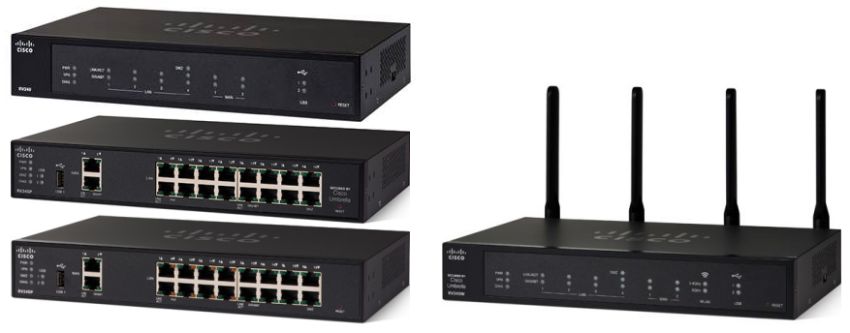
In the context of Cisco Small Business RV Series Routers, there are a few common security error messages that end-users may encounter while operating the router. It is important to be aware of these messages and understand their implications to ensure a secure network environment.
1. WAN Interface Down
The error message “WAN Interface Down” indicates that the interface connecting the router to the Wide Area Network (WAN) is no longer working. This could be due to a physical issue with the WAN cable or a problem with the configuration of the router. Troubleshooting steps such as checking cable connections and reconfiguring the router’s WAN settings may be necessary to resolve this issue.
2. Access Denied
When an end-user receives the “Access Denied” error message, it means that they do not have the necessary permissions to access a certain resource or perform a specific action. This could be due to improper configuration of user access privileges or a security measure implemented by the router. To resolve this issue, the end-user should contact the router’s administrator or refer to the product documentation for guidance on granting access.
3. Configuration Failed
If the error message “Configuration Failed” appears, it means that the router was unable to apply the desired configuration changes. This could be caused by compatibility issues with certain features or protocols, incorrect command syntax, or insufficient resources. The end-user can try troubleshooting by verifying the compatibility of the chosen configuration, double-checking the command syntax, or ensuring that the router has enough resources to support the changes.
4. Protocol Error
A “Protocol Error” message suggests that there was an issue with the communication protocol used by the router. This could be due to misconfiguration, incompatible protocols, or network connectivity problems. The end-user should check the router’s configuration settings, ensure that the chosen protocols are compatible, and troubleshoot any network connectivity issues to resolve this error.
Being familiar with these common security error messages and understanding how to troubleshoot them can help end-users effectively manage and secure their network environment. Cisco Small Business RV Series Routers provide the necessary features and functionality to address these errors and deliver reliable and secure connectivity for small businesses.
Troubleshooting Connectivity Issues
When it comes to troubleshooting connectivity issues with Cisco Small Business RV Series Routers, there are several steps you can take to identify and resolve the problem:
1. Check the Physical Connections
The first step is to ensure that all cables are securely connected. Make sure the Ethernet cables are plugged in properly and that the modem and router are getting power. Additionally, check if your WAN port is properly connected to your ISP’s modem or network.
2. Verify the Configuration Settings
Next, verify your configuration settings. Ensure that the router’s IP address, subnet mask, and gateway settings are correct. Additionally, check if any port forwarding or 6to4 tunnel configurations are affecting your connectivity.
3. Update the Firmware
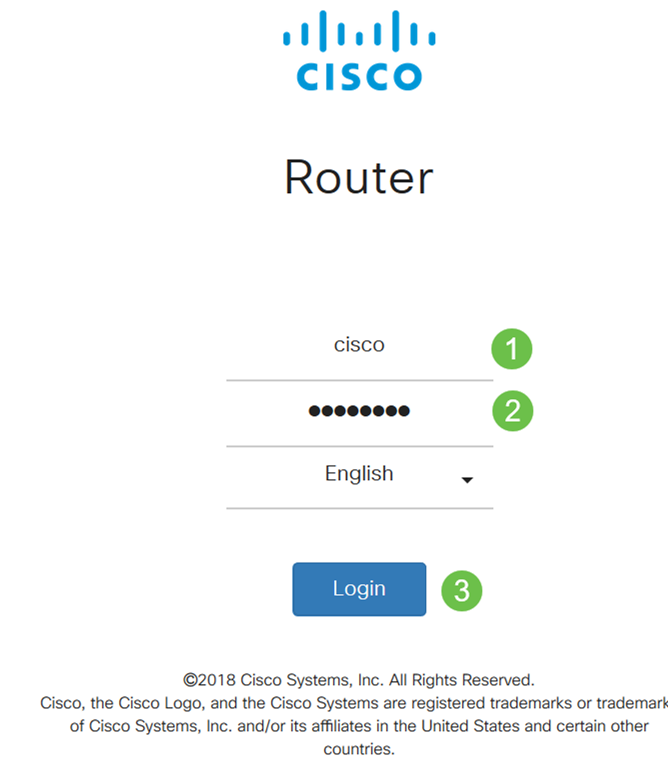
Ensure that your router is running the latest firmware release. Updating the firmware can often resolve compatibility issues and bring improvements in performance and security.
4. Troubleshoot Connectivity with VPN Tunnels
In case you’re using VPN tunnels for remote access or site-to-site connectivity, verify if the necessary SSL/IPsec VPN configurations are correctly set up. Utilize the appropriate VPN troubleshooting commands to diagnose and resolve any VPN-related connectivity issues.
5. Check for Wireless Interference
If you’re experiencing connectivity problems with wireless devices, check for any potential sources of interference such as other wireless networks, cordless phones, or microwave ovens. Adjust your wireless channel or position the router to minimize such interference.
6. Review the Security and Filtering Settings
Review the security and filtering settings on your router. Ensure that the firewall settings are properly configured and that any content filtering rules or access restrictions are not blocking your desired connections. Adjust these settings as needed to allow the required traffic.
By following these troubleshooting steps, you can effectively diagnose and resolve connectivity issues with Cisco Small Business RV Series Routers. In case further assistance is required, refer to the product documentation or seek support from the Cisco community.
Resetting the Router to Default Settings
Resetting the router to its default settings can be a useful troubleshooting step if you are experiencing issues with your Cisco Small Business RV Series Router. By resetting the router, you can restore it to its original factory settings, eliminating any potential configuration issues that may be causing problems with the security or routing of your network.
To reset the router to its default settings, follow the step-by-step guides provided in the Cisco Small Business RV Series Router user manual or installation guide. These guides will walk you through the process of resetting the router, ensuring that you do so correctly and without any data loss.
Before performing a factory reset, it is important to note that all of your current configurations and settings will be lost. This includes your wireless network settings, routing configurations, and any security features you may have enabled. Additionally, any remote administration or VPN settings will also be reset, so it is important to make note of these settings beforehand.
Once you have reset the router, you can begin the process of reconfiguring it to meet the specific needs of your network. This may include re-establishing your wireless network, setting up security features like filtering or SSL/IPSec, and configuring your WAN and Ethernet interfaces.
It is also recommended to check for any available firmware updates for your router. By installing the latest firmware release, you can ensure that your router is running the most up-to-date software, which may address known issues and improve compatibility with client devices and other systems.
Maintaining a secure and reliable network is at the heart of any small business operation. By resetting your Cisco Small Business RV Series Router to its default settings, you can troubleshoot any issues you may be experiencing and ensure the continued operation of your network.
Contacting Customer Support
If you are experiencing any issues with your Cisco Small Business RV Series Routers, there are several ways to contact customer support to get assistance. Whether you are having trouble with installation, configuration, or troubleshooting, the Cisco community is there to help.
Online Resources:
First, you can visit the Cisco Small Business RV Series Routers product page on the Cisco website for access to a wide range of resources. Here, you can find datasheets, configuration guides, troubleshooting technotes, and more. These documents provide valuable information on how to install, configure, and maintain your router.
Community Forums:
If you are unable to find the solution you need in the provided documents, you can turn to the Cisco community forums. These forums are frequented by both Cisco experts and fellow end-users who may have encountered similar issues. You can ask questions, share your experiences, and find additional resources to help solve your problem.
Contacting Cisco Support:
If your issue requires direct assistance from Cisco, you can contact their support team. Cisco provides multiple channels for contacting support, including phone, chat, and email. It is recommended to reach out to their support team with as much detail as possible about the issue you are facing and the steps you have already taken. This will help them diagnose the problem more efficiently and provide you with a solution.
Providing Information:
When contacting customer support, it is important to provide relevant information about your Cisco Small Business RV Series Router. This includes the model number, firmware version, and a description of the issue you are experiencing. The more information you provide, the quicker and more accurately they can assist you in resolving the problem.
Вопрос-ответ:
What are the security risks associated with Cisco Small Business RV Series Routers?
Cisco Small Business RV Series Routers are vulnerable to multiple security risks, including unauthorized access, malware attacks, and data breaches. These routers may have vulnerabilities that can be exploited by hackers to gain unauthorized access to the network, steal sensitive information, or install malware. It is important to stay updated with the latest security notices and patches provided by Cisco to mitigate these risks.
How can I protect my Cisco Small Business RV Series Router from security threats?
To protect your Cisco Small Business RV Series Router from security threats, you should regularly update the router’s firmware to the latest version provided by Cisco. Additionally, you should enable and configure the router’s built-in security features, such as firewall and intrusion prevention systems. It is also important to regularly monitor the router’s logs for any suspicious activity and to follow best practices for network security, such as using strong passwords and disabling remote management if not needed.
What should I do if I receive a security notice for my Cisco Small Business RV Series Router?
If you receive a security notice for your Cisco Small Business RV Series Router, you should take immediate action to address the issue. Follow the instructions provided in the security notice, which may include updating the router’s firmware or applying a patch provided by Cisco. It is important to prioritize these security notices and apply the necessary fixes as soon as possible to minimize the risk of a security breach.
Can I use third-party security software with Cisco Small Business RV Series Routers?
Yes, you can use third-party security software with Cisco Small Business RV Series Routers. While these routers have built-in security features, you may choose to enhance their security by using additional security software provided by third-party vendors. However, it is important to ensure that the third-party software is compatible with the router and does not conflict with its built-in security features. Consult the router’s documentation or contact Cisco support for guidance on integrating third-party security software.
Are there any known vulnerabilities in the latest firmware version of Cisco Small Business RV Series Routers?
As of the latest security notice, there are no known vulnerabilities in the latest firmware version of Cisco Small Business RV Series Routers. However, it is important to note that new vulnerabilities may be discovered over time, and Cisco regularly releases updates and patches to address these vulnerabilities. It is crucial to stay updated with the latest security notices provided by Cisco and to promptly apply any necessary updates or patches to ensure the router’s security.
Видео:
Cisco Tech Talk: Enabling MAC VPN Client on RV340 Series Routers
Cisco Tech Talk: Enabling MAC VPN Client on RV340 Series Routers by Cisco 4 years ago 2 minutes, 23 seconds 10,369 views
