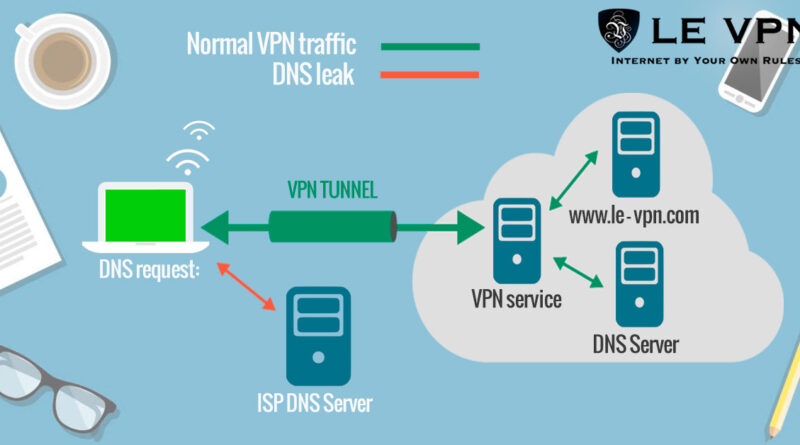
Can a VPN Truly Hide Your IP Address? Safeguard Your Online Activity from ISPs and Third Parties!
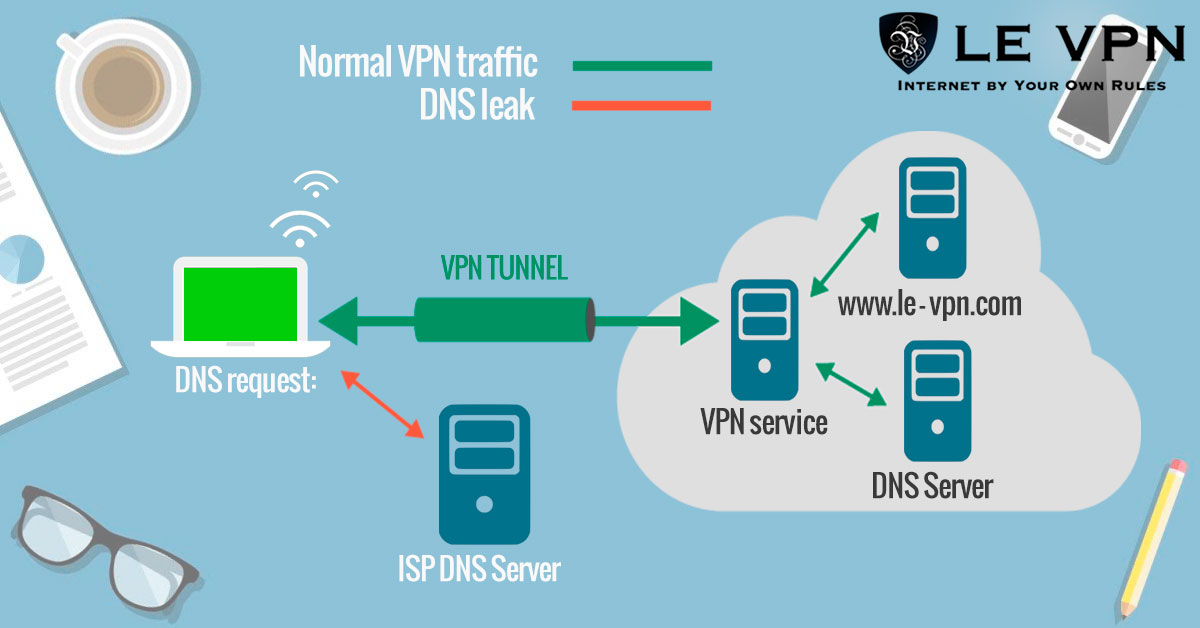
When you connect to the internet, your IP address is like a unique identifier that reveals your exact location. This information is valuable for various reasons, including security and privacy concerns. However, it is also highly sought after by ISPs, third parties, and even hackers. So, is it actually possible to hide your IP address and protect your online activity?
The short answer is yes, with the help of a VPN (Virtual Private Network). A VPN is a service that allows you to mask your IP address and browse the internet securely. When you connect to a VPN server, your internet traffic is routed through a different IP address, making it impossible for anyone to track your exact location and view your web activity. This provides a layer of security and privacy that is crucial in today’s digital age.
One of the main benefits of using a VPN is that it protects your web activity from ISPs and third parties. ISPs have the capability to track and log your browsing history, even if you are using incognito mode. This data can be approached by anyone who is looking for your private information. By using a VPN, your browsing data is encrypted, making it impossible for ISPs to see what websites you’ve visited and what content you’ve accessed online.
Additionally, a VPN allows you to switch your virtual location. For example, if you connect to a VPN server in a different city or country, websites and apps will see your virtual location instead of your actual location. This is especially useful if you want to access content that is restricted to certain locations. It also makes it more difficult for others to track your online activities.
In conclusion, using a VPN is a smart solution if you want to protect your web activity and keep your IP address hidden. It provides a secure and private connection that cannot be tracked by ISPs or third parties. So, if you value your online security and don’t want anyone to see your browsing history, consider using a VPN for the best and most secure browsing experience.
Does a VPN Really Hide Your IP Address?
A VPN, or Virtual Private Network, is a solution that allows you to hide your IP address and protect your web activity from ISPs and third parties. But does it really work?
Why Would You Want to Hide Your IP Address?
Your IP address is like your online identity – it is a unique number assigned to your device that allows it to connect to the internet. When you go online, your IP address can be easily tracked, revealing your browsing history, the websites you’ve visited, and even your exact location.
The Benefits of Hiding Your IP Address
By hiding your IP address with a VPN, you can prevent anyone from tracking your online activities. This is especially useful when connected to public Wi-Fi networks, as it prevents other people on the same network from viewing your web traffic.
How Does a VPN Hide Your IP Address?
A VPN works by routing your internet traffic through its own servers. When you connect to a VPN server, your IP address is replaced with the IP address of the server. This makes it appear as if your web traffic is coming from a different location.
Can ISPs and Third Parties Still Track You?
While a VPN can hide your IP address from most people, it is important to note that some third parties, such as government agencies, may still be able to track your activities. However, this is much more difficult when using a VPN, and it provides an extra layer of security.
Switching IP Addresses and Increasing Anonymity
One of the benefits of using a VPN is the ability to switch IP addresses. This means that you can appear to be connecting from a different location each time you go online, making it even more difficult for anyone to track your activities.
Conclusion
In conclusion, a VPN really does hide your IP address and provide an extra layer of security when browsing the web. While it may not completely prevent all tracking, it significantly reduces the likelihood of your activities being traced. So, if you want to protect your privacy and secure your online activities, using a VPN is an effective solution.
Learn how a VPN can protect your web activity from ISPs and third parties
In today’s digital world, our online activity is constantly being monitored by ISPs and third parties. From the moment you connect to the internet, someone, whether it’s your Internet Service Provider (ISP) or a third party, can see your IP address, which reveals your location and other sensitive information. This is where a VPN comes in.
A VPN, or Virtual Private Network, ensures that your web activity remains private and secure. When you use a VPN like VeePN, it creates an encrypted tunnel between your device and the VPN server. This means that all of your online traffic is routed through this tunnel, effectively hiding your IP address from anyone who may be looking to track your internet activity.
Not only does a VPN hide your IP address, but it also allows you to access websites and services that may be restricted in your current location. By connecting to a VPN server in a different country, you can bypass geo-restrictions and access content that may not be available to you otherwise.
Furthermore, a VPN protects your web activity from ISPs and third parties who may sell your data to advertisers or use it for other purposes. By encrypting your internet traffic, a VPN ensures that your information remains secure and anonymous, so that even if it is intercepted, it cannot be read or used.
So, how does a VPN really hide your IP address? Let’s break it down. When you connect to the internet without a VPN, your device communicates directly with websites and services, revealing your IP address and allowing them to track your exact location. However, when you connect to the internet through a VPN, your device first establishes a secure connection with the VPN server. All of your online activity is then routed through this server, effectively hiding your actual IP address and location.
In addition to hiding your IP address, a VPN also protects your data from being tracked by ISPs and other third parties. While ISPs are able to see that you are connected to a VPN, they are unable to see the specific websites and services you are accessing. This means that your web activity remains private and secure, away from the prying eyes of ISPs and other third parties.
In conclusion, using a VPN is an easy and effective way to protect your web activity from ISPs and third parties. It ensures that your IP address and location are hidden, and it encrypts your internet traffic, keeping your data secure and anonymous. So, if you’re in a hurry to safeguard your online privacy and security, here’s why you should consider using a VPN – it’s the best tool for the job.
Understand the importance of hiding your IP address online
When you connect to the web, your device is assigned an IP address, which is a unique identifier that allows other devices to locate and communicate with it. However, this IP address can be easily tracked and used to gather information about your online activities, including the websites you visit, the files you download, and even your location.
One of the main reasons why people use a VPN is to hide their IP address and protect their privacy online. A VPN, or virtual private network, creates a secure and encrypted tunnel between your device and the VPN server, making it difficult for anyone to see your exact IP address and track your online activity. This means that third parties, such as your ISP or government, cannot easily gain access to your personal information.
Furthermore, by connecting to a VPN, you can also mask your IP address from websites and online services. This prevents them from collecting your data and creating profiles based on your online behavior. Moreover, a VPN can also improve your online security by encrypting your data, preventing anyone on the same Wi-Fi network as you from intercepting your information.
It’s important to note that while a VPN can hide your IP address and protect your online activity, it doesn’t prevent websites from seeing that you are using a VPN. Some websites and online services may block or restrict access to users using VPNs, as they may be used to bypass geographic restrictions or engage in unauthorized activities.
In conclusion, hiding your IP address with a VPN is a solution for protecting your privacy and security online. By encrypting your data and masking your IP address, you can browse the web anonymously and prevent third parties from accessing your personal information. However, it’s important to choose a reliable VPN service that doesn’t store your logs and prioritizes your privacy and security.
How does a VPN hide your IP address?
A VPN, or Virtual Private Network, is an online service that provides a secure connection and anonymizes your internet activity. But how does a VPN hide your IP address?
Most online activities involve sending and receiving data packets through the internet. When you connect to a website or online service, your IP address is like your digital ID, identifying your device and its location.
ISPs, or Internet Service Providers, can see what you are doing online and even log your activity. This is where a VPN comes in. It acts as a middleman between your device and the websites or online services you are accessing, hiding your real IP address.
A VPN provides you with a new IP address, often from a different location, which makes it difficult for anyone to trace your online activities back to you. This is especially beneficial when accessing geo-restricted content or trying to view someone’s website from a different country.
When you use a VPN, your connection is encrypted, which adds an extra layer of security. This means that even if someone were able to intercept your traffic, they would only see encrypted data that they can’t decipher.
By hiding your IP address, a VPN can prevent not only ISPs but also third parties like hackers, government agencies, and even the VPN provider itself from tracking your online activities. This is one of the main benefits of using a VPN.
In short, a VPN hides your IP address by routing your internet traffic through its own servers, masking your real location, and encrypting your data. It provides anonymity, security, and the ability to access geo-restricted content, making it a popular choice for many users who want to protect their web activity.
Explore the encryption and anonymity features of a VPN
When it comes to protecting your web activity and keeping your online history private, using a VPN is one of the best solutions available. A VPN, or Virtual Private Network, actually hides your IP address, making it difficult for anyone to track your online activities.
With a VPN, your data is encrypted, meaning it is scrambled in a way that makes it unreadable to anyone trying to intercept it. This encryption ensures that your online activity remains private and secure, even if you are connecting to public Wi-Fi networks or browsing the web in countries with strict internet censorship.
One of the main benefits of using a VPN is the ability to hide your IP address. Your IP address is like your online identity, as it reveals your exact location and allows others to track your web activity. With a VPN, your IP address is replaced with the IP address of the VPN server you are connected to. This means that anyone trying to track your online activities will only see the IP address of the VPN server, not your own.
Another important feature of a VPN is its ability to protect your web activity from ISPs and third parties. ISPs (Internet Service Providers) can track and log your online activities, and third parties can collect your data for targeted advertising or other purposes. By using a VPN, you can prevent your ISP from tracking your web activity and keep your data private from third parties.
A VPN also allows you to access geo-restricted content and bypass censorship. By connecting to a VPN server located in a different country, you can appear as if you are browsing the internet from that country. This is especially useful for accessing streaming services like Netflix, which have different content libraries in different countries. It also enables people in countries with strict internet censorship to access blocked websites and communicate freely.
In summary, using a VPN provides encryption and anonymity for your online activities. It hides your IP address, protects your web activity from ISPs and third parties, and allows you to bypass geo-restrictions and censorship. With all these benefits, a VPN is a valuable tool for anyone who wants to keep their online activities private and secure.
Can a VPN prevent tracking and monitoring of your web activity?
When it comes to protecting your online privacy, using a VPN can be an effective solution. With the increasing amount of information and data we share online, it’s important to ensure that this information remains secure and hidden from prying eyes.
One of the key features of a VPN is that it masks your IP address, making it difficult for anyone to view your exact location or track your online activities. By connecting to a VPN server, your real IP address is replaced with the IP address of the server, providing an additional layer of anonymity.
While it doesn’t completely hide your web activity from all parties, a VPN can prevent ISPs (Internet Service Providers), government agencies, and even websites like Facebook from looking into your online activities. This is especially important in cases where ISPs may throttle your internet speed or collect and sell your browsing data to advertisers.
Best VPN services also provide encryption, which adds an extra level of security to prevent anyone from intercepting and accessing your data. By encrypting your internet traffic, a VPN makes it nearly impossible for anyone to decipher the information you send and receive, ensuring that your online activities are kept hidden.
VPNs are commonly used for a variety of reasons, such as accessing geo-restricted content on streaming platforms like Netflix or ensuring the security of your online banking activities. In these instances, a VPN allows you to appear as if you are connected from a different location, bypassing any geographic restrictions.
In a hurry? Here’s a summary: A VPN hides your IP address, preventing tracking and monitoring of your web activity to a certain extent. It provides security, prevents ISPs and government agencies from accessing your data, and allows you to access geo-restricted content. However, it doesn’t completely make you invisible, and there are limitations depending on the specific VPN service you choose and the level of security it provides.
Discover the Benefits of Using a VPN for Privacy and Security
In today’s digital age, privacy and security are of utmost importance. With cybercrime on the rise and online surveillance becoming a norm, it’s crucial to protect your web activity from prying eyes. One effective solution that ensures your anonymity and safeguards your data is the use of a Virtual Private Network (VPN).
1. Hide Your IP Address
By connecting to a VPN, you can hide your actual IP address, making it difficult for anyone to track your online activities back to your exact location. Whether you’re in a bustling city or a remote location, a VPN masks your IP address.
2. Encrypt Your Information
A VPN encrypts your data, ensuring that even if intercepted, it remains indecipherable. This added layer of security is essential, especially when connecting to public Wi-Fi networks that may be vulnerable to hackers.
3. Bypass Geographical Restrictions
One of the key benefits of using a VPN is the ability to access content that may be restricted in your country or region. By connecting to a server in a different location, a VPN lets you enjoy a world of content and media that would otherwise be unavailable.
4. Protect Against Tracking
Many websites and online service providers track your browsing habits to deliver targeted ads or gather data for their own purposes. A VPN prevents such tracking by masking your IP address and encrypting your internet traffic.
5. Switch Between Locations
A VPN service typically offers multiple server locations for you to connect to. This flexibility allows you to switch between different countries and regions, letting you experience the web as if you were browsing from there.
6. Stay Anonymous
When you connect to the internet through a VPN, your real IP address is hidden, and your online activities appear to be coming from the VPN server. This anonymity makes it more challenging for anyone, including government agencies and ISPs, to track your online behavior.
7. Protect Multiple Devices
A VPN can be easily installed and used on various devices, such as smartphones, tablets, and laptops. This versatility ensures that all your internet-connected devices are protected and your information remains secure.
In conclusion, using a VPN is an effective way to enhance your privacy and security online. It hides your IP address, encrypts your information, bypasses geographical restrictions, protects against tracking, and allows you to switch between locations. Don’t wait, protect your web activity now!
How to choose the right VPN to hide your IP address
When it comes to protecting your web activity and hiding your IP address, a VPN is a valuable tool. One popular VPN service that you may consider is VeePN. Here are some key factors to consider when choosing the right VPN:
1. Security
A VPN should ensure your data is encrypted and logged. Look for a VPN that offers strong encryption protocols such as OpenVPN, as well as a strict no-logging policy. This will help protect your online activities and keep them hidden from prying eyes.
2. Anonymity
The main purpose of a VPN is to hide your IP address and provide you with an anonymous online experience. Look for a VPN that allows you to connect to servers in different locations around the world. This will make it more difficult for anyone to track your online activities or identify your true location.
3. Reliability
A reliable VPN should provide a stable and fast connection. This is especially important if you plan to use the VPN for streaming or downloading large files. Look for a VPN that has a large server network and offers unlimited bandwidth to ensure a smooth and uninterrupted browsing experience.
4. User-friendly interface
When choosing a VPN, it’s important to consider the ease of use. Look for a VPN that has a user-friendly interface and offers easy-to-use apps for different devices and operating systems. This will make it easier for you to connect to the VPN and protect your online privacy.
5. Customer support
Lastly, consider the level of customer support provided by the VPN service. Look for a VPN that offers 24/7 customer support through various channels such as live chat, email, or phone. This will ensure that you can easily reach out to them whenever you have any issues or questions.
In conclusion, while there are many VPN options available, choosing the best VPN to hide your IP address requires careful consideration of factors such as security, anonymity, reliability, user-friendliness, and customer support. By selecting a reliable VPN that meets your specific needs, you can protect your web activity and stay hidden from ISPs and third parties.
Considerations when selecting a VPN provider
When it comes to protecting your online activity and privacy, selecting the right VPN (Virtual Private Network) provider is crucial. A VPN allows you to hide your IP address and encrypt your internet traffic, preventing ISPs, third parties, and even hackers from tracking your online activities and accessing your personal information.
When choosing a VPN provider, there are several important factors to consider:
- Security and privacy: The primary purpose of using a VPN is to ensure your online activities are secure and private. Look for a VPN provider that offers strong encryption protocols and a strict no-logs policy. This ensures that your data remains protected and cannot be tracked or accessed by anyone.
- Server network: The number of servers and their locations offered by a VPN provider is important. The more servers a provider has, the better the chances of finding a fast and stable connection. Additionally, having servers in various locations allows you to hide your true location and access content from different parts of the world.
- Ease of use and compatibility: A user-friendly VPN service that is compatible with various devices and operating systems is a must. This makes it easy for you to switch between devices and protect your online activities on all of them.
- Speed: A VPN adds an extra layer of encryption to your internet traffic, which can sometimes slow down your connection. Look for a VPN provider that offers fast and reliable connections, ensuring that your online experience doesn’t suffer.
- Cross-platform support: Consider a VPN provider that offers support for multiple platforms and devices. This allows you to protect not only your computer but also your mobile devices, such as smartphones and tablets.
In addition to these factors, it’s also worth considering the reputation and track record of the VPN provider. Reading reviews and checking user feedback can provide valuable insights into the quality and reliability of their service.
In conclusion, selecting the best VPN provider is essential for ensuring your online activities are kept private, secure, and protected from ISPs, third parties, and hackers. By considering the factors mentioned above, you can find a VPN service that meets your needs and provides the necessary tools to hide your IP address and encrypt your internet traffic effectively.
Does a VPN affect your internet speed?
When it comes to using a VPN, one concern that many people have is how it affects their internet speed. A VPN stands for Virtual Private Network, and it works by creating a secure, encrypted connection between your device and the VPN server. This connection masks your IP address and hides your online activity from prying eyes.
However, as with any technology, using a VPN can sometimes impact your internet speed. Here’s how it works.
The Impact on Internet Speed
When you connect to a VPN server, all of your internet traffic is routed through that server. While the VPN server encrypts your data and protects it from third parties, it can also introduce some delays in your connection.
The speed of your VPN connection depends on various factors. For example, the geographical distance between you and the VPN server can affect speed, as well as the server’s own network capacity. The quality of your own internet connection also plays a role. If you have a slow connection to begin with, using a VPN may further decrease your speed.
However, it’s important to note that not all VPNs are created equal. Some VPNs offer faster connections and better performance than others. Additionally, using a VPN can actually improve your internet speed in certain situations.
Improving Internet Speed with a VPN
In some cases, you may experience faster internet speeds when using a VPN. This is especially true if your internet service provider (ISP) is known for throttling certain types of internet traffic, such as streaming or torrenting.
By connecting to a VPN, you can bypass your ISP’s restrictions and gain faster access to websites and online services. The VPN encrypts your traffic, making it difficult for ISPs to identify and throttle specific types of data.
Additionally, VPNs can also give you the ability to connect to servers in different countries. This can be useful if you want to access region-restricted content, such as streaming services or websites that are blocked in your country.
Conclusion
While using a VPN may occasionally result in slower internet speeds, the overall impact will vary depending on various factors. The best VPNs strive to provide fast and reliable connections, prioritizing security without sacrificing performance.
If you’re concerned about the impact on your internet speed, it’s recommended to choose a reputable VPN provider with servers in locations close to your actual city. You can also consult the VPN’s website or customer support for information on their speed policy and data logs.
In summary, using a VPN offers a tradeoff between security and speed. While it may not always provide the same speed as a direct connection, a good VPN can greatly enhance your online privacy and protect your web activity from ISPs and other third parties.
Learn about the potential impact on your connection
When you want to browse the internet with more privacy and security, many people turn to VPNs. But while these virtual private networks can provide some benefits, it’s important to understand the potential impact they can have on your internet connection.
Switching IP addresses: When you use a VPN, your IP address is masked and replaced with an IP address from the VPN server. This means that the website or media you visit will see the VPN server’s IP address instead of your own.
Logged account history: While VPNs offer increased security, it is important to note that some VPN providers may still track your online activity. Even though your ISP or other third parties won’t be able to see your browsing history, it is possible that your VPN provider can still store this information.
Potential decrease in internet speed: Due to the additional encryption and rerouting of your internet traffic through a VPN server, your internet speed may be slightly slower when using a VPN. This is because your data has to travel a longer distance and go through more processing to reach its destination.
Protection from hackers and third parties: One of the main benefits of using a VPN is the added security it provides. By encrypting your internet connection, VPNs prevent hackers and third parties from intercepting your data and accessing your personal information.
Increase in online privacy: VPNs also offer increased online privacy by masking your IP address and making it difficult for anyone to track your online activities. This is especially useful when using public Wi-Fi networks or when accessing sensitive information online.
Availability of VPN apps: Most VPN providers offer apps for various devices, making it convenient to stay connected and protected on the go. Whether you’re using your smartphone, tablet, or computer, you can easily download and install a VPN app for added security.
Does a VPN really hide your IP address?
While a VPN can hide your IP address from websites and other online services, it is important to note that your VPN provider may still have access to this information. Additionally, if someone has your VPN provider’s logs, it is possible to trace your activities back to your previous IP address.
Conclusion: Using a VPN is a great solution for enhancing your online security and privacy. However, it’s important to consider the potential impact on your internet connection, such as a decrease in speed and potential logging of your online activity. By choosing a reliable VPN provider and understanding their privacy policy, you can enjoy the benefits of a secure and private online experience.
Is it legal to use a VPN to hide your IP address?
Using a VPN to hide your IP address is generally legal, although the legality may vary depending on your country and the specific circumstances. In most parts of the world, VPN usage is legal and widely accepted as a legitimate way to protect your online privacy and security.
One of the main reasons why people turn to VPNs is to prevent ISPs, third-party companies, and even government agencies from tracking their online activities. By masking your IP address, a VPN creates a secure and private tunnel between your device and the websites you visit. This ensures that your online traffic and browsing history remain hidden from prying eyes.
Not only does a VPN hide your IP address, but it also encrypts your internet traffic, making it nearly impossible for anyone to intercept or track the data you send and receive. This level of encryption is especially important when accessing public Wi-Fi networks, as it protects your sensitive information from being stolen by hackers.
While using a VPN is generally legal, there may be some cases where its usage is restricted or prohibited. For example, some countries impose restrictions on VPN usage in an attempt to control online content or limit access to certain websites. It’s important to be aware of the laws and regulations regarding VPN usage in your country to avoid any potential legal issues.
In conclusion, using a VPN to hide your IP address is a secure and effective way to protect your online privacy. It allows you to access content from different regions, maintain anonymity while browsing, and secure your data from being tracked by third parties. While there may be some legal restrictions in certain countries, in most cases, using a VPN is a legitimate and recommended practice.
Understand the legal implications of using a VPN
Why is it important to understand the legal implications of using a VPN?
Using a VPN can provide many benefits, such as hiding your IP address and protecting your web activity. However, it’s important to understand the legal implications of using a VPN to ensure you are using it within the boundaries of the law.
What are the legal reasons for using a VPN?
While there are legitimate reasons to use a VPN, such as protecting your online privacy and security, there are also potential legal concerns that users should be aware of. For example, using a VPN to engage in illegal activities such as hacking or downloading copyrighted content is against the law in many countries.
Do VPNs keep logs of your online activities?
One of the key aspects to consider when using a VPN is whether the provider keeps logs of your online activities. Different VPN services have different policies regarding the retention of user data. Some VPNs may keep logs of your previous connections, while others have a strict no-logs policy, meaning they do not keep any records of your online activities.
Can government agencies or third parties view your online activities when using a VPN?
A properly configured and reputable VPN can help prevent government agencies and other third parties from tracking your online activities. By hiding your real IP address and encrypting your internet traffic, a VPN provides an additional layer of security and anonymity. However, it’s important to note that using a VPN does not make you completely anonymous online, and there may be ways for determined parties to track your activities.
How can using a VPN affect your ability to view geographically restricted content?
One of the benefits of using a VPN is gaining access to geographically restricted content, such as streaming services like Netflix. By connecting to a VPN server in a different country or city, you can appear as if you are accessing the internet from that location, allowing you to bypass regional restrictions. However, it’s important to read the terms and conditions of the specific service you are using, as some platforms may have policies against using VPNs to access their content.
Are there any risks associated with using a VPN?
Using a VPN can provide added security and privacy for your online activities, but it is not without its risks. While a VPN can hide your IP address and prevent others from tracking your online activity, there are still some risks to be aware of.
Potential Risks:
- Inaccurate Location: While a VPN can hide your true location, it does not change your physical location. In some cases, websites or services may still be able to determine your approximate location based on other factors.
- Data Logging: It is important to choose a reliable VPN service that has a strict no-logs policy. Some VPN providers may keep logs of your online activities, which could potentially be accessed by third parties.
- Connection Switching: Switching between different VPN servers can sometimes lead to temporary drops in security and privacy. It is best to choose a VPN service that offers a seamless and secure switching experience.
- Misleading Security Claims: Not all VPN services provide the same level of security. Some VPN providers may claim to offer strong encryption and security features, but in reality, they may not be as secure as advertised.
- Wi-Fi Networks: While using a VPN can protect your data and make your activities anonymous, it is still important to exercise caution when using public Wi-Fi networks. Hackers can potentially track your online activities even when using a VPN.
It is important to be aware of these risks and to choose a reputable VPN service that prioritizes user privacy and security. By doing so, you can help protect your online activities and maintain your privacy in an increasingly interconnected world.
Explore Potential Vulnerabilities and Precautions
While a VPN service provides an added layer of security and privacy by hiding your IP address, there are still potential vulnerabilities that users should be aware of.
1. ISP Tracking
Even with a VPN, your Internet Service Provider (ISP) can still track your online activity. They may not be able to see the exact websites you visit, but they can still monitor the amount of data you transfer and the time you spend connected to the VPN.
2. Wi-Fi Network Risks
When connecting to public Wi-Fi networks, using a VPN doesn’t guarantee complete protection. Hackers can exploit vulnerabilities within the network to intercept your information, even if you are connected to a VPN service.
3. Third Party Access
While a VPN hides your IP address from websites and third parties, it doesn’t necessarily prevent them from accessing other information about your online activities. Some websites, for example, may use tracking technologies or store cookies to gather data about your browsing behavior.
4. Switching VPN providers
If you decide to switch VPN providers, it’s important to consider the security of your data during the switch. Some VPN services may store logs of your activities, which can potentially be accessed by third parties.
5. Different VPN Products
Not all VPN services are created equal. Some may provide better security and privacy features than others. It’s important to research and choose a reputable VPN provider that offers the best protection for your needs.
In conclusion, while a VPN can provide a more secure and private browsing experience, it’s essential to understand its limitations and potential vulnerabilities. By taking precautions and using a reliable VPN service, you can enhance your online security and protect your web activity from ISPs and third parties.
How to set up a VPN to hide your IP address
If you’re concerned about your online privacy and want to hide your IP address, setting up a VPN is a reliable solution. A VPN, or Virtual Private Network, encrypts your internet traffic and redirects it through servers located around the world. This means that when you access the web, it appears as though you’re connecting from a different location, keeping your true IP address hidden.
Why hide your IP address?
There are several reasons why you might want to hide your IP address. Firstly, if you want to access geo-restricted content, like streaming services or websites that are blocked in your country, a VPN can help you bypass these restrictions. Additionally, hiding your IP address can protect you from ISPs, companies, and other third parties that may try to track and collect your data.
How does a VPN hide your IP address?
When you connect to a VPN, your internet traffic is encrypted and sent through the VPN’s servers. Your IP address is masked, and instead, the VPN server’s IP address is used, making it nearly impossible for anyone to trace your online activity back to your actual location.
Setting up a VPN
To set up a VPN, you’ll first need to choose a VPN provider. Popular options include Veepn, NordVPN, and ExpressVPN. Once you’ve signed up for a VPN service, you can usually download their software or app onto your devices. From there, you’ll be able to connect to a VPN server and hide your IP address when accessing the web.
Benefits of using a VPN
Using a VPN provides several benefits. Not only does it hide your IP address, but it also encrypts your internet traffic, making it more secure and protecting your data from potential hackers. Additionally, a VPN allows you to access geo-restricted content and can improve your online experience by eliminating ISP throttling.
FAQ
Q: Can a VPN completely hide my IP address?
A: While a VPN can hide your IP address from websites, ISPs, and other third parties, it’s important to note that your VPN provider may still be able to see your IP address. However, reputable VPN providers have strict no-logs policies and prioritize user privacy.
Q: Are there other ways to hide my IP address?
A: Yes, there are other ways to hide your IP address, although using a VPN is the most effective and reliable method. Some other methods include using proxy servers, Tor network, or using public Wi-Fi networks. However, these methods may not provide the same level of security and privacy as a VPN.
Q: Why is hiding my IP address important?
A: Hiding your IP address is important because it helps protect your online privacy and prevents third parties from tracking and collecting your data. It also allows you to access blocked content and improve your online security.
Step-by-step guide to configuring a VPN on different devices
1. Setting up a VPN on your computer
To protect your web activity from ISPs and other third parties, you can configure a VPN on your computer. Start by installing a VPN software of your choice, available for both Windows and Mac operating systems. Once installed, you can open the application and sign in with your VPN account credentials.
Step 1: Install the VPN software on your computer.
Step 2: Open the VPN application and sign in with your account credentials.
Step 3: Choose a VPN server location from the options provided.
Step 4: Connect to the VPN server and your web traffic will be encrypted and routed through the chosen server, hiding your IP address from trackers.
2. Configuring a VPN on your mobile devices
If you’re always on the go, it’s important to protect your online activities on your mobile devices as well. Whether you have an iPhone or an Android device, you can follow these steps to configure a VPN:
Step 1: Download and install a VPN app from the App Store or Google Play Store.
Step 2: Open the app and sign in with your VPN account credentials.
Step 3: Choose a VPN server location from the options provided.
Step 4: Once connected to the VPN server, your IP address will be masked, and your online activities will be protected, preventing tracking from ISPs and other parties.
3. Setting up a VPN on your router
If you want to protect all devices connected to your home network, setting up a VPN on your router is the best option. Here’s how you can do it:
Step 1: Access your router’s settings page by entering your router’s IP address in a web browser.
Step 2: Look for the VPN or Network settings section and enable VPN functionality.
Step 3: Enter your VPN account’s credentials and configure the VPN settings, including the server location.
Step 4: Save the settings and let your router establish a connection to the VPN server. Now, all devices connected to your home network will have their web traffic encrypted and your IP address hidden.
In conclusion, configuring a VPN on your devices is a straightforward process that allows you to protect your online activities, hide your IP address, and prevent tracking from ISPs and other third parties. Whether you’re using a computer, mobile device, or router, following the step-by-step guide ensures the best possible security and anonymity.
Can a VPN hide your IP address on mobile devices?
When it comes to protecting your online privacy and hiding your IP address, VPNs are often seen as a reliable solution. However, it’s important to understand how VPNs work on mobile devices and what they can actually do to ensure your anonymity.
The role of VPNs on mobile devices
VPNs, or Virtual Private Networks, are products that provide a secure and private connection over the internet. Instead of directly connecting to a website or online service, a VPN acts as an intermediary by routing your traffic through its own servers. This approach hides your IP address from anyone who may be tracking you.
How a VPN hides your IP address
- A VPN creates a virtual tunnel between your device and the internet. Your web activity is encrypted and routed through the VPN server, making it nearly impossible for anyone to see your real IP address or track your online history. This ensures that your location and personal information remain hidden from prying eyes.
- By connecting to a VPN server, your IP address is replaced with the server’s IP address. This means that websites and other online services will see the IP address of the VPN server instead of your own. It makes it difficult to trace your online activities back to you, providing an additional layer of anonymity.
- While using a VPN, your web traffic is encrypted, meaning that even if someone intercepts your data, they won’t be able to decipher it. This is particularly important when accessing sensitive websites, preventing hackers, ISPs, and other third parties from spying on your online activity.
Limitations and considerations
It’s important to note that while a VPN can hide your IP address and provide a certain level of anonymity, it’s not a foolproof solution. In some cases, VPN companies may keep logs of your online activities, which could potentially be traced back to you. Additionally, government agencies and other organizations may have ways of tracking VPN users.
Furthermore, not all VPNs are created equal, and some may not offer the same level of privacy and security. It’s crucial to choose a reputable VPN provider that has a strong track record in protecting user anonymity.
In conclusion, while using a VPN can help hide your IP address and protect your web activity on mobile devices, it’s important to approach this technology with caution. Remember to choose a reliable VPN provider and be aware of the limitations and potential risks involved.
Learn about VPN options for smartphones and tablets
When it comes to using a VPN on your smartphone or tablet, there are several options available. Let’s explore what you can do to protect your web activity.
VPN apps for mobile devices
There are many VPN apps available for both iOS and Android devices. These apps provide encryption that ensures secure communication between your device and the VPN server. By connecting to a VPN server, your actual IP address is hidden, and instead, the server’s IP address is used, making it much harder for someone to track your location or access your personal information.
ISP tracking and data privacy
ISPs (Internet Service Providers) have the ability to track and log your online activity. However, when using a VPN, all your internet traffic is routed through an encrypted connection, preventing your ISP from seeing the exact websites you visit or the information you send or receive.
Government agencies and online privacy
Government agencies and other third parties may also try to access your online information. However, VPN services provide an additional layer of security that makes it much more difficult for anyone to intercept your data. While it is not impossible for government agencies to approach VPN companies for information, most reputable VPN companies have a strict no-logs policy, which means they don’t keep records of your online activity.
Public Wi-Fi and hidden dangers
Public Wi-Fi networks are known to be vulnerable to hackers and data breaches. By using a VPN on your smartphone or tablet, you can mask your IP address and encrypt your internet traffic, making it much safer to use public Wi-Fi networks. This ensures that even if someone tries to access your data on a public network, they won’t be able to see your actual activity or obtain your personal information.
FAQ on VPN services
- Can a VPN hide your IP address completely?
- Do VPN services provide anonymity?
- Can someone still track your online activity while using a VPN?
- Does a VPN protect you from government agencies?
These are some common questions when it comes to using VPN services. While a VPN does provide a higher level of security and privacy, it is important to note that no system is completely foolproof. However, using a reputable VPN service can greatly reduce the chances of your online activity being tracked or your personal information being accessed by unauthorized individuals.
Does a VPN hide your IP address on all websites?
When it comes to browsing the web and protecting your privacy, a VPN plays a crucial role in ensuring your IP address remains hidden from third parties. But does it actually hide your IP address on all websites? Let’s take a closer look.
First off, let’s clarify what an IP address is. An IP address is a unique numerical label assigned to each device connected to a computer network, which includes the internet. It serves as an identifier for your device’s location and is used by websites and online services to deliver content to you.
When you connect to the internet without a VPN, your IP address is easily visible to anyone looking. Internet service providers (ISPs), websites, and even malicious parties can track your online activities and potentially gather sensitive information about you.
However, when you use a VPN, your IP address is hidden and substituted with the IP address of the VPN server you’re connecting to. This allows you to browse the web anonymously and prevents third parties from tracking your online activities.
So, does a VPN hide your IP address on all websites? The answer is yes and no. While a VPN effectively hides your IP address from most websites, there are some exceptions. Certain websites and services may have sophisticated tracking mechanisms or use other methods to uncover your real IP address, even when you’re connected to a VPN.
Additionally, if someone were to approach the VPN service provider with legal requests or other means, your browsing activities could potentially be exposed. It’s important to choose a VPN service with a strict no-logs policy to avoid this risk.
Overall, a VPN provides numerous benefits in terms of security, privacy, and anonymity. It ensures that your web browsing activities are protected from ISPs, third parties, and even government surveillance. While it may not completely hide your IP address on all websites, it significantly reduces the chances of being tracked and enhances your online privacy.
Considerations for accessing region-restricted content
Accessing region-restricted content is a common reason why many people turn to VPNs. When you connect to a VPN, your web traffic is encrypted and routed through a server located in a different location than your own. This ensures that if someone were to intercept your internet activities, they would only see the location of the VPN server, rather than your exact location.
One of the main advantages of using a VPN to access region-restricted content is that it allows you to bypass government censorship and access websites and services that may be blocked in your country. For example, if you are in a country with strict internet regulations, you can use a VPN to connect to a server in a different country where those websites or services are accessible. In this way, VPNs hide your real location, allowing you to view content that may otherwise be restricted.
Another reason why many people use VPNs to access region-restricted content is to take advantage of deals and offers that may only be available in certain locations. For example, if you are a frequent traveler, you can use a VPN to connect to a server in a specific country and access local discounts and promotions that are not available to people from other locations.
It’s also worth noting that while a VPN can hide your IP address from third parties, it doesn’t make you completely anonymous. Your ISP, government, and VPN provider still have the ability to see your online activities. However, by encrypting your internet traffic and routing it through a different location, VPNs add an extra layer of security that can deter hackers and prevent them from tracking your online activities.
In short, VPNs are a useful tool for accessing region-restricted content and protecting your privacy online. They allow you to hide your real location, bypass government censorship, access deals and offers in different locations, and add an extra layer of security to your browsing activities. However, it’s important to remember that while VPNs can provide some level of anonymity, they are not foolproof and should not be relied upon as the sole solution for protecting your privacy online.
Вопрос-ответ:
Does using a VPN hide my IP address?
Yes, using a VPN can hide your IP address. When you connect to a VPN server, your internet traffic is routed through that server, which acts as a middleman between your device and the websites or services you are accessing. This means that the IP address seen by those websites or services is the IP address of the VPN server, not your actual IP address. It adds an extra layer of privacy and anonymity to your online activities.
How does a VPN protect my web activity from ISPs and third parties?
A VPN encrypts your internet traffic, making it unreadable to your internet service provider (ISP) and third parties who may be monitoring your connection. By encrypting your data, a VPN ensures that even if someone intercepts your traffic, they won’t be able to decipher its contents. This protects your web activity from being monitored, logged, or used for targeted advertising or other purposes without your consent.
Can a VPN be completely trusted to protect my privacy?
While a VPN can significantly enhance your privacy and security, it is important to choose a reputable VPN provider. Some VPN providers may keep logs of your internet activity, which could potentially be accessed by third parties. Reading reviews and doing research on different VPN providers can help you make an informed decision and choose a VPN that prioritizes user privacy and does not log your activity.
Can a VPN slow down my internet connection?
Using a VPN can sometimes result in a slight decrease in internet speed. This is because your internet traffic is being encrypted and routed through a remote server, which can introduce some latency. However, the extent of the speed decrease depends on various factors, such as the distance between your device and the VPN server, the server’s capacity, and your internet connection speed. In many cases, the speed reduction is minimal and may not be noticeable in day-to-day browsing or streaming activities.
Is it legal to use a VPN?
Using a VPN is legal in most countries, but there are some exceptions. Some countries have restrictions on the use of VPNs or may require VPN providers to be licensed. It is essential to familiarize yourself with the laws and regulations regarding VPN use in your country to ensure that you are not in violation. In general, VPNs are commonly used for legitimate reasons such as privacy protection, accessing geographically restricted content, and securing internet connections.
Can a VPN bypass censorship or access geo-restricted content?
Yes, a VPN can bypass censorship and access geo-restricted content. By masking your IP address and encrypting your internet traffic, a VPN allows you to bypass restrictions imposed by governments, workplaces, or educational institutions. It can also enable you to access content that is blocked or unavailable in your current location, such as streaming services or websites that may be region-locked. However, it is important to note that some streaming platforms actively block VPN usage, so not all VPNs may be effective in accessing geo-restricted content.
Do free VPNs provide the same level of privacy and security as paid ones?
Free VPNs may not provide the same level of privacy and security as paid ones. Some free VPN providers may rely on advertising or data collection as a source of revenue, compromising user privacy. Additionally, free VPNs may have limitations in terms of available server locations, speed, or data usage. Paid VPNs typically offer more robust privacy features and better performance, as they have dedicated resources to maintain and optimize their services. If privacy and security are a top priority, investing in a reputable paid VPN service is generally recommended.
Видео:
Does a VPN Hide Your Location?
Does a VPN Hide Your Location? by VPN Wisdom 1 year ago 4 minutes, 2 seconds 7,314 views
What can someone do with YOUR IP address??
What can someone do with YOUR IP address?? by VPNpro 2 years ago 7 minutes, 44 seconds 73,643 views
How to Hide Your IP Address | Protect IP Address From Hackers
How to Hide Your IP Address | Protect IP Address From Hackers by CyberGeeks 6 months ago 5 minutes, 47 seconds 2,584 views
