
SuperVPN – The Fastest and Best Free Privacy and Security Proxy for iPhone and iPad
When it comes to protecting your privacy and security on your iPhone or iPad, finding a superior VPN is essential. SuperVPN is the best free proxy service available that offers unmatched privacy and security features. It ensures that your online browsing activities are always secure, keeping your personal information safe and protected.
Setting up SuperVPN is a breeze, making it the ideal choice for anyone, regardless of their technical expertise. With its user-friendly interface, you can connect to a wide range of server locations around the world, ensuring that you can browse the web without restrictions, even when using public Wi-Fi.
One of the key advantages of SuperVPN is its ability to protect your mobile devices against unwanted attacks and threats. With SuperVPN, you can browse the internet with peace of mind, knowing that your personal data and information can’t be accessed by anyone. Whether you’re using your iPhone or iPad, SuperVPN makes it easy to keep yourself and your device safe from any outside influence.
SuperVPN is also a favorite choice among older iPhone and iPad users who want to access restricted content. With its built-in proxy settings, SuperVPN allows you to bypass any restrictions and access the content you want, no matter where you are. Whether it’s streaming your favorite series or accessing blocked websites, SuperVPN is the perfect tool to ensure you have an uninterrupted browsing experience.
In addition to its privacy and security features, SuperVPN is recommended by experts in the field. Only the best VPN services, such as Tunsafe, Windscribe, and Adguard, can rival SuperVPN when it comes to ease of use and connection speed. With SuperVPN, you can connect to the internet in just a few simple steps, giving you unlimited access to all the content and information you need.
Don’t let the high price of other VPN services deter you from protecting your privacy and security. SuperVPN offers a cost-effective solution that anyone can afford, without compromising on performance or features. With SuperVPN, you can keep yourself safe from online threats while enjoying a fast and hassle-free browsing experience.
In conclusion, SuperVPN is the ultimate proxy service for iPhone and iPad users. With its unmatched privacy and security features, easy setup process, and affordable price, SuperVPN is the ideal choice for anyone looking to browse the web without restrictions and keep their personal information safe.
Benefits of SuperVPN
1. Enhanced Security: SuperVPN provides superior security and encryption to protect your online activities from hackers and surveillance.
2. Access Restricted Content: With SuperVPN, you can browse and access content that is blocked or restricted in your region.
3. Easy Setup: Setting up SuperVPN on your iPhone or iPad is quick and hassle-free, allowing you to start enjoying its benefits in no time.
4. Private and Anonymous: SuperVPN allows you to browse the internet without revealing your true identity, keeping your online activities private and anonymous.
5. Unlimited Bandwidth: You can enjoy unlimited browsing and downloads with SuperVPN, without any restrictions on your data usage.
6. Money-Back Guarantee: SuperVPN offers a money-back guarantee, ensuring that you are satisfied with its services or you can get a refund.
7. Customer Support: SuperVPN provides excellent customer support to help you with any issues or questions you may have while using the app.
8. Multiple Server Locations: SuperVPN has an extensive network of servers around the world, allowing you to connect from anywhere and enjoy fast and reliable browsing.
9. Protect against Hackers: SuperVPN safeguards your personal information and protects it from hackers who may try to steal your sensitive data.
10. Secure Wi-Fi Hotspot: SuperVPN ensures that your connection to public Wi-Fi hotspots is secure and safe, protecting your data from being intercepted by unauthorized individuals.
Features of SuperVPN
1. High-speed browsing: SuperVPN offers fast and unrestricted browsing, allowing you to download files and stream media without any buffering or loading issues.
2. Enhanced security: With SuperVPN, you can protect your online privacy and safeguard your personal information against hackers, cybercriminals, and unauthorized third parties.
3. Wide variety of server locations: SuperVPN has servers in different locations around the world, giving you the flexibility to browse the internet from various countries and access geo-restricted content.
4. No logs policy: SuperVPN does not keep any logs of your browsing history or online activities, ensuring your privacy is always upheld.
5. Simple and user-friendly interface: SuperVPN has a straightforward interface that is easy to navigate, making it suitable for both beginners and experienced users.
6. Free and paid options: SuperVPN offers both a free version with limited features and a paid version with additional benefits, allowing you to choose the option that best suits your needs.
7. Support for various devices: SuperVPN is compatible with iPhone, ensuring that you can enjoy its features and protection on your preferred Apple device.
8. Battery efficient: Unlike some other VPN apps, SuperVPN is designed to minimize battery drain, allowing you to use it for an extended period without rapidly depleting your device’s battery life.
9. Unlimited bandwidth: With SuperVPN, you can browse, stream, and download without restrictions, as there is no limit on the amount of data you can use.
10. Expert recommended: SuperVPN is highly regarded by experts in the security and privacy field, with many recommending it as a reliable and effective solution for protecting your online activities.
How to download SuperVPN
If you’re looking for the best free privacy and security proxy for your iPhone, SuperVPN is the way to go. With its fast and secure tunneling, SuperVPN ensures that your online activities are protected against any unsecured networks.
To download SuperVPN, follow these simple steps:
- Open the App Store on your iPhone.
- Search for “SuperVPN – Best Free Privacy and Security Proxy for iPhone”.
- Click on the SuperVPN app from the search results.
- Tap the “Install” button to begin the download and installation process.
- Wait for the installation to complete.
- Once the app is installed, you can open it and start using SuperVPN to access various services and protect your privacy.
SuperVPN not only provides a secure connection, but it also allows you to access websites and services that may be restricted in your country. With a wide range of server locations, you can connect to SuperVPN from anywhere in the world and enjoy a fast and reliable browsing experience.
SuperVPN is trusted by millions of users worldwide and has gained fame for its reliable and efficient service. It beats other VPN services like HotspotShield, Astrill, and Proton VPN in terms of speed and security.
So don’t hesitate, download SuperVPN now and experience the best privacy and security for your iPhone!
How to install SuperVPN on iPhone
If you are looking for a solution to enhance your privacy and security on your iPhone, SuperVPN is the best choice. With its top-notch features and user-friendly interface, it is the perfect tool for both personal and business use.
Installing SuperVPN on your iPhone is easy and takes just a few simple steps. Here’s a step-by-step guide to help you get started:
- First, download the SuperVPN app from the App Store and install it on your device.
- Once the installation is complete, open the app and you will see a simple and intuitive interface.
- Before you can start using SuperVPN, it’s essential to create an account. Don’t worry, this process is quick and hassle-free.
- After creating an account, you can now connect to SuperVPN’s secure servers with just a single tap. This will instantly protect your data and safeguard your privacy.
- SuperVPN provides various server locations around the world, allowing you to connect from anywhere and bypass any content restrictions that may be in place.
- With SuperVPN, your internet browsing is encrypted, ensuring that your personal information and browsing history are kept private from any third-party attacks.
- SuperVPN also offers a handy built-in ad-blocker, which helps you to enjoy a seamless and uninterrupted browsing experience.
- Whether you are using public Wi-Fi or your own network, SuperVPN ensures that all your data is securely encrypted, so you can browse with peace of mind.
- For those who are concerned about their online privacy, SuperVPN offers an extra layer of protection by allowing you to change your IP address.
- With SuperVPN, you can also access geo-restricted content, such as Netflix’s library of movies and TV shows, from anywhere in the world.
- SuperVPN is compatible with various iOS devices, including iPhone, iPad, and iPod Touch. So, no matter which device you have, you can enjoy its benefits.
Overall, SuperVPN is a straightforward and reliable solution for anyone who wants to enhance their online security and privacy. With its easy installation process and top-notch features, it’s a must-have app for all iPhone users. Install SuperVPN now and experience the benefits it offers!
How to set up SuperVPN on iPhone
Step 1: Download and Install
To begin using SuperVPN on your iPhone, you need to download and install the app from the App Store. Simply search for “SuperVPN – Best Free Privacy and Security Proxy” and click the download button. The app is free and can be installed on any iPhone running iOS. Once the download finishes, you can find the app icon on your home screen.
Step 2: Launch the App
After the installation is complete, tap on the SuperVPN icon to launch the app. This will open the application, and you will see the main interface.
Step 3: Choose a VPN Server
In SuperVPN, you have the option to choose a VPN server from locations all around the world. Tap on the “Server” button, and a list of available countries will appear. Scroll through the list and choose the country you want to connect to. Once you have selected a server, tap on it to connect.
Step 4: Enjoy Secure Browsing
After the connection is established, SuperVPN encrypts your internet traffic, protecting your privacy and preventing anyone from intercepting your data. You can now browse the internet, access geo-restricted content, and stay safe while using public Wi-Fi networks. SuperVPN also helps to increase your online security by masking your IP address.
Step 5: Customize Settings
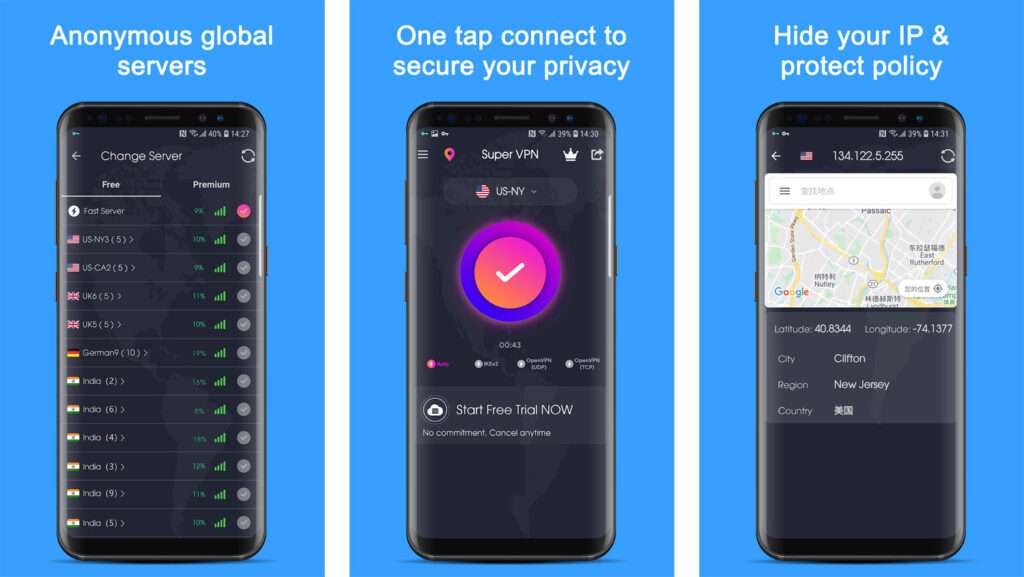
If you want to customize your VPN settings, SuperVPN offers a variety of options. You can adjust the protocol, choose between different encryption levels, and set up VPN on specific apps or devices. These settings can help you optimize your VPN experience based on your preferences and needs.
Step 6: Stay Protected Anywhere
Whether you are at home, traveling, or at work, SuperVPN is the perfect solution for protecting your privacy and security. With its fast and reliable VPN servers, you can access any content you want, from anywhere in the world, without any restrictions. SuperVPN also offers a money-back guarantee, so you can subscribe with confidence.
Step 7: Explore Additional Features
SuperVPN is not just a VPN app. It also provides additional features like ad-blocking, which helps to speed up your browsing experience and save battery life. You can also explore other premium VPN services like NordVPN, Windscribe, ZenMate, or 123VPN that offer a full range of features to enhance your online privacy and security.
In conclusion, setting up and using SuperVPN on your iPhone is a simple and effective way to protect your privacy and ensure your online security. Don’t miss out on the benefits of a VPN – install SuperVPN on your iPhone today and enjoy a superior browsing experience!
Troubleshooting tips for SuperVPN on iPhone
1. Check your internet connection
If you’re experiencing issues with SuperVPN on your iPhone, the first thing you should do is check your internet connection. Ensure that you are connected to a strong and stable Wi-Fi network or that your mobile data is enabled. A weak or unstable connection can affect the performance of the VPN app.
2. Update the SuperVPN app
Ensure that you have the latest version of the SuperVPN app installed on your iPhone. Developers constantly release updates to fix bugs and improve overall performance. Updating the app may help resolve any compatibility issues that you may be experiencing.
3. Try different VPN servers
If you’re having trouble connecting to a specific server or experiencing slow speeds, try connecting to a different VPN server within the SuperVPN app. Sometimes, certain servers may be overloaded or experiencing technical issues. Switching to a different server can often resolve the issue.
4. Check for any restrictions or policies on your network
Some Wi-Fi networks or workplaces may have certain restrictions or policies in place that prevent the use of VPNs. If you are unable to connect to SuperVPN on a specific network, try using it on a different network. Additionally, check if the VPN app you’re using is allowed on the network you’re connected to.
5. Restart your iPhone
Restarting your iPhone can help resolve minor software glitches that may be causing issues with SuperVPN. Simply power off your device, wait for a few seconds, and power it back on. This simple step can sometimes resolve various connectivity issues.
6. Contact SuperVPN support
If you’ve exhausted all troubleshooting options and are still experiencing issues with SuperVPN on your iPhone, consider reaching out to SuperVPN’s support team for further assistance. They may be able to provide you with specific troubleshooting steps or solutions based on the nature of the problem you’re facing.
Remember, ensuring the smooth functioning of SuperVPN on your iPhone is essential for a secure and unrestricted browsing experience. By following these troubleshooting tips, you can resolve common issues and make the most out of this privacy and security proxy app.
Frequently asked questions about SuperVPN on iPhone
What is SuperVPN?
SuperVPN is a free privacy and security proxy app designed for iPhone users. It helps protect your online privacy and secure your internet connection. With SuperVPN, you can access content and social media platforms securely without any limitations.
How does SuperVPN work?
SuperVPN uses a built-in proxy network to route your internet traffic through a secure and encrypted connection. By doing so, it hides your IP address and encrypts your data, making it difficult for anyone to track your online activities or intercept your information.
What are the benefits of using SuperVPN?
Using SuperVPN offers several key benefits, including:
- Enhanced privacy and security
- Access to geo-restricted content
- Secure browsing on public Wi-Fi networks
- Protection against online threats
Are there any limitations to using SuperVPN?
While SuperVPN is a free app, it may have certain limitations in terms of speed, bandwidth, or the number of available servers. Additionally, the free version may contain ads. If you require unlimited access and additional features, you can upgrade to a paid version.
Can SuperVPN be used with other VPN services?
SuperVPN can be used alongside other VPN services, but it is important to note that running multiple VPNs simultaneously can lead to conflicts and may cause connectivity issues. It is recommended to disable any other VPN services while using SuperVPN.
Is SuperVPN compatible with all iPhone models?
SuperVPN is compatible with most iPhone models running iOS 9.0 or later. However, older devices may experience slower performance due to hardware limitations.
Is SuperVPN available on the App Store?
Unfortunately, SuperVPN is not available on the App Store. However, you can download it from our official website or other trusted third-party app stores.
Additional tips for using SuperVPN on iPhone
1. Protect your privacy and data
SuperVPN is the best free privacy and security proxy app for iPhone that provides full protection for your internet connection. By using SuperVPN, you can protect your personal information from being accessed by others and keep your browsing history private.
2. Enjoy unlimited and fast internet
With SuperVPN, you can enjoy unlimited and fast internet access on your iPhone. The app allows you to browse the web, watch videos, and use social media without any limitations or speed restrictions.
3. Easy setup and user-friendly interface
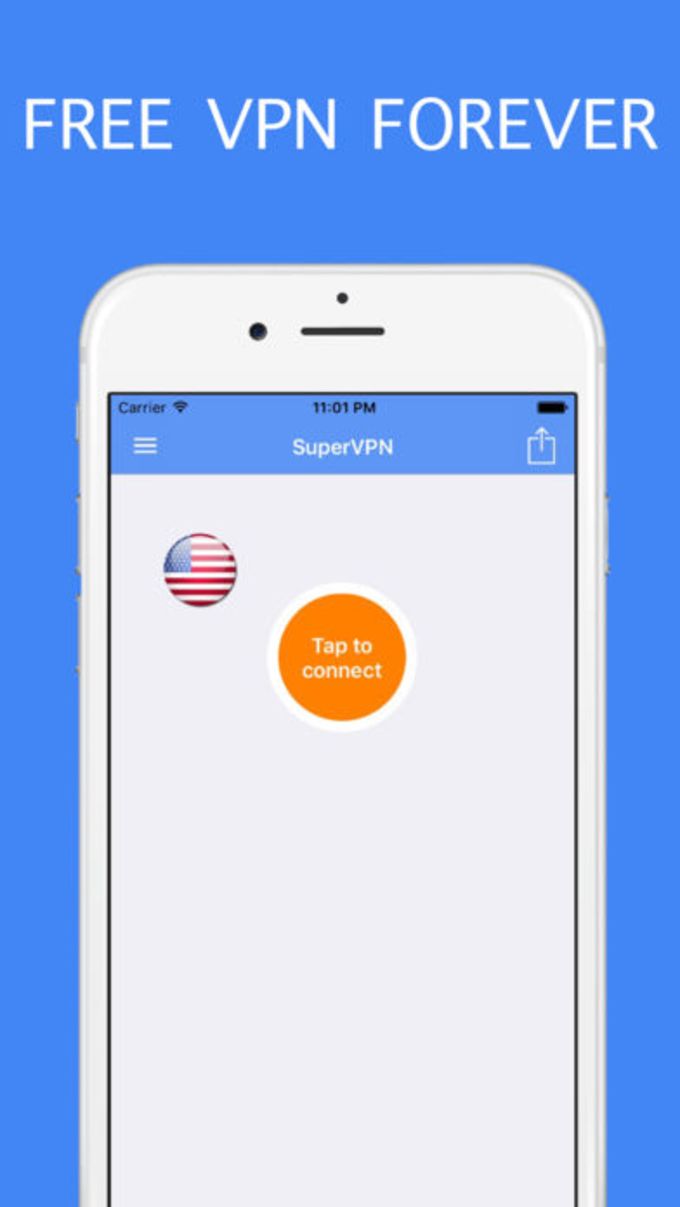
Setting up and using SuperVPN on your iPhone is extremely easy. The app has a simple and intuitive interface that allows you to connect to a server with just a few taps. Whether you are a beginner or an expert, you can easily navigate through the app and start protecting your privacy.
4. Connect to your favorite servers
SuperVPN offers a wide range of servers to choose from. You can connect to your favorite server to access content that may be blocked in your region or to enhance your browsing experience. The app allows you to connect to different servers around the world, giving you the ability to browse the internet as if you were in a different country.
5. Keep your identity hidden
SuperVPN ensures that your IP address is hidden when you are connected to the internet. This means that your online activities cannot be traced back to you, providing an extra level of privacy and security.
6. Try before you buy
If you’re unsure about purchasing the full version of SuperVPN, you can take advantage of the free trial period. This allows you to test out the app and its features before making a decision.
7. Stay updated with the latest features and improvements
SuperVPN is frequently updated to provide the best user experience and security. Make sure to update the app regularly to take advantage of the latest improvements and features.
8. Use SuperVPN on older iPhone models
SuperVPN is compatible with both older and newer iPhone models, ensuring that you can protect your privacy and security regardless of the device you have.
9. Split tunneling for easier browsing
SuperVPN offers split tunneling, which allows you to choose which apps or websites use the VPN service. This can make browsing faster and easier, as you can choose to use the VPN only for specific apps or websites that are blocked or need extra security.
10. Get support from the experts
If you have any questions or issues with SuperVPN, you can reach out to the support team for assistance. The experts behind SuperVPN are dedicated to providing the best customer experience and are always ready to help.
In conclusion, SuperVPN is the best free privacy and security proxy for iPhone. Whether you’re looking to protect your privacy, access blocked content, or enhance your browsing experience, SuperVPN has got you covered.
SuperVPN vs. other VPN apps for iPhone
1. Performance and Speed
When it comes to performance and speed, SuperVPN stands out among other VPN apps for iPhone. With its fast and reliable servers, you can enjoy a superior browsing experience and stream your favorite content without any interruptions.
Other VPN apps like NordVPN, HideMe, and Windscribe may offer similar features, but they often fall short when it comes to providing consistently fast speeds across different devices.
2. Security and Privacy
SuperVPN takes your online security and privacy seriously. It uses advanced encryption protocols to ensure that your data is safe and protected from any potential threats. The app also provides a secure tunneling setup that allows you to browse the internet privately and anonymously.
In comparison, other VPN apps like ProtonVPN, Yoga VPN, and X-VPN might provide decent security, but their limited server network and lack of additional security features can leave your device vulnerable to cyber attacks.
3. User-Friendly Interface
SuperVPN offers an easy-to-use interface that even beginners can navigate without any difficulty. With just a few simple steps, you can connect to your favorite VPN server and start surfing the web without any restrictions.
In contrast, other VPN apps like 360 VPN, Ooku VPN, and ZenMate VPN can be confusing to set up and use, often requiring a technical knowledge that not everyone possesses.
In summary, SuperVPN truly provides a compelling VPN experience for iPhone users. Whether you are looking for fast speeds, reliable security, or an easy-to-use interface, SuperVPN outshines other VPN apps in the market. So why settle for anything less when you can enjoy the best VPN service with SuperVPN? Try it now and experience the difference!
SuperVPN for iPad
If you’re looking for a reliable and secure VPN solution for your iPad, look no further than SuperVPN. With SuperVPN, you can browse the internet privately and securely, protecting your online privacy from prying eyes.
Unlike other VPN apps like Astrill or X-VPN, SuperVPN is specifically designed for iPad users. It is a simple and easy-to-use app that is perfect for anyone who wants to surf the web securely and anonymously. With SuperVPN, you don’t have to worry about your personal information being compromised or your online activities being tracked.
Setting up SuperVPN on your iPad is a breeze. Just follow a few simple steps to download and install the app from the App Store. Once you have it installed, you can connect to the wide network of servers available, allowing you to browse the internet from different locations.
One of the best features of SuperVPN is its ability to unblock blocked websites and apps. Whether you’re trying to access Instagram, watch videos on YouTube, or connect to your favorite social media platforms, SuperVPN has got you covered.
When it comes to privacy and security, SuperVPN is second to none. It uses the latest encryption technology to ensure that all your data is protected and kept private. SuperVPN also has a strict no-logs policy, which means that it doesn’t keep any records of your online activities.
SuperVPN is the recommended choice for iPad users who are looking for a fast, reliable, and secure VPN solution. Protect your privacy and browse the internet with peace of mind knowing that your personal information is safe from prying eyes.
With SuperVPN, you can connect to public Wi-Fi networks without worrying about your data being intercepted. Whether you’re at a coffee shop, airport, or hotel, SuperVPN will keep your connection secure and private.
In addition, SuperVPN offers a free trial for new users, so you can try it out before committing to a subscription. It also offers different subscription plans to suit your needs, whether you’re a casual internet user or a power user who needs unlimited bandwidth.
So if you’re an iPad user looking for the best VPN solution, look no further than SuperVPN. Download it today and start enjoying a safe and secure browsing experience.
Benefits of installing hideme VPN on iPhone
Enhanced Security: Installing hideme VPN on your iPhone provides an essential solution to protect your information and ensure the security of your browsing activities. With hideme VPN, you can browse the web wide and secure, safeguarding your personal data from sniffers and other third-party intruders. It is the bestline of defense against hackers and identity theft.
Privacy at its Best: With hideme VPN, you can surf the internet privately and anonymously. Your browsing history and personal information are kept private, ensuring that no one, not even your ISP or the government, can see what you are doing online. Whether you’re browsing on public Wi-Fi or at home, hideme VPN creates a secure and private tunnel for you to browse without any worries.
Access to Restricted Content: hideme VPN allows you to access content that may be blocked or restricted in your location. Whether it’s streaming your favourite series, accessing business-related apps, or keeping up with the latest downloads on Softonic, hideme VPN gives you the freedom to browse without limitations.
Easy and User-Friendly: hideme VPN is incredibly easy to setup and use on your iPhone. With just a few simple taps, you can connect to the VPN and start enjoying a fast and secure browsing experience. Its intuitive interface makes it the perfect option for users of all ages, from older family members who need a simple solution to tech-savvy friends who want to stay secure and surf the web with ease.
Split Tunneling Feature: With hideme VPN, you have the option to use split tunneling. This feature allows you to choose which apps or services use the VPN while allowing others to access the internet through your regular Wi-Fi connection. This is particularly useful when you want to browse specific content or use certain apps without going through the VPN.
Fastest VPN Speeds: hideme VPN offers one of the fastest VPN speeds on the planet. Whether you’re browsing, streaming, or downloading, you can experience a seamless and compelling online experience without any lagging or buffering. With hideme VPN, your internet connection is optimized to provide you with the best possible speed and performance.
Included Cross-Platform Support: hideme VPN is not limited to just the iPhone. It also supports other platforms such as iPad and even Mac and Windows computers. This means that you can enjoy the benefits of hideme VPN on all your devices, ensuring a consistent and secure browsing experience across your entire digital ecosystem.
Unlimited Data Usage: Unlike some other VPN services, hideme VPN offers unlimited data usage. You don’t have to worry about running out of data or being restricted in your browsing activities. With hideme VPN, you can browse, stream, download, and do whatever you want online without any limitations, all while keeping your data secure and private.
Compatibility with Leading VPN Protocols: hideme VPN is compatible with various VPN protocols, such as OpenVPN, IKEv2, and WireGuard. This ensures that you can choose the protocol that suits your needs best, whether you prioritize speed, security, or a combination of both. hideme VPN uses the latest encryption technology to keep your data safe and secure, making it a top choice for those seeking the best VPN experience.
Features of hideme VPN for iPhone
hideme VPN for iPhone provides a range of features that enhance your online privacy and security. With its user-friendly interface and affordable pricing, it’s the perfect choice for individuals and businesses alike.
1. Global Server Locations: hideme VPN offers a vast network of servers from around the world, allowing you to connect to different locations easily and experience a fast and reliable connection.
2. Secure Browsing: With hideme VPN, you don’t have to worry about your personal information being exposed. It encrypts your internet traffic, keeping your data safe and protected against hackers and other online threats.
3. Unblock Restricted Websites: Whether you need to access blocked websites or bypass internet censorship, hideme VPN has got you covered. You can browse any site you want, no matter where you are.
4. Fast and Reliable Connection: hideme VPN ensures a fast and stable connection, allowing you to browse the internet without any buffering or lagging. Say goodbye to slow loading times and enjoy a seamless online experience.
5. 24/7 Customer Support: If you ever need assistance, hideme VPN provides reliable customer support. Their team of experts is available round the clock to answer any questions or help you with any issues you may encounter.
6. No-Logs Policy: hideme VPN doesn’t keep any logs of your online activities, ensuring your privacy is protected. You can browse the internet without leaving a trace.
7. Easy Setup: Setting up hideme VPN on your iPhone is a simple and straightforward process. With just a few steps, you can secure your internet connection and start browsing privately.
8. Multiple Devices: hideme VPN allows you to connect multiple devices simultaneously, including iPhones, iPads, and other mobile devices. You can enjoy privacy and security across all your devices.
9. Money-Back Guarantee: If you’re not satisfied with hideme VPN, they offer a money-back guarantee. You can try their services risk-free and get a refund if it doesn’t meet your expectations.
10. Trusted Provider: hideme VPN is a trusted and reliable provider in the VPN market. With a large customer base and positive reviews, you can rely on their services for a secure and private online experience.
In conclusion, hideme VPN for iPhone is packed with essential features to keep your online activities private and secure. Its easy setup, fast connection, and reliable customer support make it the go-to choice for individuals and businesses alike. So why wait? Try hideme VPN today and enjoy the benefits it has to offer.
How to download hideme VPN for iPhone
If you are looking for a trusted VPN service to protect your privacy and security while browsing on your iPhone, then hideme VPN is a great option. This VPN app will encrypts your internet connection and allows you to access blocked content or browse the web anonymously.
To download and set up hideme VPN on your iPhone, follow these simple steps:
- Visit the App Store on your iPhone.
- Search for “hideme VPN” in the search bar.
- Tap on the hideme VPN app from the search results.
- Tap on the “Get” button to download and install the app.
- Once the app is installed, open it and tap on the “Connect” button to connect to a VPN server.
- You can also choose your desired location by tapping on the “Server” button and selecting from a wide range of server locations.
- hideme VPN will now encrypt your internet connection and hide your IP address, ensuring your online activities are private and secure.
- You can now browse the web with complete anonymity and access geo-restricted content from anywhere in the world.
hideme VPN offers a full range of features, including ad-blocking and split tunneling, to enhance your browsing experience and protect your privacy. With their strongVPN protocols, you can be confident that your data is safe from hackers and third-party intrusion.
Whether you are using an older iPhone or the latest iPhone models, hideme VPN is compatible with all iPhone and iPad devices. They also offer affordable pricing plans that suit various needs and budgets.
In summary, hideme VPN is a top-rated VPN service that will protect your privacy, encrypt your internet connection, and allow you to access restricted content. Download and set up hideme VPN to experience the best free privacy and security proxy for your iPhone.
How to Install HideMe VPN on iPhone
If you’re an iPhone or iPad user looking for a reliable VPN service, HideMe VPN is one of the best options available. With its easy installation process and top-notch security features, HideMe VPN ensures that your browsing activities are safeguarded against any potential threats.
To install HideMe VPN on your iPhone, simply follow these easy steps:
- Go to the App Store on your iPhone and search for “HideMe VPN”.
- Click on the HideMe VPN app from the search results.
- Tap the “Get” button to download and install the app on your device.
- Once the installation process is complete, open the HideMe VPN app.
- At the first launch, you will be asked to grant permission to the app to add a VPN configuration to your device. Tap “Allow” to proceed.
- Next, you will be prompted to create a HideMe VPN account. Enter your email address and create a password to sign up.
- After signing up, you will be presented with a list of available servers to connect to. Choose the server location that suits your needs, whether it’s for accessing restricted content or ensuring faster browsing.
- Once connected, HideMe VPN encrypts your internet connection, ensuring that your online activities and personal data are protected from prying eyes.
With HideMe VPN, you can now browse the internet with peace of mind, knowing that your privacy is being safeguarded. Whether you’re using public Wi-Fi or your own hotspot, HideMe VPN’s built-in security features will keep you protected against any potential threats.
If you have any further questions about HideMe VPN or need assistance with its installation process, the HideMe VPN support team is always there to help. You can reach out to them through their website or refer to the frequently asked questions section for more information.
So why wait? Install HideMe VPN on your iPhone today and experience the freedom to surf the web securely and anonymously.
How to set up hideme VPN on iPhone
Step 1: Download the hideme VPN app
To set up the hideme VPN on your iPhone, start by downloading the official app from the App Store. The app is available for free and can be downloaded easily.
Step 2: Install and open the app
Once the app is downloaded, locate the app icon on your home screen and tap on it to open it. The app will guide you through the setup process and provide all the necessary instructions.
Step 3: Sign up or log in
If you are a new user, you will need to create an account by signing up with your email address and creating a password. If you already have an account, simply log in using your existing credentials.
Step 4: Choose a server
After logging in, you will be presented with a list of server locations to choose from. Select the server location you wish to connect to. hideme VPN offers a wide range of servers from all around the world, so you can choose the one that suits your needs the best.
Step 5: Connect to the VPN
Once you have selected the server, simply tap on the “Connect” button to establish a VPN connection. The app will take a few moments to connect and will notify you when the connection is established.
Step 6: Enjoy a secure and private internet experience
Once connected, you can now browse the internet, access blocked content, and protect your privacy with hideme VPN on your iPhone. Enjoy fast and secure browsing without any restrictions!
In summary, setting up hideme VPN on your iPhone is a simple and straightforward process. Just download the app, install it, sign up or log in, choose a server, and connect. With hideme VPN, you can enjoy a trusted and top-rated VPN service on your iPhone, ensuring a fast and secure internet experience.
Troubleshooting Tips for hideme VPN on iPhone
1. Check your network connection
If you’re experiencing issues with hideme VPN on your iPhone, the first step is to ensure that your network connection is stable and reliable. If your internet connection goes down or becomes weak, it can interfere with the VPN’s functionality. Try connecting to different Wi-Fi networks or switching to your mobile data to see if the problem persists.
2. Renew or purchase a subscription
If you’re using the free version of hideme VPN, it’s important to note that it may have limitations in terms of speed and available server locations. To unlock the full features and capabilities of the VPN, consider purchasing a subscription or renewing your existing one. This will provide you with access to a wider range of server locations and faster speeds.
3. Clear cache and app data
Sometimes, accumulated data and cache can cause issues with VPN apps. To fix this, try clearing the cache and app data for hideme VPN on your iPhone. Go to the Settings app, find hideme VPN in the list of installed apps, and select “Clear Cache” and “Clear Data”. This will reset the app and may resolve any underlying problems.
4. Update to the latest version
Keeping your hideme VPN app updated is essential for optimal performance and security. Make sure you have the latest version of the app installed on your iPhone by checking for updates in the App Store. Developers often release updates to address bugs, improve compatibility with iOS, and enhance overall functionality.
5. Contact customer support
If you’ve tried the above troubleshooting steps and are still experiencing issues with hideme VPN, don’t hesitate to contact their customer support. They have dedicated teams that can assist you with any technical problems, answer your questions, or provide further guidance on how to resolve specific issues you may be facing.
Frequently asked questions about hideme VPN on iPhone
1. How do I setup hideme VPN on my iPhone?
Setting up hideme VPN on iPhone is simple. You can install the app from the App Store and follow the instructions to configure it on your device. Once installed, you can easily connect to the VPN server and start browsing securely.
2. Can I use hideme VPN on multiple devices?
Yes, hideme VPN allows you to use the service on multiple devices. Whether it’s your iPhone, iPad, or other devices, you can connect to the VPN server and enjoy the privacy and security it provides.
3. Can I use hideme VPN on public Wi-Fi networks?
Absolutely! With hideme VPN, you can securely connect to any public Wi-Fi networks without worrying about your information getting intercepted by hackers or sniffers. Your data is encrypted and protected, giving you peace of mind while browsing on the go.
4. Is hideme VPN the best solution for accessing geo-restricted content?
While hideme VPN is a highly trusted and secure VPN client, the best solution for accessing geo-restricted content such as Netflix’s video is subjective. There are other VPN providers like ExpressVPN, X-VPN, ProtonVPN, and BlufVPN that also offer reliable and secure access to such content. It’s recommended to try different VPNs and see which one works best for your specific needs.
5. Does hideme VPN keep any logs?
No, hideme VPN has a strict no-logs policy. This means that they do not store any information about your online activities. Your privacy and anonymity are their top priorities, giving you the freedom to browse the internet without any worries.
6. What is the money-back guarantee for hideme VPN?
Hideme VPN offers a 30-day money-back guarantee. If you are not satisfied with the service within the first 30 days, you can request a refund and get your money back.
7. Can I use hideme VPN on older iOS devices?
Yes, hideme VPN is compatible with older iOS devices. Whether you have the latest iPhone or an older model, you can still enjoy the benefits of hideme VPN and keep your online activities secure.
8. How can I subscribe and turn on automatic updates for hideme VPN?
To subscribe to hideme VPN and turn on automatic updates, simply visit the App Store and search for “hideme VPN.” Download and install the app, then go to the Settings on your iPhone and enable automatic updates for the app. This way, you will always stay up to date with the latest features and security enhancements.
FAQ:
What is SuperVPN? Is it really the best free privacy and security proxy for iPhone?
SuperVPN is a virtual private network (VPN) service that allows users to securely browse the internet and protect their privacy. It is one of the many VPN options available for iPhone users. While some people may consider it the best free privacy and security proxy for iPhone, it ultimately depends on individual preferences and needs. There are other VPN services that offer similar features and may be better suited for certain users.
How does SuperVPN ensure privacy and security on iPhone?
SuperVPN creates a secure and encrypted connection between the user’s iPhone and the internet, making it difficult for third parties to intercept or access their online activities. It masks the user’s IP address, making it more difficult for websites and services to track their location or identity. Additionally, SuperVPN prevents ISPs and other organizations from monitoring or controlling the user’s internet connection. Overall, it provides an extra layer of privacy and security for iPhone users.
Can I use SuperVPN for streaming and accessing geo-restricted content on my iPhone?
Yes, SuperVPN can be used for streaming and accessing geo-restricted content on iPhone. By connecting to a VPN server located in a different country, users can bypass geographic restrictions and access content that is normally unavailable in their region. However, it’s worth noting that some streaming services and websites may actively block VPN connections, so it may not always be possible to access certain content.
Is SuperVPN really free to use on iPhone?
Yes, SuperVPN is available as a free service for iPhone users. However, the free version of SuperVPN may have certain limitations compared to the paid version. For example, there may be restrictions on data usage, slower connection speeds, or limited server locations. Users can choose to upgrade to a paid subscription to unlock additional features and access to a wider range of server locations.
Is it safe to use SuperVPN for iPhone? Can my data be compromised?
While SuperVPN aims to provide security and privacy for iPhone users, it’s important to note that no VPN service is completely foolproof. The security of a VPN largely depends on the provider’s implementation and the measures they have in place to protect user data. It’s recommended to choose a reputable VPN provider that has a strong track record in privacy and security. It’s also advisable to avoid transmitting sensitive or confidential information over a VPN connection, as it can never be guaranteed to be 100% secure.
Videos:
Best FREE VPN 2023 | (Without paying ANYTHING) 😎
Best FREE VPN 2023 | (Without paying ANYTHING) 😎 by VPN Gratis org 🛡️ 5 months ago 6 minutes, 36 seconds 92,690 views
How to Use Super VPN App | Best Free VPN | Super VPN Facebook
How to Use Super VPN App | Best Free VPN | Super VPN Facebook by H&S Academy 2 years ago 2 minutes, 59 seconds 65,017 views
