
Aloha Browser – Donate, VR Player, Private Mode, Media Player, Apk VPN, Music and Video Downloads – Download Now
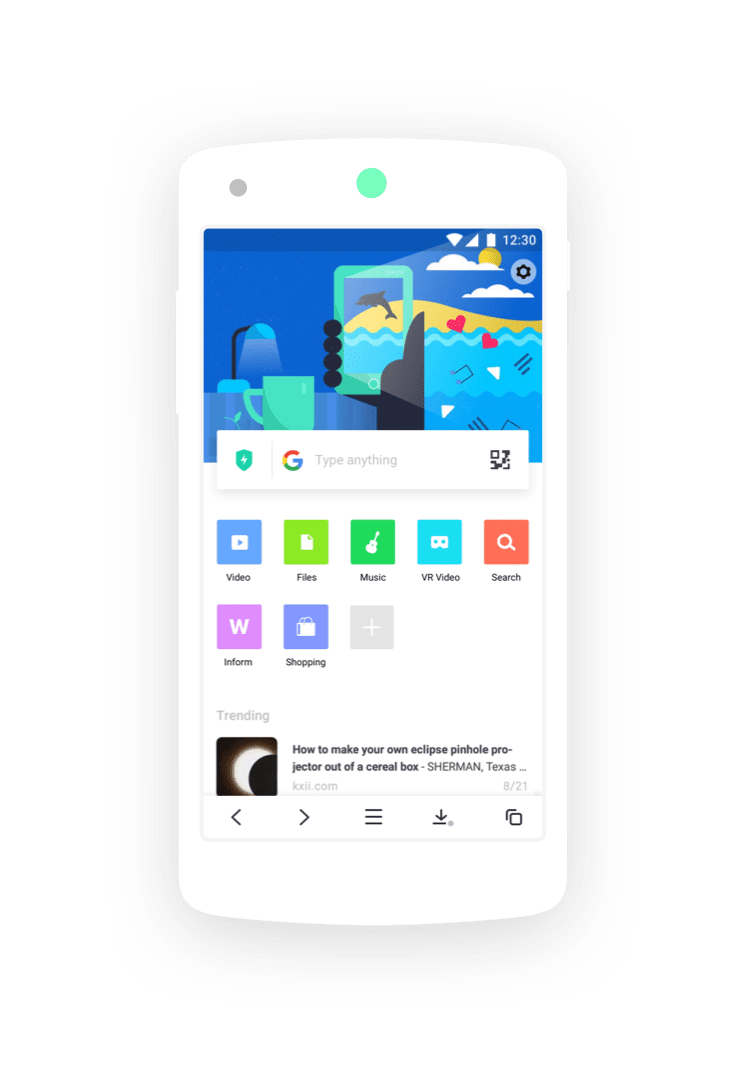
Aloha Browser is a powerful and versatile app that offers a wide range of features for browsing the internet, managing your media, and protecting your privacy. With a user-friendly interface and robust functionality, this app is a must-have for anyone looking for a reliable and comprehensive internet browsing experience.
One of the standout features of Aloha Browser is its ability to control your internet connection and manage data downloads. Whether you’re browsing the web or streaming videos, this app allows you to easily monitor and control your data usage, ensuring that you stay within your limits and avoid any unexpected charges.
In addition to its advanced network management capabilities, Aloha Browser also offers a private mode that allows you to browse the internet anonymously. This feature encrypts your internet traffic and hides your online activity from prying eyes, providing you with a secure and private browsing experience.
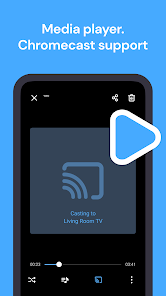
Furthermore, Aloha Browser includes a built-in media player that supports a wide range of audio and video formats. This allows you to easily play your favorite music and videos directly from the browser, without the need for any additional apps or software.
With its integrated VPN, Aloha Browser also ensures that your internet connection is secure and private. This feature encrypts your internet traffic and routes it through a secure server, protecting your data from hackers and other malicious actors. Whether you’re connected to Wi-Fi or using a mobile network, you can browse the internet with peace of mind, knowing that your personal information is safe.
In conclusion, Aloha Browser is a feature-rich and powerful app that offers a wide range of tools and services to enhance your internet browsing experience. Whether you’re looking to browse the web, stream media, or protect your privacy, this app has you covered. So don’t wait, download Aloha Browser now and start enjoying a faster, safer, and more secure internet experience!
About Us
Welcome to the official page of Aloha Browser! We are a team of developers dedicated to providing you with a fast, secure, and private browsing experience on your Android device.
Our Mission
Our mission is to create a browser that not only allows you to access the internet, but also protects your privacy and provides you with additional features and functionalities.
What We Offer
Aloha Browser offers a wide range of features and services to enhance your browsing experience. This includes a built-in media player for playing videos and music, a private mode for browsing without leaving any traces, and the ability to download media files for offline viewing. You can also control your downloads, manage your contacts, and even donate to support us.
Privacy and Security
We understand the importance of privacy and security in today’s digital age. That’s why we have incorporated features like a VPN to protect your data and identity while browsing, as well as fingerprint control to secure access to the browser. With our browser, you can have peace of mind knowing that your personal information is safe.
Constant Improvement
We are constantly working on improving our browser and adding new features based on user feedback. Our team is dedicated to enhancing the performance and functionality of the app, as well as ensuring compatibility with the latest Android devices and operating systems. By staying up-to-date with the latest trends and technologies, we strive to provide you with the best browsing experience.
Get in Touch
If you have any questions, suggestions, or feedback about our browser, we would love to hear from you. You can contact us through our website or reach out to us through our social media platforms. Your input is valuable to us and helps us in our ongoing efforts to improve our services.
Who we are
We are the creators of Aloha Browser, an Android application that provides a private and secure internet browsing experience. With over 5 million downloads from the Google Play Store, our app has gained popularity for its unique features and user-friendly interface.
Our team has put in extensive effort to develop an application that caters to the needs of all users. Whether you’re concerned about your privacy, want to have control over your browsing experience, or need a reliable media player, Aloha Browser has got you covered.
One of the standout features of our app is the Private Mode, which allows users to browse the internet without leaving any traces on their devices. Aloha Browser also allows users to download music and videos directly to their devices for offline access.
Our app supports VR (virtual reality) content, allowing users to enjoy immersive experiences with a compatible VR player. Additionally, Aloha Browser provides VPN functionality, giving users the ability to browse anonymously and access geo-restricted content.
We understand the importance of security and have implemented features such as fingerprint and passcode lock to ensure the privacy of our users. Our app supports both x86_64 and ARM64-v8a processors, making it compatible with a wide range of devices.
In terms of connectivity, Aloha Browser supports Wi-Fi and cellular networks, allowing users to browse the internet wherever they are. Our app also has the ability to control notifications and vibration signals, providing a personalized browsing experience.
As a team, we are dedicated to continuously improving the functionality and performance of Aloha Browser. We regularly release updates and new versions, incorporating user feedback and addressing any bugs or issues.
We are grateful for the support and donations we have received from our users. These contributions have allowed us to further enhance the app’s features and provide a better overall user experience.
In conclusion, Aloha Browser is a versatile and user-friendly application that offers a secure and customizable browsing experience. Whether you want to browse privately, download media, or enjoy VR content, our app has the features to meet your needs.
Contacts
Contacts in the Aloha Browser – Donate, VR Player, Private Mode, Media Player, Apk VPN, Music and Video Downloads – Download Now app allow you to manage and control your contact information in a secure and private manner. You can access your contacts from the initial screen of the app, where you will find a list of all your connected contacts.
When connected to the internet, the app ensures that your contact data is encrypted and anonymized to protect your privacy. You can add, edit, and delete contacts as needed, giving you full control over your contact list. The app also supports importing contact data from other sources, such as APK files or from your device’s storage.
In addition to providing a secure and private environment for managing your contacts, the Aloha Browser – Donate, VR Player, Private Mode, Media Player, Apk VPN, Music and Video Downloads – Download Now app offers a variety of features and protocols to further enhance your experience. For example, you can allow the app to read other information from your device, such as your location, to provide tailored suggestions and recommendations.
The app also supports different versions, including arm64-v8a, x86_64, and armeabi-v7a, to ensure compatibility with various device architectures. Whether you are a beta tester or using the stable version, you can enjoy the full functionality of the app. The built-in VPN and media player allow you to access and enjoy video and music downloads from the internet, while the private mode ensures that your browsing activities remain confidential.
Overall, the contacts feature in the Aloha Browser – Donate, VR Player, Private Mode, Media Player, Apk VPN, Music and Video Downloads – Download Now app provides a secure and convenient way to manage your contact information. Whether you want to make changes to your existing contacts or import new ones, the app has you covered. Stay connected and in control with the Aloha Browser.
Aloha Browser – Download Now
Are you looking for a reliable browser with advanced features? Look no further – Aloha Browser is the perfect solution for you. With its private mode, media player, and video downloader, this browser offers various functions to enhance your internet experience.
One of the standout features of Aloha Browser is its built-in VPN service. With this functionality, you can access the internet securely and anonymously, preventing any unauthorized access to your data. Whether you want to browse the web, stream videos, or download files, Aloha Browser has got you covered.
When you download Aloha Browser, you gain access to an unlimited number of contacts, bookmarks, and downloads. You can also control and manage your Wi-Fi connections, allowing you to stay connected wherever you go. Additionally, with its x86_64 version, Aloha Browser is compatible with a wide range of devices.
The Aloha Browser also offers a VR player, allowing you to enjoy immersive 360-degree videos. It supports various video formats and allows you to easily switch between different viewing modes. Whether you want to watch videos in standard or VR mode, Aloha Browser can cater to your needs.
Another great feature of Aloha Browser is its ability to read data from external storage, such as SD cards or USB drives. This means you can access and play media files directly from your storage device without the need to transfer them to your device’s internal memory.
If you become a beta tester for Aloha Browser, you will get early access to new features and updates. This allows you to test the latest version of the browser and provide valuable feedback to the developers. Your input can help shape the future development of Aloha Browser.
In conclusion, Aloha Browser is a powerful internet browser that offers a wide range of features and functionality. From its private mode and media player to its VPN service and video downloader, Aloha Browser has everything you need for a great internet experience. So why wait? Download Aloha Browser now and start enjoying its amazing features.
Versions
The Aloha Browser – Donate, VR Player, Private Mode, Media Player, Apk VPN, Music and Video Downloads – Download Now offers different versions to cater to various user preferences and needs.
Main Version
The main version of the Aloha Browser is the standard package that includes all the essential features for a seamless browsing experience. It allows users to browse the internet, download music and videos, and use the VR player for immersive content viewing. This version also comes with private mode, which ensures privacy and prevents the collection of user data.
Tester Version
For those who want to be at the forefront of the latest developments, the tester version is available. This version showcases new features and enhancements that are still being tested. By using the tester version, users can provide valuable feedback to improve the browser’s functionality and overall performance.
Apk VPN Version
The Apk VPN version of the Aloha Browser allows users to access the internet securely and anonymously by using virtual private network (VPN) protocols. With this version, users can prevent their personal data from being intercepted and protect their online activities from prying eyes. It also enables users to bypass geographical restrictions and access blocked websites or content.
CalyxVPN Version
The CalyxVPN version of the Aloha Browser offers enhanced security and privacy features by integrating the CalyxVPN service. By using this version, users can encrypt their network traffic and ensure that their online activities remain confidential. It also provides an additional layer of protection from potential threats and allows for safe browsing across all devices.
In conclusion, the different versions of the Aloha Browser cater to the diverse needs and preferences of its users. Whether you’re looking for a standard browsing experience, advanced security features, or access to VR content, there is a version that will suit your requirements. The continuous updates and improvements made to the browser ensure its optimal performance and provide users with a seamless and efficient web browsing experience.
Aloha Browser – Donate
The Aloha Browser is a feature-rich web browser for Android devices, offering a variety of functions to enhance your online experience. One of its standout features is the ability to donate to support the developers and contribute to the ongoing development of the app.
Whether you want to support the creators of the Aloha Browser or simply show your appreciation for their work, the donation feature allows you to contribute securely and easily. It provides a convenient way to give back and ensure the continued improvement of the app.
In addition to donating, the Aloha Browser offers a range of other features to enhance your browsing experience. It includes a built-in VPN to keep your internet connection secure and anonymous, allowing you to browse the web privately and access regionally restricted content. The app supports multiple downloads, allowing you to easily save and manage files from the internet.
The Aloha Browser also features a media player for playing music and videos directly within the app. It supports various media formats and offers a seamless playback experience. With the VR player, you can even enjoy virtual reality content right from your device.
With its intuitive interface and user-friendly design, the Aloha Browser makes it easy to navigate the internet and control your online activities. It includes features such as bookmarks, history, and tabs to help you organize and revisit your favorite websites. The app is compatible with a wide range of devices and is available for download on various platforms.
You can personalize your browsing experience by customizing the appearance and functionality of the Aloha Browser. It allows you to adjust settings, enable or disable certain features, and choose your preferred search engine. The app also supports various add-ons and extensions to further enhance its capabilities and meet your specific needs.
In conclusion, the Aloha Browser is a comprehensive web browsing solution that offers not only a great browsing experience but also the option to support its creators through donations. With its wide range of features and user-friendly interface, it is an excellent choice for anyone looking for a versatile and reliable browser.
Become Beta Tester
If you are interested in testing out the latest features and improvements of the Aloha Browser – Donate, VR Player, Private Mode, Media Player, Apk VPN, Music and Video Downloads, you can become a beta tester. As a beta tester, you will have access to the newest version of the app before it is released to the general public.
To become a beta tester, you need to join the beta testing program. This can be done by signing up on the official website of the Aloha Browser. Once you are a beta tester, you will receive regular updates with the latest beta version of the app.
As a beta tester, you will be able to test out various new features and enhancements. You can provide feedback and report any issues or bugs that you encounter during your testing. Your feedback will help the developers improve the app and make it more stable and reliable.
By becoming a beta tester, you will also have the opportunity to explore and use different protocols for network connectivity. You can test both Wi-Fi and cellular data connections, and even create virtual private networks (VPNs) to ensure anonymous and secure internet access.
In addition, as a beta tester, you can also control and manage the app’s settings and permissions. You can allow or deny access to various network protocols and control the behavior of the app in different network environments. This will give you more control and customization options for your browsing experience.
Overall, becoming a beta tester for the Aloha Browser allows you to actively contribute to the development of the app and be part of its evolution. You will have the opportunity to try out new features, provide valuable feedback, and help shape the future of the app.
Aloha Browser – VR Player
Aloha Browser is a versatile web browser that offers a wide range of features, including a VR player. With the VR player, users can enjoy immersive virtual reality experiences right from their Android devices. Whether you want to watch VR videos or explore VR content, Aloha Browser has got you covered.
The VR player in Aloha Browser supports both 360-degree and 3D videos, providing a truly immersive viewing experience. It allows you to control the playback and navigate through the VR content easily. Additionally, you can adjust the resolution and prevent buffering issues for a smooth VR experience.
With Aloha Browser’s VR player, you can also download VR videos for offline viewing. The browser’s built-in download manager allows you to save videos directly to your device’s storage or an external storage device. This feature is especially useful for users who want to enjoy VR content without an active internet connection.
In addition to the VR player, Aloha Browser offers other powerful features. It has a private mode that lets you browse the internet without leaving any trace of your online activities. You can also enable VPN services to protect your privacy and encrypt your internet traffic. The browser supports various network connections, including Wi-Fi and mobile data, so you can access the internet from anywhere.
Aloha Browser is available in both free and premium versions. The premium version, called Aloha Browser+, unlocks additional features such as ad-blocking, unlimited downloads, and faster browsing speed. If you want to support the development of Aloha Browser, you can donate to the developers through the app.
If you are looking for a feature-rich browser with a VR player, Aloha Browser is the perfect choice. Its user-friendly interface and extensive features make it a top pick for both casual and advanced users. Download Aloha Browser now and experience the best of VR and browsing in one app!
Private mode
The Aloha Browser provides a private mode that allows you to have secure and anonymous access to the internet. In this mode, your online activities are not recorded, and your personal information remains protected.
When you enable private mode, the browser becomes your secure vault – it does not store any data about the websites you visit, the videos you watch, or the files you download. This ensures that your browsing history, media files, and contacts remain confidential.
Aloha Browser’s private mode features a built-in VPN that encrypts your internet connection and masks your IP address, providing an extra layer of security. With this feature, you can browse the internet without worrying about your privacy being compromised.
In private mode, you can also use the VR Player function to enjoy immersive virtual reality experiences. This allows you to watch videos and explore virtual environments without leaving traces on your device.
Whether you want to donate to a good cause, test new features as a beta tester, or simply enjoy a faster and more secure browsing experience, Aloha Browser’s private mode is the perfect solution. You can also choose to support the development of the browser by making a donation to the Calyx Institute, which is committed to advancing privacy and preserving the freedom of the internet.
Furthermore, private mode does not require any additional permissions or access to your device’s storage. It only requires network access to function properly, making it a lightweight and efficient option for private browsing.
Aloha Browser – Media Player
The Aloha Browser is a versatile web browser that offers a wide range of features, including a powerful media player. With this browser, you can easily play various forms of media content directly from the internet or your local downloads.
The media player in Aloha Browser is designed to provide a seamless and efficient playback experience. It supports a variety of file formats, such as video, audio, and even virtual reality (VR) content. Whether you want to watch your favorite videos or listen to music, the media player has got you covered.
In addition to its playback capabilities, the media player in Aloha Browser also features a private mode. This allows you to prevent your browsing history and fingerprints from being recorded or tracked while enjoying your media content. This privacy feature ensures that your online activities remain secure and anonymous.
Aloha Browser also supports downloading media files from the internet. Whether it’s a video, audio file, or any other downloadable content, you can easily save them to your device for offline access. This feature is especially handy when you’re in an area with limited internet connectivity or if you want to save data while enjoying your favorite media.
Furthermore, Aloha Browser offers a unique donation feature. By choosing to donate, you can support the development and maintenance of the browser, ensuring that it continues to provide a high-quality browsing experience. Your contribution will go towards improving the browser’s performance, adding new features, and fixing any bugs or issues.
To enhance the overall user experience, Aloha Browser supports different versions for various devices and platforms. Whether you’re using Android, iOS, or even a Windows computer, there’s a version of the browser for you. The browser is compatible with both x86_64 and ARM devices, ensuring that it can be run on a wide range of hardware.
Whether you’re a casual user or a power user, Aloha Browser’s media player is a fantastic tool for your browsing needs. With its impressive range of features, such as VR support, private mode, and easy media downloads, the browser offers a complete and convenient media playback experience.
Versions
The Aloha Browser – Donate, VR Player, Private Mode, Media Player, Apk VPN, Music and Video Downloads – Download Now app offers different versions to cater to different user needs.
Main Versions
There are two main versions of the app:
- Aloha Browser Free: This version is available for free and is suited for general internet browsing and media playback. Users can anonymously browse the internet, download music and videos, and use private mode to protect their online activities.
- Aloha Browser Premium: This version is a paid version of the app and offers additional features such as VR player and unlimited VPN. Users can also use the server in different countries and connect to the internet through a private and secure network.
Additional Versions
Besides the main versions, there are also other versions available:
- Aloha Browser Beta: This version is for users who want to try out the latest features and improvements before they are officially released. Users can provide feedback and help in the development of the app.
- Aloha Browser x86_64: This version is specifically optimized for devices that use the x86_64 architecture. It ensures better performance and compatibility on these devices.
Features in Different Versions
Each version of the app provides different features and capabilities. Some of the key features added over time include:
- Support for different protocols and network connections
- Ability to read and write data in the app’s private storage
- Enhanced media player for better video playback
- Compatibility with different device architectures such as arm64-v8a and armeabi-v7a
- Option to become a CalyxVPN supporter and enjoy unlimited browsing
The version you choose depends on your specific requirements and preferences. Whether you want a free browsing experience or are looking for advanced features like VR player and VPN, there is a version of the Aloha Browser app that suits your needs.
Aloha Browser – Apk VPN
Aloha Browser is an Android application that provides a secure and private internet browsing experience. With its Apk VPN feature, you can control your online privacy and access websites and content that may be restricted in your region.
The Apk VPN version of Aloha Browser allows you to browse the internet anonymously and securely. It encrypts your data and provides you with a new IP address, making it difficult for anyone to track your online activities.
In addition, Aloha Browser Apk VPN offers faster connection speeds, ensuring a smooth and uninterrupted browsing experience. You can also choose from various server locations to optimize your connection.
With Aloha Browser’s Apk VPN, you can also enjoy unrestricted access to downloads. Whether it’s music, videos, or any other files, you can easily download them without any limitations. This feature is especially useful for downloading large files or streaming media content.
Moreover, Aloha Browser’s Apk VPN allows you to become a beta tester, giving you access to the latest features and improvements before they are released to the general public. This way, you can stay up-to-date with the newest version of the app and provide valuable feedback to the developers.
In summary, with Aloha Browser’s Apk VPN, you can have complete control over your internet browsing experience. You can browse the web privately and anonymously, enjoy fast connection speeds, access unrestricted downloads, and even become a beta tester for the latest version of the app. Download Aloha Browser now and experience the benefits for yourself!
Music and Video Downloads
Aloha Browser offers the ability to download music and videos directly to your Android device. With its advanced features and user-friendly interface, it has become a popular choice for those who want to have control over their media content.
Downloading media is easy with Aloha Browser. Whether you want to download a single song or an entire playlist, you can do it with just a few taps. Simply navigate to the desired music or video file and tap the download button. You can choose to save the files to your device’s internal storage or an external SD card.
Multiple versions of Aloha Browser are available to cater to different devices and Android versions. Whether you have a device that uses the arm64-v8a or armeabi-v7a architecture, there is a version of the browser that is compatible with your device.
Preventing accidental deletion of downloaded media is important. Aloha Browser understands this and provides an option to lock downloaded files. This prevents them from being deleted, even if you are organizing or deleting other files on your device.
Private mode is a feature that allows you to browse and download media without leaving any traces. Your browsing history, downloaded files, and other sensitive information are kept private and secure.
Manage your media easily with Aloha Browser. You can create playlists, organize your music and videos, and even edit metadata such as artist name, album, and genre. This ensures that your media library remains organized and easy to navigate.
Efficient network connections are crucial for smooth media downloads. Aloha Browser is designed to optimize network connections and provide fast download speeds. It intelligently manages your Wi-Fi and cellular data connections to ensure a seamless downloading experience.
Aloha VPN is integrated within the browser, providing enhanced security and privacy during media downloads. It encrypts your internet traffic, preventing hackers or other unauthorized individuals from intercepting your data.
Become a beta tester to get early access to new features and improvements. As a beta tester, you can provide valuable feedback to the developers and help shape the future of Aloha Browser.
Overall, Aloha Browser provides a comprehensive solution for music and video downloads on Android devices. Its user-friendly interface, advanced features, and efficient network connections make it an ideal choice for those who want to enjoy their media offline.
Aloha Browser – Music and Video Downloads
With Aloha Browser, you can easily download your favorite music and videos directly to your Android device. Whether you want to enjoy them offline or share with friends, Aloha Browser provides a convenient and efficient way to access and manage your media files.
The browser supports various versions of Android, including armeabi-v7a, arm64-v8a, x86, and x86_64. This ensures compatibility with different devices and allows you to take full advantage of its features and functionality.
In addition to its downloading capabilities, Aloha Browser also offers a private mode for secure browsing and a built-in VPN client for enhanced privacy and security while accessing the internet. You can quickly switch between different modes and take control over your online activities.
Aloha Browser also includes a media player that supports various formats, allowing you to easily play your downloaded music and videos within the app itself. This eliminates the need for additional media player applications and provides a seamless and integrated experience.
To further enhance the user experience, Aloha Browser supports features such as background downloads, download resuming, and the ability to download files to external storage. These features ensure uninterrupted downloads and provide flexibility in managing your media files.
For those who want more control over their downloads, Aloha Browser allows for the management and organization of downloaded files. You can easily delete files, change their locations, or even create playlists for a personalized music and video experience.
With its fast performance and efficient network utilization, Aloha Browser ensures speedy downloads and smooth playback of media files. You can enjoy high-quality music and videos without any lag or buffering, providing an optimal entertainment experience.
In conclusion, Aloha Browser is a versatile and feature-rich app that allows you to easily download and manage your favorite music and videos. Its compatibility with different Android versions, inclusion of private mode and VPN, and functionality for organizing and playing media make it a must-have for any mobile device.
Download now
Looking for a reliable and feature-packed browsing experience? Look no further than the Aloha Browser – Download Now app. This app offers a wide range of functionalities and features that enhance your internet browsing. Whether you want to access blocked websites, download videos, or browse privately, the Aloha Browser has got you covered.
The Aloha Browser – Download Now app has a user-friendly interface and is compatible with both Android and iOS operating systems. The app allows you to take full control of your internet connection, as it supports various protocols and ensures secure and encrypted connections.
One of the standout features of this app is the built-in VR Player, which allows you to watch virtual reality videos without the need to download an additional player. The app also offers a private mode, where your browsing history and cookies are not stored, ensuring your privacy is protected.
With the Aloha Browser – Download Now app, you can easily download videos and music from various websites and services. You can even download streaming videos, allowing you to watch them offline at your convenience. The app also supports background downloads, so you can continue using your device without interruptions.
The app’s VPN service provides an extra layer of security by encrypting your internet connection and hiding your IP address. This is especially useful when accessing public Wi-Fi networks or when you want to browse anonymously. The VPN service also allows you to bypass geographical restrictions for accessing certain websites or services.
In addition to its browsing and downloading capabilities, the Aloha Browser – Download Now app also offers other useful features. You can easily manage and organize your downloads, sort them by file type or date, and even schedule automatic downloads.
Overall, the Aloha Browser – Download Now app is a powerful and versatile tool that provides a seamless browsing experience. Whether you want to browse the internet, download videos, or enhance your privacy and security, this app has everything you need. Download now and unlock the full potential of your internet connection.
FAQ:
Is Aloha Browser available for download on Android?
Yes, Aloha Browser is available for download on Android. You can find it on the Google Play Store.
What features does Aloha Browser have?
Aloha Browser has several features including a private mode, VR player, media player, music and video downloads, and an APK VPN.
How does the private mode in Aloha Browser work?
The private mode in Aloha Browser works by not storing any browsing history, cookies, or cached files. It ensures your privacy by not leaving any traces of your browsing activity on your device.
Can I download music and videos using Aloha Browser?
Yes, you can download music and videos using Aloha Browser. It provides a built-in downloader that allows you to easily download media files from various websites.
Is Aloha Browser free to use?
Yes, Aloha Browser is free to use. However, there are some additional features and functionalities that can be unlocked through in-app purchases.
Can I use Aloha Browser on my iPhone?
Yes, Aloha Browser is available for download on iPhone. You can find it on the App Store.
Videos:
The best vr app for ios
The best vr app for ios by Phone Hackers 6 years ago 3 minutes, 43 seconds 49,134 views
Aloha Browser + Private VPN – App Review
Aloha Browser + Private VPN – App Review by Critique Corner Review 2 months ago 4 minutes, 1 second 19 views
Best Browser For Android 2023 | Aloha Browser Include Vpn For Android
Best Browser For Android 2023 | Aloha Browser Include Vpn For Android by Android Urdu 5 months ago 11 minutes, 26 seconds 5,281 views
